1
USER GUIDE
u-line.com
SAFETY • INSTALLATION & INTEGRATION • OPERATING INSTRUCTIONS • MAINTENANCE • SERVICE
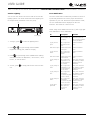
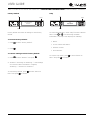
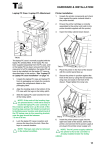
Control Operation
Up
Zone Toggle
Select
Root
5O°F
Down
Can be displayed in Celsius
Power
U-Select Lighting
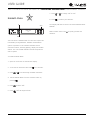
CONTROL FUNCTION GUIDE
FUNCTION
COMMAND
DISPLAY/OPTIONS
OFF
Press
and hold
Display will count down from 5 to off.
ON
Press
and release
Unit will come on immediately.
Press
and release to scroll through
Press
Select mode
the modes
Press
Adjust temp
below).
to select mode. Press
or
to select one of 5 modes (see table
to set temperature
Adjust lighting
Press
to adjust lighting
Light ON/OFF with door
Press
to have light on/off with door
Customer menu
Press
and hold for 5 seconds
Mode
Set Point
°F (°C)
Temperature Range
°F (°C)
Deli
36 (2)
34 - 40 (1 - 4)
Beverage/Drinks
38 (3)
34 - 65 (1 - 18)
Market/Fresh
38 (3)
34 - 40 (1 - 4)
Root
50 (10)
45 - 55 (7 - 12)
Pantry
42 (5)
34 - 70 (1 - 21)
Press
to confirm temperature or wait 5 seconds.
Press
or
Press
and release to scroll through timer
to set low, medium or high.
settings.
Press
or
to scroll through menu.
Control Operation 1