1
Description
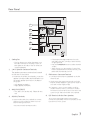
Front Panel
1
29
2
28
3
27
4
26
5
25
6
24
7
23
8
22
9
10
21
11
12
20
19
13
14
15
18
17
16
1. POWER button
17. AUX IN 1 jack
•Press this button to switch your mini-compact
system.
2.
3.
4.
5.
6.
7.
8.
9.
10.
11.
12.
13.
14.
15.
16.
PARTY button
AUTO CHANGE button
MASTER VOLUME button
EQ button
Search/Skip button
STOP/Tuning Mode button
RETURN button
DELETE button
USB 1/USB 2 button
MP3/CD button
TUNER/AUX button
USB 1 jack
MIC jack
Disc Tray
REC SPEED
6
English
18.
19.
20.
21.
22.
23.
24.
25.
26.
27.
28.
29.
Connecting an External Component such as an
MP3 player.
•Connect AUX IN 1 on the front panel of the
MINI COMPACT to the Audio Out of the external
component/MP3 player.
•Press the TUNER/AUX button to select the AUX 1
input.
USB 2 REC jack
USB 2 REC button
OPEN/CLOSE button
BLUETOOTH button
ENTER button
PLAY/PAUSE button
Search/Skip button
USER EQ button
Window display
LOCAL EQ button FOOTBALL MODE button
GIGA SOUND BLAST button