1
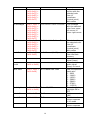
Name
Draw Circle
Syntax
0x44 + 0x43 +
(0x00-0x01) +
(0x00-0xFF) +
(0x00-0xEF) +
(0x00-0x01) +
(0x00-0xFF)
Parameters
D+C+X+X+Y+Radius+Color
Fill Rectangle
0x46 + 0x52 +
(0x00-0x01) +
(0x00-0xFF) +
(0x00-0xEF) +
(0x00-0x01) +
(0x00-0xFF) +
(0x00-0xEF) +
(0x00-0xFF)
0x46 + 0x43 +
(0x00-0x01) +
(0x00-0xFF) +
(0x00-0xEF) +
(0x00-0x01) +
(0x00-0xFF)
0x4C + 0x50 +
(0x01-0x0C)
F+R+X+X+Y+X+X+Y+Color
Beep
0x42 + 0x50
B+P
Beep On
Touch
0x42 + 0x54 +
(0x01 or 0x00)
B+T+Enable/Disable
Baud Rate
0x42 + 0x52 +
(0x00-0x06)
B+R+Baud Rate Code
Back Light
0x42 + 0x4C +
(0x01 or 0x00)
B+L+ ON/OFF
Rotate Screen
0x52 + 0x53
R+S
Touch Enable
0x54 +0x45
T+E
Touch Disable
0x54 +0x44
T+D
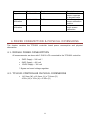
Fill Circle
Load Picture
F+C+X+X+Y+Radius+Color
L+P+Screen#(1-12)
10
Description
Draws circle
outline with the
selected color
from XY
coordinate
(central point)
with radius
Fills rectangle
with the selected
color from upper
left corner to
lower right corner
Fills circle with
the selected color
from XY
coordinate
(central point)
with radius
Loads picture
from the flash
memory
Activates audio
signal (beep)
Enables/Disables
audio signal
(beep) on touch
Sets the specified
baud rate:
0 – 9600
1 – 14400
2 – 19200
3 – 28800
4 – 38400
5 – 57600
6 – 115200
Turns the display
backlight ON or
OFF
Rotates screen to
180°
Enables touch
screen response
in XY mode
Disables touch
screen response