1
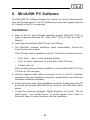
ACOUSTILYZER
User Manual
AL1
Contact details:
NTi Audio AG
Im alten Riet 102
9494 Schaan
Liechtenstein, Europe
Tel. +423 - 239 6060
Fax +423 - 239 6089
E-mail [email protected]
Web www.nti-audio.com
NTi Audio is an ISO 9001:2008
certified company.
© NTi Audio AG
All rights reserved.
Subject to change without notice.
Release June 2012 / Firmware A1.32 or higher
MiniLINK, Minilyzer, Digilyzer, Acoustilyzer, Minirator,
MiniSPL and Minstruments are trademarks of NTi Audio.
2
Made in
Switzerland
Contents
1. Introduction
Registration
CE Declaration of Conformity
International Warranty and Repair
Warnings
Test & Calibration Certificate
4
5
6
7
8
8
2. Overview
Acoustilyzer Functions
Easy Operation
Connectors
9
10
10
11
3. Basic Operation
Start-up Screen
Menu Bar
13
14
14
4. Measurement Functions
SPL/RTA - Sound Level Meter
SPL/RTA - Real Time Analyzer RTA
Reverberation Time RT60
FFT Analysis
Polarity Test
Delay Time
Electrical Measurements - RMS/THD
Speech Intelligibility STI-PA (optional)
Calibration
23
24
28
37
43
47
49
52
54
62
5. MiniLINK PC Software
Installation
Start the MiniLINK PC Software
Free Registration of your Test Instrument
Readout of Stored Test Results
Visualizing the Test Results
Test Result Logging at the PC
Remote Test Instrument Control with the PC
MiniLINK Tools
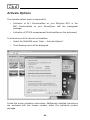
Activate Options
65
65
66
67
68
69
73
75
76
82
6. Troubleshooting
83
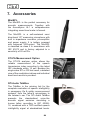
7. Accessories
84
8. Technical Specification
86
9. Appendix: Introduction to STI-PA
89
3
1. Introduction
Congratulations and thank you for buying NTi Audio’s Acoustilyzer AL1,
a product specially suited for professional acoustical test applications.
The Acoustilyzer offers advanced acoustic functions including an optional
speech intelligibility STI-PA measurement module and further basic electrical
features. We are convinced you will enjoy using it!
This manual describes the Acoustilyzer AL1 functions and measurements
in detail. Further application information about the acoustical and electrical
measurements can be found on the web site www.nti-audio.com.
The Acoustilyzer AL1 is available as a stand-alone test instrument or as a
crossgrade package for existing Minilyzer ML1 users. The same crossgrade
option can be used to install the Minilyzer functionalities on the AL1. The
STI-PA measurement feature is optional.
The product packages include the following items:
Acoustilyzer AL1
1xAcoustilyzer AL1
1xMiniLINK CD (PC software)
1xMiniLINK USB Cable
1xAcoustilyzer Test CD
1xAcoustilyzer User Manual
ML1-AL1 Crossgrade
1xMiniLINK CD (PC software)
1xAcoustilyzer Test CD (audio samples)
1x License Number Crossgrade
1xAcoustilyzer User Manual
1xMinilyzer User Manual
STI-PA Measurement
Option
1xSTI-PA Test CD (STI-PA test signal)
1x License Number STI-PA
1xAcoustilyzer User Manual
4
Registration
Register as a customer with NTi Audio and benefit from the following
possibilities:
• Keep your products up-to-date
Access free firmware and software updates.
• Activate options
Enable additional functions for your products.
• Access premium content
Access downloads, information and specific support for your products.
• Receive application and product news
Sign in for the NTi Audio Newsletter.
• Get fast worldwide support
Register your products for fast support.
• Confirm your ownership
Allows us to contact you with important product notifications and
provides a product record in case of loss or theft.
How to Register
• Open the web page http://my.nti-audio.com.
• You are prompted to login or create the My NTi Audio Account.
• The web page “My NTi Audio Products” opens.
• Select the product type and enter the serial number.
• Confirm with “Register”.
• Now your product is listed in the table “My NTi Audio Products“.
5
CE Declaration of Conformity
We, the manufacturer
NTi Audio AG
Im alten Riet 102
9494 Schaan
Liechtenstein, Europe
hereby declare that the product Acoustilyzer AL1, released in 2004,
conforms to the following standards or other normative documents.
EMC-Directives: 89/336, 92/31, 93/68
Harmonized Standards: EN 61326-1
This declaration becomes void in case of any changes on the product
without written authorization by NTi Audio.
Date:
1. September 2004
Signature:
Position of signatory: Technical Director
6
International Warranty and Repair
International Warranty
NTi Audio guarantees the functionality of Acoustilyzer AL1 against defects
in material or workmanship for a period of one year from the date of original
purchase, and agrees to repair or to replace at its discretion any defective
unit at no cost for either parts or labor during this period.
Restrictions
This warranty does not cover damages caused through accidents, misuse,
lack of care, the attachment or installation of any components that were
not provided with the product, loss of parts, connecting the instrument to
a power supply, input signal voltage or connector type other than specified
or wrongly polarized batteries. In particular, no responsibility is granted for
special, incidental or consequential damages.
This warranty becomes void if servicing or repairs of the product are
performed by any party other than an authorized NTi Audio service center
or if the instrument has been opened in a manner other than specified in
this manual.
No other warranty, written or verbal, is authorized by NTi Audio. Except
as otherwise stated in this warranty, NTi Audio makes no representation
or warranty of any kind, expressed or implied in law or in fact, including,
without limitation, merchandising or fitting for any particular purpose and
assumes no liability, either in tort, strict liability, contract or warranty for
products.
Repair
In case of malfunction, take - or ship prepaid - your NTi Audio Acoustilyzer
AL1 packed in the original box, to the authorized NTi Audio representative
in your country. For contact details see the NTi Audio web page
www.nti-audio.com.
Make sure to include a copy of your sales invoice as proof of purchase
date. Transit damages are not covered by this warranty.
7
Warnings
In order to avoid any problems during the operation of the instrument, follow
the guidelines listed below:
• Use the instrument for the intended purpose only.
• Never connect the instrument to a high voltage output such as
a power amplifier, mains power plug, etc.
• Do not disassemble the instrument.
• Never use the instrument in a damp environment.
• Remove the batteries as soon as they are flat or if it is not
intended to use the instrument for an extended period of time.
Test & Calibration Certificate
This is to certify the Acoustilyzer AL1 is fully tested to the manufacturer’s
specifications. NTi Audio recommends calibration of this test instrument
one (1) year after purchase, and every subsequent one (1) year thereafter.
8
2. Overview
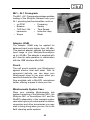
The Acoustilyzer AL1 is a sophisticated
tool used to analyze acoustic signals. It
is designed for easy and quick detailed
analysis of the acoustic environment
and to carry out significant electrical
measurements. An accurate overview
of the actual acoustic signal is displayed
on a large LCD.
The AL1 is a class 1 accuracy instrument
and available with the measurement
microphones MiniSPL (class 2) or
M2010 (class 1 frequency response).
Alternatively,
other
measurement
microphones can be used.
Class 1 acoustical analyzer
NTi Audio offers the class 1 frequency
response microphone M2010 (an external
phantom power supply is required). The
Acoustilyzer in combination with the
M2010 measurement microphone forms
a highly accurate class 1 acoustical
analyzer.
Class 2 acoustical analyzer
The Acoustilyzer in combination with
the MiniSPL forms a comprehensive
class 2 acoustical analyzer. MiniSPL
is a battery-powered measurement
microphone. It is the ideal accessory for
the Acoustilyzer.
9
Acoustilyzer Functions
The Acoustilyzer AL1 features many
measurement
functions,
which
are
accessible through a drop down menu bar.
The base element is the cursor (inverted
area), which may be navigated through the
various functions by using the cursor keys.
• SPL/RTA:
Sound Pressure Level (SPL) & time-averaged sound
pressure level (Leq) measurements of wideband values.
Real Time Analysis (RTA) of octave or ⅓ octave values
• RT60:
Reverberation time with 1/1 octave band resolution
• FFT:
Real-time zoom Fast Fourier Transform (FFT)
• POLARITY:
Polarity measurement of speakers and line signals
• DELAY:
Delay time measurements between speakers
• RMS/THD:
Root Mean Square (RMS) level and Total Harmonic
Distortion (THD) measurements
• STI-PA:
Speech intelligibility measurement is visible after
Speech Transmission Index for Public Address systems
(STI-PA) license key has been activated
• CALIBRTE:
Calibration of connected measurement microphone
Easy Operation
Unit selected with cursor to
change setting
All selectable settings may be adjusted
simply by
• Pressing the enter key to select the
required value.
• Alternatively, for longer selection lists,
the chosen field flashes. Now select
the required value with the cursor keys.
Confirm the setting by pressing the enter
key again.
10
Connectors
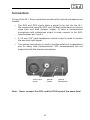
On top of the AL1, three connectors as well as the internal microphone are
located:
• The XLR and RCA inputs allow a signal to be fed into the AL1.
We recommend using the XLR input for best performance (minimum
noise floor and best dynamic range). In case a measurement
microphone with unbalanced output is used, connect to the XLRinput between pin 2 and 3.
• A 3.5 mm (1/8“) jack headphone monitor output is used to monitor
the electrical input signal.
• The internal microphone is used to test the polarity of loudspeakers
and for delay time measurements. SPL measurements are not
supported with this internal microphone.
XLR & RCA
Inputs
Monitor
Output
Internal
Microphone
Note: Never connect the XLR- and the RCA input at the same time!
11
Battery Replacement
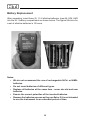
After unpacking, insert three (3) 1.5 V alkaline batteries, type AA, LR6, AM3
into the AL1 battery compartment as shown below. The typical life-time for
a set of alkaline batteries is 16 hours.
Notes:
• We do not recommend the use of rechargeable NiCd- or NiMHbatteries.
• Do not insert batteries of different types.
• Replace all batteries at the same time - never mix old and new
batteries.
• Ensure the correct polarities of the inserted batteries.
• Remove the batteries as soon as they are flat or if it is not intended
to use the instrument for an extended period of time.
12
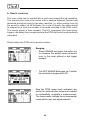
3. Basic Operation
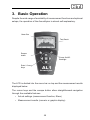
Despite the wide range of availability of measurement functions and optional
setups, the operation of the Acoustilyzer is almost self-explanatory.
Menu Bar
Test Result
Escape
button
Power On/OffBacklight
Enter / Cursor
Keys
The LCD is divided into the menu bar on top and the measurement results
displayed below.
The cursor keys and the escape button allow straightforward navigation
through the available features
• Actual settings (measurement function, filters)
• Measurement results (numeric or graphic display)
13
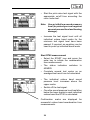
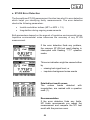
Start-up Screen
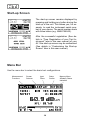
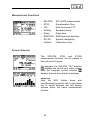
The start-up screen remains displayed by
pressing and holding any button during the
start up of the unit. This allows you, for example, to read the instrument serial number of your device. The serial number starts
with three letters (e.g. ANK675A2A2).
After the successful registration (See details in “Free Registration of your Test Instrument“ later in this user manual) of your
AL1 the start-up screen may be customized
(See details in “Customizing the Start-up
Screen” later in this user manual).
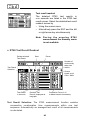
Menu Bar
Use the menu bar to select the basic test configurations.
Measurement
Functions
Screen
Selector
Input
Filters
14
Setup
Screen
Memory Menu
& Battery Status
Indication
Measurement Functions
•
•
•
•
•
•
•
•
SPL/RTA:
RT60: FFT:
Polarity:
Delay:
RMS/THD:
STI-PA:
Calibrte:
SPL & RTA measurement
Reverberation Time
Real time zoom FFT
Speaker polarity
Delay time
RMS level and distortion
Speech intelligibility
Calibration menu
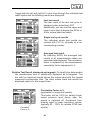
Screen Selector
The SPL/RTA, RT60 and STI-PA
measurement functions can be viewed in
two test result screens.
For example, the SPL/RTA “123” selector
displays the sound level meter screen
while the bargraph symbol selector
displays the real time spectrum analyzer.
Short-cut
Hold the ESC button down and
simultaneously press the left or right arrow
key to switch between the two display
screens within the same measurement
function.
15
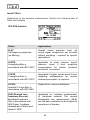
Input Filters
Depending on the selected measurement function the following sets of
filters are available:
SPL/RTA function:
Filters
Applications
FLAT
Flat frequency response
(no filtering)
Overall sound pressure level; all
sound signal components are included
without weighting - required for special
applications.
A-WTD
A-weighting filter in
accordance with IEC 61672
Applicable to most common sound
pressure levels if level weighting
compensation for human loudness
perception is required.
C-WTD
C-weighting filter in
accordance with IEC 61672
Applicable to higher sound levels if level
weighting compensation for human
loudness perception is required.
X-CRV-1
Inverted X-Curve filter in
accordance with ISO 2969
Required for cinema installations
RLB (Revised Lowfrequency B-curve)
Broadcast Loudness
filter in accordance with
AES Paper “Loudness
Assessment of Music and
Speech” 2004
Applicable for loudness measurement
of broadcast material. The revised
B-weighted Leq measurement (RLB)
has the best correlation to the subjective
experience of humans.
16
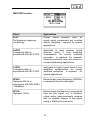
RMS/THD function:
Filters
Applications
FLAT
Flat frequency response
(no filtering)
Overall sound pressure level; all
sound signal components are included
without weighting - required for special
applications.
A-WTD
A-weighting filter in
accordance with IEC 61672
Applicable to most common sound
pressure levels if level weighting
compensation for human loudness
perception is required. For example,
measuring residual noise of a device in
sound broadcasting applications.
C-WTD
C-weighting filter in
accordance with IEC 61672
Applicable to higher sound levels if level
weighting compensation for human
loudness perception is required - for
special applications.
HP400
Highpass 400 Hz in
accordance with DIN 45045,
-120dB/dec.
Removes any mains frequency (50/60Hz)
components from the test signal.
HP19k
Highpass 19 kHz
Removes any low frequency components
from the test signal, e.g. to measure
critical public announcements systems
with no audible change to the signal
(using a 20kHz pilot tone level)
17
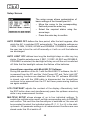
Setup Screen
The setup screen allows customization of
basic settings of the Acoustilyzer AL1:
• Move the cursor to the corresponding
field and press the enter key.
• Select the required status using the
arrow keys.
• Press the enter key to confirm.
AUTO POWER OFF defines the time period, after the last keypress, after
which the AL1 is switched OFF automatically. The available settings are
3 MIN, 10 MIN, 30 MIN, 60 MIN and DISABLE. If DISABLE is selected,
the user has to turn the unit off manually or it will run until the batteries
are discharged.
AUTO LIGHT OFF defines how long the backlight stays on after any key
stroke. Possible selections are 3 SEC, 10 SEC, 60 SEC and DISABLE.
If DISABLE is selected, the backlight will stay on until the unit is switched
off. Note that the backlight reduces the lifetime of the batteries.
Acoustilyzer operation with MiniLINK PC Software
During the operation of the AL1 with the MiniLINK PC software, the AL1
is powered from the PC and the “Auto Power Off” and “Auto Light Off”
power-saving functions are disabled. After the PC software MiniLINK
is closed, and until the USB cable is disconnected, the Acoustilyzer
continues to be powered from the PC but these power-saving features
are again enabled.
LCD CONTRAST adjusts the contrast of the display. Alternatively, hold
the ESC button down and simultaneously press the up/down arrow key
while in any measurement function.
MULTIPLE SETUP allows storage of up to four individual settings. To
enable the multiple setup mode, set the corresponding entry to ENABLE
and confirm. The next time the Acoustilyzer is switched on, the user will
be prompted to select the individual setup-ID (1, 2, 3 or 4) in the startup screen. All parameter settings in all measurement functions are now
stored under this ID at switch off.
18
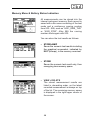
Memory Menu & Battery Status Indication
All measurements can be stored into the
internal instrument memory. Each record is
saved with a file name consisting of the test
mode and a continuous running number
from 000 - 999, such as “A001_RMS_THD”
or “A002_RT60”. After 999 the running
number starts again with 000.
You can store the test results as follows:
• STORE+BMP
Saves the numeric test results including
the graphical screenshot, indicated by
BMP (bitmap), in the memory overview.
• STORE
Saves the numeric test result only, thus
occupying less memory space.
• VIEW + DELETE
The stored measurement results are
listed in decending order, so the latest
recorded measurement is always on top
of the list. The remaining memory space
is displayed in the right-upper corner of
the screen.
19
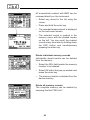
All screenshots marked with BMP can be
reviewed directly on the instrument.
• Select any record in the list using the
cursor.
• Press and hold the enter key.
• The recorded measurement is displayed
on the instrument screen
• The selected record is marked in the
memory menu with the shaded square
on the left. You can recall the marked
record at any time later by holding down
the ESC button and simultaneously
pressing the enter key.
Delete individual memory records
Individually stored results can be deleted
from the memory.
• Select the DEL field beside the memory
location to be deleted.
• Select OK within the pop up window and
press the enter key.
• The memory location is deleted from the
device memory.
Delete all memory records
The complete memory can be deleted by
selecting the field “DEL ALL“.
20
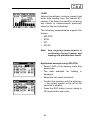
LOAD
Various Acoustilyzer functions support test
result data loading from the internal AL1
memory. This feature is useful for reviewing
test results of measurements previously
stored on the test instrument.
The following measurements support this
feature:
• SPL/RTA
• RT60
• FFT
• STI-PA
Note: Any ongoing measurement is
continuing during loading and
viewing of a previous test result.
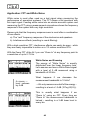
Application example using SPL/RTA:
• Select LOAD in the memory menu and
press enter.
• The data available for loading is
displayed.
• Select the test result of interest.
• Confirm the selection with the enter key
→ the square symbol on the left of the
selection is shaded.
• Press the ESC button (cursor jumps to
OK) and confirm with enter.
21
The loaded test result is displayed on the
active AL1 screen and the abbreviation LOD
flashes in the status bar memory field.
The individual band levels can be viewed,
the Y-axis altered or even the Leq or min/
max test result shown.
Return to the live mode by selecting LIVE
MODE in the memory menu of the upper
menu bar.
Low battery indication
A low battery symbol is displayed in the
“MEM” field of the menu bar when a change
of batteries is required.
22
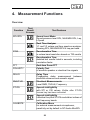
4. Measurement Functions
Overview
Function
SPL/RTA
Test
Result
Screens
Test Features
Sound Level Meter
Sound pressure level SPL, MAX/MIN SPL, Leq,
LCpeak
Real Time Analyzer
1/1 and 1/3 octave real time spectrum analyzer
showing SPL, MAX/MIN SPL & Leq per band
RT60
Reverberation Time
in octave band resolution based on T20 results
Reverberation Time
detailed test results listed in seconds, including
correlation factor
FFT
Real-time Zoom FFT
POLARITY
Polarity Test
of acoustic speaker or electrical line signals
DELAY
Delay Time
Propagation delay measurement between
electrical reference and acoustic signal
RMS/THD
Electrical Measurements
Level RMS, THD+N, Frequency
STI-PA
Speech intelligibility
with STI or CIS values. Visible after STI-PA
license key has been activated
Speech intelligibility
Individual Leq and STI-PA modulation indices of
test frequency bands
CALIBRTE
Calibration Menu
for external measurement microphones,
sensitivity set by default to NTi Audio MiniSPL
23
SPL/RTA - Sound Level Meter
The Acoustilyzer features a comprehensive, integrating sound level meter
with timer for single or repeated measurements. All results may be logged
into the internal memory for further review.
The measurements displayed on the big and small result position may be
chosen amongst
• SPL • MIN SPL • MAX SPL • Leq • PreLeq • LCpeak Actual sound pressure level
Minimum sound pressure level
Maximum sound pressure level
time-averaged sound pressure level
Leq of the previous timer period (only available
when timer is in repeat mode
C-weighted peak sound pressure level
The Timer can be configured to
• Stop the Leq, LCpeak and MAX/MIN SPL measurements after a
user-defined time period
• Reset the Leq, LCpeak and MAX/MIN SPL measurements after a
user-defined time period in order to start a new measurement
Timer
Status
Pause
Reset
Test Cycle
Period
Measurement
Timer, Clock
Big Result
Small
Result
Input Range
indicator arrows
SPL Bargraph and range
indication
24
Time Weighting
indicator / selector
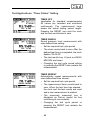
Test Applications: “Timer Status” Setting
TIMER OFF
(applicable for standard measurements)
All values are recorded and monitored
continuously. The measurement timer
shows the actual testing period length.
Pressing the RESET icon sets the clock
and the test results back to zero.
TIMER SINGLE
Sound pressure level measurement with
user-defined time setting.
• Set the required test cycle period.
• The clock counts back to zero. After the
defined test time is completed, the clock
flashes ”00.00.00”.
• The test results Leq, LCpeak and MAX/
MIN SPL are frozen.
• Changing the test cycle period setting
or pressing the RESET icon restarts the
measurement.
TIMER REPEAT
Automatically repeat measurements with
user-defined test time interval.
• Set the required test cycle period.
• The measurement timer counts back to
zero. When the test time has elapsed ,
the clock and the test results are reset
and a new measurement is started.
• The previously measured Leq is
displayed as PreLeq (useful for Leq
monitoring at live concerts)
• Changing the test cycle period or
pressing the RESET icon restarts the
measurement.
25
Pause: The Leq, LCpeak and MAX/MIN measurements can be paused
• Select the PAUSE symbol and press the enter key.
• The PAUSE symbol flashes.
• The actual SPL value is continuously measured and displayed.
• Select the pause symbol and press the enter key to continue the
measurement; the clock continues to count.
Reset: Pressing the RESET icon restarts the measurement. The timer and
test results are reset.
Test Cycle Period: Applicable in SINGLE and REPEAT timer status only.
• SINGLE: Set to 10 min by default
• REPEAT: Set to 10 sec by default
Measurement Timer: Actual measurement in hours:minutes:seconds.
Big and Small Result: Two of the previously-listed measurements may be
display at the same time.
Time Weighting: All SPL measurements (SPL and MAX/MIN SPL)
are time-weighted measurements. Changes in the SPL level are
smoothed, resulting in quicker or slower change of the displayed value.
Available time weightings, corresponding to IEC 61672, are
• SLOW (long attack and release response time, t = 1s)
• FAST (short attack and release response time, t = 125ms)
The time weighting for the broad band values (
are always the same.
) and the RTA (
Overload
The OVL (Overload) flashes if the input
voltage exceeds the selected input range
of the instrument. As long as the OVL is
flashing the displayed Leq and LCpeak
results are not accurate.
26
)
Input Range Selector & Bargraph
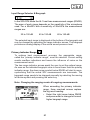
In the SPL/RTA Mode the AL1 has three measurement ranges (RNGE).
The span of each range depends on the sensitivity of the microphone
used. For a MiniSPL with a sensitivity of 20mV/Pa the measurement
ranges are:
20 to 100 dB
40 to 120 dB
60 to 140 dB
The selected input range is displayed at the bottom of the bargraph and
may be changed by operating the range indicator arrows. The bargraph
provides an analog display of the actual sound pressure level.
Primary Indicator Range
To achieve best measurement accuracy the appropriate range,
called the “primary indicator range”, must be selected. Correct setting
avoids overflow indications and lowers the influence of noise on the
measurement result.
The two range indicator arrows assist the user to set the optimal range.
As soon as the indicated bargraph value is found lower than the primary
indicator range, the down arrow symbol below RNGE will start to move,
symbolizing that the actual SPL measurements are inaccurate. The
bargraph range needs to be changed manually by selecting the moving
left arrow symbol and pressing the enter key.
Note: Changing the ranging resets all ongoing measurements.
When exceeding the primary indicator
range, three overload arrows replace
the big result reading.
• Select the right arrow below RNGE
and press enter to change to the next
higher bargraph range.
27
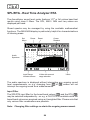
SPL/RTA - Real Time Analyzer RTA
The Acoustilyzer sound level meter features 1/3rd or full octave band test
results using class 0 filters. The SPL, MAX / MIN and Leq values are
displayed per band.
Stored spectra may be averaged by using the available mathematical
functions. The MAX-MIN display is particularly helpful for characterizations
of listening areas.
Set
Menu
Pause
Reset
Cursor
Readout
Audio
Spectrum
Input Range
indicator arrows
X-Axis with manual
range selection
Y-Axis
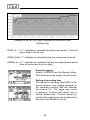
The audio spectrum is displayed without interrupting any ongoing sound
level measurements, so e.g. changing from
to
screen will not
interrupt the ongoing sound level measurements.
Input Filter
The SPL/RTA input filter for the broad band values (
) and the RTA (
)
may be selected independently - so e.g. a FLAT RTA is available while the
broad band values are acquired using an A weighted filter. Please note that
only various filter combinations are possible.
Note: Changing filter settings re-starts the ongoing measurement.
28
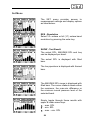
Set Menu
The SET menu provides access to
measurement settings and display options
as listed below:
RES - Resolution
Select 1/3rd octave or full (1/1) octave band
resolution by pressing the enter key.
SHOW - Test Result
The actual SPL, MAX/MIN SPL and Leq
can be displayed per band.
The actual SPL is displayed with filled
bars.
The Leq spectrum is displayed with framed
bars.
The MAX/MIN SPL range is displayed with
filled bars. The cursor readout shows either
the maximum, the max-min difference or
the minimum sound pressure level of the
selected band.
Simply toggle through these results with
upper & lower arrow keys:
- max. SPL
- min. SPL
- max. - min. SPL
29
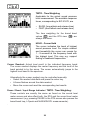
TWTD - Time Weighting
Applicable for the actual sound pressure
level measurement. The available response
times, corresponding to IEC 61672, are
• SLOW (long attack and release time)
• FAST (short attack and release time)
The time weighting for the broad band
values (
) and the RTA view (
) are
always the same.
HOLD - Cursor Hold
The cursor indicates the band of highest
sound pressure level. For simple readout
and traceability the cursor can remain for
1 - 9 seconds at the frequency band with
the highest level. This may e.g. support
finding of feedback frequencies.
Cursor Readout: Actual level result in the indicated frequency band.
The cursor readout displays the center frequency and the level of the
band pointed to by the arrow. The cursor automatically jumps to the
highest level band in the spectrum.
Alternatively the cursor readout may be controlled manually:
• Select the readout data field and press the enter key.
• A frame flashes around the data readout.
• Move the cursor and read the corresponding test results.
Pause / Reset / Input Range Indicator / TWTD - Time Weighting:
These controls are exactly the same as found on the sound level
meter screen and also effect both, the RTA and the sound level meter
measurement (e.g. pressing PAUSE in the RTA screen also pauses the
broad band Leq, LCpeak and MAX/MIN SPL measurements).
.
30
X-Axis: Logarithmic scale fixed to 20 Hz - 20kHz
Y-Axis: The scaling of the spectrum’s Y-axis (sensitivity) can be adjusted
manually.
• Select the displayed upper value of Y-axis and press the enter key.
• Use the up/down keys to scroll the displayed level along the Y-axis
and the left/right keys zoom in/out the Y-axis, e.g. to alter the display
resolution.
31
SPL/RTA - Memory Functions
The SPL/RTA mode includes special memory features, such as
SPL/RTA - Sound Level Meter
• LOGGING: records the measured parameters to the internal device
memory every time the log interval ∆t expires (in table form).
SPL/RTA - Real Time Analyzer RTA
• LOAD: loads stored test results into the active AL1 display for
review.
• MATH: completes mathematical averaging of various stored
measurements selected from the memory.
Logging
The Acoustilyzer can record various levels over time into the instrument
memory. e.g. for monitoring sound levels during an event for many hours,.
Every time the recording interval ∆t elapses, the results are stored and
values marked with “_dt” are reset. The logging may stop automatically
after the preset measurement time has elapsed. The results can then
be loaded to a PC and visualized as a level diagram using, for example,
Microsoft Excel.
Note: The stored results remain within the AL1 memory even in the
event of a battery failure during the recording session.
The following parameters are recorded during the logging:
Leq
Leq over the whole measurement period. The measurement
period is indicated and controlled by the measurement timer.
PreLeq
Leq of the previous measurement timer period (in timer repeat
mode only).
Leq_dt
Short time Leq of the actual log interval ∆t. Leq_dt values may
be combined to derive the Leq of any desired period:
32
⎛ 1 N LEQ10_ dtn
LEQ =10 ⋅ log⎜⎜ ⋅ ∑10
⎝ N n =1
⎞
⎟
⎟
⎠
MIN_dt
Minimum SPL value measured within the actual log interval ∆t;
time weighted value (SLOW/FAST).
MAX_dt
Maximum SPL value measured within the actual log interval ∆t;
time weighted value (SLOW/FAST).
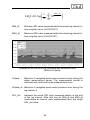
Example of an SPL/LEQ log visualized with Microsoft Excel
(without LCpeak)
LCpeak
Maximum C-weighted peak sound pressure level during the
whole measurement period. The measurement period is
indicated and controlled by the measurement timer.
LCpeak_dt Maximum C-weighted peak sound pressure level during the
log interval ∆t.
SPL_Act
Indicates the actual SPL level measured exactly at the end
of the log interval. Note that Leq_dt, MIN_dt and MAX_dt
characterize an interval more appropriately than this single
SPL_Act value.
33
Example of an SPL/LEQ log visualized with Microsoft Excel
(LCpeak only)
OVER_dt
A “1” indicates an overload during the log interval ∆t (thus all
values tend to be too low).
OVER_HoldA “1” indicates an overload during the measurement period.
UNDER_dt A “1” indicates an underload during the measurement period
(thus all values tend to be too high).
Prepare Logging
Select LOGGING from the Memory Menu.
This will bring up the Logger Setup Screen:
Setting of recording time
The maximum recording time (END) of the
sound pressure level logging depends on
the remaining memory and the selected
test interval (∆t). The logger may record
a maximum of about 580 points over a
custom defined time. The test interval (∆t)
and the total logging time can be defined by
the user in the format hh:mm:ss.
34
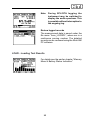
Note: During SPL/RTA logging the
instrument may be switched to
display the audio spectrum. This
is possible without interruption to
the ongoing log.
Review logged records
The measurement data is saved under the
file name “Axxx_LOGSPL”, where xxx is a
continuous running number. The detailed
records can be reviewed using the MiniLINK
PC software.
LOAD - Loading Test Results
For details see the earlier chapter “Memory
Menu & Battery Status Indication”.
35
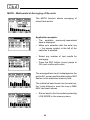
MATH - Mathematical Averaging of Records
The MATH function allows averaging of
stored test results.
Application example:
• The available previously-memorized
data is displayed.
• Make your selection with the enter key
→ the square symbol to the left of the
selection is shaded.
• Select any number of test results for
averaging.
• Press the ESC button (cursor jumps to
OK) and confirm with enter.
The averaged test result is displayed on the
active AL1 screen and the abbreviation MAT
flashes in the status bar memory field.
The individual band levels can be read out,
the Y-axis altered or even the Leq or MIN/
MAX test result shown.
• Return back to the live mode by selecting
LIVE MODE in the memory menu.
36
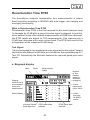
Reverberation Time RT60
The Acoustilyzer supports reverberation time measurements in octave
band resolution according to ISO3382 with auto trigger, auto ranging and
averaging functionality.
What is Reverberation Time RT60
Reverberation time RT60 is the time required for the sound pressure level
to decrease by 60 dB after a sound stimulus signal is stopped. In practice,
since ambient noise often defeats measurements of 60dB level decrease,
the RT60 results are based on T20 measurements. This requires only a
35 dB level decrease within each octave band. The RT60 test result is the
extrapolation of the measured 20 dB decay.
Test Signal
It is recommended to use a gated pink noise signal as the test signal. Various
test tracks with different on/off time are included on the accompanying AL1
Test CD. Alternatively the Minirator features the required gated pink noise
signal.
a. Bargraph display
Start
Pause
Measurement
Status
Number
of Test
Results
taken for
automatic
averaging
Ranging,
initial record of
environmental
noise prior
measurement
Octave
bands scroll
63Hz - 8kHz
X-Axis,
level with
10 dBSPL
marks
Octave Bands
Individual Octave
Band Spectrum
RT60 Lower Mark
Indicator
37
RT60 Upper Mark
Indicator
b. How to measure
The room under test is injected with a pink noise signal through speakers.
The sound source has to be active until a balance between injected and
absorbed acoustical energy has been reached. i.e. allow enough time for
the sound to reflect off all surfaces. As a rule of thumb, the noise should
be played for at least the number of seconds recorded in the RT60 result.
The source signal is then stopped. The AL1 recognizes this interruption,
triggers, the decay time is measured and the RT60 test result is automatically
calculated.
Please follow the RT60 test instruction below:
Ranging
• Select RANGE and press the enter key
to measure the actual sound pressure
level in the room without a test signal
present.
• The SET RANGE field pops up. Confirm
the automatic ranging with OK.
Now the RT60 upper mark indicators are
set to the minimum pink noise level needed
to successfully complete a measurement.
The lower marks indicate the environmental
noise without any test signal present.
38
• Start the pink noise test signal with the
appropriate on/off time according the
room under test.
Note: Use an initial low sound pressure
level (to protect your ears against
excessive sound level and hearing
damage).
• Increase the test signal level until all
individual octave band marks for the
minimum test signal level have been
passed. If required, an equalizer can be
used to push up individual band levels.
Start RT60 measurement
• Select the START icon and press the
enter key to initiate the reverberation
time measurement.
• The status indication switches to
ARMED.
• Complete several test cycles so an
averaged test result can be calculated.
• The individual octave band sound
pressure level increases above the
upper marks.
• Switch off the test signal.
• Once the sound pressure level has fallen
below the lower marks in each individual
octave band the RT60 is calculated.
Confirmation marks are displayed for
successful octave band reverberation time
measurements.
39
Test result readout
The detailed RT60 test results in
x.xx seconds are listed in the RT60 test
result screen. Select the detailed test result
readout screen by
• Using the screen menu
• Alternatively press the ESC and the left
or right arrow key simultaneously.
Note: D u r i n g t h e o n g o i n g R T 6 0
measurement the memory menu
is not available.
c. RT60 Test Result Readout
Delete selected
Test Result
Start
Pause
Number of
continuously
taken test
results
Test Result
Selection
Octave
bands scroll
63Hz - 8kHz
Test Result
in seconds
Relative Test
Result, displayed as
bargraph
Correlation Factor in %
or Measurement Uncertainty
Test Result Selection: The RT60 measurement function enables
consecutive reverberation time measurements within one test
sequence. Automatically an averaged test result of all measurements
is calculated.
40
Toggle with the left and right AL1 cursor keys through the individual test
result cycles and the following results are displayed:
Last test result
The test result of the last test cycle is
displayed when selectiing LAST.
Additionally, you can use the upper and
lower cursor keys to display the 63 Hz or
8 kHz octave band test result.
Single test cycle results
The individual single test results are
marked with CYC xx, whereby xx is an
incrementing number.
Averaged test result
By selecting AVRG the averaged test
results of all measurements taken are
calculated and displayed. The correlation
factor is replaced by the measurement
uncertainty factor expressed in %.
Relative Test Result, displayed as bargraph: To simplify the data readout
the reverberation time is additionally displayed as a bargraph. The
bar with the maximum length shows the octave band with the longest
measured reverberation time. The other octave band test results are
displayed relative to this longest time.
Correlation
Factor in %
Correlation Factor in %
(applicable for single test results)
This factor will be 100% for perfect linear
sound pressure level decay after the
source is switched off. Deviations from
linearity result in lower correlation values.
(typically 80 - 100% for reliable RT60 test
results).
41
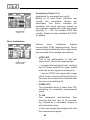
Uncertainty
Factor in %
Uncertainty Factor in %
(applicable for averaged test result)
Based on at least three individual test
results, the uncertainty factors are
calculated. This factor indicates the
statistical test result accuracy based on
the randomly created pink noise test signal
(typically 0 - 15% for reliable RT60 test
results). Please see the standard ISO 3382
for details.
Error Indications
Various
error
indications
display
unsuccessful RT60 measurements, These
can be deleted individually. Non-valid results
are excluded from average calculations.
Delete single
test results
• LOW LEVL
This is the abbreviation of “low test
signal level” during the measurement
→ Increase the test signal level, verifying
that all levels exceed the upper marks
while the source signal is switched on
→ Use an RT60 test signal with longer
on/off times, ensuring sufficient time for
the lower level marks to be reached after
the source is switched off
• CORR<70%
The correlation factor is lower than 70%
indicating an unreliable measurement
result.
• T>18S
The measured reverberation time
exceeds the time limit of 18 seconds,
e.g. caused by a unsuitable ranging or
environmental noise.
In this case repeat the ranging and start
the measurement again.
42
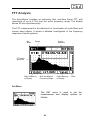
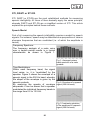
FFT Analysis
The Acoustilyzer includes an extremely fast, real-time Zoom FFT with
resolutions of up to 0.7Hz over the entire frequency range. The display
shows 93 bins simultaneously.
The FFT measurement is the ideal tool for visualization of comb filters and
narrow band effects. It allows a detailed investigation of the frequency
response of audio systems.
Set
Menu
Pause
Cursor
Readout
FFT Audio
Spectrum
Start Frequency
of Display
Size of displayed
Frequency Range
End Frequency
of Display
Y-Axis
Set Menu
The SET menu is used to set the
measurement and display options as
follows:
43
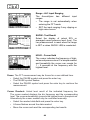
Range - AL1 Input Ranging
The Acoustilyzer has different input
ranges.
• The range is set automatically when
entering the FFT mode
• SET the input ranging if any clipping or
high noise occurs
SHOW - Test Result
Select the display of actual SPL or
averaged sound pressure level (Leq). The
Leq measurement is reset when the range
is SET or when SHOW: LEQ is reselected.
HOLD - Cursor Hold
The cursor indicates the frequency of highest sound pressure level. For simple readout
and traceability the cursor can remain for
1 - 9 seconds at the frequency with the
highest level.
Pause: The FFT measurement may be frozen for a user-defined time.
• Select the PAUSE symbol and press the enter key.
• The PAUSE symbol flashes.
• Select the PAUSE symbol and press the enter key to continue the
measurement.
Cursor Readout: Actual level result of the indicated frequency bin.
The cursor readout displays the bin frequency and the corresponding
level. The cursor automatically jumps to the highest level in the spectrum.
Alternatively the cursor readout may be controlled manually:
• Select the readout data field and press the enter key.
• A frame flashes around the data readout.
• Move the cursor and read the corresponding test results.
44
X-Axis: Linear scale showing, from left to right, the start frequency, the
frequency range and the end frequency within 92 bins. Includes zooming
functionality.
Y-Axis: The scaling of the Y-axis can be adjusted manually.
• Select the displayed upper value of Y-axis and press the enter key.
• Use the up/down keys to scroll the displayed level along the Y-axis
and the left/right keys zoom in/out the Y-axis, e.g. to alter the display
resolution.
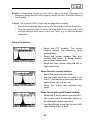
How to measure:
• Select the FFT function. The cursor
readout shows the maximum level
automatically.
• Select the cursor readout field and
confirm with enter. A frame flashes
around the readout data.
• Read out other values using the left or
right arrow keys.
Zoom in/out to cursor position
• Select the cursor readout field.
• Use the lower arrow key to zoom in up
to a 0.7 Hz frequency resolution and the
upper arrow key to zoom out.
• Move the X-axis with left/right key
press.
Zoom in/out with quick X-axis shifting
• Select the X-axis frequency range field
• The zoom in/out functionality refers to
the displayed center frequency.
• Use the left/right arrow key for quick left/
right shifting of the X-axis.
45
Application: FFT and White Noise
White noise is most often used as a test signal when measuring the
performance of acoustical systems. The FFT shows a flat spectrum with
this input signal. Feeding white noise into an electro-acoustic system and
measuring the FFT using a measurement microphone shows the frequency
response of the system with very high resolution.
Please note that the frequency response seen is most often a combination
of two effects:
a) The “real” frequency response of the electronics and speakers
b) Interference effects (resulting in comb filtering)
With a high resolution FFT, interference effects can easily be seen - while
they are nearly impossible to notice on a 1/3 octave resolution RTA.
With the Zoom FFT of the AL1 you can “Zoom In” at any frequency point to
a resolution of up to 0.73 Hz.
White Noise and Zooming
The energy of “White Noise” is equally
distributed over the linear frequency axis.
Let’s assume we have a White Noise signal
with a level of 0 dB measured using a
bandwidth of 20 kHz.
4 x zoom →
level reduces
by 6 dB
What happens if we decrease
measurement bandwidth to 10 kHz?
the
→ We only measure one half of the energy –
resulting in a level of -3 dB (10*log10(0.5)).
This is exactly what happens if we
“Zoom In” using an FFT. Every time we
“Zoom In” the measurement bandwidth is
halved – resulting in a 3 dB lower level in
every bin.
46
Polarity Test
The polarity test function detects the correct cable and speaker polarity in
combination with the Minirator MR1 polarity test signal. The Acoustilyzer
provides the following test configurations:
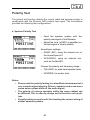
a. Speaker Polarity Test
• Feed the speaker system with the
polarity test signal of the Minirator.
• Adjust the level (at MR1 or amplifier) so
the test signal is clearly audible.
Acoustilyzer settings:
• IN:MIC (INT), using the internal mic of
the Acoustilyzer AL1
• IN:XLR/RCA, using an external mic,
such as the MiniSPL
Choose the polarity test frequency range:
• FULL/MID, for wide band speaker tests
• WOOFER, for woofer tests
Notes:
• Please note the polarity testing is a simplified measurement of a
very complex signal phasing. Drivers, speakers and cross-overs
cause severe phase shifts of the audio signal.
• The polarity of various speakers within the same cabinet can
be different. This is often by design and is therefore not a problem.
• Polarity testing is most useful for checking the correct wiring of
similar speaker systems.
47
b. Cable Polarity Test
Use the polarity test signal of the Minirator to
feed the cable under test. The Acoustilyzer
analyzes the signal polarity at the other end
of the cable.
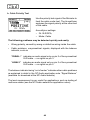
Acoustilyzer settings:
• IN: XLR/RCA,
• Mode: Cable
The following problems may be detected quickly and easily:
• Wrong polarity, caused by wrong or defective wiring inside the cable
• Cable problems, unsymmetrical signals; displayed with the balance
indicator, such as
“2UBAL–” indicates an audio signal only on pin 2 of the symmetrical
XLR cable → no signal on pin 3.
“-UBAL3”
indicates an audio signal only on pin 3 of the symmetrical
XLR cable → no signal on pin 2.
The balance indicator being “out of center” indicates other cable problems
as explained in detail in the NTi Audio application note “Signal Balance“
(available for download at the NTi Audio website).
The level measurement is very useful for applications, such as testing of
multicore cables (see the NTi Audio website for application notes).
48
Delay Time
The setting of the acoustical propagation delay time from speaker to
speaker in e.g. churches or auditoriums, is required so the listening public
perceive the direction of speech as coming from the speaking person’s
actual position and not from the side or rear speakers.
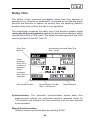
The Acoustilyzer measures the delay time of the acoustic speaker signal
(using the built-in microphone) against the electrical line reference signal
(connected at RCA or XLR input). The delay time test signal that has to be
used is provided on the AL1 Test CD.
Delay Time
Memory
Automatically calculated Delay Time
Store - Actual
Actual
measured
Delay Time
to Electrical
Reference
Signal
Converted
Delay Time in
meter/feet
Start Synchronization
Synchronization Time Bar
100% = 100 seconds
Status Indication
Synchronization: The automatic synchronization allows delay time
measurements without any connected electrical reference signal for
100 seconds and displays the time remaining until the next required
synchronization.
Manual Synchronization:
Initiate a manual synchronization by selecting SYNC.
49
How to measure
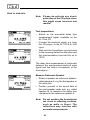
Note: Please de-activate any shock
protection of the CD-player since
this might cause incorrect test
results!
Test preparations
• Switch on the acoustical delay time
measurement signal, available on the
AL1 Test CD.
• Connect the electrical signal, e.g. from
the CD player, to the AL1 RCA or XLR
input.
• Wait until the Acoustilyzer synchronizes
to the incoming delay time test chirp and
the synchronization time bar fills up to
100%.
The delay time measurement is conducted
between the synchronized electrical input
signal and the built-in microphone of the
Acoustilyzer.
Measure Reference Speaker
• Select a speaker as reference speaker,
called speaker A, e.g. the first speaker in
the delay line.
• Position yourself in the sound field of
the next speaker under test, e.g. called
speaker B, to measure the delay time
compared to the reference speaker A.
Note: Do not position the Acoustilyzer
too close to reflecting surfaces,
such as walls or floors. The
reflections may interfere with
accurate measurements.
50
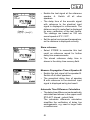
Change
[m][°C] ↔ [feet][°F]
• Enable the test signal at the reference
speaker A. Switch off all other
speakers.
• The delay time of the acoustic signal
with reference to the electrical input
signal is displayed in milliseconds. The
distance result in meter/feet is displayed
for easy verification of the test results.
The readings are based on 330 m/s
sound speed at 0°C / 32°F.
• Set the actual environment temperature,
so the distance is displayed correctly.
Store reference
• Select STORE to memorize this test
result as reference record for further
delay time measurements.
• The stored reference delay time is
shown in the delay time memory field.
Measure Propagation Time at Speaker B
• Enable the test signal at the speaker B.
Switch off all other speakers.
• The acoustical delay time of speaker
B with reference to the electrical input
signal is displayed as big test result.
Automatic Time Difference Calculation
• The delay time difference is automatically
calculated and shown in the upper small
STO-ACT (stored - actual) field.
The automatic difference calculation
simplifies the verification of delay line
arrangements, e.g. used in larger halls
or auditoriums.
51
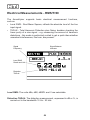
Electrical Measurements - RMS/THD
The Acoustilyzer supports basic electrical measurement functions,
such as
• Level RMS - Root Mean Square; reflects the absolute level of the line
input signal.
• THD+N - Total Harmonic Distortion plus Noise; besides checking the
linear purity of a sine signal - e.g. measuring the amount of harmonic
distortions - this mode is particularly suited to get a quick idea whether
unwanted interferences, like hum, are present.
Signal
Frequency
Signal Balance
Indicator
Level RMS
Result and Unit
Distortion
THD+N
Level RMS: The units dBu, dBV, dBSPL and V are selectable.
Distortion THD+N: The distortion measurement, expressed in dB or %, is
carried out in the bandwidth 10 Hz - 20 kHz.
52
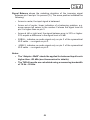
Signal Balance shows the matching deviation of the incoming signal
between pin 2 and pin 3 in percent (%). The arrow position indicates the
following:
• Arrow in center, the input signal is balanced.
• Arrow out of center, linear indication of a balancing problem, e.g.
arrow moves left nearer to the number 2 shows the signal level on
pin 2 is higher than on pin 3.
• Arrow at left or right end, the signal balance error is 33% or higher.
33% equals a difference in the signal level of 6 dB.
• 2UBAL-, indicates an audio signal only on pin 2 of the symmetrical
XLR cable → no signal on pin 3.
• -UBAL3, indicates an audio signal only on pin 3 of the symmetrical
XLR cable → no signal on pin 2.
Notes:
• The “Adapter -20dB” should be applied for balanced input levels
higher than +20 dBu (see Accessories for details).
• The THD+N results are calculated using a measuring bandwidth
of 10 Hz - 20 kHz.
53
Speech Intelligibility STI-PA (optional)
The speech intelligibility measurement STI-PA is an optional sales package
for the Acoustilyzer AL1. Ask your local representative for purchasing
details.
The STI-PA analyzer option allows reliable measurement of the speech
transmission index within 15 seconds. Besides the single value STI or CIS
test result, a detailed view of the modulation indices and individual band
level results is provided. The STI-PA analyzer fulfills the latest 2003 IEC
60268-16 standard and is a TNO verified algorithm (dutch STI-PA research
institute).
Find more information about speech intelligibility basics and the historical
developments in the Appendix to this user manual.
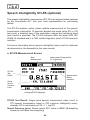
a. STI-PA Measurement Screen
Start
Measurement
Measurement Progress Bar
(0..15 seconds)
STI-PA
Test
Result
Measurement
Status
Indication
Actual
Sound
Pressure
Level
Analogue STI-PA Bargraph
STI-PA Test Result: Single-value speech transmission index result in
STI (speech transmission index) or CIS (common intelligibility scale),
whereby CIS is calculated as CIS = 1 + log STI.
Sound Pressure Level: Shows actual SPL value in dBAS (A-weighting
frequency and Slow time weighting).
54
b. How to measure
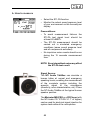
• Select the STI-PA function.
• Monitor the actual sound pressure level
of your environment on the Acoustilyzer
display.
Preconditions:
• To avoid measurement failures the
STI-PA test signal level should be
at least 60 dBSPL.
• The STI-PA measurement should be
carried out in simulated emergency
conditions (same sound pressure level
and all components activated).
• No impulsive noise events should occur
during the 15 seconds measurement
time.
NOTE:Even intermittent noise may affect
the STI-PA test result.
Signal Source:
The NTi Audio TalkBox can simulate a
human talker at normal and emergency
speaking levels, enabling the measurement
of the complete system including the
acoustic signal to the microphone
(directivity, room characteristics, etc). Place
the NTi Audio TalkBox at the typical human
speaker position.
The Minirator MR-PRO or a CD Player (with
the NTi Audio CD “STI-PA V1.1” or higher)
can be used for electrical signal injection for
system tests without the microphone.
55
• Start the STI-PA test signal.
• Set the acoustical sound pressure level
of the PA system according the typical
emergency condition requirements, e.g.
85 dBAS.
• Press START on the AL1 menu to initiate
the measurement. Ensure that there is
no speaking or additional noise near the
measurement microphone during the
measurement.
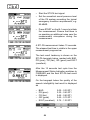
A STI-PA measurement takes 15 seconds.
The elapsed test time is visible in the upper
measurement progress bar.
The test result tendency is shown on the
STI-PA bargraph below, marked with BAD,
PR (poor), FR (fair), GD (good) and EXLT
(excellent).
After the 15 seconds test cycle time the
Measurement Status Indication switches to
FINISHED and the final STI-PA test result
is displayed.
On the bargraph below the quality of the
speech intelligibility test result is displayed
as
•
•
•
•
•
BAD
PR (poor)
FR (fair)
GD (good)
EXLT (excellent)
56
0.00 - 0.30 STI
0.30 - 0.45 STI
0.45 - 0.60 STI
0.60 - 0.75 STI
0.75 - 1.00 STI
The detailed test result view of the
modulation indices and individual band
level results is provided on the second
STI-PA measurement screen.
c. Detailed Test Result Readout
Error
Detection
STI-PA
Octave Bands
Individual Octave
Band LEQ Level
STI-PA Modulation
Index 1
STI-PA Modulation
Index 2
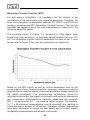
STI-PA Modulation Index 1 & 2:
For high speech intelligibility it is mandatory that the integrity of the
transmitted voice signal modulations are preserved. Therefore STI-PA is
based on measuring the MTF (Modulation Transfer Function). This function
quantifies the degree to which the voice modulations are preserved in
individual octave bands. STI-PA determines the MTF by analyzing all
seven frequency bands, each band being modulated with two frequencies,
resulting in the modulation index 1 and index 2
57
d. STI-PA Post Processing
Measuring speech intelligibility index in realistic environment conditions
is often not applicable, e.g. playing the test signal in a railway station at
emergency levels during peak hours will irritate passengers. Additionally,
at rush hours the characteristics of background noise is likely to be highly
impulsive, while a prerequisite for accurate STI-PA measurements is a
negligible impulsivity in the background noise.
Under such circumstances the STI-PA measurement should be shifted to
a more suitable time of the day, e.g. at night. Such STI-PA measurements
taken with atypical background noise conditions have to be post-processed.
Post processing combines the STI-PA measurement data taken with quasi
noise-free ambient conditions with the unweighted octave band noise levels
(Leq) taken e.g. during day time with realistic environmental conditions.
The NTi Audio STI-PA Post Processing Software is exactly tailored for this
application e.g. to combine the night and day time measurements.
“STI-PA_PostProcessing.xlt” is available
• For download at www.nti-audio.com,
Acoustilyzer AL1, Downloads
• On the CD “MiniLINK - PC Software”
Products,
Minstruments,
Note: When opening the post processing sheet all macros have to be
activated.
58
e. STI-PA Error Detection
The Acoustilyzer STI-PA measurement function has a built in error detection
which helps you identifying faulty measurements. The error detection
checks the following parameters:
•
•
Invalid modulation indices (MF1 or MF2 > 1.3)
Irregularities during ongoing measurements
Both parameters depend on the amount of impulsive environmental noise.
Impulsive environmental noise influences the accuracy of any STI-PA
measurement.
If the error detection finds any problem,
the common STI-PA test result display is
interrupted with flashing “?.??” question
marks.
This error indication might be caused either
by
• missing test signal level, or
• impulsive background noise events
Detailed test result screen
The
octave
bands
detected
with
irregularities, are marked with a question
mark (?).
Recommendation
If the error detection finds any faults,
NTi Audio recommends you repeat the
measurement and compare the STI test
result with the previous ones.
59
f. STI-PA Measurement Hints
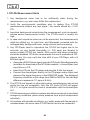
1. Any background noise has to be sufficiently static during the
measurement, e.g. pink noise fulfills this requirement.
2. Verify the environmental conditions prior to testing. Run STI-PA
measurements without any test signal - the results should be < 0.20
STI.
3. Impulsive background noise during the measurement, such as speech,
causes severe measurement errors. The STI-PA result is usually too
high.
4. In case such impulsive noise can not be prevented, the measurements
might be shifted e.g. to night time, and afterwards corrected with the
averaged daily background noise, using external post processing.
5. Any CD-Player used to reproduce the STI-PA test signal has to be
accurate, as only limited time-shifts (+/- 200 ppm) are allowed to
ensure reliable STI-PA test results. Pitch control and shock protection
should be disabled. NTi Audio recommends the use of professional CDplayers only. You may verify the time shift of your CD-Player with a 9
kHz test signal:
• Generate a 9000 Hz sine signal using the NTi Audio Wavefilegenerator
(available for download at the NTi Audio-website -> Acoustilyzer) and
copy this on a CD
• Insert this CD into the CD player and play the 9 kHz test signal
• Connect the Acoustilyzer directly to the CD-player audio output and
measure the signal frequency in the RMS/THD mode. The displayed
frequency should be in the range from 8998 to 9002 Hz (the last digit
difference represents 111 ppm at 9 kHz)
6. The STI-PA test signals of other test system manufacturers may sound
similar but are not compatible. Only the NTi Audio STI-PA test signal
CD V1.1 or higher should be used in combination with the Acoustilyzer
AL1.
7. STI-PA measurement of alarm systems should be carried out in simulated
emergency conditions (same sound pressure level and all components
activated).
8. At locations with variable conditions, e.g. public areas with few people or
crowded areas, the worst-case STI-PA results have to be measured.
60
9. Select typical locations, such as positioning the microphone
at 1 - 1.2 meters above ground in sitting areas or 1.5 - 1.8 meters
in standing areas (typical worst-case measurement positions are
normally not directly in front of the speakers)
10.The person taking the measurements should be out of the acoustic
field, so as to not affect the measurement results. For this purpose
the measurement microphone can be mounted on a mic stand and
connected electrically (using an extension audio cable) to the AL1.
11.Low STI-PA readings can be caused by
• Excessive sound reverberation, echoes or reflections
• Poor speaker directivity or speaker coverage
• Speaker power setting not in order (e.g. low signal-to-noise ratio)
• Incompatible speaker polarity
Please see the NTi Audio website or Appendix for further information.
61
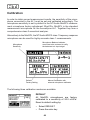
Calibration
In order to obtain correct measurement results, the sensitivity of the microphone connected to the AL1 must be set and calibrated accordingly. The
microphone sensitivity is set by default to the NTi Audio MiniSPL measurement microphone factory adjustment 20mV/Pa. MiniSPL is the standard
measurement microphone for the Acoustilyzer AL1. Together they form a
comprehensive class 2 acoustical analyzer.
Alternatively to the MiniSPL, the NTi Audio M2010 class 1 frequency response
microphone can be used for highly accurate class 1 measurements.
Microphone Balance Indicator,
arrow has to be centered to verify
the balanced mic input singal
Microphone
Sensitivity
Default
Factory Setting
Manual Calibration with
external microphone calibrator
The following three calibration modes are available:
DEFAULT
All MiniSPL microphones are factory
calibrated to a sensitivity of 20.0 mV/Pa.
Reset to default setting by:
• Select DEFAULT
• Press the enter key
62
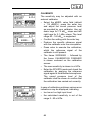
CALIBRATE
The sensitivity may be adjusted with an
external calibrator.
• Select the dBSPL value field (default
= 114 dBSPL), press the enter key
and adjust the sound pressure level
as provided by your calibrator. Use up/
down keys for 1.0 dBSPL steps and left/
right keys for 0.1 dBSPL steps. The level
range 80 - 140 dBSPL is supported.
• Confirm the setting with the enter key.
• Produce the specific reference signal
with the calibrator onto the microphone.
• Press enter to execute the calibration,
whilst the reference signal of the
calibrator is still present.
• The frame WORKING ... followed by
the frame CALIBRATION FINISHED!
is shown centered on the calibration
screen.
• The new sensitivity is shown in mV/Pa.
• Enter the SPL/RTA mode and check the
calibration by applying the reference
signal again to the attached microphone.
The sound pressure level of the
calibrator shall be shown to confirm that
the calibration has carried out correctly.
In case of calibration problems various error
indications may be displayed, indicating
• too low or too high input level.
• the calculated sensitivity is out of the
range 2 - 80 mV/Pa.
63
Manual sensitivity setting
• Select the sensitivity value field,
• Press enter and adjust the sensitivity
using the up/down keys for 1.0 mV/Pa
steps and left/right keys for 0.1 mV/Pa
steps. The setting range 2 - 80 mV/Pa is
supported.
• Press enter to confirm the setting.
64
5. MiniLINK PC Software
The MiniLINK PC software enables the transfer of stored measurements
from the Acoustilyzer AL1 to a PC. Additionally online data logging from the
AL1 directly to the PC is supported
Installation
a. Start up the PC with Windows operating system (MiniLINK V3.00 or
higher supports Windows XP, Vista, Win7 (32 & 64 Bit) and Win 7
Starter).
b. Insert the enclosed MiniLINK CD into the CD drive.
c. The MiniLINK software installation starts automatically. Follow the
instructions on the screen.
If the CD auto-start is disabled on the PC, follow the instructions below:
• Click “Start → Run“ on the windows taskbar.
• Type “d:\setup“ (assuming “d“ is the letter of the CD drive)
• Confirm with “ok“
After completing the software installation, leave the MiniLINK CD in the
CD drive for the next step.
d. Use the supplied USB cable to connect the AL1 to the PC. Windows
recognizes the new hardware component automatically and starts the
hardware installation assistant.
e. Follow the instructions of the installation assistant. Please select the CD
drive with the inserted MiniLINK CD as source for the USB driver when
asked.
f. In case the warning messages “Digital signature not found”, “Do not
install driver”, “not certified driver” or similar appear: Don’t listen to
Microsoft, listen to us and continue with the installation.
65
Start the MiniLINK PC Software
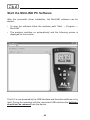
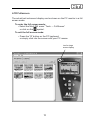
After the successful driver installation, the MiniLINK software can be
started.
• To start the software follow the windows path “Start → Program →
MiniLINK”.
• The analyzer switches on automatically and the following screen is
displayed on the monitor:
The AL1 is now powered by the USB interface and therefore switches on by
itself. During the operation with the connected USB interface the batteries
should not be removed from the device.
66
Free Registration of your Test Instrument
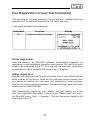
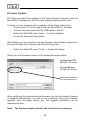
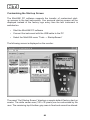
The Acoustilyzer includes additional “bonus features“, enabled after the
registration of the test instrument at the NTi Audio web site.
Overview of available bonus features:
Instrument
AL1
Function
Display
Customized start-up screen
Online registration:
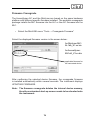
After the start-up, the MiniLINK software automatically suggests the
registration of non-registered connected instruments. The test instrument
needs to be connected to the PC. Proceed with the automatic registration
or alternatively select the MiniLINK menu “Help → Register“.
Offline registration:
Register your device at http://my.nti-audio.com. Key in your details and the
serial number of the device. Read out the instrument serial number from
your device by starting the instrument and keeping any button pressed.
The start up screen remains displayed. The serial number starts with three
letters (such as ANK675A0A2).
After successfully registering your device, you will receive an e-mail
with your registration key within a few minutes. Please insert this key in
the MiniLINK menu “Help → Register“. The test instrument needs to be
connected to the PC.
67
Readout of Stored Test Results
The analyzer memory is automatically transferred to the PC and visualized
through small screenshots on the MiniLINK memory window.
Note: The MiniLINK memory window remains empty when no test
results are stored on the instrument. Otherwise, use the PC
mouse to click onto the “AL1 Memory“ tab to initiate and update
the data memory window.
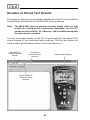
The test instrument display on the PC is synchronized to the actual LCD
screen display of the connected audio analyzer. The title bar shows the
serial number and firmware version of the test instrument.
MiniLINK PC
Software Release
Version
Firmware of
connected audio
analyzer
Synchronized Display
Serial Number of
connected audio
analyzer
68
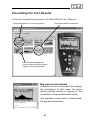
Visualizing the Test Results
All stored screenshots are shown in the MiniLINK tab “AL1 Memory“.
Stored screenshot incl. numerical results
Stored data without screenshot
Arrows indicating additional
numerical test results are stored
together with this screenshot
Big view of screenshots
A double click on a screenshot will enlarge
the screenshot. In this mode the menu
allows printing, saving or copying of the
screenshot or the numerical test results.
Any available numeric table is listed below
the big view screenshot.
69
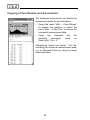
Copying of Test Results and Screenshots
The displayed screenshots can directly be
copied into reports for documentation.
• Select the menu “Edit → Copy Bitmap”
to choose the graphics or select the
menu “Edit → Copy Text” to choose the
numerical measurement data
• Insert
the
clipboard
into
reporting
document
(such
Excel) with “Ctrl + V”.
the
as
Alternatively import the stored “*.txt” file,
including the numerical measurement data,
e.g. to Microsoft Excel by using the Excel
import assistant.
70
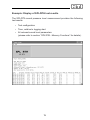
Example: Display of SPL/RTA test results
The SPL/RTA sound pressure level measurement provides the following
test results:
• Test configuration
• Time, relative to logging start
• All relevant sound level parameters
(please refer to section “SPL/RTA - Memory Functions” for details).
71
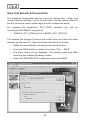
Save Test Results & Screenshots
The displayed screenshots can be saved as bitmap files (*.bmp) and
numeric data as text files (*.txt) to the hard drive. The file names consist of
the first six device serial number digits and the screenshots name.
For example the screenshot “A011_RT60” recorded e.g. with an
Acoustilyzer S/N ANK675 is saved as
• “ANK675_A011_RT60.bmp” & “ANK675_A011_RT60.txt”
This enables the storage of various test results from more than one audio
analyzer on the same PC. Save the stored test results as follows:
• Select the screenshots to be saved in the memory field.
• Press the SAVE button or select in the menu “File → SAVE“.
• The menu below will be displayed. The directory path may differ
according the installed Windows system.
• Select the SAVE/DELETE configuration and press SAVE.
72
When saving the screenshots to the PC the same values on the AL1 memory
can be simultaneously deleted. In the above displayed menu, simply select
“Delete files in instrument memory after save” to simultaneously empty the
test instrument memory.
Delete Test Results of Analyzer Memory
The memorized test results in the test instrument can be deleted as
follows:
• Directly in the test instrument memory overview
• Select the screenshot in the MiniLINK memory screen and press
DEL on the PC keyboard or use the delete function of the MiniLINK
memory menu
• Select the delete function when saving the screenshots/test results
to the PC
Test Result Logging at the PC
MiniLINK also allows the continuous logging of the Acoustilyzer test results
online in user-defined time intervals. This test data is saved into the default
log file software directly. At the end of the logging process, press the
“SAVE” button to save and the data will be saved under the file name e.g.
“ANK675_PcLog_Level SPL”.
The logging function is ideally suited for long term monitoring or
troubleshooting, e.g. in repair or broadcast applications.
Note: For sound pressure logging of specific events the tick box
“Reset Leq on Start” has to be enabled. This resets the device
timer of the Acoustilyzer at the begin of the online logging and
a new measurement is started automatically.
73
icon for direct copying of
present screenshot
To log online results, please:
• Select the requested measurement function on the test instrument
• Select the “Logging“ screen in the MiniLINK PC Software menu
• Select the required log time interval
• Press the “START” button to start the test result logging
• Press the “STOP” button to end the logging process
• Press the “SAVE” button to save the record to file
Additionally the present screenshot displayed on the MiniLINK PC software
can be directly copied to file by pressing the marked icon with the mouse
button. Paste the screenshot into any document with “CTRL + V”.
74
Remote Test Instrument Control with the PC
MiniLINK supports the remote control of the analyzer from a PC. Just click
on the displayed test instrument and all keys can be operated with the
mouse or the PC keys as listed below.
Click into these areas
to change the screen
selection
(e.g. SPL ↔ RTA)
On/Off: Ctrl + P
Light: Ctrl + L
ESC
arrow keys & enter
“Shift ←” or “shift →” or the keys indicated above allow the screen selection
of the enabled measurement function to be changed.
75
MiniLINK Tools
The MiniLINK PC software includes many useful tools:
• LCD Fullscreen
• Update Firmware
• Crossgrade Firmware
• StartUp Screen
76
LCD Fullscreen
The actual test instrument display can be shown on the PC monitor in a full
screen mode.
To enter the full screen mode:
• Select the MiniLINK menu “Tools → FullScreen“
or click on the
symbol.
To exit the full screen mode:
• Press the “Q” button on the PC keyboard
or simply click into the screen with your PC mouse.
icon for large
screen display
77
Firmware Update
NTi Audio provides free updates of the test instrument firmware and the
MiniLINK PC software on the NTi Audio website www.nti-audio.com.
To check out any available online updates, follow these instructions:
• Connect your PC to the web & start the MiniLINK PC software
• Connect the instrument with the USB cable to the PC
• Select the MiniLINK menu “Help → Look for Updates“
• Follow the download instructions
Alternatively you can check for any new firmware and software releases on
the web site http://my.nti-audio.com/VersionCheck.php.
• Select the MiniLINK menu “Tools → Update Firmware“
Select the new firmware version in the displayed screen below:
for Minilyzer ML1:
ML1dA_V3.xx.bin
for Acoustilyzer:
AL1dA_A1.xx.bin
applicable firmware for
the connected device
After confirming the selected device firmware, the test instrument firmware
is updated automatically. In case of any problems during the firmware
upgrade, such as power failure, etc., the upgrade procedure can be
repeated anytime.
Note: The firmware update deletes the internal device memory.
78
Firmware Crossgrade
The Acoustilyzer AL1 and the Minilyzer are based on the same hardware
platform with different specific firmware installed. The available crossgrade
package installs the ML1 firmware into the AL1 or the AL1 firmware into the
ML1.
• Select the MiniLINK menu “Tools → Crossgrade Firmware“
Select the displayed firmware version in the screen below:
for Minilyzer ML1:
AL1dA_A1.xx.bin
for Acoustilyzer:
ML1dA_V3.xx.bin
applicable firmware for
the connected device
After confirming the selected device firmware, the crossgrade firmware
is installed automatically within several seconds. The instrument displays
UPDATING FIRMWARE.
Note: The firmware crossgrade deletes the internal device memory,
thus the customized start-up screen needs to be reloaded onto
the instrument.
79
Customizing the Start-up Screen
The MiniLINK PC software supports the transfer of customized startup screens to the test instruments. Your personal start-up screen will be
displayed instead of the factory logo every time the test instrument is
switched on.
• Start the MiniLINK PC software
• Connect the instrument with the USB cable to the PC
• Select the MiniLINK menu “Tools → StartupScreen“
The following screen is displayed on the monitor:
The panel “Set Startup Screen” displays a sample default factory start-up
screen. The white center area (100 x 32 pixels) can be customized by the
user. The remaining top & bottom gray area is fixed and cannot be altered.
80
Guideline to define the new start-up screen:
• Use a pre-defined picture. The MiniLINK PC software will convert it
to a 100x32 pixels black & white picture automatically. The following
file types can be used as start-up screens: *.pcx;*.bmp;*.dic;*.rle;*.ico;
*.wmf.
• Alternatively create a new start-up screen yourself using any picture /
paint programs, such as “Microsoft Paint”. Set the file size to 100x32
pixel and insert any text or graphics for the start-up screen. Save the file
as “*.bmp* format.
• Press the button “Load Image” to select the file containing the new start
up screen.
• The start-up screen preview is displayed on the PC monitor.
• Press the button “Send to Device” to transfer the file to the device
• The audio analyzer then switches off and on automatically, so you can
check out your new start-up screen immediately.
Sample start-up screens:
81
Activate Options
The activate options menu is required for
• Activation of AL1 functionalities on your Minilyzer ML1 or the
ML1 functionalities on your Acoustilyzer with the crossgrade
package
• Activation of STI-PA measurement functionalities on the instrument
To activate one of the above functionalities
• Select the MiniLINK menu “Help → Activate Options“
• The following menu will be displayed
Follow the online activation instructions. Additionally detailed instructions
are enclosed with the license number within the individual product
package.
82
6. Troubleshooting
Numeric data import of “*.txt” files to Excel
Problem:
Numbers are recognized as text only during the import of numeric test
results to e.g. Microsoft Excel, so you cannot create tables or use the data
for further calculations.
Solution:
The MiniLINK data files use the “.” as decimal separator. Therefore please
set the decimal separator to “.” within Excel before starting the import
procedure.
Alternatively you can use copy → paste in the big view mode, select
the menu “Edit → Copy Text” and paste the data into an open Excel
document.
Factory Reset
To reset the instrument back to factory settings proceed as follows:
• Switch off the unit
• Press the ESC button and the On button at the same time for a few
seconds
• The start-up screens shows up, reading in the bottom line “LOADING
DEFAULT SETUP”
The instrument is now reset to factory conditions.
83
7. Accessories
MiniSPL
The MiniSPL is the perfect accessory for
acoustic measurements. Together with
the Acoustilyzer AL1 a comprehensive
integrating sound level meter is formed.
The MiniSPL is a self-contained omni
directional 1/2" measuring microphone with
built in impedance converter, pre-amplifier
and power supply. It is battery powered
with balanced XLR-output. The MiniSPL
is classified as class 2 in accordance with
IEC 61672 and is factory adjusted to a
sensitivity of 20 mV/Pa.
STI-PA Measurement Option
The STI-PA analyzer option allows the
reliable measurement of the speech
transmission index according to the latest
IEC standards within 15 sec. Besides the
single value STI or CIS test result, a detailed
view of the modulation indices and individual
band level results is provided.
NTi Audio TalkBox
The TalkBox is the missing link for the
complete evaluation of speech intelligibility
in emergency life & safety announcement
systems, from the talker’s microphone to
the listener’s ear. The NTi Audio TalkBox
presents the standardized voice-like
acoustic signal emission simulating a
human talker according to IEC 6026816, combined with a TNO certified speech
intelligibility signal at standardized levels.
84
ML1 - AL1 Crossgrade
The ML1 - AL1 Crossgrade package enables
loading of the Minilyzer firmware onto your
AL1, providing test functionalities, such as
• vu-PPM
• Balance
• THD 2nd - 5th
harmonics
• Scope
• Frequency
Sweep
• Time Sweep
• Induction Loop
Mode
Adapter -20dB
The Adapter -20dB may be applied for
balanced input levels higher than +20 dBu.
This passive adapter extends the balanced
input range of your Minilyzer/Acoustilyzer
up to +40 dBu. The adapter is supplied with
pin1-fuse for safe operation in combination
with the USB interface MiniLINK.
Pouch
The soft pouch protects your Minstrument
against shocks, dust and water. With its
convenient belt-clip you can keep your
Minstrument close to you even when you
need both hands for other tasks.
Now available with a MiniSPL microphone
holder, offering a space to store your mic.
Minstruments System Case
Store your valuable Minstruments test
system consisting of the Minirator MR1, the
Minilyzer ML1 or Acoustilyzer AL1 and the
MiniSPL adequately in the compact system
case which gives you extra space for cables,
connectors and other accessories you may
wish to bring along when you are ‘out in the
field’ checking audio systems.
85
8. Technical Specification
Measurements
• Sound Pressure Level
• Real Time Analyzer
• Zoom FFT
• Reverberation Time
• Delay Time
• Level RMS, Distortion THD+N
• Frequency
• Polarity Test
• Speech Intelligibility STI-PA (optional)
Sound Pressure Level
• SPL, Leq, LCpeak, Lmin, Lmax in accordance with IEC 61672
• Timer for single and repeated measurements
• Dynamic range (using MiniSPL): 30 - 130 dBSPLA
• Filters: Flat, A, C, X-Curve-1, RLB (Broadcast Loudness)
• Logging of SPL/RTA results into AL1 memory
• Wideband and RTA values simultaneously available
Real Time Analyzer
• 1/3 or full octave band resolution, class 0 filters
• SPL, Leq and Max-Min display per band
Reverberation Time
• 1/1 Octave band resolution, 63 Hz - 8 kHz,
based on T20 results, according to ISO3382
• 1/3 Octave band resolution with post-processing
• Automatic averaging with individual result readout and storage
• Source signal: Gated pink noise (from Test-CD or Minirator)
Zoom FFT
• Real-time Zoom FFT with 50% overlapping, 93 Bins
• Frequency Range: 10 Hz - 20 kHz
• Resolution: 187.5 Hz to 0.73 Hz
Delay Time
• Propagation delay between electrical and acoustic signal
input using built-in mic. Resolution < 0.1ms, max time: 1 s
• Dedicated test signal: NTi Audio chirp (from Test-CD or Minirator)
86
Polarity Test
• Positive / Negative detection through internal microphone or XLR RCA connector
.
• Checks polarity of midrange-speakers, woofers, sub-woofers and cables.
• Down to 10 dB S/N ratio of input signal.
• Testsignal: NTi Audio Polarity Signal (AL1 Test CD or Minirator)
Electrical
• Level RMS, THD+N, Frequency, Polarity
• Filters: Flat, A-weighting, C-weighting, Highpass 400 Hz,
Highpass 19 kHz
STI-PA (Option)
• Single value STI and CIS test result. Modulation indices
and individual band level results accessible. Error indicator.
• Fulfills the IEC 60268-16 release 2003 standard
(including amplitude weighting)
• TNO verified algorithm
Frequency
• Range
• Resolution
• Accuracy
10 Hz to 20 kHz
4 digits
< ± 0.1 %
Level
•
•
•
•
•
dBu, dBV, VRMS
3 digits (dB-scale) or 4 digits (V-scale)
± 0.5 % @ 1 kHz
20 Hz to 20 kHz
± 0.1 dB
Units
Resolution
Accuracy
Bandwidth
Flatness
THD+N (Total Harmonic Distortion + Noise)
• Bandwidth
10 Hz to 20 kHz
• Resolution
3 digits (dB-scale) or 4 digits (%-scale)
• Residual balanced < -85 dB @ -10 dBu to +20 dBu
THD+N
unbalanced < -74 dB @ 0 dBu to +14 dBu
PC Interface
• Internal device memory for up to 580 records
• USB interface to MiniLINK PC software
• Online data logging from Acoustilyzer directly to PC
87
Input Connectors
• XLR balanced, RCA unbalanced
Input Impedance
• 40 kOhm balanced, 20 kOhm unbalanced
Input RMS ( upper measurement limit )
• balanced
+20 dBu (7.75 VRMS)
• unbalanced
+14 dBu (3.8 VRMS)
• for input levels > 20 dBu (balanced) the Adapter -20 dB is
available as accessory
Max. DC Input
• ± 50 VDC
Residual Noise
• < 12 μV, XLR-input shorted
Internal Microphone (for Polarity and Delay measurement only)
• Omni directional
Monitor Output
• Jack 3.5 mm (1/8“), suitable for all common headsets
Display Graphic LCD 64 x 100 pixel, with backlight
Batteries
• 3x AA batteries (alkaline)
• Typical battery lifetime > 16 hrs
Dimensions (L x W x H)
• 163 x 86 x 42 mm (6.4“ x 3.38“ x 1.63“)
Weight
• 300 g (10.5 oz) incl. batteries
Temperature
• 0° to +45° C (32° to 113° F)
Humidity
< 90 % R.H., non condensing
88
9. Appendix: Introduction to STI-PA
Application:
In case of emergency, public address systems in buildings like airports,
railway stations, shopping centers or concert halls have to (clearly)
inform persons in danger about escape information and directions.
However if such announcements are misunderstood due to poor system
quality, tragic consequences may result. Therefore, it is essential
to design, install and verify sound reinforcement systems properly
for intelligibility. In addition, a variety of other applications such as
legal and medical applications may require intelligibility verification.
Standard:
The IEC 60849 standard (national standards - see next section) requires the
verification of electro-acoustic sound systems for emergency purposes to
ascertain a minimum level of speech intelligibility in case of an emergency
under realistic circumstances. Therefore, speech intelligibility from a
regulatory view is not a subjective measurement, but can be verified with
several, more or less complex methods that have been standardized in IEC
60268-16.
National standards:
• IEC 60849 Sound systems for emergency purposes (also VDE 0828
part 1 and DIN-EN, BS-EN, SN-EN, OEVE-EN, …)
• NFPA 72 National Fire Alarm Code 2002 (2002 edition, section 7.4.1.4)
• BS 5839-8 Fire detection and alarm systems for buildings. Code
of practice for the design, installation and servicing of voice alarm
systems
Subjective Testing Methods:
Although frequency response, distortion and loudness are important
to intelligibility, conventional measurements of these parameters alone
only marginally relate to intelligibility. When additional issues such as
directionality of drivers and the environment are taken into consideration,
the question then is how well a spoken message can be understood at
different locations, and particularly at the “worst” location.
One approach is to let a trained human speaker read a number of
existing or synthetic words, while a representative number of listeners
89
individually write down what they believe to have understood. The
statistical analysis of these notes results in a value representing the
percentage of the listeners who have understood the messages correctly.
Important procedures according to this method are PB-words, CVC or SRT
(Speech Reception Threshold). However, conducting such tests is rather
costly, and in some hazardous locations, even impossible. Therefore,
these methods are mainly used to verify technical principles during
development.
Technical Methods:
Already back in 1940, Bell Laboratories started to develop measurement
technologies to determine the speech intelligibility. Nowadays, highly
developed algorithms such as SII (Speech Intelligibility Index) and various
forms of the STI (Speech Transmission Index) measure speech intelligibility.
These techniques take care of many parameters which are important for
intelligibility such as:
• Speech level
• Background noise level
• Reflections
• Reverberation
• Psycho acoustic effects (masking effects)
Measurement techniques use synthesized test signals that don’t sound like
speech, but which have many common characteristics to real speech signals.
The averaged frequency response, as well as low frequency modulation,
is based on human speech. Since the speech of men’s and women’s
voices sound different, some measurement techniques use separate male
and female test signals: Speech intelligibility measurements acquire and
evaluate the signals in a manner characteristic of the way human speech is
altered before reaching the ears of a listener. Extensive investigations have
revealed the relationship between the alteration of speech characteristics
and the resulting speech intelligibility. These findings are incorporated into
the speech intelligibility meter that is able to display the intelligibility result
as a single number between 0 (unintelligible) and 1 (excellent intelligibility).
90
STI, RASTI or STI-PA
STI, RASTI or STI-PA are the most established methods for measuring
speech intelligibility. All three of them basically apply the same principle,
whereby RASTI and STI-PA are a simplified version of STI. This article
explains the principles behind these methods.
Speech Model:
First of all, measuring the speech intelligibility requires a model for speech
signals. For instance, speech may be described as superposition of various
phoneme frequencies that are modulated (i.e. of which the amplitude is
varied).
Frequency Spectrum:
The frequency analysis of a male voice
over a certain period results in a typical
characteristic as shown in Figure 1.
Fig. 1: Averaged octave
band spectrum of a male
speaker.
Time Modulations:
Within each frequency band, the signal
level varies, i.e. it is “modulated” by the
speaker. Figure 2 shows the envelope of a
speech signal in the 250 Hz band, whereby
the shape of the envelope is given by the
Fig. 2: Envelope of a speech
speech contents.
By analyzing the spectra of envelope signal (250 Hz band).
sequences it can be shown that a speaker
modulates the individual frequency bands in
the range from 0.2 to 12.5 Hz.
Fig. 3: frequency spectrum
of the envelope of a speech
signal (250 Hz band).
91
Modulation Transfer Function (MTF)
For high speech intelligibility it is mandatory that the integrity of the
modulations of the transmitted voice signal be preserved. Therefore, the
three core intelligibility measurement methods, STI, RASTI und STI-PA are
based on measuring the MTF (Modulation Transfer Function). This function
quantifies the degree to which the voice modulations are preserved in the
individual frequency bands.
The envelope shown in Figure 3 is divided into 1/3rd octave band
frequencies, thus resulting in 14 frequency bands between 0.63 and 12.5
Hz. The modulation transfer function determines for each of the 7 voice
bands (refer to Figure 1) how well the modulations are preserved.
Based on the MTF results as well as further parameters such as the
sound pressure level, hearing threshold, frequency response or psycho
acoustic effects (masking effects) it becomes possible to reliably determine
the speech intelligibility. The corresponding calculations, which are
optimized continuously, are based on extensive and profound evaluations
and comparisons with subjective methods. Measuring the complete
MTF – as required for STI – can become rather complex. For instance,
14 * 7 = 98 individual measurements must be executed, thus resulting in
a total acquisition duration of 15 minutes. Therefore, different approaches
have been developed to reduce the test period and to enable speech
intelligibility measurements with portable instruments.
92
STI - Speech Transmission Index
The STI result is based on the complete set of 98 measurements. Since
this approach requires a rather long test period, it is less frequently applied
in practice. However, STI represents the most detailed method to measure
the speech intelligibility and is mostly used if alternative approaches do not
provide reliable results due to unfavorable environmental conditions.
In practice, the STI result is preferably calculated out of the impulse
response (MLSA) that has been acquired e.g. with a PC-based system.
This approach is much quicker, but requires a lot of experience and
especially a linear behavior of the setup, i.e. there must be no non-linear
processing or conditions, including compressors or limiters, which is a
rather rare situation.
RASTI - Room Acoustics Speech Transmission Index
RASTI acquires only few segments of a complete MTF, which at first glance
obviously represents an extreme simplification of STI. Therefore, tight use
restrictions must be met to acquire reliable speech intelligibility results with
RASTI. Furthermore, the RASTI result does not consider significant and
practical auxiliary parameters such as the frequency response, echoes or
frequency-dependant reverberation times.
For a RASTI measurement, only two simultaneously generated frequency
bands are considered, i.e. the 500 Hz and the 2 kHz band which are then
modulated with four and five frequencies respectively.
The practical application of RASTI is mainly restricted to acquisitions
between two persons. However, RASTI was, for a long time, the only
method to measure the speech intelligibility with a portable instrument
93
STI-PA - Speech Transmission Index for Public Address Systems
A rising awareness of security issues from unintelligible speech, new
technological means and the shortcomings of RASTI triggered the speaker
manufacturer Bose and the research institute TNO to develop a new method
for speech intelligibility measurements of PA installations. The result of
these efforts is STI-PA, which allows quick and accurate tests with portable
instruments.
Like RASTI, STI-PA applies a simplified procedure to calculate the MTF.
But STI-PA determines the MTF by analyzing all seven frequency bands,
whereby each band is modulated with two frequencies.
Supposing that no severe impulsive background noise is present and
that no massive non-linear distortions occur, STI-PA provides results as
accurate as STI. If however impulsive background noise is present during
the normal system operation hours, it is usually possible to mitigate the
effects by also acquiring a measurement at a more favorable time e.g.
under slightly different conditions in the area, or during the night time - and
to calculate an unbiased overall measurement by using the results of both
test cycles.
NTi Audio STI-PA measurement table:
Portable STI-PA analyzers, e.g. NTi Audio’s Acoustilyzer, are able to
evaluate speech intelligibility within 15 seconds per position and are thus
well suited for wide-area measurements and high productivity.
Read more on the web site www.nti-audio.com
94
95
e 600 dt 09.10
www.nti-audio.com