1
4
BB702 RS-232 Communications
Section 4 - RS-232 Communication
The RS232 port allows customers to send Setpoint information to the BB702 and
record process temperature from the BB702 via a computer. The port enables bidirectional data transfer via a three-conductor cable consisting of signal ground,
receive input, and transmit output. It is recommended that less than fifty feet of
shielded cable be used between the computer and this instrument. This will
assure performance of the BB702 to EN61326, under the E.M.C. requirements of
the CE mark. Note that multiple instruments cannot be tied to the same port in
this configuration. The RS-232 port is optically isolated to eliminate ground loop
problems.
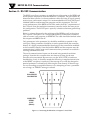
Below is a pinout diagram for the serial port of the BB702 as well as the pinout
for a 9-pin PC serial port. Use a straight DB9 (female) to DB9 (male) connector
cable to connect your computer to the BB702. The cable should be attached when
the computer and BB702 are off.
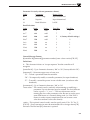
Only parameters in the parameter list should be modified or queried via the
serial port. Other parameters should be viewed or queried from the controller,
directly. It is highly recommended that baud rate for the controller be modified
on the controller, directly. Note that both the BB702 and the computer must be
communicating with the same serial communications parameters to establish a
working communication link.
The serial communications feature can be tested using terminal emulation
package. Note that this controller does not time out waiting for the next
character to be transmitted. Be sure not to use the XON/XOFF or hardware
handshaking. Lastly, it should be noted that following a complete transmission
to the BB702, a response it sent back. If the message was valid, the changed or
queried parameter is echoed back (following the same format). If the message
was not according to acceptable format or was attempting to force a parameter
out of range, an "ERROR" message is echoed.
2
COMPUTER
SERIAL
PORT
(RS232)
1
RX
TX
2
6
4
8
TX
7
RX
6
3
3
7
5
9
GND
1
GND
BB702
BLACKBODY
CALIBRATOR
4
8
5
9
Figure 8. Connecting the BB702 to a Computer’s Serial Port
4-1