1
☞
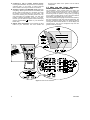
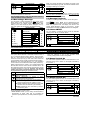
You (at remote telephone):
[1], “All right, over and
out”.....
[ ] 9] [9] (END OF SESSION)
Important! If you wish to exit the two-way communication
mode and execute another command, just press [ ] and
then key your user code followed by the command (see
“keying sequences” in Para. 6.3 B above).
☞
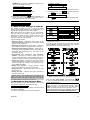
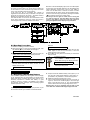
Communication with a pager takes place as follows:
• The PowerMax dials the pager’s phone number, waits 5
seconds and sends the numerical message.
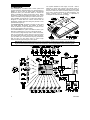
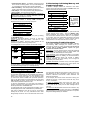
• The message transmitted by the PowerMax to the pager
is actually a string of digits, as exemplified in Figure 6
below.
6.5 Receiving Messages at a Remote
Telephone
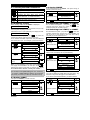
The PowerMax can be programmed by the installer for
selective transmission of messages to private telephone
subscribers. Messages are divided by type into 3 groups:
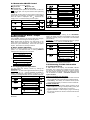
Group Events Reported
Fire, Burglary, Panic, Tamper
1
Arming AWAY, Arming HOME, Disarming
2
No-activity, Emergency, Latchkey
3
Group 1 has the highest priority and group 3 has the
lowest priority.
When the called party answers a call initiated by the
PowerMax, he will hear a verbal message composed of
the “house identity” and the type of event that occurred.
For example, once smoke is detected in the Smith
residence, the message will be:
[The Smith Residence - Fire Alarm].
If a person under surveillance in the Watkins residence
has been inactive, the message will be:
[The Watkins Residence - No Activity].
The called party must acknowledge the message (as
explained later on), but if he does not respond, the
message will be transmitted repeatedly as many times as
possible within a 45-second time limit. When the 45
seconds are up, the PowerMax will disengage the line and
call the next private telephone number on its list.
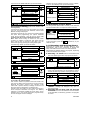
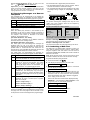
The called party can acknowledge the message by
pressing a digit on the telephone keypad, as listed below:
Figure 6. Pager Message Structure
The person receiving the message sees only the “YYY
-00ZZ” part of the message, which he can interpret by
using the following legend:
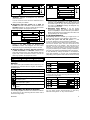
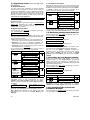
Events types (YYY) are coded as follows:
Event
Code
Event
Code
Alarm
919
Fire
515
Trouble
818
Close
101
Emergency
717
Open
102
Panic
616
Latchkey
103
ZZ is the zone number in which the event occurred, or the
user number in case of Close, Open and Latchkey events.
Example 1: Message reads “919-0003”:
This means an alarm occurred in Zone No. 3.
Example 1: Message reads “101-0008”:
This means the system was closed (armed) by user No. 8.
6.7 Conducting a Walk Test
Digit Effect
2
Acknowledge only: The PowerMax disengages
the line and considers the event duly reported.
The walk test is an indispensable operation by which you
verify that all detectors function properly, without disturbing the neighbors with loud sirens. The test must be
performed at least once a week, and should include all
detectors in all zones.
Note: During the test period, 24-hour zones will not cause
an alarm if violated, but a fire zone will function normally.
A typical test will take place as follows:
3
A. Press the test button (
1
9
Acknowledge and listen-in: The protected site is
“bugged” for sound for 60 seconds. The called
party may prolong the listening session by
pressing [3] again before the PowerMax disengages the line, or by pressing [1] to speak.
Acknowledge and speak out: The called party
may speak for 60 seconds to whoever is in the
protected site. The called party may prolong the
“speak out” session by pressing [1] again before
the PowerMax disengages the line, or by pressing
[3] to listen.
Acknowledge and request a status report: The
PowerMax will issue a verbal report of system
status. For example:
[Disarm - ready to arm] or
[Disarm - back door open] or
☞
).
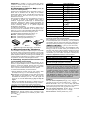
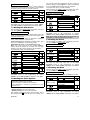
B. The display will prompt you for your user code:
ENTER CODE
___
C. Enter your code. The siren will sound for 2 seconds
and the display will change to:
TESTING
D. Walk throughout the protected area and make sure you
trigger every detector with no exception (move across
the field of view of motion detectors and open/close
doors and windows). Each time a detector is triggered:
The “Happy Tune” will sound,
The zone name and number will be displayed briefly,
EXAMPLE 1: You triggered a motion detector in the
living room (zone 11). The display will show:
LIVING
ROOM
[Disarm - alarm in memory].
6.6 Receiving Messages Via a Pager
Since the PowerMax can be programmed to report events
to a pager, the user of the pager must be informed on how
to interpret the numerical message that his pager displays.
14
Z11
Violated
After 5 seconds the display will revert to:
TESTING
DE5450U