1
User’s Manual of WNAP-1110
Appendix C: Troubleshooting
If you found the AP is working improperly or stop responding to you, please read this troubleshooting first before
contacting the Planet Tech Support for help.. Some problems can be solved by yourself within a very short time.
Scenario
Solution
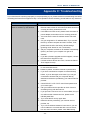
The AP is not responding to me when
a. Please check the connection of the power cord and the
Ethernet cable of this AP. All cords and cables should be
I want to access it by web browser.
correctly and firmly inserted to the AP.
b. If all LEDs on this AP are off, please check the status of
power adapter, and make sure it is correctly powered.
c.
You must use the same IP address section which AP
uses.
d. Are you using MAC or IP address filter? Try to connect
the AP by another computer and see if it works; if not,
please reset the AP to the factory default settings
(pressing ‘reset’ button for over 10 seconds).
e. Set your computer to obtain an IP address automatically
(DHCP), and see if your computer can get an IP
address.
f.
If you did a firmware upgrade and this happens, contact
the Planet Tech Support for help.
g. If all the solutions above don’t work, contact the Planet
Tech Support for help.
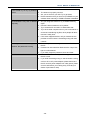
I can’t get connected to the Internet.
a. Check the Internet connection status from the router that
is connected with the AP.
b. Please be patient, sometime Internet is just that slow.
c.
If you have connected a computer to Internet directly
before, try to do that again, and check if you can get
connected to Internet with your computer directly
attached to the device provided by your Internet service
provider.
d. Check PPPoE / L2TP / PPTP user ID and password in
your router again.
e. Call your Internet service provider to check if there’s
something wrong with their service.
f.
If you just can’t connect to one or more website, but you
can still use other internet services, please check
URL/Keyword filter.
g. Try to reset the AP and try again later.
h. Reset the device provided by your Internet service
provider, too.
i.
Try to use IP address instead of host name. If you can
use IP address to communicate with a remote server,
but can’t use host name, please check DNS setting.
-107-