1
Connecting the Antenna
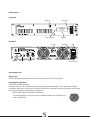
Connect a 50 Ohm antenna or dummy load.
The antenna is one of the major elements which effect the range of the broadcast.
CAUTION
1.a wire is not an antenna, connecting unmatched antenna or not connecting antenna at all will damage the final RF amplifier stage.
2. Do not pass the antenna near the DCE-300 or the audio cables; this could add undesired noises to the broadcast.
Warning
Some of the commissioned items, particularly transmitters, require an operating license.
It is an offence in some other countries of the world to radiate electro magnetic waves at certain frequencies without a license.
It is the Customer's responsibility to check relevant laws, regulations and directives regarding licensing and putting into service any
goods commissioned by Tugicom. The Customer agrees to defend,
indemnify and hold harmless Tugicom, it's employees and agents, from and against any claims, actions or demands, including without
limitation legal and accounting fees, alleging or resulting from the improper or unlawful use of goods commissioned by Tugicom.
Finally - Make it work
Recheck that 50 Ohm dummy load or antenna is connected properly, power is connected and switched off, and audio source
is connected to the XLR inputs.
Turn on the power.
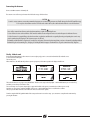
After switched on, the DCE-300 will perform a power up sequence, in first time operation the display should show:
This is the first time we are going to setup the DCE300 - The first screen setup is the freq’ adjust - with A and B buttons you can set the freq’
and when you are done press C button - Next.
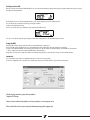
The second setup screen is power output adjust - again with A and B set the power you want the then C when you are ready.
Next there are stereo\mono switching and RDS on\off screens - with A and B button choose on\off and C to confirm.
when you pass the RDS manu the screen will show on the screen the word - update .
From the setup the DCE will go ON-Air with all the setup sets that we insert on the setup - you can return to setup from the main manu by
pressing the C button.