1
Kramer Electronics, Ltd.
USER MANUAL
Model:
K-Able Box
Cable Retractor
Contents
Contents
1
2
2.1
2.2
2.3
3
3.1
4
5
5.1
5.2
5.3
6
6.1
6.2
6.3
7
8
Introduction
Getting Started
TBUS Compatibility
Recycling Kramer Products
Quick Start
Overview
Component Identification
Defining the K-Able Box
Mounting the K-Able Box
Mounting the K-Able Box Horizontally
Mounting a Single K-Able Box Vertically
Mounting Multiple K-Able Box Units Vertically
Using the K-Able Box
Extending the Cable
Retracting the Cable
Storing the Fixed End of the Cable
Connecting the K-Able Box
Technical Specifications
1
1
2
2
3
4
5
6
7
7
8
11
13
13
13
13
13
14
Figures
Figure 1: K-Able Box
Figure 2: Mounting the K-Able Box and Cable Exit Bracket Horizontally
Figure 3: Cable Exit Bracket Showing the Plastic Friction Bush in Place
Figure 4: Various Vertical Mounting Options
Figure 5: Mounting a Single K-Able Box Vertically
Figure 6: Vertical Mount Bracket
Figure 7: Inserting the Pin and Bolt into the Bracket
Figure 8: Mounting Multiple K-Able Box Units Vertically
Figure 9: Mounting Multiple K-Able Box Units Vertically—Rear View
6
7
8
8
9
9
10
11
12
Tables
Table 1: K-Able Box Component Identification
Table 2: K-Able Box Features
Table 3: Vertical Mount Bracket Features
Table 4: Technical Specifications of the K-Able Box
5
6
9
14
i
Introduction
1
Introduction
Welcome to Kramer Electronics! Since 1981, Kramer Electronics has been
providing a world of unique, creative, and affordable solutions to the vast
range of problems that confront the video, audio, presentation, and
broadcasting professional on a daily basis. In recent years, we have
redesigned and upgraded most of our line, making the best even better! Our
1,000-plus different models now appear in 11 groups 1 that are clearly defined
by function.
Congratulations on purchasing your Kramer K-Able Box™, which is ideal
for boardrooms, conference and training rooms.
The package includes the following items:
• K-Able Box
• Cable exit bracket, plastic friction bush and mounting screws
• Vertical mounting bracket, mounting screws, front mount pin, rear
fixing bolt and locking nut
• Four horizontal mounting wood screws
• This user manual 2
2
Getting Started
We recommend that you:
• Unpack the equipment carefully and save the original box and
packaging materials for possible future shipment
• Review the contents of this user manual
• Use Kramer high performance high resolution cables 3
1 GROUP 1: Distribution Amplifiers; GROUP 2: Switchers and Router; GROUP 3: Control Systems; GROUP 4:
Format/Standards Converters; GROUP 5: Twisted-Pair Solutions; GROUP 6: Specialty AV Products; GROUP 7: Scan
Converters and Scalers; GROUP 8: Cables and Connectors; GROUP 9: Room Connectivity; GROUP 10: Accessories and
Rack Adapters; GROUP 11: Sierra Products
2 Download up-to-date Kramer user manuals from http://www.kramerelectronics.com
3 The complete list of Kramer cables is available from http://www.kramerelectronics.com
1
Getting Started
2.1 TBUS Compatibility
The K-Able Box can be used in conjunction with the following Kramer table
mount units (when a WCP, WCP-2 or WCP-21 is installed):
• TBUS-1A
• TBUS-3
• TBUS-4
• TBUS-5
• TBUS-6
• TBUS-9
• TBUS-10
2.2 Recycling Kramer Products
The Waste Electrical and Electronic Equipment (WEEE) Directive
2002/96/EC aims to reduce the amount of WEEE sent for disposal to landfill
or incineration by requiring it to be collected and recycled. To comply with
the WEEE Directive, Kramer Electronics has made arrangements with the
European Advanced Recycling Network (EARN) and will cover any costs of
treatment, recycling and recovery of waste Kramer Electronics branded
equipment on arrival at the EARN facility. For details of Kramer’s recycling
arrangements in your particular country go to our recycling pages at
http://www.kramerelectronics.com/support/recycling/.
2
KRAMER: SIMPLE CREATIVE TECHNOLOGY
Getting Started
2.3 Quick Start
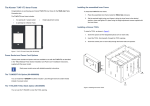
This quick start chart summarizes the basic steps when installing a
K-Able Box.
3
Overview
3
Overview
The K-Able Box is a furniture-mounted cable extension, retractor and
housing that is easily installed underneath a table top or in a podium. The
K-Able Box is available with one of seven cable types:
• VGA
• Audio
• VGA and Audio
• HDMI/Ethernet
• USB-A
• CAT 6 Twisted Pair
• DisplayPort
The K-Able Box can be mounted:
• Horizontally or vertically
• Independently or vertically in conjunction with the Kramer TBUS
range of products
• Vertically in a bank of up to three units
4
KRAMER: SIMPLE CREATIVE TECHNOLOGY
Overview
3.1 Component Identification
Table 1 lists the components supplied with the K-Able Box and their
descriptions.
Table 1: K-Able Box Component Identification
Item
Qty
Description
1
K-Able Box
4
K-Able Box 60 x 4mm
horizontal mounting
countersunk head screws
1
Cable exit bracket
1
Plastic Friction Bush
1
Vertical mounting bracket
9
Vertical mounting bracket/Cable
exit bracket 18 x 4mm
countersunk head screws
1
Vertical mounting bracket front
pin
1
Vertical mounting bracket rear
carriage bolt M6 x 60, M6
locking nut and M6 flat washer
5
Defining the K-Able Box
4
Defining the K-Able Box
Figure 1 and Table 2 define the K-Able Box unit.
Figure 1: K-Able Box
Table 2: K-Able Box Features
1
#
Feature
Cable—Fixed End
Function
Connect to room wiring infrastructure, for example, leading to a projector
2
Mounting Holes (4)
For mounting horizontally to the underneath of a surface
3
Mounting Hole (1)
For mounting vertically using locking nut/bolt in the mounting bracket
4
Mounting Hole (1)
For mounting vertically using the pin in the mounting bracket
5
Cable—Extendable End
Connect to the mobile user device, for example, a laptop PC
6
Spool
For storage of the fixed cable end when not in use
7
Wrapped Cable
Fixed end of cable wrapped around the storage spool
If there is restricted space, it is possible to remove the cable storage spool by
removing the three screws securing it to the housing.
Note: When winding the fixed end of the cable around the storage spool,
keep a bend radius of at least 2cm (0.8in) where the cable exits the housing to
as avoid damaging the cable.
6
KRAMER: SIMPLE CREATIVE TECHNOLOGY
Mounting the K-Able Box
5
Mounting the K-Able Box
This section consists of:
• Mounting the K-Able Box horizontally (See Section 5.1)
• Mounting a single K-Able Box vertically (see Section 5.2)
• Mounting multiple K-Able Box units vertically (see Section 5.3)
5.1 Mounting the K-Able Box Horizontally
The K-Able Box can be mounted horizontally to the underneath of a surface
(such as, a table) using the supplied screws.
Figure 2: Mounting the K-Able Box and Cable Exit Bracket Horizontally
To mount the K-Able Box horizontally as illustrated in the example in
Figure 2:
1. Position the K-Able Box relative to the edge of the table as shown in
Figure 2 and secure it using the four wood screws supplied.
2. Feed the cable through the cable exit bracket.
3. Position the cable exit bracket underneath the table such that the cable
connector will not protrude beyond the edge of the table.
4. Secure the cable exit bracket using the two of the short wood screws
supplied.
5. Slide the plastic friction bush around the cable and press it into the
opening in the cable exit bracket (see Figure 3).
7
Mounting the K-Able Box
Figure 3: Cable Exit Bracket Showing the Plastic Friction Bush in Place
5.2 Mounting a Single K-Able Box Vertically
Figure 4 shows various vertical mounting options of one or two K-Able Box
units.
Figure 4: Various Vertical Mounting Options
8
KRAMER: SIMPLE CREATIVE TECHNOLOGY
Mounting the K-Able Box
Figure 5 shows a single K-Able Box mounted vertically next to a TBUS unit.
Figure 5: Mounting a Single K-Able Box Vertically
Figure 6 shows the vertical mount bracket for a single K-Able Box.
Figure 6: Vertical Mount Bracket
Table 3: Vertical Mount Bracket Features
1
#
Feature
Bracket Extension
Function
Position against the side of the TBUS to insure correct spacing
between the TBUS and the K-Able Box
2
Vertical Mount Bracket
Bracket for mounting a single K-Able Box vertically
3
Mounting Holes (6)
Holes for the mounting screws
9
Mounting the K-Able Box
To mount a single K-Able Box vertically as illustrated in the example in
Figure 5:
1. Position the vertical-mounting bracket (see Figure 6) such that the
cable exits in line with the TBUS insert.
Note: The vertical mounting bracket is designed to be mounted with the
extension against the side of the TBUS providing the correct spacing between
the TBUS and the K-Able Box.
2. Secure the vertical mounting bracket perpendicular to the TBUS on the
underneath of the table using at least four of the small screws supplied.
3. Slide the pin through the top mounting hole of the K-Able Box
housing so that it protrudes the same distance from each side of the
hole.
4. Slide the bolt through the top rear mounting hole of the K-Able Box.
5. Screw the nut onto the bolt only until the end of the bolt is flush with
the nut.
6. Slide the pin at the front of the K-Able Box housing into the front of
the vertical mounting bracket at the same time as hooking the bolt onto
the rear of the vertical mounting bracket (see Figure 7).
Figure 7: Inserting the Pin and Bolt into the Bracket
7.
8.
9.
10
Tighten the nut on the bolt, securing the K-Able Box to the vertical
mounting bracket.
Feed the cable through the TBUS WCP/WCP-2/WCP-21 insert and
secure it to the plate of the TBUS.
Slide the plastic friction bush around the cable and press it into the
opening in the insert.
KRAMER: SIMPLE CREATIVE TECHNOLOGY
Mounting the K-Able Box
5.3 Mounting Multiple K-Able Box Units Vertically
Vertical mounting brackets that have room for either two or three K-Able
Box units are available as options.
Figure 8: Mounting Multiple K-Able Box Units Vertically
The procedure is the same for mounting two or three K-Able Box units.
To mount multiple K-Able Box units vertically as illustrated in the
example in Figure 8:
1. Position the multiple mounting bracket (see Figure 6) in line with the
TBUS insert such that when the cables are extended they are in line
with the TBUS inserts.
Note: The vertical mounting bracket is designed to be mounted with the
extension against the side of the TBUS providing the correct spacing between
the TBUS and the K-Able Box units.
2. Secure the multiple-mounting bracket to the underneath of the table
using the wood screws supplied.
3. Slide the pin through the top mounting hole of each of the K-Able Box
units to be mounted.
4. Slide the bolt through the top rear mounting holes of the K-Able Box
units.
11
Mounting the K-Able Box
5.
6.
7.
8.
9.
Screw the nut onto the bolt only until the end of the bolt is flush with
the nut.
Slide the pin at the front of the K-Able Box housings into the front of
the multiple-mounting bracket at the same time as hooking the bolt
onto the rear of the vertical-mounting bracket.
Tighten the nut on the bolt, securing the K-Able Box units to the
vertical-mounting bracket.
Feed the cables through the TBUS WCP/WCP-2/WCP-21 inserts.
Slide the plastic friction bushes around each of the cables and press
them into the openings in the inserts.
Figure 9: Mounting Multiple K-Able Box Units Vertically—Rear View
12
KRAMER: SIMPLE CREATIVE TECHNOLOGY
Using the K-Able Box
6
Using the K-Able Box
6.1 Extending the Cable
To extend the cable:
1. Extend the free end of the cable until the required length is exposed.
2. Extend the cable a short distance further until you feel increased
tension.
3. Release the cable.
The lock engages and prevents the cable from retracting.
6.2 Retracting the Cable
To retract the cable:
1. Extend the cable a short distance until you feel decreased tension.
The lock is disengaged.
2. Allow the cable to retract keeping it under a light tension.
!
When the lock disengages, do not let go of the cable and allow it to
retract unrestrained or the mechanism/cable may be damaged.
In the event that there is a problem with getting the cable to retract, extend
the cable fully and the mechanism will disengage.
6.3 Storing the Fixed End of the Cable
Wind the fixed end of the cable around the external spool for storage.
7
Connecting the K-Able Box
To connect the K-Able Box:
1. Connect the fixed cable end to the cable infrastructure of the room (for
example, leading to a projector).
2. Pull the extendable cable end and connect it to the source (for example,
a laptop).
13
Technical Specifications
8
Technical Specifications
Table 4 lists the technical specifications of the K-Able Box.
Table 4: Technical Specifications 1 of the K-Able Box
DIMENSIONS:
WEIGHT:
FIXED END CABLE
LENGTH:
EXTENDABLE END
CABLE LENGTH:
ACCESSORIES:
OPTIONS:
26.7cm x 21.1cm x 3.7cm (10.5" x 8.3" x 1.5")
1.4kg (3.1lbs) approx.
1m (3.3ft)
1.2m (3.9ft)
4 horizontal mount wood screws
Cable exit bracket, plastic friction bush
Single unit vertical mounting bracket, front pin, rear carriage bolt, nut and
washer
9 vertical mount/cable exit bracket wood screws
K-ABLE-BOX/BRKT_DUAL_CLIP_TABALE, Part Number 85-0400799
K-ABLE-BOX/BRKT_TRIO_CLIP_TABALE, Part Number 85-0400899
1 Specifications are subject to change without notice
14
KRAMER: SIMPLE CREATIVE TECHNOLOGY
For the latest information on our products and a list of
Kramer distributors visit www.kramerelectronics.com
where updates to this user manual may be found.
We welcome your questions, comments and feedback.
Safety Warning:
Disconnect the unit from the power supply before
opening/servicing.
Caution
P/N:
2900- 000731
Rev: 3
Kramer Electronics, Ltd.
Web site: www.kramerelectronics.com
E-mail: [email protected]
P/N: 2900-000731 REV 3