1
Power
Labeling
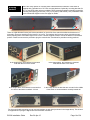
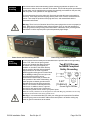
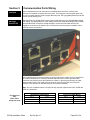
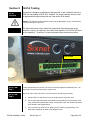
The power headers and plugs will be labeled to guide you in properly connecting your
power. Make sure to reference this labeling when wiring your switch to make sure you are
connecting the appropriate power to the correct terminals. If your switch does not have dual
power inputs then do not connect anything to the terminals labeled Power 2.
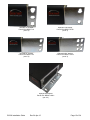
Power Header and Plug Labeling
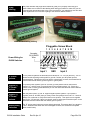
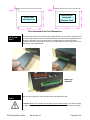
Power Plug Installed
Pluggable Screw Block
1 2 3 4 5 6 7 8 9 10
Accepts
14-24 AWG
Wire
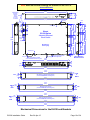
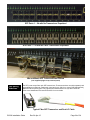
Power Wiring for
EL228 Switches
P1
P1
P2
P2
+/L
-/N
-/N
+/L
Power
Chassis
Power
Input 1
Input 2
GND
AC Power
Systems
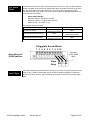
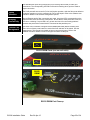
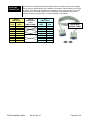
For AC powered systems the terminals will be labeled as “+/L” for Line (aka Hot), “-/N” for
Neutral and the chassis ground symbol for ground. Connect your AC power input as
correspondingly. Typically the Line (Hot) lead is colored black or brown, the Neutral lead is
colored white or blue and the ground is green or green/yellow.
Positive (+)
DC Power
Systems
For positive power systems (such as +24 VDC) put the positive lead on the terminal
marked “+/L” and the return (or ground) lead on the terminal marked “-/N“. If there is a
chassis, earth or safety ground lead then put it on the associated terminal marked with the
chassis ground symbol.
Negative (-)
DC Power
Systems
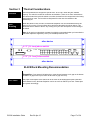
Both the power option ”A” and “D” support negative power systems. If your power is
negative (such as -48 VDC) then you must put the most positive lead on the “+/L” terminal.
Always use a voltmeter to verify which lead is more positive. Then put the more negative
lead on the “-/N” terminal. If there is a chassis, earth or safety ground lead then put it on the
associated terminal marked with the chassis ground symbol.
Reverse Polarity
Protection
The “D” option power inputs are reverse polarity protected. This means that if you swap the
+ and – leads then the switch will not be damaged. However, the switch will not operate
when wired this way.
EL228 Installation Guide
Rev 24-Apr-15
Page 20 of 34