1
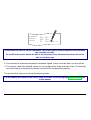
MDP40B
User Manual
Rev. 003
Compuprint Information
Thanks for choosing the MDP40B printer.
Your printer is a reliable working equipment that will be very useful in your daily job.
Our printers have been designed to be compact and respectful of the work environment. They offer
a wide range of features and multiple functions that confirm the high technological level reached
by the Compuprint S.p.A.
To maintain these printing performances unchanged in the long run, Compuprint has developed
specific consumable accessories for each printer type (for example: ribbon cartridges for dot matrix
printers, toner and OPC cartridges for laser printers, bubble ink jet cartridges for inkjet printers)
that assure an excellent operation with high printing quality level reliability.
Compuprint recommends to use only its original consumables with original packaging
(identified by its holographic label). In this way, a proper use of the printer at quality level
stated in the product characteristics can be assured. All typical usage problems related to not
certified consumables may be avoided, such as an overall quality print level degradation and,
often, the reduction of the product life due to the fact that the proper working conditions for the
print heads, OPC cartridge and other printer parts are not assured.
Moreover, Compuprint does not only certify its consumables in terms of working conditions but
also carefully controls their compliance with the international standard rules concerning:
• no cancerous materials;
• no flammability of the plastic materials;
• other standards
Compuprint advises the customers not to use products for which the compliance to this safety
rules are not warranted.
Finally seek your dealer or contact a Compuprint office and be sure that are provided you the
original Compuprint consumables.
Table of Contents
Table of Contents ................................................ iii
Printer Presentation ............................................. 1
Unpacking the Printer .......................................... 3
Printer Parts.......................................................... 4
Printer Installation................................................ 5
Printer Setup .......................................................27
Printing the Printer Setup Forms .................................................27
Filling in the Printer Setup Forms ................................................30
Reading the Preprinted Forms ....................................................31
Printer Setup Flow Chart..............................................................32
Setup Parameters ........................................................................33
Offset Adjustments.......................................................................44
Choosing a Suitable Location ........................................................5
Installing the Paper Stand ..............................................................6
Installing the Power Cable .............................................................8
Installing the Ribbon Cartridge.......................................................9
Troubleshooting .................................................47
Clearing Paper Jams....................................................................47
Print Quality Problems .................................................................50
Hexadecimal Dump......................................................................50
Paper Handling ................................................... 12
Loading Paper ..............................................................................12
Loading Cut Sheet and Multiparts...........................................12
Loading Passbooks .................................................................15
Paper Specifications...........................................51
Cuts Sheets ..................................................................................52
Passbooks ....................................................................................53
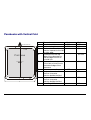
Passbooks with Horizontal Fold..............................................54
Passbooks with Vertical Fold ..................................................55
The Operator Panel ............................................ 18
Function Keys ...............................................................................18
Leds...............................................................................................20
Technical Specifications ....................................56
Software Driver Selection .................................. 21
Connection to the Host ...................................... 22
FCC Notes....................................................................................59
Canadian D.O.C. Radio Interference Regulation .......................59
EEC Regulations..........................................................................59
Setting the Interface Parameters .................................................23
Parallel Interface ......................................................................23
Serial Interface .........................................................................23
Printing a Test Page ........................................... 25
iii
Printer Presentation
This dot-matrix printer is a multi-purpose printer for counter applications. Its compact structure
is designed for integration in an ergonomic environment. The printer provides a high level of
reliability, form-handling accuracy and data integrity. Its main features are:
• Printing on a wide range of paper media: different types of cut sheets, multiparts and
passbooks.
• High print pressure for multipart documents
• High print quality supplied by a 24 wire print head
• High reliability paper handling
The straight paper path allows the printing on particular documents such as multipart forms
and passbooks.
• Automatic paper thickness adjustment
The print head detects automatically the paper thickness for correct printing on any type of
document. This printer can print also on documents with a variable thickness, such as
passbooks.
• Easy paper handling
The operator places the paper on the front table and the printer loads it without any other
user intervention. The paper ejection towards the front or the rear of the printer allows an
easy access to the printed document.
• Automatic document alignment feature
The printer checks automatically the alignment of the top margin and the left margin of the
document and adjusts it, if necessary. The printout is therefore performed correctly
independently from the paper loading position.
• Storage of two complete configurations for instant recall
1
• Standard parallel and serial interface and automatic switch-over function. The financial
interface is available for the IBM 4722 and the IBM 9068 protocols.
• Easy printer setup
• Supported emulations: Epson 570, IBM Proprinter XL24E, XL24E AGM, IBM 2390+, 4722,
9068 and Olivetti PR40+, PR2, 2845.
2
Unpacking the Printer
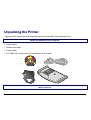
Together with the printer the following items are included in the shipment box:
Notify any damage to your supplier.
• Paper stand
• Ribbon cartridge
• Power cable
• CD-ROM with the printer documentation and drivers.
Always keep the packing material in a safe place as you must repack the printer into it, when you
need to move it.
3
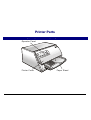
Printer Parts
Never remove any printer part unless it is expressly indicated in this manual.
O p erato r P a ne l
P rin ter C o ver
P ap er S tan d
4
Printer Installation
Choosing a Suitable Location
Consider the following points when you choose the location for your printer:
• The distance between the printer and the host computer must not exceed the length of the
interface cable;
• The location must be sturdy, horizontal and stable;
• Your printer must not be exposed to direct sunlight, extreme heat, cold, dust or humidity;
• You need an AC power outlet compatible with the plug of the printer’s power cord. The voltage
of the outlet must match the voltage shown on the printer’s Name Plate;
• When printing on standard paper formats, the paper is partially ejected on the rear side of the
printer. Make sure that behind the printer there is sufficient clearance to correctly move the
paper.
5
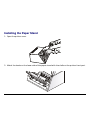
Installing the Paper Stand
1. Open the printer cover.
2. Match the hooks on the lower side of the paper stand with the clefts on the printer front part.
6
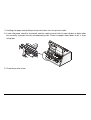
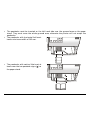
3. Holding the paper stand oblique insert the hooks into the printer clefts.
4. Lower the paper stand to horizontal position making sure that the two holders on both sides
are correctly inserted into the corresponding slots. Press the paper stand down until it clips
into place.
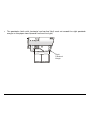
5. Close the printer cover.
7
Installing the Power Cable
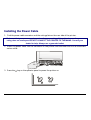
1. Find the power cable connector and the rating plate on the rear side of the printer.
Make sure that your power supply matches the power rating of the printer. In case the power
rating does not correspond DO NOT CONNECT THE PRINTER TO THE MAINS. Consult your
dealer for help. Always use a grounded outlet.
2. Insert the power cable into the connector on the printer and the other end into a convenient
mains outlet.
3. Press the
key on the operator panel to power the printer on.
LQ
8
Installing the Ribbon Cartridge
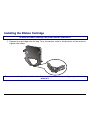
To install the ribbon cartridge, the printer must be powered on.
1. Remove the cartridge from its bag. Turn the tension knob in the direction of the arrow to
tighten the ribbon.
Do not remove the plastic mask from the ribbon cartridge. The ribbon cartridge may not be used
without it.
9
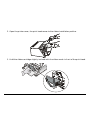
2. Open the printer cover, the print head moves to the ribbon installation position.
3. Hold the ribbon cartridge slightly inclined with the ribbon mask in front of the print head.
10
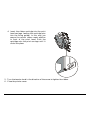
4. Insert the ribbon cartridge into the print
head carriage, leading the cartridge pins
into the fixing guides. In this way you
assure the correct ribbon mask position
in front of the print head. Push the
cartridge onto the print carriage until it
clicks into place.
5. Turn the tension knob in the direction of the arrow to tighten the ribbon.
6. Close the printer cover.
11
Paper Handling
This printer is designed for versatile and reliable paper handling. The flat-bed mechanism
allows the handling of special documents, such as multiple invoices, postcards, labels, passbooks
and tickets.
The print head detects the paper edges automatically, the sheet can therefore be inserted in any
position within the detection area according to the rules described in the following paragraph.
The paper thickness sensors determine the thickness of the documents and match the print head.
The paper alignment sensors determine the alignment of the upper and left paper margins,
adjusting them if necessary.
Loading Paper
Loading Cut Sheet and Multiparts
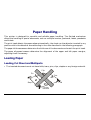
• The inserted documents must not have folds, tears, pins, clips, staples or any foreign material.
C lip
P in
Te a r
S ta p le
F old
F ore ig n
m ate ria l
12
If you insert damaged documents or paper with foreign material, you can seriously damage the
printer.
When inserting the paper into the printer, keep the following points in mind:
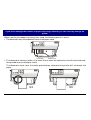
• The document may not exceed the limits of the paper stand.
R ight Lim it
Left Lim it
• The documents having a width of at least 90 mm must be inserted on the left hand side over
the grooved area on the paper stand.
The documents must cover the whole grooved area, otherwise the printer will not accept the
paper.
NO
OK
13
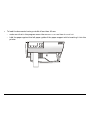
•
To load the documents having a width of less than 90 mm:
− make sure that in the program menu the MANUAL LOADING item is enabled.
− hold the paper against the left paper guide of the paper support while inserting it into the
printer
14
Loading Passbooks
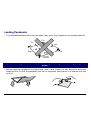
• The inserted passbooks must not have folds, tears, pins, clips, staples or any foreign material.
C lip
P in
Te a r
S ta p le
F old
F ore ig n
m ate ria l
If you insert damaged documents or paper with foreign material, you can seriously damage the
printer.
• Before inserting a passbook into the printer, open it and crease it in both directions along the
binding stitch, so that the passbook lays flat on the paper stand when it is inserted into the
printer.
15
•
•
•
The passbooks must be inserted on the left hand side over the grooved area on the paper
stand. They must cover the whole grooved area, otherwise the printer will not accept the
passbooks.
The passbooks with horizontal fold must
have a minimum width of 102 mm.
The passbooks with vertical fold must at
least cover the two passbook signs ( ) on
the paper stand.
16
•
The passbooks (both with horizontal and vertical fold) must not exceed the right passbook
margin on the paper stand (second line from the right).
R ight
P a ssboo k
M argin
17
The Operator Panel
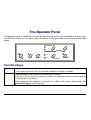
The operator panel is located on the front left side of the printer and is composed of function keys
and leds with which you can easily check the printer status and select the functions as described
below:
STATION1
STATION2
P1
LQ
P2
EJECT
PROGRAM
ON LINE
Function Keys
Turns the printer on or off.
To turn the printer off, this key must be pressed for at least 3 seconds.
LQ
Toggles between Letter Quality and Draft printing mode.
This key is active, when the printer is offline or when the printer is online and no
print data are in the buffer.
When pressed while powering the printer on, selects the printer setup mode. See
“Printer Setup” later in this manual.
18
EJECT
Ejects the inserted form.
This key is active, when the printer is offline or when the printer is online and no print
data are in the buffer.
When pressed while powering the printer on, the hexadecimal printing is selected.
When using an Olivetti protocol, this key is enabled only, when the printer is offline.
PROGRAM Selects one of the available configurations P1 and P2 if the PROGRAM LOCKED parameter
is not enabled.
This key is active, when the printer is offline or when the printer is online and no print
data are in the buffer.
When pressed while powering the printer on, selects the offset adjustment page. See
“Offset Adjustments” later in this manual.
ON LINE
Toggles the printer between online and offline status.
When pressed while powering the printer on, selects the Self Test printout. See
“Printing a Test Page” in this manual.
STATION1
STATION2
When using the IBM 4722, IBM 9068 and the Olivetti protocols in two operators
(“booking”) mode, the application software determines the function of these keys.
When using the other protocols, these keys are disabled.
19
Leds
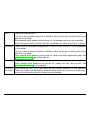
POWER
On, if the printer is powered on.
LQ
On, if the Letter Quality mode is selected.
P1, P2
Indicate the currently selected configuration both in normal printing mode and
during the Printer Setup procedure. See “Printer Setup” later in this section.
If the INTERFACE TYPE function is set to auto+blink, when line 1 (parallel
interface) is selected for data transmission, the P1 indicator blinks.
If the INTERFACE TYPE function is set to auto+blink, when line 2 (serial
interface) is selected for data transmission, the P2 indicator blinks.
In a fault condition P1 and P2 blink.
ON LINE
On, if the printer is online.
Off, if the printer is offline.
Blinks, when receiving printing data from host.
STATION1
STATION2
When using the IBM 4722, IBM 9068 and the Olivetti protocols in two
operators (“booking”) mode, the application software determines the behavior
of these leds. When using the other protocols, these leds are disabled.
In case of a printer fault during the initialization of the LQ, P1, P2 and ON LINE indicators blink
contemporaneously. Turn the printer off and on again. If the problem is not solved, call the
Customer Service.
20
Software Driver Selection
At this point it is necessary to configure your printer for your application package. The
installation procedures depend upon the host environment.
Together with the printer you receive a CD-ROM containing the printer drivers for the Windows
environment. This printer supports the Plug&Play facility in the Windows95/98/2000®
environment.
If you want to install the printer in the Windows environment, insert the CD-ROM and follow
the instructions given.
The printer drivers of all Compuprint printers can be found at the Internet Address
http://www.compuprint.net/drivers
21
Connection to the Host
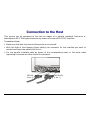
This printer can be connected to the host by means of a parallel standard Centronics or
bidirectional IEEE 1284 type interface or by means of the serial RS-232/C interface.
Proceed as follows:
1.
Make sure that both the host and the printer are turned off.
2.
With the help of the following figure identify the connector for the interface you want to
connect and insert the cable firmly into it.
3.
Fix the parallel interface cable by means of the corresponding hooks or the serial cable
tightening the screws on either side of the connector.
S E R IA L
(L in e 2)
PA R A LL E L
(L in e 1)
22
Setting the Interface Parameters
Parallel Interface
The parameters set for the parallel interface match most of the most common environments and
the printer can be used immediately after the connection to the host.
In case you need to modify the standard parameters see “Printer Setup” later in this section.
Serial Interface
Because of the great variety of the possible connection configurations, when you use the serial
interface you will need to set the parameters accordingly.
To assure a correct functioning of the printer connected through the serial interface, the
transmission parameters set for the printer must match the values set for the host. Check the
interface settings on the host and proceed as follows:
1. Press the LQ key while powering the printer on and keep it pressed until all leds turn briefly on.
The printer enters the Setup mode.
2. Insert a blank sheet in A4 or Letter format. The printer loads the sheet and stops. The P1 and
P2 leds are lit.
3. Press the PROGRAM key once. The P1 and P2 leds are unlit.
4. Press the LQ key. The printer prints the first configuration sheet.
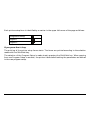
5. To change the values of the serial interface parameters, fill in the marker ( ) beside the value
you want to set with a black or blue ball-point pen or a fiber-pen.
Do not use pencils.
23
W ORD LENG TH
B A U D R AT E
PA R IT Y B IT
( )
( )
d is a b le d *
e n a b le d
( )
( )
d is a b le d *
e n a b le d
( )
( )
D TR
X O N /XO FF* X O N /X O F F + D T R
( )
If more than one value is set for a parameter, the printer ignores these parameters and maintains
the currently set value.
Do not fill in the marker beside the title of the preprinted form, otherwise the printer will not be
able to read that page.
6. Once the serial interface parameters have been signed, insert the sheet back into the printer.
7. The printer reads the selected values on the configuration sheet and sets them. The settings
are confirmed by a # symbol printed on the left of the corresponding marker.
The printer then returns to normal functioning mode.
For a complete description of the printer setup procedure see the paragraph “Printer Setup” later
in this manual.
24
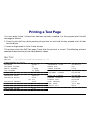
Printing a Test Page
It is now useful to test, if the printer has been correctly installed. For this purpose print the self
test page as follows.
1. Press the ON LINE key while powering the printer on and hold the key pressed until all leds
turn briefly on.
2. Insert a single sheet in A4 or Letter format.
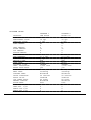
The printer prints the Self-Test page. Check that the printout is correct. The following printout
example shows also the printer setup default values.
SELF TEST
MDP40B : Code Version Vx.x
CONFIGURATION SETUP
PROGRAM
PROGRAM LOCKED
ERROR BUZZER
JOB BUZZER
SECURITY MODE
PASSBOOK TYPE
PASSBOOK WIDTH
PASSBOOK LENGTH
AUTO GAP OFFSET
GET EDGE QUOTE
xxxxxxxx CharGen:xxxxxxxx ver. x.xx
progr.1
no
1 beep
no beep
enabled
special
auto
mm 213
auto
mm 176
+0.000 mm
1/2”
INTERFACE TYPE
HONOR CTS
INPUT BUFFER
IGNORE PE
AUTOFEED SIGNAL
SLCT-IN SIGNAL
BUFFER CONTROL
ROBUST XON
WORD LENGTH
BAUD RATE
PARITY BIT
25
automatic
yes
8 Kb
enabled
disabled
disabled
XON/XOFF
enabled
8 bit
9600 bps
none
PROGRAM SETUP
PROTOCOL
FONT
HORIZONTAL PITCH
VERTICAL PITCH
FORM LENGTH
LEFT MARGIN
RIGHT MARGIN
TOP MARGIN
BOTTOM MARGIN
IBM C-SET
IBM COMPRESS
EPSON C-SET
NATION C-SET
CODE PAGE
OLIVETTI C-SET
VERT. RESOLUTION
RESET WITH EJECT
LINE MODE
WRAP MODE
SLASHED ZERO
PRINT DIRECTION
EJECT ON FF
CUT SHEET EJECT
MANUAL LOADING
ALIGN MODE
VERT.POS 1/10”
VERT.ADJ 1/60”
HORIZ.POS 1/10”
HORIZ.ADJ 1/60”
PROGRAM 1
IBM XL24E
Draft
10 lpi
6 lpi
A4
0
0
96
0
0
IBM set 1
17.1 cpi
graphic
USA
CP437
INTERN.
1/240 inch
yes
LF=LF, CR=CR
autowrap
disabled
sw control
enabled
on front
disabled
Fast
0
0
0
0
26
PROGRAM 2
EPSON 570
Draft
10 lpi
6 lpi
A4
0
0
96
0
0
IBM set 1
17.1 cpi
graphic
USA
CP437
INTERN.
1/240 inch
yes
LF=LF, CR=CR
autowrap
disabled
sw control
enabled
on front
disabled
fast
0
0
0
0
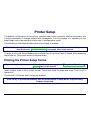
Printer Setup
The default configuration of this printer matches most of the commonly used environments, but
it may be necessary to change some printer parameters. For this purpose it is necessary to use
preprinted forms to be used with the printer in configuration mode.
The following is the complete description of the Setup Procedure.
The detailed description of the parameters that can be set on the various preprinted forms are
described in the “Setup Parameters” paragraph, later in this manual.
To enter the Printer Setup Mode press and hold the LQ key for at least 1 second while powering
the printer on. The printer enters the Setup Mode.
Printing the Printer Setup Forms
If you already have the preprinted forms for the printer setup, go to “Filling in the Printer Setup
Forms” later in this manual.
Insert a blank sheet in A4 or Letter format. The printer loads the sheet and stops. The P1 and P2
leds are lit.
The ON LINE, PROGRAM and LQ keys are enabled.
If the LQ key is pressed immediately after the printer enters in Setup Mode, all printer setup
modules are printed.
27
If you press the ON LINE key:
• the printer self-test is printed. See “Printing a Test Page” before in this manual. In this way it
is possible to check the current printer parameters.
• once the self-test is finished, the printer remains in Setup Mode.
If you press the PROGRAM key:
• the P1 and P2 leds change and you can select the Setup Page you want to print as follows:
P1
P2
P1
P2
P1
P2
P1
P2
All setup pages
Configuration page
Program 1 page
Program 2 page
= lit
= unlit
The printer setup forms contain all printer parameters and the values that can be set. The
current value is indicated by an asterisk (*).
For a detailed description of the parameters and the settings see “Setup Parameters” later in this
manual.
28
Each printer setup form is identified by a marker in the upper left corner of the page as follows:
Configuration Setup)
Program 1
Program 2
If you press the LQ key:
The printing of the printer setup forms starts. The forms are printed according to the selection
made with the PROGRAM key.
The selection of the Program Setup is made simply pressing the PROGRAM key. When passing
from one Program Setup to another, the printer resets before setting the parameters as defined
in the new program setup.
29
Filling in the Printer Setup Forms
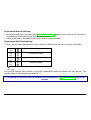
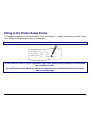
To change the values of the parameters, fill in the marker ( ) beside the value you want to set
with a black or blue ball-point pen or a fiber-pen.
Do not use pencils.
A U TO FE E D S IG N A L ( )
( )
d is a b le d *
S L C T -IN S IG N A L
B U FF E R C O N TR O L
en a b le d
( )
( )
d is a b le d *
en a b le d
( )
( )
D TR
XO N /XO FF* X O N /X O F F +
( )
If more than one value is set for a parameter, the printer ignores these parameters and maintains
the currently set value.
Do not fill in the marker beside the title of the preprinted form, otherwise the printer will not be
able to read that page.
30
Reading the Preprinted Forms
When the Printer Setup Forms have been filled in, insert them back into the printer. The printer
is able to recognize the Setup Forms by means of the markers on these pages. The printer reads
the values marked for the various parameters and configures the printer accordingly.
The settings are confirmed by a # symbol printed on the left of the corresponding marker.
31
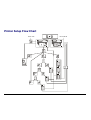
Printer Setup Flow Chart
N o rm al M ode
P rin ter O FF
LQ
P1
P2
PR O G R AM
O N L IN E
LQ
S elf Te st
P1
P2
PR O G R AM
LQ
P1
P2
PR O G R AM
LQ
P1
P2
PR O G R AM
LQ
32
!
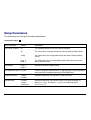
Setup Parameters
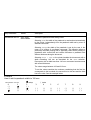
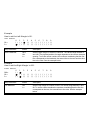
The following is a listing of the setup parameters.
Configuration Sheet
Setup Parameter
Values
Description
RESTORE TO MFG
no
The selected values are not set to factory defaults.
all
The values set in all printer setups are reset to factory default values.
config
The values set in the configuration setup are reset to factory default
values.
prog. 1,
prog. 2
The values set in the corresponding program setup are reset to the
factory default values.
progr. 1,
progr. 2
Defines the default Program Setup
PROGRAM
PROGRAM LOCKED no, yes
Locks the program setup selection. In case the lock is ‘yes' the program
setup cannot be changed pressing the PROGRAM key.
ERROR BUZZER
1 beep,
no beep
Selects the behavior of the buzzer in case of an error.
JOB BUZZER
no beep,
1 beep,
continuous
Selects the behavior of the buzzer when a new print job starts: no
signal (no beep), one beep (1 beep) or a continuous signal
(continuous).
33
Setup Parameter
Values
Description
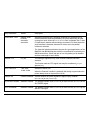
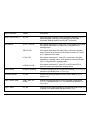
INTERFACE TYPE
parallel, serial,
financial,
automatic,
auto+blink
Selects the interface type. Selecting ‘automatic’ the interface type is
selected between serial and parallel by the printer depending on data
coming from host. When the auto+blink item is selected, the P1 and
P2 leds blink to indicate which interface is selected: P1 blinks when the
serial interface is selected, whereas P2 blinks, when the parallel
interface is selected.
The 'financial' interface should be selected for typical applications of the
IBM4722 and IBM 9068 protocol with the controlled link required by the
IBM financial driver. When this item is set, the parallel port is disabled
and the word length is set to 8 bits.
HONOR CTS
no, yes
This setting is significant only if the ‘financial’ interface has been
selected.
This function sets the CTS signal, that may be considered (yes) or
ignored (no).
INPUT BUFFER
IGNORE PE
1 Kb, 8 Kb,
16 Kb, 32 Kb
Selects the buffer size.
When the 'financial' interface is selected, this setting is ignored and the
printer always uses an input buffer of 2 Kb.
enabled, disabled Selects whether the printer signals the paper empty condition
(disabled) or not (enabled).
AUTOFEED SIGNAL disabled, enabled The parallel interface uses (enabled) or does not use (disabled) the
AUTOFEED signal.
SLCT-IN SIGNAL
disabled, enabled The parallel interface uses (enabled) or does not use (disabled) the
SELECT-IN signal.
34
Setup Parameter
Values
Description
BUFFER CONTROL
DTR, XON/XOFF, Selection of the buffer protocol. When the 'financial' interface is
XON/XOFF+DTR selected, this setting is ignored.
ROBUST XON
enabled, disabled Perform the Robust XON (enabled) or not (disabled).
WORD LENGTH
7 bit, 8 bit
Sets the number of the data bits.
When the 'financial' interface is selected, this value is always set to 8
bits.
BAUD RATE
600 - 38400 bps
Sets the data transfer rate.
PARITY BIT
even, odd, none
Selects the parity control for the data.
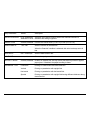
SECURITY MODE
enabled, disabled Enables or disables the security actions that assure protection against
paper jams. If disabled, the paper handling is faster.
PASSBOOK TYPE
Fixed thick
Printing on a document with fixed thickness.
Vertical
Printing on passbooks with upright fold.
Horizontal
Printing on passbooks with horizontal fold.
Special
Printing on passbooks with upright fold having different thickness along
the document.
35
Setup Parameter
Values
Description
PASSBOOK WIDTH
auto, setup,
auto>140mm
Selects the passbook width setting mode.
Selecting auto the width of the passbook is read and set automatically
by the printer, independently from the passbook width set by menu or
software command.
Selecting setup the width of the passbook is set by the user in the
menu or by means of a software command. This selection allows a
particularly accurate printing and is especially useful when printing on
passbooks with vertical fold and uniform thickness or passbook with
different thickness along the document.
Selecting auto > 140 mm the printer handles the documents with a
width exceeding 140 mm as described for the auto selection.
Documents with a width less than 140 mm are treated as documents
with a fixed thickness.
The values range between 102 and 213 mm.
To set the values combine the numbers considering that the first line
corresponds to the hundreds, the second line to the tens and the third
line to the units. See the example below.
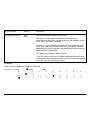
Example:
How to set the passbook width to 120 mm:
(
(
2
( )
(
(
PASSBOOK WIDTH
0
1
(
( )
( )
( )
(
( )
( )
setup
3
( )
( )
( ) auto
4
( )
( )
36
5
6
7
8
9
( )
( )
( )
( )
( )
( )
( )
( )
( )
( )
(
(
Setup Parameter
Values
Description
PASSBOOK LENGTH
auto
setup
Selects the passbook length setting mode.
Selecting auto the length of the passbook is read and set
automatically by the printer, independently from the passbook length
set by menu or software command.
Selecting setup the length of the passbook is set by the user in the
menu or by means of a software command. This selection allows a
particularly accurate printing and is especially useful when printing on
passbooks with horizontal fold.
The values range between 99 and 210 mm.
To set the values combine the numbers considering that the first line
corresponds to the hundreds, the second line to the tens and the third
line to the units. See the example below.
Example:
How to set the passbook length to 150 mm:
(
( )
( )
setup
2
( )
( )
( )
( ) auto
3
4
( )
( )
( )
( )
37
5
6
7
8
9
(
( )
( )
( )
( )
( )
( )
( )
( )
(
1
(
(
(
(
(
PASSBOOK LENGTH
0
( )
( )
( )
Setup Parameter
Values
Description
AUTO GAP OFFSET
-0,075 mm, -0.050 mm,
-0.025 mm, +0.000 mm,
+0.025 mm, +0.050 mm,
+0.075 mm, +0.100 mm
Sets the automatic gap offset to one of the given values.
GET EDGE QUOTE
0/2”, 1/2”, 2/2”, 3/2”, 4/2”, Sets the position in which the left paper edge is checked. If
5/2”, 6/2”, 7/2”
set to 0, the check is performed at the first line. The other
values correspond to the physical distance from the first
line.
PROGRAM 1
PROGRAM 2
Setup Parameter
Values
Description
PROTOCOL
EPSON 570, IBM X24E,
X24E AGM, IBM 2390,
OLI. PR40+, OLI. PR2,
OLI. PR2845, IBM 4722,
IBM 9068
Defines the printer protocol.
NOTE: For the IBM 4722 and 9068 protocols, if the
software driver uses the controlled link of the IBM financial
driver, set the INTERFACE TYPE item in the Configuration
Menu to financial.
FONT
Draft, Courier, OCR-B,
Gothic, Prestige, Present,
OCR-A, Script, Boldface
Selects the font.
HORIZONTAL PITCH
10 cpi, 12 cpi, 15 cpi,
16.6 cpi, 17.1 cpi, 20 cpi
Selects the character spacing in characters per inch (cpi).
VERTICAL PITCH
5 lpi, 6 lpi, 8 lpi
Selects the line spacing in lines per inch (lpi).
38
Setup Parameter
Values
Description
LOCK
no lock, font, hor. pitch,
font+hor.pitch
The following selections made via operator panel may be
locked: font, horizontal pitch (hor.pitch), or both the
font and horizontal pitch (font+hor. pitch). The locked
settings cannot be changed via software commands.
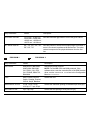
FORM LENGTH
# lines, A4, letter, A5, legal
Sets the page length in number of lines or standard
formats A4, Letter, A5 or Legal. If you select # lines,
you must indicate the number of lines you want to set in
the scheme below this selection. The values range
between 0 and 255. To set the values combine the
numbers considering that the first line corresponds to the
hundreds, the second line to the tens and the third line to
the units. See the example below.
Example:
How to set the form length to 82 lines:
( )
( )
( )
letter A5
legal
2
3
4
( )
( )
( )
( )
(
( )
( )
(
( )
#lines A4
0
1
( )
( )
( )
( )
( )
( )
5
6
7
8
9
( )
( )
( )
( )
( )
( )
(
( )
( )
(
(
(
FORM LENGTH
( )
Setup Parameter
Values
Description
LEFT MARGIN
10 x
1x
Sets the left margin in number of columns. The values range between 0
and 90. To set the values combine the numbers considering that the first
line corresponds to the tens, the second line to the units. See the example
below.
39
Example:
How to set the Left Margin to 20.
LEFT MARGIN
0
( )
(
(
1
( )
( )
2
(
(
10 x
1x
( )
3
( )
( )
4
( )
( )
5
( )
( )
6
( )
( )
7
( )
( )
8
( )
( )
9
( )
( )
Setup Parameter
Values
Description
RIGHT MARGIN
100 x
10 x
1x
Sets the right margin in number of columns. The values range between 0
and 190. The physical position of margin depends on the current character
spacing. To set the values combine the numbers considering that the first
line corresponds to the hundreds, the second line to the tens and the third
line to the units. See the example below:
Example:
How to set the Right Margin to 101.
1
(
( )
(
(
2
3
4
5
6
7
8
9
( )
( )
( )
( )
( )
( )
( )
( )
( )
( )
( )
( )
( )
( )
( )
( )
(
RIGHT MARGIN
0
100 x
( )
(
10 x
1x
( )
(
Setup Parameter
Values
Description
TOP MARGIN
10 x
1x
Sets the top margin in number of lines. The values range between 0 and
90. To set the values combine the numbers considering that the first line
corresponds to the tens, the second line to the units. See the example
below.
40
Example:
How to set the Top Margin to 15.
TOP MARGIN
(
( )
2
( )
( )
3
( )
( )
4
( )
( )
5
6
7
8
9
(
( )
( )
( )
( )
(
1
(
10 x
1x
0
( )
( )
Setup Parameter
Values
Description
BOTTOM MARGIN
10 x
1x
Sets the bottom margin in number of lines. The values range between 0
and 90. To set the values combine the numbers considering that the first
line corresponds to the tens, the second line to the units. See the example
below.
Example:
How to set the bottom margin to 34 lines:
2
( )
( )
3
(
( )
4
( )
(
(
1
( )
( )
(
BOTTOM MARGIN
0
10 x
( )
1x
( )
5
6
7
8
9
( )
( )
( )
( )
( )
Setup Parameter
Values
Description
IBM C-SET
IBM set 1, IBM set 2
Selects the IBM character set.
IBM COMPRESS
17.1 cpi, 20 cpi
Selects the pitch for the compressed mode printing
in IBM emulation.
EPSON C-SET
Italic, graphic
Selects italic or graphic Epson character set.
41
Setup Parameter
Values
Description
NATION C-SET
USA, FRANCE, GERMANY,
ENGLAND, DENMARK1, SWEDEN,
ITALY, SPAIN1, JAPAN, NORWAY,
DENMARK2, SPAIN2, LATIN A1
Selects the national character sets.
CODE PAGE
CP437, CP437G, 96GREEK, CP850,
Selects the code page for both the IBM and
CP851, CP852, CP853, CP855,
the EPSON emulations.
CP857, CP858, CP860, CP862,
CP863, CP864, CP865, CP866,
CP867, CP876, CP877, CP1098,
CP1250, CP1251, CP1252, GOST,
TASS, MAZOWIA, CP437SL, UKRAIN,
8859/1, 8859/2, 8859/3, 8859/4,
8859/5, 8859/6, 8859/7, 8859/8,
8859/9, 8859/15, ROMAN-8, ID 12,
ID 14, ID 17, SANYO, KU, PHILIP,
CP874
OLIVETTI C-SET
CODE PAGE*, INTERN., GERMANY,
PORTUGAL, SPAIN1, DEN/NORW,
FRANCE, ITALY, SWE/FIN, SWISS,
G. BRITAIN, USA ASCII, GREECE,
ISRAEL, SPAIN 2, JUGOSLAVIA,
TCV 370, CANADA, SDC, TURKEY,
CIBC, PC-DEN/NORW, PC-DEN OPE,
PC-210, PC-220, OLI-UNIX
Selects the character sets for the OLIVETTI
protocol.
1/216 inch, 1/240 inch
Sets the vertical character resolution. Setting
used for the OLIVETTI protocols.
VERT. RESOLUTION
42
Selecting CODE PAGE, it is possible to select
one of the above Code Pages to be used with
the Olivetti protocol.
Setup Parameter
Values
Description
RESET WITH EJECT
no, yes
When the printer receives a reset command, selecting yes it
ejects the paper, selecting no it performs only the reset
command. Setting used for the OLIVETTI protocols.
LINE MODE
LF=LF, CR=CR
If the printer receives a LF code (LF), it only performs a line feed.
If the printer receives a CR code (CR), it only performs a
carriage return.
CR=LF+CR
If the printer receives a CR code (CR), it performs a carriage
return followed by a line feed. If the printer receives a LF code
(LF), it performs a line feed.
LF=LF+CR
If the printer receives a LF code (LF), it performs a line feed
followed by a carriage return. If the printer receives a CR code
(CR), it only performs a carriage return.
LF&CR=LF+CR
If the printer receives a LF code (LF) or a CR code (CR), it
performs both a line feed and a carriage return.
WRAP MODE
truncate, autowrap
The data exceeding the line length are truncated (truncate) or
printed on the following line (autowrap).
SLASHED ZERO
no, yes
Selects the printing character for zero, with a slash (yes) or
without (no).
PRINT DIRECTION
unidir., bidir., sw
control
Selects the printing direction of the print head: unidirectional
(unidir.), bidirectional (bidir.) or selected via software (sw
control).
EJECT ON FF
no, yes
Performs a form feed according to the selected page format (no)
or ejects a cut sheet loaded into the printer (yes).
43
Setup Parameter
Values
Description
CUT SHEET EJECT
on front, on rear
Selects whether the cut sheet loaded into the printer is ejected
towards the front or the rear of the printer.
MANUAL LOADING
enabled, disabled
Selects the manual loading mode. Setting it to enabled the
printer loads any kind of document according to the described
procedures. Select disabled, when a more precise paper
alignment is necessary. With this selection it is not possible to
load documents with a width of less than 90 mm.
ALIGN MODE
fast, normal
Selects the paper alignment mode. Selecting fast the printer
performs less checks on the alignment, whereas, if you need a
particularly precise alignment of the documents, select normal.
Offset Adjustments
For a precise adjustment of the position of the printed characters on a preprinted form, this
printer allows to easily adjust the first line and the first printing column as follows:
1. Press the PROGRAM key while powering the printer on.
2. Insert a blank sheet into the printer.
The following sheet will be printed:
44
OFFSET TUNING SETUP
Vertical Position Offset (1/10 INCH)
PROGRAM 1
( )*
( )
( )
PROGRAM 2
( )*
( )
( )
0
+1
+2
Vertical Offset Tuning (1/60 INCH)
X
X
X
X
X
PROGRAM 1
PROGRAM 2
( )
( )
-6
( )
( )
-5
Horizontal Position Offset
PROGRAM 1 ( ) ( ) ( ) ( )
PROGRAM 2 ( ) ( ) ( ) ( )
-6 -5 -4 -3
( )
( )
-4
( )
( )
-3
( )
( )
-2
( )
( )
+3
( )
( )
+4
( )
( )
+5
( )
( )
+6
( )
( )
+7
( )
( )
+8
X
X
X
X
X
X
( )
( )
-1
( )*
( )*
0
( )
( )
+1
( )
( )
+2
( )
( )
+3
( )
( )
+4
(1/10 INCH)
( ) ( ) ( )* ( ) ( ) ( ) ( ) ( ) ( ) ( ) ( ) ( )
( ) ( ) ( )* ( ) ( ) ( ) ( ) ( ) ( ) ( ) ( ) ( )
-2 -1
0
+1 +2 +3 +4 +5 +6 +7 +8 +9
Horizontal Offset Tuning (1/60 INCH)
PROGRAM 1 PROGRAM 2
X
( )
( )
-6
X
( )
( )
-5
X
( )
( )
-4
X
( )
( )
-3
X
( )
( )
-2
X
( )
( )
-1
X
( ) *
( ) *
0
X
( )
( )
+1
X
( )
( )
+2
X
( )
( )
+3
X
( )
( )
+4
X
( )
( )
+5
X
( )
( )
+6
45
X
( )
( )
+5
( )
( )
+9
X
( )
( )
+6
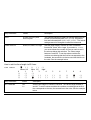
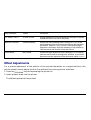
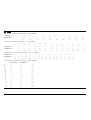
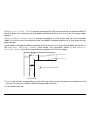
The Vertical Offset Tuning values correspond to 1/60 inches and set the vertical offset of
the first print line starting from the default standard position at 1 mm from the upper paper
margin.
The Horizontal Offset Tuning values correspond to 1/60 inches and set the horizontal
offset of the first print line starting from the default standard position at 3 mm from the left
paper margin.
If you need to change the default position of the first print line the vertical offset can be set in
the Vertical Position Offset lines and/or the horizontal offset in the Vertical
Position Offset lines. Both these values correspond to 1/10 inch values.
1 mm
X
X X
X X
Vertical O ffset Tun ing
V ERT. DEF. P OS
3 mm
X
X X
X X
HO RIZ
DE F.
P OS
X
X
X
X
X
Vertical O ffset Tun ing
= F IR S T P R IN T P O S IT IO N
X
X
X
X
X
Horizon tal O ffset Tun ing
3. Fill in the marker corresponding to the value you want to set and reinsert the sheet into the
printer. The printer reads the selected values and sets them.
4. Turn the printer off.
46
Troubleshooting
Clearing Paper Jams
The straight paper path of this printer is designed for trouble-free handling of a great variety of
documents.
In case a paper jam condition occurs, proceed as follows:
1. Open the printer cover.
2. Pull the lever on the right inner side of the printer towards the printer front side to open the
paper path and with the other hand hold pressed the paper path cover.
47
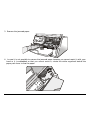
3. Remove the jammed paper.
4. In case it is not possible to remove the jammed paper because you cannot reach it with your
hand or it is embedded so that you cannot move it, rotate the white cog-wheel beside the
paper path lever to free the paper.
48
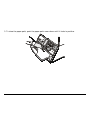
5. To close the paper path, push the paper path cover down until it locks in position.
49
Print Quality Problems
The following table is useful to identify and solve print quality problems.
Problem
Cause
Solution
Fading print
The ribbon is not fed
Check that the ribbon is correctly inserted (see
“ Installing the Ribbon Cartridge ”.
Turn the ribbon tension knob to verify, that the
ribbon is not blocked.
If the problem is not solved, change the ribbon
cartridge.
The ribbon is used up or torn
Paper damaged after
printing
Change the ribbon cartridge.
The paper does not correspond Verify that the paper corresponds to the
to the specifications given in
specifications and has been loaded according to
this manual or was not loaded the indications given.
according to the indications
given
Hexadecimal Dump
If you need to check the data transmission and want to print in hexadecimal mode, proceed as
follows:
1. Press the EJECT key until all leds briefly light up while powering the printer on.
2. The data sent to the printer are printed in three columns where the first column indicates the
number of the line, the second shows the hexadecimal values corresponding to the transferred
data and the third column shows the corresponding ASCII values.
3. To exit form the hexadecimal mode turn off the printer.
50
Paper Specifications
The documents must all guarantee the following characteristics:
• Use paper matching the indicated characteristics.
•
They must have well defined top and left edges, with a square angle tolerance of 0.1° on all
edges.
•
The paper must not have holes, perforations, folds or tears anywhere within the print area of
the document.
•
The radius on a corner of the form must be within 9.5 mm from the left or right edge.
•
The form to be printed must not contain foreign material.
•
Form opacity must be at least 75%. Forms with a lower opacity may cause feed errors.
•
Never print on documents with metallic or hard plastic fasteners or staples, they may damage
the printer. Use only sewn passbooks.
•
To get the maximum print contrast you should print on white or light colored paper. You may
overstrike to improve the low contrasting paper.
•
It is preferable to use single and multiple documents with the fibre running in the insertion
direction of the printing unit.
•
Recycled paper is permitted on principle.
•
It is preferable to print on multiple forms with a narrow glue strip or top-gluing. The gluing
must not cause waving in the set of forms.
51
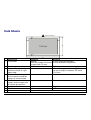
Cuts Sheets
Insertion direction
D
C
C
P rint A rea
B
E
A
B
C
D
E
Dimensions
Form width
Form length
Distance between dot
position and left or right
paper edge
Distance between top of the
first printed line and top
margin of the document
Distance between the lower
margin and the lower part
of the last printed line
Weight
Thickness
Copies
A
Maximum
240 mm
(226 mm if paper thickness
is more than 0,2 mm)
711.2 mm
-
Minimum
70 mm (manual alignment)
90 mm (automatic alignment)
-
68.6 mm
3.0 mm if length is less than 355.6 mm
8.0 mm if length is between 335.6 and
711.2 mm
1 mm
-
6.6 mm
0,6 mm
Original + 5 copies
60 g/m2
0,06 mm
52
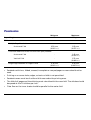
Passbooks
Minimum
Maximum
75
120 g/m2
0.28 mm
(0.011 in.)
1.80 mm
(0.071 in.)
Paper Weight
Thickness
Multiple Page Passbooks
Horizontal Fold
Thickness difference across the fold of an open passbook
Horizontal Fold
-
1.42 mm
(0.056 in.)
Vertical Fold
-
1.22 mm
(0.048 in.)
0.18 mm
(0.011 in.)
0.28 mm
(0.0071 in.)
Single Page Passbook or Ledger Cards
•
Passbooks with torn, folded, creased, incomplete or warped pages or covers should not be
used.
•
Printing on or across holes, edges, cut outs or folds is not permitted.
•
Passbook covers must be of uniform thickness under the printing area.
•
The fold of all pages and the stitching must coincide with the cover fold. The stitches should
be spaced at 6 to 10 stitches per inch.
•
Fiber flow on the inner sheets should be parallel to the center fold.
53
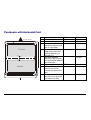
Passbooks with Horizontal Fold
A
B
C
Insertion direction
D
C
C
D
P rint A rea
A BC D
A BC D
G
H
P rint A rea
F
B
E
F
G
J
Dimension
Passbook width
Passbook length
Distance between print
character position and
left or right edge
Distance between top
edge of the document
and top edge of first
printed line
Distance between
bottom of last printed
line and bottom edge of
the document
Outer corner radius
Distance from fold to
bottom of the first
printed line above the
fold.
Distance from fold to
top of the first printed
line below the fold.
54
Maximum
213 mm
210 mm
-
Minimum
102 mm
127 mm
3.0 mm
-
6.6 mm
-
6.6 mm
9.35 mm
-
5.1 mm
-
5.1 mm
Passbooks with Vertical Fold
A
B
C
Insertion direc tion
D
H
A BC D
C
C
D
P rint A re a
A BC D
B E
A BC D
G H
F
G
L
F
E
K
H
A
K-L
Dimension
Passbook width
Passbook length
Distance for the dot
position nearest to the left
or right edge
Distance from the top
edge of the document to
the top edge of the first
printed line
Distance from the bottom
of the last printed line to
the bottom edge of the
document
Outer corner radius
Distance from the fold to
the first character
position beside the fold.
Distance from the fold to
the first character
position beside the fold.
Short Page Offset
55
Maximum
213 mm
210 mm
-
Minimum
127 mm
99 mm
3,0 mm
-
6,6 mm
-
6,6 mm
9,35 mm
-
5,1 mm
-
5,1 mm
-
0,0 mm
Technical Specifications
Printing Technology
Print head:
Resolution:
24 pin
360 x 360 dpi (HxV)
Line Length (@ 10 cpi)
94 columns (cut sheets)
Printing Speed
480/400 cps @ 12/10 cpi (Draft)
160/133 cps @ 12/10 cpi (LQ)
Emulation
IBM ® Personal Printer 2390+, Proprinter XL24E, Proprinter XL24AGM, IBM 4722, 9068, Epson 570 and
Olivetti PR40+, PR2, 2845
Resident Fonts
Draft, Courier, Gothic, Prestige, Presentor, Script, OCR-A, OCR-B, Boldface
Character Sets (IBM and Epson protocols)
PC standard set (CS1-CS2) - 13 National Epson sets - CP437 (USA) - CP437G (Greek) - CP850
(Multilanguage) – CP851 (Greek) - CP852 (Latin 2) - CP853 (Turkish) - CP855 (Russian) - CP857 (Turkish) CP 858 (Euro) - CP860 (Portuguese) - CP862 (Hebrew) - CP863 (French/Canadian) - CP864 (Arabic) CP865 (Norwegian) - CP866 (Cyrillic) - CP867 (Turkish) – CP874 (Thai) - CP876 (OCRA) - CP877 (OCRB) CP1250 (Central Europe) – CP1251 (Cyrillic) – CP1252 (Windows Latin1 Ansi) - Gost - Tass – Mazowia - ISO
8859/1/2/3/4/5/6/7/8/9/15 - 96GREEK- Ukrainian – ID 12 – ID 14 – ID 17 – CP1098 (Farsi Arabic) – Roman-8,
CP437 Slavic – Sanyo – Ku - Philip
Character Sets (OLIVETTI protocols)
CS000 – CS010 International, CS020 Germany, CS030 Portugal, CS040 Spain1, CS050 Denmark/Norway,
CS060 France, CS070 Italy, CS080 Sweden/Finland, CS090 Switzerland, CS100 Great Britain, CS110 USA
ASCII, CS140 Greece, CS150 Israel, CS170 Spain 2, CS200 Jugoslavia, CS410 Olivetti TCV 370, CS510
SDC, CS520 Turkey, CS540 CIBC, CS680 OLI-UNIX, CS701 PC-220 Spain2, CS711 PC-Denmark/Norway,
CS712 PC-Denmark OPE, CS771 PC-210 Greek
56
Barcodes
UPC/A, UPC/E, EAN8, EAN13, Code 39, Code 128, Postnet, Codabar, ADD-ON 2, ADD-ON 5, Code 11,
Code 93, BCD, MSI, 2/5 Interleaved, 2/5 Matrix, 2/5 Industrial
Interfaces
Parallel IEEE 1284 bidirectional,
Serial RS-232/C
Automatic Interface Switching
Memory
32 Kbytes buffer
Special Functions
Automatic Gap Adjustment (AGA)
Auto Alignment
Auto Border Recognition
Ribbon Life
4 million characters (black)
Reliability
MTBF: 10,000 hours
Print Head Life
400 million characters
Physical Dimensions & Weight
390 (W) x 210 (H) x 320 (D) mm
14 Kg
Power Supply
Tension:
Frequency :
Power consumption:
110V and 220V
60 Hz and 50 Hz
120 W max. (printing), 10 W (standby)
57
Environmental conditions
Temperature:
working 5/40 °C, stock -25/60 °C
Humidity:
working from 20 to 85% (r.h.),
stock from 10% to 90% (r.h.) (without condensation)
Standard
EN 60950, IEC 950
Environment
Energy star compliant
Noise Level
54dbA
58
FCC Notes
This equipment has been tested and found to comply with the limits for a Class B digital device, pursuant to Part 15 of the FCC Rules.
These limits are designed to provide reasonable protection against harmful interference when the equipment is operated in a
commercial environment. This equipment generates, uses and can radiate radio frequency energy and, if not installed and used in
accordance with the instruction manual, may cause harmful interference to radio communications. However, there is no guarantee that
interference will not occur in a particular installation. If this equipment does cause harmful interference to radio or television reception,
which can be determined by turning the equipment off and on, the user is encouraged to try to correct the interference by one or more of
the following measures:
•
•
•
•
Reorient or relocate the receiving antenna.
Increase the separation between the equipment and the receiver.
Connect the equipment into an outlet on a circuit different from that to which the receiver is connected
Consult the dealer or an experienced radio/TV technician for help.
A shielded Centronics IEEE1284 compliant bi-directional parallel cable, maximum length 3 meters (10 feet), and a shielded RS-232
serial cable, maximum length 15 meters (50 feet), are necessary for this device to meet the requirements of a Class B digital device
pursuant to part 15 of the FCC rules.
The above specified cables are readily available as Personal Computer or Peripheral accessories from multiple retail outlets.
Please consult your dealer for details concerning such cables and also for information about FCC rules for digital devices.
Changes or modifications to the device covered by this manual, which are not expressly approved by the party responsible for
compliance, could void the user’s authority under the FCC rules to operate the equipment.
Canadian D.O.C. Radio Interference Regulation
This digital apparatus complies with the Canadian ICES-003 Class B limits for radio frequency emissions.
Cet appareil numérique est conforme aux limites de Classe B de la norme NMB-003 du Canada.
EEC Regulations
This equipment conforms to the EEC Directive 89/392 (the sound pressure, measured according to ISO 7779, does not exceed 70
dBA).
59