1
INSTALLATION GUIDE
VERSION 1.00
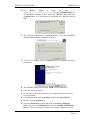
On the next opened window screen select the Diagnosis tab, to test the
modem, if it works properly , just click the Query modem button. If
the modem response then the modem is ready for use. Click OK
buttons to close the opened windows. Now you have to install the
WellPhone software, which is also included into the delivered CDROM.
Note: Engineering samples of the SAMBA55-SET include limited
version of the “WellPhone” configuration software with a
licence key that is valid for 3 months after installation.
Unlimited version of the “WellPhone” application software is
available for all production units. Please contact your local
FALCOM supplier for further details.
0.1.3
Install the configuration software:
The Samba “WellPhone” is a software that enables you to make Internet
connections. It is available in two different forms with similar functions.
Please refer to the corresponding user manual. During the installation of the
SAMBA software, please follow the on-screen instructions.
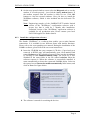
Insert the CD-ROM into your computer’s CD drive, if previously was
removed. A HTML page will automatically open, click attached link
named Software on the left side of appeared site, start the installation
by clicking on link SambaWellPhone setup. The serial key is also
included in the same folder in the file named serial.txt when the
software requests it. When the software is successfully installed, it
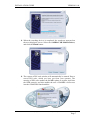
starts automatically to detect the connected SAMBA phone. Select on
the opened screen Detect the mobile automatically radio button, and
click on Next. See figure below.
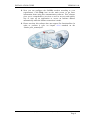
The software is started for searching the devices.
This confidential document is the property of FALCOM GmbH and may not be copied or circulated without permission.
Page 6