1
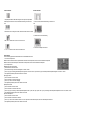
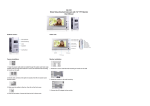
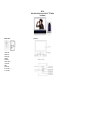
Camera installation:
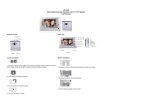
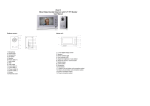
Monitor installation:
1. Keep the power cable and lock cable through the water cycle hole, keep suitable
cable enough then fixed the 4 screw, the install the wall mounting of monitor on the
wall.
1. Fixed the 4 screw, install the wall mounting of monitor on the
wall
2. Electric lock connect at the right end socket, the left end socket used connect indoor.
2. Install the monitor on the wall mounting
3. Make sure the cables is fixed on, then fix on the front cover.
3. Connect the DC adapter to the monitor
4. Fixed on the bottom 2 screw the fixed on the 2 silicone mat.
Basic Operation
Note: The following operation must meet situation which no abnormalities and normal
1)How to turn to sleep model?
◆ When outdoor unit call the indoor unit, press“talk button” two times into the sleep model, or after 15 seconds automatic into sleep mode
◆ When indoor unit in video model press “monitor button” into sleep model, or after 3 minutes automatic into sleep mode
2) How to adjust menu ?
◆ Brightness,contrast, chroma adjust
① Press“menu button” into menu model
② Press“menu button”again, and choice the“brightness” “contrast” “chroma”
③ Press “up” by way of increasing parameter adjustment; “brightness” “contrast” “chroma”; or press“down” by way to decrease parameter adjustment“brightness” “contrast” or “chroma”
④ After adjust the parameter, press the“menu button” into next item
◆ Language choose
① Press “menu button” into menu model
② Press “menu button” to choice the “language”
③ Press “up” or “down” to choose the language
④ After adjust the parameter, press the “menu button” into next item
◆ Adjust date and time
① Press “menu button” into menu model
② Press “menu button” to choose the“date” “time”
③ Press “up” by way of increasing or decrease parameter adjustment “date” of year, month, day, or press “down” by way of increasing or decrease parameter adjustment “time” of hour, minute, second
④ After adjust the parameter, press the “menu button” into next item
◆ How to delete pictures ?
① Press “menu button” into menu model
② Press “menu button” select menu of “delete all”
③ Press “up” or “down” choose “delete all” column of “Yes”, then press “menu” button delete the photos; don't want delete the picture choose “No”
④ After adjust the parameter, press the “menu button” into next item
◆ How to preview picture ?
① Press “menu button”into menu model
② Press “menu button” select menu of “preview”
③ Press “up” or “down” to sure preview picture; if don't want preview picture, no need press “up” or “down” ; press“menu button”exit
◆ How to exit menu ?
① Select menu in any field (no adjusted), press “exit menu” exit
② When adjust menu parameters (except “date” “time” and “delete all” ), can directly press “exit key” exit