1
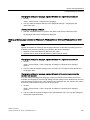
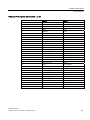
SIMATIC IPC847C
SIMATIC
Industrial PC
SIMATIC IPC847C
Operating Instructions
06/2011
A5E02669184-03
1
___________________
Introduction
2
___________________
Safety notes
3
___________________
Description
4
___________________
Application planning
5
___________________
Installing/Mounting
6
___________________
Connecting
7
___________________
Commissioning
Integration into an
8
___________________
automation system
9
___________________
Functions
Expansions and parameter
10
___________________
assignment
11
___________________
Service and maintenance
Alarm, error, and system
12
___________________
messages
13
___________________
Troubleshooting/FAQs
14
___________________
Technical data
15
___________________
Dimension drawings
16
___________________
Detailed descriptions
A
___________________
Appendix
B
___________________
ESD directive
C
___________________
List of abbreviations
Legal information
Legal information
Warning notice system
This manual contains notices you have to observe in order to ensure your personal safety, as well as to prevent
damage to property. The notices referring to your personal safety are highlighted in the manual by a safety alert
symbol, notices referring only to property damage have no safety alert symbol. These notices shown below are
graded according to the degree of danger.
DANGER
indicates that death or severe personal injury will result if proper precautions are not taken.
WARNING
indicates that death or severe personal injury may result if proper precautions are not taken.
CAUTION
with a safety alert symbol, indicates that minor personal injury can result if proper precautions are not taken.
CAUTION
without a safety alert symbol, indicates that property damage can result if proper precautions are not taken.
NOTICE
indicates that an unintended result or situation can occur if the relevant information is not taken into account.
If more than one degree of danger is present, the warning notice representing the highest degree of danger will
be used. A notice warning of injury to persons with a safety alert symbol may also include a warning relating to
property damage.
Qualified Personnel
The product/system described in this documentation may be operated only by personnel qualified for the specific
task in accordance with the relevant documentation, in particular its warning notices and safety instructions.
Qualified personnel are those who, based on their training and experience, are capable of identifying risks and
avoiding potential hazards when working with these products/systems.
Proper use of Siemens products
Note the following:
WARNING
Siemens products may only be used for the applications described in the catalog and in the relevant technical
documentation. If products and components from other manufacturers are used, these must be recommended
or approved by Siemens. Proper transport, storage, installation, assembly, commissioning, operation and
maintenance are required to ensure that the products operate safely and without any problems. The permissible
ambient conditions must be complied with. The information in the relevant documentation must be observed.
Trademarks
All names identified by ® are registered trademarks of Siemens AG. The remaining trademarks in this publication
may be trademarks whose use by third parties for their own purposes could violate the rights of the owner.
Disclaimer of Liability
We have reviewed the contents of this publication to ensure consistency with the hardware and software
described. Since variance cannot be precluded entirely, we cannot guarantee full consistency. However, the
information in this publication is reviewed regularly and any necessary corrections are included in subsequent
editions.
Siemens AG
Industry Sector
Postfach 48 48
90026 NÜRNBERG
GERMANY
A5E02669184-03
Ⓟ 07/2011
Copyright © Siemens AG 2011.
Technical data subject to change
Table of contents
1
Introduction................................................................................................................................................ 9
1.1
Preface...........................................................................................................................................9
1.2
Guideline to the operating instructions ........................................................................................10
2
Safety notes............................................................................................................................................. 11
3
Description............................................................................................................................................... 13
4
5
3.1
Overview ......................................................................................................................................13
3.2
Areas of application .....................................................................................................................13
3.3
Highlights .....................................................................................................................................14
3.4
Function .......................................................................................................................................15
3.5
Features .......................................................................................................................................15
3.6
3.6.1
3.6.2
3.6.3
3.6.4
Installation ....................................................................................................................................20
External structure.........................................................................................................................20
Operator Controls ........................................................................................................................21
Connecting elements ...................................................................................................................23
Status displays .............................................................................................................................26
Application planning................................................................................................................................. 29
4.1
Transport......................................................................................................................................29
4.2
Unpacking and checking the delivery unit ...................................................................................29
4.3
Ambient and environmental conditions........................................................................................31
4.4
Access protection.........................................................................................................................32
Installing/Mounting................................................................................................................................... 33
5.1
6
7
Installing the device .....................................................................................................................33
Connecting .............................................................................................................................................. 35
6.1
Connecting peripherals ................................................................................................................35
6.2
Connecting the power supply.......................................................................................................36
6.3
Equipotential bonding ..................................................................................................................39
6.4
Strain relief for network cables.....................................................................................................39
Commissioning ........................................................................................................................................ 41
7.1
Requirements for commissioning.................................................................................................41
7.2
Initial commissioning....................................................................................................................41
7.3
Windows Security Center.............................................................................................................42
7.4
7.4.1
Notes on operation.......................................................................................................................43
Opening the front door .................................................................................................................43
SIMATIC IPC847C
Operating Instructions, 06/2011, A5E02669184-03
3
Table of contents
7.4.2
7.4.3
7.4.4
7.4.5
7.4.6
7.4.7
8
9
10
11
DVD burner (optional) ................................................................................................................. 43
Removable hard disks................................................................................................................. 44
2HDD system (optional) .............................................................................................................. 46
RAID systems ............................................................................................................................. 46
Integrated SATA RAID system ................................................................................................... 47
Hardware SAS RAID system ...................................................................................................... 53
Integration into an automation system ..................................................................................................... 59
8.1
Integration ................................................................................................................................... 59
8.2
PROFINET .................................................................................................................................. 60
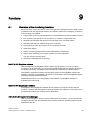
Functions ................................................................................................................................................. 63
9.1
Overview of the monitoring functions.......................................................................................... 63
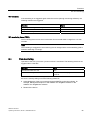
9.2
Temperature monitoring and temperature display...................................................................... 64
9.3
Watchdog (WD)........................................................................................................................... 64
9.4
Fan monitoring ............................................................................................................................ 65
9.5
RAID monitoring.......................................................................................................................... 66
9.6
Battery monitoring ....................................................................................................................... 66
9.7
Status of the redundant power supply ........................................................................................ 66
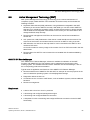
9.8
Active Management Technology (AMT)...................................................................................... 67
Expansions and parameter assignment................................................................................................... 69
10.1
Open the device. ......................................................................................................................... 69
10.2
10.2.1
Memory expansion...................................................................................................................... 71
Installing memory modules ......................................................................................................... 71
10.3
10.3.1
10.3.2
10.3.3
Installing expansion cards........................................................................................................... 73
Notes on the modules ................................................................................................................. 73
Installing an expansion module................................................................................................... 73
Installing the RAID card .............................................................................................................. 74
10.4
10.4.1
10.4.2
10.4.3
10.4.4
Installing drives ........................................................................................................................... 78
Options of installing disk drives................................................................................................... 78
Installing and removing disk drives in the front drive bay ........................................................... 79
Installing and removing drives in the front drive bay................................................................... 81
Installing / removing hard disk drives in the fixed hard disk rack................................................ 83
Service and maintenance ........................................................................................................................ 85
11.1
11.1.1
11.1.2
11.1.3
11.1.4
11.1.5
11.1.6
11.1.7
11.1.8
11.1.9
11.1.10
Removing and installing hardware components ......................................................................... 85
Repairs ........................................................................................................................................ 85
Preventive maintenance.............................................................................................................. 86
Replacing filters........................................................................................................................... 86
Removing the device / drive cooling fan ..................................................................................... 87
Replacing the backup battery ..................................................................................................... 90
Removing the AC power supply.................................................................................................. 92
Removing the redundant AC power supply ................................................................................ 92
Replacing the redundant power supply completely .................................................................... 93
Removing the bus board ............................................................................................................. 94
Removing the OP........................................................................................................................ 95
SIMATIC IPC847C
4
Operating Instructions, 06/2011, A5E02669184-03
Table of contents
11.1.11 Removing the motherboard .........................................................................................................96
11.1.12 Processor replacement ................................................................................................................98
12
13
14
15
16
11.2
11.2.1
11.2.2
11.2.3
11.2.3.1
11.2.3.2
11.2.4
11.2.5
11.2.6
11.2.7
11.2.8
11.2.8.1
11.2.8.2
11.2.9
11.2.9.1
11.2.9.2
11.2.9.3
11.2.10
Reinstalling the software..............................................................................................................98
General installation procedure .....................................................................................................98
Restoring the delivery state .........................................................................................................98
Installing Windows .....................................................................................................................100
Installing Windows XP ...............................................................................................................100
Installation of Windows 7, Windows Server 2008 or Windows Server 2008 R2 .......................102
Setting up the language selection by means of the Multilanguage User Interface (MUI)..........102
Installing drivers and software ...................................................................................................104
Installing the Intel RAID controller software...............................................................................104
Installing the optional burner or DVD software ..........................................................................105
Update installation .....................................................................................................................105
Updating the operating system ..................................................................................................105
Installing or updating application programs and drivers ............................................................105
Data backup / subsequent modification of partitions .................................................................106
Hardware supported ..................................................................................................................106
Creating an image......................................................................................................................106
Modifying the partitions ..............................................................................................................106
CP 1616 onboard.......................................................................................................................106
11.3
BIOS update...............................................................................................................................107
11.4
BIOS Recovery ..........................................................................................................................107
Alarm, error, and system messages ...................................................................................................... 109
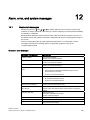
12.1
Boot error messages..................................................................................................................109
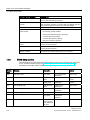
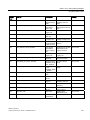
12.2
BIOS beep codes.......................................................................................................................110
Troubleshooting/FAQs........................................................................................................................... 117
13.1
General troubleshooting.............................................................................................................117
13.2
Troubleshooting RAID................................................................................................................119
13.3
Notes on the use of third-party modules....................................................................................120
Technical data ....................................................................................................................................... 121
14.1
General specifications................................................................................................................121
14.2
Power requirements of components (maximum values) ...........................................................127
14.3
AC power supply........................................................................................................................128
14.4
AC power supply, redundant......................................................................................................129
14.5
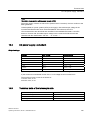
Technical data of the telescopic rails.........................................................................................129
Dimension drawings .............................................................................................................................. 131
15.1
Dimensional drawing of the device ............................................................................................131
15.2
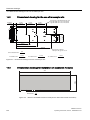
Dimensional drawing for the use of telescopic rails...................................................................132
15.3
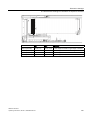
Dimensional drawings for installation of expansion modules ....................................................132
Detailed descriptions ............................................................................................................................. 135
16.1
Motherboard...............................................................................................................................135
SIMATIC IPC847C
Operating Instructions, 06/2011, A5E02669184-03
5
Table of contents
16.1.1
16.1.2
16.1.3
16.1.4
16.1.5
Structure and functions of the motherboard.............................................................................. 135
Technical features of the motherboard ..................................................................................... 136
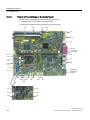
Position of the interfaces on the motherboard .......................................................................... 138
External interfaces .................................................................................................................... 139
Internal ports ............................................................................................................................. 147
16.2
16.2.1
16.2.2
Displays and operator panel ..................................................................................................... 154
Operating panel - Layout and function...................................................................................... 154
Pin assignment of the OP connectors....................................................................................... 154
16.3
16.3.1
16.3.2
16.3.3
16.3.4
Bus board .................................................................................................................................. 155
Bus board - Layout and principle of operation .......................................................................... 155
Pin assignment of the bus board connectors............................................................................ 157
Interrupt assignment of the slot connectors on the bus board.................................................. 162
Exclusive PCI hardware interrupt.............................................................................................. 163
16.4
16.4.1
16.4.2
16.4.2.1
16.4.2.2
16.4.2.3
System resources ..................................................................................................................... 164
Currently allocated system resources....................................................................................... 164
System resources used by the BIOS/DOS ............................................................................... 165
I/O address allocation ............................................................................................................... 165
Interrupt assignments................................................................................................................ 167
Memory address assignments .................................................................................................. 168
16.5
16.5.1
16.5.2
16.5.3
16.5.4
16.5.5
16.5.6
16.5.7
16.5.8
16.5.9
16.5.10
16.5.11
16.5.12
BIOS Setup ............................................................................................................................... 169
Overview ................................................................................................................................... 169
Starting BIOS Setup.................................................................................................................. 169
BIOS Setup menus ................................................................................................................... 170
Main menu................................................................................................................................. 171
Advanced menu ........................................................................................................................ 173
"Advanced, Active Management Technology Support" menu .................................................. 180
Security menu ........................................................................................................................... 184
"Power" menu............................................................................................................................ 185
Boot Menu ................................................................................................................................. 186
Version Menu ............................................................................................................................ 189
Exit menu .................................................................................................................................. 190
BIOS Setup default settings ...................................................................................................... 191
16.6
16.6.1
16.6.2
16.6.3
16.6.4
16.6.5
16.6.6
Active Management Technology (AMT).................................................................................... 195
AMT basics................................................................................................................................ 195
Enabling AMT, basic configuration ........................................................................................... 197
Advanced settings..................................................................................................................... 198
Resetting with Un-configure ...................................................................................................... 198
Determining the network address ............................................................................................. 199
Forcing user consent................................................................................................................. 199
16.7
16.7.1
16.7.1.1
16.7.1.2
16.7.2
16.7.2.1
16.7.3
CP 1616 onboard communications processor .......................................................................... 199
Introduction ............................................................................................................................... 199
Network connections................................................................................................................. 200
Typical Communication Partners .............................................................................................. 200
Firmware Loader ....................................................................................................................... 201
Loading firmware....................................................................................................................... 203
Further actions in STEP 7/NCM PC.......................................................................................... 204
SIMATIC IPC847C
6
Operating Instructions, 06/2011, A5E02669184-03
Table of contents
A
Appendix................................................................................................................................................ 205
A.1
Guidelines and declarations.......................................................................................................205
A.2
Certificates and Approvals .........................................................................................................206
A.3
Service and support ...................................................................................................................207
A.4
Retrofitting instructions ..............................................................................................................208
B
ESD directive......................................................................................................................................... 211
C
List of abbreviations............................................................................................................................... 213
Glossary ................................................................................................................................................ 219
Index...................................................................................................................................................... 231
SIMATIC IPC847C
Operating Instructions, 06/2011, A5E02669184-03
7
Table of contents
SIMATIC IPC847C
8
Operating Instructions, 06/2011, A5E02669184-03
1
Introduction
1.1
Preface
Purpose of this documentation
These operating instructions contain all the information you need for commissioning and
operation of the SIMATIC IPC847C.
These operating instructions are aimed at both programming and testing personnel who
commission the device and connect it with other units (automation systems, programming
devices), as well as for service and maintenance personnel who install add-ons or carry out
fault/error analyses.
Scope of this documentation
This documentation is valid for all supplied versions of the SIMATIC IPC847C.
Position in the information landscape
These operating instructions are available on the "Documentation and Drivers" CD included
with your product.
For supplementary instructions on how to handle the software, please refer to the
corresponding manuals.
Conventions
The term "rack PC" or "device" is sometimes used to refer to the SIMATIC IPC847C product
in this documentation. The abbreviation "CP" stands for CP 1616 onboard.
History
The following releases of the operating instructions have previously been published:
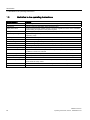
Edition
Comment
05/2010
First Edition
11/2010
Second edition changes: BIOS setup, AMT, technical data
06/2011
Third edition changes: 64-bit operating systems, SAS Hardware RAID Controller,
redundant power supply with monitoring, BIOS setup, technical specifications
SIMATIC IPC847C
Operating Instructions, 06/2011, A5E02669184-03
9
Introduction
1.2 Guideline to the operating instructions
1.2
Guideline to the operating instructions
Content structure
Contents
Table of contents
Detailed organization of the documentation, including the index of pages and chapters
Introduction
Purpose, layout and description of the important topics.
Safety instructions
Covers all general safety-related aspects of statutory regulations in terms of the installation,
commissioning and operation of the product/system.
Description
Fields of application, features and installation of the product/system
Application planning
Aspects of storage, transport, environmental and EMC conditions to be considered in the
preparatory stage
Installing
Product installation options and installation instructions
Connecting
Options of connecting the product and wiring instructions
Commissioning
Commissioning the product/system.
Integration
Options of integrating the product into existing or planned system environments/networks.
Functions
Monitoring and display functions
Expansions / Programming
Installation of expansion devices (memory, modules, drives)
Maintenance and service
Replacement of hardware components, restoring and setup of the operating system,
installation of drivers and software
Troubleshooting
Problems, cause, remedy
Technical specifications
General specifications in compliance with relevant standards and current/voltage values
Dimensional drawings
Dimensions of the device and of modules
Detailed descriptions
Structure, function and features of vital components, distribution of system resources and
use of the BIOS Setup routine
Appendix
Guidelines and certifications, service and support, notes on retrofitting
ESD directives
General ESD directives.
SIMATIC IPC847C
10
Operating Instructions, 06/2011, A5E02669184-03
2
Safety notes
WARNING
Please observe the safety instructions on the back of the cover sheet of this
documentation. You should not expand your device unless you have read the relevant
safety instructions.
This device is compliant with relevant safety directives to IEC, VDE, EN and UL. If you have
questions about the validity of the installation in the planned environment, please contact
your service representative.
Opening the device/repairs
Only qualified personnel are permitted to repair the device.
WARNING
Unauthorized opening and improper repairs can cause considerable damage to property or
danger for the user.
System expansions
Only install system expansion devices designed for this device. Installation of other
expansions may damage the system or violate safety requirements and RF interference
suppression regulations. Contact your technical support team or where you purchased your
PC to find out which system expansion devices may safely be installed.
CAUTION
If you install or exchange system expansions and damage your device, the warranty
becomes void.
SIMATIC IPC847C
Operating Instructions, 06/2011, A5E02669184-03
11
Safety notes
Battery
This device is equipped with a Lithium battery. Batteries may only be replaced by qualified
personnel.
CAUTION
There is the risk of an explosion if the battery is not replaced as directed. Replace only with
the same type or with an equivalent type recommended by the manufacturer. Dispose of
used batteries in accordance with local regulations.
WARNING
Risk of explosion and release of harmful substances!
Therefore, do not throw Lithium batteries into an open fire, do not solder or open the cell
body, do not short-circuit or reverse polarity, do not heat up above 100° C, dispose of in
accordance with regulations and protect against direct exposure to sunlight, moisture and
condensation.
ESD directives
Electrostatic-sensitive devices (ESDs) can be identified by an appropriate label.
Strictly follow the guidelines mentioned below when handling modules which are sensitive to
ESD:
● Always discharge your body´s static electricity before handling modules that are sensitive
to ESD (for example, by touching a grounded object).
● All devices and tools must be free of static charge.
● Always pull the mains connector and disconnect the battery before you install or remove
modules which are sensitive to ESD.
● Handle modules fitted with ESDs by their edges only.
● Do not touch any wiring posts or conductors on modules containing ESDs.
SIMATIC IPC847C
12
Operating Instructions, 06/2011, A5E02669184-03
3
Description
3.1
Overview
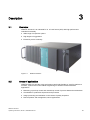
SIMATIC IPC847C is an industrial PC in 19" rack format (4HU) with high-performance
industrial functionality.
● Wide range of expansion options
● High degree of ruggedness
● Extensive product continuity
Figure 3-1
3.2
SIMATIC IPC847C
Areas of application
SIMATIC Rack PCs provide a high-performance and highly flexible 19" rack PC platform to
machine, systems and control cabinet engineering for machine-oriented industrial
applications:
● Measuring, open-loop control and closed-loop control of process data and machine data
● Visualization of production sequences and processes
● Image processing and evaluation in the context of quality inspection
● Data acquisition and management, server applications
SIMATIC IPC847C
Operating Instructions, 06/2011, A5E02669184-03
13
Description
3.3 Highlights
The SIMATIC IPC847C is certified to CE for use in the following fields:
● Industry
● Domestic
● Business and commercial use
The device can therefore not only be used in industrial applications but also in building
automation or in public facilities.
3.3
Highlights
Highly compatible to industrial standards:
● High operational vibration and shock resistance
● Wide operational temperature range
● High service friendliness
● Distinct diagnostic features
High-performance industrial functionality:
● Integrated PROFIBUS DP / MPI interface (optional)
● Integrated PROFINET interface CP 1616 onboard (optional)
● PCI-, PCIe x1-, PCIe x16 slots
PEG graphics and onboard graphics can be used simultaneously
● High flexibility and expansibility of components
High investment security:
● High continuity of the components/design
● Guaranteed spare parts availability for at least 5 years
High system availability:
● SIMATIC IPC DiagMonitor – PC diagnostics/message software by way of
OPC/SNMP/LAN
● SIMATIC IPC/PG Image Creator – data imaging software
● RAID based on SAS hard disks through intelligent expansion module
● RAID based on SATA hard disks on-board
● RAID1 – redundant data storage on two hard drives, also "hot swap" in connection with
removable racks
● RAID5 – striping with parity on three hard disks, "hot swap" in connection with removable
racks
● Optional ECC memory module
● Redundant power supply with status message
SIMATIC IPC847C
14
Operating Instructions, 06/2011, A5E02669184-03
Description
3.4 Function
3.4
Function
● Integrated programmable monitoring functions (program execution (watchdog), internal
housing temperature, fan speed)
● Enhanced diagnostic/messaging by way of Ethernet, e-mail, SMS, and for direct input in
SIMATIC software by way of OPC (optional using SIMATIC IPC DiagMonitor V4.2 or
higher):
– Operating hours counter
– Hard disk status
– System status (heartbeat)
– Automatic logging of all messages to a log file
– Option of remote monitoring of networked SIMATIC IPCs
● RAID1 (mirroring):
For automatic data mirroring on two hard disks
● RAID5 (striping with parity):
For increased memory capacity and improved data security on three hard disks
3.5
Features
General features
Design
Enclosure
Drive bays
19” rack, 4 HU
Rugged panel-mount housing, all metal
Prepared for mounting telescopic rails
Horizontal and vertical mounting position is possible
Tower installation by means of Tower Kit
Lockable front cover as access protection
Dust protection by means of overpressure ventilation using
bearing seated front fan through filter
Enclosure cover fastened with a single screw
Front fan can be exchanged without tools
Card retainer for reliable operation of PC modules under
vibration and shock conditions
Front: 3 x 5.25" or
1 x 5.25" and a maximum of 3 x Slimline removable racks
and 1 x 3.5"
Internal: 2 x 3.5" (fixed installation or in vibration-damping
drive bracket)
SIMATIC IPC847C
Operating Instructions, 06/2011, A5E02669184-03
15
Description
3.5 Features
General features
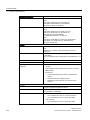
Slots for expansion cards (long)
Graphics
7 x PCI (5 V, 32 bits)
1x PCI Express x16 1)
3 x PCI Express x4 (optional)
for max. 11 modules
Onboard Intel® CPU with integrated
HD Graphic Controller and Intel® QM57 Express Chipset
Platform Controller Hub, 2-D and 3-D engine integrated on
the processor
Dynamic Video Memory Technology
(uses up to 1.7 GB of RAM)
Up to 1600x1200 at 120 Hz / 32-bit color depth
Max. resolution:
VGA 2560x1600 at 60 Hz / 32-bit color depth
DVI 2048x1152 at 60 Hz / 32-bit color depth
in PCIe x16 slot (optional)
PCIe x16 graphics card (dual head: 2x DP, 2x VGA or
2x DVI-D through DP adapter),
256 MB memory at 75 Hz / 32-bit color depth
Maximum resolution:
DP 2560x1600 at 60 Hz / 32-bit color depth
DVI 1920x1200 at 60 Hz / 32-bit color depth
VGA 2048x1536 at 60 Hz / 32-bit color depth
Interfaces
PROFIBUS/MPI
12 Mbps (isolated potential, compatible to CP 5611); optional
PROFINET
10/100 Mbps (CP 1616 onboard), three RJ45; optional
Ethernet
2 x 10/100/1000 Mbps (two RJ45)
Wake on LAN and Remote Boot supported
USB
2 x front panel, 4 x rear panel, 1 x internal; (high current)
Serial
COM1 (V.24), COM2 (V.24) 9-pin
Parallel
LPT1
Monitor
1 x DVI-I (for DVI-D or VGA using cable adapter)
Keyboard
PS/2
Mouse
PS/2
Audio
Microphone, Line out / Headset
Power supply
100 VAC to 240 VAC, wide range; with short-term power
failure backup in accordance with NAMUR: Max. 20 ms at
0.85 rated voltage
SIMATIC IPC847C
16
Operating Instructions, 06/2011, A5E02669184-03
Description
3.5 Features
Monitoring functions
Temperature
Fan
Watchdog
Status LEDs
Overshoot/undershoot of permissible operating
temperature
Messages can be evaluated by an application program.
Speed monitoring
Messages can be evaluated by an application program.
Monitoring of the IPC
Monitoring time can be parameterized in software
Restart can be parameterized in the event of a fault
Messages can be evaluated by an application program.
POWER (internal power supply unit, PC switched On)
HDD (access to hard disk drive)
ETHERNET 1, ETHERNET 2 (Ethernet status)
PN Ι MPI/DP (activity display of the PROFIBUS/MPI
interface, optional product feature or status display of the
CP 1616 onboard interface, optional product feature)
WATCHDOG (Watchdog function/error display)
TEMP (temperature status)
FAN (speed monitoring)
HDD1, HDD2, HDD3 Alarm RAID status message in
conjunction with SIMATIC monitoring software (only with
RAID option)
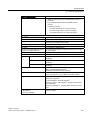
Basic variant
CPU motherboard
Motherboard without Fieldbus
Bus module
8 slots (7 x PCI, 1 x PCIe x16)
or
11 slots (7 x PCI, 1 x PCIe x16, 3 x PCIe x4)
Processor
Intel® Core™ i3-330E (2.13 GHz, 2 cores, 4 threads,
1066 MT/s FSB, 3 MB cache, EM64T, VT-x)
RAM expansion
1 GB SDRAM DDR3 1066MT/sec (PC3-8500)
Single Channel without ECC
2 DIMM base for maximum of 8 GB (without or with ECC) 1)
Drives
Hard disks
250 GB SATA, 3.5", internal installation
Operating system
without
memory expansions ≥4 GB can only be used in combination with 64-bit operating
systems.
1)
SIMATIC IPC847C
Operating Instructions, 06/2011, A5E02669184-03
17
Description
3.5 Features
Optional accessories
Processor
Intel® Core™ i5-520E (2.4 GHz, 2 cores, 4 threads, 1066
MT/s FSB, 3 MB cache, TB, EM64T, VT-x, VT-d, AMT)
Intel® Core™ i7-610E, (2.53 GHz 2 cores, 4 threads,
1066 MT/s FSB, 4 MB cache, TB, EM64T, VT-x, VT-d,
AMT)
RAM expansion
Up to 8 GB, Dual Channel (without or with ECC) 1)
PROFIBUS/MPI
12 Mbps (isolated potential, compatible to CP 5611)
PROFINET
10/100 Mbps (CP 1616 onboard, three RJ45)
Drives
DVD ROM
Read:
DVD ROM: Single layer 16x, Dual layer 10x
DVD+R/RW, DVD-R/RW 12x, DVD-RAM 5x
CD-ROM: CD-R 48x, CD-RW 40x
DVD burner
Read:
DVD ROM: Single layer 18x, Dual layer 12x
DVD-R/+R: Single layer 16x, Dual layer 12x
DVD-RW/+RW 13x, DVD-RAM 12x
CD-ROM: CD-R 48x, CD-RW 40x
Write:
DVD+R 24x, DVD+RW 8x, DVD-R 24x, DVD-RW 6x,
DVD+R (DL) 12x, DVD-R DL 12x, DVD-RAM 6x,
CD-R 48x, CD-RW 32x
Hard disks 3.5" (SATA/SAS)
Installation in internal drive bay (fixed or vibration-damping)
250 GB (SATA)
2 x 500 GB (SATA)
RAID1: 500 GB ( 2x 500 GB, SATA)
Installation in the front bracket of the removable rack
250 GB (SATA)
500 GB (SATA)
2 x 500 GB (SATA)
RAID1:
500 GB ( 2x 500 GB, SATA)
1000 GB (2x 1000 GB, SAS)
RAID5:
1 TByte (3x 500 GB, SATA)
2TByte (3x 1000 GB, SAS)
Solid State Drive 2.5" (SATA)
50 GB SLC
SIMATIC IPC847C
18
Operating Instructions, 06/2011, A5E02669184-03
Description
3.5 Features
Optional accessories
Expansion modules
SAS hardware RAID controller 2)
Intelligent PCIe-x8 RAID controller type: AD-5405Z
for max. 3 SAS drives
with CPU, cache memory (for little retroactive effect on
system)
with buffer for data safety in the event of power failures
Graphic modules 2)
Graphics card PCIe x16, Dual Head (2 x DP or 2 x VGA or
2 x DVI-D)
DVI-I to VGA adapter
Used to connect a monitor with a VGA port to the PC (can be
ordered by configurator).
DVI-I to VGA and DVI Y-adapter
(dual display)
Used to directly connect two monitors to the PC (without
Dual Head graphics card).
Available as option (not per configurator).
Optional accessories
Operating system
Preinstalled and activated / included on restore DVD
Windows XP Professional MUI*, 32 bits
Windows Server 2008 Standard Edition (including 5
clients), MUI *, 32 bits
Windows Server 2008 R2 Standard Edition (including 5
clients), MUI *, 64 bits
Windows 7 MUI*, 32 bits / 64 bits
*MUI: Multi language User Interface; 5 languages (German,
English, French, Spanish, Italian)
1)
memory expansions ≥4 GB can only be used in combination with 64-bit operating systems.
2) SAS
hardware RAID controller and graphic module cannot be used together.
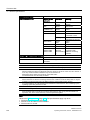
Operating system languages
The following languages for the operating system can be installed at a later time from the
recovery DVD:
Language
German
Windows XP
Windows
Server 2008
Windows Server
2008 R2
Windows 7
32-bit
Windows 7
64-bit
X
X
X
X
X
X
X
X
X
English
French
X
X
X
X
X
Italian
X
X
X
X
X
Spanish
X
X
X
X
X
Japanese
X
X
X
X
X
Chinese (Hong Kong)
X
X
X
X
X
Chinese (simplified)
X
X
X
X
X
X
X
X
X
X
X
X
Chinese (Taiwan)
Korean
X
X
Russian
X
X
SIMATIC IPC847C
Operating Instructions, 06/2011, A5E02669184-03
19
Description
3.6 Installation
Optional expansions
SIMATIC IPC
DiagMonitor SW
Software tool for monitoring local and remote SIMATIC PCs:
SIMATIC IPC
Image & Partition Creator SW
3.6
Installation
3.6.1
External structure
Watchdog
Temperature
Fan speed
Hard disk monitoring (SMART, RAID status)
Monitoring modules of the redundant power supply
System / Ethernet monitoring (Heartbeat)
Software tool for local data backup and setting up of the hard
disks
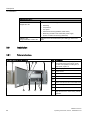
Front view of the device (example)
Item
Description
①
Front panel with vent openings (filter mat
and fan behind the front panel). Check
the filter mat regularly for soiling and, if
appropriate, replace it.
②
Status displays
③
Cover screws
④
On/off button
⑤
Reset button
⑥
Lock
⑦
Features for the installation of DVD ROM
drives, DVD burners and removable racks
⑧
Installation option for 3.5" drive
⑨
2 x USB interface
⑩
Lockable front door for access security.
Keep the front door closed during normal
operation.
SIMATIC IPC847C
20
Operating Instructions, 06/2011, A5E02669184-03
Description
3.6 Installation
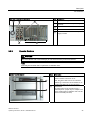
Rear view of the device (example)
Item
①
Rear drive cooling fan
②
Modules of the redundant power supply
(optional)
③
Expansion slots
④
Connection elements
⑤
Mains connection of the redundant power
supply modules
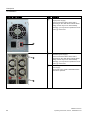
3.6.2
Description
Operator Controls
WARNING
The on/off button and on/off switch(es) do not disconnect the power from the PC!
Note
Data may be lost when the PC performs a hardware reset.
Operator control element
Item
Description
①
On/off button
Used to switch the device on or off.
Note: The device rear has one or 2 line side
switches ③. These have to be switched on so
that the on/off button at the front functions.
②
Reset button
The reset button can be operated using a
pointed object or a paper clip, for example. The
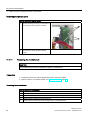
button signal triggers a hardware reset. The PC
performs a restart (cold start).
SIMATIC IPC847C
Operating Instructions, 06/2011, A5E02669184-03
21
Description
3.6 Installation
Operator control element
Item
Description
③
On/Off switch
(simple power supply)
Used to connect the device to the mains.
Depending on the "After Power Failure" BIOS
setting, the PC may turn on automatically.
Otherwise, you may have to operate the on/off
button ① on the front.
③
On/Off switch
(redundant power supply)
Used to connect the device to the mains.
Depending on the "After Power Failure" BIOS
setting, the PC may turn on automatically.
Otherwise, you may have to operate the on/off
button ① on the front.
④
Acknowledgement button of the redundant
power supply
The acoustic error signal is deactivated when
the button is pressed.
SIMATIC IPC847C
22
Operating Instructions, 06/2011, A5E02669184-03
Description
3.6 Installation
3.6.3
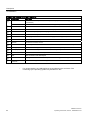
Connecting elements
Interfaces
Layout of the interfaces on the rear of the device
SIMATIC IPC847C
Operating Instructions, 06/2011, A5E02669184-03
23
Description
3.6 Installation
Layout of the interfaces on the rear of the device
Item
Designation
Description
①
PROFIBUS/MPI
PROFIBUS interface (RS 485, electrically isolated), 9-pin D-sub socket (optional product
characteristic)
PROFINET
CP-1616 onboard interface, three RJ45 sockets (optional product version)
②
USB
Connection for USB devices, USB Port 1 to 4
③
ETHERNET 1, 2 *
2 x RJ45 connectors, Ethernet 10/100/1000 Mbps (ETHERNET 1 is AMT-capable)
④
COM
Serial interface (V.24), 9-pin sub D plug
⑤
LPT
Parallel interface, 25-pin
⑥
DP
2 x display port, DP connection of Dual Head graphics card (optional)
⑦
KEYBOARD
Connection for a PS/2 keyboard
⑧
MOUSE
Connection for a PS/2 mouse
⑨
DVI-I
DVI/VGA port for CRT or LCD monitor with DVI interface, VGA via DVI/VGA adapter
⑩
Audio (input)
Connection for analog audio source, microphone, 3.5 mm phono jack
⑪
Audio (output)
Connection for active speakers or headset, 3.5 mm phono jack
⑫
DVI-D
DVI-D connection of the DP adapter
⑬
VGA
VGA connection of the DP adapter
⑭
DP
Display port connection of the DP adapter at Dual Head graphics card (optional)
⑮
Connecting
potentials
Connection for equipotential bonding
*
For unique labeling, the LAN interfaces are numbered on the enclosure. The
numbering by the operating system may deviate from this.
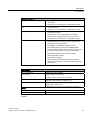
SIMATIC IPC847C
24
Operating Instructions, 06/2011, A5E02669184-03
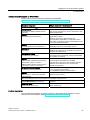
Description
3.6 Installation
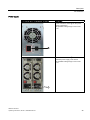
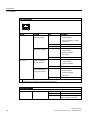
Power supply
Position of the connector for cooling devices
Description
Power connection socket ⑯ for the power
supply of the device.
The permitted voltage range is 100 to 240
V AC.
Power connection socket ⑯ in case of
redundant power supply of the device.
The permitted voltage range is 100 to 240
V AC.
SIMATIC IPC847C
Operating Instructions, 06/2011, A5E02669184-03
25
Description
3.6 Installation
3.6.4
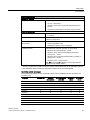
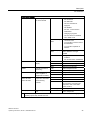
Status displays
Front status displays
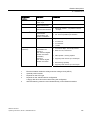
Display
Meaning
LED
Description
POWER
PC status display
OFF
isolated from mains
YELLOW
Standby (hibernating)
HDD
ETHERNET 1 *
ETHERNET 2 *
PN Ι MPI/DP
(optional)
GREEN
PC in operation
Display for hard disk
access
OFF
no access
GREEN
Access
ETHERNET status
display
OFF
No connection
No data traffic
ETHERNET status
display
Display of the
communication status
to S7 or PROFIBUS
GREEN
Data traffic
OFF
No connection
No data traffic
GREEN
Data traffic
OFF
No connection
No data traffic
PROFIBUS not equipped
MPI/DP data traffic
GREEN
SIMATIC IPC847C
26
Operating Instructions, 06/2011, A5E02669184-03
Description
3.6 Installation
Front status displays
Status display for
CP 1616 onboard
OFF
Flashes slowly
RED
WATCHDOG
TEMP
FAN
HDD1 ALARM
HDD2 ALARM
HDD3 ALARM
All displays are lit
*
WATCHDOG status
display
No connection
No data traffic
CP 1616 onboard not
equipped
CP disabled
No error, communication
established
Charging in progress
CP 1616 driver not installed
CP in NDIS mode
Link status error
IO controller: IO device cannot
be addressed
IO controller: Duplicate IP
address
Flashes rapidly
RED
Exception error: diagnostics via
Web or SNMP is no longer
possible
RED
Diagnostics information
available
No communication established
OFF
WATCHDOG not activated
GREEN
WATCHDOG monitoring enabled
RED
Monitoring time elapsed
Internal temperature
monitoring
OFF
Internal temperature OK
RED
Internal temperature critical
Fan status (only with
active DiagBase or
DiagMonitor software)
OFF
Fan speed OK
RED
Fan speed too low
Hard disk alarm in
conjunction with RAID
and monitoring
software
OFF
RAID is OK
One RED
HDD1, HDD2 or HDD3 not OK
All RED
RAID not OK
(for information on locating the
faulty HDD, refer to the RAID
system section)
All flashing
RAID is synchronized
All lit
CPU startup failure
Error in early POST
Error in early BIOS
Post
For unique labeling, the LAN interfaces are numbered on the enclosure. The numbering by the
operating system may deviate from this.
SIMATIC IPC847C
Operating Instructions, 06/2011, A5E02669184-03
27
Description
3.6 Installation
Rear status displays
/('
/('
Display
Meaning
LED
Description
Ethernet LAN 1, 2 *
Green LED
Link status display
OFF
No cable connected
Cable disabled
Interface disabled, 10 MBit
cable active
Yellow LED
Activity status display
GREEN
100 MBit cable active
ORANGE
1000 MBit cable active
OFF
No cable connected
Cable disabled
Interface disabled
No activity
YELLOW
Data transfer active
PROFINET LAN X1, Green LED
P1, P2, P3 *
Link status display of
CP 1616 channel
OFF
No cable connected
Cable disabled
Interface disabled
GREEN
Active cable connected
Yellow LED
Activity status display
of CP 1616 channel
OFF
No cable connected
Cable disabled
Interface disabled
No activity
YELLOW
*
Data transfer active
For unique labeling, the LAN and PROFINET interfaces are numbered on the housing. The
numbering by the operating system may deviate from this.
Virtual status displays
The two "virtual" CP 1616 LEDs are only visible in the SIMATIC software and can be read via SNMP.
PROFINET
Virtual LEDs
RUN
CP is active
STOP
CP is in the stop state
Flashes
The states "flashes slowly" or
"flashes rapidly" do not exist.
SIMATIC IPC847C
28
Operating Instructions, 06/2011, A5E02669184-03
Application planning
4.1
4
Transport
Despite the device's rugged design, its internal components are sensitive to severe
vibrations or shock. You must therefore protect the PC from severe mechanical stress when
transporting it.
You should always use the original packaging for shipping and transporting the device.
CAUTION
Risk of damage to the device!
When transporting the PC in cold weather, it may be submitted to extreme variations in
temperature. In this situation, ensure that no moisture (condensation) develops on or inside
the device.
If condensation has developed on the device, wait at least 12 hours before you switch it on.
4.2
Unpacking and checking the delivery unit
Unpacking the device
Note the following points when you unpack the unit
● It is advisable not to dispose of the original packing material. Keep it in case you have to
transport the unit again.
● Please keep the documentation in a safe place. It is required for initial commissioning and
is part of the device.
● Check the delivery unit for any visible transport damage.
● Verify that the shipment contains the complete unit and your separately ordered
accessories. Please inform your local dealer of any disagreements or transport damage.
● Please inform Siemens AG by means of the enclosed SIMATIC IPC/PG quality control
report form.
Noting down the device identification data
The device can be clearly identified with the help of this identification data in case of repairs
or theft.
SIMATIC IPC847C
Operating Instructions, 06/2011, A5E02669184-03
29
Application planning
4.2 Unpacking and checking the delivery unit
Enter the following data in the table below:
● Serial number: The serial number (S VP) is located on the rating plate either on the rear
panel of the device or on the inside of the front door.
Figure 4-1
Rating plate
● Order number of the device
● Device Ethernet address: The Ethernet address is printed on the device and is stored in
the BIOS Setup (F2 key) under "Advanced > Peripheral Configuration".
● Microsoft Windows "Product Key" on the "Certificate of Authenticity" (COA). The COA
label is attached to the inside of the front door.
You may need the Product Key in case you reinstall the operating system.
Figure 4-2
COA label
Serial number:
S VP ...
Order no.
6AGA114-1 ...
Microsoft Windows Product Key
Ethernet 1 address
Ethernet 2 address
CP 1616 onboard layer 2
Device equipment
Information on the device equipment is available on the inside of the front door.
SIMATIC IPC847C
30
Operating Instructions, 06/2011, A5E02669184-03
Application planning
4.3 Ambient and environmental conditions
4.3
Ambient and environmental conditions
WARNING
If the following conditions for system installation are not observed, approvals in accordance
with UL 60950-1 and EN 60950-1 are rendered void and there is a risk of overheating and
personal injury.
When you plan your project, you should make allowances for:
● Climatic and mechanical environmental conditions defined in the "General technical data"
chapter of the operating instructions.
● Avoid extreme ambient conditions as far as possible. Protect your device against dust,
moisture and heat.
● This device was designed for use in a normal industrial environment. SIMATIC Rack PCs
may not be operated in severe environments which are subject to caustic vapors or
gases without taking additional protective measures (such as the provision of clean air.)
● Do not expose the device to direct sunlight.
● Install the device in such a way that it poses no danger, for example, by falling over.
● The device conforms to protection class IP41 at the front panel. Ensure that the
installation opening for the device is splash-proof in areas which may be subject to splash
water.
● Always maintain a minimum clearance of 50 mm to the area of the ventilation slots in
order to ensure adequate ventilation of the PC.
● Do not cover the ventilation slots of the enclosure.
● The device meets requirements for fire protection housings to EN 60950-1 and can be
installed without additional fire protection enclosure.
● The connected or built-in peripherals should not introduce a counter emf in excess of
0.5 V into the device.
See also
General specifications (Page 121)
SIMATIC IPC847C
Operating Instructions, 06/2011, A5E02669184-03
31
Application planning
4.4 Access protection
4.4
Access protection
NOTICE
Access protection
Unauthorized persons have direct access to the device.
Protect the device from unauthorized access with a front door that can be locked and is
adequately secured.
CAUTION
Electrostatic-sensitive devices
The device contains electronic components which may be destroyed by electrostatic
charge.
Before you open the front door, read the (ESD) guidelines for handling electrostaticsensitive devices.
SIMATIC IPC847C
32
Operating Instructions, 06/2011, A5E02669184-03
Installing/Mounting
5.1
5
Installing the device
Optional installation locations
The device can be mounted horizontally or vertically in control desks, switching cabinets and
19" rack systems.
Optional mounting methods
WARNING
Function test while installing the device in machines or systems
Following the results of a risk analysis, additional protection equipment on the machine or
the system is necessary to avoid endangering persons. With this, especially the
programming, configuration and wiring of the inserted peripherals have to be executed, in
accordance with the safety performance (SIL, PL or Cat.) identified by the necessary risk
analysis.
The intended use of the device has to be ensured.
The proper use of the device has to be verified with a function test on the system. This test
can detect programming, configuration and wiring errors. The test results have to be
documented and if necessary inserted into the relevant inputs.
Options of mounting the device
● Mounting on cabinet brackets
● Mounting on device bases
● Tower installation: a tower kit can be ordered separately for this (not available in some
countries)
● Mounting on telescopic rails
When telescopic rails are used for mounting, the device can be withdrawn fully from the
cabinet or rack.
For detailed information on telescopic rails, see the sections Technical data of the
telescopic rails (Page 129) and Dimensional drawing for the use of telescopic rails
(Page 132).
SIMATIC IPC847C
Operating Instructions, 06/2011, A5E02669184-03
33
Installing/Mounting
5.1 Installing the device
Figure 5-1
Position of the mounting holes
CAUTION
The mounting screws of the telescopic rails may not protrude more than 5 mm into the
enclosure.
CAUTION
Risk of injury!
It is not permitted to install the device only on the 19-inch brackets of the front panel.
Note
For vertical operation, install the device on a horizontal metal base and secure it against
tilting. The following RITTAL module panels are available:
Rittal type TE 7000.620, Rittal type VR 3861.580, Rittal type DK 7063.710. Note the
information of the switch cabinet supplier.
SIMATIC IPC847C
34
Operating Instructions, 06/2011, A5E02669184-03
6
Connecting
6.1
Connecting peripherals
Note before connecting
NOTICE
Connect only I/Os approved for industrial applications according to EN 61000-6-2. Shielded
interface cables must be used for interfaces integrated ex factory.
Note
Hot-plug I/O modules (USB) may be connected while the PC is in operation.
CAUTION
I/O devices that are incapable of hot-plugging may only be connected after the device has
been disconnected from the power supply.
WARNING
Strictly adhere to the specifications in the I/O manuals.
NOTICE
The connected or built-in I/Os should not introduce a counter emf into the device.
A counter emf greater than 0.5 V to ground on the + 3.3 VDC / + 5 VDC / + 12 VDC power
rail due to a connected or integrated component can prevent normal operation or even
destroy the computer.
When measuring the counter emf, remember the following:
The computer in question must be turned off and the power supply connector should be
plugged in.
During the measurement, all cables from the plant to the computer should be
connected.
All other components in the plant must be active.
SIMATIC IPC847C
Operating Instructions, 06/2011, A5E02669184-03
35
Connecting
6.2 Connecting the power supply
6.2
Connecting the power supply
Note before connecting
WARNING
Do not connect or disconnect power and data cables during thunderstorms.
WARNING
The device may only be operated on grounded power supply networks (TN systems to VDE
0100, part 300, or IEC 60364-3).
Operation on ungrounded or impedance-grounded power networks (IT networks) is
prohibited.
WARNING
The permitted nominal voltage of the device must conform with local mains voltage.
WARNING
The mains connector must be disconnected to fully isolate the device from mains. Ensure
easy access to this area.
A master mains disconnect switch must be installed if the device is mounted in a switch
cabinet. Always ensure free and easy access to the power inlet on the device or that the
safety power outlet of the building installation is freely accessible and located close to the
device.
Note
The wide-range power supply module is designed for operation on 100 VAC to 240 VAC
mains. The setting of the voltage range takes place automatically.
Note
The power supply contains a PFC (Power Factor Correction) circuit to conform with the EMC
directive.
Uninterruptible AC power systems (UPSs) must supply a sinusoidal output voltage in the
normal and buffered mode when used with SIMATIC PCs with a PFC circuit.
UPS characteristics are described and classified in the standards EN 50091-3 and IEC
62040-3. Devices with sinusoidal output voltage in the normal and buffered mode are
identified with the classification "VFI-SS-...." or "VI-SS-....".
SIMATIC IPC847C
36
Operating Instructions, 06/2011, A5E02669184-03
Connecting
6.2 Connecting the power supply
Localized information
Outside of the USA and Canada, operation on a 230 V power supply:
This device is equipped with a safety-tested power cord which may only be connected to a
grounded shockproof power outlet. If you choose not to use this cable, you must use a
flexible cable of the following type: Min. 18 AWG conductor cross-section and 15-A / 250-V
shock-proof connector. The cable set must be compliant with safety regulations and
stipulated IDs of the country where the system is to be installed.
For the USA and Canada:
For the United States and Canada, a CSA or UL-listed power cord must be used.
The connector must be compliant with NEMA 5-15.
120 V AC power supply
To be used is a flexible power cord approved to UL and with CSA label, and which has the
following features: Type SJT with three leads, min. 18 AWG conductor cross-section, max.
length 4.5 m, parallel grounding plug 15 A, min. 125 V.
240 VAC power supply
Use a flexible power cord which is approved to UL and CSA, and which has the following
features: Type SJT with three conductors, min. 18 AWG conductor cross-section, max.
length 4.5 m, and tandem grounded connector 15 A, min. 250 V.
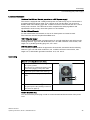
Connecting
Steps for connecting the device to mains
1
Make sure that the ON/OFF switch ② is in
the '0' (OFF) position.
This prevents an unintentional starting of the
device when plugging in the power cable.
2
Connect the power cable to the socket ①.
3
Plug the power cable plug into the power
outlet.
4
Turn on the ON/OFF switch ②.
The yellow power LED (standby) on the front
panel of the PC lights up.
Secure the power plug
You can secure the power plug in order to avoid unintentional disconnection of the power
cord.
SIMATIC IPC847C
Operating Instructions, 06/2011, A5E02669184-03
37
Connecting
6.2 Connecting the power supply
Steps for securing the power plug
1
2
Screw out the lower left-hand fixing screw
② on the power supply unit.
Screw on the lock for the mains connector
(1) to the power supply unit.
WARNING
If the power plug is secured with a clamp, the power outlet must be freely accessible to
allow the device to be easily removed from the mains.
Connecting to the redundant power supply
Steps for connecting the device to mains (redundant power supply)
1
2
Connect the two connectors for cooling
devices ①
Turn both on/off switches on or off
simultaneously. The green LED at the power
supply ③ lights up.
Note:
If only one control supply module is switched
on or connected, or a module is defective, a
warning signal is emitted. You cancel the
warning signal by pressing button ④.
The status is also displayed and signaled by
the SIMATIC monitoring software, if active.
You can mute the acoustic alarm in the
SIMATIC monitoring software.
SIMATIC IPC847C
38
Operating Instructions, 06/2011, A5E02669184-03
Connecting
6.3 Equipotential bonding
6.3
Equipotential bonding
A low-impedance ground connection improves the discharge of interference generated by
external power cables, signal cables or cables for I/O modules to ground.
Equipotential bonding terminal
The equipotential bonding terminal ① on the device
(large surface, large-area contact) must be connected
with the central grounding busbar of the cabinet or plant
in which the PC is to be installed. The minimum
conductor cross-section may not be less than 5 mm2.
6.4
Strain relief for network cables
The strain relief provided in the scope of delivery is used to prevent accidental loosening of
the network cable from the device. One cable tie (not included in the package) is required for
each interface.
To fix the strain relief, you will need a TORX T10 screwdriver.
SIMATIC IPC847C
Operating Instructions, 06/2011, A5E02669184-03
39
Connecting
6.4 Strain relief for network cables
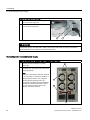
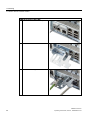
Steps for mounting the strain relief
1
Remove the PROFINET interface plate.
2
Attach the PROFINET strain relief.
3
Attach the cable using the cable tie.
SIMATIC IPC847C
40
Operating Instructions, 06/2011, A5E02669184-03
Commissioning
7.1
7
Requirements for commissioning
CAUTION
Risk of damage to the device!
Make sufficient allowances for the device to acquire room temperature before you put it into
use. If condensation has developed on the device wait at least 12 hours before you switch it
on.
Note
Switching the device on
The device is equipped with a power supply unit with line side switch.
In the line side switch position "1" the device can be switched on by using the On/Off switch
at the front.
If the line side switch is in the position "0", the device draws the lowest power from the AC
power supply. It cannot be switched on by using the On/Off switch at the front.
● Before you switch on the device, you should verify that all peripheral devices such the
keyboard, mouse, monitor and the power supply are connected.
● The operating system of your device is preinstalled on the hard disk.
7.2
Initial commissioning
Following the initial switch on, the operating system is set up automatically on the device.
CAUTION
Faulty installation
If you change the default values in the BIOS setup or if you turn off the device during
installation, you disrupt the installation and the operating system is not installed correctly.
The operating safety of the device and the plant is at risk.
Do not switch off the device during the entire installation process. Do not change the default
values in the BIOS setup.
Procedure
1. Press the on/off button.
The green POWER LED lights up. The module carries out a self-test. During the self-test,
the following message appears:
Press <F2> to go to Setup Utility
Press <F12> to go to Boot Manager
SIMATIC IPC847C
Operating Instructions, 06/2011, A5E02669184-03
41
Commissioning
7.3 Windows Security Center
2. Wait for the message to disappear.
3. Follow the instructions on the screen.
4. Make the region and language settings.
If you want your system language to be international, select English. You can find
information on retroactively changing the regional and language settings in the chapter
"Setting up the language selection by means of the Multilanguage User Interface (MUI)
(Page 102)".
Note
Once the operating system has been set up, the device may restart.
5. Type in the product key as required.
The product key is located on the "Certificate of Authentication", in the "Product Key" line.
Result
The interface of the operating system is displayed every time you turn on the device and
after the startup routine.
7.3
Windows Security Center
Warning from the Windows Security Center
A warning from the Windows Security Center is displayed the first time you switch on your
device. The Security Center checks the status of the device in regard to the three important
security aspects listed below. If a problem is detected (an outdated antivirus program, for
example), the Security Center issues a warning and makes recommendations on how you
can better protect the device.
● Firewall: The Windows Firewall adds protection to the device by blocking network or
Internet access to the device by unauthorized users. Windows checks if the device is
protected by a software firewall.
The firewall is enabled by default in the factory state.
● Antivirus software: Antivirus programs add protection to the device by searching for and
eliminating viruses and other security threats. Windows checks if a full-range, up-to-date
antivirus program is running on the device.
No antivirus software is installed in the factory state.
● Automatic updates: Using the Automatic Update feature allows Windows to regularly
search for the latest critical updates for the device and to install them automatically. This
feature is disabled in the factory state.
● Real-time protection (Windows 7 only): Windows Defender displays warnings if spyware
or possibly unwanted software is installed or executed on the computer. You will also
receive a warning if programs attempt to modify important Windows settings.
Configure the Security Center according to your requirements.
SIMATIC IPC847C
42
Operating Instructions, 06/2011, A5E02669184-03
Commissioning
7.4 Notes on operation
7.4
Notes on operation
7.4.1
Opening the front door
CAUTION
Electrostatic-sensitive devices
The device contains electronic components which may be destroyed by electrostatic
charge.
Before you open the front door, read the (ESD) guidelines for handling electrostaticsensitive devices.
7.4.2
DVD burner (optional)
The DVD burner drive is an optional feature. Recording methods supported by the disk drive:
Disc-at-once, Track-at-once, Session-at-once, Packet writing. You can write to CD-R, CDRW, DVD+R, DVD-R, DVD-RW, DVD+RW, DVD-RAM and dual-layer media.
Burner software
You need to install additional software (burn software) to utilize full functionality of the DVD
burner, depending on the operating system. This software is included on the CD supplied
with the device. Insert the CD in the drive, run setup and follow the instructions on the
screen.
NOTICE
When first starting the burner software, no data carriers should be inserted in the drive. This
is because data carriers with errors can interrupt the automatic hard drive recognition. This
makes it impossible to correctly display the possible burner functions.
SIMATIC IPC847C
Operating Instructions, 06/2011, A5E02669184-03
43
Commissioning
7.4 Notes on operation
Notes on burning optical data carriers
CAUTION
Danger of data errors when burning data carriers!
Burning is permissible only in an undisturbed environment, i.e. shock and vibration stress
must be avoided. Because of heavy fluctuation in the quality of CD-Rs, data may be
corrupted in a burning session, even if no error message is initially displayed. The written
data can only be verified by comparing these with the source. To be on the safe side, data
should be verified after every burning session.
7.4.3
Removable hard disks
The removable racks support hot plugging in connection with RAID1 and RAID5 during
operation.
Replacing a hard disk
CAUTION
Removing the removable rack in order to replace the hard disk is only permissible when the
hard disk is inactive, meaning when the hard disk status display of the removable rack is
not flashing. Observe the EGB guidelines.
CAUTION
Always lock the hard disk cartridge in the removable rack to ensure reliable operation of the
device.
Note
The table and information below apply only to the delivery state of the device, that is if no
changes or expansions were made.
SIMATIC IPC847C
44
Operating Instructions, 06/2011, A5E02669184-03
Commissioning
7.4 Notes on operation
How to remove the hard disk:
1. Identify which hard disk the RAID controller has reported as being faulty.
Power LED ①
Power supply applied
HDD activity display ②,
Also observe the status display HDD ⑨,
HDD1 ALARM ⑧, HDD2 ALARM ⑦ or
HDD3 ALARM ⑥
The table below shows the assignment of the removable rack positions in the device to
the RAID system reports:
Assigned LED 1)
Installation location
Enclosure labeling
HDD1 ALARM
③ Removable rack
*Type HDD1
HDD2 ALARM
④ Removable rack
*Type HDD2
HDD3 ALARM
⑤ Removable rack
*Type HDD3
1)
If the hard disk is defective and the SIMATIC monitoring software is installed, LEDs ⑥,
⑦, ⑧ light up individually or simultaneously.
Note
*Type stands for SAS or SATA design of the hard disk. Always replace the faulty drive
with a new drive of the same type and capacity.
Information about the recovery of the RAID system is available in the section "RAID
systems (Page 46)".
2. Set the key switch to the "OPEN" position.
3. Pull the hard disk cartridge out.
Notes on operation
NOTICE
Always interlock the hard disk cartridge with the removable rack in order to ensure reliable
operation of the device.
SIMATIC IPC847C
Operating Instructions, 06/2011, A5E02669184-03
45
Commissioning
7.4 Notes on operation
Removable rack lock ①
7.4.4
2HDD system (optional)
When the device ships, the second hard disk is connected to SATA port 2. This hard disk
drive is not set up. This gives you the option of backing up your data to this hard disk. For
information on hard disk capacities, refer to your order documentation.
Booting from the slave hard disk
In order to allow booting from the second hard disk, you need to configure it as the primary
boot device. Make the following settings in your BIOS Setup:
Select Boot > Legacy > Hard Disk Drive > <Hard disk name> e.g. P0- ST3500418AS, then
press the "+" key to move it up in the boot order.
NOTICE
The drive letters for the partitions on both drives are assigned by the operating system
used. You can change these in the Control Panel as required.
7.4.5
RAID systems
Two versions of RAID systems are available.
● Integrated SATA RAID based on the system CPU and chip sets:
– For standard applications without high demands regarding system effects of the RAID.
– No expansion slot is used.
● SAS hardware RAID controller with own CPU and cache memory:
– For applications with high demands regarding system effects of the RAID.
– With maintenance-free buffering for high data safety.
– The RAID controller with PCIe-x8 interface uses the PCIe-x16 expansion slot of the
device.
SIMATIC IPC847C
46
Operating Instructions, 06/2011, A5E02669184-03
Commissioning
7.4 Notes on operation
7.4.6
Introduction
Integrated SATA RAID system
The system is configured as RAID1 or RAID5: Data backup on two or three SATA hard
disks. This configuration enhances system availability as the system is able to continue
operation if a hard drive fails or if there is a cable problem at a channel.
Note
You will find information about Intel RAID controllers in the RAID documentation on the
"Documentation and Drivers" DVD that ships with the product in the "Drivers\RAIDAHCI\Intel" directory.
Figure 7-1
Example
RAID system management functions
The pre-installed RAID system software offers enhanced functionality for RAID system
operation and management. Start the software by selecting "Start > Programs > Intel Rapid
Storage Technology".
Figure 7-2
Example
SIMATIC IPC847C
Operating Instructions, 06/2011, A5E02669184-03
47
Commissioning
7.4 Notes on operation
The "Manage -> Advanced" command returns details of the RAID system.
Use the command "Help > System Report > Save" to create a report with details of the RAID
system.
NOTICE
The RAID system status is displayed by default in the Windows event view and in the log
file of the program.
A hard drive can be synchronized at operating system level if a fault is detected. It may take
a very long time to synchronize a new hard disk in the background, depending on the size
of the hard disk and on the system load. It may take several hours or even days in the case
of a high hard disk load.
The redundant system state RAID Level 1 or 5 is only recovered if synchronization has
been successfully completed.
Comments about faults
NOTICE
Input delay
The data is synchronized in the case of a hard disk failure. The system response may be
delayed depending on the processor and hard disk loads. In extreme cases, the execution
of keyboard, mouse or touch screen commands may be briefly delayed.
The result may be faulty operations of the machine or plant.
Do not operate any safety-critical functions during a hard disk failure.
Replacing a faulty RAID system drive
Replace the faulty drive with a new drive of the same type and capacity to return to the
secure RAID1 or RAID5 status after a fault.
The RAID software displays the following:
● A defective drive
● Details of the functioning hard drive
The working hard disk is displayed by the BIOS with a port number and by the RAID
software with a device port number. To view details about each drive, move the mouse
cursor over the drive and press the right mouse button. A pop-up window is then activated.
SIMATIC IPC847C
48
Operating Instructions, 06/2011, A5E02669184-03
Commissioning
7.4 Notes on operation
Figure 7-3
Example
The functioning drive can be located using the following pictures and tables.
NOTICE
Deviating figures
The following figures and notes apply only to the delivery state of the device without any
changes or expansions.
The following figure shows the drives in the removable rack.
Assigned LED 1
RAID
BIOS
RAID software
SATA
Installation location
connection
Enclosure
labeling
HDD1 ALARM ⑥
Port 0
Device port 0
SATA0
Removable rack ①
SATA HDD1
HDD2 ALARM ⑤
Port 2
Device port 2
SATA2
Removable rack ②
SATA HDD2
HDD3 ALARM ④
Port 5
Device port 5
SATA5
Removable rack ③
SATA HDD2
The removable racks are installed in the front drive bay ⑦.
SIMATIC IPC847C
Operating Instructions, 06/2011, A5E02669184-03
49
Commissioning
7.4 Notes on operation
The following figure shows the drives in the internal drive bay ④.
The drive has not been installed with vibration dampening.
Assigned LED 1
RAID
BIOS
RAID software
SATA
Installation location
connection
HDD1 ALARM
Port 0
Device port 0
SATA0
Side wall ③ Drive
①
HDD2 ALARM
Port 2
Device port 2
Side wall ③
SATA2
Drive ②
Enclosure
labeling
1
2
The following figure shows the drives in the internal and vibration damped drive bay.
'ULYHED\
'ULYH
'ULYH
Assigned LED 1
RAID
BIOS
RAID software
SATA
Installation location
connection
HDD1 ALARM
Port 0
Device port 0
SATA0
Drive bay drive 1
HDD2 ALARM
Port 2
Device port 2
SATA2
Drive bay drive 2
1
Enclosure
labeling
1
2
If the hard disk is defective and the SIMATIC monitoring software is installed, LEDs ④,
⑤, ⑥ light up individually or simultaneously on the front.
SIMATIC IPC847C
50
Operating Instructions, 06/2011, A5E02669184-03
Commissioning
7.4 Notes on operation
NOTICE
Hot swap: For devices with removable racks, the drive can be replaced without turning off
the device.
For devices without removable rack, drives may only be replaced in shutdown state.
The new hard disk can be integrated into the RAID system at operating system level with
the RAID software.
Points to note if the hard disk is replaced when the computer is turned off
Only a hard disk that was active and functioning correctly during startup can later be
included in the RAID system.
To be able to boot from the RAID system, you must place the RAID system first in the list of
bootable sources in the BIOS "Boot" setup menu. Otherwise, the system boots from the hard
disk you have just installed and the message "Operating system not found" is displayed.
Integrating a new hard drive
Use the "Run hardware scan now" ① symbol to search for and display the new hard disk.
You can also choose to reboot the device. In this case, the RAID software automatically
integrates the new hard disk. The "Rebuild to another Disk" command synchronizes the
RAID system.
If you shut down and restart the system without installing a functioning new hard disk,
"unused" is displayed for the corresponding SATA port. In this case, you will need to shut
down the system again and start it up with the functioning hard disk. The new hard disk is
then assigned to a SATA port and can be included in the RAID system. The "Rebuild to
another Disk" command initiates synchronization of the RAID1 system.
SIMATIC IPC847C
Operating Instructions, 06/2011, A5E02669184-03
51
Commissioning
7.4 Notes on operation
A defective drive ① continues to be displayed during the rebuilding process. This drive
disappears from the display when the rebuilding process has been completed.
SIMATIC IPC847C
52
Operating Instructions, 06/2011, A5E02669184-03
Commissioning
7.4 Notes on operation
7.4.7
Hardware SAS RAID system
Introduction
The system is configured as RAID1 or RAID5: Data backup on two or three SAS hard disks.
This configuration enhances system availability as the system is able to continue operation if
a hard drive fails or if there is a cable problem at a channel. The RAID system is set up fully
functioning. Operator controls are not necessary for operation.
Different RAID modules are described in the manufacturer documentation. The RAID module
"Adaptec RAID 5405Z" is installed in your device:
①
Connection for the adapter cable
The figure below shows the adapter cable.
①
②
Hard disk connections 0-3 (for the removable rack
Connection for the RAID module
The installed RAID controller for the "Adaptec RAID 5405Z" module is displayed as follows in
the BIOS:
SIMATIC IPC847C
Operating Instructions, 06/2011, A5E02669184-03
53
Commissioning
7.4 Notes on operation
The following documentation is available on the "Documentation and Drivers" DVD that ships
with the product in the "Drivers\RAID\Adaptec" directory:
● Adaptec RAID Controller Quick Start Guide
The PDF file describes how you install the RAID controller and create a bootable RAID1
or RAID5 array. It also describes how you install the operating system and the controller
driver on the array.
● Adaptec RAID Controller Installation and User Manual
The PDF file includes comprehensive information on installation and configuration of the
RAID module and the connected devices.
● Adaptec Storage Manager User Manual
The PDF file includes comprehensive information on installation and use of the Adaptec
Storage Manager.
● Command Line Utility User’s Guide
The PDF file includes the user manual for the command line utility program and
comprehensive information on the use of ARCCONF.
● Adaptec Storage Manager as integrated online help
The online help includes details on the creation and management of arrays with the
Adaptec Storage Manager.
RAID system management functions
The installed RAID system software offers enhanced functionality for RAID system operation
and management. The software must be started for the detailed status displays to be
displayed on the screen or for work to be carried out on the RAID.
You start the software with "Start > Program Files > Adaptec Storage Manager".
SIMATIC IPC847C
54
Operating Instructions, 06/2011, A5E02669184-03
Commissioning
7.4 Notes on operation
The symbols here have the following meaning:
NOTICE
The RAID system status is displayed in the Windows event view and in a log file of the
program.
A hard drive can be synchronized at operating system level if a fault is detected. It may take
a very long time to synchronize a new hard disk in the background, depending on the size
of the hard disk and on the system load. It may take several hours or even days in the case
of a high hard disk load.
The safe system states RAID Level 1 or 5 are only reached once synchronization has been
successfully completed.
SIMATIC IPC847C
Operating Instructions, 06/2011, A5E02669184-03
55
Commissioning
7.4 Notes on operation
Comments about faults
NOTICE
Input delay
The data is synchronized in the case of a hard disk failure. The system response may be
delayed depending on the processor and hard disk loads. In extreme cases, the execution
of keyboard, mouse or touch screen commands may be briefly delayed.
The result may be faulty operations of the machine or plant.
Do not operate any safety-critical functions during a hard disk failure.
Before you replace the defective hard disk, create a backup copy of the system. Always
replace the defective drive with a new one of the same type and capacity.
Replacing a faulty RAID system drive
Replace the faulty drive with a new drive of the same type and capacity to return to the
secure RAID1 or RAID5 status after a fault.
The RAID software displays the following:
● A defective drive
● Details of the functioning hard drive
The defective hard drive is displayed by the BIOS with port number and by the RAID
software with the warning symbol at the drive symbol. For details on the respective drive,
double-click the drive symbol. The "Properties" dialog opens.
SIMATIC IPC847C
56
Operating Instructions, 06/2011, A5E02669184-03
Commissioning
7.4 Notes on operation
NOTICE
Deviating figures
The following figures and notes apply only to the delivery state of the device without any
changes or expansions.
The following figure shows the drives in the removable rack.
Assigned
LED 1
RAID
BIOS
RAID
software
Cable
connection
Installation location
Enclosure labeling
HDD1 ALARM ⑥
Dev00
Device 0
0
Removable rack ①
SAS HDD1
HDD2 ALARM ⑤
Dev01
Device 1
1
Removable rack ②
SAS HDD2
HDD3 ALARM ④
Dev02
Device 2
2
Removable rack ③
SAS HDD2
The removable racks are installed in the front drive bay ⑦.
1
If the hard disk is defective and the SIMATIC monitoring software is installed, LEDs ④,
⑤, ⑥ light up individually or simultaneously on the front.
Integrating a new hard drive
A hard drive is integrated automatically into the RAID if it fulfills one of the following
requirements:
● It is brand-new
● It is set up as a global spare drive
● It is set up as a dedicated spare drive.
Information about creating the spare drives is available in the controller documentation.
SIMATIC IPC847C
Operating Instructions, 06/2011, A5E02669184-03
57
Commissioning
7.4 Notes on operation
SIMATIC IPC847C
58
Operating Instructions, 06/2011, A5E02669184-03
Integration into an automation system
8.1
8
Integration
Options of integration in existing or planned system environments/networks:
Ethernet
Wake on LAN and Remote Boot are supported.
The integrated Ethernet interfaces (10/100/1000 Mbps) can also be used for communication
and data exchange with programmable controllers such as SIMATIC S7.
This functionality requires the "SOFTNET S7" software package.
PROFIBUS/MPI
The optional electrically isolated PROFIBUS interface (12 Mbps) can be used to interconnect
distributed field devices or for coupling to SIMATIC S7.
The "SOFTNET for PROFIBUS" software package is required for coupling to S7 automation
systems.
PROFINET
CP 1616 onboard allows you to connect industrial PCs to Industrial Ethernet. Only one CP
1616 can be installed in a PG/PC. For more information, refer to section PROFINET
(Page 60) and to chapter CP 1616 onboard communications processor (Page 199).
Device driver CP 16xx.sys
The device driver allows you to use the Windows network protocol for the optionally available
"CP 1616 onboard" Ethernet PROFINET controller on SIMATIC PCs. The PROFINET
interface will act like a 100 MBit Ethernet interface with a MAC address when you use this
driver. The three RJ45 sockets are connected to each other via switch.
The drivers and documentation can be found in the user manual on the supplied
Documentation and Drivers CD.
PROFINET IO application
You can use the "Development Kit DK-16xx PN IO" to create, operate and configure
PROFINET IO applications. It must be installed in addition to the CP 16xx.sys device driver.
You can obtain information about this from your Siemens sales partner.
SIMATIC IPC847C
Operating Instructions, 06/2011, A5E02669184-03
59
Integration into an automation system
8.2 PROFINET
SIMATIC NET
You can create, operate and configure SIMATIC installations using this software package.
You will find this information on the SIMATIC NET Manual Collection CD. The software
package and the documentation are not parts of the development package.
Additional information
Additional information is available in the catalog and the online ordering system Industry
Automation and Drive Technologies - Homepage
(http://www.siemens.com/automation/service&support).
8.2
PROFINET
CP 1616 onboard
The basic characteristics of the PCS 1616 onboard are:
● Optimized for PROFINET IO
● With Ethernet realtime ASIC ERTEC 400
● Three RJ45 sockets for connecting terminal devices or addition network components
● Integrated 3-port real-time switch
● Automatic hardware detection
CAUTION
Only one CP 1616 can be installed in a PG/PC. If you want to use an additional CP
1616 module, the "CP 1616 onboard" option must be disabled in the BIOS Setup.
SIMATIC IPC847C
60
Operating Instructions, 06/2011, A5E02669184-03
Integration into an automation system
8.2 PROFINET
Additional documentation on PROFINET
Get an overview of the information available for PROFINET
(http://support.automation.siemens.com/WW/view/en/18880715/133300).
Document designation
What is contained in this document?
This documentation is not included in the product package:
Getting Started
PROFINET IO Getting Started: Manual
Collection
The documents use concrete examples to provide
step-by-step instructions on how to commission a fully
functional application.
Manual
PROFINET System Description
This gives you the basic knowledge about the
PROFINET IO topics:
Network components, data exchange and
communication, PROFINET IO, component-based
automation, application example of PROFINET IO and
component-based automation.
Manual
From PROFIBUS DP to PROFINET IO
Read this document if you want to convert an installed
PROFIBUS system to a PROFINET system.
Readme file for CP 1616/CP 1604 and DK16xx PN IO
This provides the latest information about the
SIMATIC NET products CP 1616/CP 1604, CP 1616
onboard, the developer kit.
Configuration Manual
Commissioning PC Stations
This provides you will all the information necessary for
commissioning and configuring a PC as a PROFINET
IO controller or IO device.
Manual
SIMATIC NET Industrial Communication
with PG/PC: Volume 1 - Basics
This manual introduces you to industrial
communication and explains the available
communication protocols. It also describes the OPC
interface as an alternative to the IO-based user
programming interface.
SIMATIC NET Industrial Communication
with PG/PC: Volume 2 - Interfaces
S7 CPs for Industrial Ethernet
Configuring and Commissioning
Manual
SIMATIC NET - Twisted Pair and FiberOptic Networks
This provides the following support:
- For commissioning S7 stations
- For establishing effective communication
Configure and build your Industrial Ethernet networks
based on this document.
This documentation is part of the supplied Documentation and Drivers CD:
Operating instructions
CP 1616/CP 1604/CP 1616 onboard
This provides you with all information required for
operation.
Installation guide
Device Driver CP16xx.sys
Read this guide if you want to install the NDIS device
driver, CP16xx.sys.
Further information
You can find the information on specific products in the Internet at the address: Productrelated Information SIMATIC NET (http://www.siemens.com/simatic-net)
SIMATIC IPC847C
Operating Instructions, 06/2011, A5E02669184-03
61
Integration into an automation system
8.2 PROFINET
SIMATIC IPC847C
62
Operating Instructions, 06/2011, A5E02669184-03
9
Functions
9.1
Overview of the monitoring functions
Even in its basic version, the device comes with optional monitoring functions. When used in
combination with the appropriate software, the following functions for displaying, monitoring
and controlling are available:
● Temperature monitoring (overtemperature / undertemperature at the temperature sensor)
● Fan monitoring (fan speed too low, fan failure, or a break in a tachometer line)
● Monitoring of hard disks with S.M.A.R.T functionality even in a RAID system
● Watchdog (hardware or software reset of the computer)
● Operating hours meter (information on the cumulative run time)
● RAID alarm display
● Battery monitoring (charge status of the CMOS battery is displayed)
● Status of the redundant power supply (module errors are displayed)
You can mute the acoustic alarm.
● AMT (Active Management Technology)
SIMATIC IPC DiagBase software
With the SIMATIC IPC DiagBase software (ships with the product), you can use these
functions for local monitoring. You can use the DiagBase Management Explorer application
for general monitoring or DiagBase Alarm Manager for notification of individual alarms.
The DMAPI programming interface and sample programs for the DiagBase software are
located on the DVD "Documentation & Drivers" in the directory "\Drivers\DiagBase\program
files\Siemens\DiagnosticManagement".
Additional information on the functionality of the SIMATIC IPC DiagBase software is
available in the online help.
SIMATIC IPC DiagMonitor software
The SIMATIC IPC DiagMonitor software can be ordered on CD (does not ship with the
product). It contains the networkable monitoring software, the software for the stations to be
monitored and a library for creating custom applications.
AMT (Active Management Technology)
AMT is a technology from Intel for remote maintenance of computers. You turn an AMT PC
on and off remotely and start the BIOS setup remotely. Different operating systems can be
booted with ISO files.
SIMATIC IPC847C
Operating Instructions, 06/2011, A5E02669184-03
63
Functions
9.2 Temperature monitoring and temperature display
9.2
Temperature monitoring and temperature display
The temperature is recorded using temperature sensors that are installed at critical locations
of the device. A sensor monitors the process temperature, further sensors monitor critical
points below the bus module.
The flashing Temp LED indicates that the device is being operated at its limits. The following
fault reactions are triggered if one of the temperature values exceeds the set temperature
threshold:
Reaction
Option
The Temp LED changes to red
None
Device cooling fan switches to maximum speed (the power unit
controls its own fan)
None
SIMATIC monitoring software alarmed
Start user-defined programs, can
be set
Temperature errors do not occur if the device is used as intended. If a temperature error
does occur, check for the following possible causes:
● Are the fan apertures covered?
● Is the filter dirty?
● Is the fan functioning correctly?
● Is the ambient temperature within the specified range?
● Is the total output of the power supply within the specified limit?
The temperature error is retained in memory until temperatures have fallen below the
thresholds and are reset by one of the following measures:
● Acknowledgment of the error message by the monitoring software
● Restart of the device
9.3
Watchdog (WD)
Function
The watchdog (WD) monitors the activities of the device and reports an overload or blockade
of the device to the user by means of various reactions.
After POWER ON of the device or after a HW RESET (cold restart), the watchdog is in idle
state, i.e. a reaction of the WD will not be triggered and the Watchdog LED is switched off.
The Watchdog LED is lit green when the watchdog is enabled (by means of the monitoring
software, e.g. DiagBase or DiagMonitor software).
SIMATIC IPC847C
64
Operating Instructions, 06/2011, A5E02669184-03
Functions
9.4 Fan monitoring
WD reactions
If the watchdog is not triggered again within the set time (through monitoring software), the
following reactions are triggered:
Reaction
Option
Watchdog LED changeover from green to red
None
Trigger a PC reset
can be set
SIMATIC monitoring software is activated
None
WD monitoring times (TWD)
The monitoring times can be set in increments of one second within a range from 4 to 255
seconds.
Note
The watchdog is retriggered if the monitoring time is changed at the active watchdog (that is
while the watchdog is running)!
9.4
Fan monitoring
Operation of the front / processor / power unit fans is monitored. The following reactions are
triggered when a fan fails:
Reaction
Option
The fan LED switches to red
None
SIMATIC monitoring software alarmed
Startup of user-defined programs
can be set
The fan fault is retained in memory until the cause of the fan failure has been rectified and
the error is reset by taking one of the following measures:
● Acknowledgment of the error message through SIMATIC monitoring software, for
example, Management Explorer of the SIMATIC IPC DiagBase software or the
SIMATIC IPC DiagMonitor software.
● Restart of the device.
SIMATIC IPC847C
Operating Instructions, 06/2011, A5E02669184-03
65
Functions
9.5 RAID monitoring
9.5
RAID monitoring
In conjunction with the SIMATIC monitoring software and in addition to the RAID software,
the status of the RAID system is shown on the HDD1 Alarm, HDD2 Alarm and HDD3 Alarm
front LEDs. For detailed information on the RAID system and on the operation of the RAID
software, refer to the RAID section.
Reaction
HDD1 alarm
HDD2 alarm
HDD3 Alarm
9.6
Meaning
Option
Off
RAID system is ready for operation. SIMATIC
software is not active.
None
One is red
Drive 1, Drive 2 or Drive 3 has failed.
All are red
RAID system is not ready for operation.
Affected drive must be determined with the
help of the RAID software.
All flashing
RAID system is currently being synchronized.
Battery monitoring
The installed backup battery has a service life of 5 years. The status can be checked with
two-tier battery monitoring. The information can be read from an I/O register and evaluated.
When the first warning level is reached, the remaining service life of the battery for buffering
CMOS data amounts to at least 1 month.
9.7
Status of the redundant power supply
The status of the modules is monitored. Any module is reported if its input voltage or fan
fails. You can mute the acoustic alarm of the power supply using software:
Reaction
Option
SIMATIC monitoring software alarmed
Muting alarm
Start user-defined programs, can be set
SIMATIC IPC847C
66
Operating Instructions, 06/2011, A5E02669184-03
Functions
9.8 Active Management Technology (AMT)
9.8
Active Management Technology (AMT)
AMT (Active Management Technology) is technology for the remote maintenance of
computers (simply called AMT-PC in the remainder of the document) and it includes the
following functions:
● Keyboard–Video–Mouse (KVM) redirection: Using KVM that is integrated in the AMT
hardware you access the AMT PC remotely. With KVM, you can also control AMT PCs
that have no or a defective operating system. A KVM remote session is always possible
with the KVM server integrated in the firmware. This means you can restart the PC and
change the BIOS setup remotely.
● Remote power management: AMT PCs can be turned on and off and restarted from
another PC.
● SOL (Serial over LAN): Redirection of the data of a serial interface to the network. The
main use of the function is text-based remote control of an AMT PC using a console.
● IDE redirection: An ISO file on the help desk PC can be mounted on the AMT PC and
used as a DVD drive.
An ISO file contains a memory image of the content of a CD or DVD structured in the ISO
9660 format.
● Remote reboot: An AMT PC can be booted from a bootable ISO file made available by
another PC.
SIMATIC IPC Remote Manager
The "SIMATIC IPC Remote Manager" software is available for utilization of the AMT
functions with SIMATIC IPCs. The software can be ordered from the Siemens online
ordering system. For detailed information about "SIMATIC IPC Remote Manager", refer to
the corresponding product documentation.
Typical areas of application and functions of the SIMATIC IPC Remote Manager:
● Remote maintenance of SIMATIC IPC with AMT, for example for service purposes in the
case of a defective operating system or for adapting BIOS settings.
● Diagnostics without on-site use
● Convenient service: Access to AMT clients, such as headless systems, without additional
hardware
● Resource management
Requirement
● A device with a Core i5 or Core i7 processor
● A functioning and configured management engine
● A functioning and configured Ethernet connection
● A help desk PC with a functioning and configured Ethernet connection for the full AMT
functionality
SIMATIC IPC847C
Operating Instructions, 06/2011, A5E02669184-03
67
Functions
9.8 Active Management Technology (AMT)
Configuration of the AMT PC
You configure AMT using the BIOS setup and the MEBx (Management Engine BIOS
Extension). MEBx is a BIOS extension for configuring AMT.
When the BIOS appears briefly during startup, press the <Ctrl+P> keyboard shortcut. The
"MEBx" dialog opens.
SIMATIC IPC847C
68
Operating Instructions, 06/2011, A5E02669184-03
Expansions and parameter assignment
10.1
10
Open the device.
CAUTION
Only qualified personnel are permitted to carry out any work on the open device. You may
only install memory modules and expansion cards to expand the hardware within the
warranty period.
CAUTION
Electrostatic-sensitive devices
The device contains electronic components which may be destroyed by electrostatic
charge. This causes malfunctions and damage to the machine or plant.
Take precautionary measures even when you open the device, e.g. device doors, device
flaps or the housing cover. Additional information is available in the (ESD) guidelines for
handling electrostatic-sensitive devices.
You can mount all components on the device using TORX T10 and T20 screwdrivers and a
4.5-mm hexagonal wrench (for the interface interlock on the rear panel).
Requirement
● Device is disconnected from power supply.
● Screwdriver T10
Note
Unauthorized opening of device without previously disconnecting power may result in
substantial damage to equipment and/or danger to the user.
Disclaimer of liability
All technical data and approvals apply only to expansion units which are released by
SIEMENS.
Siemens does not accept any liability for impairment of functions caused by the use of thirdparty devices or components.
Observe the installation instructions for the components. UL approval of the device only
applies when the UL-approved components are used according to their "Conditions of
Acceptability".
SIMATIC IPC847C
Operating Instructions, 06/2011, A5E02669184-03
69
Expansions and parameter assignment
10.1 Open the device.
Open the device
How to open the device
1
Open the front panel.
2
Loosen the indicated screw.
The screw stays captive in the
housing.
3
Push the cover back and remove it.
SIMATIC IPC847C
70
Operating Instructions, 06/2011, A5E02669184-03
Expansions and parameter assignment
10.2 Memory expansion
10.2
Memory expansion
10.2.1
Installing memory modules
Memory expansion options
The motherboard is equipped with 2 slots for memory modules. DIMM DDR3 memory
modules, storage frequency 1066 MT/sec, type PC3-8500, unbuffered, no ECC, or with ECC
can be utilized. This allows you to expand Rack PC memory up to 8 GB, of which you can
use approx. 3.2 GB for the operating system and applications in case of 32-bit operating
systems. You can install one or two modules.
Combination
Slot X19 (outside)
1
1 GB / 2 GB / 4 GB
2
1 GB / 2 GB / 4 GB
Slot X20 (inside)
Maximum
expansion
4 GB
1 GB / 2 GB / 4 GB
8 GB
Note
The modules can be inserted into any slot. Memory is operated in dual-channel mode if
two modules are installed.
If expansion modules with their own memory (for example, graphics cards with 256 MB or
more) are used on the module, the memory available for the 32-bit operating system or
application can also be less than 3.2 GB.
In order to avoid operating faults you may have to extend a module so that the real
memory expansion on the motherboard and the reserved memory of the expansion
module do not overlap.
Preparation
Disconnect the device from mains and unplug all cables.
CAUTION
The electronic components on the PCBs are highly sensitive to electrostatic discharge.
Always take appropriate precautionary measures when handling these components. Refer
to the ESD directives on handling of electrostatically sensitive components: ESD directive
(Page 211) .
SIMATIC IPC847C
Operating Instructions, 06/2011, A5E02669184-03
71
Expansions and parameter assignment
10.2 Memory expansion
Installing a memory module
How to install a memory module
1
Open the device. See:
Open the device. (Page 69)
2
3
If you have more than one free slot, use the slot with the lowest number.
Remove the memory module from its packaging.
Hold it by the upper edges only. Note the indicated notch during insertion.
4
Hold the memory module at a flat
angle to the motherboard and push it
into the slot.
5
Press both sides of the memory
module evenly to avoid jamming. The
memory module latches in audibly.
The memory module is inserted
correctly if less than 1 mm of the gold
contacts is visible evenly across the
entire length of the module.
6
Close the device.
Removing a memory module
How to remove a memory module
1
Open the device. See:
Open the device. (Page 69)
2
Open the two latches at the sides of
the memory module evenly. Remove
the memory module from the slot.
3
Close the device.
Display of the current memory configuration
The new memory configuration is detected automatically. The allocation of the ”base
memory and extended memory” is automatically displayed when you switch on the device.
SIMATIC IPC847C
72
Operating Instructions, 06/2011, A5E02669184-03
Expansions and parameter assignment
10.3 Installing expansion cards
10.3
Installing expansion cards
10.3.1
Notes on the modules
Notes on module specifications
The device is designed for use with modules to PCI specification 2.3 or PCIe
specification 1.0a or 2.0. The module supports operation of 5 V and 3.3 V PCI modules.
Compliance with the defined mechanical defaults is imperative. Failure to comply with these
defaults can result in contact problems, malfunctions and assembly difficulties. The
permissible module contour dimensions are specified in the dimension drawings section.
Note about long PCI, PCIe modules
Long PCI/PCIe modules must be fitted with an extender for insertion into the guide rails (the
extender should be supplied with the long PCI/PCIe board).
Note on PROFINET expansion modules
The "CP 1616 onboard" option must be disabled in the BIOS for devices with CP 1616
onboard, before a PROFINET module (such as a CP 1616) can be installed in the system.
10.3.2
Installing an expansion module
Preparation
Disconnect the device from mains
SIMATIC IPC847C
Operating Instructions, 06/2011, A5E02669184-03
73
Expansions and parameter assignment
10.3 Installing expansion cards
Installing expansion modules
How to install an expansion module (PCI / PCIe format):
1
Open the device (Page 69).
2
Remove the module retainer ③
3
Unscrew the slot cover ① of the planned slot
4
Insert the expansion module ② into the relevant
slot.
5
Screw down the slot cover ① for the expansion
module
6
Insert the module retainer ③ again
7
Loosen the free retainer ④, place it onto the
expansion module and screw it tight.
With short expansion modules, you can remove
the locking screw from the retainer and screw it
into the hole on the opposite side.
8
Close the device
Notes on the allocation of resources
Only two exclusive interrupts are available for PCI /PCIe modules due to the large functional
scope of the motherboard. If the new expansion modules require additional exclusive
resources, you must disable certain motherboard functions. For information on allocated
resources, refer to the section System resources (Page 164). Information on disabling
motherboard functions is available in the BIOS Setup (Page 169)BIOS Setup menu.
Information on the assignment of the PCI IRQ Line to the PCI slots is found in the "Advanced
menu" or Bus board (Page 155) section.
The device supports graphics modules with expansion ROM of up to 48 K.
10.3.3
Installing the RAID card
A RAID system is used to organize several physical hard disks of a computer into one logical
drive, which permits higher data availability in the event of a single hard disk failure and/or a
larger data throughput than with just one physical drive.
SIMATIC IPC847C
74
Operating Instructions, 06/2011, A5E02669184-03
Expansions and parameter assignment
10.3 Installing expansion cards
Requirement
● A RAID module with connections for the capacitor block ① and hard disk drive ②
● A capacitor block of a maintenance-free cache module (ZMM)
● An adapter cable for connection of the hard disk drive ② to the RAID module
Note the numbering of the connections ①.
● SAS-LED cable (connection to SCSI-LED connection on motherboard)
SIMATIC IPC847C
Operating Instructions, 06/2011, A5E02669184-03
75
Expansions and parameter assignment
10.3 Installing expansion cards
Procedure
Diagram
Working step
Secure the capacitor block ① with two cable ties
② on the module bracket ③
–
Install the RAID card in slot 4.
–
Secure the RAID card with the holder.
Insert the capacitor block connector at the
marked position.
SIMATIC IPC847C
76
Operating Instructions, 06/2011, A5E02669184-03
Expansions and parameter assignment
10.3 Installing expansion cards
Diagram
Working step
Insert the adapter cable at the marked position.
Make sure that the connector latch engages.
Install the black connector of the SAS-LED cable
into the 2-pin header J1 (AACT) at the RAID
module.
You determine the polarity based on the cable
colors: black left, red right.
Install the white connector onto the motherboard
at the install position "SCSI-LED".
The SAS-LED cable is coded and latched.
For a function check monitor the HDD LED of the
operation display. It flashes when the hard disk is
accessed.
–
Connect the adapter cable to the required drives.
SIMATIC IPC847C
Operating Instructions, 06/2011, A5E02669184-03
77
Expansions and parameter assignment
10.4 Installing drives
10.4
Installing drives
10.4.1
Options of installing disk drives
In the front drive bay
Item Description
①
Front drive bay
②
Bay for 3.5" drives
③
5.25" drive bay for DVD
drives or removable
racks.
In the rear drive bay (with vibration damping)
Item Description
①
Rear drive bay
②
Two bays for hard disk
drives (with shock and
vibration damping)
Internal drive bay (fixed)
Item Description
①
Hard disk drive
②
Second drive bay for
3.5" hard disk drives
③
Internal drive bay (fixed)
You do not need to
remove the drive bay to
install / remove the hard
disks.
SIMATIC IPC847C
78
Operating Instructions, 06/2011, A5E02669184-03
Expansions and parameter assignment
10.4 Installing drives
10.4.2
Installing and removing disk drives in the front drive bay
Preparations
1. Disconnect the device from the power supply and remove all connecting cables from the
device
2. Open the device. See: Open the device. (Page 69)
Remove the front drive bay
How to remove the front drive bay
1
Remove the retaining screws ①
and ②.
2
Then disconnect the power supply
cable and the data cable from the
installed drives.
3
Lift the drive bay ③ slightly and
slide it approximately 1 cm toward
the power supply.
4
Take the drive bay completely out
of the housing.
Installing a drive
How to install a drive
1
Push the drive ① into the drive
bay from the front.
SIMATIC IPC847C
Operating Instructions, 06/2011, A5E02669184-03
79
Expansions and parameter assignment
10.4 Installing drives
How to install a drive
2
Secure the drive with four screws
② on both sides of the drive bay.
3
Connect the power supply cable
and the data cables to the drive.
4
Install the drive bay again.
SIMATIC IPC847C
80
Operating Instructions, 06/2011, A5E02669184-03
Expansions and parameter assignment
10.4 Installing drives
Installing the removable rack
How to install a removable rack
1
Fasten the 5.25" adapter ① to the
removable rack.
2
Push the removable rack with
adapter into the drive bay from the
rear.
3
Fasten the removable rack with
adapter on both sides to the drive
bay with four screws ②.
4
Connect the power and data cables
to the drive.
5
Install the drive bay again.
10.4.3
Installing and removing drives in the front drive bay
Preparations
1. Disconnect the device from the power supply and remove all connecting cables from the
device
2. Open the device (Page 69).
SIMATIC IPC847C
Operating Instructions, 06/2011, A5E02669184-03
81
Expansions and parameter assignment
10.4 Installing drives
Removing internal drive bays
How to remove the internal drive bay (with vibration damping)
1
Remove the module retainer
2
Remove the four screws ①
3
Then disconnect the power supply
cable and the data cable from the
installed drives.
4
Take the drive bay out of the housing.
Installing a drive
How to install a drive
1
Push the drive into the bay from
the front
2
Secure the drive with four screws
to the drive bay
3
Connect the power supply cable
and the data cables to the drive
4
Install the drive bay again
SIMATIC IPC847C
82
Operating Instructions, 06/2011, A5E02669184-03
Expansions and parameter assignment
10.4 Installing drives
10.4.4
Installing / removing hard disk drives in the fixed hard disk rack
Preparations
1. Disconnect the device from the power supply and remove all connecting cables from the
device
2. Open the device (Page 69).
Installing a drive
How to install a drive
1
Hold the drive ① or ② onto the
drive carrier plate and fasten it with
four screws ③ or ④
2
Connect the power supply cable
and the data cables to the drive
Removing drives
How to remove a drive
1
Disconnect the power cable and the data cables from the drive
2
Loosen the four screws ③ or ④ and remove the drive from the bay
SIMATIC IPC847C
Operating Instructions, 06/2011, A5E02669184-03
83
Expansions and parameter assignment
10.4 Installing drives
SIMATIC IPC847C
84
Operating Instructions, 06/2011, A5E02669184-03
Service and maintenance
11.1
Removing and installing hardware components
11.1.1
Repairs
11
Repairing components
Only qualified personnel are permitted to repair the device.
WARNING
Unauthorized opening and improper repairs may lead to material damage and hazards to
users.
● Always disconnect the power connector before you open the device.
● Install only system expansions which are designed for this computer. Installation of other
expansions may damage the system or violate safety requirements and RF interference
suppression regulations. Contact Technical Support or your local sales department to find
out which system expansions are suitable for installation.
If you install or exchange system expansions and damage your device, the warranty
becomes void.
NOTICE
Observe the ESD instructions (Page 211).
Disclaimer of liability
All technical data and approvals apply only to expansion units which are released by
SIEMENS.
Siemens does not accept any liability for impairment of functions caused by the use of thirdparty devices or components.
Tools
You can perform all installation tasks on the device using TORX T10 and T20 drivers, a 4.5mm hexagonal wrench (for the interface interlock on the rear panel) and a side cutter.
SIMATIC IPC847C
Operating Instructions, 06/2011, A5E02669184-03
85
Service and maintenance
11.1 Removing and installing hardware components
11.1.2
Preventive maintenance
To maintain high system availability, we recommend the preventative exchange of those PC
components that are subject to wear. The table below indicates the intervals for this
exchange.
11.1.3
Hard disk drive
Fan
CMOS backup battery
Air filter mat
3 years
3 years
5 years
Depending on the degree of
soiling
Replacing filters
Preparing for filter replacement
Note
You may only use filters of the same type. Information about the original spare parts for
SIMATIC PCs is available in the Internet at After sales information system from SIMATIC
IPC (http://www.siemens.com/asis).
Filter meshes are available under the following order number: A5E01064980.
Replacing filters
How to replace the filter
1. Open the front door to about 45° to
release the lock of the front panel.
2. Remove the front panel
3. Change the filter when necessary.
This is inserted loosely in the fan
cover. When you insert the filter,
make sure it lies uniformly in the
fan cover.
NOTICE
Used filters
We advise that you do not insert filters again that have already been used. If you do want to
refit a filter you have removed, take account of the direction in which the fan draws air into
the device. Make absolutely certain that you do not fit the outer side of the filter on the
inside. Generally, the outer side is clearly dirty after it has been in use for some time.
SIMATIC IPC847C
86
Operating Instructions, 06/2011, A5E02669184-03
Service and maintenance
11.1 Removing and installing hardware components
11.1.4
Removing the device / drive cooling fan
Preparing for removal of the device fan
Disconnect the device from the mains.
Removing the front fan
How to remove the front fan
1.
Open the front door to about 45°
to release the lock of the front
panel.
2.
Remove the front panel and, if
necessary, replace the filter. See
section Replacing filters
(Page 86)
3.
Release the knurled screws of
the fan holder
4.
Take the fan holder out of the
housing
SIMATIC IPC847C
Operating Instructions, 06/2011, A5E02669184-03
87
Service and maintenance
11.1 Removing and installing hardware components
How to remove the front fan
5.
Pull out the fan connector
6.
Loosen all the expanding rivets
and remove the fan from the fan
holder
Installing the fan
NOTICE
Always install a fan of the same type. Information about the original spare parts for
SIMATIC PCs is available in the Internet at After-sales information system for SIMATIC
PC/PG (http://www.siemens.com/asis).
Ensure that the arrow on the fan points away from the fan bracket. The fan blows cooling
air into the enclosure.
SIMATIC IPC847C
88
Operating Instructions, 06/2011, A5E02669184-03
Service and maintenance
11.1 Removing and installing hardware components
Fan mounting position
Install the fan in reverse order. Observe
the direction of the arrow on the fan; the
arrow points away from the fan rack.
The front fan blows cooling air into the
enclosure. The picture shows the
proper fan mounting position.
Replacing drive fans
How to remove the drive fan
1.
Screw out the four screws ①
and fold the fan rack ② out of
the housing
2.
Remove the fan cable.
SIMATIC IPC847C
Operating Instructions, 06/2011, A5E02669184-03
89
Service and maintenance
11.1 Removing and installing hardware components
How to remove the drive fan
3.
Unscrew the two screws ① of
the fan ②
Install the fan in reverse order. Observe the direction of the arrow on the fan; the arrow points
towards the fan rack. The drive fan extracts hot air from the enclosure.
11.1.5
Replacing the backup battery
The battery is used to back up the CMOS data for BIOS setup and the real-time clock.
Items to observe for replacement
Note
Batteries are wearing parts. Backup batteries should be replaced at intervals of 5 years in
order to maintain PC functionality.
CAUTION
Risk of damage
The lithium battery may only be replaced with an identical battery or with a type
recommended by the manufacturer (Order No.: A5E00047601). Information about the
original spare parts for SIMATIC PCs is available in the Internet at After sales information
system from SIMATIC IPC (http://www.siemens.com/asis).
Disposal
CAUTION
Used batteries must be disposed of in accordance with local regulations.
SIMATIC IPC847C
90
Operating Instructions, 06/2011, A5E02669184-03
Service and maintenance
11.1 Removing and installing hardware components
Preparation
Note
The configuration data of the device may be deleted when you replace the backup battery,
depending on BIOS settings.
The configuration data are retained in the BIOS "Profile: User" setting; only the date and time
must be set again.
A table in which you can enter your settings is available in the section BIOS Setup default
settings (Page 191).
Isolate the device from mains and disconnect all connecting cables.
Replacing the battery
Proceed as follows:
How to replace the battery
1. Open the device (Page 69) and, if
necessary, remove the expansion
module. See also Installing an
expansion module (Page 73).
3. Remove the battery from socket.
4. Press the new battery into the socket
applying slight pressure.
5. Close the device.
SIMATIC IPC847C
Operating Instructions, 06/2011, A5E02669184-03
91
Service and maintenance
11.1 Removing and installing hardware components
New BIOS Setup
Device configuration data may be deleted when you replace the backup battery, depending
on the settings in BIOS Setup, and must be configured again in BIOS Setup.
11.1.6
Removing the AC power supply
WARNING
Only qualified personnel are permitted to replace the power supply.
Requirement
● Disconnect the device from the mains.
● Remove all connecting cables from the device.
● Open the device.
See: Open the device. (Page 69).
● Screwdriver T10
Removing the power supply
How to remove the power supply
1.
Disconnect the cables of the drives and of the motherboard.
2.
Remove the cable ties securing the cables in the housing.
3.
Remove the retaining screws ① of the mounting plate.
4.
Pull the power supply towards the rear out of the enclosure
until you can access the power cable of the bus board.
5.
Pull out the power supply cable of the bus PCB.
6.
Loosen the retaining screws ② of the power supply unit on
the mounting plate.
11.1.7
Removing the redundant AC power supply
WARNING
Only qualified personnel are permitted to replace the power supply.
SIMATIC IPC847C
92
Operating Instructions, 06/2011, A5E02669184-03
Service and maintenance
11.1 Removing and installing hardware components
Replacing the AC module
If a module of the redundant power supply is defective, you can continue to operate the
system until it can be shut down in a controlled manner.
Steps for replacing the module
1.
Use the LEDs ① to determine which module is
defective (LED at the module is off)
2.
Shut down the device so that the power supply is
switched off
3.
Remove the power cable of the defective module
4.
Unscrew the cross-tip screw ② of the defective
module
5.
Pull out the defective module at the handle
6.
Insert the new module and secure it with the screw
7.
Reconnect the power cable and reboot the device.
11.1.8
Replacing the redundant power supply completely
In rare cases replacing the module may not solve the problem. In this case, the redundant
power supply has to be replaced.
WARNING
Only qualified personnel are allowed to replace the power supply.
Preparation
1. Isolate the device from mains and disconnect all connecting cables.
2. Open the device. See: Open the device. (Page 69)
Replacing the redundant power supply completely
SIMATIC IPC847C
Operating Instructions, 06/2011, A5E02669184-03
93
Service and maintenance
11.1 Removing and installing hardware components
How to replace the redundant power supply
1.
Remove all the modules as described
above from the power supply.
2.
Disconnect the power cable of the
drives and of the motherboard.
3.
Remove the cable ties securing the
power cables in the housing.
4.
Loosen the Torx screw T10 ① on the
inside of the device.
5.
Remove the six Torx screws T10 ②
from the rear panel.
6.
Slide the power supply toward the front
drive bay until the screw head is
positioned freely in the keyhole.
7.
Lift the power supply out of the
housing.
8.
To install the new power supply, carry
out the same steps in the reverse
order.
11.1.9
Removing the bus board
Preparation
1. Isolate the device from mains and disconnect all connecting cables.
2. Open the device. See: Open the device. (Page 69).
SIMATIC IPC847C
94
Operating Instructions, 06/2011, A5E02669184-03
Service and maintenance
11.1 Removing and installing hardware components
Removing the bus board
How to remove the bus board
1. Remove all modules from the slots
2. Remove the seven screws ① on the
bus PCB.
3. Withdraw all the connectors from the
bus board.
4. Pull the bus board from the
motherboard
11.1.10
Removing the OP
Preparation
1. Isolate the device from mains and disconnect all connecting cables.
2. Open the device. See: Open the device. (Page 69).
SIMATIC IPC847C
Operating Instructions, 06/2011, A5E02669184-03
95
Service and maintenance
11.1 Removing and installing hardware components
Removing the operator panel
How to remove the operator panel
1. Remove the fixing screws ① on the inside of
the front panel of the device (3 x TORX)
2. Disconnect the cables ② at the display
module
11.1.11
Removing the motherboard
CAUTION
Only qualified personnel are permitted to replace a motherboard.
Preparation
1. Isolate the device from mains and disconnect all connecting cables.
2. Open the device. For further details, see: Open the device. (Page 69).
Removing the motherboard
How to remove the motherboard
1.
Remove the modules from the slots
2.
Remove the bus board
3.
Disconnect all the cables from the motherboard, noting down their positions while doing so
4.
Remove the six screws on the CPU heat sink
5.
Remove the two screws and seven hexagon bolts on the motherboard
SIMATIC IPC847C
96
Operating Instructions, 06/2011, A5E02669184-03
Service and maintenance
11.1 Removing and installing hardware components
How to remove the motherboard
6.
Unscrew the hexagon bolts from the interfaces
7.
To install the new basic module, carry out the same steps in the reverse order. The hexagon
bolt of the center hole ① has to be fastened first.
The motherboard is supplied as spare part without processor heat sink, memory modules
and bus board.
SIMATIC IPC847C
Operating Instructions, 06/2011, A5E02669184-03
97
Service and maintenance
11.2 Reinstalling the software
11.1.12
Processor replacement
Removing the processor
Since the processor is soldered to the motherboard, it has to be replaced completely.
Observe the information in the Chapter Removing the motherboard (Page 96).
11.2
Reinstalling the software
11.2.1
General installation procedure
If your software no longer functions correctly, you can reinstall it from either the
Recovery DVD, the "Documentation and Drivers" DVD or the Restore DVD.
Recovery DVD:
The recovery DVD contains the installation program with tools for configuring the hard drives
and installing the operating system and the languages supported by the operating system
(MUI package).
The basic language of the installed operating system is English. To add other languages,
install these languages from the Recovery DVD at a later time.
"Documentation and Drivers" DVD:
The "Documentation and Drivers" DVD contains the documentation and the hardware
drivers.
Restore DVD:
The Restore DVD is included in the product package when you have ordered a device with
operating system. The DVD contains a hard disk image file with the original software
package: Operating system with installed hardware drivers and monitoring software, e.g.
DiagBase.
Note
Place the data medium from which the operating system is to be booted later at the first
position in the boot folder. Make this setting in the "Boot" menu of BIOS Setup.
11.2.2
Restoring the delivery state
You can restore the original factory software using the Restore DVD. The DVD contains the
necessary images and tools for transferring the factory software to the drive of your device.
Restoration of the entire C drives: (system) and D: or only drive C: is possible. This allows
you to retain any user data on drive D:.
SIMATIC IPC847C
98
Operating Instructions, 06/2011, A5E02669184-03
Service and maintenance
11.2 Reinstalling the software
Retrieving authorization or license
● Check whether you can retrieve your authorization or license key from the disk and
perform this procedure if possible.
● If backup is not possible, please contact Customer Support. There you can obtain
information necessary for software authorization.
CAUTION
If "Restore system partition only" is set all data on drive C: (system partition) will be
deleted. All data, user settings and all authorizations or license keys on drive C: are lost!
All data on drive C: will be completely deleted, reformatted and overwritten with the
original factory software.
If "Restore entire hard disk" is set ALL data, user settings, authorizations or license keys
will be lost on the entire drive.
Procedure
1. Insert the Restore DVD into the DVD drive.
2. Restart the device with the on/off button.
3. Press the <F12> key when the following BIOS message appears.
Press <F2> to go to Setup Utility
Press <F12> to go to Boot Manager
The "Boot Menu" is displayed when initialization is completed.
4. Select the optical drive with your cursor keys which is identified with a "P" in front of the
SATA port number.
Example:
P3 - OPTIARC DVD-ROM DDU1681S.
5. Follow the on-screen instructions.
CAUTION
All existing data, programs, user settings, authorizations and license keys on the drives
will be deleted and are thereby lost.
SIMATIC IPC847C
Operating Instructions, 06/2011, A5E02669184-03
99
Service and maintenance
11.2 Reinstalling the software
11.2.3
Installing Windows
11.2.3.1
Installing Windows XP
Note
Specific information on the use of the Windows XP Professional operating system is
available in the following manual (not included in the product package):
Microsoft Windows XP Professional, Technical Reference (MSPress No. 934)
Requirement
You need the recovery DVD for the Windows XP operating system. It is included in the
product package.
If you use a data carrier controller that is unknown to the operating system, for example,
RAID, AHCI or SAS controller, copy the corresponding controller driver to a 3.5 inch floppy
disk and keep this driver disk at hand. If your device does not have 3.5 inch floppy disk drive,
connect a USB floppy disk drive. The controller driver is required during installation.
You can create a driver disk for the onboard RAID, the AHCI or the SAS RAID controller with
the "Documentation and Drivers" DVD. Additional information is available in the section
Installing drivers and software (Page 104).
Procedure
1. Insert the Recovery DVD into the DVD drive.
2. Restart the device with the on/off button.
3. Press the <F12> key when the following BIOS message appears.
Press F2 to go to Setup Ulility
Press F12 to go to Boot Manager
After initialization, a boot menu is displayed.
4. In the boot menu, select the optical drive using the cursor keys. It is identified by a "P" in
front of the SATA port number.
Example:
P3 - OPTIARC DVD-ROM DDU1681S
5. Confirm the selection by pressing ENTER.
SIMATIC IPC847C
100
Operating Instructions, 06/2011, A5E02669184-03
Service and maintenance
11.2 Reinstalling the software
6. Immediately press any key when you see the following prompt to install the operating
system from the Recovery DVD.
Press any key to boot from CD ..
The Windows XP installation program (blue screen) appears after a few seconds.
7. Follow the instructions of the Windows XP installation program. You can find additional
information on this in the section: Windows XP installation program
Windows XP installation program
The language of the installation program and the Windows XP Professional operating
system is preset to English. You can change the language of Windows XP Professional once
you have installed it. You can find information on this in section: Setting up the language
selection by means of the Multilanguage User Interface (MUI) (Page 102).
Setting up partitions and integrating data carrier controllers unknown to the operating system
During the installation, you can create partitions and integrate data carrier controllers needed
for the installation which are unknown to the operating system. Follow the instructions of the
Windows XP installation program for this purpose. More information on integrating data
carrier controllers is available in the section: Information for systems with RAID, AHCI or
SAS controllers (optional).
The recommended minimum size of the partition on which you want to install Windows XP
varies depending on how much work memory and which additional software you want to use.
Information on partitioning of the data carrier in the delivery state is provided in the following
table.
Partitions in the delivery state for Windows XP
Partition
Name
Size
File system
First
SYSTEM
25 GB
NTFS not compressed
Second
DATA
Remainder
NTFS not compressed
Procedure for systems with RAID, AHCI or SAS controllers (optional)
Data carrier controllers that are unknown to the operating system must be made known to
the operating system during installation. Proceed as follows:
1. Insert the 3.5 inch floppy disk with the controller driver into the 3.5 inch floppy disk drive
of the device.
If the device does not have a 3.5 inch floppy disk drive, connect a USB floppy drive and
insert the disk into this drive.
2. Start the Windows installation process as described above.
SIMATIC IPC847C
Operating Instructions, 06/2011, A5E02669184-03
101
Service and maintenance
11.2 Reinstalling the software
3. To start installation of the data carrier controller, press the <F6> key at the start of the
Windows setup program (blue screen).
After a few seconds, a dialog for installation of the data carrier controllers appears.
4. Select the corresponding driver on the driver disk.
Note
Select the following drivers for the onboard RAID or AHCI controller:
For AHCI controller: "Intel(R) 5 Series 6 Port SATA AHCI Controller"
For RAID controller: "Intel(R) ICH8M-E/ICH9M-E/5 Series SATA RAID Controller"
Note
Select the following drivers for the SAS controller:
For AHCI controller: "Intel(R) 5 Series 6 Port SATA AHCI Controller"
This driver is required for the Recovery DVD access.
For SAS RAID controller: "Adaptec SAS/SATA-II RAID Controller"
11.2.3.2
Installation of Windows 7, Windows Server 2008 or Windows Server 2008 R2
See also
Setting up the language selection by means of the Multilanguage User Interface (MUI)
(Page 102)
11.2.4
Setting up the language selection by means of the Multilanguage User Interface
(MUI)
You can set the display of menus, dialogs or other information, such as date and time, to a
different language. For this purpose, you can either select one of the preinstalled languages
or install a new language package.
The following command sequences are described in English. Depending on the default
setting, they can be displayed in another language.
Setting up the language selection for Windows XP Professional
Note
Specific information for setting up the language for Windows XP Professional is available in
the following manual (not included in the product package):
"Microsoft Windows XP Professional, Technical Reference" (MSPress No 934)
SIMATIC IPC847C
102
Operating Instructions, 06/2011, A5E02669184-03
Service and maintenance
11.2 Reinstalling the software
Changing the settings for language, region and formats of a registered user account
1. Choose:
"Start > Control Panel > Regional and Language"
2. You can make the desired changes in the "Regional Settings", "Languages" and
"Advanced" tabs.
Installing new language packages
1. Start the "MUISETUP.EXE" program in the "MUI" folder from the Recovery DVD.
All languages that can be installed are displayed.
Setting up the language selection for Windows 7, Windows Server 2008 and Windows Server 2008
R2
Note
Specific information for setting up the language selection for Windows operating systems is
available in the following manuals (not included in the product package):
Windows 7 Technical Reference (MS Press No. 5913)
Windows Server 2008 Technical Reference (MS Press No. 5919)
Changing the settings for language, region and formats of a registered user account
1. Choose:
"Start > Control Panel > Clock, Language, and Region > Regional and Language
Options"
2. You can make the desired changes in the "Formats" and "Location und Keyboards and
Languages" tabs.
Changing the settings for language, region and formats of the system account and the
standard user account
You can change the settings for language, region and formats of the system account (for
example, the language in the user login dialog) and the settings of the standard user account
(standard setting for new users). The settings of the registered user are copied to the system
account and the standard user account for this purpose.
1. Choose:
"Start > Control Panel > Clock, Language, and Region > Regional and Language
Options"
2. You can make the required changes in the "Administrative" tab. You copy the settings by
clicking the respective button.
SIMATIC IPC847C
Operating Instructions, 06/2011, A5E02669184-03
103
Service and maintenance
11.2 Reinstalling the software
Installing new language packages
Some language packages are available on the Recovery DVD in the "Languagepacks"
folder.
1. Choose:
"Start > Control Panel > Clock, Language, and Region > Regional and Language
Options"
2. Select the "Keyboards and Languages" tab.
3. Click the "Install/uninstall languages" button and make the required changes.
11.2.5
Installing drivers and software
NOTICE
In the case of multilingual operating systems (MUI versions), you have to set the regional
settings for menus and dialogs and the default language to English (US) before you install
new drivers or operating system updates.
Install the drivers and software from the included "Documentation and Drivers" DVD.
Procedure:
1. Insert the DVD.
2. Run START.
3. Select Drivers & Updates from the index.
4. Select the device and operating system.
5. Select the desired driver.
6. Open the folder with the driver data by clicking on the link next to "Driverpath".
7. Start the setup program in this folder.
NOTICE
During the installation of a new Windows operating system, the chipset driver, if
required, must be installed before all other drivers.
11.2.6
Installing the Intel RAID controller software
The software installation of the onboard RAID controller takes place with its driver
installation. Additional information on this is available in the section "Installation of drivers
and software".
SIMATIC IPC847C
104
Operating Instructions, 06/2011, A5E02669184-03
Service and maintenance
11.2 Reinstalling the software
11.2.7
Installing the optional burner or DVD software
Information about installation of the burner / DVD software is available on the supplied CD.
11.2.8
Update installation
11.2.8.1
Updating the operating system
Windows
The latest updates for the Windows operating system are available in the Internet at
Microsoft (http://www.microsoft.com).
NOTICE
Before you install new drivers or operating system updates for Windows MUI versions, set
the default language to US English in the regional settings for menus and dialogs.
Other operating systems
Contact the corresponding manufacturer.
11.2.8.2
Installing or updating application programs and drivers
Install and connect an appropriate drive in order to install software from a CD and / or floppy
disk in Windows.
The USB floppy disk and CD-ROM drivers are included in Windows and do not have to be
installed from other sources.
For information about installation of SIMATIC software packages, refer to the corresponding
manufacturer documentation.
Contact the manufacturer to obtain updates of drivers and application programs you
purchased from third-party vendors.
NOTICE
Before you install new drivers or operating system updates for Windows versions, set the
default language to US English in the regional settings for menus and dialogs.
SIMATIC IPC847C
Operating Instructions, 06/2011, A5E02669184-03
105
Service and maintenance
11.2 Reinstalling the software
11.2.9
Data backup / subsequent modification of partitions
11.2.9.1
Hardware supported
Note
Older versions of the SIMATIC IPC Image Creators do not support the hardware of the
device.
Support is available as of SIMATIC IPC Image & Partition Creator Version 3.2.
In the case of device equipment with hardware RAID, the device driver has to be reloaded. A
new function is available in the SIMATIC IPC Image & Partition Creator to this purpose.
For information on SIMATIC IPC Image & Partition Creator, refer to the corresponding
product documentation.
11.2.9.2
Creating an image
To backup your data under Windows, we recommend that you use the
"SIMATIC IPC Image & Partition Creator" software tool. This tool allow easy backup and fast
restoration of the full contents of Compact Flash cards, hard disks and individual partitions
(images).
"SIMATIC IPC Image & Partition Creator" supports burning to DVD media.
The software can be ordered from the SIEMENS online ordering system. For detailed
information about "SIMATIC IPC Image & Partition Creator", please refer to the
corresponding product documentation.
11.2.9.3
Modifying the partitions
In order to modify partitions, we recommend using the software tool
"SIMATIC IPC Image & Partition Creator". The software can be ordered from the SIEMENS
online ordering system.
Detailed information about using this tool is available in the manufacturer documentation of
the "SIMATIC IPC Image & Partition Creator".
11.2.10
CP 1616 onboard
NDIS device driver
Read the information in description provided by Device_Driver_CP16xx.pdf on the supplied
"Documentation and Drivers" CD.
PROFINET IO
Read the information regarding the SIMATIC devices and SIMATIC NET documentation
listed in the "Integration" section.
SIMATIC IPC847C
106
Operating Instructions, 06/2011, A5E02669184-03
Service and maintenance
11.3 BIOS update
11.3
BIOS update
Writing down the BIOS Setup settings
Before you update your BIOS Setup settings, you should write down the values so that you
can restore them after the BIOS update, if necessary.
Updating the BIOS default values
It is imperative that you update the BIOS default values after a BIOS update:
1. Keep the F2 key pressed during the device start until the setup menu is displayed on the
screen.
2. Load the defaults using F9.
3. Adapt the BIOS Setup settings again, if necessary.
Reboots
Several reboots can be carried out after a BIOS update. These reboots are initiated by the
Management Engine (ME). The reboots are required by the ME to adapt itself to the changes
in the BIOS update.
11.4
BIOS Recovery
The "BIOS-Recovery" function is used to reinstall the device when a BIOS is unusable.
The recovery resets all the BIOS setup settings to the default values. After successful
recovery, you will need to make these settings again if you require any customer-specific
values.
Procedure
1. Switch off the device.
2. Remove the device cover.
3. Install a jumper at the marked location on the "Recovery" interface.
SIMATIC IPC847C
Operating Instructions, 06/2011, A5E02669184-03
107
Service and maintenance
11.4 BIOS Recovery
4. Close the device cover.
5. Place the Siemens BIOS Update USB stick into an USB slot of the device front.
6. Connect the power supply and switch on the device.
Recovery is executed automatically and cannot be interrupted or operated. The recovery
progress will be displayed on the screen.
7. Complete the recovery:
– Switch off the device.
– Remove the device cover, plug the jumper ① to "Park position" and close the device
cover.
– Remove the USB stick.
– Switch on the device.
– Call up the BIOS Setup by pressing the F2 key. If necessary, reset the Setup values.
SIMATIC IPC847C
108
Operating Instructions, 06/2011, A5E02669184-03
Alarm, error, and system messages
12.1
12
Boot error messages
BIOS first performs a Power On Self Test (POST) within the boot routine to verify proper
operation of certain functional units of the PC. The boot sequence is interrupted immediately
if a fatal error is detected.
BIOS initializes and tests further functional units if the POST does not return any errors. In
this startup phase, the graphics controller is initialized and any error messages are output to
the screen.
The error messages output by system BIOS are listed below. For information on error
messages output by the operating system or application programs, refer to the
corresponding manuals.
On-screen error messages
On-screen error message
Meaning / tip
Address conflict
Plug-and-play problem.
Contact your Technical Support.
Combination not supported
Plug-and-play problem.
Contact your Technical Support.
IO device IRQ conflict
Plug-and-play problem.
Contact your Technical Support.
Invalid System Configuration
Data
Plug-and-play problem
Allocation Error for ...
Set the RESET CONFIGURATION DATA option in the
"Advanced" menu of Setup.
Contact your Technical Support.
Plug and Play problem
Undo the last hardware change.
Contact your Technical Support.
System battery is dead.
Replace and run SETUP
The battery on the CPU module is defective or dead.
Contact your technical support team.
System CMOS checksum bad
Run SETUP
Call SETUP, adjust and then save the settings. Contact Technical
Support if this message persists in further retries to startup the
system.
Failure Fixed Disk
HDD access error.
Check the configuration in SETUP.
Contact Technical Support.
Keyboard error
Check whether the keyboard is properly connected.
Key seizure
Check whether a key on the keyboard has seized.
System RAM Failed at offset:
Memory error.
Contact Technical Support.
SIMATIC IPC847C
Operating Instructions, 06/2011, A5E02669184-03
109
Alarm, error, and system messages
12.2 BIOS beep codes
12.2
On-screen error message
Meaning / tip
Error - CMOS battery failed
The battery on the CPU module is defective or dead.
Contact your technical support team.
Error - SMART failure detected
on HDD
Hard disk fault: A fault threshold specified by the manufacturer has
been exceeded. Operation of the hard disk is unreliable. The hard
disk has to be replaced. Contact your Technical Support.
Error - Keyboard error
Check whether the keyboard is properly connected.
No bootable device -- Please
restart system
Possible causes:
No operating system installed
Wrong drive addressed (disk in drive A/B)
Incorrect active boot partition
Incorrect drive entries in SETUP
HDD not connected / defective
Error - Realtime clock has lost
power
Clock chip error.
Contact Technical Support.
Error - Keyboard controller error
Keyboard error.
Contact Technical Support.
Screen remains dark - cursor
flashes at top left
A data carrier is inserted in the ODD drive. In this case it can take
several minutes until the BIOS power up is continued.
BIOS beep codes
The following section lists the POST codes relevant to users in the sequence in which they
occur. Contact Customer Support (http://www.siemens.de/automation/csi_en_WW) for
information on all other POST codes.
Display
(hex)
Meaning
Description
Remedy
4DH
DXE_MTC_INIT
MTC Initial
MonoTonicCounter
initialization
Service case
4EH
DXE_CPU_INIT
CPU Middle
Initial
CPU initialization
Replacing a basic
module
4FH
DXE_MP_CPU_INIT
Multi-processor
Middle Initial
Multiprocessor
initialization
Replacing a basic
module
50H
DXE_SMBUS_INIT
SMBUS Driver
Initial
SMBUS driver
initialization
Service case
51H
DXE_SMART_TIMER_INIT
8259 Initial
SMART Timer
initialization
Service case
52H
DXE_PCRTC_INIT
RTC Initial
RTC initialization
Service case
53H
DXE_SATA_INIT
SATA Controller
early initial
Advance initialization
of the SATA
Controller
Service case
54H
DXE_SMM_CONTROLER_INIT
Setup SMM
SSM Control service
Control service,
DXE_SMMContr
oler_INIT
Service case
SIMATIC IPC847C
110
Operating Instructions, 06/2011, A5E02669184-03
Alarm, error, and system messages
12.2 BIOS beep codes
Display
(hex)
Meaning
Description
Remedy
55H
DXE_LEGACY_INTERRUPT
Setup Legacy
Setup Legacy
Interrupt service, Interrupt service
DXE_LegacyInte
rrupt
Service case
01H
SEC_SYSTEM_POWER_ON
CPU power on
and switch to
Protected mode
Switch to Protected
Mode
Service case
02H
SEC_BEFORE_MICROCODE_PATCH
Patching CPU
microcode
Load CPU Microcode
Service case
03H
SEC_AFTER_MICROCODE_PATCH
Setup Cache as
RAM
Set up cache as RAM Service case
04H
SEC_ACCESS_CSR
PCIE MMIO
Base Address
initial
Initialize PCIE
Service case
05H
SEC_GENERIC_MSRINIT
CPU Generic
MSR initial
Initialize CPU MS
(Machine Status)
Register
Service case
06H
SEC_CPU_SPEEDCFG
Setup CPU
speed
Specify CPU speed
Service case
07H
SEC_SETUP_CAR_OK
Cache as RAM
test
Carry out RAM Test
on cache
Replacing a basic
module
08H
SEC_FORCE_MAX_RATIO
Tune CPU
frequency ratio
to maximum
level
Setting CPU
frequency
Service case
09H
SEC_GO_TO_SECSTARTUP
Setup BIOS
ROM cache
Set up BIOS ROM
cache
Service case
0AH
SEC_GO_TO_PEICORE
Enter Boot
Firmware
Volume
Calling up the boot
firmware memory
area
Service case
70H
PEI_SIO_INIT
Super I/O initial
Initialization of the
Super I/O
Service case
71H
PEI_CPU_REG_INIT
CPU Early Initial Initialize CPU
Register
Service case
72H
PEI_CPU_AP_INIT
Multi-processor
Early initial
Multi processor
initialization
Service case
73H
PEI_CPU_HT_RESET
HyperTransport
initial
Initialize Hyper
Service case
Transport functionality
74H
PEI_PCIE_MMIO_INIT
PCIE MMIO
BAR Initial
Initialize PCIE
Register
Service case
75H
PEI_NB_REG_INIT
North Bridge
Early Initial
Initialization of the
North bridge
Service case
76H
PEI_SB_REG_INIT
South Bridge
Early Initial
Initialization of the
South bridge
Service case
77H
PEI_PCIE_TRAINING
PCIE Training
Training phase of the
PCIE device
Service case
79H
PEI_SMBUS_INIT
SMBUS Early
Initial
Initialization of the SM Service case
Bus
SIMATIC IPC847C
Operating Instructions, 06/2011, A5E02669184-03
111
Alarm, error, and system messages
12.2 BIOS beep codes
Display
(hex)
Meaning
Description
Remedy
41H
DXE_SB_SPI_INIT
South bridge
SPI initial
Initialization of the
Serial Peripheral
Interface in the South
Bridge
Service case
42H
DXE_CF9_RESET
Setup Reset
service,
DXE_CF9Reset
Setup Reset service
Service case
43H
DXE_SB_SERIAL_GPIO_INIT
South bridge
Serial GPIO
initial,
DXE_SB_Serial
GPIO_INIT
Initializations of the
serial GPIO
Service case
44H
DXE_SMMACCESS
Setup SMM
ACCESS
service
Setup SMM access
service
Service case
45H
DXE_NB_INIT
North bridge
Middle initial
Initialization of the
North Bridge
Service case
46H
DXE_SIO_INIT
Super I/O DXE
initial
Initialization of the
Super IO
Service case
47H
DXE_LEGACY_REGION
Setup Legacy
Region service,
DXE_LegacyRe
gion
Setup service Legacy
region
Service case
48H
DXE_SB_INIT
South Bridge
Middle Initial
Initialization of the
South Bridge
Service case
49H
DXE_IDENTIFY_FLASH_DEVICE
Identify Flash
device
Identify FLASH type
Service case
4AH
DXE_FTW_INIT
Fault Tolerant
Checking of the write
Write verification fault tolerance
Service case
4BH
DXE_VARIABLE_INIT
Variable Service Initialization of the
Initial
variable service
Service case
4CH
DXE_VARIABLE_INIT_FAIL
Fail to initial
Failure to initialize the Service case
Variable Service variable service
26H
BDS_CONNECT_LEGACY_ROM
Dispatch option
ROMs
Callup of the Legacy
Option ROMs
Service case
27H
BDS_ENUMERATE_ALL_BOOT_OPTION
Get boot device
information
Determine the Boot
Device information
Service case
28H
BDS_END_OF_BOOT_SELECTION
End of boot
selection
Boot selection
terminated
Service case
29H
BDS_ENTER_SETUP
Enter Setup
Menu
Callup into SETUP
Service case
2AH
BDS_ENTER_BOOT_MANAGER
Enter Boot
manager
Callup Boot Manager
Service case
2BH
BDS_BOOT_DEVICE_SELECT
Try to boot
system to OS
Booting of the OS
Service case
2CH
BDS_EFI64_SHADOW_ALL_LEGACY_ROM
Shadow Misc
Option ROM
Copying the Legacy
Option ROMs into
RAM
Service case
SIMATIC IPC847C
112
Operating Instructions, 06/2011, A5E02669184-03
Alarm, error, and system messages
12.2 BIOS beep codes
Display
(hex)
Meaning
Description
Remedy
2DH
BDS_ACPI_S3SAVE
Save S3 resume Make available for
required data in operating state S3
RAM
RAM
Service case
2EH
BDS_READY_TO_BOOT_EVENT
Last Chipset
initial before
boot to OS
Initialization of the last Service case
chipset before the OS
Boot
2FH
BDS_GO_LEGACY_BOOT
Start to boot
Legacy OS
Boot Legacy OS
Service case
30H
BDS_GO_UEFI_BOOT
Start to boot
UEFI OS
Boot UEFI OS
Service case
31H
BDS_LEGACY16_PREPARE_TO_BOOT
Prepare to Boot
to Legacy OS
Preparation for
booting of Legacy OS
Service case
32H
BDS_EXIT_BOOT_SERVICES
Send END of
POST Message
to ME via HECI
Terminate Boot
Service
Service case
33H
BDS_LEGACY_BOOT_EVENT
Last Chipset
initial before
boot to Legacy
OS.
Initialization of the last Service case
chipset before the
Legacy OS Boot
34H
BDS_ENTER_LEGACY_16_BOOT
Ready to Boot
Legacy OS.
Callup to boot the
Legacy OS
Service case
35H
BDS_RECOVERY_START_FLASH
Fast recovery
start flash
Start the BIOS
Recovery function
Service case
F9H
POST_BDS_NO_BOOT_DEVICE
No Boot Device,
PostBDS_NO_B
OOT_DEVICE
No BOOT device
found
Service case
FBH
POST_BDS_START_IMAGE
UEFI Boot Start
Image,
PostBDS_STAR
T_IMAGE
Booting of an UEFI
image
Service case
FDH
POST_BDS_ENTER_INT19
Legacy 16 boot
entry
Start Legacy 16 boot
Service case
FEH
P0ST_BDS_JUMP_BOOT_SECTOR
Try to Boot with
INT 19
Boot with INT 19
Service case
E5H
ASL_WAKEUP_S5
System wakeup
from S5
Reboot from
operating state S5
Service case
10H
BDS_ENTER_BDS
Enter BDS entry
Phase Boot Device
Selection
Service case
11H
BDS_INSTALL_HOTKEY
Install Hotkey
service
Installation of the
Hotkey service
Service case
12H
BDS_ASF_INIT
ASF Initial
Initialize Alert
Standard Format
Service case
13H
BDS_PCI_ENUMERATION_START
PCI
enumeration
Enumerate PCI bus
Service case
SIMATIC IPC847C
Operating Instructions, 06/2011, A5E02669184-03
113
Alarm, error, and system messages
12.2 BIOS beep codes
Display
(hex)
Meaning
Description
Remedy
14H
BDS_BEFORE_PCIIO_INSTALL
PCI resource
assign complete
Assign PCI resources
Run a test by
disabling the
hardware
components in
SETUP or by
removing the
expansion modules
installed on the bus
module.
15H
BDS_PCI_ENUMERATION_END
PCI
enumeration
complete
PCI enumeration
completed
Service case
16H
BDS_CONNECT_CONSOLE_IN
Keyboard
Controller,
Keyboard and
Mouse initial
Initialization of
keyboard and mouse
Run a test by
replacing the
keyboard/mouse
17H
BDS_CONNECT_CONSOLE_OUT
Video device
initial
Initialize graphic
connection
Service case
18H
BDS_CONNECT_STD_ERR
Error report
device initial
Initialize default error
output
Service case
19H
BDS_CONNECT_USB_HC
USB host
controller initial
Initialize USB host
controller
Service case
1AH
BDS_CONNECT_USB_BUS
USB BUS driver
initial
Initialize USB bus
driver
Service case
1BH
BDS_CONNECT_USB_DEVICE
USB device
driver initial
Initialize USB device
driver
Service case
1CH
BDS_NO_CONSOLE_ACTION
Console device
initial fail
Initialization of the
console faulty
Service case
1DH
BDS_DISPLAY_LOGO_SYSTEM_INFO
Display logo or
system
information
Display logo or
system information
Service case
1EH
BDS_START_IDE_CONTROLLER
IDE controller
initial
Initialization of the
IDE controller
Service case
1FH
BDS_START_SATA_CONTROLLER
SATA controller
initial
Initialization of the
SATA controller
Service case
20H
BDS_START_ISA_ACPI_CONTROLLER
SIO controller
initial
Initialization of the
Super IO
Service case
21H
BDS_START_ISA_BUS
ISA BUS driver
initial
Initialization of the
ISA bus driver
Service case
22H
BDS_START_ISA_FDD
Floppy device
initial
Initialization of the
floppy connection
Service case
23H
BDS_START_ISA_SERIAL
Serial device
initial
Initialization of the
serial connection
Service case
24H
BDS_START_IDE_BUS
IDE device initial Initialization of the
IDE connection
Service case
25H
BDS_START_AHCI_BUS
AHCI device
initial
Service case
Initialization of the
AHCI connection
SIMATIC IPC847C
114
Operating Instructions, 06/2011, A5E02669184-03
Alarm, error, and system messages
12.2 BIOS beep codes
Display
(hex)
Meaning
Description
Remedy
56H
DXE_RELOCATE_SMBASE
Relocate SMM
BASE
Reassign SMM base
Service case
57H
DXE_FIRST_SMI
SMI test
SMI test
Service case
58H
DXE_VTD_INIT
VTD Initial
Initialize I/O
virtualization (VTD)
Service case
59H
DXE_BEFORE_CSM16_INIT
Legacy BIOS
initial
Legacy BIOS
initialization
Service case
5AH
DXE_AFTER_CSM16_INIT
Legacy interrupt
function initial
Legacy interrupts
initialization
Service case
5BH
DXE_LOAD_ACPI_TABLE
ACPI Table
Initial
ACPI table
initialization
Service case
5CH
DXE_SB_DISPATCH
Setup SB SMM
Dispatcher
service,
DXE_SB_Dispat
ch
SMM dispatcher
service
Service case
5DH
DXE_SB_IOTRAP_INIT
Setup SB
SouthBridge IOTRAP
IOTRAP Service service
Service case
5EH
DXE_SUBCLASS_DRIVER
Build AMT Table Initialization of the
AMT (Active
Management
Technology) table
Service case
5FH
DXE_PPM_INIT
PPM Initial
Initialization of the
Processor Power
Management
Service case
60H
DXE_HECIDRV_INIT
HECIDRV Initial
Initialization of the
Host Embedded
Controller Interface
Service case
61H
DXE_VARIABLE_RECLAIM
Variable store
garbage
collection and
reclaim
operation
Loading of the
variable memory
Service case
7AH
PEI_PROGRAM_CLOCK_GEN
Clock Generator Initializations of the
Initial
clock generator
Service case
7BH
PEI_IGD_EARLY_INITIAL
Internal Graphic First initialization of
device early
the graphic
initial,
connection
PEI_IGDOpRegi
on
Service case
7CH
PEI_HECI_INIT
HECI Initial
Initialization of the
Host Embedded
Controller Interface
Service case
7DH
PEI_WATCHDOG_INIT
Watchdog timer
initial
Initialization of the
watchdog timer
Service case
7EH
PEI_MEMORY_INIT
Memory Initial
for Normal boot
Memory initialization
during the PEI phase
Replace the
memory modules
SIMATIC IPC847C
Operating Instructions, 06/2011, A5E02669184-03
115
Alarm, error, and system messages
12.2 BIOS beep codes
Display
(hex)
Meaning
Description
Remedy
7FH
PEI_MEMORY_INIT_FOR_CRISIS
Memory Initial
for Crisis
Recovery
Memory initialization
for BIOS recovery
Replace the
memory modules
80H
PEI_MEMORY_INSTALL
Simple Memory
test
Memory test
Replace the
memory modules
81H
PEI_TXTPEI
TXT function
early initial
Initialization of the
Trusted Execution
Technology
Service case
82H
PEI_SWITCH_STACK
Start to use
Memory
Start the memory use
Service case
83H
PEI_MEMORY_CALLBACK
Set cache for
physical
memory
Use cache as a
physical memory
Service case
84H
PEI_ENTER_RECOVERY_MODE
Recovery device Initialize the device
initial
for BIOS recovery
Service case
85H
PEI_RECOVERY_MEDIA_FOUND
Found Recovery BIOS Recovery
image
image found
Service case
86H
PEI_RECOVERY_MEDIA_NOT_FOUND
Recovery image
not found
BIOS Recovery
image not found
Check whether the
BIOS Recovery
image exists on the
recovery medium
(e.g. USB stick).
87H
PEI_RECOVERY_LOAD_FILE_DONE
Load Recovery
Image complete
Loading of BIOS
Recovery image
completed
Service case
88H
PEI_RECOVERY_START_FLASH
Start Flash
BIOS with
Recovery image
Starting of flashing of
BIOS Recovery
image
Service case
89H
PEI_ENTER_DXEIPL
Loading BIOS
image to RAM
Copy BIOS image to
the RAM
Service case
8AH
PEI_FINDING_DXE_CORE
Loading DXE
core
Loading DXE (Driver
Execution
Environment)
program
Service case
8BH
PEI_GO_TO_DXE_CORE
Enter DXE core
Start DXE program
Service case
Special codes
The BIOS does not generate any beep codes.
SIMATIC IPC847C
116
Operating Instructions, 06/2011, A5E02669184-03
13
Troubleshooting/FAQs
13.1
General troubleshooting
This section provides you with tips on how to locate and/or troubleshoot problems which
occur.
Problem
Possible cause
Possible remedy
The device is not operational
No power supply
Check the power supply, the network cable and
the power plug.
Check if the On/Off switch is in the correct
position.
Device is being operated outside
the specified ambient conditions
Check the ambient conditions.
After transport in cold weather, wait
approximately 12 hours before switching on the
device.
The monitor is switched off.
Switch on the monitor.
The monitor is in "power save"
mode
Press any key on the keyboard.
The monitor remains dark
The brightness button has been set Increase brightness using the brightness button. For
to dark
detailed information, refer to the monitor operating
instructions.
The power cord or the monitor
cable is not connected.
Check whether the power cord has been properly
connected to the monitor and to the system unit
or to the grounded shockproof outlet.
Check whether the monitor cable has been
properly connected to the system unit and to the
monitor.
If the monitor screen still remains dark after you
have performed these checks and measures,
contact your technical support team.
The mouse pointer does not
appear on the screen
The mouse driver is not loaded
Check whether the mouse driver is properly installed
and available when you start the user program.
Detailed information about the mouse driver is
available in the corresponding documentation.
Mouse not connected.
Check whether the mouse cord is properly
connected to the system unit.
If you use an adapter or extension for the mouse
cable, also check these connectors.
If the mouse pointer still does not appear on the
screen after you have performed these checks and
actions, contact your technical support team.
SIMATIC IPC847C
Operating Instructions, 06/2011, A5E02669184-03
117
Troubleshooting/FAQs
13.1 General troubleshooting
Problem
Possible cause
Wrong time and/or date on the
PC
Possible remedy
1. Press <F2> during the booting process to open
the BIOS Setup.
2. Set the time and date in the setup menu.
Although the BIOS setting is
OK, the time and data are still
wrong.
The backup battery is dead.
Replace the backup battery.
USB device not responding.
The USB ports are disabled in
BIOS.
Use a different USB port or enable the port.
USB 2.0 device connected and
USB 2.0 is disabled.
Enable USB 2.0.
The operating system does not
support the USB ports.
Turn on USB Legacy Support for mouse and
keyboard.
For other devices, you need the USB device
drivers for the required operating system.
DVD/CD drive door, if present, The device is switched off or the
does not open
open/close button is disabled by a
software application.
Emergency removal of the data medium:
1. Switch off the device
2. Insert a pointed object, for example, an opened
paper clip, into the emergency extraction opening
of the drive. Apply pressure carefully until the
door opens.
3. Pull the door out further with your hand.
The screen flickers when the
mouse moves or when
programs are called
DDC information is not available.
Possible causes:
Use a monitor that supports DDC
Monitor does not supply DDC
information
Use a KVM switch that forwards DDC information
KVM switch does not forward
DDC information
Use a simple cable adapter with only one
interface
Y cable adapter with DVI-I for
DVI-D/VGA connector is being
used
The startup of a Windows
The boot parameters in the boot
loader file "BCD" are incorrect or
operating system on a GPT
data carrier is aborted with the damaged.
following error message:
"Status: 0xc0000225 Info: The
boot selection failed because
a required device is
inaccessible"
Run "Startup and Repair" from Microsoft Windows:
1. Insert the Recovery DVD into the optical drive.
2. Start the boot manager using the <F12> key
during booting
3. Select the line with "UEFI" in front of the name of
the optical drive
4. Click "Next" in the language selection window
5. In the following "Install Windows" dialog, click on
"Repair your computer" or press the <R> key.
The "System Recovery Options" dialog appears.
The system is checked for errors.
6. Next, click "Repair and restart"
SIMATIC IPC847C
118
Operating Instructions, 06/2011, A5E02669184-03
Troubleshooting/FAQs
13.2 Troubleshooting RAID
Error displays on the front panel
Front LED
Possible cause
Details about the error display
Red WATCHDOG LED is lit
Watchdog has triggered
See section Watchdog (WD) (Page 64).
Red TEMP LED is lit
Excess temperature in the device
See section Temperature monitoring and
temperature display (Page 64).
Red FAN LED is lit
Fan failure
See section Fan monitoring (Page 65).
Red HDD1 ALARM LED is lit
RAID reports that hard disk 1 is
defective
See section RAID monitoring (Page 66).
Red HDD2 ALARM LED is lit
RAID reports that hard disk 2 is
defective
See section RAID monitoring (Page 66).
HDD3 ALARM lights up red
RAID reports that hard disk 3 is
defective
See section RAID monitoring (Page 66).
HDD1 ALARM, HDD2 ALARM RAID is in the "rebuild" state
and HDD3 ALARM flash red
See section RAID monitoring (Page 66).
HDD1 ALARM, HDD2 ALARM RAID system is not ready for
and HDD3 ALARM light up red operation:
Affected drive must be identified with the help of the
RAID software.
See section RAID monitoring (Page 66).
PN Ι MPI/DP lights up red
A fault has occurred on the CPU
1616 onboard interface
See section CP 1616 onboard communications
processor (Page 199).
All front-panel LEDs are
constantly lit
Error in early BIOS-POST
Contact Technical Support.
13.2
Troubleshooting RAID
Problem
Possible cause
Possible remedy
After changing the hard
disk, the system does not
boot from the RAID system
RAID system does not have BIOS setup, boot menu:
highest boot priority
Permit RAID system in the boot priority
After changing the hard
disk, "unused" is indicated
for the relevant SATA port
The system was booted
without a functioning hard
disk (the removable
cartridge was possibly not
turned on)
Computer does not boot or
"Boot device not found" is
displayed
The boot device is not
permitted
The boot device is not in
first place of the boot
priority in the BIOS
setup
Set the RAID system to be first in the boot priority order.
Reboot the system with a functioning hard disk
In the BIOS setup, "Boot" menu, permit the boot device in
the boot priority
In the BIOS setup, "Boot" menu, change the boot priority
of the boot device
Activate UEFI boot in the BIOS setup.
The boot data carrier is
set up with GPT and
UEFI boot is deactivated
in the BIOS setup
SIMATIC IPC847C
Operating Instructions, 06/2011, A5E02669184-03
119
Troubleshooting/FAQs
13.3 Notes on the use of third-party modules
13.3
Problem
The device
crashes during
startup
Notes on the use of third-party modules
Possible cause
To correct or avoid error
Redundant I/O addresses
Check your computer configuration:
Redundant hardware interrupts
and/or DMA channels
If the computer configuration corresponds to the delivery
state, contact your technical support team.
Fluctuation of signal frequencies
or levels
Different pin assignment
In the case of a change in the configuration, restore the
delivery state. To do this, remove the third-party modules
and restart the device. If the error no longer occurs, the
third-party module being used was the cause of the fault.
Replace the thrid-party module with a Siemens module or
contact the module supplier.
If the device still crashes, contact your technical support team.
The device does
not start up or
switches off
immediately
Insufficient output of an external
power supply, e.g. UPS
Use a higher capacity power supply
A counter voltage is fed into the
device by connected or installed
third-party components
Clarify the following with the supplier of the component:
The component can be operated without an external power
supply.
The component can be reconfigured so that it only uses the
external power supply or that of the device.
so that only the PC voltage supply or external voltage supply
is used"
SIMATIC IPC847C
120
Operating Instructions, 06/2011, A5E02669184-03
14
Technical data
14.1
General specifications
General specifications
Order number
6AGA114-1... (for details, refer to the ordering documentation)
Dimensions
430.4 x 177.4 x 444.4 (WxHxD in mm) Detailed dimensional
specifications can be found in the section Dimension drawings
(Page 131).
Weight
min. 16 kg, max. 23 kg
Supply voltage (VN)
100 -240 VAC (-15%, +10%), wide range; with short-term
power failure backup in accordance with NAMUR:
Input current AC
Continuous current up to 7 A (during startup up to 30 A for the
duration of 5 ms)
Line voltage frequency
50 to 60 Hz (min. 47 Hz to max. 63 Hz, sinusoidal)
Transient voltage interruption
Min. 20 ms at 93 V
(max. 10 events per hour; recovery time of at least 1 s)
Power consumption
Redundant AC power supply:
Max. 300 W at 70 % efficiency
AC power supply:
Max. 270 W at 80 % efficiency
Power loss / heat emission
300 W = 300 J/s = 0.28 BTU/s
270 W = 270 J/s = 0.26 BTU/s
Current delivery (DC)
+5 V/26 A +3.3 V/24 A, max. accumulated power 190 W
+12 V/15 A +12 V/15 A -12 V/0.2 A +5 Vaux/2 A
Maximum accumulated power of all voltages = 210 W
Noise emission
< 45 dB(A) at 25°C to DIN EN ISO 7779ODDs are not in operation
Degree of protection
IP41 at the front and IP20 at the rear to IEC 60529
Dust protection
With closed front door
Filter class G2 EN 779, 99% of particles > 0.5 mm are filtered
Safety
Protection class
Protection class I according to IEC 61140
Safety regulations
IEC 60950-1
EN 60950-1
UL 60950-1
CSA C22.2 No 60950-1-07
Electromagnetic compatibility (EMC)
Radiated interference (AC)
EN 61000-6-3, FCC Class A
EN 61000-3-2 Class D and EN 61000-3-3
SIMATIC IPC847C
Operating Instructions, 06/2011, A5E02669184-03
121
Technical data
14.1 General specifications
General specifications
Noise immunity:
Mains borne disturbance on supply
lines
± 2 kV, (to IEC 61000-4-4; Burst)
± 1 kV; (to IEC 61000-4-5; Surge symm.)
± 2 kV; (to IEC 61000-4-5; Surge asymm.)
Noise immunity on signal lines
± 1 kV;(according to IEC 61000-4-4; Burst; Length < 30 m)
± 2 kV; (according to IEC 61000-4-4; Burst; Length > 30 m)
± 2 kV; (according to IEC 61000-4-5; Surge; Length > 30 m)
Immunity to discharge of static
electricity
± 6 kV contact discharge; (to IEC 61000-4-2)
± 8 kV air discharge; (to IEC 61000-4-2)
Immunity to RF interference
10 V/m, 80 to 1000 MHz and 1.4 to 2 GHz, 80% AM
(to IEC 61000-4-3)
1 V/m 2 - 2.7 GHz, 80% AM (to IEC 61000-4-3)
10 V, 10 KHz to 80 MHz; 80% AM; (to IEC 61000-4-6)
Magnetic field
100 A/m, 50 Hz / 60 Hz; (to IEC 61000-4-8)
Climatic conditions
Temperature
Tested to:
IEC 60068-2-2, IEC 60068-2-1, IEC 60068-2-14
- Operation
- Storage/shipping
+ 5 °C to + 35 °C (maximum temperature with SAS
hardware RAID)
+ 5 °C to + 45 °C no burner operation
+ 5 °C to + 50 °C no ODD operation
Power loss of the expansion modules in total less than
30 W
Gradient: Max. 10 °C/h, no condensation
- 20°C to + 60°C
Gradient: Max. 20 °C/h, no condensation
Relative humidity
Tested to IEC 60068-2-78, IEC 60068-2-30
- Operation
5% to 80% at 25 °C (no condensation)
Gradient: Max. 10 °C/h, no condensation
5% to 95% at 25 °C (no condensation)
Gradient: Max. 20 °C/h, no condensation
- Storage/shipping
Atmospheric pressure
- Operation
1080 to 795 hPa
(corresponds to an altitude of -1000 to 2000 m)
- Storage / shipping
1080 to 660 hPa
(corresponds to an altitude of -1000 to 3500 m)
Mech. ambient conditions
Vibration
Tested to IEC 60068-2-6, 10 cycles
- Operation 1, 2
Storage/shipping
10 to 58 Hz 0.0375 mm, 58 Hz to 500 Hz: 4.9 m/s2
5 to 9 Hz: 3.5 mm, 9 to 500 Hz: 9.8 m/s2
Resistance to shock
Tested to IEC 60068-2-27, IEC 60068-2-29
- Operation 1, 2
Storage/shipping
Half-sine: 50 m/s2, 30 ms, 100 shocks per axis
half-sine: 250 m/s2, 6 ms, 1000 shocks per axis
Special features
Quality assurance
to ISO 9001
SIMATIC IPC847C
122
Operating Instructions, 06/2011, A5E02669184-03
Technical data
14.1 General specifications
General specifications
Motherboard
Chipset
Mobile Intel® QM57 Express Chipset
(Platform Controller Hub)
Integrated RAID (on-board)
Mobile Intel® QM57 Express (5 Series SATA RAID Controller)
Processor
Intel® Core™ i3-330E (2.13 GHz, 1066 MT/sec FSB,
3 MB cache, EM64T, VT, 2 cores / 4 threads)
Intel® Core™ i5-520E (2.4 GHz Turboboost, 1066
MT/sec FSB, 3 MB cache, EM64T, VT, 2 cores / 4
threads), AMT
Intel® Core™ i7-610E, 2.53 GHz Turboboost, 1066
MT/sec FSB, 4 MB cache, EM64T, VT, 2 cores / 4
threads), AMT
RAM
2 DIMM base maximum 8 GB DDR3 with 1066MT/sec
SDRAM (PC3-8500)
Modules with and without ECC can be operated
Memory expansion
1 GB to 8 GB DDR3 (PC3-8500), max. 3.5 GB for 32-bit
operating system and applications can be used. Modules with
and without ECC can be ordered.
(see ordering documents for features)
Free expansion slots
Max. configuration with 8 modules:
7 x PCI
1 x PCIe x16 Graphics (PEG or PCIe x8 IO possible)
Max. configuration with 11 modules (optional):
7 x PCI
3 x PCIe x4
1 x PCIe x16 (PEG or PCIe x8 IO possible)
All modules up to 312 mm length are supported
Max. permissible power consumption 5 V/5 A or 3.3 V/7 A, 12 V/0.5 A, -12 V/0.05, 3.3 Vaux/0.4 A
per PCI slot
Max. permitted power consumption
per PCIe slot
PCIe x4 module: 3.3 V/3A; 12 V/2.1 A, 3.3 Vaux/0.4 A
Max. permitted power consumption
per PCIe slot
PCIe x16 module: 3.3 V/3A; 12 V/2.1 A, 3.3 Vaux/0.4 A
Max. permissible power loss per PCI
slot
Accumulated power loss (all voltages) may not exceed 25 W.
Max. permissible power loss at all
slots
Accumulated power loss (all slots) may not exceed 90 W.
Accumulated 3.3 Vauxcurrent may not exceed 0.8 A.
Maximum bandwidth of PCI slots
133 MB/s bandwidth
Maximum bandwidth of PCIe x4 slots 2.5 GB/s bandwidth per lane
Drives (for configuration details, refer to the order documentation)
Hard disk drive
3.5" SATA 300, 250 / 500 GB
3.5" SAS 3 GBit/s, 1000 GByte
NCQ (Native Command Queuing) is supported.
Flash memory
2.5" Solid State Disk
SIMATIC IPC847C
Operating Instructions, 06/2011, A5E02669184-03
123
Technical data
14.1 General specifications
General specifications
DVD ROM
5.25" SATA
Read:
DVD ROM: Single layer 18x, Dual layer 10x
DVD+R/RW, DVD-R/RW 12x, DVD-RAM 5x
CD-ROM, CD-R 48x, CD-RW 40x
DVD burner
5.25" SATA
Read:
DVD ROM: Single Layer 16x, Dual Layer 12x
DVD-R/+R: Single layer 16x, Dual layer 12x
DVD-RW/+RW 13x, DVD-RAM 6x
CD-ROM/CD-R Read 48x, CD-RW 40x
Write
DVD+R 24x, DVD+RW 12x, DVD-R 24x, DVD-RW 6x
DVD+R (DL) 12x, DVD-R DL 12x, DVD-RAM 12x
CD-R 48x, CD-RW 32x
Chipset
Main memory interface
Max. 8 GB SDRAM DDR3 (PC3-8500), unbuffered, ECC, no
ECC
Module types: 1 Gbit or 2 Gbit technology x8 and x16
organized
USB
Max. 7 USB 2.0 devices (500 mA high current, high speed up
to 480 Mbps)
Max. accumulated power consumption of all USB devices: 2.3
A.
PCI/PCIe
PCI V2.3, PCIe 2 data rate PCIe V1.0
SATA (on-board)
4x SATA 150/300, with optional RAID
SAS hardware RAID controller
(optional)7
SAS RAID module PCIe x8, RAID 1, 5 (installed in PCIex16 slot)
Type: Adaptec 5405Z (independent processor, 512 MB
DDR2 cache)
Parameters:
–
1x Mini SAS adapter (SFF-8087 for 4 SAS/SATA
drives)
–
Maximum data rate 3 GBit/s per port
–
Maintenance-free buffer unit for on-board cache
memory
Graphics
Graphics controller
Intel® HD Graphics Controller,
2-D and 3-D engine integrated in chipset
Graphics memory
Dynamic Video Memory Technology
(uses 32 MB to 1.7 GB RAM)
Resolutions/frequencies/colors
CRT (via DVI-I VGA adapter):
–
Up to 1600x1200 at 120 Hz / 32-bit color depth
–
Up to 2560x1600 at 60 Hz / 32-bit color depth
LCD via DVI-D:
–
Up to 2048x1152 at 60 Hz / 32-bit color depth
SIMATIC IPC847C
124
Operating Instructions, 06/2011, A5E02669184-03
Technical data
14.1 General specifications
General specifications
Graphics module (optional) 7
Graphics card PCIe x16, Dual Head (2x DP, 2x VGA or
2x DVI-D)
Type: NVIDIA Quadro NVS 295 (256 MB graphics
memory)
Maximum resolution:
–
DP 2560x1600 at 60 Hz / 32-bit color depth
–
DVI 1920x1200 at 60 Hz / 32-bit color depth
–
VGA 2048x1536 at 60 Hz / 32-bit color depth
Interfaces
COM1
Serial interface 1 (V.24), 9-pin D-sub connector
COM2
Serial interface 2 (V.24), 9-pin D-sub connector
LPT1
Parallel interface (Standard, EPP and ECP mode)
Connection for parallel interface printer
VGA (optional) (DVI-I)
Connection of an analog monitor via DVI-I / VGA adapter
1x DVI-D
For connecting a digital monitor
2x DP / DVI-D/VGA with Dual-Head
graphics controller (optional) 7
For connecting two digital or analog monitors DVI-D or VGA
via cable adapter
Keyboard
PS/2 keyboard connection
Mouse
PS/2 mouse connection
USB
Rear of the device
4 x USB 2.0 devices (500 mA high current, high speed up to
480 Mbps)
Front panel
2 x USB 2.0 devices (500 mA high current, high speed up to
480 Mbps)
Internal
1 x USB 2.0 devices (500 mA high current, high speed up to
480 Mbps)
PROFIBUS (optional)
9-pin D–sub socket, CP5611-compatible, 9.6 Kbps to 12
Mbps, programmable with software
Electrically isolated RS485 (SELV circuit)*
PROFINET 4
3x RJ45 interface, CP 1616 compatible onboard interface
based on ERTEC 400, 10/100 Mbps electrically isolated *
Ethernet 4
2 x Ethernet interface (RJ-45), wake on LAN, remote boot and
teaming are supported.
10/100/1000 Mbps, electrically isolated *
Ethernet 1: 82577 L, AMT-capable 6, supports jumbo frames
up to 4088 bytes
Ethernet 2: Intel 82574 L, supports jumbo frames up to 9014
bytes
Audio
- Microphone
- Line out / Headset
IDT 92HD81HD
2x 0.5 W / 8 Ohm
SIMATIC IPC847C
Operating Instructions, 06/2011, A5E02669184-03
125
Technical data
14.1 General specifications
General specifications
Status displays (LEDs)
Labeling on the
front panel
LED color
Meaning
POWER
Green
Yellow
Device active
standby
Green
HDD active
ETHERNET 1
ETHERNET 2 4
Green
Green
Active
Active
PN Ι MPI/DP 5
Green
MPI/DP active
Red
PROFINET: No cable
connected or fault
Flashing red
PROFINET: Fault or
node flash test function
WATCHDOG
Green
Red
Active
Alarm
TEMP
Red
Temperature alarm
FAN
Red
Fan alarm
HDD1 ALARM
HDD2 ALARM
HDD3 ALARM
Red or
Hard disk alarm in
all red or
conjunction with
all red flashing SIMATIC monitoring
3
software
HDD
4
Approvals / manufacturer's declarations
cULus
60950-1
CE
For details refer to Appendix A1 and manufacturer's
declaration
*
Electrical isolation within the safety extra-low voltage circuit (SELV)
1
Mechanical interference must be safely excluded within the burning operation.
2
Restrictions of HDD mounting on the side panel:
When mounting the device on telescopic rails, the values 10 to 58 Hz: 0.019 mm, 58 to 200 Hz: 3
m/s2 may not be exceeded. Vibrations may not exceed 200 Hz.
Restrictions when HDDs are mounted in removable racks:
mechanical stress must be safely excluded.
3
All the flashing red LEDs indicate that the RAID system is being synchronized.
All the red LEDs are lit if the monitoring software was unable to locate the faulty HDD. It may be
possible to locate this HDD using the RAID software. See the RAID system section.
4
For unique labeling, the LAN interfaces are numbered on the enclosure. The numbering by the
operating system may deviate from this.
5
Interfaces supplied as optional.
6
AMT and teaming cannot be used simultaneously on the Ethernet interface.
7
SAS hardware RAID controller and the Dual Head graphics card occupy the same PCIe-x16
expansion slot, which means that they cannot be operated together.
Note
Observe the EGB guidelines (Page 211). The specifications apply only when:
The devices is in correct working order.
The fan cover and filter mat are installed.
The front door is closed.
SIMATIC IPC847C
126
Operating Instructions, 06/2011, A5E02669184-03
Technical data
14.2 Power requirements of components (maximum values)
14.2
Power requirements of components (maximum values)
Base system
Component
Motherboard core i processor
with cooling
Voltage
+5 V
+3.3 V
+12 V
4A
2.3 A
3.0 A
Front fan
0.5 A
Rear fan
0.1 A
Base system (dual core)
4A
HDD
0.5 A
1
1A
4A
-5 V
-12 V
5 Vaux
0.03 A
0.3 A
0A
0.03 A
0.3 A
0.5 A
0.5 A
2A
0.7 A
SATA and SAS (typical values)
DVD ROM 1
0.9 A
0.8 A
DVD Burner 1
1.1 A
1.4 A
SAS hardware RAID controller
0.4 A
1.2 A
28 A
15 A
Single currents (max.
permissible)
30 A
Total power consumption,
permissible
210 W
Efficiency of the power supply 1
Redundant AC power supply:
Approx. 70% (230 VAC) / approx. 65% (120 VAC)
2
2
AC power supply:
80% (230 VAC) / approx. 75% (120 VAC)
based on the selected device configuration
The accumulated power of the + 5 V and + 3.3 V voltage must not exceed 190 W with an AC power
supply, or 100 W with AC redundant power supply.
1
2
Typical power values
Component
Current consumption
Power consumption
(AC-SV, U=230 V)
Base device
0.2 A
45 W
Hard disk drive 1 x 3.5"
0.04 A
9W
Hard disk drives 2 x 3.5"
0.08 A
18 W
Hard disk drives 3 x 3.5"
0.12 A
27 W
DVD-ROM drive
0.06 A
14 W
DVD burner drive
0.09 A
22 W
SIMATIC IPC847C
Operating Instructions, 06/2011, A5E02669184-03
127
Technical data
14.3 AC power supply
14.3
AC power supply
Output voltage
Voltage
Max. current
Voltage stability
+ 12 V
10 A
+/- 5 %
+ 12 V
13 A
+/- 5 %
- 12 V
0.3 A
+/- 10 %
+5V
20 A 1
+/- 5 %
+ 3.3 V
20 A
+/- 5 %
+ 5 V Aux
2A
1
1
+5%/-3%
The accumulated power of the +5 V and + 3.3 V supply may not exceed 190 W
Maximum inrush current at:
110 VAC = 25 A / 5 ms
230 VAC = 30 A / 5 ms
Power Good Signal
Figure 14-1
Timing profile of the Power Good Signal
SIMATIC IPC847C
128
Operating Instructions, 06/2011, A5E02669184-03
Technical data
14.4 AC power supply, redundant
Note
Operation at an uninterruptible power supply (UPS)
The power supply contains an active PFC (Power Factor Correction) circuit to conform to the
EMC guidelines.
Uninterruptible AC power systems (UPS) must supply a sinusoidal output voltage in the
normal and buffered mode when used with SIMATIC PCs with an active PFC.
UPS characteristics are described and classified in the standards EN 50091-3 and IEC
62040-3. Devices with sinusoidal output voltage in the normal and buffered mode are
identified with the classification "VFI-SS-...." or "VI-SS-....".
14.4
AC power supply, redundant
Output voltage
Voltage
Max. current
Voltage stability
+ 12 V
18 A
2)
+/- 5 %
+ 12 V
18 A
2)
+/- 5 %
+ 12 V
14 A 2)
+/- 5 %
- 12 V
0.8 A
+/- 10 %
+5V
20 A 1)
+5%/-4%
+ 3.3 V
20 A
+5%/-4%
+ 5 Vaux
2.0 A
1)
+5%/-3%
1) The max. permitted accumulated power of the +5 V and + 3.3 V voltages is 100 W.
2) the maximum accumulated current of the +12 V voltage must not exceed 24 A.
The maximum inrush current is as follows for:
110 VAC: 25 A, 5 ms
230 VAC: 30 A, 5 ms
14.5
Technical data of the telescopic rails
Ultimate load per pair
At least 23 kg
Full extraction length
At least 470 mm
Rail thickness
Maximum 9.7 mm
Mounting screws
M5 x 6 mm
SIMATIC IPC847C
Operating Instructions, 06/2011, A5E02669184-03
129
Technical data
14.5 Technical data of the telescopic rails
SIMATIC IPC847C
130
Operating Instructions, 06/2011, A5E02669184-03
15
Dimension drawings
15.1
Dimensional drawing of the device
7RSLQYHUWLFDO
PRXQWLQJSRVLWLRQ
WATCHDOG
TEMP
FAN
HDD1 ALARM
HDD2 ALARM
SIMATIC RACK PC
POWER
HDD
ETHERNET 1
ETHERNET 2
PROFIBUS/MPI
SIEMENS
7RSLQYHUWLFDO
PRXQWLQJSRVLWLRQ
8QLWVRIPHDVXUHPHQW
Figure 15-1
PP
=ROO
Dimensional drawing
SIMATIC IPC847C
Operating Instructions, 06/2011, A5E02669184-03
131
Dimension drawings
15.2 Dimensional drawing for the use of telescopic rails
Dimensional drawing for the use of telescopic rails
s7
s7
s7
s7
'LPHQVLRQVIRUWKH5LWWDOWHOHVFRSLFUDLOV
7\SH53IRUPPFDELQHW
7\SH53IRUPPFDELQHW
s7
s7
s7
s7
s7
s7
s7
s7
8QLWVRIPHDVXUHPHQW
7 WROHUDQFHRIs
Figure 15-2
15.3
s7
s7
s7
s7
s7
s7
15.2
'LPHQVLRQVIRU6FKURII
WHOHVFRSLFUDLOW\SH
PP
LQFKHV
PP
LQFKHV
7 WROHUDQFHRIs
PP
LQFKHV
7 WROHUDQFHRIs
PP
LQFKHV
Dimensional drawing for the use of telescopic rails
Dimensional drawings for installation of expansion modules
',0$
'LPHQVLRQV
Figure 15-3
PP
LQFK
Maximum mountable PCI/PCIe module (shown without slot bracket and retainer)
SIMATIC IPC847C
132
Operating Instructions, 06/2011, A5E02669184-03
',0$
',0% ',0& ',0'
Dimension drawings
15.3 Dimensional drawings for installation of expansion modules
5HWDLQHU
PCI
PCIe
Meaning
DIM A (mm/inch)
106,68 / 4,2
111,15 / 4,38
Lower edge of module to upper edge of module
DIM B (mm/inch)
111,94 / 4.41
116,4 / 4,58
Lower edge of module to lower edge of retainer
DIM C (mm/inch)
113,44 / 4.47
117,9 / 4,64
Lower edge of module to retainer
DIM D (mm/inch)
123,54 / 4,86
128,0 / 5,0
Lower edge of module to bottom of device cover
SIMATIC IPC847C
Operating Instructions, 06/2011, A5E02669184-03
133
Dimension drawings
15.3 Dimensional drawings for installation of expansion modules
SIMATIC IPC847C
134
Operating Instructions, 06/2011, A5E02669184-03
16
Detailed descriptions
16.1
Motherboard
16.1.1
Structure and functions of the motherboard
Core components of the motherboard: processor and chipset, three slots for memory
modules, internal and external interfaces, Flash BIOS and the backup battery.
Figure 16-1
Layout of the motherboard
①
Two memory module slots
③
Slot for the bus board
②
Processor
④
Backup battery
SIMATIC IPC847C
Operating Instructions, 06/2011, A5E02669184-03
135
Detailed descriptions
16.1 Motherboard
16.1.2
Technical features of the motherboard
Component /
interface
Description
Parameters
Chipset
Single chipset
Mobile Intel® 5 chipset QM57 Express
(Platform Controller Hub)
BIOS
Update by means of
software
Insyde modified by Siemens
CPU
Intel® Core™ i
VT and multimedia support
Turbo Boost and AMT, depending on CPU
Onboard cache with 3M/4M depending on
CPU
Data width of 64/72 bits (without ECC / with
ECC)
3.3 V
DDR3-SDRAM in accordance with PC3-8500
specification
1 to 2 Gbit chip size on the module
1066 MT/sec transfer rate
Variable from 1 GB to 8 GB / DIMM
With and without ECC
Mobile CPU with integrated "Hi-K process
Graphics" Graphics Controller and
Mobile Intel® QM57 Express (Platform Contro
ller Hub)
Memory
Graphics
2 DIMM module slots,
max. 4 GB per module
Integrated in chip set
–
VGA:
2560x1600/32-bit color depth/120 Hz to
2560x1600 at 60 Hz/32-bit color depth
–
DVI-I:
2048x1152/32-bit color depth/60 Hz
Graphics memory:
Up to 1.7 GB, used in system memory, 32 MB
reserved.
Hard disk 4
Various SATA modes,
AHCI, RAID 0, 1 and
RAID 5 can be set
Compatible to SATA -150 / 300
Supports NCQ (Native Command Queuing)
SATA interface
Compatible to SATA -150 / 300
Floppy 4
FD drive interface
1.44 MB
Keyboard
PS/2 keyboard interface
Standard
Mouse
PS/2 mouse interface
Standard
DVD ROM 4
DVD ROM/CD RW4
SIMATIC IPC847C
136
Operating Instructions, 06/2011, A5E02669184-03
Detailed descriptions
16.1 Motherboard
Component /
interface
Description
Parameters
Serial
COM1, 9-pin
COM2, 9-pin
V.24
Parallel
Standard, bi-directional,
EPP and ECP mode
SUB-D 25-pole
PROFIBUS/MPI 2
SIMATIC S7
communication interface
Electrically isolated 1 compatible to CP5611
- 12 Mbps
PROFINET 2
Communication interface
for PROFINET
IO applications and
SIMATIC installations
10/100 Mbps, electrically isolated1
CP -1616 compatible 3-port interface
USB 2.0
Ethernet (two
interfaces)
Universal Serial Bus
10BaseT/100BaseTX/1000Base-TX
Ethernet 1:
Intel® 82577LM Gigabit
Network Connection
(Hanksville)
Ethernet 2:
Intel® 82574L Gigabit
Network Connection
7 high-current (500 mA) USB -2.0 ports, of those:
2 on the front
4 on the back
1 inside
10/100/1000 Mbps, electrically isolated1
Wake on LAN, remote boot
AMT-capable 5, teaming-capable
Supports jumbo frames up to 4088 bytes
With teaming capability
Supports jumbo frames up to 9014 bytes
1
Electrical isolation within the safety extra-low voltage circuit (SELV)
2
Optional product variant
3
Depends on the CPU type
4
Depends on the selected device configuration
A floppy disk drive cannot be ordered using the configurator
5
AMT and teaming cannot be used simultaneously on the Ethernet interface.
SIMATIC IPC847C
Operating Instructions, 06/2011, A5E02669184-03
137
Detailed descriptions
16.1 Motherboard
16.1.3
Position of the interfaces on the motherboard
The Rack PC motherboard contains the following interfaces:
● Interfaces for the connection of external devices
● Interfaces for internal components (drives, bus boards etc.)
;
;
;
;
;
;
;
;WRS
;ERWWRP
;ERWWRP
;
;
;
;
*
;
;
;
;
;
352),%86
352),1(7
RSWLRQDO
;
;
;
;
;
;
;
;
;
;
;
;
;
;
;
;
;
;
SIMATIC IPC847C
138
Operating Instructions, 06/2011, A5E02669184-03
Detailed descriptions
16.1 Motherboard
16.1.4
External interfaces
Interface
Positio
n
Connecto Description
r
COM1
Extern
al
X617
9-pin, standard connector
COM2
Extern
al
X615
9-pin, standard connector
LPT1
Extern
al
X609
25-pin, standard socket
PS/2 mouse
Extern
al
X21
(7 to 12)
6-pin, miniature DIN socket (top socket)
PS/2 keyboard
Extern
al
X21
(1 to 6)
6-pin, miniature DIN socket (bottom socket)
USB 2.0
Extern
al
X40A, B;
X41A, B;
X420
Port 0, 2; 4, 5; USB ports 1, 3 at the front
PROFIBUS/MPI
Extern
al
X600
9-pin, standard socket, electrically isolated interface
PROFINET
Extern
al
Ethernet 1 and 2
Extern
al
X40, 41
RJ45
DVI-I
Extern
al
X302
Combined socket: 24-pin DVI-D plus 5-pin VGA
Microphone
Extern
al
X60 (top)
6-pin 3.5-mm phono jack
Line out
Extern
al
X60
(bottom)
6-pin 3.5-mm phono jack
RJ45
Serial interfaces COM1, COM2 (V24), X617, X615
Pin no.
Short name
Meaning
Input / output
1
DCD (M5)
Receive signal (carrier)
Input
2
RxD (D2)
Receive data
Input
3
TxD (D1)
Send data
Output
4
DTR (S1)
Data terminal ready
Output
5
GND (E2)
Functional ground (reference potential) –
6
DSR (M1)
Ready for operation
7
RTS (S2)
Request to send
Output
8
CTS (M2)
Clear to send
Input
9
RI (M3)
Incoming call
Input
Input
SIMATIC IPC847C
Operating Instructions, 06/2011, A5E02669184-03
139
Detailed descriptions
16.1 Motherboard
Parallel interface LPT1, X609
Pinno.
Short name
Meaning
Input / output
1
/ Strobe (CLK)
Data message
Output (open collector)
2
Data - Bit 0
Data channel 0
Output (TTL level)
3
Data - Bit 1
Data channel 1
Output (TTL level)
4
Data - Bit 2
Data channel 2
Output (TTL level)
5
Data - Bit 3
Data channel 3
Output (TTL level)
6
Data - Bit 4
Data channel 4
Output (TTL level)
7
Data - Bit 5
Data channel 5
Output (TTL level)
8
Data - Bit 6
Data channel 6
Output (TTL level)
9
Data - Bit 7
Data channel 7
Output (TTL level)
10
/ACK
Data acknowledge
Input (4.7 kΩ pull up)
11
BUSY
Not ready
Input (4.7 kΩ pull up)
12
PE (PAPER END)
Paper end
Input (4.7 kΩ pull up)
13
SELECT
Device selection
Input (4.7 kΩ pull up)
14
/ AUTO FEED
Automatically new line
Output (open collector)
15
/ ERROR
Device error
Input (4.7 kΩ pull up)
16
/ INIT
Reset / Initialization
Output (open collector)
17
/ SELECT IN
Printer selection
Output (open collector)
18…25
GND
Ground
–
PS/2 mouse interface, X21 7 to 12
Pin no.
Short name
Meaning
Input
output
1
DAT
Data channel, mouse
Input/output
2
–
Not used
–
3
GND
Ground
–
4
P5VFK
+ 5 V (fused)
Output
5
CLK
Clock channel, mouse
Input/output
6
–
Not used
–
SIMATIC IPC847C
140
Operating Instructions, 06/2011, A5E02669184-03
Detailed descriptions
16.1 Motherboard
PS/2 keyboard interface, X21 1 to 6
Pin no.
Short name
Meaning
Input
output
1
DAT
Data channel, keyboard
Input/output
2
–
Not used
–
3
GND
Ground
–
4
P5VFK
+ 5 V (fused)
Output
5
CLK
Clock channel, keyboard
Input/output
6
–
Not used
–
USB 2.0 ports, X40A, B; X41A, B
Pinno.
Short name
Meaning
Input / output
1
VCC
+ 5 V (fused)
Output
2
– Data
Data channel
Input / output
3
+ Data
Data channel
Input / output
4
GND
Ground
–
The connectors are of type A.
The ports are rated as high-current USB 2.0 (500 mA).
PROFIBUS/MPI interface X600 1
Pinno.
Short name
Meaning
Input / output
1
–
Not used
–
2
–
Not used
–
3
LTG_B
Signal line B of MPI module
Input/output
SIMATIC IPC847C
Operating Instructions, 06/2011, A5E02669184-03
141
Detailed descriptions
16.1 Motherboard
4
RTS_AS
RTSAS, control signal for received data
stream. The signal is "1" when the directly
connected AS is sending.
Input
5
M5EXT
M5EXT return line (GND) of 5 V power supply.
The current load of an external consumer
connected between P5EXT and M5EXT may
not exceed the 90 mA.
Output
6
P5 EXT
P5EXT power supply (+5 V) of the 5 V power
supply. The current load of an external
consumer connected between P5EXT and
M5EXT may not exceed the 90 mA.
Output
7
–
Not used
–
8
LTG_A
Signal line A of the MPI module
Input/output
9
RTS_PG
RTS output signal of the MPI module. The
control signal is "1" when the programming
device is sending.
Output
Shield
1
on connector casing
Optional product variant
PROFINET LAN X1 Port P1, P2, P3
/('
/('
Pinno.
Short name
Meaning
Input / output
1
RD+
Receive data *
Input
2
RD-
Receive data *
Input
3
TD+
Send data *
Output
4, 5 1)
SYMR
Internal 75 Ohm terminating resistor
_
6
TD-
Receive data *
Output
7, 8 1)
SYMT-
Internal 75 Ohm terminating resistor
_
S
Shield
LED 1
Lit green: link
LED 2
Lights up yellow: activity
* Auto negotiation and auto crossover supported
SIMATIC IPC847C
142
Operating Instructions, 06/2011, A5E02669184-03
Detailed descriptions
16.1 Motherboard
Ethernet LAN connection, X40, X41
/('
/('
Pinno.
Short name
Meaning
Input / output
1
BI_DA+
Bi-directional data A+
Input / output
2
BI_DA-
Bi-directional data A-
Input / output
3
BI_DB+
Bi-directional data B+
Input / output
4
BI_DC+
Bi-directional data C+
Input / output
5
BI_DC-
Bi-directional data C-
Input / output
6
BI_DB-
Bi-directional data B-
Input / output
7
BI_DD+
Bi-directional data D+
Input / output
8
BI_DD-
Bi-directional data D-
Input / output
Shield
–
LED 1
Off: 10 Mbps
Lit in green color: 100 Mbps
Lit in orange color: 1000 Mbit/s
–
LED 2
Lit: Active connection
(to a hub, for example)
Flashing: actvity
–
S
VGA interface of the DVI-I/VGA adapter or of the DP/VGA adapter
Pinno.
Short name
Meaning
Input / output
1
R
Red
Output
2
G
Green
Output
3
B
Blue
Output
4
–
Not used
–
5
GND
Ground
–
6
GND
Ground
–
7
GND
Ground
–
8
GND
Ground
–
9
+5V
+ 5 V (fused)
Output
10
GND
Ground
–
SIMATIC IPC847C
Operating Instructions, 06/2011, A5E02669184-03
143
Detailed descriptions
16.1 Motherboard
11
–
Not used
–
12
DDC_DAT
Display data channel data
Input/output
13
EXT_H
Horizontal synchronizing pulse
Output
14
EXT_V
Vertical synchronizing pulse
Output
15
DDC_CLK
Display data channel clock
Input/output
DVI-D interface of the DVI-I/DVI-D adapter or of the DP/DVI-D adapter
Pinno.
Short name
Meaning
Input / output
S
GND
Ground
–
S1
GND
Ground
–
1
TX2N
TDMS data 2-
Output
2
TX2P
TDMS data 2+
Output
3
GND
Ground
–
4
NC
Not used
–
5
NC
Not used
–
6
DDC CLK
DDC clock
Input / output
7
DDC CLK
DDC data
Input / output
8
VSYNC
Vertical synchronizing pulse
Output
9
TX1N
TDMS data 1-
Output
10
TX1P
TDMS data 1+
Output
11
GND
Ground
–
12
NC
Not used
–
13
NC
Not used
–
14
+5 V
+5 V
Output
15
GND
Ground
–
16
MONDET
Hotplug detect
Input
17
TX0N
TDMS data 0-
Output
18
TX0P
TDMS data 0+
Output
19
GND
Ground
–
20
NC
Not used
–
21
NC
Not used
–
22
GND
Ground
–
23
TXCP
TDMS clock +
Output
24
TXCN
TDMS clock -
Output
SIMATIC IPC847C
144
Operating Instructions, 06/2011, A5E02669184-03
Detailed descriptions
16.1 Motherboard
DVI-I interface
Pinno.
Short name
Meaning
Input / output
S
GND
Ground
–
S1
GND
Ground
–
C1
R
Red
Output
C2
G
Green
Output
C3
B
Blue
Output
C4
HSYNC
Horizontal synchronizing pulse
Output
C5
GND
Ground
–
CSA
GND
Ground
–
1
TX2N
TDMS data 2-
Output
2
TX2P
TDMS data 2+
Output
3
GND
Ground
–
4
NC
Not used
–
5
NC
Not used
–
6
DDC CLK
DDC clock
Input / output
7
DDC CLK
DDC data
Input / output
8
VSYNC
Vertical synchronizing pulse
Output
9
TX1N
TDMS data 1-
Output
10
TX1P
TDMS data 1+
Output
11
GND
Ground
–
12
NC
Not used
–
13
NC
Not used
–
14
+5 V
+5 V
Output
15
GND
Ground
–
16
MONDET
Hotplug detect
Input
17
TX0N
TDMS data 0-
Output
18
TX0P
TDMS data 0+
Output
19
GND
Ground
–
20
NC
Not used
–
21
NC
Not used
–
22
GND
Ground
–
23
TXCP
TDMS clock +
Output
24
TXCN
TDMS clock -
Output
SIMATIC IPC847C
Operating Instructions, 06/2011, A5E02669184-03
145
Detailed descriptions
16.1 Motherboard
Microphone interface, X60 top
Pin no.
Short name
Meaning
Input / output
1
Right
Right channel
Input
2
7M
Analog ground
Output
3
Sense
Switch contact for device identification
Input
4
Left
Left channel
Input
5
M
Logic ground
Output
Input / output
Line Out interface, X60 bottom
Pin no.
Short name
Meaning
5
M
Logic ground
Output
6
Left
Left channel
Output
7
7M
Analog ground
Output
8
Sense
Switch contact for device identification
Input
9
Right
Right channel
Output
SIMATIC IPC847C
146
Operating Instructions, 06/2011, A5E02669184-03
Detailed descriptions
16.1 Motherboard
16.1.5
Internal ports
Pin assignment of the internal interfaces
Interface
Position
Connector
Description
Memory
Internal
X19, X20
2 DIMM sockets, 64-/ 72-bit
Bus expansion
Internal
X10
Bus expansion socket, used by PCI and
PCIe bus signals
Power supply
Internal
X9
4-pin 12 V ATX power connector
(CPU-VRM supply)
Fan monitoring
Internal
X130
Power supply fan monitoring
8-pin pin header
Floppy
Internal
X608
Two drives can be installed (82078
compatible) 360 KB, 720 KB, 1.2 MB,
1.44 MB 3F0h–3F7h, 370h–377h, IRQ 6
can be disabled, edge triggered 34-pin,
socket for standard floppy disk drive
SATA
Internal (hard X50, 51, 52,
disk drive, for 53, 54, 55
example)
SATA connector, 7-pin
Connection for device fan
Internal
X132, X131
Power supply, device fan monitoring
(controlled), 4-pin, pin header
Connection for SCSI LED
Internal
X12
Input for SCSI drive activity display
Internal USB interface
Internal
X420
For connecting the USB cable to the front
panel of the computer
Front panel interface
Internal
X46
OP connection
RAID HDD Alarm
Internal
X11
2-pin plug, LED interface for hard disk or
removable racks 1 and 2
Port 80 connector
Internal
X45
Connection for Port 80 / mode switch
Assignment of the SCSI activity connector, X12 Type JST B2B-PH-SM3-TB
Pin no.
Short name
Meaning
Input / output
1
NC
-
-
2
SCSI HD_N
0-V level means that the SCSI
interface is active
Input
External Reset, X6, Type JST B2B-PH-SM3-TB
Pin no.
Short name
Meaning
Input / Output
1
GND
Ground
-
2
Reset
0 V level means reset
Input
SIMATIC IPC847C
Operating Instructions, 06/2011, A5E02669184-03
147
Detailed descriptions
16.1 Motherboard
External Power button, X47, Type JST B2B-PH-SM3-TB
Pin no.
Short name
Meaning
Input / Output
1
EXT_PWRBTN
OV level means Power button
pressed
Input
2
GND
Ground
-
Pin assignment of the internal USB connector, X420
Pin no.
Short name
Meaning
Input / output
1
VCC
+ 5 V (fused)
Output
2
VCC
+ 5 V (fused)
Output
3
-Data USB1
Data channel
Input / output
4
-Data USB3
Data channel
Input / output
5
+Data USB1
Data channel
Input / output
6
+Data USB3
Data channel
Input / output
7
GND
Ground
–
8
GND
Ground
-
9
GND
Ground
–
10
Key
–
–
Note
Contact Customer Support or the Repair Center for detailed information on pin assignments
of the interfaces.
SATA data interface, X50, 51, 52, 53, 54, 55
Pin no.
Short name
Meaning
Input / output
1
GND
Ground
-
2
TX-P
Transmitter positive
Output
3
TX-N
Transmitter negative
Output
4
GND
Ground
-
5
RX-N
Receiver negative
Input
6
RX-P
Receiver positive
Input
7
GND
Ground
-
SIMATIC IPC847C
148
Operating Instructions, 06/2011, A5E02669184-03
Detailed descriptions
16.1 Motherboard
Pin assignment of the power supply fan monitoring interface, X130
Pin no.
Short name
Meaning
Input / output
1 to 3
Reserved
-
-
4
Tacho signal
Monitoring signal
Input
5-7
Reserved
-
-
8
Ground
-
-
Pin assignment of the front fan interface, X131, X132
Pin no.
Short name
Meaning
Input / output
1
GND
Ground
-
2
VCC
+12 V fused
Output
3
Tacho signal
Monitoring signal
Input
4
PWM
Speed setting
Output
Pin assignment of the supply for the serial ATA drives X25, X26, X27, X28, X29, X30
Pin no.
Short name
Meaning
Input / output
1
+12 V
Power supply
Output
2
GND
Ground
–
3
GND
Ground
–
4
+5 V
Power supply
Output
5
+3.3 V
Power supply
Output
Pin assignment of the PEG interface (PCIe X16 socket), X610
Signal
Pin no.
Pin no. Signal
P12V
B1
A1
P12V
P12V
B2
A2
P12V
P12V
B3
A3
P12V
GND
B4
A4
GND
SMB_CLK2
B5
A5
n.c.
SMB_DATA2
B6
A6
n.c.
GND
B7
A7
n.c.
P3V3
B8
A8
n.c.
n.c.
B9
A9
P3V3
AUX_3V
B10
A10
P3V3
WAKE2
B11
A11
PCIE_RESET_L
n.c.
B12
A12
GND
SIMATIC IPC847C
Operating Instructions, 06/2011, A5E02669184-03
149
Detailed descriptions
16.1 Motherboard
Signal
Pin no.
Pin no. Signal
GND
B13
A13
PCIE0_ECLK
PCIEX16_TX_P(15)
B14
A14
PCIE0_ECLK_N
PCIEX16_TX_N(15)
B15
A15
GND
GND
B16
A16
PCIEX16_RX_P(15)
SDVO_CTRLCLK
B17
A17
PCIEX16_RX_N(15)
GND
B18
A18
GND
PCIEX16_TX_P(14)
B19
A19
n.c.
PCIEX16_TX_N(14)
B20
A20
GND
GND
B21
O21
PCIEX16_RX_P(14)
GND
B22
A22
PCIEX16_RX_N(14)
PCIEX16_TX_P(13)
B23
A23
GND
PCIEX16_TX_N(13)
B24
A24
GND
GND
B25
A25
PCIEX16_RX_P(13)
GND
B26
A26
PCIEX16_RX_N(13)
PCIEX16_TX_P(12)
B27
A27
GND
PCIEX16_TX_N(12)
B28
A28
GND
GND
B29
A29
PCIEX16_RX_P(12)
n.c.
B30
A30
PCIEX16_RX_N(12)
SDVO_CTRLDATA
B31
A31
GND
GND
B32
A32
n.c.
PCIEX16_TX_P(11)
B33
A33
n.c.
PCIEX16_TX_N(11)
B34
A34
GND
GND
B35
A35
PCIEX16_RX_P(11)
GND
B36
A36
PCIEX16_RX_N(11)
PCIEX16_TX_P(10)
B37
A37
GND
PCIEX16_TX_N(10)
B38
A38
GND
GND
B39
A39
PCIEX16_RX_P(10)
GND
B40
A40
PCIEX16_RX_N(10)
PCIEX16_TX_P(9)
B41
A41
GND
PCIEX16_TX_N(9)
B42
A42
GND
GND
B43
A43
PCIEX16_RX_P(9)
GND
B44
A44
PCIEX16_RX_N(9)
PCIEX16_TX_P(8)
B45
A45
GND
PCIEX16_TX_N(8)
B46
A46
GND
GND
B47
A47
PCIEX16_RX_P(8)
MCH_CFG_20
B48
A48
PCIEX16_RX_N(8)
GND
B49
A49
GND
PCIEX16_TX_P(7)
B50
A50
n.c.
PCIEX16_TX_N(7)
B51
A51
GND
GND
B52
A52
PCIEX16_RX_P(7)
GND
B53
A53
PCIEX16_RX_N(7)
PCIEX16_TX_P(6)
B54
A54
GND
SIMATIC IPC847C
150
Operating Instructions, 06/2011, A5E02669184-03
Detailed descriptions
16.1 Motherboard
Signal
Pin no.
Pin no. Signal
PCIEX16_TX_N(6)
B55
A55
GND
GND
B56
A56
PCIEX16_RX_P(6)
GND
B57
A57
PCIEX16_RX_N(6)
PCIEX16_TX_P(5)
B58
A58
GND
PCIEX16_TX_N(5)
B59
A59
GND
GND
B60
A60
PCIEX16_RX_P(5)
GND
B61
A61
PCIEX16_RX_N(5)
PCIEX16_TX_P(4)
B62
A62
GND
PCIEX16_TX_N(4)
B63
A63
GND
GND
B64
A64
PCIEX16_RX_P(4)
GND
B65
A65
PCIEX16_RX_N(4)
PCIEX16_TX_P(3)
B66
A66
GND
PCIEX16_TX_N(3)
B67
A67
GND
GND
B68
A68
PCIEX16_RX_P(3)
GND
B69
A69
PCIEX16_RX_N(3)
PCIEX16_TX_P(2)
B70
A70
GND
PCIEX16_TX_N(2)
B71
A71
GND
GND
B72
A72
PCIEX16_RX_P(2)
GND
B73
A73
PCIEX16_RX_N(2)
PCIEX16_TX_P(1)
B74
A74
GND
PCIEX16_TX_N(1)
B75
A75
GND
GND
B76
A76
PCIEX16_RX_P(1)
GND
B77
A77
PCIEX16_RX_N(1)
PCIEX16_TX_P(0)
B78
A78
GND
PCIEX16_TX_N(0)
B79
A79
GND
GND
B80
A80
PCIEX16_RX_P(0)
n.c.
B81
A81
PCIEX16_RX_N(0)
n.c.
B82
A82
GND
Pin assignment of the PCI-PCIe interface (PCIe X16 socket), X10
Signal
Pin no.
Pin no.
Signal
N12V
B1
A1
AUX_5V
P12V
B2
A2
P12V
P12V
B3
A3
P12V
GND
B4
A4
GND
PCI_INT_N(7)
B5
A5
PCI_INT_N(6)
PCI_INT_N(5)
B6
A6
PCI_INT_N(8)
P5V
B7
A7
P5V
PCI_REQ_N(4)
B8
A8
P5V
PCI_REQ_N(3)
B9
A9
PCI_GNT_N(4)
SIMATIC IPC847C
Operating Instructions, 06/2011, A5E02669184-03
151
Detailed descriptions
16.1 Motherboard
Signal
Pin no.
Pin no.
GND
B10
A10
Signal
PCI_GNT_N(3)
PCI0_PCLK
B11
A11
AUX_3V
GND
B12
A12
PLT_RST_N_BUFF
PCI1_PCLK
B13
A13
GND
GND
B14
A14
PCI_GNT_N(1)
PCI_REQ_N(1)
B15
A15
PCI_GNT_N(2)
PCI_REQ_N(2)
B16
A16
GND
P5V
B17
A17
PME
PCI_AD(31)
B18
A18
PCI_AD(30)
PCI_AD(29)
B19
A19
P3V3
GND
B20
A20
PCI_AD(28)
PCI_AD(27)
B21
O21
PCI_AD(26)
PCI_AD(25)
B22
A22
GND
P3V3
B23
A23
PCI_AD(24)
PCI_CBE_N(3)
B24
A24
n.c.
PCI_AD(23)
B25
A25
P3V3
GND
B26
A26
PCI_AD(22)
PCI_AD(21)
B27
A27
PCI_AD(20)
PCI_AD(19)
B28
A28
GND
P3V3
B29
A29
PCI_AD(18)
PCI_AD(17)
B30
A30
PCI_AD(16)
PCI_CBE_N(2)
B31
A31
P3V3
GND
B32
A32
FRAME
IRDY
B33
A33
GND
P3V3
B34
A34
TRDY
DEVSEL
B35
A35
GND
GND
B36
A36
STOP
PLOCK
B37
A37
P3V3
PERR
B38
A38
SMB_CLK1
P3V3
B39
A39
SMB_DAT1
SERR
B40
A40
GND
P3V3
B41
A41
PAR
PCI_CBE_N(1)
B42
A42
PCI_AD(15)
PCI_AD(14)
B43
A43
P3V3
GND
B44
A44
PCI_AD(13)
PCI_AD(12)
B45
A45
PCI_AD(11)
PCI_AD(10)
B46
A46
GND
GND
B47
A47
PCI_AD(9)
PCI_AD(8)
B48
A48
PCI_CBE_N(0)
PCI_AD(7)
B49
A49
P3V3
P3V3
B50
A50
PCI_AD(6)
PCI_AD(5)
B51
A51
PCI_AD(4)
SIMATIC IPC847C
152
Operating Instructions, 06/2011, A5E02669184-03
Detailed descriptions
16.1 Motherboard
Signal
Pin no.
Pin no.
PCI_AD(3)
B52
A52
Signal
GND
GND
B53
A53
PCI_AD(2)
PCI_AD(1)
B54
A54
PCI_AD(0)
P5V
B55
A55
P5V
P5V
B56
A56
P5V
P5V
B57
A57
PCIE_1X4X
AUX_5V
B58
A58
GND
WAKE1
B59
A59
PLT_RST_N_PCIE4X
GND
B60
A60
PS_ON
GND
B61
A61
PS_PWRGD
n.c.
B62
A62
GND
n.c.
B63
A63
GND
GND
B64
A64
PCIE_TX_P(1)
GND
B65
A65
PCIE_TX_N(1)
PCIE_RX_P(1)
B66
A66
GND
PCIE_RX_N(1)
B67
A67
GND
GND
B68
A68
PCIE1_ECLK
GND
B69
A69
PCIE1_ECLK_N
PCIE_TX_P(2)
B70
A70
GND
PCIE_TX_N(2)
B71
A71
GND
GND
B72
A72
PCIE_RX_P(2)
GND
B73
A73
PCIE_RX_N(2)
PCIE_TX_P(3)
B74
A74
GND
PCIE_TX_N(3)
B75
A75
GND
GND
B76
A76
PCIE_RX_P(3)
GND
B77
A77
PCIE_RX_N(3)
PCIE_TX_P(4)
B78
A78
GND
PCIE_TX_N(4)
B79
A79
GND
GND
B80
A80
PCIE_RX_P(4)
RESERVE1 *)
B81
A81
PCIE_RX_N(4)
RESERVE2 *)
B82
A82
GND
SIMATIC IPC847C
Operating Instructions, 06/2011, A5E02669184-03
153
Detailed descriptions
16.2 Displays and operator panel
16.2
Displays and operator panel
16.2.1
Operating panel - Layout and function
The operator panel is interconnected with the motherboard using a 26-pin connecting cable.
Operator panel
16.2.2
Item Description
①
USB port
(only the top USB contact is
used)
②
9-pole pin header
Connection to the motherboard
(x420)
③
External reset connector
④
Connection to the motherboard
(x46)
⑤
LEDs
⑥
On/off pushbutton
Single-pole pushbutton
⑦
Reset button
Single-pole pushbutton
⑧
USB port
Pin assignment of the OP connectors
External Reset (3), type: JST B2B-PH-SM3-TB
Pin no.
Short name
Meaning
Input / output
1
PWR Good
External reset, (IO low max. 30 mA)
2
GND
Ground
The device is reset when pins 1 and 2 (for example, by means of a pushbutton) are shortcircuited. It remains in this state until the short-circuit is cleared.
Note
Contact Customer Support or the Repair Center for detailed information on pin assignments
of the interfaces.
SIMATIC IPC847C
154
Operating Instructions, 06/2011, A5E02669184-03
Detailed descriptions
16.3 Bus board
16.3
Bus board
16.3.1
Bus board - Layout and principle of operation
The bus board is designed as a link between the motherboard and the expansion modules. It
is mounted using six screws.
This bus board is available in two versions:
Variant 1: Low end (8 slots)
7 PCI slots, 2 upstream of a PCI2PCI bridge, 5
downstream
Blue line
Upstream of the PCI bridge (primary
PCI bus)
Red line
Downstream of the PCI bridge
(secondary PCI bus)
1 PCIe-x16 (PEG slot, or PCIe-x8 IO)
Variant 2: High end (11 slots)
7 PCI slots, 2 upstream of a PCI2PCI bridge, 5
downstream
Blue line
Upstream of the PCI bridge (primary
PCI bus)
Red line
Downstream of the PCI bridge
(secondary PCI bus)
1 PCIe-x16 (PEG slot, or PCIe-x8 IO)
3 x PCIe-x4 slots
SIMATIC IPC847C
Operating Instructions, 06/2011, A5E02669184-03
155
Detailed descriptions
16.3 Bus board
①
High-end equipment variant with 3 x PCIe x4 slots (Slot 1, 2, 3), with PCIe switch and circuit
②
PCIe-x16 (PEG slot, or PCIe-x8 IO, Slot 4)
③
Primary PCI bus: 2 slots (Slot 5, 6)
④
Secondary PCI bus: 5 slots (Slots 7, 9, 10, 11)
⑤
PCI, PCIe 4lane, PCIe 16lane Riser
⑥
BTX power connector
⑦
PCI2PCI bridge
Can host expansion modules conforming to PCI specification (Rev. 2.3) or PCI specification
2 All PCI slots support master mode. Power is directly supplied to the expansion modules via
the bus board connection.
SIMATIC IPC847C
156
Operating Instructions, 06/2011, A5E02669184-03
Detailed descriptions
16.3 Bus board
16.3.2
Pin assignment of the bus board connectors
Pinout for PCI slots (slots 5, 6, 7, 8, 9, 10, 11)
5V System Environment
Side B
Side A
1
-12 V
TRST#
2
TCK
+12 V
3
Ground
TMS
4
TDO
TDI
5
+5 V
+5 V
6
+5 V
INTA#
7
INTB#
INTC#
8
INTD#
+5 V
9
PRSNT1#
Reserved
10
Reserved
+5 V (I/O)
11
PRSNT2#
Reserved
12
Ground
Ground
13
Ground
Ground
14
Reserved
Reserved
15
Ground
RST#
16
CLK
+5 V (I/O)
17
Ground
GNT#
18
REQ#
Ground
19
+5 V (I/O)
Reserved
20
AD[31]
AD[30]
21
AD[29]
+3.3 V
22
Ground
AD[28]
23
AD[27]
AD[26]
24
AD[25]
Ground
25
+3.3 V
AD[24]
26
C/BE[3]#
IDSEL
27
AD[23]
+3.3 V
28
Ground
AD[22]
29
AD[21]
AD[20]
30
AD[19]
Ground
31
+3.3 V
AD[18]
32
AD[17]
AD[16]
33
C/BE[2]#
+3.3 V
34
Ground
FRAME#
35
IRDY#
Ground
36
+3.3 V
TRDY#
SIMATIC IPC847C
Operating Instructions, 06/2011, A5E02669184-03
157
Detailed descriptions
16.3 Bus board
37
DEVSEL#
Ground
38
Ground
STOP#
39
LOCK#
+3.3 V
40
PERR#
SDONE
41
+3.3 V
SBO#
42
SERR#
Ground
43
+3.3 V
PAR
44
C/BE[1]#
AD[15]
45
AD[14]
+3.3 V
46
Ground
AD[13]
47
AD[12]
AD[11]
48
AD[10]
Ground
49
Ground
AD[09]
50
CONNECTOR KEY
51
CONNECTOR KEY
52
AD[08]
C/BE[0]#
53
AD[07]
+3.3 V
54
+3.3 V
AD[06]
55
AD[05]
AD[04]
56
AD[03]
Ground
57
Ground
AD[02]
58
AD[01]
AD[00]
59
+5 V (I/O)
+5 V (I/O)
60
ACK64#
REQ64#
61
+5 V
+5 V
62
+5 V
+5 V
Pinout of the PEG interface (PCIe x16 socket), Slot 4
Signal
Pin no.
Pin no.
Signal
P12V
B1
A1
P12V
P12V
B2
A2
P12V
P12V
B3
A3
P12V
GND
B4
A4
GND
SMB_CLK2
B5
A5
n.c.
SMB_DATA2
B6
A6
n.c.
GND
B7
A7
n.c.
P3V3
B8
A8
n.c.
n.c.
B9
A9
P3V3
AUX_3V
B10
A10
P3V3
WAKE2
B11
A11
PCIE_RESET_L
n.c.
B12
A12
GND
SIMATIC IPC847C
158
Operating Instructions, 06/2011, A5E02669184-03
Detailed descriptions
16.3 Bus board
Signal
Pin no.
Pin no.
GND
B13
A13
Signal
PCIE0_ECLK
PCIEX16_TX_P(15)
B14
A14
PCIE0_ECLK_N
PCIEX16_TX_N(15)
B15
A15
GND
GND
B16
A16
PCIEX16_RX_P(15)
SDVO_CTRLCLK
B17
A17
PCIEX16_RX_N(15)
GND
B18
A18
GND
PCIEX16_TX_P(14)
B19
A19
n.c.
PCIEX16_TX_N(14)
B20
A20
GND
GND
B21
O21
PCIEX16_RX_P(14)
GND
B22
A22
PCIEX16_RX_N(14)
PCIEX16_TX_P(13)
B23
A23
GND
PCIEX16_TX_N(13)
B24
A24
GND
GND
B25
A25
PCIEX16_RX_P(13)
GND
B26
A26
PCIEX16_RX_N(13)
PCIEX16_TX_P(12)
B27
A27
GND
PCIEX16_TX_N(12)
B28
A28
GND
GND
B29
A29
PCIEX16_RX_P(12)
n.c.
B30
A30
PCIEX16_RX_N(12)
SDVO_CTRLDATA
B31
A31
GND
GND
B32
A32
n.c.
PCIEX16_TX_P(11)
B33
A33
n.c.
PCIEX16_TX_N(11)
B34
A34
GND
GND
B35
A35
PCIEX16_RX_P(11)
GND
B36
A36
PCIEX16_RX_N(11)
PCIEX16_TX_P(10)
B37
A37
GND
PCIEX16_TX_N(10)
B38
A38
GND
GND
B39
A39
PCIEX16_RX_P(10)
GND
B40
A40
PCIEX16_RX_N(10)
PCIEX16_TX_P(9)
B41
A41
GND
PCIEX16_TX_N(9)
B42
A42
GND
GND
B43
A43
PCIEX16_RX_P(9)
GND
B44
A44
PCIEX16_RX_N(9)
PCIEX16_TX_P(8)
B45
A45
GND
PCIEX16_TX_N(8)
B46
A46
GND
GND
B47
A47
PCIEX16_RX_P(8)
MCH_CFG_20
B48
A48
PCIEX16_RX_N(8)
GND
B49
A49
GND
PCIEX16_TX_P(7)
B50
A50
n.c.
PCIEX16_TX_N(7)
B51
A51
GND
GND
B52
A52
PCIEX16_RX_P(7)
GND
B53
A53
PCIEX16_RX_N(7)
PCIEX16_TX_P(6)
B54
A54
GND
SIMATIC IPC847C
Operating Instructions, 06/2011, A5E02669184-03
159
Detailed descriptions
16.3 Bus board
Signal
Pin no.
Pin no.
PCIEX16_TX_N(6)
B55
A55
Signal
GND
GND
B56
A56
PCIEX16_RX_P(6)
GND
B57
A57
PCIEX16_RX_N(6)
PCIEX16_TX_P(5)
B58
A58
GND
PCIEX16_TX_N(5)
B59
A59
GND
GND
B60
A60
PCIEX16_RX_P(5)
GND
B61
A61
PCIEX16_RX_N(5)
PCIEX16_TX_P(4)
B62
A62
GND
PCIEX16_TX_N(4)
B63
A63
GND
GND
B64
A64
PCIEX16_RX_P(4)
GND
B65
A65
PCIEX16_RX_N(4)
PCIEX16_TX_P(3)
B66
A66
GND
PCIEX16_TX_N(3)
B67
A67
GND
GND
B68
A68
PCIEX16_RX_P(3)
GND
B69
A69
PCIEX16_RX_N(3)
PCIEX16_TX_P(2)
B70
A70
GND
PCIEX16_TX_N(2)
B71
A71
GND
GND
B72
A72
PCIEX16_RX_P(2)
GND
B73
A73
PCIEX16_RX_N(2)
PCIEX16_TX_P(1)
B74
A74
GND
PCIEX16_TX_N(1)
B75
A75
GND
GND
B76
A76
PCIEX16_RX_P(1)
GND
B77
A77
PCIEX16_RX_N(1)
PCIEX16_TX_P(0)
B78
A78
GND
PCIEX16_TX_N(0)
B79
A79
GND
GND
B80
A80
PCIEX16_RX_P(0)
n.c.
B81
A81
PCIEX16_RX_N(0)
n.c.
B82
A82
GND
SIMATIC IPC847C
160
Operating Instructions, 06/2011, A5E02669184-03
Detailed descriptions
16.3 Bus board
Pinout for PCI Express slot x4 (slots 1, 2, 3)
Side B
Side A
1
P12V
PRSNT1_N
2
P12V
GND
3
P12V
P12V
4
GND
GND
5
SMBCLK
PTCK
6
SMBDAT
PTDI
7
GND
PTDO
8
P3V3
PTMS
9
PTRST_N
P3V3
10
Aux_3V3
P3V3
11
PCIE_Wake_N
PCI RST_N
12
Reserved
GND
13
GND
GND
14
PCIE_TX_P(1)
GND
15
PCIE_TX_N(1)
GND
16
M
PCIE_RX_P(1)
17
PRSNT2_N
PCIE_RX_N(1)
18
GND
GND
19
PCIE_TX_P(2)
Reserved
20
PCIE_TX_N(2)
GND
21
GND
PCIE_RXP(2)
22
GND
PCIE_RX_N(2)
23
PCIE_TX_P(3)
GND
24
PCIE_TX_N(3)
GND
25
GND
PCIE_RX_P(3)
26
GND
PCIE_RX_N(3)
27
PCIE_TX_P(4)
GND
28
PCIE_TX_N(4)
GND
29
GND
PCIE_RX_P(4)
30
GND
PCIE_RX_N(4)
31
PRSNT2_N
GND
32
GND
Reserved
SIMATIC IPC847C
Operating Instructions, 06/2011, A5E02669184-03
161
Y
162
6ORW
6ORWDQG3&,
6ORWDQG
6ORWDQG3&,
6ORW3&,H;
6ORW3&,H;
6ORW3&,H;
3&,,54&
3&,,54'
3&,,54$
3&,,54%
3&,,54&
3&,,54'
3&,,54&
3&,,54'
3&,,54$
3&,,54%
3&,,54$
3&,,54%
3&,,54&
3&,,54'
3&,,54$
3&,,54%
3&,,54&
3&,,54'
3&,,54'
3&,,54$
3&,,54%
3&,,54$
3&,,54%
3&,,54&
3&,,54%
3&,,54&
3&,,54'
,54
3&,,54$
+RVW,54/LQH
=
=
=
=
=
=
=
=
=
=
=
=
=
=
=
=
=
=
=
=
=
=
=
=
=
=
=
=
=
<
<
<
<
<
<
<
<
<
<
<
<
<
<
<
<
<
$%&'E
<
<
<
<
<
<
<
<
<
<
<
<
F *+
()DUHH[FOXVLYH
LQWHUUXSWV
&RPPHQWV
16.3.3
6ORW3&,H[
6ORW1R
,54QXPEHU
$&3,,54 ,54 Detailed descriptions
16.3 Bus board
Interrupt assignment of the slot connectors on the bus board
Z
Interrupt in APIC mode
BIOS Default Interrupt PIC mode, e.g. DOS
1)
Host PCI-IRQ A to H is assigned to IRQ 16 to 23 permanently in APIC mode. Host PCI-IRQ A to H is assigned to
IRQ 0 to 15 automatically in PIC mode by the BIOS. A specific assignment cannot be forced.
SIMATIC IPC847C
Operating Instructions, 06/2011, A5E02669184-03
Detailed descriptions
16.3 Bus board
NOTICE
As long as no modules are plugged into slots 1, 2, 3, IRQs 17, 18, 19 are not used by the
PCIe switch, the display only shows that these IRQs would be used if modules were
plugged in.
The PCIe switch is displayed in Windows Device Management as "PCI standard PCI-toPCI bridge".
16.3.4
Exclusive PCI hardware interrupt
Applications demanding high-performance interrupt handling require high-speed hardware
interrupt reaction. The PCI hardware interrupt should only be used by one resource in order
to ensure high-speed reaction of the hardware.
Setting up an exclusive interrupt on the device (only APIC mode)
An exclusive interrupt can only be set for PCI Slot 5 or 8 and Slot 6 or 9. Further exclusive
interrupts for use at the slots are not available.
Assigning exclusive interrupts in BIOS Setup (PIC mode only)
The interrupts are automatically assigned to the slots at system startup due to the default
settings in system BIOS.
Several slots may share the same interrupt, depending on the system configuration. This
functionality is known as interrupt sharing. Exclusive interrupts are not available in PIC
mode. Disable specific system resources in order to obtain exclusive interrupts. The resulting
free interrupt is then assigned to the slots. The lower free IRQ is assigned to the lower Slot
No.
If a conflict arises through the assignment, a message will be displayed and has to be
acknowledged.
Message: "Resources Conflict. Please re-select [ok]"
The interface that causes the conflict is disabled automatically. Additional information is
available in the section Interrupt assignments (Page 167).
Example:
If you want to use "IRQ 3" for a slot, you have to disable the "Internal COM 2" by using
Advanced > Peripheral Configuration. IRQ 3 is then assigned automatically to the slot that
has the lowest slot number.
SIMATIC IPC847C
Operating Instructions, 06/2011, A5E02669184-03
163
Detailed descriptions
16.4 System resources
IRQ assignments for Windows (APIC mode)
Ethernet 1
16 1) 2)
Ethernet 2
17 1)
PROFIBUS/MPI
19 1)
PCI slot 1
20 1)
PCI slot 2
21 1)
PCI Express slot
16 1) 3)
1)
Requirement: The modules in the PCI slots each require only one interrupt
2)
Requirement: VGA and PCI Express do not require an interrupt
3)
Requirement: VGA does not require an interrupt and Ethernet1 is disabled
16.4
System resources
16.4.1
Currently allocated system resources
All system resources (hardware addresses, memory configuration, allocation of interrupts,
DMA channels) are assigned dynamically by the Windows OS, depending on the hardware
configuration, drivers and connected external devices. You can view the current
configuration of system resources or possible conflicts with the following operating systems:
Windows XP Professional
Start > Run, then enter "msinfo32" in Open field and confirm with OK
Windows 7
Start > Enter "msinfo32" in the search function
SIMATIC IPC847C
164
Operating Instructions, 06/2011, A5E02669184-03
Detailed descriptions
16.4 System resources
16.4.2
System resources used by the BIOS/DOS
The following tables describe the system resources for the factory state of the device.
16.4.2.1
I/O address allocation
I/O address (hex)
from
to
Size
Description of the basic function
(bytes)
0000
000F
16
0010
001F
16
Motherboard resources
0020
0021
2
Programmable interrupt controller
0022
003F
30
Motherboard resources
Possible alternative
function
DMA controller
0040
0043
4
System timer
0044
005F
28
Motherboard resources
0060
0060
1
Keyboard controller
0061
0061
1
System loudspeaker
0062
0063
2
Motherboard resources
0064
0064
1
Keyboard controller
0067
006F
9
Motherboard resources
0070
0075
6
System CMOS/real-time clock
0076
0080
11
Motherboard resources
0081
008F
15
DMA controller
0090
009F
16
Motherboard resources
00A0
00A1
2
Programmable interrupt controller
00A2
00BF
30
Motherboard resources
00C0
00DF
32
DMA controller
00E0
00EF
16
Motherboard resources
00F0
00FE
15
Numeric data processor
0110
016F
96
Not used
0170
0177
8
Secondary EIDE channel
0178
01EF
120
Not used
01F0
01F7
8
Primary EIDE channel
01F8
01FF
8
Not used
0200
0207
8
Reserved for game port
0208
02E7
224
Not used
02E8
02EF
8
Reserved
02F8
02FF
8
COM2
0300
031F
32
Not used
0320
032F
16
Not used
0330
033F
16
Not used
0340
035F
32
Not used
Switchable in Setup,
then free
Switchable in Setup,
then free
SIMATIC IPC847C
Operating Instructions, 06/2011, A5E02669184-03
165
Detailed descriptions
16.4 System resources
I/O address (hex)
0360
0367
8
Not used
0370
0371
2
SOM
0372
0375
4
Not used
0376
0376
1
Secondary EIDE channel
0378
037F
8
LPT 1
0380
03AF
48
Not used
03B0
03BB
12
Graphics
03BC
03BF
4
Reserved
03C0
03DF
16
Graphics
Switchable in Setup,
then free
03E0
03E7
8
Not used
03E8
03EF
6
Reserved
03F0
03F5
6
Standard floppy disk controller
03F6
03F6
1
Primary EIDE channel
03F7
03F7
1
Standard floppy disk controller
03F8
03FF
8
COM1
Switchable in Setup,
then free
Dynamic range; resources are managed by means of Plug and Play functionality
0400
0777
888
Not used
0778
077F
8
ECP LPT 1
0780
07FF
128
Not used
0800
080F
16
ACPI communications range
Fixed
0810
0CFB
1260
PCI configuration index
Fixed
Fixed
0CFC
0CFF
4
PCI configuration data
0D00
0EFF
512
Not used
0F00
0F4F
80
Super IO
0F50
0FFF
176
Not used
1000
10FF
256
Used internally
1180
11FF
128
Used internally
1800
187F
128
Used internally
8800
8BFF
1023
SATA RAID Controller
8C00
FEFF
29288
Not used for SATA RAID
8870
8897
39
PATA RAID Controller
8898
FEFF
30311
Not used for PATA RAID
1880
886F
28655
Not used
FF00
FF0F
16
EIDE bus master register
SIMATIC IPC847C
166
Operating Instructions, 06/2011, A5E02669184-03
,54QXPEHU
Operating Instructions, 06/2011, A5E02669184-03
$XGLR
352),%86RU352),1(7
=
=
=
9*$
;
=
;
=
;
(WKHUQHW
;
(WKHUQHW
;
=
;
86%FRQWUROOHU
;
=
;
86%3RUW
86%3RUW
6$7$
86%3RUW
1XPHULFDOSURFHVVRU
36PRXVH
5HDOWLPHFORFN57&
3DUDOOHOLQWHUIDFH
)'FRQWUROOHU
6HULDOLQWHUIDFH
6HULDOLQWHUIDFH
&DVFDGHG,54
.H\ERDUG
7LPHURXWSXW
+RVW3&,,54/LQH
)XQFWLRQ
=
=
=
;
;
<
<
<
<
<
<
<
&DQQRWEHVZLWFKHGRII
&DQEHVZLWFKHGRII
2SWLRQDOFDQEHVZLWFKHGRII
&DQEHVZLWFKHGRII
&DQEHVZLWFKHGRII
&DQEHVZLWFKHGRII
&DQQRWEHVZLWFKHGRII
&DQEHVZLWFKHGRII
&DQQRWEHVZLWFKHGRII
<
&DQEHVZLWFKHGRII
)L[HG
)L[HGFDQEHVZLWFKHGRII
&DQEHVZLWFKHGRII
&DQEHVZLWFKHGRII
&DQEHVZLWFKHGRII
&DQEHVZLWFKHGRII
)L[HG
)L[HG
)L[HG
<
<
$%&'()*+
&RPPHQW
16.4.2.2
,54$&3,PRGH ,543,&PRGH Detailed descriptions
16.4 System resources
Interrupt assignments
The functions are assigned different interrupts, depending on the operating system. A
distinction is made between the PIC and APIC modes.
Y
Interrupt in APIC mode
Z
BIOS Default Interrupt PIC mode, e.g. DOS
1)
Host PCI-IRQ A to H is assigned to IRQ 16 to 23 permanently in APIC mode. Host PCI-IRQ A
to H is assigned to IRQ 0 to 15 automatically in PIC mode by the BIOS. A specific assignment
cannot be forced.
SIMATIC IPC847C
167
Detailed descriptions
16.4 System resources
PCI / PCIe cards and the on-board PCI / PCIe devices require PCI interrupt channels. These
interrupt channels can be shared and are plug-and-play compatible, that is, several devices
can share the same interrupt. The IRQ is assigned automatically.
PCI interrupt channels must be derived from the PIC interrupt pool, that is PCI modules also
use PIC resources. These IRQ channels are assigned automatically.
The Host PCI IRQ channels A to H are permanently assigned in APIC mode. These default
settings cannot be modified.
The Host PCI IRQ channels A to H in PIC mode are assigned automatically in BIOS. The
assignment can be changed by disabling functions. Resulting free IRQs are assigned to the
slots.
16.4.2.3
Memory address assignments
PCI VGA modules can be operated with expansion ROM up to 48K.
Address
from
Size
Description of the basic function
to
0000 0000
0007 FFFF
512K
Conventional system memory
0008 0000
0009 F7FF
127K
Conventional system memory
extended
Possible alternative
function
0009 F800
0009 FFFF
2K
XBDA, extended Bios Data Area
000A 0000
000A FFFF
64K
VGA graphics refresh memory
Shared SMM for power
management
000B 0000
000B 7FFF
32K
SW graphics / text refresh
memory
Not used
000B 8000
000B FFFF
32K
VGA graphics/text refresh
memory
000C 0000
000C BFFF
48K
000C 0000
000C E9FF
000C F000
VGA BIOS expansion
59K
1)
VGA BIOS
Always occupied
000D FFFF
68K
1)
Not used (no RAID, no PXE)
via EMM High DOS
Memory
000C F000
000C FFFF
4K 1)
PXE
000D 0000
000D FFFF
64K
Not used (no RAID, with PXE)
000C F000
000D 37FF
18K 1)
RAID
000D 3800
000D FFFF
50K
Not used (RAID, no PXE)
000C F000
000D 47FF
22K 1)
000D 4800
000D FFFF
46K
000E 0000
000E 1FFF
8K
USB
000E 2000
000E 3FFF
8K
DMI data
000E 4000
000F FFFF
112K
System BIOS
0010 0000
CFFF FFFF
3.5 GB
System memory at ≥ 4 GB
Depends on memory
memory expansion and 32-bit OS configuration
E000 0000
FFEF FFFF
511 MB
PCIe Configuration Space
FFF0 0000
FFFF FFFF
1 MB
Firmware HUB
8 GB
RAM expansion
1)
1)
1)
1)
via EMM High DOS
Memory
via EMM High DOS
Memory
RAID and PXE
Not used
Optional memory allocation, depending on settings in BIOS Setup
SIMATIC IPC847C
168
Operating Instructions, 06/2011, A5E02669184-03
Detailed descriptions
16.5 BIOS Setup
16.5
BIOS Setup
16.5.1
Overview
BIOS Setup program
BIOS SETUP allows you to set the hardware configuration, and system properties. SETUP is
also used to set the time and date of the realtime clock.
Changing the device configuration
Your device configuration is preset for operating with the included software. You should only
change the default values if you have modified the technical configuration your device, or if a
fault occurs when the unit is powered up.
16.5.2
Starting BIOS Setup
Start the setup program as follows:
1. Reset the device (warm or cold restart).
In the figures shown, the default settings differ based on the device versions. With the
default setting of the Box PC, the display shown below appears following power-on, for
example:
On completion of the POST, the BIOS gives you the opportunity of starting the SETUP
program. The following message appears on the screen:
–
Press F2 go to Setup Utility
–
Press F12 go to Boot Manager
2. Press the F2 key while the BIOS prompt appears on the screen.
SIMATIC IPC847C
Operating Instructions, 06/2011, A5E02669184-03
169
Detailed descriptions
16.5 BIOS Setup
16.5.3
BIOS Setup menus
The various menus and submenus are listed on the next pages. You can obtain information
on the selected SETUP item from the "item-specific help" part of the respective menu.
Figure 16-2
SETUP Main menu (example)
① Header
④ Help window
② Menu bar
⑤ Command line
③ System information
Menu layout
The screen is divided into four sections. In the top section ②, you can select the submenus
[Main], [Advanced], [Security], [Power], [Boot], [Version], [Exit]. You can select various
settings or submenus in the left middle section ③. Short help texts are displayed on the right
④ for currently selected menu entries; the bottom section contains information for operator
input.
The following figures represent examples of specific device configurations. The screen
content may deviate slightly depending on the equipment actually supplied.
You can move between the menu forms using the cursor keys [←] left and [→] right.
SIMATIC IPC847C
170
Operating Instructions, 06/2011, A5E02669184-03
Detailed descriptions
16.5 BIOS Setup
16.5.4
Menu
Meaning
Main
System functions are set here
Advanced
An extended system configuration can be set here
Security
This is where setting security functions such as the password are set.
Power
The behavior of the device after a power failure and after wake events is specified
here.
Boot
This is where the boot priority is specified.
Version
This shows device-specific information (such as the release version).
Exit
Used for terminating and saving.
Main menu
Figure 16-3
Main menu (example)
SIMATIC IPC847C
Operating Instructions, 06/2011, A5E02669184-03
171
Detailed descriptions
16.5 BIOS Setup
Settings in the main menu
In the main menu, you can move up and down to select the following system configuration
boxes by means of the [↑] up and [↓] down cursor keys:
Field
Meaning
System Time
For viewing and setting the current time
System Date
For viewing and setting the current date
System time and date
System Time and System Date indicate the current values. Once you have selected the
appropriate option, you can use the [+] and [-] keys to modify the time setting
Hour: Minute: Second
and for the date
Month/Day/Year
.
You can navigate between the entries in the date and time fields (for example, from hour to
minute) using the ENTER key.
SIMATIC IPC847C
172
Operating Instructions, 06/2011, A5E02669184-03
Detailed descriptions
16.5 BIOS Setup
16.5.5
Advanced menu
Menu layout
Figure 16-4
"Advanced" menu (example)
Settings in the Advanced Menu
Entry
Meaning
Peripheral Configuration
Configuration of components on the
motherboard.
SATA Configuration
Configuration of the SATA interface.
Video Configuration
Configuration of the graphics interface
USB Configuration
Configuration of the USB ports
Chipset Configuration
Extended chipset configuration.
CPU Configuration
Configuration of CPU parameters
Active Management Technology Support
Configuration of the AMT functionality
Fan control
Activate/deactivate fan control. If deactivated, the
fans always run at full speed.
Operating Mode Switch
Evaluate the mode switch.
SIMATIC IPC847C
Operating Instructions, 06/2011, A5E02669184-03
173
Detailed descriptions
16.5 BIOS Setup
Advanced menu > "Peripheral Configuration"
Figure 16-5
"Peripheral Configuration" submenu example
Entry
Meaning
Internal COM 1, Internal COM 2
Enable (Enabled) or disable (Disabled) the serial interface or
configure it automatically (Auto).
With Enabled, it is possible to specify the I/O base address and
the interrupt.
AUTO: BIOS switches on the COM. Resources are assigned in
the OS per reconfiguration.
Internal LPT
Enable (Enabled) or disable (Disabled) the parallel interface or
configure it automatically (Auto).
With Enabled, it is possible to specify the I/O base address, the
interrupt, mode and the DMA channel.
AUTO: BIOS switches on the LPT. Resources are assigned and
the mode set in the OS per reconfiguration.
Audio
Enable or disable the audio interface
Onboard Ethernet 1:
Enable or disable the onboard Ethernet 1 interface.
Ethernet 1 Address:
Display the MAC address of Ethernet 1
Onboard Ethernet 1:
Enable or disable the onboard Ethernet 2 interface.
Ethernet 1 Address:
Display the MAC address of Ethernet 2
PCI – MPI / DP or PROFINET
Enable or disable the onboard MPI/DP or PROFINET interface.
SIMATIC IPC847C
174
Operating Instructions, 06/2011, A5E02669184-03
Detailed descriptions
16.5 BIOS Setup
Advanced menu > SATA/PATA Configuration
Figure 16-6
"SATA/PATA Configuration" submenu example
Entry
Meaning
SATA Controller
Enable or disable the SATA and PATA controllers.
SATA Controller mode
Set operating mode of the SATA controller:
Enhanced: SATA Ports 0-3 operate in Legacy mode, SATA
Ports 4-5 in native IDE mode
AHCI : Disable or enable the AHCI support
RAID: Disables or enables RAID support
Serial ATA Port 0
Submenu for SATA Port 0 configuration
Serial ATA Port 1
Submenu for SATA Port 1 configuration
Serial ATA Port 2
Submenu for SATA Port 2 configuration
Serial ATA Port 3
Submenu for SATA Port 3 configuration
Serial ATA Port 4
Submenu for SATA Port 4 configuration
Serial ATA Port 5
Submenu for SATA Port 5 configuration
CAUTION
Data loss
The RAID array information on the data carriers may be deleted when you switch from
RAID to "AHCI" or "Enhanced".
This result is a malfunction of the device.
NOTICE
RAID must be disabled in connection with the SAS hardware RAID controller.
SIMATIC IPC847C
Operating Instructions, 06/2011, A5E02669184-03
175
Detailed descriptions
16.5 BIOS Setup
Advanced menu > Video Configuration
Figure 16-7
Submenu Advanced menu > Video Configuration example
Entry
Meaning
Primary video device
Selection of the primary video interface to which the boot
messages are to be output:
IGD boot type
IGD Dual View DVI/CRT
IGD: Internal onboard graphics
PEG: PCIExpress graphics (internal graphics is deactivated)
PCI: PCI graphics (internal graphics is deactivated)
Selection of the video device that is used during booting.
VBIOS default: The graphics specified by the VIDEO BIOS is
used.
CRT: VGA screen
EFP: External Flat Panel (DVI)
CRT+EFP: VGA and DVI screen
Activate/deactivate the dual view mode: Simultaneous operation
of 2 monitors (CRT and DVI) by means of adapter (splitter) at
the DVI output of the device.
SIMATIC IPC847C
176
Operating Instructions, 06/2011, A5E02669184-03
Detailed descriptions
16.5 BIOS Setup
Advanced menu > USB Configuration
Figure 16-8
Submenu Advanced menu > USB Configuration
Entry
Meaning
USB Port0 -10
Enable: USB port is activated.
Auto: USB port is deactivated when no device is plugged.
Disable: USB port is disabled.
The following table lists the assignment of the USB ports to the USB interfaces:
USB port
USB interface
0
Ext. interface X60 P1
1
Ext. interface X60 P2
2
Ext. interface X60 P3
3
Ext. interface X60 P4
6
Int. interface X43 Pin 1 - 5
7
Int. interface X43 Pin 6 - 10
8
Front-end interface of the panel fronts X42
9
Int. interface X38
10
Keyboard / Touch controller interface of the panel fronts X44
SIMATIC IPC847C
Operating Instructions, 06/2011, A5E02669184-03
177
Detailed descriptions
16.5 BIOS Setup
Advanced menu > Chipset Configuration
Figure 16-9
Submenu Advanced menu > Chipset Configuration
Entry
Meaning
Port 80h Cycles
Output Port 80 status display to PCI bus or LPC BUS (status
display at the device).
VT-d
Enable or disable advanced support for virtualization
technology "DIRECT I/O"
HPET
Enable High Precision Event Timer
SIMATIC IPC847C
178
Operating Instructions, 06/2011, A5E02669184-03
Detailed descriptions
16.5 BIOS Setup
Advanced menu > CPU Configuration
Figure 16-10 Submenu Advanced menu > CPU Configuration
Entry
Meaning
C-States
Enable the power saving modes of the processor.
P-States (IST)
Enable the performance modes of the processor.
Turbo Mode
Enable or disable Turbo Modes.
CMP support
Auto: Multi Core operation, if available
Disabled: Single Core operation
Auto: Use hyperthreading, if available.
Disabled: Hyperthreading disabled.
HT Support
Use XD Capability
Enable or disable XD (Execute Disable) Capability.
VT Support
Enable or disable virtualization functionality "Vanderpool
Technology".
SIMATIC IPC847C
Operating Instructions, 06/2011, A5E02669184-03
179
Detailed descriptions
16.5 BIOS Setup
16.5.6
"Advanced, Active Management Technology Support" menu
Settings in the BIOS
The following figure shows the BIOS submenu "Advanced Menu > Active Management
Technology Support", in which you configure part of AMT in the BIOS. You will find further
configuration options for AMT in the MEBx (see "Settings in the MEBx").
Entry
Meaning
Intel AMT Support
Enable and disable BIOS support for Intel Active Management
Technology (AMT)
Intel AMT Setup Prompt
Enable and disable the boot interruption <Ctrl+P> to call up the MEBx
configuration page.
AMT CIRA Request Trig
Enable CIRA (Client Initiated Remote Access, "Fast Call For Help").
CIRA allows AMT maintenance event if the AMT PC is not in the
intranet.
AMT CIRA Timeout
CIRA timeout for connection establishment with MPS (Manageability
Presence Server / "vPro Enabled Gateway").
Un-Configure ME
Resets all the values of the MEBx to their defaults (see section
"Resetting with Un-configure (Page 198)").
USB Configure
Enable and disable the USB configuration (provisioning).
SIMATIC IPC847C
180
Operating Instructions, 06/2011, A5E02669184-03
Detailed descriptions
16.5 BIOS Setup
Settings in the MEBx
Entry
Meaning
Intel(R) ME General Settings
Opens the submenu with the general ME settings (see "ME General
Settings").
Intel(R) AMT Configuration
Opens the submenu for the AMT settings (see "ME General
Settings").
Exit
Exits the MEBx.
ME general settings
SIMATIC IPC847C
Operating Instructions, 06/2011, A5E02669184-03
181
Detailed descriptions
16.5 BIOS Setup
You cannot see all the switches in the menu at the same time. Use the arrow buttons to
display the hidden switches.
Entry
Meaning
Intel(R) ME State Control
Enable ME: Normal operation
Disable ME: Stops ME at a very early boot stage to search for
errors.
When searching for errors, ME can then be excluded as a
possible source of error.
No ME activities on a BUS.
Change ME Password
Used to change the password
Password Policy
Password policy that specifies the conditions under which the
password can be modified remotely.
Network Setup
Network settings, for example DHCP, IP address, host name,
domain name.
Activate Network Access
Activates the network interface. This menu entry only exists if
the network is not activated.
Unconfigure Network Access
Deactivates the network interface and resets the network
settings to their default values.
Remote Setup And Configuration
Displays the current provisioning settings.
FW Update Settings
Sets the user rights and the conditions under which ME firmware
updates can be transferred.
Set PRTC
PRTC (protected real time clock) is an internal ME clock, that is
required in the ME, for example for comparing times with TLS &
Kerberos, time stamps of events. Period of validity: 1/1/2004 –
4/1/2021.
Power Control
Specifies the power states S0, S3, S4 of the computer in which
the ME is activated.
Previous Menu
Return to the main menu.
SIMATIC IPC847C
182
Operating Instructions, 06/2011, A5E02669184-03
Detailed descriptions
16.5 BIOS Setup
AMT configuration
Entry
Meaning
Manageability Feature Selection
Enable and disable all AMT features.
SOL/IDER/KVM
Enable and disable the features SOL, IDE redirection, KVM.
User Consent
User consent settings. Forces the following additional security
behavior: When a user attempts to establish a KVM connection
remotely, a six-figure number is displayed on the AMT PC. The
remote user must enter this number on the help desk PC before
the KVM connection can be opened.
Previous Menu
Return to the main menu.
SIMATIC IPC847C
Operating Instructions, 06/2011, A5E02669184-03
183
Detailed descriptions
16.5 BIOS Setup
16.5.7
Security menu
In this menu access to the IPC can be limited or prevented by assigning passwords
(Supervisor / User password).
Figure 16-11 Security menu
Entry
Meaning
Supervisor Password
Installed: A Supervisor password is set up
Not installed: No Supervisor password is set up
Installed: A User password is set up
Not installed: No User password is set up
User password
Set Supervisor Password
Set a Supervisor password for full access to the SETUP.
This field opens the password input dialog. After entering the
Supervisor password correctly, the user can change the password,
or clear and thus deactivate it by pressing "ENTER".
Set User Password
Set a User password for limited access to the SETUP.
This field opens the password input dialog. Logged on users can
change the password, or clear and thus deactivate it by pressing
"RETURN."
SIMATIC IPC847C
184
Operating Instructions, 06/2011, A5E02669184-03
Detailed descriptions
16.5 BIOS Setup
16.5.8
"Power" menu
The behavior of the device after a power failure and after wake events is specified in this
menu.
Figure 16-12 Power menu
Entry
Meaning
Wake on LAN 1
Device can be activated by an event via LAN.
Wake on PME/LAN 2
The device switches on when a Power Management Event occurs.
Wake on Time
The device switches on at a moment to be specified when it is in
the operating state S5.
After Power Failure
Specification of the device behavior after a voltage failure and
voltage recovery.
[Power On]: After voltage failure and subsequent voltage
restoration, the device switches on automatically.
[Stay Off]: After voltage failure and subsequent voltage
restoration, the device remains switched off.
[Last State]: If the device was switched on when the power
failure occurred, the device switches on when the voltage is
restored.
Otherwise, the device remains switched off when the voltage is
restored.
SIMATIC IPC847C
Operating Instructions, 06/2011, A5E02669184-03
185
Detailed descriptions
16.5 BIOS Setup
16.5.9
Boot Menu
In this menu this booting behavior of the device is specified and the boot medium or
sequence of the boot media is determined.
Figure 16-13 Boot Menu
Entry
Meaning
UEFI Boot
Enable (Enabled) or disable (Disabled, default) the UEFI Boot functionality
UEFI option ROM
support
Enable (Enabled) or disable (Disabled, default) the UEFI Boot option from
bootable expansion modules.
Quick Boot
Enable or disable
If enabled, the programming device starts faster because various
hardware function tests are skipped.
Quiet Boot
Booting is carried out in text mode.
POST errors
Specification of the booting behavior if errors are recognized.
Never halt on errors: Continue the booting process when errors occur.
Halt on all errors: Interrupt the booting process when errors occur.
All Without keyboard: Interrupt the booting process when errors occur,
except for keyboard errors.
All without kb/smart: Interrupt the booting process when errors occur,
except for keyboard and S.M.A.R.T errors. (SMART: Self-Monitoring,
Analysis and Reporting Technology)
NumLOCK
On = Enable numeric keypad on right
USB Boot
Allow/Do not allow booting of inserted USB devices.
Off = Disable numeric keypad on right (= navigation)
SIMATIC IPC847C
186
Operating Instructions, 06/2011, A5E02669184-03
Detailed descriptions
16.5 BIOS Setup
Entry
Meaning
Boot manager
Enable (Enabled, Default) or disable (Disabled) of the Boot manager
accessible through <F12> button.
Ethernet 1 Remote Boot
Enable or disable booting of the LAN1.
Ethernet 2 Remote Boot
Enable or disable booting of the LAN2.
UEFI Boot Type Order
Set order of the EFI boot media
Legacy Boot Type Order Set traditional boot order (Normal, Advanced, Advanced Placeholder)
Boot Menu > Legacy Boot Type Order: Standard
Figure 16-14 Submenu "Boot / Legacy / Normal Boot Menu <Normal>" example
Entry
Meaning
Entry
Meaning
Normal = Boot order based on component type
Advanced = Customized boot order of all components
Advanced Placeholder = Individual, fixed booting sequence that is not
changed automatically
Normal Boot Menu
Boot Type Order
Submenu for setting the boot order of component groups relative to one
another
Hard disk drive 1)
CD/DVD ROM Drive
USB
Submenu for setting the boot order within the hard disk group
1)
1)
Others 1)
1)
Submenu for setting the boot order within the group of optical drives.
Submenu for setting the boot order within the group of USB drives.
Submenu for setting the boot order within the group of Others (for example
Remote Boot Device).
The groups are only displayed if a device of this group exists.
SIMATIC IPC847C
Operating Instructions, 06/2011, A5E02669184-03
187
Detailed descriptions
16.5 BIOS Setup
Boot menu / Legacy / Normal Boot Menu (Advanced)
In this menu all the connected bootable components and their booting position are displayed.
The booting position of the component can be moved freely. During booting the component
at the first position (highest booting priority) is used. If the component is not available,
booting is carried out from the next component in the list.
Figure 16-15 Submenu "Boot / Legacy / Normal Boot Menu <Advanced>" example
Figure 16-16 Advanced Placeholder example
SIMATIC IPC847C
188
Operating Instructions, 06/2011, A5E02669184-03
Detailed descriptions
16.5 BIOS Setup
Bootable components that are disconnected from and then reconnected to the PC between
booting processes are set by the BIOS to the first position in the case of the "Advanced"
setting, and relocated back to their original booting position (Advanced Placeholder Boot) in
the case of the "Advanced Placeholder" setting.
The boot sequence is changed as follows:
Select the boot component with the ↑↓ keys, move to the desired position with + or -.
Note
During the booting process the boot manager can be started by using the F12 key. The boot
manager displays all the available boot components and boots the device selected by the
user.
16.5.10
Version Menu
This menu contains system information which should be made available to Technical
Support.
Figure 16-17 Version menu example
SIMATIC IPC847C
Operating Instructions, 06/2011, A5E02669184-03
189
Detailed descriptions
16.5 BIOS Setup
16.5.11
Exit menu
You always exit BIOS Setup in this menu.
Figure 16-18 The "Exit" menu (example)
Entry
Meaning
Exit Saving Changes
All the parameter changes are saved. Afterwards a system restart is
carried out with the new parameters.
Exit Discarding Changes
All the parameter changes are discarded and the system is restarted
with the old parameters.
Load Setup Defaults
All parameters are set to safe values.
Discard Changes
All the parameter changes are rejected.
Save Changes
All the parameter changes are saved.
Load User Profile
All the user-defined settings are loaded.
(The user settings must have been saved beforehand with the
Save User Profile function.)
Save User Profile
The set parameters are saved as a USER profile.
Load Manufacturer Profile
The manufacturer parameters are downloaded to the SETUP device.
Profiles
Display field: Displays the active profile (Standard, User, Manufacturer)
with which the device is currently operating ...
SIMATIC IPC847C
190
Operating Instructions, 06/2011, A5E02669184-03
Detailed descriptions
16.5 BIOS Setup
16.5.12
BIOS Setup default settings
Documenting the device configuration
If you have changed any default settings in Setup, you can enter them in the following table.
You can then refer to these entries for any future hardware modifications.
Note
Print out the table below and keep the pages in a safe place once you made your entries.
The default setup settings vary depending on the ordered device configuration.
If you have changed any default settings in Setup, you can enter them in the following table.
You can then refer to these entries for any future hardware modifications.
BIOS Setup default settings
System parameters
Default settings
Local settings
Main
System Time
hh:mm:ss
System Date
MM/DD/YYYY
System parameters
Default settings
Local settings
Advanced>Peripheral
Configuration
Internal COM 1
Auto
Internal COM 2
Auto
Internal LPT
Auto
Audio
Enabled
Onboard Ethernet 1
Enabled
Onboard Ethernet 2
Enabled
PCI – MPI / DP
Enabled
Profinet
System parameters
Default settings
Local settings
Advanced>SATA Configuration
SATA Controller
Enabled
SATA Controller mode
AHCI
SIMATIC IPC847C
Operating Instructions, 06/2011, A5E02669184-03
191
Detailed descriptions
16.5 BIOS Setup
System parameters
Default settings
Local settings
Default settings
Local settings
Advanced>SATA Configuration
System parameters
Advanced>Video Configuration
Primary video device
PEG
IGD boot type
VBIOS default
IGD Dual View DVI/CRT
Disabled
System parameters
Default settings
Local settings
Advanced > USB Configuration
USB Port0
Enabled
USB Port1
Enabled
USB Port2
Enabled
USB Port3
Enabled
USB Port6
Enabled
USB Port7
Enabled
USB Port8
Enabled
USB Port9
Enabled
USB Port10
Enabled
System parameters
Default settings
Local settings
Advanced>Chipset
Configuration
Port 80h Cycles
LPC Bus
VT-d
Enabled
HPET
Enabled
SIMATIC IPC847C
192
Operating Instructions, 06/2011, A5E02669184-03
Detailed descriptions
16.5 BIOS Setup
System parameters
Default settings
Local settings
Advanced>CPU Configuration
C-States
Enabled
P-States (ACTUAL)
Enabled
Turbo mode
Enabled
CMP support
Auto
HT Support
Auto
Use XD Capability
Disabled
VT Support
Enabled
System parameters
Default settings
Local settings
Advanced>Active Management
Technology Support
Intel AMT Support
Disabled
Intel AMT Setup Prompt
Disabled
AMT CIRA Request Trig
Disabled
AMT CIRA Timerout
30
Un-Configure ME
Disabled
USB Configure
Enabled
System parameters
Default settings
Local settings
Advanced
Fan control
Enabled
Operating Mode Switch
Disabled
System parameters
Default settings
Local settings
Security
Supervisor Password
Not installed
User password
Not installed
Set Supervisor Password
Inactive (no password assigned)
Set User Password
Inactive (no password assigned)
SIMATIC IPC847C
Operating Instructions, 06/2011, A5E02669184-03
193
Detailed descriptions
16.5 BIOS Setup
System parameters
Default settings
Local settings
Power
Wake on LAN 1
Enabled
Wake on PME/LAN 2
Disabled
Wake on Time
Disabled
After Power Failure
Power On
System parameters
Default settings
Local settings
Boot
UEFI Boot
Disabled
UEFI option ROM support
Disabled
Quick Boot
Disabled
Quiet Boot
Disabled
POST errors
All without keyboard
NumLOCK
On
USB Boot
Enabled
Boot manager
Enabled
PXE Boot to LAN 1
Disabled
PXE Boot to LAN 2
Disabled
System parameters
Default settings
Local settings
Boot > UEFI Boot Type Order
System parameters
Default settings
Local settings
Boot > Legacy Boot Type Order
Normal Boot Menu
System parameters
Advanced Placeholder
Default settings
Version
Product
SIMATIC IPC
BIOS Version
V15.01.
BIOS Number
InsydeH2O Version
MPI / DP Firmware ID
SIMATIC IPC847C
194
Operating Instructions, 06/2011, A5E02669184-03
Detailed descriptions
16.6 Active Management Technology (AMT)
System parameters
Default settings
Version
FPGA Revision ID
Intel ME Version
Video Option ROM
RAID Option ROM
PXE Option ROM
1
Deviating default settings are possible. These depend on the manufactured device
configuration.
System parameters
Default settings
Local settings
Exit
Profile:
16.6
Active Management Technology (AMT)
16.6.1
AMT basics
The processors Intel Core i5 and Core i7 support Intel® vProTM and Intel Active Management
Technology at the hardware end.
An administrator at the Help Desk PC accesses the AMT PCs. Only the AMT PCs must have
an integrated Intel AMT.
The following figure shows the possible structure of a network for remote management on
the basis of SIMATIC AMT-PCs.
SIMATIC IPC847C
Operating Instructions, 06/2011, A5E02669184-03
195
Detailed descriptions
16.6 Active Management Technology (AMT)
$GPLQLVWUDWRUDW+HOS'HVN3&
,3&PDLQWHQDQFH
XVHU
:DNHIURP6
/6
SDVVZRUG
7&
3
RU
7
,3&
,3&
,3&
,3&
,3&
,3&
$07,3&V
%OXHVFUHHQ
U
3R
7&
7 /6
7&3RU7/6
7&
3
R
7&3
R
U7
%RRWLQJ
U7/6
/6
&KDQJLQJVHWWLQJV
LQWKH%,26
+RVW
.909LHZHU,(
26XQUHVSRQVLYH
5HSDLU0RGH
From a SIMATIC IPC which does not have Intel AMT functions, you can access networked
SIMATIC IPCs with Intel AMT using the SIMATIC IPC Remote Manager and/or a web
browser.
SIMATIC IPCs that support AMT feature two onboard Ethernet interfaces, each with a
separate controller. You can configure the controller integrated in the chipset for use with
Intel AMT. Further details about the controller can be found in the technical specification.
For security reasons, AMT is disabled when you receive a SIMATIC IPC. Enable AMT in the
BIOS setup. Afterwards the Intel® Management Engine (Intel® ME) has to be activated and
set for AMT. You make additional settings in the Management Engine:
● Configuring the network for access via AMT
● Creating a password
This section describes the required measures and settings on the local IPC so that the IPC
can be controlled and maintained remotely from a management station known below as the
help desk PC.
The local IPC is known below as the "AMT PC".
The sections contain the following information:
● AMT settings in the MEBx and in the BIOS setup
● Basic configuration of AMT
● Further useful notes
SIMATIC IPC847C
196
Operating Instructions, 06/2011, A5E02669184-03
Detailed descriptions
16.6 Active Management Technology (AMT)
16.6.2
Enabling AMT, basic configuration
Procedure
For security reasons, AMT is not enabled on new devices.
To enable AMT, follow these steps:
1. Connect the AMT PC with the LAN.
2. If necessary, first reset AMT to the default status (see section "Unconfigure").
3. To access the BIOS, press the <F2> key while the device is booting.
4. In the Advanced menu, enable "Intel AMT Support", and "Intel AMT Setup Prompt".
5. Exit the BIOS with the <F10> key "Save and Exit". The AMT PC restarts.
6. To access the MEBx, press the <Ctrl+P> keyboard shortcut
7. In the login dialog, enter the standard password "admin".
8. Change the default password. The new password must include the following characters:
– In total at least eight characters
– One upper case letter
– One lower case letter
– One number
– One of the special characters ! @ # $ % ^ & * @ # $ % ^ & *
Note
The underscore _ and the space characters are valid password characters, however
they do not increase password complexity.
9. Enable "Intel (R) AMT Configuration > Manageability Feature Selection".
10.Enable "Intel (R) ME General Settings > Activate Network Access".
SIMATIC IPC847C
Operating Instructions, 06/2011, A5E02669184-03
197
Detailed descriptions
16.6 Active Management Technology (AMT)
16.6.3
Advanced settings
The BIOS and the MEBx contain the most important basic settings for AMT. Additional tools
are necessary if you want to make more advanced settings. If required, these must be
downloaded from the relevant manufacturer's site. For information on the options and use of
these tools, refer to the relevant documentation of the manufacturer.
● Manageability Commander and other tools of the Intel DTK (Manageability Developer
Tool Kit): Programs from the Intel DTK that you can download from the Internet at
"http://software.intel.com/en-us/manageability".
● AMT Web interface: For encrypted connections, the URL of the Web interface is "https://
<Fully qualified domain name>:16993" and for unencrypted connections "http://<IP
address>:16992".
● WinRM: A command line program that is part of Windows as of Windows Vista. This tool
can be downloaded for older Windows versions.
16.6.4
Resetting with Un-configure
Note
If the AMT PC still has its factory settings, for example has just been purchased, you can
skip this section.
If you have already configured AMT previously, it is best to discard all the previous AMT
settings made in the MEBx.
NOTICE
All previous settings in the management engine are deleted.
Correct operation in the plant may be at risk.
Note down all the settings in the MEBx. Make the settings again as necessary following
Unconfigure.
To reset the AMT settings, follow these steps:
1. Enable the "Un-configure ME" entry in "Advanced > Active Management Technology
Support" in the BIOS.
2. Exit the BIOS with the <F10> key "Save and Exit". The AMT PC restarts.
3. After the restart, a user prompt appears asking whether you really want to discard all the
settings in the management engine:
4. Confirm with "Y". On a German keyboard, this means pressing the <Z> key.
The device continues to boot with the factory settings of the management engine.
SIMATIC IPC847C
198
Operating Instructions, 06/2011, A5E02669184-03
Detailed descriptions
16.7 CP 1616 onboard communications processor
16.6.5
Determining the network address
To connect the AMT PC with the AMT server, the network address that uniquely localizes
the AMT server on the AMT PC must be entered.
If DHCP is set for the automatic assignment of the network address in "Network Setup" in
the MEBx of the AMT PC, the network address is not fixed.
Procedure
If the AMT server uses the same network address as the operating system of the AMT PC
(most common situation):
1. You can obtain the address of the AMT server in the command line in Windows using
"ipconfig" and in UNIX using "ifconfig".
If the AMT server and operating system do not use the same network address, ask your
network administrator for the address you have been assigned.
16.6.6
Forcing user consent
When establishing a connection to the AMT PC, the KVM viewer may prompt the user to
enter a six-figure code. This code is displayed on the screen of the AMT PC. The user of the
AMT PC must inform the user of the KVM viewer of this code.
Procedure
To set up this code query on the KVM viewer, follow these steps:
1. Select "Intel(R) AMT Configuration > User Consent" in the MEBx.
2. Select the value "KVM" for "User Consent".
To allow a user with administrator privileges to avoid this code query, follow these steps:
1. Select "Intel(R) AMT Configuration > User Consent" in the MEBx.
2. Enable "Opt-in configurable from remote IT".
16.7
CP 1616 onboard communications processor
16.7.1
Introduction
The CP 1616 on-board allows the connection of industrial PCs to Industrial Ethernet.
The basic characteristics of the PCS 1616 onboard are:
● Optimized for PROFINET IO
● With Ethernet realtime ASIC ERTEC 400
● Three RJ45 sockets for connecting terminal devices or addition network components
● Integrated 3-port real-time switch
● Automatic hardware detection
SIMATIC IPC847C
Operating Instructions, 06/2011, A5E02669184-03
199
Detailed descriptions
16.7 CP 1616 onboard communications processor
16.7.1.1
Network connections
Ethernet
The CP 1616 is designed for operation in Ethernet networks. Additional features are:
● The connectors are designed for 10BaseT and 100BaseTX.
● Data transfer rates of 10 and 100 Mbps in full/half duplex mode are supported.
● The handshake is performed automatically (auto negotiation).
● A 3-port realtime switch is located in the module.
● Autocrossing
Three RJ45 connectors
The CP 1616 is connected to the LAN (Local Area Network) via one of the three RJ45
sockets of the PC.
These three sockets lead to the integrated realtime switch.
16.7.1.2
Typical Communication Partners
CP 1616 onboard as an IO controller
The following diagram shows a typical application: CP 1616 onboard as PROFINET IO
controller on the IO controller layer.
The IO base controller user program runs on the PC. This program accesses the functions of
the IO base user program interface.
Data traffic is routed via the communication processor to several SIMATIC S7 PROFINET IO
devices, ET 200S over Industrial Ethernet.
SIMATIC IPC847C
200
Operating Instructions, 06/2011, A5E02669184-03
Detailed descriptions
16.7 CP 1616 onboard communications processor
CP 1616 onboard as IO device
The following diagram shows a typical application: Two PCs each with a CP as a PROFINET
IO device on the IO device layer.
A PC with a CP as PROFINET IO controller, a SIMATIC S7-400 with a CP 443-1 as
PROFINET IO controller and two SIMATIC S7 ET 200S PROFINET IO devices are also
connected in the network.
The IO base device user program runs on the IO device PC. This program accesses the
functions of the IO base user program interface. Data traffic is routed via the CP 1616
onboard communication processor to a PC as PROFINET IO controller, or to an S7-400
automation system with CP 443-1 over Industrial Ethernet.
352),1(7,2&RQWUROOHU
3&ZLWK&3DQG
,2%DVH&RQWUROOHU
8VHU3URJUDP
6ZLWK
&3$GYDQFHG
31,2,QGXVWULDO(WKHUQHW
3&ZLWK&3DQG
,2%DVH'HYLFH
8VHU3URJUDP
352),1(7,2'HYLFHV
16.7.2
6,0$7,&6
(76
Firmware Loader
This section will familiarize you with the application area and use of the firmware loader. You
can find additional, detailed information about the individual loader variants in the integrated
help of the program.
"Firmware" refers to the system programs in the SIMATIC NET modules.
Scenario for using the firmware loader
The CP 1616 onboard is supplied with the latest version of the firmware. If new functions
become available due to product development, you can make them available by performing
a firmware download.
SIMATIC IPC847C
Operating Instructions, 06/2011, A5E02669184-03
201
Detailed descriptions
16.7 CP 1616 onboard communications processor
Application area for the firmware loader
The firmware loader enables you to reload new firmware releases to SIMATIC NET modules.
It is used for:
● PROFIBUS modules
● Industrial Ethernet modules
● Modules for gateways, for example IE/PB link
Installation
The firmware loader is available on your PG/PC under Windows following the installation of
STEP 7/NCM PC.
Loader files
The firmware loader supports the following file types:
● <File>.FWL
A file form that contains information in addition to the LAD file format, which is displayed
by the firmware loader. The firmware loader can use this information to check if the
firmware is compatible to the device.
● <File>.LAD
A file format that only contains the system program to be loaded into the module.
Read the information provided along with the loader file, for example, in the readme file. This
information is also displayed in the firmware loader when the FWL file is loaded.
SIMATIC IPC847C
202
Operating Instructions, 06/2011, A5E02669184-03
Detailed descriptions
16.7 CP 1616 onboard communications processor
16.7.2.1
Loading firmware
Start downloading procedure
1. In the Windows Start menu, select the menu command SIMATIC > STEP 7 > NCM S7 >
Firmware Loader.
2. Click "Next" and follow the instructions in the dialog fields that follow. A help function is
integrated in the software as support.
CAUTION
Ensure that the loader file you are using for the update is suitable for the version of
firmware on your module. If you have any doubts, contact your local Siemens
consultant.
CAUTION
Be aware that aborting the loading process may result in an inconsistent state in your
module.
You can find additional, detailed information about the individual loader variants in the
integrated help.
NOTICE
When loading the firmware or commissioning the module, be aware that the CP 1616
onboard takes five MAC addresses (always in direct sequence). The first two are shown in
the BIOS.
SIMATIC IPC847C
Operating Instructions, 06/2011, A5E02669184-03
203
Detailed descriptions
16.7 CP 1616 onboard communications processor
Figure 16-19 Advanced menu > "Peripheral Configuration"
Example
The lower MAC address under "Profinet" is intended for Layer 2 communication, while the
second one is for Ethernet/PROFINET communication.
16.7.3
Further actions in STEP 7/NCM PC
Configuring
Your PC is now ready, although you still have to configure the SIMATIC NET communication
software. The rest of the procedure is described in the "Commissioning PC Stations" manual
(on the Windows PC that also contains STEP 7/NCM PC: Start > Simatic > Documentation >
English > Commissioning PC Stations).
SIMATIC IPC847C
204
Operating Instructions, 06/2011, A5E02669184-03
A
Appendix
A.1
Guidelines and declarations
The following applies to the SIMATIC product described in this document:
Notes on CE marking
The following applies to the SIMATIC product described in this document:
EMC directive
This product meets the requirements of EC directive 2004/108/EEC "Electromagnetic
Compatibility", and is designed for operation in the following fields of application in
accordance with this CE marking:
Fields of application
Requirement for
Emitted interference
Immunity to interferences
Residential, business and
commercial operations, and small
businesses
EN 61000-6-3: 2007
EN 61000-6-1: 2007
Industry
EN 61000-6-4: 2007
EN 61000-6-2: 2005
The product complies with EN 61000-3-2:2006 (harmonic currents) and
EN 61000-3-3:2008 (voltage fluctuations and flicker.)
Low-voltage directive
The product fulfills the requirements of EC Directive 2006/95/EC "Low Voltage Directive".
Conformance with this directive has been verified according to EN 60950-1: 2006.
Declaration of conformity
The EC declaration of conformity and the corresponding documentation are made available
to authorities in accordance with the EC directives stated above. Your sales representative
can provide these on request.
Note the installation guidelines
The installation guidelines and safety instructions given in this documentation have to be
noted during commissioning and operation.
Connecting I/Os
Noise immunity requirements to EN 61000-6-2 are met if connected I/Os are suitable for
industrial applications. Peripheral devices are only be connected via shielded cables.
SIMATIC IPC847C
Operating Instructions, 06/2011, A5E02669184-03
205
Appendix
A.2 Certificates and Approvals
A.2
Certificates and Approvals
ISO 9001 certificate
The Siemens quality management system for all production processes (development,
production and sales) meets ISO 9001:2000 requirements.
This has been certified by DQS (the German society for the certification of quality
management systems).
Q-Net certificate no.: DE-001108 QM
Software License Agreement
The device can be supplied with or without preinstalled software. For devices with
preinstalled software, please note the relevant license agreements.
Approvals for the USA, Canada and Australia
Product safety
The following approval is available for the device:
Underwriters Laboratories (UL) to Standard UL 60950-1, Report E11 5352 and
Canadian Standard C22.2 No. 60950-1 (I.T.E)
EMC
USA
Federal Communications
Commission
Radio Frequency
Interference Statement
This equipment has been tested and found to comply with the limits for a
Class A digital device, pursuant to Part 15 of the FCC Rules. These limits
are designed to provide reasonable protection against harmful
interference when the equipment is operated in a commercial
environment. This equipment generates, uses, and can radiate radio
frequency energy and, if not installed and used in accordance with the
instruction manual, may cause harmful interference to radio
communications. Operation of this equipment in a residential area is likely
to cause harmful interference in which case the user will be required to
correct the interference at his own expense.
Shielded cables
Shielded cables must be used with this equipment to maintain compliance
with FCC regulations.
Modifications
Changes or modifications not expressly approved by the manufacturer
could void the user's authority to operate the equipment.
Conditions of operations
This device complies with Part 15 of the FCC Rules. Operation is subject
to the following two conditions: (1) this device may not cause harmful
interference, and (2) this device must tolerate any interference received,
including interference that may cause undesired operation.
SIMATIC IPC847C
206
Operating Instructions, 06/2011, A5E02669184-03
Appendix
A.3 Service and support
CANADA
Canadian Notice
This Class B digital apparatus complies with Canadian ICES-003.
Avis Canadian
Cet appareil numérique de la classe B est conforme à la norme NMB-003
du Canada.
AUSTRALIA
This product meets the requirements of the standard EN 61000-6-3:2007
Generic standards - Emission standard for residential, commercial and
light-industrial environments.
A.3
Service and support
You can find additional information and support for the products described on the Internet at
the following addresses:
● Technical support (http://www.siemens.de/automation/csi_en_WW)
● Support request form (http://www.siemens.com/automation/support-request)
● After-sales information system for SIMATIC PC / PG (http://www.siemens.com/asis)
● SIMATIC Documentation Collection (http://www.siemens.com/simatic-tech-doku-portal)
● Your local representative
(http://www.automation.siemens.com/mcms/aspa-db/en/Pages/default.aspx)
● Training center (http://sitrain.automation.siemens.com/sitrainworld/?AppLang=en)
● Industry Mall (http://mall.automation.siemens.com)
When contacting your local representative or Technical Support, please have the following
information at hand:
● Order number of the device (MLFB)
● BIOS version (industry PC) or image version (HMI device)
● Installed additional hardware
● Installed additional software
Tools & downloads
Please check regularly if updates and hotfixes are available for download to your device. The
downloads are available on the Internet under "After Sales Information System SIMATIC
PC/PG" (see above).
SIMATIC IPC847C
Operating Instructions, 06/2011, A5E02669184-03
207
Appendix
A.4 Retrofitting instructions
A.4
Retrofitting instructions
The section below describes the approved variants of the drive and processor configuration
for Rack PCs and the resultant operating conditions. Hard disks (HDD) can be installed in
the internal drive bay or in the removable rack.
Approved configuration versions for the temperature range 5°C to 35°C
+
'
'
+
'
'
)UHH
'9'520
'9'5:
+''UHPRYDEOHUDFN
)UHH
+''UHPRYDEOHUDFN
,QWHUQDO
'ULYHUDFN
*RU*
)UHH
+''UHPRYDEOHUDFN
'9'520
'9'5:
)URQWGULYHUDFN
$Q6$6RU6$7$KDUGGLVNLQWKHUHPRYDEOHUDFN
Maximum power loss of expansion modules: 80 W.
Devices equipped with hard disks in removable racks may not be exposed to shock or
vibration during operation. The restrictions do not apply for the use of SSD.
Approved configuration versions for the temperature range 5°C to 40°C
6
$
7
$
6
$
7
$
)UHH
'9'520
6$7$+''UHPRYDEOH
UDFN
+
'
'
+
'
'
)UHH
6$7$+''UHPRYDEOH
UDFN
,QWHUQDO
'ULYHUDFN
*RU*
)UHH
6$7$+''UHPRYDEOH
UDFN
'9'520
)URQWGULYHUDFN
SIMATIC IPC847C
208
Operating Instructions, 06/2011, A5E02669184-03
Appendix
A.4 Retrofitting instructions
Maximum power loss of expansion modules: 80 W.
Devices equipped with hard disks in removable racks may not be exposed to shock or
vibration during operation. The restrictions do not apply for the use of SSD.
Approved configuration versions for the temperature range 5°C to 45°C
6
$
7
$
6
$
7
$
)UHH
6$7$+''UHPRYDEOH
UDFN
+
'
'
+
'
'
)UHH
6$7$+''
5HPRYDEOHIUDPH
,QWHUQDO
'ULYHUDFN
*RU*
)UHH
6$7$+''
5HPRYDEOH+''IUDPH
'9'520
)URQWGULYHUDFN
Maximum power loss of expansion modules: 80 W.
Devices equipped with hard disks in removable racks may not be exposed to shock or
vibration during operation. The restrictions do not apply for the use of SSD.
Approved configuration versions for the temperature range 5°C to 50°C
6
$
7
$
6
$
7
$
+
'
'
+
'
'
)UHH
6$7$+''UHPRYDEOH
UDFN
)UHH
6$7$+''UHPRYDEOH
UDFN
'9'520
,QWHUQDO
'ULYHUDFN
*RU*
)URQWGULYHUDFN
Maximum power loss of expansion modules: 30 W. DVD ROM/CD RW and DVD ROM can
be installed and operated within the temperature limits as described earlier.
Devices equipped with hard disks in removable racks may not be exposed to shock or
vibration during operation. The restrictions do not apply for the use of SSD.
SIMATIC IPC847C
Operating Instructions, 06/2011, A5E02669184-03
209
Appendix
A.4 Retrofitting instructions
SIMATIC IPC847C
210
Operating Instructions, 06/2011, A5E02669184-03
ESD directive
B
Meaning
An electronic module is equipped with highly integrated electronic components. Due to their
design, electronic components are highly sensitive to overvoltage and thus to the discharge
of static electricity. Such electronic components are labeled as electrostatic sensitive devices
(ESD).
The following abbreviations are commonly used for electrostatic sensitive devices:
● ESD – Electrostatic Sensitive Device
● ESD – Electrostatic Sensitive Device (internationally recognized term)
Electrostatic charge
CAUTION
Electrostatic charge
ESDs may be destroyed by voltages far below the level perceived by human beings. If you
are not discharged electrostatically, the voltage that you transfer when touching a
component or the contact points of a module can already cause damage.
The damage to an ESD caused by overvoltage is usually not recognized immediately. The
damage only becomes apparent after a long period of operation.
Discharge any electrostatic charge of your body before you touch the ESD.
Anyone who is not connected conductively to their surroundings is subject to electrostatic
charge.
The following diagram shows the maximum voltage values to which a person can be
charged electrostatically. The values depend on the material and humidity. The shown
values are in conformity with the specifications of EN 61000-4-2.
SIMATIC IPC847C
Operating Instructions, 06/2011, A5E02669184-03
211
9ROWDJH
ESD directive
>N9@
>@
5HODWLYHKXPLGLW\
①
②
③
Synthetic materials
Wool
Antistatic materials such as wood or concrete
Protective measures against discharge of static electricity
CAUTION
Grounding measures
There is no equipotential bonding without grounding. An electrostatic charge is not
discharged and may damage the ESD.
When working with electrostatic sensitive devices, make sure that the person and the
workplace are properly grounded.
Note the following:
● Only touch the ESD if it is absolutely necessary.
● When you touch ESD modules, avoid touching the pins or the PCB tracks.
This precaution reduces the risk of damaging an ESD.
● Discharge electrostatic electricity from your body if you are performing measurements on
an ESD.
To do so, touch a grounded metal object before you carry out the measurement.
● Always use grounded measuring instruments.
SIMATIC IPC847C
212
Operating Instructions, 06/2011, A5E02669184-03
C
List of abbreviations
Abbreviation
Term
Meaning
AC
Alternating current
Alternating current
ACPI
Advanced Configuration and Power
Interface
PLC
Programmable controller
AGP
Accelerated Graphics Port
High speed bus system
AHCI
Advanced Host Controller Interface
Standardized controller interface for SATA
devices. This is supported in Microsoft
Windows XP as of SP1 and IAA driver.
AMT
Active Management Technology
Remote maintenance technology from Intel
APIC
Advanced Programmable Interrupt
Controller
Extended programmable interrupt controller
APM
Advanced Power Management
Tool for monitoring and reducing power
consumption of the PC
AS
Automation system
ASIS
After Sales Information System
AT
Advanced Technology
ATA
Advanced Technology Attachment
ATX
AT-Bus-Extended
AWG
American Wire Gauge
US standard for the cable diameter
BIOS
Basic Input Output System
Basic Input Output System
CAN
Controller Area Network
CD-ROM
Compact Disc – Read Only Memory
Removable storage medium for large data
volumes
CD-RW
Compact Disc – Rewritable
Rewritable CD
CE
Communauté Européenne (CE symbol)
The product is in conformance with all applicable
EC directives
CF
Compact Flash
CGA
Color Graphics Adapter
Standard monitor interface
CIRA
Client Initiated Remote Access
Administration of AMT PCs not in the intranet
CLK
Clock pulse
Clock signal for controllers
CMOS
Complementary Metal Oxide
Semiconductors
Complementary metal oxide semiconductors
COA
Certificate of authentication
Microsoft Windows Product Key
CoL
Certificate of License
License authorization
COM
Communications Port
Term for the serial interface
CP
Communication Processor
Communication computer
SIMATIC IPC847C
Operating Instructions, 06/2011, A5E02669184-03
213
List of abbreviations
Abbreviation
Term
Meaning
CPU
Central Processing Unit
CPU
CRT
Cathode Ray Tube
CSA
Canadian Standards Association
Canadian organization for tests and certifications
according to own or binational standards (with UL
/ USA) standards
CTS
Clear To Send
Clear to send
DRAM
Dynamic Random Access Memory
DC
Direct Current
DC current
DCD
Data Carrier Detect
Data carrier signal detection
DDRAM
Double Data Random Access Memory
Memory chip with high-speed interface
DHCP
Dynamic Host Configuration Protocol
Protocol for configuring IP networks
DMA
Direct Memory Access
Direct memory access
DOS
Disk Operating System
Operating system without GUI
DP
Display Port
New powerful digital monitor port
DQS
Deutsche Gesellschaft zur Zertifizierung
von Qualitätsmanagement mBH
DSR
Data Set Ready
Ready for operation
DTK
Developer Tool Kit
Tools for software development, testing,
configuration etc.
DTR
Data Terminal Ready
Data terminal is ready
DVD
Digital Versatile Disk
Digital versatile disk
DVI
Digital Visual Interface
Digital display interface
DVI-I
Digital Visual Interface
Digital display interface with digital and VGA
signals
ECC
Error checking and correction
Error correction code
ECP
Extended capability port
Extended parallel port
EFI
Extensible Firmware Interface
EGA
Enhanced Graphics Adapter
ESD
Components sensitive to electrostatic
charge
PC to monitor interface
DM
Electronic Manual
EIDE
Enhanced Integrated Drive Electronics
EISA
Extended Industry Standard Architecture
Extended ISA standard
EMM
Expanded Memory Manager
Manages memory expansions
EM64T
Extended Memory 64 technology
An enhancement of the IDE standard
EN
European standard
EPROM / EEPROM
Erasable Programmable Read-Only
Memory / Electrically Erasable
Programmable Read-Only Memory
Plug-in submodules with EPROM/EEPROM chips
EPP
Enhanced Parallel Port
Bi-directional Centronics interface
ESC
Escape character
Control character
EWF
Enhanced Write Filter
FAQ
Frequently Asked Questions
FAQs
FAT 32
File Allocation Table 32-bit
32-bit file allocation table
SIMATIC IPC847C
214
Operating Instructions, 06/2011, A5E02669184-03
List of abbreviations
Abbreviation
Term
FBWF
File-Based Write Filter
FD
Floppy disk
Disk drive, 3.5"
FQDN
Fully qualified domain name
Full name of a domain
FSB
Front Side Bus
GND
Ground
GPT
Globally Unique Identifier Partition Table
HD
Hard disk
HDA
High Definition Audio
HDD
Hard Disk Drive
HU
Height unit
Meaning
Chassis ground
Hard disk
Hard disk drive
HMI
Human Machine Interface
HORM
Hibernate Once - Resume Many
HT
Hyper-Threading
HTML
Hyper Text Markup Language
Script language for creating Internet pages.
HTTP
Hypertext Transfer Protocol
Protocol for data transfer on the Internet
Hardware
Hardware
I/O
Input/Output
IAA
Intel Application Accelerator
IAMT
Intel Active Management Technology
User interface
Data input/output on computers
Diagnostics, management and remote control of
PCs
IDE
Integrated Device Electronics
IDER
IDE Redirection
IEC
International Electronical Commission
IGD
Integrated Graphics Device
IP
Ingress Protection
Degree of protection
IR
Infrared
Infrared
IRDA
Infrared Data Association
Standard for data transfer via IR module
IRQ
Interrupt Request
Interrupt request
ISA
Industry Standard Architecture
Bus for expansion modules
ITE
Information Technology Equipment
KVM
Keyboard, Video, Mouse
L2C
Level 2 cache
LAN
Local Area Network
Remotely mounting an ISO file as a drive
Computer network that is limited to a local area.
LCD
Liquid Crystal Display
Liquid crystal display
LEDs
Light Emitting Diode
Light emitting diode
LPT
Line Printer
Printer port
LVDS
Low Voltage Differential Signaling
LW
Drive
MAC
Media access control
Media access control
MC
Memory Card
Memory card in credit card format
ME
Management engine
Unit implemented by AMT
MEBx
Management Engine BIOS Extension
User interface for basic configuration of AMT
SIMATIC IPC847C
Operating Instructions, 06/2011, A5E02669184-03
215
List of abbreviations
Abbreviation
Term
MLFB
Machine-readable product designation
MMC
Micro Memory Card
MPI
Multipoint-capable interface for
programming devices
MPS
Manageability Presence Server
MS-DOS
Microsoft Disc Operating System
MTBF
Mean Time Between Failures
MUI
Multilanguage User Interface
NA
Not Applicable
NAMUR
Normenarbeitsgemeinschaft for Mess- und
Regelungstechnik in der chemischen
Industrie (standardization body for
instrumentation and control technology in
the chemicals industry)
Meaning
Memory card of the format 32 mm x 24.5 mm
Proxy for AMT
Language localization in Windows
NC
Not Connected
Not connected
NCQ
Native Command Queuing
Automatic re-sorting of the file and disk access,
for increased performance
NEMA
National Electrical Manufacturers
Association
Syndicate of manufacturers of electrical
components in the USA
NMI
Non Maskable Interrupt
Interrupt the processor can not reject
NTFS
New Techniques File System
Secure file system for Windows versions (2000,
XP, 7)
ODD
Optical Disk Drive
OPC
OLE for Process Control
PATA
Parallel ATA
Standardized interface for industrial processes
PC
Personal computer
PCI
Peripheral Component Interconnect
High-speed expansion bus
PCIe
Peripheral Component Interconnect
express
High-speed serial, differential full-duplex PtP
interface with high data rate.
PCMCIA
Personal Computer Memory Card
International Association
PI
Protective Earth
PEG
PCI Express Graphics
PG
Programming device
PIC
Programmable Interrupt Controller
POST
Power On Self Test
Protective conductor
Programmable interrupt controller
PRTC
Protected Real Time Clock
Clock in the management engine MEBx
PXE
Preboot Execution Environment
Software for running new PCs without hard disk
data via the network
RAID
Redundant Array of Independent Disks
Redundant hard disk array
RAL
Restricted Access Location
Installation of device in operating facilities with
restricted access - for example, a locked
switchgear cabinet
RAM
Random Access Memory
RI
Ring Input
Incoming call
SIMATIC IPC847C
216
Operating Instructions, 06/2011, A5E02669184-03
List of abbreviations
Abbreviation
Term
ROM
Read-Only Memory
Meaning
RS 485
Reconciliation Sublayer 485
Bi-directional bus system designed for up to 32
nodes.
RTC
Real Time Clock
Real-time clock
RTS
Reliable Transfer Service
Request to send
RxD
Receive Data
Data transfer signal
SAS
Serial attached SCSI
SATA
Serial Advanced Technology Attachment
SCSI
Small Computer System Interface
SDRAM
Synchronous DRAM
SELV
Safety Extra Low Voltage
SLC
Second Level Cache
Safety extra low voltage
SMART
Self Monitoring Analysis and Reporting
Technology
Hard disk error diagnostics program
SMS
Short Message Service
Short message via telecommunication network
SNMP
Simple Network Management Protocol
Network protocol
SO-DIMM
Small Outline Dual Inline Memory Module
SOL
Serial over LAN
SOM
SafeCard on Motherboard (SOM)
SPP
Standard Parallel Port
Synonym for parallel port
SRAM
Static Random Access Memory
Static RAM
Text-based remote control
SSD
Solid State Drive
SVGA
Super Video Graphics Array
SVP
Serial number of the device
SW
Software
TCO
Total Cost of Ownership
TFT
Thin-Film-Transistor
Type of LCD flat-screen
TTY
Tele Type
Asynchronous data transfer
TxD
Transmit Data
Data transfer signal
TXT
Trusted Execution Technology
Hardware implementation
TWD
Watchdog Time
Watchdog monitoring time
UEFI
Unified Extensible Firmware Interface
UL
Underwriters Laboratories Inc.
US organization for tests and certifications
according to own or binational standards (with
CSA / Canada) standards.
UMA
Unified Memory Architecture
Video memory
URL
Uniform Resource Locator
Designation of the full address of an Internet
page
USB
Universal Serial Bus
UXGA
Ultra Extended Graphics Array
Enhanced VGA standard with at least 256 colors
Graphic standard, maximum resolution
1600x1200 pixels.
V.24
ITU-T standardized recommendation for data
transfer via serial ports.
VCC
Positive supply voltage of integrated circuits
SIMATIC IPC847C
Operating Instructions, 06/2011, A5E02669184-03
217
List of abbreviations
Abbreviation
Term
VDE
Verein deutscher Elektrotechniker (Union
of German Electrical Engineers)
Meaning
VGA
Video Graphics Array
VRM
Voltage Regulator Module
VT
Virtualization Technology
Intel technology with which a virtually closed
environment can be made available.
VT-D
Virtualization Technology for Directed I/O
Enables the direct assignment of a device (e.g.
network adapter) to a virtual device.
W2k
Windows 2000
WAN
Wide Area Network
WAV
Wave Length Encoding
Loss-free file format for audio data.
WD
Watchdog
Program monitoring with error detection and
alarming.
WLAN
Wireless LAN
LWireless local area network
WoL
Wake on Local Area Network
WWW
World Wide Web
Video adapter which meets industrial standard
XD
Execute Disable Capability
Hardware implementation
XGA
Extended Graphics Array
Graphic standard, maximum resolution 1024x768
pixels.
ZMM
Zero Maintenance Cache Protection
Module
Maintenance-free cache unit for saving cache
contents
SIMATIC IPC847C
218
Operating Instructions, 06/2011, A5E02669184-03
Glossary
AHCI mode
AHCI is a standardized method to address the SATA controller. AHCI describes a structure
in the RAM, which contains a general area for control and status, as well as a command list.
APIC mode
Advanced peripheral interrupt controller. 24 interrupt lines are available.
ATAPI CD-ROM Drive
AT Bus Attachment Packet Interface (connected to AT bus) CD-ROM drive
Automation system (AS)
A programmable controller (PLC) of the SIMATIC S7 system consist of a central controller,
one or several CPUs, and various I/O modules.
Backup
Duplicate of a program, data medium or database, used either for archiving purposes or for
the protection of vital and non-replaceable data against loss when the working copy is
corrupted. Certain applications automatically generate backup copies of data files, and
manage both the current and the previous versions on the hard disk.
Baud
Physical unit for the step speed in signal transmission. Defines the number of transferred
signal states per second. With only two states, one baud is equivalent to a transmission rate
of 1 bps.
Boot disk
A boot disk is a disk with a "Boot" sector. This can be used to load the operating system from
the disk.
Cache
High-speed access buffer for interim storage (buffering) of requested data.
SIMATIC IPC847C
Operating Instructions, 06/2011, A5E02669184-03
219
Glossary
CE marking
Communauté Européene The CE mark confirms compliance of the product with
corresponding EC Directives, for example, with the EMC Directive.
Chipset
Located on the motherboard, connects the processor with the RAM, the graphics controller,
the PCI bus, and the external interfaces.
Cold restart
A start sequence, starting when the computer is switched on. The system usually performs
some basic hardware checks within the cold start sequence, and then loads the operating
system from the hard disk to work memory -> boot
COM interface
The COM interface is a serial V.24 interface. The interface is suitable for asynchronous data
transfer.
Compact Flash cards (CF)
Compact Flash is a digital storage medium in card format and without moving parts. The CF
card contains the non-volatile memory and the controller. The interface of the CF card
corresponds with the IDE interface. CF cards can be operated without additional electronics
on PCMCIA or IDE hard disk controllers using a plug and socket adapter. There are two
design forms: CF-I (42.6 x 36.4 x 3.3 mm) and CF-II (42.8 x 36.4 x 5 mm).
Configuration files
These are files containing data which define the configuration after restart. Examples of such
files are CONFIG.SYS, AUTOEXEC.BAT and the registry files .
Configuration software
The configuration software updates the device configuration when new modules are installed
. This is done either by copying the configuration files supplied with the module or by manual
configuration using the configuration utility.
Controller
Integrated hardware and software controllers that control the functions of certain internal or
I/O devices (for example, the keyboard controller).
SIMATIC IPC847C
220
Operating Instructions, 06/2011, A5E02669184-03
Glossary
Device configuration
The configuration of a PC or programming device contains information on hardware and
device options, such as memory configuration, drive types, monitor, network address, etc.
The data are stored in a configuration file and enable the operating system to load the
correct device drivers and configure the correct device parameters. . If changes are made to
the hardware configuration, the user can change entries in the configuration file using the
SETUP program. .
Disc-at-once
With this burning technique, data are written to a CD in a single session, and the CD is then
closed. Further write access is then no longer possible.
DP
Display Port: New digital monitor interface.
Drivers
Program parts of the operating system. They adapt user program data to the specific formats
required by I/O devices such as hard disk, printers, and monitors.
Dual Core CPU
Dual-core processors significantly increase the speed of computing and program execution
compared to the previous generation of single-core processors with hyperthreading
technology.
ECC
Error checking and correction is a method for detecting and correcting errors when saving
and transferring data, frequently used in conjunction with RAM modules with and without
ECC.
EMC directive
Directive concerning Electromagnetic Compatibility. Compliance is confirmed by the CE
symbol and the EC certificate of conformity.
Energy management
The energy management functions of a modern PC allow individual control over the current
consumption of vital computer components (e.g. of the monitor, hard disk and CPU), by
restricting their activity based on the current system or component load. Energy
management is of particular importance for mobile PCs.
SIMATIC IPC847C
Operating Instructions, 06/2011, A5E02669184-03
221
Glossary
Energy options
The energy options can be used to reduce energy consumption of the computer, while
keeping it ready for immediate use. This can be configured in Windows by selecting Settings
> Control Panel > Energy options.
Enhanced Write Filter (EWF)
Configurable write filter that allows you, for example, to boot Windows Embedded Standard
from write-protected media (such as CD-ROM), to write protect individual partitions and
adapt the performance of the file system to your needs (when using Compact Flash cards).
ESD directive
Directive for using electrostatic sensitive components.
Ethernet
Local network (bus structure) for text and data communication with a transfer rate of
10/100/1000 Mbps.
Execute Disable Capability
Hardware implementation that prevents mutual memory accesses by programs and
applications. It is only effective when all relevant system components, such as processors,
operating systems and applications are supported.
Extensible Firmware Interface (EFI)
Refers to the central interface between the firmware, the individual components of a
computer and the operating system. EFI is located logically beneath the operating system
and represents the successor to PC BIOS, focusing on 64-bit systems.
File Based Write Filter (FBWF)
Configurable write filter to protect individual files from write access.
Formatting
Basic partitioning of memory space on a magnetic data medium into tracks and segments.
Formatting deletes all data on a data medium. All data media must be formatted prior to their
first use.
Gender changer
Using the gender changer (25-pin / 25-pin), the COM1/V24/AG interface of the SIMATIC PC
family can be converted to the usual 25-pin male connector.
SIMATIC IPC847C
222
Operating Instructions, 06/2011, A5E02669184-03
Glossary
HORM
Hibernate once, resume many is a method for fast booting from a single Hibernate file that
only needs to be created once. HORM ensures restoration of a uniform, saved system state
when booting. This reduces the writing to a CompactFlash medium to a minimum, for
example, when starting up and shutting down Windows Embedded Standard 2009.
Hot plug
The SATA interface gives the device's hard drive system hot plugging capability. Prerequisite
for this configuration is a RAID1 system with SATA RAID controller (onboard, or slot
module), and at least two SATA removable cartridges. The advantage of hot plugging is that
defective hard disks can be replaced without having to reboot the computer.
Hub
A term in network technology. In a network, a device joining communication lines at a central
location, providing a common connection to all devices on the network.
Hyper Threading
HT technology (multi-threading) enables the parallel computing of processes. HT is only
effective when all relevant system components, such as processors, operating systems and
applications are supported.
IGD
Integrated Graphics Device. Graphics interface integrated in the chipset.
Image
This refers to the image, for example, of hard disk partitions saved to a file in order to restore
them when necessary.
Intel Active Management Technology
This technology permits the diagnostics, management and remote control of PCs. It is only
effective when all relevant system components, such as processors, operating systems and
applications are supported.
Intel VT
The Intel Virtualization Technology (IVT) is the implementation of a secure closed
environment for applications. Special (visualization) software an a VT-capable processor is
required for its use.
SIMATIC IPC847C
Operating Instructions, 06/2011, A5E02669184-03
223
Glossary
Interface
● Physical interconnection (cable) of hardware elements such as PLCs, PCs, programming
devices, printers or monitors.
● Interface for interactive software applications.
Interface, multi-point
MPI is the programming interface of SIMATIC S7/M7. Allows remote access to
programmable modules, text-based displays and OPs from central locations. The MPI nodes
can intercommunicate.
LAN
Local Area Network: LAN is a local network that consists of a group of computers and other
devices that are distributed across a relatively restricted range and are linked with
communication cables. The devices connected to a LAN are called nodes. The purpose of
networks is the mutual use of files, printers or other resources.
Legacy Boot Device
Conventional drives can be used as USB devices.
Legacy USB support
Support of USB devices (e.g. mouse, keyboard) on the USB ports without driver.
License key
The license key represents the electronic license stamp of a license. Siemens provides the
license keys for protected software.
License key disk
The license key disk contains the authorizations or license keys required to enable protected
SIMATIC software.
Low-voltage directive
EC Product Safety Directive relating to the safety of products which are operated on low
voltage (50 V AC to 1000 V AC, 70 V DC to 1500 V DC) and not specified in other directives.
Compliance is confirmed by the CE symbol and the EC certificate of conformity.
SIMATIC IPC847C
224
Operating Instructions, 06/2011, A5E02669184-03
Glossary
LPT interface
The LPT interface (Centronics interface) is a parallel interface that can be used to connect a
printer.
Memory card
Memory cards in credit card format. Memory for user programs and parameters, for
example, for programmable modules and CPs.
Module
Modules are plug-in units for PLCs, programming devices or PCs. They are available as
local modules, expansion modules, interfaces or mass storage (Mass storage module).
Motherboard
The motherboard is the core of the computer. Here, data are processed and stored, and
interfaces and device I/Os are controlled and managed.
Operating system
Generic term which describes all functions for controlling and monitoring user program
execution, distribution of system resources to the user programs and the operating mode in
cooperation with the hardware (for example Windows XP Professional).
Packet writing
The CD-RW is used as a disk medium. The CD can then be read only by packet–writing
compatible software or has to be finalized. Finalization of a CD closes the CD within an
ISO9660 shell. You can still write to the CD-RW several times in spite of finalization. Not all
CD drives can read packet-written CDs . There are restrictions to using this method in
general data transfer.
PATA
Interface for hard disk drives and optical drives, with parallel data transmission rate up to 100
Mbps.
SIMATIC IPC847C
Operating Instructions, 06/2011, A5E02669184-03
225
Glossary
PC card
Trademark of the Personal Computer Memory Card International Association (PCMCIA).
Designation for auxiliary cards that conform with PCMCIA specifications. A PC card that has
roughly the size of a credit card can be plugged into a PCMCIA slot. Version 1 specifies
cards of Type I with a thickness of 3.3 millimeters, which are designed mainly for use as
external memory. Version 2 of the PCMCIA specification also defines cards of Type II with a
thickness of 5 mm and cards of Type III with a thickness of 10.5 mm. Type II cards can
realize devices such as modems, fax cards and network interface cards. Type III cards are
equipped with devices that require more space, for example wireless communications
modules, or rotary storage media such as hard disk drives, for example.
PC/104 / PC/104-Plus
Two bus architectures are especially fashionable today in the industrial world. PC/104 and
PC/104-Plus. Both are standard in single-board computers of the PC class. The electrical
and logical layout of the two bus systems is identical with ISA (PC/104) and PCI (PC/104Plus). Software cannot usually detect a difference between them and normal desktop bus
systems. Their advantage is the compact design and the resulting space they save.
PCMCIA
Association consisting of approx. 450 member companies of the computer industry whose
focus is set on providing worldwide standards for miniaturization and flexible use of PC
expansion cards in order to provide basic technologies to the market.
PEG interface
PCI Express for Graphics. Graphics interface with 16 PCIe lanes for expansions with
graphics modules.
PIC mode
Peripheral interrupt controller. 15 interrupt lines are available.
Pixel
PixElement (picture point). The pixel represents the smallest element that can be reproduced
on-screen or on a printer.
Plug&Play
Generally, a reference to the ability of a computer to automatically configure the system for
communication with peripheral devices (for example monitors, modems or printers). The
user can plug in a peripheral and "play" it at once without manually configuring the system. A
Plug&Play PC requires both a BIOS that supports Plug&Play and a Plug&Play expansion
card.
SIMATIC IPC847C
226
Operating Instructions, 06/2011, A5E02669184-03
Glossary
POST
Self-test performed by the BIOS after the computer is switched on. Performs a RAM test and
a graphics controller test, for example. The system outputs audible signals (beep codes) if
the BIOS detects any errors; the relevant message indicating cause of error is output on the
screen.
PROFIBUS/MPI
Process Field Bus (standard bus system for process applications)
PROFINET
PROFINET is the name of the standard for Industrial Ethernet developed and maintained by
the PROFIBUS user organization. PROFINET unites protocols and specifications with which
Industrial Ethernet meets the requirements of industrial automation technology.
Programmable controller (PLC)
The programmable controllers (PLC) of the SIMATIC S5 system consist of a central
controller, one or more CPUs, and various other modules (e.g. I/O modules).
PXE server
A Preboot Execution Environment server is part of a network environment and can provide
software to connected computers even before they boot. This can involve operating system
installations or servicing tools, for example.
RAID
Redundant Array of Independent Disks: Data storage system which is used to save data and
the corresponding error correction codes (parity bits, for example) to at least two hard disk
volumes in order to enhance reliability and performance. The hard disk array is controlled by
management programs and a hard disk controller for error correction. The RAID system is
usually implemented in network servers.
RAL
Restricted Access Location: Installation of the device in a production facility with restricted
access, for example, a locked control cabinet.
Recovery CD
Contains the tools for configuring hard disks and the Windows operating system.
Reset
Hardware reset: Reset/restart of the PC using a button/switch.
SIMATIC IPC847C
Operating Instructions, 06/2011, A5E02669184-03
227
Glossary
Restart
Warm restart of a computer without switching the power off (Ctrl + Alt + Del)
Restore DVD
The Restore DVD is used to restore the system partition or the entire hard disk to factory
state if the system has crashed. The bootable DVD contains all the necessary image files.
You can also create a boot disk allowing restoration via the network.
ROM
Read-Only Memory ROM is a read-only memory in which every memory location can be
addressed individually. The programs or data are permanently stored and are not lost in the
event of a power failure.
S.M.A.R.T
The Self-Monitoring, Analysis and Reporting Technology (SMART or S.M.A.R.T.) is an
industry standard integrated in storage media. It makes for permanent monitoring of
important parameters and early detection of imminent problems.
SAS
Serial SCSI interface for connection of hard drives, for example, with serial data transmission
SATA
Serial ATA Interface for hard disk drives and optical drives with serial data transmission.
SCSI interface
Small Computer System Interface Interface for connecting SCSI devices such as hard disk
drives or optical drives.
Session at once
In session at once, the CD can be written to both with an audio session and a data session.
The two sessions are written to at once (as in disc at once).
SETUP (BIOS Setup)
A program in which information about the device configuration (that is the configuration of
the hardware on the PC/PG) is defined. The device configuration of the PC/PG is preset with
defaults. Changes must therefore be entered in the SETUP if a memory expansion, new
modules or a new drive are added to the hardware configuration.
SIMATIC IPC847C
228
Operating Instructions, 06/2011, A5E02669184-03
Glossary
SSD (Solid State Drive)
A Solid State Drive is a drive that can be installed like any other drive; it does not contain a
rotating disk or other moving parts because only semiconductor memory chips of similar
capacity will be used. This design makes SSDs more rugged, provides shorter access times,
low energy consumption and rapid data transfer.
STEP 7
Programming software for the creation of user programs for SIMATIC S7 controllers.
Track-at-once
In track-at-once recording, a CD can be written to in bits in several sessions if the CD was
not closed.
Troubleshooting
Error cause, cause analysis, remedy
Trusted Execution Technology
Hardware implementation that allows secured execution of programs and applications. It is
only effective when all relevant system components, such as processors, operating systems
and applications are supported.
Turbo Mode
In this mode individual processor cores can be clocked higher in accordance with the load
from the user programs and as required. It is only supported by Core i5 and Core i7
processors.
V.24 interface
V.24 is a standardized interface for data transfer. Printers, modems, and other hardware
modules can be connected to a V.24 interface.
Wake on LAN (WoL)
Wake on Local area network. This function allows the PC to be started via the LAN interface.
Warm restart
The restart of a computer after a program was aborted. The operating system is loaded and
restarted again. The CTRL+ ALT+ DEL hotkey can be used to initiate a warm restart.
SIMATIC IPC847C
Operating Instructions, 06/2011, A5E02669184-03
229
Glossary
WLAN
Wireless LAN is a local network that transmits data via radio waves, infrared light or another
wireless technology. Wireless LAN is mainly used for mobile computer applications in office
or factory environments.
ZMM
Zero Maintenance Cache Protection Module is a functional unit of the SAS Raid controller
that stores the data in the cache of the controller in the case of a voltage failure. This
functional unit is maintenance-free.
SIMATIC IPC847C
230
Operating Instructions, 06/2011, A5E02669184-03
Index
Bus expansion, 147
C
A
Abbreviations, 213, 218
AHCI controller
Introducing to the operating system (Windows
XP), 101
Allocation of resources, 74
Angle brackets
Mounting methods, 33
Antivirus software, 42
APIC mode, 167
Approvals, 31, 206
Assignment
External interfaces, 139
Memory addresses, 168
Authorization, 99
B
Battery, 12, 91
Battery monitoring, 66
Battery replacement, 91
BEEP codes, 110
BIOS, 136
Beep codes, 110
BIOS Setup, 169
Default settings, 191
Menu layout, 170
Menus, 170
BIOS Setup menus
Advanced, 173
Boot, 186
Main, 172
Security, 184
Version, 189
Boot sequence
Error messages, 109
Burner software, 43
Bus board, 95
Installation, 155
Removing, 95
CD-RW, 43
CE marking, 205
Certificates, 206
Charge
Electrostatic, 211
Chipset, 123, 136
COM, 125
Connecting
I/Os, 35, 205
Power supply, 36
Connection elements, 21, 23
Connector pin assigment
PCI Express slot, 161
CPU, 136
Current delivery, 121
D
Data backup, 106
Data carrier controller
Introducing to the operating system (Windows
XP), 101
Data exchange, 59
Declaration of conformity, 205
Degree of protection, 121
Device
Open, 70
Unpacking, 29
Device configuration, 191
Device fan, 87, 147
DiagBase software, 63
DiagMonitor
Fan monitoring, 65
Temperature monitoring, 64
DiagMonitor software, 63
Diagnostics
BIOS beep codes, 110
DiagBase software, 63
DiagMonitor software, 63
Dimensional drawing
Expansion module, 132
Telescopic rails, 132
Dimensions, 121
SIMATIC IPC847C
Operating Instructions, 06/2011, A5E02669184-03
231
Index
Disclaimer of liability, 85
Documentation and Drivers DVD, 98
Drive
Installing, 82, 83
Removing, 83
Drive bay, 78
Removing, 79
Drives, 17, 123
Expansion, 78
Dust protection, 121
DVD burner, 124
DVD drive, 20
DVD player, 43
DVD ROM, 43, 124
Installing burner or DVD software, 105
E
Electrostatic charge, 211
Electrostatic sensitive devices, 12
EMC directive, 205, 206
Equipotential bonding, 39
Error messages
BIOS beep codes, 110
Startup, 109
ESD directives, 12
ETHERNET, 26
Ethernet address, 30
Ethernet interface, 16
Expansion
Drives, 78
Memory, 71
Slots, 16
Expansion module, 74
Expansion slots, 123
External interfaces, 139
F
Fan, 21
Removing, 87
FAN, 27
Fan bracket, 87
Fan connector, 88
Fan monitoring, 65
Fields of application, 13
Filter mat, 20
Firewall, 42
Floppy, 147
Front cover, 87
Front door, 20
Front door, 20
Front door, 20
Front panel interface, 147
Front view, 20
G
Graphics, 124, 136
Technical specifications, 124
H
Hard disk drive, 78, 123
Hard disks
Partitions, 46
Hardware interrupt
Assigning, 163
Hexagonal bolts, 96
I
I/Os, 35
Connecting, 205
Identification data, 29
Image
creating, 106
Initial commissioning, 41
installation
Installation locations, 33
Mounting methods, 33
Installation
Burner / DVD software, 105
Memory modules, 71
Modules, 74
Installation of operating system
Windows XP, 100
Installing
Drive, 79, 81, 82, 83
Installing language package, 102
Interface, 16
Interface pinout
DVI, 145
Interfaces, 23
COM, 24, 137
COM1, 16, 139
DVI-D, 24
DVI-I, 24
Ethernet, 16, 137
Ethernet, 16, 137
Ethernet, 16, 137
ETHERNET, 24
SIMATIC IPC847C
232
Operating Instructions, 06/2011, A5E02669184-03
Index
Ethernet RJ 45, 59
External devices, 138
Internal components, 138
Keyboard, 16
KEYBOARD, 24
KEYBOARD, 24
Line Out, 146
LPT, 24, 137
LPT1, 16
Microphone, 146
Mouse, 16
MOUSE, 24
Parallel, 125, 140
PROFIBUS, 125, 137
PROFIBUS/MPI, 16, 24, 59, 60, 141
PROFINET, 24
PS/2, 16
PS/2 keyboard, 141
PS/2 mouse, 140
Serial, 125
USB, 16, 24, 125, 137, 141
VGA, 16, 24
Interrupt assignment, 163
IRQ assignment, 168
Microsoft Windows Product Key, 29
Microsoft Windows Product Key, 29
Module retainer, 74, 82
Modules, 73
Installing, 71
Monitoring
Fan, 65
Function overview, 17
Status displays, 26, 28
Temperature, 64
Watchdog, 64
Watchdog, 64
Monitoring functions, 17
Monitoring software, 64
Motherboard, 96
External interfaces, 139
Internal interfaces, 147
Position of the interfaces, 138
Removal, 96
Mounting holes, 33
Mouse, 136
MUI, 102
K
Noise emission, 121
Keyboard, 136
L
License key, 99
Line Out interface, 146
Localized information, 37
Lock for mains connector, 38
Low-voltage directive, 205
LPT1, 125
M
Memory, 136, 147
Memory addresses
Assignment, 168
Memory expansion, 123
Memory expansion, 123
Memory modules
Installing, 71
Removing, 72
Messages
BIOS beep codes, 110
Microphone interfaces, 146
N
O
On/off button, 20, 21, 154
Online ordering system, 60
Open
Device, 70
Open the front door, 70
Operating system, 19, 41
Initial commissioning, 41
Updates, 105
Operator panel, 96
Installation, 154
Removal, 96
Order no., 30
Output voltage, 128, 129
P
Partition
Windows XP delivery state, 101
Partitions
Hard disks, 46
PCI Express slot
Connector pin assigment, 161
SIMATIC IPC847C
Operating Instructions, 06/2011, A5E02669184-03
233
Index
PCI interface, 151
PCI IRQ Line, 74
PCI modules, 73
PEG interface, 149
PEG slot, 155
PIC mode, 167
Pin assignment
Operator panel, 154
Pinout
PEG interface, 158
POST codes
BIOS beep codes, 110
Power connection socket, 25
Power consumption, 121
Power Good Signal, 128
Power requirements, 127
power supply
Removing, 92
Power supply, 16, 21, 25, 92, 147
AC power supply, 128
AC supply voltage, 129
Connecting, 36
Processor, 17, 123, 136
Removing, 98
PROFIBUS, 125
PROFIBUS/MPI, 26, 59, 60
PROFIBUS/MPI interface, 16
PROFINET, 200, 204
Protection class, 31, 121
Protective measure
Static electricity, 212
R
RAID, 119
RAID controller
Introducing to the operating system (Windows
XP), 101
RAID Level 1, 48, 55
RAID system, 47, 53
Integrated SATA RAID, 47
Management functions, 47, 54
SAS hardware RAID, 53
RAID1, 14
RAID5, 14
RAM, 123
Rating plate, 21, 30
Real-time protection, 42
Rear view, 21
Recovery DVD, 98
Redundant power supply, 66
Status, 66
Removable hard disk, 44
Removable rack
Installing, 79, 81
Removing
Bus board, 95
Drive, 83
Drive bay, 79
Fan, 87
Motherboard, 96
Operator panel, 96
Power supply, 92
Processor, 98
Removing the operator panel, 96
Repairs, 11, 85
Replacing
Battery, 91
Replacing filters, 86
Reset button, 20, 21, 154
Restore DVD, 98
Restoring the delivery state, 99
Retrofitting instructions, 208
RJ45 Ethernet, 59, 142, 143
S
Safety instructions, 11
Safety regulations, 121
SAS, 53
SAS controller
Introducing to the operating system (Windows
XP), 101
SAS hardware RAID system, 53
SAS RAID system, 53
SATA, 47
SATA, 47
SATA RAID system, 47
SATA/PATA Configuration, 175
SCSI interface, 147
Secure the power plug, 37
Serial number:, 30
Setting up partitions
Windows XP, 101
Setting up the language selection, 102
Slot cover, 74
Slots, 16
Software, 98
Startup
Error messages, 109
Static electricity
Protective measures, 212
Status displays, 20, 26, 28
Ethernet, 26
SIMATIC IPC847C
234
Operating Instructions, 06/2011, A5E02669184-03
Index
FAN, 27
PROFIBUS/MPI, 26
TEMP, 27
WATCHDOG, 27
Strain relief
Ethernet cable, 39
Supply voltage, 37, 121
System BIOS, 109
System partition, 99
System resources, 164
T
Telescopic rails
Mounting methods, 33
TEMP, 27
Temperature, 122
Temperature monitoring, 64
Temperature ranges
Approved configuration versions, 208
Troubleshooting, 119
U
Updates
Operating system, 105
User programs and drives, 105
USB interface, 16, 20
USB socket, 96
V
Ventilation slots, 31
VGA interface, 16
W
Warranty, 11
Watchdog, 17
Monitoring function, 64
WATCHDOG, 27
Watchdog monitoring times, 65
Windows Security Center, 42
Windows XP
Installation, 100
SIMATIC IPC847C
Operating Instructions, 06/2011, A5E02669184-03
235
Index
SIMATIC IPC847C
236
Operating Instructions, 06/2011, A5E02669184-03