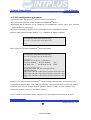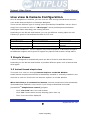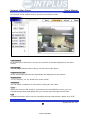
1
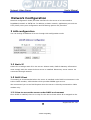
Network Video Server
User’s Manual
User’s Guide
FlexWATCHTM 3210
(Version. 3.0_Rev1)
Seyeon Technology Co., Ltd
www.flexwatch.com
www.intplus.es
Seyeon Tech Co., Ltd
- INTPLUS [2005] -
Network Video Server
User’s Manual
2
- INTPLUS [2005] -
Seyeon Tech Co., Ltd
Network Video Server
User’s Manual
Table of Contents
Overview of FlexWATCHTM Server ............................................................ 9
1 Packing List................................................................................................ 9
2 What is FlexWATCHTM? ............................................................................... 10
2.1 Key Function of FlexWATCHTM .............................................................. 10
2.2 Product Specification ......................................................................... 12
2.3 Basic Network Connection Diagram...................................................... 13
2.4 Application ....................................................................................... 15
3 Hardware Description ................................................................................ 16
3.1 Caution and observance ..................................................................... 16
3.2 Hardware Description......................................................................... 16
IP assignment ....................................................................................... 18
1 Key Words for Network .............................................................................. 18
2 Check Points before IP assignment .............................................................. 20
2.1 IP address........................................................................................ 20
2.2 LAN cable or Cross-Over Cable ............................................................ 22
2.3 PC Environment ................................................................................ 24
3 Factory Default ......................................................................................... 24
4 IP Assignment .......................................................................................... 24
4.1 Through Installation Wizard Program ................................................... 24
4.2 Through ARP command ...................................................................... 27
4.3 IP Assignment through HyperTerminal Mode ......................................... 30
Live view & Camera Configuration......................................................... 34
1 Simple Viewer .......................................................................................... 34
3
- INTPLUS [2005] -
Seyeon Tech Co., Ltd
Network Video Server
User’s Manual
1.1 ActiveX based simple view.................................................................. 34
1.2 Java Applet based live view ................................................................ 35
1.3 Simple viewer page guide................................................................... 35
2 FW-Voyager based view and recording ......................................................... 37
3 Camera configuration ................................................................................ 38
3.1 Camera value string configuration........................................................ 38
3.2 Camera configuration......................................................................... 39
System Configuration ............................................................................ 43
1 System Information................................................................................... 43
2 Date & Time ............................................................................................. 43
2.1 Date & Time in the server clock........................................................... 43
2.2 Date & Time using NTP server ............................................................. 44
3 Admin Password Setup .............................................................................. 44
4 Access permission and User registration ....................................................... 44
4.1 Full Access ....................................................................................... 45
4.2 Limited Access and User registration .................................................... 45
5 Tx Module Registration(NVCP)..................................................................... 46
Network Configuration .......................................................................... 49
1 LAN configuration...................................................................................... 49
1.1 Static IP .......................................................................................... 49
1.2 DHCP Client...................................................................................... 49
2 Network port configuration ......................................................................... 51
2.1 HTTP port configuration...................................................................... 51
4
- INTPLUS [2005] -
Seyeon Tech Co., Ltd
Network Video Server
User’s Manual
2.2 VDCP Port configuration ..................................................................... 51
3 Security configuration(IP filtering) ............................................................... 51
3.1 Configuration Example ....................................................................... 52
4 WAN Configuration and Application .............................................................. 53
4.1 Application with Dial-in/out feature ...................................................... 53
4.2 Dial Out configuration ........................................................................ 54
4.3 Dial-in Configuration.......................................................................... 56
5 Service path............................................................................................. 57
External Device connection & configuration .......................................... 59
1 Serial Input device .................................................................................... 59
2 Serial output device .................................................................................. 59
2.1 X 10 device ...................................................................................... 59
2.2 UART(Universal Asynchronous Receiver Transmitter) device .................... 60
3 PTZ device connection and configuration ...................................................... 60
3.1 PTZ Hardware cabling between the server and PTZ device...................... 60
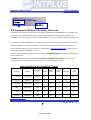
3.2 Supported PTZ(Pan/Tilt/Zoom) Device list............................................. 61
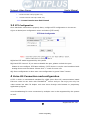
3.3 PTZ Configuration.............................................................................. 63
4 Voice Kit
Connection and configuration ........................................................ 63
4.1 Hardware connection ......................................................................... 64
4.2 Voice configuration ............................................................................ 64
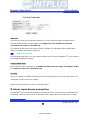
5 Alarm input device connection .................................................................... 65
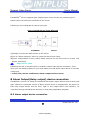
6 Alarm Output(Relay output) device connection .............................................. 66
6.1 Alarm output device connection........................................................... 66
5
- INTPLUS [2005] -
Seyeon Tech Co., Ltd
Network Video Server
User’s Manual
6.2 Manual control of Alarm output device.................................................. 67
6.3 Automatic Control of Alarm Output device............................................. 68
Advanced Service configuration ............................................................ 70
1 Pre/Post alarm buffer assignment(Buffering Service) ...................................... 70
1.1 Pre alarm buffer image ...................................................................... 70
1.2 Buffer calculator................................................................................ 71
2 Service Condition ...................................................................................... 73
2.1 Condition Setup ................................................................................ 74
2.2 Criteria Setup ................................................................................... 75
3 e-mail configuration .................................................................................. 76
3.1 e-mail function configuration............................................................... 76
3.2 e-Mail condition set up ....................................................................... 79
4 FTP Configuration...................................................................................... 79
4.1 Directory option ................................................................................ 80
4.2 FTP service configuration........................... ¡Error! Marcador no definido.
5 Sensor Notification service ................................ ¡Error! Marcador no definido.
6
- INTPLUS [2005] -
Seyeon Tech Co., Ltd
Network Video Server
User’s Manual
Notice
• The material in this document is for information only and is subject to change without
notice. While reasonable efforts have been made in the preparation of this document to
assure its accuracy, Seyeon Tech assumes no liability resulting from errors or omissions
in this document, or from the use of the information contained herein.
• Seyeon Tech reserves the right to make changes in the product design without
reservation and without notification to its users.
Copyright
Copyright© 1999-2005 Seyeon Tech Co., Ltd. All rights reserved. No part of this
publication may be reproduced, stored in a retrieval system, or transmitted in any form
or by any means, electronic, mechanical, photocopying, recording or otherwise, without
the prior written consent of Seyeon Tech Co., Ltd.
Copyright © 1999-2005 Seyeon Tech Co., Ltd.
810-12 Yeok Sam-dong,
Kang Nam-gu, SEOUL,
135-081,KOREA
TEL : 82 2 3017 0855
FAX : 82 2 3017 0843
URL : http://www.seyeon.co.kr
http://www.flexwatch.com
7
- INTPLUS [2005] -
Seyeon Tech Co., Ltd
Network Video Server
User’s Manual
Warning
To prevent risk of electric shock, Do not remove system-case. No user serviceable parts
inside. Any repair or modification for the product will be allowed to qualified service
personal only.
Do not expose this appliance to water or moisture.
Do not install this product in Hazardous areas where highly combustible or explosive
products are stored or used.
Important Information
• Before installation, please read and observe all instructions and warnings contained in
this manual. Retain this manual with the original receipt for future reference and
warranty.
• If any items are missing from the package when you open the box,
please DO NOT install or OPERATRE FlexWATCHTM server. Contact
the local Dealer or Distributor.
• Please record following information for technical support and the track record in
case of any theft or loss. Serial Number can be found underside of FlexWATCHTM server
Product Model :
Purchase Date :
Serial Number :
8
- INTPLUS [2005] -
Seyeon Tech Co., Ltd
Network Video Server
User’s Manual
Overview of FlexWATCHTM Server
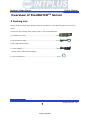
1 Packing List
Please check and make sure following items are included in your package without any missing
items.
If there are any missing items, please refer to your local distributor.
A. FlexWATCHTM 3210..…………………………………………………………………….1unit
B. RS-232 Serial cable…………………………………………………………………..…1unit
(Cross cable DB9 Female)
C. Power Adapter…………………………………………………………………………..….1unit
(Power Cable, SMPS DC 5V Adapter)
D. User’s Manual CD………………………………………………………….……………… 1unit
9
- INTPLUS [2005] -
Seyeon Tech Co., Ltd
Network Video Server
User’s Manual
2 What is FlexWATCHTM?
The FlexWATCHTM server is the Network Video Server, which transmits digital images captured by
Analog CCD camera over the Internet. So users can view real-time live images over the Internet at
anytime and anywhere using the standard web browser such as MS Internet Explorer or Netscape
Communicator. There is no need other specific software to view real-time live images over the
Internet. The FlexWATCHTM server is state-of-the art device and leads new generation of monitoring
and security solution.
2.1 Key Function of FlexWATCHTM
Video transmission: Transmit real-time live images over the Internet up to 30 frames per
second(fps).
Recording and Playback:
You can view and record live video stream transmitted from Video server through standard web
browser using FW-Voyager program.
Various Video Recording Option:
Scheduled, Motion detected, Sensor driven video recording as well as Forced recording and
Snapshot recording options are provided by FW-Voyager.
PTZ control:
Provide remote control for Pan/Tilt/Zoom device. So users can easily control the PTZ devices
connected to FlexWATCHTM server over the Internet without Key Pad or controller.
Security function: Provide security option to prevent unauthorized video access to FlexWATCHTM
server. Only authorized person can view live video.
Alarm input and output control:
Provide alarm sensor input interface. Thus, alarm based video transmission is possible. Also relay
output device can remotely be controlled through web browser.
Encryption mode:
This security feature is to prevent unauthorized access to image-data transmitted from
FlexWATCHTM server.
You can encrypt live video using Encryption mode and you need to enter Key code to view
encrypted video.
IP filtering function:
This security feature is for blocking the unauthorized access from the unauthorized IP address.
10
- INTPLUS [2005] -
Seyeon Tech Co., Ltd
Network Video Server
User’s Manual
Using this function, you can allow access to video for only specific IP address or IP address group.
Dial In/Out function:
With this option, you can dial into FlexWATCHTM server from remote site using regular telephone
line and view live video. Also, FlexWATCH can make auto dial-up connection to client PC or ISP to
send event driven video to FTP server or user defined e-mail address.
If FlexWATCHTM server is registered in AOIP server (which is IP gateway for Dynamic IP users) and
you use regular Telephone line based internet service, you can configure FlexWATCHTM server to
make a dial-up connection to ISP for the user_defiined time and connect the FlexWATCHTM server
at anytime and anywhere by connecting to the AOIP server. This eliminates the necessity for you to
make a dial-in connection whenever you want to view live video through Telephone line connection.
For more details, please refer to AOIP server configuration diagram in the CD Manual.
FTP Function:
With this option, you can have FlexWATCHTM server send live images triggered by the alarm sensor
or time reservation to FTP server to save those captured images at the remote location.
e-mail Function:
With this option, sensor-trigerred-images can be sent to user defined E-mail address with the
prefixed information about the FlexWATCHTM server.
AOIP Function:
With this option, any users who are using Dynamic public IP address or Private IP
address can have access to FlexWATCHTM server over the Internet( xDSL or Cable modem
user) if FlexWATCHTM server is registered in AOIP server. Users who want to use this
service should contact local distributor or dealer. For more details, please refer to AOIP
server configuration guide in the CD manual.
Voice Support : FlexWATCHTM server works with FW-V10s which is external VOIP ( Voice
Over IP) kit so that user can view, listen and speak over the TCP/IP network through
standard Web browser..
11
- INTPLUS [2005] -
Seyeon Tech Co., Ltd
Network Video Server
User’s Manual
2.2 Product Specification
dome, Vicon 1311RB are currently supported
and other PTZ device will be supported further.
Hardware
· 32bit RISC CPU
· Hardware Motion JPEG engine
· Flash Memory: 2Mbytes
· SDRAM: 16Mbytes
Alarm I/O interface
· 2 Opto-coupled inputs /1 Relay output
Network Protocols
· HTTP, TCP/IP, FTP, Telnet, ARP, RARP, PPP, PAP,
CHAP, JAVA, DHCP, e-mail, etc.
Easy Access
· Internet Explorer 4.0 or higher
· Netscape 4.0 or higher
· No plug-in S/W for the monitoring
Image Compression & Quality
· Compression algorithm: Real-time MJPEG
· Compression rate: Max 30fps
· Image quality: 5 levels
Auxiliary Video-in & output
· 2video input
Video Resolution
· NTSC: 704x480,704x240,352x240,176x112
Dimension
· FW-3210
Size: 160(D)x98(W)x38(H),
6.29”(D)x3.85”(W)x1.49”(H)
· Weight : 1.1lbs(500g) w/o PWR supply
· PAL: 704x576,704x288,352x288,176x144
Video Format
· NTSC/PAL video format support
PWR Supply
· DC 5 Volt, 1.5Am, SMPS
Performance
· Max up to 30 fps(NTSC)/25 fps(PAL)
Operating temp
· 40° ~ 125°F (5° ~ 50°C)
Management
· Configurable by serial or LAN port
· Remote Flash memory update via
Telnet & FTP
Approval
· FCC:Class A
· CE : Class A
LAN interface
· 10/100BaseT Ethernet auto sensing
Accessories
· Console cable for system set up
· Test LAN cable
· CD for User Guide, Installation wizard &
Technical note
· Quick Installation guide
Serial Interface
· RS-232 for console or modem (PSTN & GSM )
Security Function
· Password protected server access
· IP Filtering
· Image Encryption
Miscellaneous
· Java script (ver 1.1) mode
Service
· E-mailing by event
· FTP function by time schedule & event
· Auto dial-out by time schedule & event
· Dial-in function via PSTN modem
· Dynamic IP support through AOIP
· Sensor notification service
PTZ(Pan/Tilt/Zoom) Control
· RS232, RS-485 bus for multiple PTZ device or
UART device control.
· Panasonic CS-WV 854,Pelco Spectra dome II and
“p” protocol, Sony EVI-D30,Kalatel and AD Delta
· AVI conversion tool support by FW-voyager
· Pure HTTP based network camera
· Voice kit (FW-V10s) support
· Push streaming
· Developer support program
· Dynamic IP support through AOIP
· Freely downloadable NDVR Software
· Work with FW-Manager NDVR S/W
· Dynamic IP support through AOIP
12
- INTPLUS [2005] -
Seyeon Tech Co., Ltd
Network Video Server
User’s Manual
2.3 Basic Network Connection Diagram
FlexWATCHTM server provides flexible connectivity with any type of networks available
around you such as Leased line, Cable modem, xDSL line and PSTN (POT) line. Thus, it
can be installed either in LAN or WAN environment as long as there is network available.
But its configuration is subject to change depending on its environment. Following is
basic network diagram for using FlexWATCHTM server.
Thus, you are required to consult with your network administrator or network consultant
for more information. Also you are recommended to refer to Network configuration guide
in the CD manual for more details.
2.3.1 Leased Line connection
Simply get a Static IP address from Network Administrator and assign IP address to
FlexWATCHTM server and view from the internet.
2.3.2 Static IP address from Cable modem or xDSL line
Simply get a Static IP address from Network Administrator or ISP and assign IP address
to FlexWATCHTM server and view from the internet
Seyeon Tech Co., Ltd
- INTPLUS [2005] -
Network Video Server
User’s Manual
2.3.3 Dynamic IP address from Cable or xDSL line
FlexWATCHTM server can be installed on even Dynamic IP network. But it needs to be
registered in AOIP server which is an IP gateway running by Flexwatch.com or your local
Distributor. For more details, please refer to Technical guide book in the CD manual.
2.3.4 Dial-up to AOIP server
Using Dial-up function of FlexWATCHTM server and AOIP service, you can set the
FlexWATCHTM server to make a call to ISP and get it connected AOIP server. Once
FlexWATCHTM server is registered in AOIP server, you can connect FlexWATCHTM server
through AOIP server. Using this connection, you do not need to make multiple call or
international call to FlexWATCHTM server, since FlexWATCHTM server will be connected by
your local Phone line based Internet connection.
14
- INTPLUS [2005] -
Seyeon Tech Co., Ltd
Network Video Server
User’s Manual
2.3.5 Dial-in to FlexWATCHTM server through PSTN line
You can make a call to FlexWATCHTM server from anywhere and at anytime. But if you are
concerned about call charge, we are recommending to use above connection.
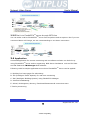
2.4 Application
Unlimited application for remote monitoring and surveillance solution can be built up
using FlexWATCHTM server and its supporting NVR Server hardwares such as FW-5000
and FW-5440 and FW-Manager DVR software.
Following could be simple application area where FlexWATCHTM server can be applied.
A. Building live home pager for advertising.
B. ITS (Intelligent Traffic System) for real time monitoring
C. IBS (Intelligent Building System) using FlexWATCH Manager
D. Internet broadcasting
E. School, Kindergarten, Nursery, Franchised Restaurant & convenient store.
F. Facility monitoring
15
- INTPLUS [2005] -
Seyeon Tech Co., Ltd
Network Video Server
User’s Manual
3 Hardware Description
• This chapter contains list of items to be prepared for the installation of FlexWATCHTM
server.
• Please carefully read this chapter before the installation.
• Please prepare all the necessary items before start installation to prevent any possible
malfunction or any other hazard can be happened during the installation.
3.1 Caution and observance
• Keep the device in the clean and dried area where air ventilation is guaranteed. The
device is not waterproof. The waterproof device or similar device must protect from any
possible hazard by water or heavy moisture etc.
• Regulated power supply is prerequisite for stable and optimal operation of the device.
Use only power supply (SMPS 5V 1.5Am) supplied with FlexWATCHTM server.
Manufacturer shall not liable for any hazard or shock caused by use of any other power
supply.
• To prevent risk of electric shock, do not remove system-case. No user serviceable parts
inside. Any repair or modification for the product will be allowed to qualified service
personal only
• Use the cable supplied with FlexWATCHTM server. If you need to connect FlexWATCHTM
server to the other device (External Modem, PTZ device), power on the devices before
connect to the FlexWATCHTM server.
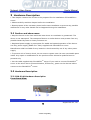
3.2 Hardware Description
3.2.1 FW-3210 Hardware Description
Front Panel View
A B
C
16
- INTPLUS [2005] -
Seyeon Tech Co., Ltd
Network Video Server
User’s Manual
BNC ports
PWR, LAN indication LED
A. BNC Port 1 : To connect Analog CCD Camera.
B. BNC Port 2 : To connect Analog CCD Camera.
C. LED : PWR- Always on when turned on
LAN – Blinking only if LAN is connected to the network
Side Panel View
A
B
A.RS232 / RS485 port:
The PTZ device connection port. RS-232/485 communication is supported.
B.DI/DO Port:
2 DI ( Sensor Input) and 1 DO (Relay output) port is supported.
Rear Panel View
A
B
C
A : LAN Port : Support 10/100M Base-T auto detection.
B : RS-232 port : to connect Modem or Serial cable
C : Poser Socket : DC 5V.
17
- INTPLUS [2005] -
Seyeon Tech Co., Ltd
Network Video Server
User’s Manual
IP assignment
1 Key Words for Network
LAN (Local Area Network) : Under the LAN network, any network device in the same
LAN network can be accessed by any other network device. But LAN network can not be
accessed from the internet (WAN).
Most of case, LAN is built after Router which is connected to WAN network so that
Network device in the local area network can access to the internet through Router. Most
of case, LAN networked device can not be accessed from the internet (WAN), unless it is
not configured to be accessed from the internet through NAT function of router.
WAN (Wide Area Network) : WAN enables all network device can be accessed by each
other over the Internet. It included Leased Line, Cable modem, xDSL, ISDN and
Telephone line etc.
IP address : IP address is abbreviation of Internet Protocol address which allows all
network device can communicate other over the network using Internet protocol. Each
network device has its own unit IP address whether or not it is in the LAN or WAN
network. Therefore network devices can be accessed by other network device from either
LAN or WAN (Internet).
For example, www.yahoo.com is a web server which has its own IP address so that any
body can has access to Yahoo web site. Like most of public web site has its own IP
address. Although IP address can not be seen by the client, domain name
(www.yahoo.com) is automatically converted into IP address by DNS server.
Static IP address : A static IP address is an IP address permanently assigned to
computer or network devices in a TCP/IP network. Static IP address is usually assigned
to network devices which are consistently accessed by any users. For instances,
www.yahoo.com has global static IP address. Thus, any body can access to the site. If
you want to view live video stream from FlexWATCHTM server over the internet, you need
to assign Global Static IP address.
Depending the network Public Static IP(WAN) or Private Static IP can be assigned to
network device.
18
- INTPLUS [2005] -
Seyeon Tech Co., Ltd
Network Video Server
User’s Manual
Dynamic IP address : A dynamic IP address is an IP address that is automatically
assigned to a client station (computer, printer, etc.) in a TCP/IP network. Dynamic IP
address is typically assigned by a DHCP server, which can be a computer on the network
or another piece of hardware, such as router. A dynamic IP address may change every
time your computer connects to the network
DHCP (Dynamic Host Configuration Protocol) : DHCP is software that automatically
assigns IP addresses to client stations logging onto a TCP/IP network. DCHP eliminates
troublesome job to manually assign permanent IP addresses to every device on your
network. DHCP software typically runs in servers and is also found in network devices
such as routers. Most of Cable Modem for internet access uses DHCP Public IP address
and Private IP address : Public IP address is an IP address which can be identified
uniquely in Internet world. All IP addresses excluding private IP addresses are public IP
addresses. Private IP addresses range from 10.0.0.0 until 10.255.255.255, and from
192.168.0.0 until 192.168.255.255. Generally speaking, private IP addresses are used in
local area network which are hidden from the Internet world. Also, when public IP
addresses not enough, private IP addresses are used while sharing global IP addresses
Router : Router is a network hardware which routes either Private or Public IP address
to Public network so that network device between private IP network and Public IP
network can communicate over the network. Router has NAT (Network Address
Translation) function and through this function Public IP address will be mapped into
private IP network so that Network device in the private IP address can be added from
internet.
Hub : Hub is a hardware which relay transmission between Router and Network device.
There are two types of Hub. One is Dummy hub and the other one is Switching hub. Note
that Hub will be used in the local network only.
NAT (Network Address Translation) : Network Address Translation (NAT) translates
multiple IP addressed on the private LAN to one public address that is sent out to the
Internet. This adds a level of security since the address of a PC connected to the private
19
- INTPLUS [2005] -
Seyeon Tech Co., Ltd
Network Video Server
User’s Manual
LAN is never transmitted on the Internet.
AOIP (Always On Internet Protocol) Server: AOIP™ server (Always On IP) is run by
Seyeon Technology or its business partner and is a gateway for remote users to access
FlexWATCH™ servers which is connected dynamic IP address over DSL,Cable modem and
PSTN network over the internet.. FlexWATCH Network Video Server and Camera Server
family is fully supported by AOIP server and any type of IP address(Global Dynamic IP or
Private IP) can be assigned to FlexWATCHTM server and user can access FlexWATCH
system from the internet at anytime and anywhere through AOIP server.
2 Check Points before IP assignment
Following are list of item to be checked before you start configuration of
FlexWATCHTM server.
2.1 IP address
You need to have Static IP address and other information such as Default Gateway and
Network Mask which are to be assigned to FlexWATCHTM server. Please consult with your
network administrator, if FlexWATCHTM server is to be installed in your corporate network,
or consult with ISP if you want to install it in your home or shop for which DSL or Cable
modem internet service is available.
Following could be a simple way of finding IP address information of your PC and with
that information you can set up IP address to FlexWATCHTM server in the private IP
network without consulting to your ISP.
- Open DOS Command window as following procedure.
Program> Accessories > DOS Prompt
- Enter ‘ ipconfig’ command. Following information will come up
2.1.1 Static IP address enabled PC (DHCP Disabled PC)
You can easily check whether Static IP address is assigned to your PC. If you are in the
Static IP network, it is more simple to assign IP address to FlexWATCHTM server than
20
- INTPLUS [2005] -
Seyeon Tech Co., Ltd
Network Video Server
User’s Manual
DHCP network.
\
C:\> ipconfig
Windows 2000/XP IP Configuration
Ethernet adapter Local area connection :
Connection-specific DNS Suffix . :
IP Address. . . . . . . . . . . . : 192.168.0.158
Subnet Mask . . . . . . . . . . . : 255.255.255.0
Default Gateway . . . . . . . . . : 192.168.0.1
C:\>
With above info, you can get information about your network from your PC and see which
IP class of IP address should be assigned to FlexWATCHTM server.
Note that the same class, but different IP address appeared in your PC must be used for
FlexWATCH server to assign an IP address from your PC keeping Subnet mask & default
gateway as same that of your PC.
For example, 192.168.0.155 or other available IP address except 192.168.0.158 can be
assigned to FlexWATCHTM server, since it is the same class of your IP address and can
be communicated in your local network.
If you want to check out whether 192.168.0.155 is available. Please try ping command in
the DOS window. If there is any response, it means 192.168.0.155 is assigned to other
network device. Thus, you need to randomly select other IP address and try ping test or
consult with your network administrator
C:\> ping 192.168.0.155
Pinging 192.168.0.155 with 32 bytes of data:
21
- INTPLUS [2005] -
Seyeon Tech Co., Ltd
Network Video Server
User’s Manual
Reply from 192.168.0.155: bytes=32 time=10ms TTL=128
Reply from 192.168.0.155: bytes=32 time<10ms TTL=128
Reply from 192.168.0.155: bytes=32 time<10ms TTL=128
Reply from 192.168.0.155: bytes=32 time<10ms TTL=128
2.1.2 DHCP Enabled PC
If your PC is set to use DHCP, you need to check out IP address of
your PC using
‘ ipconfig’ command at DOS Prompt window.
You need to get IP address from your network administrator to assign it to FlexWATCHTM
server. IP address should be Surplus of IP address which will be not randomly assigned to
any network device in your network.
Your network administrator must make sure that IP address should be excluded from IP
pool when he configure Router.
Ethernet adapter Local Area Connection:
Connection-specific DNS Suffix . :
Description . . . . . . . . . . . : 3Com EtherLink III
ISA (3C509/3C509) in Legacy mode
Physical Address. . . . . . . . . : 00-60-08-3C-40-90
DHCP Enabled. . . . . . . . . . . : Yes
Autoconfiguration Enabled . . . . : Yes
IP Address. . . . . . . . . . . . : 192.168.0.158
Subnet Mask . . . . . . . . . . . : 255.255.255.0
Default Gateway . . . . . . . . . : 192.168.0.1
DHCP Server . . . . . . . . . . . : 192.168.0.1
DNS Servers . . . . . . . . . . . : 168.126.63.1
168.126.63.2
C:\>
2.2 LAN cable or Cross-Over Cable
Check out whether FlexWATCHTM server can be connected through LAN cable or Cross-
22
- INTPLUS [2005] -
Seyeon Tech Co., Ltd
Network Video Server
User’s Manual
over cable.
2.2.1 LAN Cable Environment
If your PC is connected to network through LAN cable, you need to connect
FlexWATCHTM server to LAN port of Hub or Router.
2.2.2 Cross-over cable
If LAN network is not available, you can directly connect FlexWATCHTM server to your PC
through Cross-over cable. In this case, you need to prepare Cross-over cable separately
(Note that The LAN cable included in the product package is not Cross-over cable, but
normal straight cable) and you need to set your PC IP address as 10.10.10.11 and
connect the server with Factory default IP address, 10.10.10.10 through web browser.
Following is brief procedure to connect the server after changing PC IP address.
1) Click right button of your mouse on the ‘My Network Places’ icon in the main screen
window.
2) Click right button of your mouse on the ‘Local area connection’ icon and select
‘Property’ option.
3) Select ‘Internet protocol (TCP/IP)’ option and click ‘Property’ icon.
4) Select ‘use the following IP address’ option from the TCP/IP property option and set
the IP address as follow
-
IP address : 10.10.10.11
-
Network Mask : 255.255.255.0
-
Default Gateway : 10.10.10.1
5) Connect FlexWATCHTM server using Cross-over cable to your PC and run your web
browser and enter default IP address, 10.10.10.10, of FlexWATCHTM server in the URL
field. Note that Cross-over cable is not supplied with product.
6) Once you are connected to the server, click Admin icon and click LAN configuration
menu.
7) Enter IP address you would like to assign to the FlexWATCHTM server and change your
PC IP address again.
23
- INTPLUS [2005] -
Seyeon Tech Co., Ltd
Network Video Server
User’s Manual
2.3 PC Environment
Check out whether your PC is connected to LAN or WAN network or stand alone. If stand
alone, you need to use Cross-over cable or build up LAN environment to use LAN cable.
3 Factory Default
Please refer to the following factory defaults to change setting up.
Factory Default
Admin ID
Admin password
IP address
Network mask
Gateway
root
root
10.10.10.10
255.255.255.0
10.10.10.1
4 IP Assignment
FlexWATCHTM server can be configured by three different configuration method and
following is brief explanation.
Installation Wizard Program:
IP installation program is provided in CD form. Once FlexWATCHTM server is connected to
LAN network, you can assign IP address through program and access the Web browser
ARP Command configuration:
If you do not have IP installation program, you can use ARP command to assign IP
address over the network. This is programmer friendly interface rather than general user.
HyperTerminal mode:
f no network is available and you want to set up IP address, you can directly connect
FlexWATCHTM server to your PC through Serial cable provided together with product.
HyperTerminal mode is very useful tool to recover Admin password when you lost your
admin password or to report any problem to Manufacturer when product is on
malfunction status.
4.1 Through Installation Wizard Program
24
- INTPLUS [2005] -
Seyeon Tech Co., Ltd
Network Video Server
User’s Manual
IP setting with Installation Wizard program is easy and simple way and after IP setting is
done you can do other configuration through web browser.
You can use IP Installation Wizard Program through following step.
(IPInstallationWizard.exe is provided in the product CD)
Preset a PC with Microsoft Windows O/S.
1) Connect FlexWATCHTM Server into the network (Hub) that your PC is belong to.
2) Run the IP installation Wizard program in your PC. Then following IP Installation
Wizard window will be shown up.
D
A
E
F
B
G
C
H
Description of Window
A
Menu
Description
Serial No. (MAC Address)
of System
Enter serial number of FlexWATCHTM server (Mac
address) attached at the bottom of the unit and
select the LAN port.
WAN PORT is only for setting up FW-5000 and
fw-5440 model which has two LAN Card inside of
the box.
25
- INTPLUS [2005] -
Seyeon Tech Co., Ltd
Network Video Server
IP Address on PC
B
IP Address
C
IP, Subnet, Gateway
D
‘Set IP Address’ Button
E
‘Save IP Address’ Button
F
‘Go to Home Page’ Button
G
‘Telnet to System’ Button
H
Result window
User’s Manual
Auto scanned IP address of user’s computer with
IPInstallationWizard.exe running on. The above
IP ‘192.168.0.97’ is only an example.
Input an IP address to be assigned to
FlexWATCHTM server
Note that the IP must be directly connectable
with user’s PC.
Whether to change IP, Subnet and Gate or IP and
Sub net mask only.
To activate a new IP assignment, click this
button.
To save IP-Address in the Flash Memory.
To launch FlexWATCH Web browser and start
other configuration through Administration page.
To guide you Telnet mode for Advanced
Configuration.
Show the result of IP assignment. If failed, try
again from the start or use other configuration
method
3) Input the Serial No. (MAC address) and Select “LAN Port”.
4) Input the IP address, which will be assigned to the system.
5) Click “Set IP Address” button to save the above configuration.
6) Check whether message type is correctly appeared on Result window as below.
------------ Set Server IP Address -----------ARP: Adding static entry to ARP table
[ OK ]
Ping: Trying ping 192.168.0.97
[ OK ]
ARP: Deleting static entry from ARP table
[ OK ]
7) If message come up as below, IP address setting has been failed.
------------ Set Server IP Address -----------ARP: Adding static entry to ARP table
[ OK ]
Ping: Trying ping 192.168.0.97
[FAILED]
Please check whether IP address and MAC address is
valid.
Then, please retry again.
ARP: Deleting static entry from ARP table
[ OK ]
-
If IP address setting is failed, please check whether correct IP/MAC address is entered.
And try again with correct IP/MAC address, or please use HyperTerminal method.
-
If the above result is O.K., follow the next step to finish Network Configuration.
26
- INTPLUS [2005] -
Seyeon Tech Co., Ltd
Network Video Server
User’s Manual
8) Click “Save IP Address” button to save IP-Address in the Flash Memory.
9) Click “Go to Home Page” button to access to FlexWATCHTM server Web browser.
10)
For server configuration, click “Admin” Icon and Input User ID and Password
(Factory default is root : root) to get into configuration mode and then press “OK”
button.
) Note
Once you changed the IP address of FlexWATCHTM server, you need to connect the server
with the changed IP address. If you lost the IP address assigned to FlexWATCHTM server,
you need to set-up a new IP address again.
) Note
If IP address set result is failed, please check whether correct IP/MAC address is entered.
And try again with correct IP/MAC address, or please use HyperTerminal method.
4.2 Through ARP command
This method is easy tool to set up IP address when FlexWATCHTM server is connected to
the network and you do not have Installation wizard program.
These commands are to be done in DOS prompt window only. To get to a DOS window
for Windows computer,
-
Click “Window Start” button
Click on ‘Run’
type in “command” and click “OK”.
27
- INTPLUS [2005] -
Seyeon Tech Co., Ltd
Network Video Server
User’s Manual
4.2.1 In Case of Using Window 95/98/ME
C:> arp –s <Server IP address> <Server MAC address> <w95/98 host IP Address>
C:> ping <server IP address>
Example )
C:\> arp -s 192.168.0.187 00-30-6f-00-01-a5 192.168.10.1
C:\> ping 192.168.0.187
TIP! : Host IP address (your 95/98 PC IP address) can easily found by input ‘ipconfig /all’
command in DOS Window
4.2.2 In Case of Window NT/2000/XP
C:> arp –s <Server IP address> <Server MAC address>
C:> ping <server IP address>
Example )
C:\> arp -s 192.168.0.187 00-30-6f-00-01-a5
C:\> ping 192.168.0.187
4.2.3 UNIX
C:> arp –s <Server IP address> <Server MAC address> temp
C:> ping <server IP address>
Example )
C:\> arp -s 192.168.0.187 00:30:6f:00:01:a5 temp
C:\> ping 192.168.0.187
28
- INTPLUS [2005] -
Seyeon Tech Co., Ltd
Network Video Server
User’s Manual
4.2.4 IP configuration procedure
1) Connect your FlexWATCHTM server to the Local Network.
2) Connect the external power supply to FlexWATCHTM server.
3) Acquire an IP address to be assigned to FlexWATCHTM server from your network
Administrator or consultant.
4) Acquire S/N(MAC) Number from underside of your FlexWATCHTM server.
5) Run DOS prompt window and try ‘arp’ command as follow example.
Microsoft(R) Windows NT(TM)
(C) Copyright 1985-1996 Microsoft Corp.
C:\> arp -s 192.168.0.187 00-30-6f-00-01-a5
C:\>
6) Try ping to connect FlexWATCHTM server as follow.
Microsoft(R) Windows NT(TM)
(C) Copyright 1985-1996 Microsoft Corp.
C:\> arp -s 192.168.0.187 00-30-6f-00-01-a5
C:\> arp –a
Interface: 10.10.10.181 on Interface 2
Internet Address
Physical Address
192.168.0.187
00-30-6f-00-01-a5
Type
static
C:\> ping 192.168.0.187
Pinging 192.168.0.187 with 32 bytes of data:
Request timed out.
Reply from 192.168.0.187: bytes=32 time<10ms TTL=255
Reply from 192.168.0.187: bytes=32 time<10ms TTL=255
Reply from 192.168.0.187: bytes=32 time<10ms TTL=255
C:\>
Now you can connect the FlexWATCHTM server through web browser and once you are
connected to admin page, click ‘LAN (IP Address)’ configuration Menu on the left. Please
note that you need to change Default gateway which is comply to your network and
reboot the system to save in the Flash memory.
If you cannot succeed with above method, try it with HyperTerminal mode as well.
29
- INTPLUS [2005] -
Seyeon Tech Co., Ltd
Network Video Server
User’s Manual
4.3 IP Assignment through HyperTerminal Mode
For HyperTerminal connection, Power and RS-232 Cable as well as LAN cable must be
connected to FlexWATCHTM server from your PC. LAN cable is to run Web browser after
configuration using HyperTerminal.
Normally there are Two Serial Port in your PC (COM1/COM2). Connect RS-232 cable to
one of COM Ports.
1) Connect RS-232, LAN and Power Cable to FlexWATCHTM server.
2) Run HyperTerminal on your PC as following procedure.
‘Start Æ Program Æ Accessories Æ Communication Æ HyperTerminal.
If HyperTerminal window appear as below, input HyperTerminal name(ex. FlexWATCH)
and Icon.
3) Check Modem you would like to use. If you are to use COM1, select ‘COM1’ and click
‘Confirm’ button.
30
- INTPLUS [2005] -
Seyeon Tech Co., Ltd
Network Video Server
User’s Manual
4) Change only ‘Baud Rate’ and ‘Flow Control’ as follow and Click Enter.
Baud Rate : 38400 / Flow Control : None
After above configuration, click “OK” button and ’$’ prompter will come up.
5) Enter ‘ config ‘ command after ‘$’ prompt and following configuration menu will come
up.
$ config
+-------------------------------------++-------------------------------------+
|
Top Configuration Setup
|
+-------------------------------------++-------------------------------------+
| [c] System Configuration
|| [n] Networking Configuration
|
| [d] Device Interface Configuration
|| [a] Advanced Service Configuration
|
| [@] Set Default Configuration
||
|
+-------------------------------------++-------------------------------------+
| [s] Save & Exit
|| [q] Quit
|
+-------------------------------------++-------------------------------------+
[ ] select menu = n
6) Enter ‘n’ to configure Network status.
+-------------------------------------++-------------------------------------+
|
Networking Configuration
|
+-------------------------------------++-------------------------------------+
31
- INTPLUS [2005] -
Seyeon Tech Co., Ltd
Network Video Server
User’s Manual
| [l] LAN Configuration
|| [d] DNS Configuration
|
| [w] WAN Configuration
|| [u] Network Utility
|
|
|| [q] Quit
|
+-------------------------------------++-------------------------------------+
[ ] select menu = l
7) Enter ‘l’ for LAN configuration and current IP address will be shown and then enter ‘y’
to proceed.
------------
Network ( LAN ) Setup
------------
Current Configuration
Assign Mode
= by Static IP
IP Address
= 10.10.224.100
Network Mask
= 255.255.0.0
GateWay Address = 10.10.1.1
[] Do you want to change above configuration ?(y/n) = y
[] Select Address Assign Mode : DHCP/Static (d/s) = s
[] Enter IP Address
= 10.10.224.100
[] Enter Network Mask
= 255.255.0.0
[] Enter Gateway IP Address = 10.10.1.1
8) Enter ‘s’ and type in IP address, Network Mask and Default Gateway, and then strike
‘Enter’ Key.
9) Type in ‘q’ to get out from Networking Configuration with out change.
10)
Or Type in ‘s’ to save your configuration in the flash memory.
11)
Type in ‘reset’ command to save new IP address permanently.
12)
After reboot successfully, run your web browser and access the FlexWATCHTM
server with New IP address.
If HyperTerminal mode is not supported by your PC, you need to check out with your PC supplier
whether HyperTerminal option was installed when operating system was installed. HyperTerminal
32
- INTPLUS [2005] -
Seyeon Tech Co., Ltd
Network Video Server
User’s Manual
can be installed from your Windows CD.
If HyperTerminal is installed on your PC but you cannot connect, please check whether you have
the correct COM port selected and that your COM ports are working properly. If you are unsure if
your COM port work, please try this configuration from a computer with a COM port that is known
to work.
33
- INTPLUS [2005] -
Seyeon Tech Co., Ltd
Network Video Server
User’s Manual
Live view & Camera Configuration
Once IP assignment is finished, you can view live view through standard web browser
such as MS Internet Explorer or Netscape Navigator.
There are two different type of viewing option provided by FlexWATCHTM server. One is
simple live view and the other is “FW-Voyager” which provides personal Network
DVR(Digital Video Recording) and viewing solution.
Depending on the OS and web browser, you can get different viewing option as well.
Following is guide for OS and Web browser for live view.
Viewing mode
Simple view (ActiveX)
Java Applet mode
Operation System
MS Window
Window, Linux, Unix, MAC, OS2
FW-Voyager (Recording)
MS Window
Web browser
Internet explorer only
Netscape and other web
browser
Internet Explorer only
* Note that FlexWATCHTM server supports only Internet Explorer or Netscape Navigator.
No additional support will be given to support any specific web browser except above.
1 Simple Viewer
v server is designed to automatically sense the OS of Client PC and Web browser.
Depending on the OS and web browser it provides different option such as ActiveX and
Java Applet.
1.1 ActiveX based simple view
This mode is to view live through Internet explorer on the MS Window
Small ActiveX components should be automatically installed or manually installed in the
client PC to view live if Client PC use Internet explorer on the MS Window.
When the client pc is connected to internet, ActiveX components will automatically
downloaded and installed in the view PC if you accept to download and install
[FlexWATCHTM SimpleViewer control] program
-
Click “Live view” tab in the web browser
-
Click “Yes” button when security Warning panel come up
-
Then, live view will be displayed
34
- INTPLUS [2005] -
Seyeon Tech Co., Ltd
Network Video Server
User’s Manual
When the Client pc is not connected to internet, you need to manually install ActiveX
components in your viewing PC.
-
Insert the product CD in your PC
-
Select “FlexWATCH Simple Viewer control” program
-
Application idea
ActiveX based SDK is provided for software developers so that application program
developers can easily utilize digital video from FlexWATCH server for his own video
application.
1.2 Java Applet based live view
Java applet is to display live video through any web browser on any Operating system
supporting Java Virtual Machine. This is to view live video through Netscape navigator
on MS window or other Operation system such as Unix, Linux, MAC, OS2. Thus, if you
are using MS IE on MS Window, Java Applet can not be enabled.
Note that JRE(Java Runtime Environment) must be running in your web browser to
display live video on Unix, Linux, Mac, OS2 Operating system or Netscape Navigator on
Window. If not, you need to manually download and install JRE file from the web page of
Sun Microsystems.
1.3 ‘Live view’ page guide
Live view page provides various control option such as image magnification, snapshot,
35
- INTPLUS [2005] -
Seyeon Tech Co., Ltd
Network Video Server
User’s Manual
PTZ control, Relay output control, Voice kit connection as well.
Cam Control :
By checking the camera you can get any number of camera displayed on the same
screen.
Frame Rate :
You can adjust display frame rate by control Frame rate option
Sequence On/Off :
All the connected cameras can sequentially be displayed on the monitor.
Display Size :
‘x1’ for real size, ‘x2’ for double size screen mode.
Snap Shot :
You can make a snapshot of video while viewing the live video.
Voice :
When the voice kit (FW-V10S) is connected to the FlexWATCHTM server, you can
simultaneously listen and speak with your counter part through web browser.
PTZ :
PTZ(pan/tilt/zoom) device can be controlled through web browser. When click “PTZ”
36
- INTPLUS [2005] -
Seyeon Tech Co., Ltd
Network Video Server
User’s Manual
button, PTZ control panel will be pop up. But note that you need to get permission to
control it.
DO (Digital Output Control) :
Relay output device can be controlled through simple view page. But note that you need
to get permission to control it.
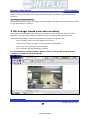
2 FW-Voyager based view and recording
FW-Voyager is web based DVR software for personal video recording. Using this free
software, user can easily install the software and do video recording at any time.
Note that FW-Voyager is works on MS Internet explorer of Window OS.
-
Click “Voyager” tab in the web page of the server
-
Wait till the Voyager program is automatically downloaded.
-
Click “yes” in the Security warning panel
-
Then software will automatically installed.
For the operation of the software, please refer to user guide of FW-Voyager
software included in the product CD.
37
- INTPLUS [2005] -
Seyeon Tech Co., Ltd
Network Video Server
User’s Manual
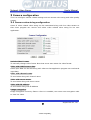
3 Camera configuration
This is to configure camera related settings such as camera value string and video quality
setting.
3.1 Camera value string configuration
Some of video related value string can be transmitted along with live video stream so
that client program can receive and utilize video related value string for his own
application.
Default Video Format :
To manually change video format. Note that server auto sense the video format
Video with UART sensor data:
Serial input data can be sent along with video so that application program can read serial
input data
Video with channel name:
To send video along with channel name
Video with server name:
To send video along with server name
Video with IP address:
To send video along with IP Address
Image encryption:
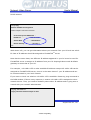
Image encryption is security feature. Once it is enabled, user must enter encryption code
to view live video.
38
- INTPLUS [2005] -
Seyeon Tech Co., Ltd
Network Video Server
User’s Manual
) Note
All of video related values are encrypted in the JPEG image and can not be read by any
program as it is. It is intended to help application program developer to utilize video
related value string for his own specific application. Manufacturer can provide more
technical documentation for the programmer to decrypt value string for his programming.
Thus, please contact your local vendor to get more in-depth technical info to decrypt the
value string.
3.1.1 Image encryption
Image encryption is security feature to prevent unwanted image hacking when
anonymous users try to access the system. Once it is enabled, user must enter
encryption code to view live video.
1) Simple set up encryption code
2) Enter encryption key code to view live. Up to 8 alpha-numeric character can be used.
) Note
Once you lost your encryption code, you can reconfigure encryption code through Admin
Mode.
Once Image encryption is enabled, FW-Manager can not display live video. Thus,
you must disable Encryption mode when the image is to be viewed from FWManager program.
3.2 Camera configuration
39
- INTPLUS [2005] -
Seyeon Tech Co., Ltd
Network Video Server
User’s Manual
• Through camera configuration mode, you can adjust the video quality to meet your
requirement.
• It is recommended that if you connect multiple cameras to the FlexWATCHTM server. It
would be better to use the camera from single vendor rather than different vendor. Video
Synchronization problem may be occurred between the respective cameras during
camera switching, as Camera Manufacturers use different technology to implement
standard video.
1) Click ‘Camera configuration’ menu in the Service configuration mode of admin
window
2) Set up camera value string
3) Select Camera channel and set up camera related information such as Camera name
and quality setting.
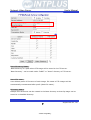
Camera name :
User defined camera name will be appeared on the camera name column of video. The
camera name can be 21-alpha-numeric or 10-unicode.
40
- INTPLUS [2005] -
Seyeon Tech Co., Ltd
Network Video Server
User’s Manual
Image Size : 4 different size of video can be set upo
Full
704 x 480
704 x 576
NTSC
PAL
Large
704 x 240
704 x 288
Normal
352 x 240
352 x 288
Small
176 x 112
176 x 144
Application Idea
Full size of video can show interlaced video when the camera is displaying fast moving
picture. To avoid interlaced video, use large size of video which use Field image only.
Note that in this case, camera quality can slightly be degraded..
Channel Install :
If “Disable” is selected, camera will not be displayed, though camera is connected and
working well
Camera Mode: choose color and Gray mode option depending on your camera
Image Quality: 5 quality levels - highest, high, normal, low, lowest
Switching Delay Time:
Video overlapping over the different type of camera can be happened by video
synchronization problem. In this case you can fix the problem by increasing video
switching delay time.
-
Value 3 ~5 is generally recommended.
-
Adjust Switching delay time for all camera, if you need to adjust
-
The larger the switching delay time, the slower the video transmission
speed. Thus, set up Video switching delay time at a proper level.
) Note
Please note that if you increase image size and quality, actual JPEG file size will be
increased and this may affect actual transmission frame rate. Thus, you are required to
check out your network bandwidth available for FlexWATCHTM server and select the right
size and quality of video.
It is not recommended to use CCD Camera by combining B/W camera and Color camera,
since it may cause video overlapping problem. If you use wireless camera, the same
41
- INTPLUS [2005] -
Seyeon Tech Co., Ltd
Network Video Server
User’s Manual
problem may be happened, because video sync signal is very weak or unstable at some
environment.
42
- INTPLUS [2005] -
Seyeon Tech Co., Ltd
Network Video Server
User’s Manual
System Configuration
System configuration is to set up basic functions which help you properly run and
manage the system. It is highly recommended to set up the configuration before any
other configurations. Following functions are provided in the System configuration mode.
-
System name and Info
-
System Administration account set up
-
System access level setting
-
Serial port configuration (PTZ or external device connection)
-
TX Module configuration
1 System Information
System information is very important one
Following menu will be provided
Server Name
Serial Number
Model
Version
User definable and Identifier of the system when the system is
accessed by third party program such as NDVR software.
Product serial number. This information must be submitted for RMA
or Warranty claim
This information also needs to be submitted for technical support
request
System firmware version. This information also needs to be
submitted for technical support request
2 Date & Time
Date & time is very important factor to trigger any service at the right time such as FTP,
e-Mail, Alarm notification etc. If Date & time is not correctly set up in the system,
any service which will be triggered by schedule will be not done correctly.
Also Server Date & time info will be displayed on the image. If you need to display
correct time, please set up more accurate time information.
2.1 Date & Time in the server clock
Date & time can be set up in the real time clock built in the server. Simple set up Date &
Time info in the Date & Time configuration field.
1) Go to Date & Time setup menu in the System configuration section of Admin mode
43
- INTPLUS [2005] -
Seyeon Tech Co., Ltd
Network Video Server
User’s Manual
2) Set the correct time and click “Apply” button
2.2 Date & Time using NTP server
If multiple servers are installed over the network and controlled by client program and
synchronized time info is required, use NTP(Network Time Protocol) option.
1) Go to [NTP setup] menu in the Network configuration section of Admin Mode
2) Enable the service and select Time Zone where the server is located
3) Type in NTP time server info.
Note that it is highly recommended to use Default NTP server in your network
environment. . Local time server will not work with the system.
.
3 Admin Password Setup
System administration Menu is user definable. It is highly recommended to change
default Admin Password to prevent any unwanted server control by any other person.
) Please note followings
A. Factory default admin ID is root and Password is root (Case sensitive)
B. Admin ID(root) is not user definable and unchanging
C. Only Admin Password is user definable
4 Access permission and User registration
Access permission is to set up user account for the system access. Through this
configuration you can create multiple user account with different control authority for
each camera , edit and delete user account.
Following features are provided by this mode
A. Option to allow system access without system Login ID & PW
B. Channel based different user account creation
C. Different control authority for Video, PTZ, Audio, and relay output device
control
44
- INTPLUS [2005] -
Seyeon Tech Co., Ltd
Network Video Server
User’s Manual
4.1 Full Access
To allow system access by anyone who know the IP address. PTZ, Audio and Relay
output device can be controlled by anyone. Thus, if security for video is important, it is
higher recommended to user limited access mode below
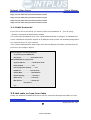
4.2 Limited Access and User registration
This is to limit server access to the authorized user only. Through this mode, you can
create multi level access account for each camera, not system level, with different control
authority.
Once Limited Access option is selected, User registration should be followed to effectively
use Limited Access function.
) Application Tips
If servers are accessed and controlled by third party application program and if
you want to give different control authority for each camera to different application
program, you can give different access and control authority for PTZ, Audio, Relay output
device control for specific camera by creating different User account in the server.
Following is step for Limited access account for each camera.
1) Select [Limited Access] option in the Access Permission menu
2) Click [Apply] button
3) Click [user registration] menu in the System configuration section of Admin window
4) Fill out the column provided such as User name, ID & Password
45
- INTPLUS [2005] -
Seyeon Tech Co., Ltd
Network Video Server
User’s Manual
5) Select the Camera for which you would like to give permission and check control item
such as video, PTZ, Audio and Relay output device
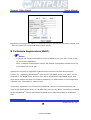
5 Tx Module Registration(NVCP)
)
-
Notice
If you do not connect FlexWATCH server to NDVR server, you don’t needs to set
up TX module registration
-
Once Tx Module configuration is done, RX module configuration should be set up
in the NDVR server as well
Video proxy function is supported by NDVR server such as FW-5440 and FW-5000
servers. By registering FlexWATCHTM video server into NDVR server, live video can be
recorded in the NDVR server and live view can be accessed through NDVR server web
page which means user does not need to separately run web browser to view respective
cameras from FlexWATCHTM video servers.
TX module registration is to set up the FlexWATCHTM server to communicate with FW5440 or FW-5000 NDVR server or FW-VSS Proxy Server only. When TX module is enabled
at the FlexWATCHTM server, RX module at NDVR server side should also be enabled as
well.
46
- INTPLUS [2005] -
Seyeon Tech Co., Ltd
Network Video Server
User’s Manual
Two different mode is provides as a connection type. One is Passive and the other is
Active mode. Depending on which device tries to establish the connection to the other
party, the connection type will be decided.
Passive mode : NDVR server tries to establish connection to FlexWATCHTM server
Active Mode : FlexWATCHTM server tries to establish connection to NDVR server
Once connection type is decided in the FlexWATCHTM server, the connection type in the
NDVR server should be opposite so that it can communicate with FlexWATCHTM server.
For example, once Passive mode is set up in the FlexWATCHTM server, Active mode must
be set in the NDVR server.
1) Click TX Module registration menu in the System configuration mode of Admin
window.
2) Select TX Module. By configuring TX module, you can program the server to
communicate with different NDVR server. Up to 6 different NDVR server can
simultaneously work with FlexWATCHTM server.
3) Select Passive or Active Mode depends on the network situation with NDVR server.
4) Once Active mode is selected, type in IP address of NDVR server.
) Note
NVCP port should be opened to communicate with NDVR Server beforehand, when the
FlexWATCHTM server is programmed to communication with NDVR server
47
- INTPLUS [2005] -
Seyeon Tech Co., Ltd
Network Video Server
User’s Manual
Following is recommended setting guide for TX and RX module for FlexWATCHTM server
and NDVR depending on the network environment
Video server
Mode
Passive mode
Active Mode
Passive mode
Active Mode
Passive Mode
)
-
NDVR Server
Network environment
WAN Network(Global Static)
LAN Network (Private)
LAN Network (Private)
WAN Network(Global Static)
LAN or WAN with AOIP
server connection
Mode
Active Mode
Passive mode
Active mode
Passive mode
Using AOIP
server
Network environment
LAN network (Private)
WAN network (Global Static)
LAN Network (Private)
WAN Network(Global Static)
LAN or WAN network
Notice
If you do not connect it FlexWATCHTM server to NDVR server, do not set TX
module configuration
-
Once Tx Module configuration is done, set up RX module configuration in the
NDVR server as well
48
- INTPLUS [2005] -
Seyeon Tech Co., Ltd
Network Video Server
User’s Manual
Network Configuration
Network configuration mode provides interface for the server to be connected to
broadband network or PSTN line. In addition to basic network, application port such as
HTTP, NVCP, Voice port configuration and IP filtering options are provided.
1 LAN configuration
You can change IP address of server through LAN configuration mode.
1.1 Static IP
Select this to assign static IP in the server. Subnet mask, Default Gateway information
must comply with the network where server is installed. Otherwise, server cannot be
connected through network.
1.2 DHCP Client
This setting is recommended when the server is installed under DHCP environment in the
LAN or Cable modem, xDSL Modem which provides PPPOA type service.
We recommend you to use DHCP option when the server is directly connected to Cable
modem only.
1.2.1 How to access the server under DHCP environment
Once DHCP is enabled, there is no way for the user to know which IP is assigned to the
49
- INTPLUS [2005] -
Seyeon Tech Co., Ltd
Network Video Server
User’s Manual
server from the server web page. Following is guide how to get to know IP address of the
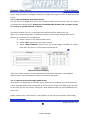
server.
2.1.1.1 IP notification by E-mail service
You can receive IP address of the server through e-mail from the server, when the server
is connected to DHCP server. Please do not enable this feature till you open a way
to receive or get IP address of server.
1) Check whether you are in the DHCP environment before starting set-up.
2) Go to e-mail configuration of Advance service in the Service configuration menu
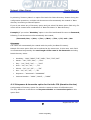
3) Set up e-mail service configuration.
A. Select camera in the configuration menu
B. Select “IPA” option from the Value format
C. Select “Boot finished” option from the e-mail trigger condition to send email when the server is connected to DHCP server.
[Value Format example]
“IPA” from Value format is to send IP address information through e-mail address.
4) Now go to LAN configuration mode and select DHCP option
2.1.1.1 Server access through AOIP server
Once Server is registered in the AOIP server and DHCP is enabled, you can access the
server through AOIP server. IP address of server can be found from AOIP server as well.
In this case you do not need to configure e-mail address setting to get IP address from
the server.
Please contact your local vendor or manufacture to get more information about AOIP
50
- INTPLUS [2005] -
Seyeon Tech Co., Ltd
Network Video Server
User’s Manual
server which is a IP gateway for Dynamic IP user.
2 Network port configuration
HTTP port, NVCP and VDCP ports are application port through which video and audio data
can be transmitted over the TCP/IP network.
2.1 HTTP port configuration
When you need to change Default HTTP Port (#80) to other port, you can change
HTTP port. This is very useful when more than one server should be installed behind a
router.
By assigning different HTTP port number for each server and configure port forwarding
feature of Router, you can install more than one server behind the router.
For more information about this, please contact your local vendor.
2.2 VDCP Port configuration
VDCP port is UDP port for Voice Communication. By changing VDCP port (Default number
is 32001), you can install more than one Voice kit and Video server under the
router.
Note that when Voice Kit is connected to internet, respective UDP port of the
router must be opened.
3 Security configuration(IP filtering)
IP filtering is to allow or deny access to FlexWATCHTM server for specific IP users or IP
group( Network Address ).
• If client PC uses Dynamic IP address, this option is not adequate for those client PC.
• Up to 5 different IP addresses can be designated for server access or you can allow or
deny server access to specific IP address group ( network address ) by configuring
Network Mask.
• If FlexWATCHTM server is to be simultaneously accessed by both LAN and modem
connection, you need to allow server access from modem connection by entering
default IP address(192.168.10.2) which will be used by client PC when client PC make
51
- INTPLUS [2005] -
Seyeon Tech Co., Ltd
Network Video Server
User’s Manual
a dial-in access to FlexWATCHTM server.
• Using IP filtering option, you can deny access through Web browser only, but can not
deny access by using telnet or ftp.
1) Click ‘IP Filtering Configuration’ in the configuration menu on the left window.
2) Enter IP address and Network mask to which you would like to limit sever access.
If you want to allow or deny access from respective IP address like PC or any other
Network Device, you need to set network mask as default (255.255.255.255) and
enter respective IP address.
If you want to allow or deny access from specific IP address group ( network address ),
you need to set up any IP address belong to IP address group , and also set up Network
Mask option properly.. It is highly recommended to consult with your network
administrator to correctly use IP filtering option.
3) Click ‘Save’ button to save new configuration.
3.1 Configuration Example
Allow server access to only specific IP user
Simply enter IP address you would like to allow access the server in the IP address field
with changing anything for Network Mask field. The denial of IP address is vice versa.
If you would like to allow IP address(192.168.0.157), you need to configure as follow.
52
- INTPLUS [2005] -
Seyeon Tech Co., Ltd
Network Video Server
User’s Manual
IP Address : 192.168.0.157
Network Mask : 255.255.255.255
Allow server access to specific IP Group
If you allow IP address group from 192.168.0. 64 ~ 192.168.0.127, you need to
configure IP address and Network mask as follow. The denial of IP address group is vice
versa.
IP Address : 192.168.0.64 Network Mask : 255.255.255.192
IP Address : any IP address between 64 and 127
Network Mask : Proper Subnet Mask value that can define the IP Address group
) Noitce
IP Filtering option requires good understanding of Network Mask. Thus, if you are not
familiar with this, please consult with your network administrator.
4 WAN Configuration and Application
Server is designed to make a call to ISP or can receive a call from outside so that server
can establish internet connect to send FTP, e-mail or send video & data through PSTN line
or other medium. This is best alternative when the broadband internet access is not
available.
4.1 Application with Dial-in/out feature
4.1.1 Application with Dial-in
Dial-in is to allow server connection from remote client. This option is useful for the user
to connect the server at any time. Especially when the server send e-mail notification for
the alarm and user want to check the situation or review alarm buffered image.
4.1.2 Application with Dial-out
Server can establish the internet connection through PSTN line and send FTP or e-mail
when the alarm condition is triggered by any event.
53
- INTPLUS [2005] -
Seyeon Tech Co., Ltd
Network Video Server
User’s Manual
Following can be done through Dial-out function
• Pre/post alarm image sending through e-mail
• Pre/post alarm image sending to FTP server through FTP function
• Establish connection with AOIP server :
when the event is happened, server can send e-mail notification for the alarm and can
keep the connection with AOIP server, not terminating the connection with ISP.
Thus, you can quickly connect the server through AOIP server and view live video. The
key benefit of using AOIP connection is to view live video without making a separate call
to FlexWATCHTM server whenever there is alarm and you can easily access the server. If
you are running FW-Manager software, live video will be automatically display on the FWmanager screen when there is any alarm.
4.2 Dial Out configuration
This is to set up the system to make a call to ISP when the dial out condition is activated
to transmit live video or send e-mail or FTP image.
4.2.1 Dial-up through Standard modem
Dial-out through standard PSTN modem is quite common and general.
1) Connect the server to PSTN line through RS-232 cable. Connect the cable to COM Port
of the server. Use the standard D-Sub 9pin connector provided by PSTN modem.
2) Go to WAN configuration from the Admin menu
3) Click “Modem” configuration
4) Put the right value in the option field of Dial-out connect menu.
54
- INTPLUS [2005] -
Seyeon Tech Co., Ltd
Network Video Server
User’s Manual
5) Change IP address for camera server WAN device line and Remote system’s
IP address in the Dial-in/out column if necessary. Otherwise leave it as it is.
• IP address for Camera Server WAN Device Line :
To specify IP address for the video server for Modem connection. System default IP
address (192.168.10.1) resides in the FlexWATCHTM server for modem connection
only. So when you connect the FlexWATCHTM server from remote PC using dial-up
networking and physical connection is made, you need to run your web browser and
enter this system default IP address(192.168.10.1) to view live video. You can change
this system default IP address as well. But it is recommended not to change system
default IP address for modem connection to prevent any possible error.
• Remote System’s IP address given by Camera Server :
IP address which is automatically given to remote client PC by FlexWATCHTM server when
FlexWATCHTM server is connected by remote client PC using dial-up networking. This IP
address (192.168.10.2) is for data communication between FlexWATCHTM server and
Remote client PC. So you do not need to change this IP address. But if you changed
55
- INTPLUS [2005] -
Seyeon Tech Co., Ltd
Network Video Server
User’s Manual
default IP address of FlexWATCHTM server (192.168.10.1) for modem connection to
different class of IP address, you need to change the IP address to match the IP class.
6) Select Modem name as a “standard modem” in the Media Specific option and save
the setting by click [Apply] button.
7) Configure service path as “Modem” in the Server patch of Service configuration
menu in the Admin window.
) Note
If you use external modem, we recommend ‘3COM U.S.Robotics 56K’ external
modem for better performance, although FlexWATCHTM system is designed to flexibly
work with different external modem from different manufacturer. If you are to use
different external modem from different manufacturer, we recommend you to contact
your distributor or contact [email protected] to choose compatible modem.
4.2.2 Dial-Out through Media specific device
Dial-out can be done through specific media which is not standard PSTN such as CDMA
modem or any type of wireless modem.
This mode is not for general users. Thus, if you need to connect special modem device,
please contact your vendor or manufacturer for more information, [email protected]
4.3 Dial-in Configuration
Dial-in is to allow client PC to call into the server and get live video through PSTN line.
Overall configuration is very similar to that of Dial-out configuration. But much more
simple than Dial-out.
1) Set up WAN(PPP) user account in the WAN(PPP) configuration mode. This is to
authenticate incoming call to server from remote client.
2) Go to Modem configuration menu
3) Configure “Dial-in/out” option field only.
D. Check Authentication mode for incoming call option if you set up WAN(PPP)
User account option.
E. Disable MLPP mode.
56
- INTPLUS [2005] -
Seyeon Tech Co., Ltd
Network Video Server
User’s Manual
4) Click [Apply] button and quit configuration menu.
5 Service path
This is to specify service path through which server can send any information to target
device.
1) Go to Service path menu in the service configuration mode
2) Select “Modem”, if any data should be sent through PSTN or external modem device
and click “Apply” button.
LAN : This is default path the send any data to outside.
Modem : when PSTN or other medium than LAN is used to send data to outside. This
service port must be checked when any data is to be sent through PSTN or other medium
than LAN which is connected to COM port.
) Note
Service path must be set up and checked before starting WAN configuration to send any
data through external PSTN modem connection or equivalent
57
- INTPLUS [2005] -
Seyeon Tech Co., Ltd
Network Video Server
User’s Manual
If LAN is to be used, select “None(LAN)” option.
58
- INTPLUS [2005] -
Seyeon Tech Co., Ltd
Network Video Server
User’s Manual
External Device connection & configuration
External device such as Serial input device, Serial output (UART) device, PTZ
(pan/Tilt/Zoom) device, Audio kit and Alarm input and output device can be connected to
the system and controlled over the IP network.
1 Serial Input device
Serial input device such as Car Speed sensor, BOG sensor, POS(Point of sales), ATM
device which communicate with external device through RS-232 port can be integrated
with the system. And data from those devices can be transmitted along with video to any
where over the TCP/IP network.
This function is not for general use. Thus, if you need more close information about this,
please contact your local distributor or manufacturer for further information,
[email protected].
2 Serial output device
The system supports to relay third party command to target device through Serial output
device control mode. Through this, user defined message can be reached to target device
The system support two different modes. One is X10 device for PLC (Power Line
Communication) and UART(Universal Asynchronous Receiver Transmitter) device.
2.1 X 10 device
X10 is a brand name of Device which is to control electronic devices over the Power line
communications. Using this control mode, you can build up a system to control any
electronic device over the TCP/IP network through FlexWATCHTM system.
This function is highly recommended for Home automation or remote device control
application.
This function is not for general use. Thus, if you need more se information about this,
please contact your local distributor or manufacturer for further information,
[email protected].
59
- INTPLUS [2005] -
Seyeon Tech Co., Ltd
Network Video Server
User’s Manual
2.2 UART(Universal Asynchronous Receiver Transmitter) device
By-pass command mode is supported by the system so that user can send command
string to target device through the server from the remote area.
By-pass command string can be sent either by third party application program or control
panel inside of the system.
A. By-pass command string from third party
This is to send command string from third party application program to the target
device connected to the server. More about this function can be supplied by HTTP CGI
API guide.
B. Control panel inside of the system
You can create control panel of external device inside of the server and control target
device through server web page.
This function is not for general use. Thus, if you need more information, please contact
your local distributor or manufacturer for further information, [email protected].
3 PTZ device connection and configuration
PTZ(Pan/Tilt/Zoom) device connected to the server can be controlled through either
standard web browser or specific application program over TCP/IP network.
3.1 PTZ Hardware cabling between the server and PTZ device
1) Check out which communication line is to be used for PTZ device you’d like to use.
2) Prepare 9 Pin De-sub connector ( FW-3400) and connect the cable to the right pin as
described following communication line (RS-232/ RS-485) supported by PTZ device.
Note that 9 Ping De-sub connector needs to be sourced by user. In case of FW-200A,
simple connect cable to either RS-232 or 485 port.
3) Refer to PTZ Technical guide to connect and set up PTZ device. PTZ technical guide is
included in the CD manual.
Pin diagram
60
- INTPLUS [2005] -
Seyeon Tech Co., Ltd
Network Video Server
User’s Manual
RS-232
RS-485 +/-
3.2 Supported PTZ(Pan/Tilt/Zoom) Device list
• Following is list of PTZ devices which are directly supported by FlexWATCHTM server. Note that
some of PTZ has not been field approved, although manufacturer integrated its protocol into
FlexWATCHTM server. Thus, it is highly recommended for you to use only field approved PTZ device.
• In addition, although Manufacturer integrated Protocol of PTZ device and did field test, PTZ can
not be workable, since PTZ manufacturer can change its protocol or other functions. Thus, it is
highly recommended for you to contact your distributor or [email protected] to make sure its
connectivity through FlexWATCHTM server.
• You are also required to refer to Technical note for installation guide per respective PTZ device
in the CD manual.
• PTZ Preset function is supported from Firmware and Web 2.2 or above. Thus, you are
recommended to upgrade software if you want to use Preset function of PTZ.
Supported PTZ List by FlexWATCHTM Server
Lab Test
Field
Test
O
O
O
O
O
O
Auto
PAN
Program
Only
Model
Comman
d
Preset
Spectra
485 (P)
** Pelco
Spectra
485(D)
* Panasonic
WV-CS854
485
*C&B
Smart PTZ
485
O
O
O
O
** AD
Delta Dome
485
O
O
O
O
* Samsung
Techwin
SPD1600
485
O
O
Supplier
** Pelco
O
61
- INTPLUS [2005] -
O
O
Seyeon Tech Co., Ltd
Network Video Server
User’s Manual
* Samsung
SCC-641
485
Evertech
ET-50
Seyeon
Seyeon
O
O
O
485
O
O
SPT-184D
485
O
O
SPT-101(2)
485
O
O
Seyeon
SRX-500
485
O
O
CTNCOM
HD-0670
485
* VICON
V-1311
485
O
O
O
***VICON
Surveyor
485
O
O
O
Kalatel
Cyber
232
O
O
SONY
EVI-D30
232
SAERIM
SSR-100
485
***Honeywel
l
HSD-250
485
*Honeywell
HRX-1000
** NIKO
O
O
O
O
O
O
O
O
O
O
485
O
O
NK97-CHE
485
O
O
O
** ELMO
ELDOME
485
O
O
O
* ERNITEC
BDR-510
485
O
O
RNK
RNK-DOME
485
* DAIWA
DMP-23-H1
485
* LILIN
PIH-717
485
* DENNARD
DENNARD
DOME
485
PHILIPS
Auto Dome
485
* SUNGJIN
SJ-2819RX
232
O
O
O
O
O
O
O
O
O
O
O
O
O
NOTE : Symbol Reference
62
- INTPLUS [2005] -
Seyeon Tech Co., Ltd
Network Video Server
*
User’s Manual
: Preset function was program only.
** : Preset function was Lap Tested only.
*** : Preset function was field Tested
3.3 PTZ Configuration
Once hardware connection is properly done, configure PTZ configuration in the server.
1) Go to Serial port configuration menu and select [PTZ mode]
2) Select PTZ model supported by the system
3) Check PTZ channel. If you want to disable the port, please uncheck the port.
Please do not configure PTZ base address, if PTZ device is not be used combined with
Analog device such as Matrix. Please click “?” mark for more info.
4) Once configuration is done save new configuration by press “Save” button
4 Voice Kit Connection and configuration
G.723.1 which is international standard for VOIP (Voice Over IP) communication based
FW-V10s voice kit can work with FlexWATCHTM server and you can enjoy not only live
video stream but also full duplex real time Voice through web browser or proprietary
application program.
Voice broadcasting for voice connection by multiple user is also supported by the system
as well.
63
- INTPLUS [2005] -
Seyeon Tech Co., Ltd
Network Video Server
User’s Manual
) Note
Once Multi user connection is enabled, only root Account user can enjoy full duplex audio
and rest of users can listen only.
4.1 Hardware connection
Aux port (FW-3400) and RS-232 port (FW-200A) is used to connect FW-V10s. Please
refer to FW-V10s user guide for more details about the hardware connection.
4.2 Voice configuration
Once Hardware connection is done, you need to set up the system to work with Voice kit.
1) Go to Serial device configuration menu in the System configuration mode and select
Serial port
2) Select “Voice” from the Aux mode port
Note that PTZ can Voice can not work simultaneously.
3) Select “Voice mode” configuration menu and configure the options.
64
- INTPLUS [2005] -
Seyeon Tech Co., Ltd
Network Video Server
User’s Manual
UDP Port :
Voice kit use UDP port to transmit Voice kit. If voice communication should be done
through WAN network, please make sure UDP port is not blocked to internet
connection in router or firewall etc.
The default VDCP (Voice port) port is 32001, please go to Network port configuration
mode to change VDCP port if required.
Application Idea
By changing VDCP port, you can install multiple Voice kit and FlexWATCHTM server behind
the single broadband network.
Single/Multi User:
Once Multiple user is selected, only Admin account user can enjoy full duplex Audio
and User account user can listen only.
Ringing :
This is to enable or disable sounds from the internal speaker of voice kit when there is a
connection to Voice kit from outside.
4) Click “Save” button to save your configuration.
5 Alarm input device connection
FlexWATCHTM server has Alarm Sensor interface so that it can send alarm notification by
activating e-mail or FTP function or activate alarm output device such as Siren or light.
65
- INTPLUS [2005] -
Seyeon Tech Co., Ltd
Network Video Server
User’s Manual
FlexWATCHTM server supports opto-coupled input circuit and any dry contact type of
Alarm sensor can easily be interfaced to the server.
Following is circuit diagram for Alarm input part.
Opto-coupled Sensor input Diagram
1) Simply connect the alarm sensor to the server.
2) Go to “Alarm input/out” menu to name the alarm input name.
3) Once configuration is done, alarm based services can be done such as e-mail, FTP,
Sensor notification
Application Idea
Followings are list of services which is related to alarm input device connection. Thus,
when you use following features, you must make sure that Alarm input device is correctly
configured.
- e-mail, FTP, Sensor notification, Alarm output device control.
6 Alarm Output(Relay output) device connection
FlexWATCHTM server can easily be interfaced with Alarm output device such as Siren and
light. Manual or automatic control of alarm output device is supported by the server so
that relay output device such as siren, light or any output device can remotely
be
controlled through standard web browser or third party application program.
6.1 Alarm output device connection
66
- INTPLUS [2005] -
Seyeon Tech Co., Ltd
Network Video Server
User’s Manual
Any Relay contact type of output device can be interfaced with FlexWATCHTM server.
Simple connect the Alarm output device to Relay output(DO) port of FlexWATCHTM server.
Following is a circuit diagram for alarm output terminal.
Relay Output Circuit Diagram
6.2 Manual control of Alarm output device
Alarm output device can manually be controlled through simple viewer page or admin
page.
6.2.1 Alarm output device through web browser
Alarm output device control panel can separately run in the simple viewer page, if control
authority for Alarm output device is given to user. If not allow, alarm output device
control panel will not be loaded in the simple viewer page.
1) Go to ‘Live view’ web page
2) Click “Output control” button in the web page
3) Check the output port number and click apply button to activate the alarm output
device
67
- INTPLUS [2005] -
Seyeon Tech Co., Ltd
Network Video Server
User’s Manual
6.2.2 Alarm output device through Admin Page
Alarm output device can manually be controlled through Admin page of the system.
This option is recommended when web browser based alarm output control panel is hided
and administrator want to manually control Alarm output device.
1) Run Admin configuration panel
2) Click Alarm output control option in the Service configuration mode
3) Check the alarm output port and click “Apply” button
6.3 Automatic Control of Alarm Output device
Alarm Output device can automatically be controlled by setting up control condition
properly. This is to automatically to activate alarm output or any relay output device
connected to the server.
Up to three different conditions per alarm output port with schedule, Sensor or its
combination are provided so as to set up powerful and various working condition for each
alarm output device.
1) Go to Advance service option in the Service configuration mode in the Admin window.
2) Click ‘None buffering service’ menu and select ‘Alarm output’ menu.
3) Check the service “Enable” option and select output port
68
- INTPLUS [2005] -
Seyeon Tech Co., Ltd
Network Video Server
User’s Manual
4) Select Alarm Duration time from the drop down menu.
Note Alarm Duration time is to set up Alarm active time when alarm output device is
activated by any condition.
5) Go to Condition mode and set up condition to activate Alarm output device.
69
- INTPLUS [2005] -
Seyeon Tech Co., Ltd
Network Video Server
User’s Manual
Advanced Service configuration
Advanced service configuration is intended to provide more sophisticated functions which
are required by high level users. Thus, if you are not familiar with or not good at
advanced features, we recommend you to consult with your local vendor or manufacturer
to get more close support.
Advanced service can be categorized into Buffering service and None buffering service
depending on whether server store pre/post alarm video in the system memory.
Buffering service means that the server can store pre/post alarm images in the system
memory and send stored images through FTP or e-mail. With this feature user can get
pre/post alarm images through e-mail or FTP without missing any video before and after
the event.
None buffering service means that Advance service will be done without image
buffering inside of the memory. FTP(Periodic), Sensor notification service and Alarm
output device control can be provided as a none buffering service option.
1 Pre/Post alarm buffer assignment(Buffering Service)
Pre/Post alarm buffer frame for FTP or e-mail should be decided and set up in the system
before start e-mail or FTP setting.
1.1 Pre alarm buffer image
Pre alarm buffer image means that the number of image which will be stored in the
system memory before event happens. The number of pre alarm image for advanced
service will be decided by this pre alarm buffer assignment. The maximum number of pre
alarm image for advanced server can not exceed the maximum number of pre configured
Pre alarm images.
Depending on the model and memory, the number of Pre alarm buffer size is different
and following is simple comparison.
File size
Up to 100K Bps
Memory Capacity
32 Frames
Max Pre alarm buffer
16 Frames
70
- INTPLUS [2005] -
Seyeon Tech Co., Ltd
Network Video Server
User’s Manual
* Maximum Pre alarm buffer is half size of Memory capacity, since Pre alarm
image for e-mail or FTP can be done within the maximum number of pre alarm
buffer pool size and its maximum size should be less than half size of the
memory.
Pre alarm for e-mail and FTP can be done with Pre alarm buffer size, it is very important
to device pre-alarm buffer size before setting up other configuration.
1) Go to Advance service mode in the Service configuration section
2) Go to Buffering service mode
3) Set up pre-alarm Buffer size
Pre-alarm Buffer size :
Check out assignable pre-alarm Buffer size for the model you would like to use using
buffer calculator.
Delay between pre-alarm image :
This is to set up delay time between the pre-alarm image. and
minimum unit is 10 milliseconds.( 1 sec is 1000 msec ) Thus, if you enter 100, it means
delay between the image will be 1 sec.
4) Click Buffer calculator button to run the calculator
1.2 Buffer calculator
Through buffer calculator you can easily calculate assignable pre/post alarm buffer size
71
- INTPLUS [2005] -
Seyeon Tech Co., Ltd
Network Video Server
User’s Manual
for each channel before setting up Pre/Post alarm buffer frame in the system memory.
Following is logic for Pre/Post alarm assignment. By running buffer calculator you can try
pre/post alarm size.
• Unit of calculation is frame ( image )
• Total Buffer Image frame= Pre alarm buffer frame+ Pre/post alarm frames
for both e-mail and ftp.
• Total buffer image frame - Pre alarm buffer frame = assignable pre/post
alarm for e-mail or FTP.
• Pre alarm buffer frame > sum of pre alarm buffer for e-mail or FTP.
• Pre alarm buffer for each channel > Pre alarm for each e-mail or FTP.
• Total buffer frame - ( Pre alarm buffer + assigned pre alarm for e-mail and
ftp) = assignable post alarm.
1) Go to Advance service mode in the Service configuration section
2) Go to Buffering service mode
3) Click Buffer calculator button to run the calculator
72
- INTPLUS [2005] -
Seyeon Tech Co., Ltd
Network Video Server
User’s Manual
4) Do Pre-test Pre/Post alarm image for FTP & e-mail service
• Fixed number of Pre/Post alarm can be supported by server (Based on
100kBps per image)
• Pre/post alarm image can be sent to e-mail or FTP only.
• Up to 10 frame of pre/post alarm image can be sent through e-mail trigger.
• up to 32pre/post alarm image can be sent through FTP
• Depending on the model, different number of alarm buffer can be supported.
2 Service Condition
Sophisticated advanced services can be done by lots of service conditions provided by the
system. To correctly set up the system use must has good understanding about the
service condition as well.
e-mail, FTP, Sensor notification and Alarm output device control function requires service
condition set up to activate the function. Note that the basic logic for the service
condition set up is same for all of other options.
73
- INTPLUS [2005] -
Seyeon Tech Co., Ltd
Network Video Server
User’s Manual
Condition Setup
Criteria Set up
2.1 Condition Setup
This is to define basic condition to activate any option selected. Select right condition
from the option provided.
Always :
To active any selected option regardless condition. If you select this condition Schedule
and Event condition window become inactive.
Schedule Only :
To active any selected option by scheduling. If you select this criteria, Event condition
setup window become inactive
Event Only :
To activate any selected option by Event only. Sensor status change is recognized as
Event.
Schedule and Event :
74
- INTPLUS [2005] -
Seyeon Tech Co., Ltd
Network Video Server
User’s Manual
To active any selected action when Event is triggered for the specified time period only. If
Event is occurred out of Scheduled period, no action will be done.
2.2 Criteria Setup
Once condition is selected, you need to set up event criteria following which any selected
service will be executed.
Criteria consist of Schedule and Event which included Sensor input trigger, Booth finish
and Serial input data trigger.
2.2.1 Schedule
You can select the day from the week. If you uncheck Sun and Sat, Sun and Sat will be
excluded from the condition. If you enable Time only and disable Day of week and Date,
any action taken place during specific time of the day, will be effective regardless day of
week and Date of the year.
Above setting tells you that any action will be done for 9AM to 10PM from Monday to
Friday from March to September of the year.
2.2.2 Event
Alarm senor, Server reboot and Serial device activation or their combined activation can
be recognized as a event .
Event number can be mapped as a Sensor port.
DI Open State :
This means that sensor is triggered and become open status from Normal close status.
75
- INTPLUS [2005] -
Seyeon Tech Co., Ltd
Network Video Server
User’s Manual
Select this when you use NC(Normal Close) type sensor.
DI Close State :
This means that sensor is triggered and become close status from Normal open. Select
this when you use NO (Normal Open) type sensor.
Boot Finished :
Booth finish means Server reboot. Thus, when the server is rebooted, it can be
recognized as a event.
Serial input :
FlexWATCHTM server can carry serial data along with video. When serial data from
external serial device is activate, this can be recognized as a event.
Sensor state means when the sensor status is Open or closed. If you use NC( Normal
Close) type sensor and activate any action when sensor is open, you need to
select [Open State] and vice versa when you use NO (Normal Open) type of
sensor.
)
Please check out sensor type connected to FlexWATCHTM server
3 e-mail configuration
Schedule, event or schedule and event driven e-mail sending is supported by the server
so that when there is any pre-configured event is happened, e-mail notice will be sent to
any e-mail account.
3.1 e-mail function configuration
Up to 10 pre/post alarm image can be appended and sent through one e-mail message
when the event happens. By configuring pre/post alarm for e-mail, you can decide the
number of image to be sent by an e-mail.
1) Go to Advance service mode in the Service configuration section
76
- INTPLUS [2005] -
Seyeon Tech Co., Ltd
Network Video Server
User’s Manual
2) Go to Buffering service mode and set up pre/post alarm image for e-mail.
3) Select e-mail option from menu
4) Set up e-mail account in the e-mail configuration. This setting will be applied for all
cameras.
SMTP Service address :
This is sending mail server address of your ISP. To get this info, consult with your internet
service provider that supply internet service where FlexWATCHTM server is installed.
Authentication Login:
Now these days most of ISP is try to authenticate sender e-mail address due to security
and spam mail issue. If sender authentication is enabled by your ISP, you need to get
your login ID and Password from your e-mail service provider.
Sender (E-MAIL): put the sender e-mail. If you use system default sender e-mail
address, it will not work.
E-mail address 1~ 3: put recipient e-mail address. Up to 3 different e-mail account can
be supported.
5) Select channel to configure e-mail for each camera after setting up e-mail account
77
- INTPLUS [2005] -
Seyeon Tech Co., Ltd
Network Video Server
User’s Manual
Number of Pre alarm images :
Number of pre-alarm image should be less than Assigned Pre-alarm buffer size and
maximum number of pre-alarm can not exceed 10 frames
Number of post-alarm images:
Less than 10 frames can be assigned as post-alarm images. Post alarm has nothing to do
with Pre alarm buffer size.
Note that the sum of pre and post alarm can not exceed 10 frames.
Value Format :
Value strings can be sent together with e-mails. Please click “
” mark in the admin
page to get more information.
Application idea
IP address of video server when the FlexWATCHTM server r is connected to DHCP server
can be sent by e-mail. In this case you need to enable IPA value string which is for IP
Address.
78
- INTPLUS [2005] -
Seyeon Tech Co., Ltd
Network Video Server
User’s Manual
3.2 e-Mail condition set up
Up to 3 different e-mail conditions can be set up for each camera. Schedule, event or
schedule & event driven e-mail condition can be set up to send e-mail.
1) Run the e-mail condition set up window from the e-mail service configuration for each
channel.
2) Check “Enable” field
3) Select mode for e-mail trigger and set up condition.
Example) Description about below condition
- e-mail will be triggered when the event happened during the specified time.
- e-mail will be sent when the Serial input device is active during the specified time
4 FTP Configuration
Schedule, event or schedule and event driven FTP functions supported by FlexWATCHTM
server so that when there is any pre-configured event is happened, image will be sent
and stored in the FTP server.
79
- INTPLUS [2005] -
Seyeon Tech Co., Ltd
Network Video Server
User’s Manual
Buffered FTP and Periodic FTP function is supported by FlexWATCHTM.
9
Buffered FTP means that ftp will be done when any event is occurred, i.e. change
of status is generated and only pre/post alarm buffered image can be sent to FTP
server.
9
Periodic FTP means that image will continuously be sent to FTP server when there
is any event. No pre/post alarm image will be sent to FTP server.
4.1 Directory option
FlexWATCHTM server provides powerful directory options so that user can easily create
multiple ftp directory and send image into classified file directory as well.
Depends on the service type, Buffering and None buffering Service, its directory option is
slightly different.
4.1.1 Directory and File Name system
Buffered FTP means that only pre/post alarm buffered image will be sent to FTP server
when the ftp is triggered by the event.
FTP function of FlexWATCHTM server has two different level of directory and file name
option and following are details.
80
- INTPLUS [2005] -
Seyeon Tech Co., Ltd
Network Video Server
User’s Manual
Base Directory Name :
‘Base directory’ is a path where FTP image will be saved in the FTP server.
‘Base Directory’ can be made under "ROOT" or "Home" directory of FTP server.
Base File name :
User defined prefix of file name of each image. File name of FTP images will be
automatically concatenated after prefix (Base File name).
Directory name :
Multiple sub-directories can be created in the Base directory so that ftp image can be
stored in a classified directory.
81
- INTPLUS [2005] -
Seyeon Tech Co., Ltd
Network Video Server
User’s Manual
By selecting ‘Directory Name’ on option filed and click ‘Make Directory’ button during the
configuration procedure, multiple sub-directories will automatically be created in ‘Base
directory’ according to selected option.
If you do not select any of Directory option and just select File Name option field only, file
name will be created with combination of ‘Base File Name’ in ‘Base Directory’.
Example) If you select “Weekday” option in the filed and Based file name is flexwatch,
following 7 sub-directories will automatically be created;
/flexwatch/Sun, ~/Mon, ~/Tue, ~/Wed, ~/Thu, ~/Fri, and ~/Sat
File name :
File name will automatically be created with the prefix (the Base file name).
Multiple file name option field can be selected at the same time. In this case, each Field
is concatenated sequentially But total length of file name is 32 characters including
based directory name.
•
Weekday : "SUN","MON","TUE","WED","THU","FRI","SAT"
•
Month : "Jan","Feb","Mar",....,"Dec"
•
Day : "1st","2nd","3rd",......,"31th"
•
Hour : "00","01","02",......,"23"
•
Minute : "00","01","02",......,"59"
•
Sec : "00","01","02",......,"59"
•
Sequence : "00000000"~"99999999"
•
Camera Number : "CAM1","CAM2",...,"CAM6"
4.1.2 Sequence & Overwrite option for Periodic FTP (Duration Service)
Configuration of Directory option for periodic is same as those of buffered service.
The only difference is that there are Sequence Modulo and Overwrite option in the
option filed.
82
- INTPLUS [2005] -
Seyeon Tech Co., Ltd
Network Video Server
User’s Manual
Sequence Modulo :
This is used when some number of ftp images should be stored and refreshed as new ftp
images are stored in the ftp server. By setting up Modulo number for sequence, you can
limit number of image to be stored and refreshed. If you set it as 8, 8images will be
stored in the FTP directory and FIFO(first come, first out) based image will be saved in
the FTP server. If you want to enable this, you need to check ‘Sequence’ on File name
option table.
Overwrite:
This is to refresh old image with new image in the ftp server. This is normally used when
the ftped image should be refreshed every time.
4.2 FTP service configuration
Once you get a good understanding of “Pre/post alarm buffering”, “Condition”, “FTP
directory & Name option” and “Sequence & Overwrite option” from above chapter,
now you can easily configure FTP service function.
83
- INTPLUS [2005] -
Seyeon Tech Co., Ltd
Network Video Server
User’s Manual
) To begin with, you must create ’Base directory’ in your FTP server. FTP
images will be basically stored in it.
WARNING!!!
All the following steps must be configured in order. If any steps are missed or
out of order, the system will not work promptly.
4.2.1 Buffered FTP service configuration
Buffered FTP means that rising or falling edge based ftp will be done when there is any
event and only pre/post alarm buffered image can be sent to FTP server.
1) Go to ‘Advanced Services – Buffering Service’ menu.
Set up Pre alarm buffering configuration for FTP service.
2) Go to Advanced Services - Buffering Service – FTP(Buffered) – Camera1 – Condition1
menu. Set up the condition as you mind to design.
(Up to 3 different conditions can be applied to each camera.)
3) Go to ‘Camera1’ menu. Set up the number of Pre and Post alarm images and delay unit.
4) Go to ‘FTP (buffered)’ service configuration menu and set up the configuration as
below.
84
- INTPLUS [2005] -
Seyeon Tech Co., Ltd
Network Video Server
User’s Manual
A. Server Address: Input your ftp server address.
B. Base Directory Name: Input the Base directory name that you already made under the root
directory of your FTP server.
9
If you create 'Base directory' as under 'home' directory of your FTP server, you
can simply input the name of 'Base directory' only in the blank as below.
Ex) "/home/user1/flexwatch"
9
If you create 'Base directory' at any place under '/ (root)' of your FTP server, you
must fully input all the absolute pass from '/ (root)' to the name of 'Base directory'.
Ex) "/flexwatch"
Or " /.…/…./..../flexwatch"
85
- INTPLUS [2005] -
Seyeon Tech Co., Ltd
Network Video Server
User’s Manual
) After creating ‘Base directory’ in your FTP server, you should verify
whether you get the right permission to read and write image files in the
directory. To do this, simply try to upload and download any files onto
'Base directory'.
C. Base File Name: Input ‘Base file name’ which will be given to the FTP images.
D. User ID & Password: Input the user ID and PW of your FTP server.
E. Connection Mode: Select ‘Active’ mode.
(If your FTP server is placed within a Firewall-network environment, you need to select
‘Passive’ mode and configure your FTP server as ‘Active’ mode. Please contact your
network administrator for more details.)
F. Option (Directory Name): Only when you want to enable this function, you need to
configure it at the next step 5). Thus, there is nothing to set up at this step.
G. Option (File Name): Select ‘File Name’ option only when you want to enable it.
H. Click ‘Save’ button.
) ’Base directory’ and ’Base file’ name must be registered on this
configuraion, while ’Directory and File option’ is only optional function
which you can make use of or not.
5) Go to ‘FTP (Periodic)’ menu again. After you select ‘Directory Name’ on option table,
click ‘Save’ and ‘Make Directory’ button in order.
) You can select only one ‘directory name’ on the option table.
If you want to make another directory option, you need to reset it from
step 5) to step 6). After that, FTP images will be stored in the newly
created sub-directory under ‘Base directory’.
6) Go to ‘Advanced Services’ menu. And click ‘Apply’ button under the Status bar to
apply the new service configuration.
WARNING!!!
Once you finish or change above configuration, you must click ’Apply’ button
on the ’Advanced Services’ menu. Otherwise, new configurations will not be
applied at all.
7) Close the window of ‘Admin menu’. When ‘Save configuration’ window pop-up, click
‘Save Configuration’.
86
- INTPLUS [2005] -
Seyeon Tech Co., Ltd
Network Video Server
User’s Manual
4.2.2 Periodic FTP service configuration
Periodic FTP means that image will continuously be sent to FTP server when there is any
event. No pre/post alarm image will be sent to FTP server.
) ’Periodice FTP configuration’ can be done by the same procedure
of ’Buffered FTP configuration’ . Only the differencies are ’Sequence
modulo’, ’Overwrite’ and ’Delay time’ configurations.
Thus, you must take care all the Notice and Warning messages showing
on the above ’Buffered FTP configuration’.
1) Go to ‘Advanced Services – Non-buffering Service - FTP(Periodic) - Camera1 Condition1’ on the Admin menu. Set up the condition as your purpose.
2) Go to ’Camera 1’ menu. Input the required Delay units at ‘Delay between Images’
and click ‘Save’. (1 sec = 1000 msec / 1 unit = 10 msec / 1 sec = 100 unit)
3) Go to ‘FTP (Periodic)’ menu as below.
87
- INTPLUS [2005] -
Seyeon Tech Co., Ltd
Network Video Server
9
User’s Manual
To enable ’Sequence Modulo’, input the required No. on it and select ’Sequence’ check-box on
option menu.
Or,
9
To enable ’Overwrite’, select ’overwrite’ check-box on option menu.
4) Go to ‘FTP (Periodic)’ menu again. After you select ‘Directory Name’ on option table,
click ‘Save’ and ‘Make Directory’ button in order.
5) Go to ‘Advanced Services’ menu. And click ‘Apply’ button under the Status bar to
apply the new service configuration.
6) Close the window of ‘Admin menu’. When ‘Save configuration’ window pop-up, click
‘Save Configuration’.
Application idea
If server is connected to dynamic IP or Private network and you want to continuously
send image to FTP server, please use Overwrite function in the Periodic FTP service.
EXAMPLE of Periodic FTP service)
Let’s suppose that FlexWATCH server takes one frame of the image every 15min and
sends it to FTP server continuously. And all the images are being stored under the
directory name 'flexwatch'(Base directory) in the FTP server for one year.
1) Go to ‘Advanced Services – Non-buffering Service - FTP(Periodic) - Camera1 Condition1’ on the Admin menu. Select ‘Enable’ and ‘Always’, then click ‘Save’.
2) Go to ’Camera 1’ menu.
Input 90000 units at ‘Delay between Images’ and click ‘Save’.
15(min) X 60(sec) X 100(unit) = 90000 units
3) Go to ‘FTP (Periodic)’ menu. Please set up as below, then click ‘Save’.
88
- INTPLUS [2005] -
Seyeon Tech Co., Ltd
Network Video Server
User’s Manual
) You need to select the file names, Month / Day / Hour / Minute, to assign
the name of FTP images in order in the ’Base directory’. Otherwise, FTP
images can not be stored promptly.
4) Only when you want to create classified directories under ‘Base directory’ (flexwatch)
and make ftp images to be stored in it, you need to go to ‘FTP (Periodic)’ menu again
and select ‘Directory Name’. Then click ‘Make Directory’ button.
5) Go to ‘Advanced Services’ menu. And click ‘Apply’ button under the Status bar to
apply the new service configuration.
6) Close the window of ‘Admin menu’. When ‘Save configuration’ window pop-up, click
‘Save Configuration’.
89
- INTPLUS [2005] -
Seyeon Tech Co., Ltd
Network Video Server
User’s Manual
5 Sensor Notification service
Sensor Notification service is to send alarm trigger information to third party application
program through CGI Path. This option is to invoke third party application program upon
receipt of sensor information from FlexWATCHTM server.
1) Go to Advance service configuration of Service configuration mode
2) Click None buffering service mode and go to sensor notification service
IP Address : IP address of target device to which sensor notification will be sent
CGI Path : Common Gateway Interface to the Application program
User ID /Password : Authentication ID and Password of the application program.
3) Type in CGI Path and User ID & Password to third party application program.
4) Select sensor input number
5) Type CGI Name ( User definable) and set up condition to trigger Sensor notification
function.
90
- INTPLUS [2005] -
Seyeon Tech Co., Ltd
Network Video Server
User’s Manual
Utilities
Utilities is to manage and control system properly. Save Configuration, Flash Update,
System Reboot and system upgrade options are provided.
1 Save Configuration
This is to save all new configuration and settings in the system memory. Once new
configuration is saved by “Save Configuration” menu, new configuration will
permanently saved in the system memory only after system Reboot or system
power off
2 Reboot
Reboot means restart system. It is needed to reinitialize and restart system after
changing some configurations that has influence on the system.
Thus, it is highly recommended to reboot the system after executing “Save
Configuration” menu.
Most of case system reboot comes last only after all the new configuration is done. But
some of system menu require system reboot in the middle of system configuration so
that new setting can properly applied in the system.
Followings are list of option which require System reboot.
-
Network Configuration
-
Date & Time configuration with Time Zone change
-
Serial Port configuration
-
Memory assignment for Advance Service
-
Factory Default
) Note
System reboot requires about 1Minutes of lead time. Thus, if you execute Reboot option,
please wait at least 1minutes to do other settings.
3 Factory Default
Factory Default is to reset all the configuration of the system as the initial status except
Network Configuration. This utility is recommended to use only when you lost all of your
91
- INTPLUS [2005] -
Seyeon Tech Co., Ltd
Network Video Server
User’s Manual
logics for system configuration, since executing this option Except Network configuration
will lose all of your setting.
4 System Update
System update can remotely be done through web page of the system or ftp option with
telnet and Hyper Terminal mode. In this user manual only web based system update
method is described and ftp based system update method can separately provided.
4.1 Description of files system
FlexWATCHTM Server has 4 different files to get the system work. In some case, you may
need to upgrade whole files or other case you need to upgrade some specific file only.
Following is brief explanation about the file system for FlexWATCHTM server.
* Note depending on the hardware initial of each file can be different.
** You can download the latest version from “Downloads” menu on www.flexwatch.com,
www.seyeon.co.kr.
*** File size will be different in each version.
**** PTZ device driver and Sensor Device Driver module can be separately uploaded into
the system through web browser.
92
- INTPLUS [2005] -
Seyeon Tech Co., Ltd
Network Video Server
User’s Manual
Firmware and Web Update:
To update system and web related software together. This update can be common to
update the system.
Firmware Update:
To update only firmware of the server.
Web Update:
To update only Web page of the server. This is useful to uploaded customized web page
only to save update times.
PTZ Device Driver :
PTZ Device Driver is already built-in the system. But if there is a new PTZ Device driver
supported by the system, it can separately uploaded into the system without other
software change.
Sensor Device Driver :
93
- INTPLUS [2005] -
Seyeon Tech Co., Ltd
Network Video Server
User’s Manual
Serial input device driver can separately be uploaded into the system so that
independent Serial input device can work with FlexWATCHTM Server.
94
- INTPLUS [2005] -
Seyeon Tech Co., Ltd
Network Video Server
User’s Manual
Warranty
Product
Network Video Server
Model
S/N
FlexWATCHTM 3210
A/S
Seyeon Tech Ltd.
Warranty
2 year
Limited
+82-2-3017-0866
Seyeon Tech Co., Ltd.
TEL : +82-2-3017-0855
FAX : +82-2-3017-0843
http://www.seyeon.co.kr
http://ww.flexwatch.com
A/S Center:
Tel : +82-2-3017-0855
Fax: +82-2-3017-0843
95
- INTPLUS [2005] -
Seyeon Tech Co., Ltd