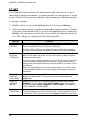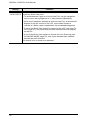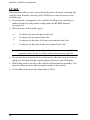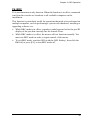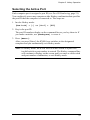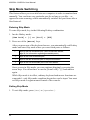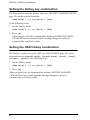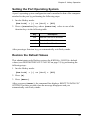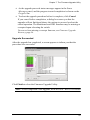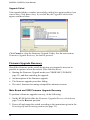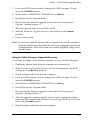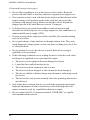
1
KVM Switch KH2508A / KH2516A User Manual www.aten.com KH2508A / KH2516A User Manual FCC Information This is an FCC Class A product. In a domestic environment this product may cause radio interference in which case the user may be required to take adequate measures. This equipment has been tested and found to comply with the limits for a Class A digital device, pursuant to Part 15 of the FCC Rules. These limits are designed to provide reasonable protection against harmful interference when the equipment is operated in a commercial environment. This equipment generates, uses and can radiate radio frequency energy and, if not installed and used in accordance with the instruction manual, may cause harmful interference to radio communications. Operation of this equipment in a residential area is likely to cause harmful interference in which case the user will be required to correct the interference at his own expense. RoHS This product is RoHS compliant. SJ/T 11364-2006 The following contains information that relates to China. ii KH2508A / KH2516A User Manual User Information Online Registration Be sure to register your product at our online support center: International http://support.aten.com North America http://www.aten-usa.com/product_registration Telephone Support For telephone support, call this number: International 886-2-8692-6959 China 86-10-5255-0110 Japan 81-3-5615-5811 Korea 82-2-467-6789 North America 1-888-999-ATEN ext 4988 United Kingdom 44-8-4481-58923 User Notice All information, documentation, and specifications contained in this manual are subject to change without prior notification by the manufacturer. The manufacturer makes no representations or warranties, either expressed or implied, with respect to the contents hereof and specifically disclaims any warranties as to merchantability or fitness for any particular purpose. Any of the manufacturer's software described in this manual is sold or licensed as is. Should the programs prove defective following their purchase, the buyer (and not the manufacturer, its distributor, or its dealer), assumes the entire cost of all necessary servicing, repair and any incidental or consequential damages resulting from any defect in the software. The manufacturer of this system is not responsible for any radio and/or TV interference caused by unauthorized modifications to this device. It is the responsibility of the user to correct such interference. The manufacturer is not responsible for any damage incurred in the operation of this system if the correct operational voltage setting was not selected prior to operation. PLEASE VERIFY THAT THE VOLTAGE SETTING IS CORRECT BEFORE USE. iii KH2508A / KH2516A User Manual Package Contents The KH2508A / KH2516A package consists of: 1 KH2508A or KH2516A Cat 5 High-Density KVM Switch 1 Firmware Upgrade Cable 1 Power Cord 1 Grounding Wire 1 Rack Mount Kit 1 Foot Pad Set (4 pcs.) 1 User Manual* 1 Quick Start Guide Check to make sure that all of the components are present and in good order. If anything is missing, or was damaged in shipping, contact your dealer. Read this manual thoroughly and follow the installation and operation procedures carefully to prevent any damage to the switch or to any other devices on the KH2508A / KH2516A installation. * Features may have been added to the KH2508A / KH2516A since this manual was printed. Please visit our web site to download the most up-to-date version of the manual. Copyright © 2010–2011 ATEN® International Co., Ltd. Manual Part No. PAPE-0292-AX3G Manual Date: 2011-01-21 Altusen and the Altusen logo are registered trademarks of ATEN International Co., Ltd. All rights reserved. All other brand names and trademarks are the registered property of their respective owners. iv KH2508A / KH2516A User Manual Contents FCC Information . . . . . . . . . . . . . . . . . . . . . . . . . . . . . . . . . . . . . . . . . . . . . ii RoHS. . . . . . . . . . . . . . . . . . . . . . . . . . . . . . . . . . . . . . . . . . . . . . . . . . . . . . ii SJ/T 11364-2006. . . . . . . . . . . . . . . . . . . . . . . . . . . . . . . . . . . . . . . . . . . . . ii User Information . . . . . . . . . . . . . . . . . . . . . . . . . . . . . . . . . . . . . . . . . . . . .iii Online Registration . . . . . . . . . . . . . . . . . . . . . . . . . . . . . . . . . . . . . . . .iii Telephone Support . . . . . . . . . . . . . . . . . . . . . . . . . . . . . . . . . . . . . . . .iii User Notice . . . . . . . . . . . . . . . . . . . . . . . . . . . . . . . . . . . . . . . . . . . . . .iii Package Contents. . . . . . . . . . . . . . . . . . . . . . . . . . . . . . . . . . . . . . . . . . . iv About This Manual . . . . . . . . . . . . . . . . . . . . . . . . . . . . . . . . . . . . . . . . . .viii Conventions . . . . . . . . . . . . . . . . . . . . . . . . . . . . . . . . . . . . . . . . . . . . ix Product Information. . . . . . . . . . . . . . . . . . . . . . . . . . . . . . . . . . . . . . . . . . ix Chapter 1. Introduction Overview . . . . . . . . . . . . . . . . . . . . . . . . . . . . . . . . . . . . . . . . . . . . . . . . . . . 1 Features and Benefits . . . . . . . . . . . . . . . . . . . . . . . . . . . . . . . . . . . . . . . . . 2 Requirements . . . . . . . . . . . . . . . . . . . . . . . . . . . . . . . . . . . . . . . . . . . . . . . 4 Consoles . . . . . . . . . . . . . . . . . . . . . . . . . . . . . . . . . . . . . . . . . . . . . . . . 4 Computers . . . . . . . . . . . . . . . . . . . . . . . . . . . . . . . . . . . . . . . . . . . . . . . 4 KVM Adapter Cables . . . . . . . . . . . . . . . . . . . . . . . . . . . . . . . . . . . . . . . 5 Operating Systems . . . . . . . . . . . . . . . . . . . . . . . . . . . . . . . . . . . . . . . . 5 Components . . . . . . . . . . . . . . . . . . . . . . . . . . . . . . . . . . . . . . . . . . . . . . . . 6 Front View . . . . . . . . . . . . . . . . . . . . . . . . . . . . . . . . . . . . . . . . . . . . . . . 6 KH2508A . . . . . . . . . . . . . . . . . . . . . . . . . . . . . . . . . . . . . . . . . . . . . 6 KH2516A . . . . . . . . . . . . . . . . . . . . . . . . . . . . . . . . . . . . . . . . . . . . . 6 Rear View . . . . . . . . . . . . . . . . . . . . . . . . . . . . . . . . . . . . . . . . . . . . . . . 8 KH2508A . . . . . . . . . . . . . . . . . . . . . . . . . . . . . . . . . . . . . . . . . . . . . 8 KH2516A . . . . . . . . . . . . . . . . . . . . . . . . . . . . . . . . . . . . . . . . . . . . . 8 Chapter 2. Hardware Setup Overview . . . . . . . . . . . . . . . . . . . . . . . . . . . . . . . . . . . . . . . . . . . . . . . . . . 11 Before you Begin. . . . . . . . . . . . . . . . . . . . . . . . . . . . . . . . . . . . . . . . . . . . 11 Stacking and Rack Mounting . . . . . . . . . . . . . . . . . . . . . . . . . . . . . . . . . . 12 Stacking. . . . . . . . . . . . . . . . . . . . . . . . . . . . . . . . . . . . . . . . . . . . . . . . 12 Rack Mounting . . . . . . . . . . . . . . . . . . . . . . . . . . . . . . . . . . . . . . . . . . 13 Single Station Installation . . . . . . . . . . . . . . . . . . . . . . . . . . . . . . . . . . . . . 14 Daisy Chaining . . . . . . . . . . . . . . . . . . . . . . . . . . . . . . . . . . . . . . . . . . . . . 17 Chapter 3. Basic Operation Port Selection . . . . . . . . . . . . . . . . . . . . . . . . . . . . . . . . . . . . . . . . . . . . . . 19 Manual. . . . . . . . . . . . . . . . . . . . . . . . . . . . . . . . . . . . . . . . . . . . . . . . . 19 OSD. . . . . . . . . . . . . . . . . . . . . . . . . . . . . . . . . . . . . . . . . . . . . . . . . . . 19 Hotkey . . . . . . . . . . . . . . . . . . . . . . . . . . . . . . . . . . . . . . . . . . . . . . . . . 19 v KH2508A / KH2516A User Manual Hot Plugging . . . . . . . . . . . . . . . . . . . . . . . . . . . . . . . . . . . . . . . . . . . . . . . 20 Hot Plugging Stations . . . . . . . . . . . . . . . . . . . . . . . . . . . . . . . . . . . . . 20 Hot Plugging KVM Ports . . . . . . . . . . . . . . . . . . . . . . . . . . . . . . . . . . . 20 Hot Plugging Console Ports . . . . . . . . . . . . . . . . . . . . . . . . . . . . . . . . 20 Powering Off and Restarting. . . . . . . . . . . . . . . . . . . . . . . . . . . . . . . . . . . 21 Port ID Numbering . . . . . . . . . . . . . . . . . . . . . . . . . . . . . . . . . . . . . . . . . . 21 Chapter 4. OSD Operation OSD Overview . . . . . . . . . . . . . . . . . . . . . . . . . . . . . . . . . . . . . . . . . . . . . 23 OSD Navigation . . . . . . . . . . . . . . . . . . . . . . . . . . . . . . . . . . . . . . . . . . . . 25 OSD Main Screen Headings. . . . . . . . . . . . . . . . . . . . . . . . . . . . . . . . . . . 25 OSD Functions . . . . . . . . . . . . . . . . . . . . . . . . . . . . . . . . . . . . . . . . . . . . . 26 F1: GOTO . . . . . . . . . . . . . . . . . . . . . . . . . . . . . . . . . . . . . . . . . . . . . . 26 F2: LIST . . . . . . . . . . . . . . . . . . . . . . . . . . . . . . . . . . . . . . . . . . . . . . . 27 F3: SET . . . . . . . . . . . . . . . . . . . . . . . . . . . . . . . . . . . . . . . . . . . . . . . . 28 F4: ADM . . . . . . . . . . . . . . . . . . . . . . . . . . . . . . . . . . . . . . . . . . . . . . . 31 F5: SKP. . . . . . . . . . . . . . . . . . . . . . . . . . . . . . . . . . . . . . . . . . . . . . . . 34 F6: BRC . . . . . . . . . . . . . . . . . . . . . . . . . . . . . . . . . . . . . . . . . . . . . . . 35 F7: SCAN . . . . . . . . . . . . . . . . . . . . . . . . . . . . . . . . . . . . . . . . . . . . . . 36 F8: LOUT . . . . . . . . . . . . . . . . . . . . . . . . . . . . . . . . . . . . . . . . . . . . . . 37 Chapter 5. Hotkey Operation Hotkey Port Control . . . . . . . . . . . . . . . . . . . . . . . . . . . . . . . . . . . . . . . . . 39 Invoking Hotkey Mode . . . . . . . . . . . . . . . . . . . . . . . . . . . . . . . . . . . . . . . 40 Number Lock and Minus Keys . . . . . . . . . . . . . . . . . . . . . . . . . . . 40 Control and F12 Keys . . . . . . . . . . . . . . . . . . . . . . . . . . . . . . . . . . 40 Hotkey Mode Environment . . . . . . . . . . . . . . . . . . . . . . . . . . . . . . 40 Exiting Hotkey Mode . . . . . . . . . . . . . . . . . . . . . . . . . . . . . . . . . . . 40 Selecting the Active Port. . . . . . . . . . . . . . . . . . . . . . . . . . . . . . . . . . . . . . 41 Auto Scan Mode Switching. . . . . . . . . . . . . . . . . . . . . . . . . . . . . . . . . . . . 42 Setting the Scan Interval . . . . . . . . . . . . . . . . . . . . . . . . . . . . . . . . 42 Invoking Auto Scan . . . . . . . . . . . . . . . . . . . . . . . . . . . . . . . . . . . . 42 Exiting Auto Scan . . . . . . . . . . . . . . . . . . . . . . . . . . . . . . . . . . . . . 43 Skip Mode Switching . . . . . . . . . . . . . . . . . . . . . . . . . . . . . . . . . . . . . . . . 44 Entering Skip Mode . . . . . . . . . . . . . . . . . . . . . . . . . . . . . . . . . . . . 44 Exiting Skip Mode . . . . . . . . . . . . . . . . . . . . . . . . . . . . . . . . . . . . . 44 Computer Keyboard / Mouse Reset . . . . . . . . . . . . . . . . . . . . . . . . . . . . . 45 Setting the Hotkey Beeper ON/OFF . . . . . . . . . . . . . . . . . . . . . . . . . . . . . 45 Setting the Hotkey key combination . . . . . . . . . . . . . . . . . . . . . . . . . . . . . 46 Setting the OSD Hotkey combination . . . . . . . . . . . . . . . . . . . . . . . . . . . . 46 Setting the Port Operating System . . . . . . . . . . . . . . . . . . . . . . . . . . . . . . 47 Restore the Default Values. . . . . . . . . . . . . . . . . . . . . . . . . . . . . . . . . . . . 47 Hotkey Summary Table . . . . . . . . . . . . . . . . . . . . . . . . . . . . . . . . . . . . . . 48 vi KH2508A / KH2516A User Manual Chapter 6. Keyboard Emulation Mac Keyboard . . . . . . . . . . . . . . . . . . . . . . . . . . . . . . . . . . . . . . . . . . . . . . 49 Sun Keyboard . . . . . . . . . . . . . . . . . . . . . . . . . . . . . . . . . . . . . . . . . . . . . . 50 Chapter 7. The Firmware Upgrade Utility Introduction . . . . . . . . . . . . . . . . . . . . . . . . . . . . . . . . . . . . . . . . . . . . . . . . 51 Before You Begin . . . . . . . . . . . . . . . . . . . . . . . . . . . . . . . . . . . . . . . . 51 Performing the Upgrade . . . . . . . . . . . . . . . . . . . . . . . . . . . . . . . . . . . 53 Starting the Upgrade . . . . . . . . . . . . . . . . . . . . . . . . . . . . . . . . . . . 53 Upgrade Succeeded . . . . . . . . . . . . . . . . . . . . . . . . . . . . . . . . . . . 55 Upgrade Failed . . . . . . . . . . . . . . . . . . . . . . . . . . . . . . . . . . . . . . . 56 Firmware Upgrade Recovery . . . . . . . . . . . . . . . . . . . . . . . . . . . . . . . 56 Main Board and OSD Firmware Upgrade Recovery . . . . . . . . . . . 56 Adapter Cable Firmware Upgrade Recovery. . . . . . . . . . . . . . . . . 57 Appendix Safety Instructions. . . . . . . . . . . . . . . . . . . . . . . . . . . . . . . . . . . . . . . . . . . 59 General . . . . . . . . . . . . . . . . . . . . . . . . . . . . . . . . . . . . . . . . . . . . . . . . 59 Rack Mounting . . . . . . . . . . . . . . . . . . . . . . . . . . . . . . . . . . . . . . . . . . 61 Technical Support . . . . . . . . . . . . . . . . . . . . . . . . . . . . . . . . . . . . . . . . . . . 62 International. . . . . . . . . . . . . . . . . . . . . . . . . . . . . . . . . . . . . . . . . . . . . 62 North America . . . . . . . . . . . . . . . . . . . . . . . . . . . . . . . . . . . . . . . . . . . 62 Specifications . . . . . . . . . . . . . . . . . . . . . . . . . . . . . . . . . . . . . . . . . . . . . . 63 Connection Tables . . . . . . . . . . . . . . . . . . . . . . . . . . . . . . . . . . . . . . . . . . 65 KH2508A . . . . . . . . . . . . . . . . . . . . . . . . . . . . . . . . . . . . . . . . . . . . . . . 65 KH2516A . . . . . . . . . . . . . . . . . . . . . . . . . . . . . . . . . . . . . . . . . . . . . . . 65 OSD Factory Default Settings . . . . . . . . . . . . . . . . . . . . . . . . . . . . . . . . . . 66 Administrator Login Failure . . . . . . . . . . . . . . . . . . . . . . . . . . . . . . . . . . . . 67 Troubleshooting . . . . . . . . . . . . . . . . . . . . . . . . . . . . . . . . . . . . . . . . . . . . 68 Overview . . . . . . . . . . . . . . . . . . . . . . . . . . . . . . . . . . . . . . . . . . . . . . . 68 Limited Warranty . . . . . . . . . . . . . . . . . . . . . . . . . . . . . . . . . . . . . . . . . . . . 69 vii KH2508A / KH2516A User Manual About This Manual This User Manual is provided to help you get the most from your KH2508A / KH2516A system. It covers all aspects of installation, configuration and operation. An overview of the information found in the manual is provided below. Chapter 1, Introduction, introduces you to the KH2508A / KH2516A system. Its purpose, features and benefits are presented, and its front and back panel components are described. Chapter 2, Hardware Setup, describes how to set up your installation. The necessary steps – from a basic single stage hookup to a complete daisy-chained operation are provided. Chapter 3, Basic Operation, explains the fundamental concepts involved in operating the KH2508A / KH2516A. Chapter 4, OSD Operation, provides a complete description of the KH2508A / KH2516A's OSD (On Screen Display), and how to work with it. Chapter 5, Hotkey Operation, details all of the concepts and procedures involved in the keyboard hotkey operation of your KH2508A / KH2516A installation. Chapter 6, Keyboard Emulation, provides tables that list the PC to Mac and PC to Sun keyboard emulation mappings. Chapter 7, The Firmware Upgrade Utility, explains how to upgrade the KH2508A / KH2516A's firmware with the latest available versions. An Appendix, provides specifications and other technical information regarding the KH2508A / KH2516A. viii KH2508A / KH2516A User Manual Conventions This manual uses the following conventions: Monospaced Indicates text that you should key in. [] Indicates keys you should press. For example, [Enter] means to press the Enter key. If keys need to be chorded, they appear together in the same bracket with a plus sign between them: [Ctrl+Alt]. 1. Numbered lists represent procedures with sequential steps. ♦ Bullet lists provide information, but do not involve sequential steps. → Indicates selecting the option (on a menu or dialog box, for example), that comes next. For example, Start → Run means to open the Start menu, and then select Run. Indicates critical information. Product Information For information about all ALTUSEN products and how they can help you connect without limits, visit ALTUSEN on the Web or contact an ALTUSEN Authorized Reseller. Visit ALTUSEN on the Web for a list of locations and telephone numbers: International http://www.aten.com North America http://www.aten-usa.com ix KH2508A / KH2516A User Manual This Page Intentionally Left Blank x Chapter 1 Introduction Overview A KH2508A/KH2516A KVM switch is a control unit that allows IT administrators to access and control multiple computers from two PS/2 or USB KVM (keyboard, monitor, and mouse) consoles. Operators working at up to two consoles can independently and simultaneously take control of up to 8 (KH2508A), or 16 (KH2516A) computers. By daisy chaining up to 31 additional switches, as many as 512 computers can be controlled from the original KVM console. An auto-sensing function recognizes the position of each station on the chain, eliminating the need to manually set the position, and a seven-segment front panel LED displays each Station's position for easy identification. Compact, high-density, RJ-45 connectors and CAT 5e/6 cable make for a compact, efficient, wiring configuration, while the use of PS/2 and USB KVM Adapter Cables to link to the computers, permits any combination of PCs, Macs, Sun computers, and serial devices to coexist on the installation. Setting up the KH2508A / KH2516A is fast and easy – plugging cables into their appropriate ports is all that is entailed. Because the KH2508A / KH2516A intercepts keyboard and mouse input directly, there is no software to configure and no complex installation routines. Access to any computer on the installation is easily accomplished – either by pressing front panel port selection pushbuttons; entering hotkey combinations from the keyboard; or by means of a powerful OSD (On Screen Display) menu system. A convenient Auto Scan function also permits automatic scanning and one-by-one monitoring of the activities of selected computers. Your KH2508A / KH2516A investment is protected through firmware upgrades. You can download firmware update files from our website, and use the Firmware Upgrade function to quickly and conveniently install them. There is no better way to save time and money than with a KH2508A / KH2516A installation. By allowing one or two consoles to manage up to 512 computers, you: (1) eliminate the expense of purchasing separate keyboards, monitors, and mice; (2) save space; (3) save on energy costs; and (4) eliminate the inconvenience and wasted effort involved in constantly having to move from one computer to another. 1 KH2508A / KH2516A User Manual Features and Benefits The features and benefits provided by a KH2508A / KH2516A deployment are described in the following table: Features Benefits Two Consoles Control Two KVM consoles independently and simultaneously control up to 8 or 16 directly connected computers. Scalability By daisy chaining up to 31 additional KH2508A / KH2516A switches, as many as 512 computers can be controlled from the original KVM console. Easy Installation Setting up the KH2508A / KH2516A is fast and easy – plugging cables into their appropriate ports is all that is entailed. Because there is no software to configure, incompatibility and configuration issues are non-existent. Easy Operation Three port selection methods: Manual (via front panel pushbuttons), Hotkey, and multi-language OSD (On Screen Display). Multi-language keyboard support includes US English, UK English, French, German, Swiss German, Hungarian, Italian, Japanese, Korean, Russian, Spanish, Swedish and Traditional Chinese. Hardware Independent The KH2508A / KH2516A supports Windows 2000/XP/Vista/7, Cross-Platform Linux, Unix, Novell, FreeBSD, Sun, and Mac. Support RJ-45 Connectors and Cat 5e/6 Cabling This space-saving innovation means that the KH2508A / KH2516A can be conveniently installed in a 1U system rack, and the installation can take advantage of the internal network wiring built into most modern commercial buildings. Reduces cable clutter for a neat and tidy data center environment KVM Adapter Cables to Connect to Servers and Devices For convenience and flexibility that allows mixing the PS/2, USB and serial interfaces, the KH2508A / KH2516A's design utilizes KVM adapter cables that serve as intermediaries between the KVM switch and the connected devices. KVM adapter cables are available in PS/2, USB, and Serial interfaces to support a wide variety of data center servers and devices. Two-Level Password Security Supports one administrator and ten user profiles. Strong password protection prevents unauthorized accessing to the installation – keeping your valuable data secure. Upgradeable Firmware Stay current with the latest functionality improvements and updates by downloading firmware upgrade files from our website and installing them with the built-in firmware upgrade utility. Effortless Upgrades 2 Simultaneous firmware upgrades to all daisy-chained KVM switches and dongles through the daisy-chain cable. Chapter 1. Introduction Features Benefits Auto Scanning and Broadcast Mode Auto scanning provides hands-free monitoring of selected devices at variable rates. Broadcast Mode sends commands from the console to all computers – allowing you to perform operations (such as software installation, upgrades, shutdowns, etc.), on them simultaneously Superior Video Quality Supports the video resolutions up to 1600x1200@60hz for up to 40 meters, and 1280x1024@75hz for up to 50 meters with the new ATEN KVM Cable Adapter KA7000 series. Multiple User Accounts Supports up to 10 user and 1 administrator accounts Port Operation Modes Diversified port operation modes (Occupy, Exclusive, and Share) enable flexible computer and access rights management between the two consoles. Hot Pluggable Ability to add or remove components without having to power off the KVM switch. Adapter Cables with ID The KH2508A / KH2516A KVM series supports automatic ID recognition of the new ATEN KVM Cable Adapter KA7000 series (See KVM Adapter Cables on page 5). Using the new adapter cables with ID means it is not required to change cable configuration settings when moving cables from port to port. Device ID and attributes are stored in the adapter cables allowing you to hot-swap port connections without having to reconfigure attributes. 3 KH2508A / KH2516A User Manual Requirements Consoles A VGA, SVGA, or multisync monitor capable of the highest resolution that you will be using on any computer in the installation A PS/2 or USB mouse A PS/2 or USB keyboard Computers The following equipment must be installed on the computers that connect to the KH2508A or KH2516A KVM ports: A VGA, SVGA or multisync port A Type A USB port and USB host controller (for USB KVM adapter cable connection, see following section) - or 6-pin Mini-DIN keyboard and mouse ports (for PS/2 KVM adapter cable connection, see following section) 4 Chapter 1. Introduction KVM Adapter Cables Cat 5e/6 cable is required to connect the KH2508A / KH2516A to one of the KVM adapter cables. The following KVM adapter cables are required for use with the KH2508A / KH2516A: Function Module Connect to devices with PS/2 ports KA7920 / KA7520 / KA7120 KA9520 / KA9120 Connect to devices with USB ports KA7970 / KA7570 / KA7170 KA9570 / KA9170 Connect to Sun Legacy systems (with 13W3 port) KA9130 / KA7130 Connect to Sun USB systems KA9170 / KA7170 Connect to serial based devices KA9140 Note: 1. KVM adapter cables are referred to as I/O Modules in some dialog boxes. 2. The following cable models support the Adapter Cable ID function: KA7920 / KA7970 / KA7520 / KA7570 / KA7120 / KA7170 / KA7130 Operating Systems Supported operating systems are shown in the table, below: OS Windows Version 1 NT , 2000, XP, 2003 Server, 2008 Server, Vista RedHat 9.0, Fedora and higher, RHEL AS 4, RHEL 5 SuSE 10 and higher, OpenSUSE 10.2; SLES 10 SP1 Debian 3.1, 4.0 Ubuntu 7.04, 7.10 UNIX IBM AIX4.3, 5L (V5.2,V5.3), V6 (V6.1) FreeBSD 5.5, 6.1, 6.2 Novell Netware 5.0 and higher Linux2 Sun Solaris 8, 9, 10 Mac 9.0, 9.1, 10.1, 10.2, 10.3, 10.4 , 10.5 DOS 6.2 and higher1 1 Does not support USB. 2 Kernels below 2.6 do not support USB 2.0 5 KH2508A / KH2516A User Manual Components Front View KH2508A 1&2 3 4 5 6 3 4 5 6 7 8 KH2516A 1&2 6 7 8 Chapter 1. Introduction No. Component 1 Port Selection Pushbuttons Description Press a pushbutton to give the KVM focus to the computer attached to its corresponding port. Simultaneously pressing Pushbuttons 1 and 2 for 3 seconds performs a keyboard and mouse reset. Simultaneously pressing Pushbuttons 7 and 8 of the KH2508A or Buttons 15 and 16 of the KH2516A starts Auto Scan mode (see F7: SCAN, page 36, for auto scan details). 2 Port LEDs The Port LEDs are built into the Port Selection Pushbuttons. The left ones are the On Line LEDs; the right ones are the Selected Port LEDs: An On Line LED lights GREEN to indicate that the computer attached to its corresponding port is up and running. A flashing LED indicates that the Port is being used for cascading to another switch. A Selected LED lights ORANGE to indicate that the computer attached to its corresponding port is the one that has the KVM focus. The LED is steady under normal conditions, but flashes when its port is accessed under Auto Scan mode (see F7: SCAN, page 36, for auto scan details).. 3 Reset Switch Pressing this switch in performs a system reset. Note: The switch is recessed and must be pushed with a small object, such as the end of a paper clip, or a ballpoint pen. 4 Console Selection Pushbuttons Press a pushbutton to select a console for manual port selection. When you press one of the manual port selection pushbuttons the selected console will be connected to that port. The LED next to the pushbutton indicates which console is selected. 5 Firmware Upgrade Recovery Switch During normal operation and while performing a firmware upgrade, this switch should be in the NORMAL position. If a firmware upgrade operation does not complete successfully, this switch is used to perform a firmware upgrade recovery. See Firmware Upgrade Recovery, page 56 for details. 6 Firmware Upgrade Port The Firmware Upgrade Cable that transfers the firmware upgrade data from the administrator's computer to the KH2508A / KH2516A (see page 51), plugs into this RJ-11 connector. 7 Power LED Lights to indicate that the KH2508A / KH2516A is powered and ready to operate. 8 Station ID LED The KH2508A / KH2516A's Station ID is displayed here. If this is a single station installation (see page 14), or the first station on a daisy chained installation (see page 17), the KH2508A / KH2516A has a station ID of 01. On a daisy chained installation, the KH2508A / KH2516A autosenses its position and displays the station ID that corresponds to its place in the chain. (see Port ID Numbering, page 21, for details). 7 KH2508A / KH2516A User Manual Rear View KH2508A 1 3 2 4 5 6 7 KH2516A 1 4 8 3 2 5 6 7 Chapter 1. Introduction No. Component Description 1 Power Socket The power cord to the AC source plugs in here. 2 Power Switch This is a standard rocker switch that powers the KH2508A / KH2516A on and off. 3 Daisy Chain Ports When daisy chaining units (see Daisy Chaining, page 17), the daisy chain cables plug in here. The port on the left is the Chain In port; the port on the right is the Chain Out port. 4 Grounding Terminal The wire used to ground the unit connects here. 5 Console 1 Ports 6 Console 2 Ports The KH2508A / KH2516A supports two independent consoles. If this is a single station installation, or if this is the first station of a daisy chained installation, the keyboard, monitor, and mouse that make up Local Console 1 plug into section no. 5 and Local Console 2 plugs into section no. 6. You can use any combination of PS/2 and USB keyboards and mice for the console. 7 KVM Port Section The Cat 5e/6 cables that link to the KVM adapter cables (which link to the computers) plug in here. 9 KH2508A / KH2516A User Manual This Page Intentionally Left Blank 10 Chapter 2 Hardware Setup Overview For convenience and flexibility that allows mixing the PS/2, USB and serial interfaces, the KH2508A / KH2516A's design utilizes KVM adapter cables that serve as intermediaries between the KVM switch and the connected devices: A separate KVM adapter cable is required for each computer or device connection. The KVM adapter cables are listed in the KVM Adapter Cables section on page 5. Consult your dealer to find out which KVM adapter cables best fit your needs. Before you Begin 1. Important safety information regarding the placement of this device is provided on page 59. Please review it before proceeding. 2. Make sure that the power to any device that you connect to the installation has been turned off. You must unplug the power cords of any computers that have the Keyboard Power On function. 11 KH2508A / KH2516A User Manual Stacking and Rack Mounting The KH2508A / KH2516A can be stacked on the desktop or rack mounted at the front or rear of the rack. The following sections take you through the procedures for each method. Note: 1. Allow at least 5.1 cm on each side for adequate ventilation and 12.7 cm at the rear for power cord and cable clearance. 2. The standard rack mount kit does not include rack mount screws or cage nuts. If you need additional rack mount screws or cage nuts, contact your rack dealer. Stacking The KH2508A / KH2516A can be placed on any appropriate level surface that can safely support its weight plus the weight of its attached cables. To place the KH2508A / KH2516A, or to stack units if you are daisy chaining them, remove the backing material from the bottom of the rubber feet that came with this package, and stick them onto the switch’s bottom panel at the corners, as shown in the diagram, below: 12 Chapter 2. Hardware Setup Rack Mounting The KH2508A / KH2516A can be mounted in a 19" (1U) rack. The mounting brackets can screw into either the front or the back of the unit so that it can attach to the front or the back of the rack. To rack mount the unit: 1. Remove the screws at the front or the rear, as shown in the diagram below. Philips hex head M3x6 Philips hex head M3x6 2. Screw the mounting brackets into the sides of the unit at the front or the rear, as shown in the diagram below. Philips hex head M3x8 Philips hex head M3x8 3. Slide the unit into the front or rear of the rack and secure it to the rack. 13 KH2508A / KH2516A User Manual Single Station Installation In a single stage installation, there are no additional KVM switches daisy chained down from the KH2508A / KH2516A. To set up a single stage installation, refer to the installation diagrams starting on page 15 (the numbers in the diagram correspond with the numbers of the instruction steps), and do the following: 1. Ground the KH2508A / KH2516A by connecting one end of the grounding wire provided with your switch to the grounding terminal, and the other end of the wire to a suitable grounded object. Note: Do not omit this step. Proper grounding helps to prevent damage to the unit from surges or static electricity. 2. Plug the the console keyboards, monitors, and mice into the unit’s Console 1 and Console 2 console ports. The ports are color coded and marked with icons for easy identification. Note: You can use any combination of keyboard and mouse connections. For example, you can use a PS/2 keyboard with a USB mouse. 3. Use Cat 5e/6 cable to connect any available KVM port to a KVM adapter cable that is appropriate for the computer you are installing (see KVM Adapter Cables, page 5 for details). Note: To support a resolution of 1280x1024, the recommended maximum distance between the KH2508A / KH2516A and the KVM adapter cable is 50 meters. 4. Connect the KVM adapter cable to the computer. Plug the connectors on the KVM adapter cable into the appropriate ports of the computer you are installing. (See KVM Adapter Cable Installation Diagrams, page 16 for connection examples.) 5. Plug the female end of the power cord into the KH2508A / KH2516A's power socket; plug the male end into an AC power source. After the KH2508A / KH2516A is cabled up, you can turn on the power. After it is powered up, you can turn on the servers. 14 Chapter 2. Hardware Setup Single Stage Installation Diagram 4 5 3 1 ATEN by DU 912 MO KA U . CP NO /2 L PS DE MO LE 0 K LIN 2 3 2 15 KH2508A / KH2516A User Manual KVM Adapter Cable Installation Diagrams by ATEN LINK KA7120 KA7520 KA7920 KA9120 KA9520 by ATEN LINK KA7170 KA7570 KA7970 KA9170 KA9570 SERIAL TERMINAL KA9140 16 by ATEN LINK KA7130 KA9130 Chapter 2. Hardware Setup Daisy Chaining To control even more computers, up to 31 additional KH2508A / KH2516A KVM switches can be daisy chained from the original KH2508A or KH2516A. As many as 512 computers can be controlled from a single console in a complete installation. Note: A single console KVM switch can not be installed on a KH2508A/ KH2516A daisy chain. Tables showing the relation between the number of computers and the number of KH2508A / KH2516A units needed to control them are provided on page 63. To set up a daisy chained installation, do the following: 1. Use a daisy chain cable set to connect the Chain Out port of the parent KH2508A / KH2516A unit to the Chain In port of the child KH2508A / KH2516A unit (first station out to second station in, second station out to third station in, etc.). Note: 1. You cannot use the chain in port of the First Station, since it is the highest level parent. 2. Daisy chain cable sets require a separate purchase. See your dealer for details. 2. Cable up the computers and the switch according to the information provided under Single Station Installation, page 14. 3. Repeat the above for any other switches you want to add to the chain. 4. Power up the installation according to the following procedure: a) Plug in the power cord for the first station. Wait for the unit to ascertain its station ID and display it on the Station ID LED. (The station ID for the first stage unit is 01, the ID for the second stage unit is 02, the ID for the third stage unit is 03, etc.) b) Power on each station on the installation in turn (second station, then third station, etc.). In each case, wait for the station ID to be ascertained and displayed before powering on the next station. c) After all the stations are up, power on the computers. Note: A chained KVM switch with active console ports is not supported since the channel is occupied by the master KVM switch. 17 KH2508A / KH2516A User Manual Daisy Chain Installation Diagram 18 Chapter 3 Basic Operation Port Selection KH2508A / KH2516A installations provide three methods to obtain instant access to any computer on your installation: Manual, OSD (on-screen display), and Hotkey. Manual Manual port selection simply involves pressing the port selection switch that corresponds to the device you wish to access. Note: Before making your port selection, first make your console selection by pressing the appropriate console selection button. OSD The OSD provides a menu driven interface to the computer switching procedure. OSD operation is discussed in the next chapter. Hotkey Hotkeys allow you to conveniently provide KVM focus to a particular computer from the keyboard instead of having to manually select them by pressing port selection switches, or accessing the OSD. Keyboard operation is discussed in Chapter 5. 19 KH2508A / KH2516A User Manual Hot Plugging The KH2508A / KH2516A supports hot plugging – components can be removed and added back into the installation by unplugging and replugging their cables without the need to shut the unit down. In order for hot plugging to work properly, however, the procedures described below should be followed. Hot Plugging Stations You can switch station positions by simply unplugging from the old parent and plugging into a new one. After you do, in order for the OSD menus to correspond to the change, you should reset the OSD. See RESET STATION IDS, page 32, for details. Hot Plugging KVM Ports After switching KVM ports, in order for the OSD menus to correspond to the change, you may need to reconfigure the OSD information for the new port information. The settings of the port name, operating system, and keyboard language will be restored to the KVM switch from any previously used adapter cables after they are plugged in. See F3: SET, page 28, and the port setting selections under the F4 ADM function, page 31, for details. Note: 1. If a computer’s operating system doesn’t support hot plugging, this function may not work properly. 2. Empty ports that previously were connected to an adapter cable will retain their prior configuration data. Hot Plugging Console Ports The keyboard, monitor, and mouse can be hot plugged. When hot plugging the mouse, however, be aware of the following: If you unplug the mouse (to reset the mouse, for example), you must use the same mouse when you plug back in. If you plug in a different mouse, all stations and computers on the installation should be shut down for 10 seconds, then restarted following the sequence given under Powering Off and Restarting on page 21. Some older operating systems may not support hot plugging. Note: If, after hot plugging (or at any other time), there is no response to keyboard and/or mouse input, perform a keyboard and mouse reset by pressing in the Reset switch (see page 7). 20 Chapter 3. Basic Operation Powering Off and Restarting If it becomes necessary to power off the KH2508A / KH2516A, or if the switch loses power and needs to be restarted, before starting it back up it is suggested that you follow these procedures to prevent possible equipment issues: 1. Shut down all the computers that are attached to the switch. Note: You must unplug the power cords of any computers that have the Keyboard Power On function. 2. Wait 10 seconds then power it back on. If you have shut down more than one station, power up the highest station first and work your way down to the lowest one. Wait for each station to display its station ID on the front panel LED before powering on the next one. 3. After the station(s) is (are) up, power the computers back on. Port ID Numbering Each computer on the installation is assigned a unique port ID. The port ID is a one or two segment number that is determined by the stage level and port number of the switch that the computer is connected to. The first segment represents the stage level of the switch (04, for example); the second segment represents the number of the port that the computer is plugged into. For example, a computer that is connected to KVM port 3 of a switch that is in the 12th position of the daisy chain, would have a port ID of 12-03. Note: Single digit numbers (1–9) are padded with a preceding zero (0). 21 KH2508A / KH2516A User Manual This Page Intentionally Left Blank 22 Chapter 4 OSD Operation OSD Overview The On Screen Display (OSD) is a menu driven method to handle computer control and switching operations. All procedures start from the OSD Main Screen. To display the Main Screen, tap the OSD hotkey twice. The default hotkey is [Scroll Lock]. You can change the hotkey to the Ctrl key or the Alt key if you like (see OSD HOTKEY, page 28). Note: 1. If you use the Ctrl or Alt key method you must press the same Ctrl or Alt key both times. 2. Once you start the OSD, the keyboard lock will be controlled by the device. The number lock and caps lock will always be on when the OSD is being accessed. The OSD incorporates a two level (administrator / user) password system. Before the OSD Main Screen comes up, a login dialog box appears requesting a username and password. You must provide a valid username and password to continue. The first time that the OSD is accessed, you must use the default username and password. The default username is administrator; the default password is password. For security purposes, we strongly recommend changing these to something unique after you log in for the first time. After logging in with the default username and password, the OSD Main Screen opens in Administrator mode. In this mode, you have administrator privileges, with access to all administrator and user functions, and can set up operations (including password authorization for the future), as you prefer. 23 KH2508A / KH2516A User Manual When you start the OSD, a screen similar to the one below appears: Note: 1. The image above is the Administrator's Main Screen. The User Main Screen does not show the F4 and F6 functions, since these are reserved for the administrator and cannot be accessed by users without administrator privileges. 2. Only the ports that have been set accessible by the Administrator, for the currently logged in user, are visible (see SET ACCESSIBLE PORTS, page 31, for details). 24 Chapter 4. OSD Operation OSD Navigation To dismiss the menu, and deactivate the OSD, click the X at the upper right corner of the OSD Window or press Esc. To Logout click F8 or the ZZZ symbol at the top of the Main Screen, or press [F8]. The OSD uses a tree view. To see the ports for a particular station, click the plus sign [ + ] in front of the station number. The port number list drops down. To retract the list, click the dash symbol [ -] in front of the station number. To move up or down through the list one line at a time, click the up and down triangle symbols (ST) or use the up and down arrow keys. If there are more list entries than there is room for on the Main Screen, the screen will scroll. To move up or down through the list one screen at a time, click the up and down arrow symbols (ÏÐ), or use the [Pg Up] and [Pg Dn] keys. If there are more list entries than there is room for on the Main Screen, the screen will scroll. To bring the KVM focus to a port, double-click it, or move the highlight bar to it and then press [Enter]. After executing any action, you automatically go back to the menu one level above. OSD Main Screen Headings Heading Explanation SN-PN This column lists the port ID numbers (station number-port number) for all the KVM ports on the installation. The simplest method to access a particular computer is to click it, or move the highlight bar to it, and then press [Enter]. QV If a port has been selected for Quick View scanning (see SET QUICK VIEW PORTS, page 30), an arrowhead displays in this column. The computers that are powered on and are online have a sun symbol in this column. NAME If a port has been given a name (see EDIT PORT NAMES, page 32), its name appears in this column. 25 KH2508A / KH2516A User Manual OSD Functions OSD functions are used to configure and control the OSD. For example, you can rapidly switch to any port, scan selected ports only, limit the list you wish to view, designate a port as a Quick View Port, create or edit a port name, or make OSD setting adjustments. To access an OSD function: 1. Either click a function key field at the top of the Main Screen, or press a function key on the keyboard. 2. In the submenus that appear make your choice either by double clicking it, or moving the highlight bar to it, and then pressing [Enter]. 3. Press [Esc] to return to the previous menu level. F1: GOTO Accessing the GOTO function allows you to switch directly to a port either by keying in the port's name or its port ID. To use the Name method, key in 1, key in the port's name, and then press [Enter]. To use the Port ID method, key in 2, key in the port ID, and then press [Enter]. Note: You can key in a partial name or port ID. The screen will show all the computers that the user has View rights to (see SET ACCESSIBLE PORTS, page 31), that match the name or port ID pattern, regardless of the current List settings (see F2: LIST, page 27, for details). To return to the OSD Main Menu without making a choice, press [Esc]. 26 Chapter 4. OSD Operation F2: LIST Many of the switch’s OSD functions only operate on the computers currently selected for listing on the Main Screen. Accessing this function lets you broaden or narrow the scope of ports that get listed. The submenu choices and their meanings are given in the table below: Choice Meaning ALL Lists all of the ports on the installation. QUICK VIEW Lists only the ports that have been selected as Quick View Ports (see SET QUICK VIEW PORTS, page 30). POWERED ON Lists only the ports that have attached computers Powered On. QUICK VIEW + POWERED ON Lists only the ports that have been selected as Quick View Ports (see SET QUICK VIEW PORTS, page 30), and that have their attached computers Powered On. Move the highlight bar to the choice you want, then press [Enter]. An icon appears before the choice to indicate that it is the currently selected one. 27 KH2508A / KH2516A User Manual F3: SET Accessing this function allows the administrator and each user to set up an individual working environment. A separate profile for each operator is stored by the OSD and is activated according to the username provided during login. To change a setting: 1. Double-click it; or move the highlight bar to it, then press [Enter]. 2. After you select an item, a submenu with further choices appears. To make a selection, either double click it; or move the highlight bar to it, then press [Enter]. An icon appears before the selected choice to indicate which one it is. The settings are explained in the following table: Setting OSD HOTKEY Function Selects which hotkey activates the OSD function: [Scroll Lock] [Scroll Lock]; [Ctrl] [Ctrl] or [Alt] [Alt]. Since the [Ctrl] or [Alt] key combinations may conflict with programs running on the computers, the default is the [Scroll Lock] combination. PORT ID DISPLAY POSITION Allows you to position where the port ID appears on the monitor. The default is the upper left corner, but you can choose to have it appear anywhere on the screen. Use the mouse or the arrow Keys plus Pg Up, Pg Dn, Home, End, and 5 (on the numeric keypad with Num Lock off), to position the port ID display, then click or press [Enter] to lock the position and return to the Set submenu. Note: The setting affects the currently selected port. If you don’t want to use the default position, you must change the setting for each port individually. PORT ID DISPLAY DURATION Determines how long a port ID displays on the monitor after a port change has taken place. There are two choices: 3 seconds and Always On. PORT ID DISPLAY MODE Selects how the port ID is displayed: the port number alone (PORT NUMBER); the port name alone (PORT NAME); or the port number plus the port name (PORT NUMBER + PORT NAME). The default is PORT NUMBER + PORT NAME. SCAN DURATION Determines how long the focus dwells on each port as it cycles through the selected ports in Auto Scan mode (see F7: SCAN, page 36). Key in a value from 1–255 seconds, then press [Enter]. Default is 5 seconds. 28 Chapter 4. OSD Operation Setting SCAN/SKIP MODE Function Selects which computers will be accessed under Skip mode (see F5: SKP, page 34), and Auto Scan mode (see F7: SCAN, page 36). Choices are: ALL – All the ports which have been set Accessible (see SET ACCESSIBLE PORTS, page 31); QUICK VIEW – Only those ports which have been set Accessible and have been selected as Quick View Ports (see SET QUICK VIEW PORTS, page 30); POWERED ON – Only those ports which have been set Accessible and are Powered On; QUICK VIEW + POWERED ON – Only those ports which have been set Accessible and have been selected as Quick View Ports and are Powered On. The default is ALL. SCREEN BLANKER If there is no input from the console for the amount of time set with this function, the screen is blanked. Key in a value from 1–30 minutes, then press [Enter]. A setting of 0 disables this function. The default is off (disabled). HOTKEY COMMAND MODE Enables / Disables the Hotkey function (see Hotkey Operation, page 39), in case a conflict with programs running on the computers occurs. The default is On. HOTKEY This setting selects the Hotkey invocation keys (see Hotkey Operation, page 39). Choices are [NUM LOCK] + [-], or [CTRL] + [F12]. The default is on as set by [NUM LOCK] + [-]. SET OSD LANGUAGE Sets the language that the OSD displays in. Choices are: English, German, Japanese, Simplified Chinese and Traditional Chinese.The default is English. SET CONSOLE KEYBOARD Sets the keyboard language mapping of the console keyboard. The default is Auto. If the switch does not automatically receive language mapping from the keyboard, it will set to English (US). SET LOGOUT TIMEOUT If there is no input from the console for the amount of time set with this function, the operator is automatically logged out. A login is necessary before the console can be used again. This enables other operators to gain access to the computers when the original operator is no longer accessing them, but has forgotten to log out. To set the timeout value, key in a number from 1–180 minutes, then press [Enter]. If the number is 0 (zero), this function is disabled. Default is Off. Note: This feature does not function if Set Login Mode is disabled. See SET LOGIN MODE, page 33. ACTIVATE BEEPER Choices are Y (for Yes), or N (for No). When activated, the beeper sounds whenever a port is changed, when activating the Auto Scan function (see F7: SCAN, page 36), or an invalid entry is made on an OSD menu. The default is On. 29 KH2508A / KH2516A User Manual Setting Function SET QUICK This function lets users and the administrator select which ports to VIEW PORTS include as Quick View ports. To select/deselect a port as a Quick View Port, use the navigation keys to move the highlight bar to it, then press the [Spacebar]. When a port has been selected as a Quick View Port, an arrowhead displays in the QV column of the LIST on the Main Screen to indicate so. When a port is deselected, the arrowhead disappears. If one of the Quick View options is chosen for the LIST view (see F2: LIST, page 27), only a port that has been selected here will display on the List. If one of the Quick View options is chosen for Auto Scanning (see SCAN/SKIP MODE, page 29), only a port that has been selected here will be Auto Scanned. The default is for no ports to be selected. 30 Chapter 4. OSD Operation F4: ADM F4 is an administrator only function. Accessing this function allows the administrator to configure and control the overall operation of the OSD. To change a setting double click it; or use the up and down arrow keys to move the highlight bar to it, then press [Enter]. After you select an item, a submenu with further choices appears. Double click the choice you want, or move the highlight bar to it, then press [Enter]. An icon appears before the selected choice. The settings are explained in the following table: Setting SET USER ACCOUNT Function This function is used to set usernames and passwords for the administrator and users: One Administrator and 10 user passwords can be set. After you select the administrator field or one of the user fields, a screen that allows you to key in your username and password appears. The username and password may be up to 16 characters long, and can consist of any combination of letters and numbers (A– Z, 0–9). For each individual, key in the username and password, then press [Enter]. To modify or delete a previous username and/or password, use the backspace key to erase individual letters or numbers. The icon indicates data is stored in the account. SET This function allows the administrator to define user access to the ACCESSIBLE computers on the installation on a port-by-port basis. PORTS For each user, select the target port, then press the [Spacebar] to cycle through the choices: F (Full access), V (View Only), or N (No Access). Repeat until all access rights have been set, then press [Esc]. The default is F for all users on all ports. Note: An N setting means that no access rights are granted. The port will not show up on the user's LIST on the Main Screen. SET OPERATION MODE This function defines how the port is to be accessed when multiple users have logged on. Press [Spacebar] to cycle through the settings, as follows: E (Exclusive): The first user to switch to the port has exclusive control over the port. No other users can view the port. The Timeout function does not apply to ports which have this setting. O (Occupy): The first user to switch to the port has control over the port. However, additional users may view the port’s video display. If the user who controls the port is inactive for longer than the time set in the Timeout box, port control is transferred to the next user to move the mouse or strike the keyboard. S (Share): Users simultaneously share control over the port. Input from the users is placed in a queue and executed chronologically. 31 KH2508A / KH2516A User Manual Setting SET OCCUPY TIMEOUT Function This function sets a time threshold for users on ports whose Operation Mode has been set to Occupy (see SET OPERATION MODE, page 31). If there is no activity from the user occupying the port for the amount of time set here, the user is timed out and keyboard and mouse control on the port is released, after which the first user to send keyboard or mouse input will occupy the port. However, the user originally connected to the port will still see the port’s video output. Input a value from 1 to 255 seconds. The default is 30 seconds. EDIT PORT NAMES To identify which computer is connected to a particular port, each port can be assigned a name. This function allows the administrator to create, modify, or delete port names. To assign a port name: 1. Click the port to be assigned, or use the navigation keys to move the highlight bar to it, then press [Enter]. 2. Key in the new port name; or modify/delete the old one. The maximum number of characters allowed for the port name is 14. Legal characters include: All alpha characters: A–Z All numeric characters: 0–9 *You can enter the port names in either upper or lower case however the OSD displays the port name only in UPPERCASE. 3. When you have finished editing, press [Enter] to have the change take effect. To abort the change, press [Esc]. RESTORE DEFAULT VALUES This function is used to undo all configuration changes and return to the original factory default configuration (see OSD Factory Default Settings, page 66) – except for the Names settings, assigned to the ports, which are saved. CLEAR THE NAME LIST This function clears the port name list. RESET Use this function to reset the Station IDs when the IDs in the OSD do STATION IDS not match the physical positions of the Stations in the chain. This can be due to a new installation or a change in the station positions. Note: Only the station numbers get updated. Except for the port names, all administrator settings (such as Set Accessible Ports, Set Quick View Ports, etc.), for all of the computers affected by the change, have to be manually redone. SET OPERATING SYSTEM Specifies the operating platform of the computer attached to each port. You must configure each port of the installation. For each port, press the [Spacebar] to cycle through the choices (PC, Mac, or Sun). Repeat until all the ports have been set, then press [Esc]. The default is PC. Note: If you are installing a Sun or Mac computer it may not boot when you run it for the first time unless you first set the correct operating system for the port it is connected to. 32 Chapter 4. OSD Operation Setting SET CAT 5 LENGTH Function Lets you specify how long the Cat 5e/6 cable between the port and the KVM adapter cable is. Press [Spacebar] to cycle through the cable length settings: S: Short – for up to 25 m M: Medium – for between 20 and 35 m L: Long – for above 35 m An S, M, or L appears next to the port to indicate the choice. SET KEYBOARD LANGUAGE Sets the keyboard language layout for the computers attached to each port. Press [Spacebar] to cycle through the language choices. The default keyboard language layout is English (US). FIRMWARE UPGRADE In order to upgrade the KH2508A / KH2516A’s and adapter cables firmware (see The Firmware Upgrade Utility, page 51) you must first enable Firmware Upgrade mode with this setting. When you bring up this menu, the current firmware version levels display. Select Y to enable Firmware Upgrade mode, or N to leave this menu without enabling it. ADAPTER UPGRADE This function allows the administrator to check the firmware version of the KVM adapter cable. When you bring up this menu, the current firmware version levels display. See FIRMWARE UPGRADE, above, also. SET LOGIN MODE This function allows the administrator to request users to login or not. When the login dialog box is disabled, the system disables the login/ logout function. If the system is re-started, the login/logout function remains disabled. 33 KH2508A / KH2516A User Manual F5: SKP This function enables you to easily skip backward or forward, switching the console focus from the currently active KVM Port to the previous or next available one. The selection of computers to be available for Skip mode switching is made with the Scan/Skip mode setting under the F3 SET function (see page 29). When you are in Skip mode, press: ← To skip to the previous port in the List. → To skip to the next port in the List. ↑ To skip to the last port of the previous station in the List. ↓ To skip to the first port of the next station in the List. Note: When you skip, you only skip to the previous or next available computer that is in the Scan/Skip mode selection (see page 29). If a port has been selected for Scan/Skip mode, when the focus switches to that port a left/right triangle symbol appears before its port ID display. While Skip mode is in effect, the console will not function normally. You must exit Skip mode in order to regain control of the console. To exit Skip mode, press the [Spacebar] or [Esc]. 34 Chapter 4. OSD Operation F6: BRC F6 is an administrator only function. When this function is in effect, commands sent from the console are broadcast to all available computers on the installation. This function is particularly useful for operations that need to be performed on multiple computers, such as performing a system wide shutdown, installing or upgrading software, etc. While BRC mode is in effect, a speaker symbol appears before the port ID display of the port that currently has the console focus. While BRC mode is in effect, the mouse will not function normally. You must exit BRC mode in order to regain control of the mouse. To exit BRC mode, start the OSD (with the OSD Hotkey), then click the F6 field, or press [F6], to turn BRC mode off. 35 KH2508A / KH2516A User Manual F7: SCAN This function automatically switches among the available computers at regular intervals so that you can monitor their activity without having to take the trouble of switching manually. The selection of computers to be included for Auto Scanning is made with the Scan/Skip mode setting under the F3 SET function (see page 29). The amount of time that each port displays for is set with the Scan Duration setting under the F3 SET function (see page 28). As each computer is accessed, an S appears in front of the port ID display to indicate that it is being accessed under Auto Scan mode. While you are in Auto Scan mode, you can pause the scanning in order to keep the focus on a particular computer either by pressing P, or with a left click of the mouse. To resume scanning, press any key or left click again. See Invoking Auto Scan, page 42, for details. While Auto Scan mode is in effect, the console will not function normally. You must exit Auto Scan mode in order to regain control of the console. To exit Auto Scan mode, press the [Spacebar] or [Esc]. 36 Chapter 4. OSD Operation F8: LOUT Clicking the F8 field, or pressing [F8], logs you out of the OSD and blanks the console screen. This is different from simply deactivating the OSD when you are at the Main Screen by pressing [Esc]. With this function you must log in all over again to regain access to the OSD, whereas with [Esc], all you have to do to reenter the OSD is tap the OSD Hotkey. Note: 1. When you reenter the OSD after logging out, the screen stays blank except for the login dialog box. You must input your username and password before you can continue (see page 23). If login has been disabled by the administrator (see page 33), the F8 function is also disabled. 2. If you reenter the OSD after logging out, and immediately use [Esc] to deactivate the OSD without having selected a port from the OSD menu, a Null Port message displays on the screen. The OSD hotkey will bring up the OSD Main Screen. 37 KH2508A / KH2516A User Manual This Page Intentionally Left Blank 38 Chapter 5 Hotkey Operation Hotkey Port Control Hotkey port control allows you to provide KVM focus to a particular computer directly from the keyboard. The KH2508A / KH2516A provides the following Hotkey port control features: Selecting the Active Port Auto Scan Mode Switching Skip Mode Switching Computer Keyboard / Mouse Reset The following settings can also be controlled in Hotkey mode: Setting the Beeper Setting the Quick Hotkey Setting the OSD Hotkey Setting the Port Operating System Restoring the OSD Default Values 39 KH2508A / KH2516A User Manual Invoking Hotkey Mode All Hotkey operations begin by invoking Hotkey mode.1 To invoke Hotkey mode you may use two possible keystroke sequences shown below. Only one of the two key-sequences below can be operational (see Setting the Hotkey key combination on page 46): Number Lock and Minus Keys 1. Hold down the [Num Lock] key; 2. Press and release the [Minus] key; 3. Release the [Num Lock] key: [Num Lock] + [-] Control and F12 Keys 1. Hold down the [Ctrl] key; 2. Press and release the [F12] key; 3. Release the [Ctrl] key: [Ctrl] + [F12] Hotkey Mode Environment When Hotkey mode is active: A command line appears on the monitor screen. The command line prompt is the word Hotkey: in white text on a blue background, and displays the subsequent Hotkey information that you key in. Ordinary keyboard and mouse functions are suspended – only Hotkey compliant keystrokes (described in the sections that follow), can be input. Exiting Hotkey Mode Pressing [Esc] exits Hotkey mode. 1. 40 Make sure that the Hotkey Command Mode function is enabled and that you key in the appropriate Hotkey. See page 29 for details. Chapter 5. Hotkey Operation Selecting the Active Port Each computer port is assigned a port ID (see Port ID Numbering, page 21). You can directly access any computer with a Hotkey combination that specifies the port ID that the computer is connected to. The steps are: 1. Invoke Hotkey mode: [Num Lock] + [-] or [Ctrl] + [F12] 2. Key in the port ID. The port ID numbers display on the command line as you key them in. If you make a mistake, use [Backspace] to erase it. 3. Press [Enter]. After you press [Enter], the KVM focus switches to the designated computer and you automatically exit Hotkey mode. Note: In Hotkey mode, the KVM focus will not switch to a port if an invalid switch or port number is entered. The Hotkey command line will continue to display on the screen until you enter a valid switch and port number combination, or exit Hotkey mode. 41 KH2508A / KH2516A User Manual Auto Scan Mode Switching Auto Scan automatically switches among all the active computer ports that are accessible to the currently logged on user at regular intervals. This allows their activity to be monitored automatically (See SKAN/SKIP MODE of the OSD F3 SET function, page 29). Setting the Scan Interval The amount of time Auto Scan keeps the focus on each port is set with the SCAN DURATION setting of the OSD F3 SET function (see page 28). You can change the scan interval, before you activate Hotkey Auto Scanning, by entering the following Hotkey combination: 1. Invoke Hotkey mode: [Num Lock] + [-] or [Ctrl] + [F12] 2. Key in [A][n] Where [A] is the letter A, and [n] is a number from 1–255 that represents the length of the focus time in seconds. The letter A and the numbers display on the command line as you key them in. Use [Backspace] to erase any wrong entry. 3. Press [Enter] After you press [Enter], you exit Hotkey mode, and are ready to start Auto Scanning. Invoking Auto Scan To invoke Auto Scanning mode, key in the following Hotkey combination: 1. Invoke Hotkey mode: [Num Lock] + [-] or [Ctrl] + [F12] 2. Press [A] + [Enter]. While you are in Auto Scan mode, you can pause the scanning to keep the focus on a particular computer by pressing [P]. When Auto Scanning is paused, the Command Line displays: Auto Scan: Paused. (Continues on next page.) 42 Chapter 5. Hotkey Operation (Continued from previous page.) When you want to keep the focus on a particular computer, Pausing is more convenient than exiting Auto Scan mode. When you resume scanning it starts at the computer where you paused. If you exited and then restarted Auto Scanning, it starts, at the beginning, from the first computer on the installation. To resume Auto Scanning, press any key. Scanning continues from the computer you paused at. While the Auto Scan mode is operating, ordinary keyboard and mouse functions are suspended - only Auto Scan mode compliant keystrokes can be input. You must exit Auto Scan mode to regain normal control of the console. Exiting Auto Scan 1. To exit Auto Scan mode press [Esc] or [Spacebar]. Auto Scanning stops when you exit Auto Scan mode. 43 KH2508A / KH2516A User Manual Skip Mode Switching This feature allows you to switch between computers in order to monitor them manually. You can focus on a particular port for as long as you like – as opposed to auto-scanning, which automatically switches the port focus after a fixed interval. Entering Skip Mode To enter Skip mode, key in the following Hotkey combination: 1. Invoke Hotkey mode: [Num Lock] + [-] or [Ctrl] + [F12] 2. Press one of the [Arrow] keys. After you press one of the keyboard arrows, you automatically exit Hotkey mode and enter Skip mode where you can switch ports as follows: ← Skips to the first accessible port. (See SCAN/SKIP MODE, page 29, for information regarding accessible ports.) → Skips to the next accessible port. ↑ Skips to the last accessible port of the previous station. ↓ Skips to the first accessible port of the next station. Once you are in Skip mode, you can continue skipping by pressing the arrow keys. You do not have to use the [Num Lock] + [-] combination again. While Skip mode is in effect, ordinary keyboard and mouse functions are suspended – only Skip mode compliant keystrokes can be input. You must exit Skip mode to regain normal control of the console. Exiting Skip Mode 1. To exit Skip mode, press [Esc] or [Spacebar]. 44 Chapter 5. Hotkey Operation Computer Keyboard / Mouse Reset If either the keyboard or mouse stop functioning on the computer connected to the currently selected port, you can perform a keyboard / mouse reset on the computer by executing the following steps: 1. Invoke Hotkey mode: [Num Lock] + [-] or [Ctrl] + [F12] 2. Press [F5]. After you press [F5] you automatically exit Hotkey mode and regain keyboard and mouse control on the computer connected to the KVM port. If you fail to regain keyboard / mouse control on the computer after pressing [F5], perform a system reset. For more information see Reset Switch, page 7. This function is essentially the same as unplugging and replugging the keyboard and mouse on the target computer. Setting the Hotkey Beeper ON/OFF The beeper (see Activate Beeper, page 29) can be turned on and off with Hotkeys by the following steps: 1. Invoke Hotkey mode: [Num Lock] + [-] or [Ctrl] + [F12] 2. Press [B]. After you press [B], the beeper turns on or off. The command line displays Beeper On or Beeper Off for one second; then the message disappears and you automatically exit Hotkey mode. 45 KH2508A / KH2516A User Manual Setting the Hotkey key combination The keys used to enter the Hotkey Mode (see HOTKEY COMMAND MODE, page 29) can be switched between: [Num Lock] + [-], and [Ctrl] + [F12] by the following steps: 1. Invoke Hotkey mode: [Num Lock] + [-] or [Ctrl] + [F12] 2. Press [H]. After you press [H], the command line displays HOTKEY HAS BEEN CHANGED for one second; then the message disappears and you automatically exit Hotkey mode. Setting the OSD Hotkey combination The Hotkeys used to access the OSD (see OSD HOTKEY, page 28) can be switched between [Scroll Lock], [Scroll Lock], [Ctrl], [Ctrl], and [Alt], [Alt] by the following steps: 1. Invoke Hotkey mode: [Num Lock] + [-] or [Ctrl] + [F12] 2. Press [T]. After you press [T], the command line displays HOTKEY HAS BEEN CHANGED for one second; then the message disappears and you automatically exit Hotkey mode. 46 Chapter 5. Hotkey Operation Setting the Port Operating System A port’s operating system configuration can be matched to that of the computer attached to the port by performing the following steps: 1. Invoke Hotkey mode: [Num Lock] + [-] or [Ctrl] + [F12] 2. Press a [Function] key, where [Function] refers to one of the function keys in the following table: Key Description F1 Sets the Port OS to Windows F2 Sets the Port OS to Mac F3 Sets the Port OS to Sun After pressing a function key you automatically exit Hotkey mode. Restore the Default Values This administrator-only Hotkey restores the KH2508A / KH2516A default values (see RESTORE DEFAULT VALUES on page 32) by performing the following steps: 1. Invoke Hotkey mode: [Num Lock] + [-] or [Ctrl] + [F12] 2. Press [R]. 3. Press [Enter]. After you press [Enter], the command line displays RESET TO DEFAULT SETTING for three seconds; then the message disappears and you automatically exit Hotkey mode. 47 KH2508A / KH2516A User Manual Hotkey Summary Table [Num Lock] + [-] [A] [Enter] or Invokes Auto Scan mode. When Auto Scan mode is in effect, [P] or left-click pauses auto-scanning. [Ctrl] + [F12] When auto-scanning is paused, pressing any key or another left-click resumes autoscanning. 48 [B] Toggles the Beeper On or Off. [Esc] or [Spacebar] Exits hotkey mode. [F1] Sets Operating System to Windows [F2] Sets Operating System to Mac [F3] Sets Operating System to Sun [F5] Performs a keyboard / mouse reset on the target computer. [H] Toggles the Hotkey invocation keys. [Port ID] [Enter] Switches access to the computer that corresponds to that Port ID. [R] [Enter] Administrator only hotkey. It returns the switch’s settings to their default values. [T] Toggles the OSD Hotkey between [Ctrl] [Ctrl] and [Scroll Lock] [Scroll Lock]. [←] Invokes Skip Mode and skips from the current port to the first accessible port previous to it. [→] Invokes Skip Mode and skips from the current port to the next accessible port. [↑] Invokes Skip Mode and skips from the current port to the last accessible port of the previous Station. [↓] Invokes Skip Mode and skips from the current port to the first accessible port of the next Station. Chapter 6 Keyboard Emulation Mac Keyboard The PC compatible (101/104 key) keyboard can emulate the functions of the Mac keyboard. The emulation mappings are listed in the table below. PC Keyboard Mac Keyboard [Shift] Shift [Ctrl] Ctrl [Ctrl] [1] [Ctrl] [2] [Ctrl] [3] [Ctrl] [4] [Alt] Alt [Print Screen] F13 [Scroll Lock] F14 = [Enter] Return [Backspace] Delete [Insert] Help [Ctrl] F15 Note: When using key combinations, press and release the first key (Ctrl), then press and release the activation key. 49 KH2508A / KH2516A User Manual Sun Keyboard The PC compatible (101/104 key) keyboard can emulate the functions of the Sun keyboard when the Control key [Ctrl] is used in conjunction with other keys. The corresponding functions are shown in the table below. PC Keyboard Sun Keyboard [Ctrl] [T] Stop [Ctrl] [F2] Again [Ctrl] [F3] Props [Ctrl] [F4] Undo [Ctrl] [F5] Front [Ctrl] [F6] Copy [Ctrl] [F7] Open [Ctrl] [F8] Paste [Ctrl] [F9] Find [Ctrl] [F10] Cut [Ctrl] [1] [Ctrl] [2] - [Ctrl] [3] + [Ctrl] [4] [Ctrl] [H] Help Compose Note: When using key combinations, press and release the first key (Ctrl), then press and release the activation key. 50 Chapter 7 The Firmware Upgrade Utility Introduction The purpose of the Windows-based Firmware Upgrade Utility is to provide an automated process for upgrading the KH2508A / KH2516A and compatible adapter cable firmware. The program comes as part of a Firmware Upgrade Package that is specific for each device. The latest revisions of new firmware for the KH2508A / KH2516A, and supported KVM Adapter Cables are posted as Firmware Upgrade Packages on our web site. Check the website regularly to find the latest firmware packages and information relating to them. Note: 1. A single upgrade package contains the upgrade files for the Main Board, OSD and all the supported KVM Adapter Cables. 2. KVM Adapter Cables are referred to as I/O Modules in some dialog boxes. Before You Begin To prepare for the firmware upgrade, do the following: 1. From a computer that is not part of your KVM installation go to our Internet support site and choose the model name that relates to your device to get a list of available Firmware Upgrade Packages. 2. Choose the Firmware Upgrade Package you want to install (usually the most recent), and download it to your computer. (Continues on next page.) 51 KH2508A / KH2516A User Manual (Continued from previous page.) 3. Use the firmware upgrade cable (provided with this unit), to connect a COM port on your computer to the firmware upgrade port of your device. Note: On a daisy chained installation, connect the cable to the first station (master) unit. The chained stations (slaves) will receive the upgrade via the daisy chain cables. 4. Shut down all of the computers except those that are attached to cable adapters that require upgrade. The cable adapters require the computers power source to be upgraded. Do not shut down the stations on the KVM installation. 5. From your KVM switch console, bring up the OSD (see page 23) and select the F4ADM function. 6. Scroll down to FIRMWARE UPGRADE. Press [Enter], then press [Y] to start the Firmware Upgrade mode (see page 33). Note: 1. The upgrade to the KVM Adapter Cables takes place via the Cat 5e/6 cable that connects the adapter cable to the KVM switch, so there is no separate firmware upgrade cable to attach. 2. Adapter cable firmware selected with the upgrade utility will upgrade in a single session all connected adapter cables models that match the firmware type. 52 Chapter 7. The Firmware Upgrade Utility Performing the Upgrade Starting the Upgrade To upgrade your firmware: 1. Run the downloaded Firmware Upgrade Package file, either by double clicking the file icon, or by opening a command line and keying in the full path to it. The Firmware Upgrade Utility Welcome screen appears: 2. Read and Agree to the License Agreement (enable the I Agree radio button). 3. Click Next to continue. The Firmware Upgrade Utility main screen appears: Device Firmware Available 53 KH2508A / KH2516A User Manual The Utility checks to make sure the KH2508A / KH2516A is in the Firmware Upgrade Mode and then lists all firmware available preselected in the Device List panel. Note: If the Utility fails to list any firmware check that the KH2508A / KH2516A is connected and in the Firmware Upgrade Mode. Alternatively the Firmware Package maybe corrupted or the wrong version therefore obtain a new copy of the file and retry. 4. Select MAIN01 and MAIN02 to upgrade the firmware for the Main Board and the OSD; they must always be upgraded together as a pair. Deselect any KVM Adapter Cable types not included in the installation or are not required to be upgraded. After you have made your selection(s), click Next to perform the upgrade. Deselect any firmware not to be upgraded Select for Firmware Checking Check Firmware Version - when selected the utility compares the Main Board and OSD firmware level with the upgrade files MAIN01 and MAIN02. If the device versions are higher than the upgrade versions a dialog box informs you and gives you the option to continue or cancel. The firmware versions of the adapter cables are not checkd. If you didn't enable Check Firmware Version, the utility installs the upgrade files without checking whether they are a higher level, or not. 54 Chapter 7. The Firmware Upgrade Utility As the upgrade proceeds status messages appear in the Status Messages panel, and the progress toward completion is shown on the Progress bar. To abort the upgrade procedure before it completes, click Cancel. If you cancel before completion, a dialog box warns you that the upgrade will not finish and shows the options to proceed or abort the cancel operation. The Mainboard and OSD firmware may be missing or corrupted upon rebooting the switch. To recover from missing or corrupt firmware, see Firmware Upgrade Recovery, page 56. Upgrade Succeeded After the upgrade has completed, a screen appears to inform you that the procedure was successful Click Finish to close the Firmware Upgrade Utility Note: At the completion of the upgrade, the KH2508A / KH2516A restarts 55 KH2508A / KH2516A User Manual Upgrade Failed If the upgrade failed to complete successfully a dialog box appears asking if you want to retry. Click Yes to retry. If you click No, the Upgrade Failed screen appears similar to below: Click Cancel to close the Firmware Upgrade Utility. See the next section, Firmware Upgrade Recovery, for how to proceed. Firmware Upgrade Recovery Should the firmware on the switch be missing or corrupted it may not be possible to operate or boot the switch. This could be due to: Starting the Firmware Upgrade mode (see FIRMWARE UPGRADE, page 33), and then canceling the upgrade. An interruption of the firmware upgrade. The firmware upgrade procedure failing. The unit’s firmware becoming corrupted for unknown reasons. Main Board and OSD Firmware Upgrade Recovery To perform a firmware upgrade recovery, do the following: 1. On the KVM Switch slide the Firmware Upgrade Recovery Switch (see page 7) to the Recover position. 2. Power off and restart the switch according to the instructions given in the Powering Off and Restarting section (see page 21). 56 Chapter 7. The Firmware Upgrade Utility 3. From your KVM switch console, bring up the OSD (see page 23) and select the F4ADM function. 4. Scroll down to FIRMWARE UPGRADE. Press [Enter]. 5. Press [Y] to invoke Upgrade mode. 6. Proceed with the firmware upgrade as described in Performing the Upgrade, starting on page 53. 7. When the upgrade ends, power off the switch 8. Slide the Firmware Upgrade Recovery Switch back to the Normal position. 9. Power on the switch. Note: If one of the child KVM units fails to upgrade successfully, unchain it from the installation and perform the recovery and upgrade operation on it independently. After it has been successfully upgraded, plug it back into the chain Adapter Cable Firmware Upgrade Recovery To perform an adapter cable firmware upgrade recovery, do the following: 1. Unplug the adapter cable from the computer it is connected to. 2. Slide its Firmware Upgrade Recovery Switch (located next to the RJ45 connector) to the Recover position. 3. Plug the adapter cable back into the computer. 4. From your KVM switch console, bring up the OSD (see page 23) and select the F4ADM function. 5. Scroll down to FIRMWARE UPGRADE. Press [Enter]. 6. Press [Y] to invoke Upgrade mode. 7. Proceed with the firmware upgrade as described in Performing the Upgrade, starting on page 53. 8. After the upgrade completes and the switch restarts, unplug the adapter cable from the computer and slide the Firmware Upgrade Recovery Switch back to the Normal position. 9. Plug the adapter cable back into the computer. 57 KH2508A / KH2516A User Manual This Page Intentionally Left Blank 58 Appendix Safety Instructions General Read all of these instructions. Save them for future reference. Follow all warnings and instructions marked on the device. Do not place the device on any unstable surface (cart, stand, table, etc.). If the device falls, serious damage will result. Do not use the device near water. Do not place the device near, or over, radiators or heat registers. The device cabinet is provided with slots and openings to allow for adequate ventilation. To ensure reliable operation, and to protect against overheating, these openings must never be blocked or covered. The device should never be placed on a soft surface (bed, sofa, rug, etc.) as this will block its ventilation openings. Likewise, the device should not be placed in a built in enclosure unless adequate ventilation has been provided. Never spill liquid of any kind on the device. Unplug the device from the wall outlet before cleaning. Do not use liquid or aerosol cleaners. Use a damp cloth for cleaning. The device should be operated from the type of power source indicated on the marking label. If you are not sure of the type of power available, consult your dealer or local power company. The device is designed for IT power distribution systems with 230V phase-to-phase voltage. To prevent damage to your installation it is important that all devices are properly grounded. The device is equipped with a 3-wire grounding type plug. This is a safety feature. If you are unable to insert the plug into the outlet, contact your electrician to replace your obsolete outlet. Do not attempt to defeat the purpose of the grounding-type plug. Always follow your local/national wiring codes. (Continues on next page.) 59 KH2508A / KH2516A User Manual (Continued from previous page.) Do not allow anything to rest on the power cord or cables. Route the power cord and cables so that they cannot be stepped on or tripped over. If an extension cord is used with this device make sure that the total of the ampere ratings of all products used on this cord does not exceed the extension cord ampere rating. Make sure that the total of all products plugged into the wall outlet does not exceed 15 amperes. To help protect your system from sudden, transient increases and decreases in electrical power, use a surge suppressor, line conditioner, or uninterruptible power supply (UPS). Position system cables and power cables carefully; Be sure that nothing rests on any cables. Never push objects of any kind into or through cabinet slots. They may touch dangerous voltage points or short out parts resulting in a risk of fire or electrical shock. Do not attempt to service the device yourself. Refer all servicing to qualified service personnel. If the following conditions occur, unplug the device from the wall outlet and bring it to qualified service personnel for repair. The power cord or plug has become damaged or frayed. Liquid has been spilled into the device. The device has been exposed to rain or water. The device has been dropped, or the cabinet has been damaged. The device exhibits a distinct change in performance, indicating a need for service. The device does not operate normally when the operating instructions are followed. Only adjust those controls that are covered in the operating instructions. Improper adjustment of other controls may result in damage that will require extensive work by a qualified technician to repair. Do not connect the RJ-11 connector marked “UPGRADE” to a public telecommunication network. 60 Appendix Rack Mounting Before working on the rack, make sure that the stabilizers are secured to the rack, extended to the floor, and that the full weight of the rack rests on the floor. Install front and side stabilizers on a single rack or front stabilizers for joined multiple racks before working on the rack. Always load the rack from the bottom up, and load the heaviest item in the rack first. Make sure that the rack is level and stable before extending a device from the rack. Use caution when pressing the device rail release latches and sliding a device into or out of a rack; the slide rails can pinch your fingers. After a device is inserted into the rack, carefully extend the rail into a locking position, and then slide the device into the rack. Do not overload the AC supply branch circuit that provides power to the rack. The total rack load should not exceed 80 percent of the branch circuit rating. Make sure that all equipment used on the rack – including power strips and other electrical connectors – is properly grounded. Ensure that proper airflow is provided to devices in the rack. Ensure that the operating ambient temperature of the rack environment does not exceed the maximum ambient temperature specified for the equipment by the manufacturer Do not step on or stand on any device when servicing other devices in a rack. 61 KH2508A / KH2516A User Manual Technical Support International For online technical support – including troubleshooting, documentation, and software updates: http://support.aten.com For telephone support, see Telephone Support, page iii: North America Email Support Online Technical Support [email protected] Troubleshooting Documentation Software Updates Telephone Support http://www.aten-usa.com/support 1-888-999-ATEN ext 4988 When you contact us, please have the following information ready beforehand: Product model number, serial number, and date of purchase. Your computer configuration, including operating system, revision level, expansion cards, and software. Any error messages displayed at the time the error occurred. The sequence of operations that led up to the error. Any other information you feel may be of help. 62 Appendix Specifications Function Computer Connections KH2508A Direct 8 16 Max. 256 (via Daisy Chain) 512 (via Daisy Chain) Port Selection Connectors KH2516A OSD (On Screen Display); Hotkeys Pushbuttons Console KB Video 2 x HDB-15 F Mouse 2 x 6-pin Mini-DIN F (Green) 2 x USB Type A F KVM Ports Daisy Chain 2 x 6-pin Mini-DIN F (Purple) 2 x USB Type A F 8 x RJ-45 16 x RJ-45 In 1 x DB-25 F Out 1 x DB-25 M F/W Upgrade Power Switches 1 x RJ-11 3-Prong AC socket Port Selection 8 x Pushbutton Console Selection KVM Reset 2 x Pushbutton 1 x Recessed pushbutton F/W Upgrade 1 x Slide Power LEDs Port 1 x Rocker On Line Selected Console Power Emulation 16 x Pushbutton 8 (Green) 16 (Green) 8 (Orange) 16 (Orange) 2 (Orange) 2 (Orange) 1 (Blue) Station ID 1 x 2 Digit 7-segment (Orange) Keyboard PS/2; USB Mouse PS/2; USB Scan Interval 1–255 sec. Video 1600 x 1200 @ 60 Hz (40 m) 1280 x 1024 @ 75 Hz (50 m) I/P Rating 100-240 VAC; 50/60 Hz; 1A Power Consumption 120V/7.2W; 230V/8.6W 120V/7.6W; 230V/9.0W 63 KH2508A / KH2516A User Manual Function Environment Physical Properties Operating Temp. KH2516A 0–50o C Storage Temp. -20–60o C Humidity 0–80% RH Housing Metal Weight Dimensions 64 KH2508A 2.81 kg 2.85 kg 43.72 x 16.36 x 4.40 cm Appendix Connection Tables The following table indicates the relationship between the number of KH2508A / KH2516A units and the number of computers that they control KH2508A No. Computers No. Computers No. Computers No. Computers 1 1-8 9 65 - 72 17 129 - 136 25 193 - 200 2 9 - 16 10 73 - 80 18 137 - 144 26 201- 208 3 17 - 24 11 81 - 88 19 145 - 152 27 209 - 216 4 25 - 32 12 89 - 96 20 153 - 160 28 217 - 224 5 33 - 40 13 97 - 104 21 161 - 168 29 225 - 232 6 41 - 48 14 105 - 112 22 169 - 176 30 233 - 240 7 49- 56 15 113 - 120 23 177- 184 31 241 - 248 8 57 - 64 16 121 - 128 24 185 - 192 32 249 - 256 KH2516A No. Computers No. Computers No. Computers No. Computers 1 1 - 16 9 129 - 144 17 257 - 272 25 385 - 400 2 17 - 32 10 145 - 160 18 273 - 288 26 401 - 416 3 33 - 48 11 161 - 176 19 289 - 304 27 417 - 432 4 49 - 64 12 177 - 192 20 305 - 320 28 433 - 448 5 65 - 80 13 193 - 208 21 321 - 336 29 449 - 464 6 81 - 96 14 209 - 224 22 337 - 352 30 465 - 480 7 97- 112 15 225 - 240 23 353 - 368 31 481 - 496 8 113 - 128 16 241 - 256 24 369 - 384 32 497 - 512 65 KH2508A / KH2516A User Manual OSD Factory Default Settings The factory default settings are as follows: Setting OSD Hotkey Default [Scroll Lock] [Scroll Lock] Port ID Display Position Upper Left Corner Port ID Display Duration 3 Seconds Port ID Display Mode Scan Duration The Port Number plus the Port Name 5 Seconds Scan/Skip Mode All Screen Blanker OFF Hotkey Command Mode Hotkey ON [Num Lock] + [-] Logout Timeout OFF Beeper ON Accessible Ports F (Full Access) For all Users on all Ports Operation Mode Share OSD Language English 66 Appendix Administrator Login Failure If you are unable to perform an Administrator login (because the Username and Password information has become corrupted or you have forgotten it, for example) you can clear the login information with the following procedure: 1. Power off the KH2508A / KH2516A and remove its housing. 2. Short the jumper labeled J8. 3. Power on the switch. The on screen display will show a message informing you that the password information has been cleared. 4. Power off the switch. 5. Remove the jumper cap from J8. 6. Close the housing and start the KH2508A / KH2516A back up. After you start back up, you can use the default Username and Password (see OSD Overview, page 23) to log in. 67 KH2508A / KH2516A User Manual Troubleshooting Overview Operation problems can be due to a variety of causes. The first step in solving them is to make sure that all cables are securely attached and seated completely in their sockets. In addition, updating the product’s firmware may solve problems that have been discovered and resolved since the prior version was released. If your product is not running the latest firmware version, we strongly recommend that you upgrade. See The Firmware Upgrade Utility, page 51, for upgrade details. Symptom Action Mouse and/or Keyboard not responding. The mouse and/or keyboard need to be reset. Unplug the cable(s) from the console port(s), then plug it (them) back in. All Station IDs display as 01. Station 1 suddenly lost its power. Wait a few seconds for the system to reinitialize the station sequence and display the proper IDs. 68 Appendix Limited Warranty ALTUSEN warrants this product against defects in material or workmanship for a period of one (1) year from the date of purchase. If this product proves to be defective, contact ALTUSEN's support department for repair or replacement of your unit. ALTUSEN will not issue a refund. Return requests can not be processed without the original proof of purchase. When returning the product, you must ship the product in its original packaging or packaging that gives an equal degree of protection. Include your proof of purchase in the packaging and the RMA number clearly marked on the outside of the package. This warranty becomes invalid if the factory-supplied serial number has been removed or altered on the product. This warranty does not cover cosmetic damage or damage due to acts of God, accident, misuse, abuse, negligence or modification of any part of the product. This warranty does not cover damage due to improper operation or maintenance, connection to improper equipment, or attempted repair by anyone other than ALTUSEN. This warranty does not cover products sold AS IS or WITH FAULTS. IN NO EVENT SHALL ALTUSEN'S LIABILITY EXCEED THE PRICE PAID FOR THE PRODUCT. FURTHER, ALTUSEN SHALL NOT BE RESPONSIBLE FOR DIRECT, INDIRECT, SPECIAL, INCIDENTAL OR CONSEQUENTIAL DAMAGES RESULTING FROM THE USE OF THE PRODUCT, ITS ACCOMPANYING SOFTWARE, OR ITS DOCUMENTATION. ALTUSEN SHALL NOT IN ANY WAY BE RESPONSIBLE FOR, WITHOUT LIMITATION, LOSS OF DATA, LOSS OF PROFITS, DOWNTIME, GOODWILL, DAMAGE OR REPLACEMENT OF EQUIPMENT OR PROPERTY, AND ANY EXPENSES FROM RECOVERY, PROGRAMMING, AND REPRODUCTION OF ANY PROGRAM OR DATA. ALTUSEN makes no warranty or representation, expressed, implied, or statutory with respect to its products, contents or use of this documentation and all accompanying software, and specifically disclaims its quality, performance, merchantability, or fitness for any particular purpose. ALTUSEN reserves the right to revise or update its product, software or documentation without obligation to notify any individual or entity of such revisions, or update. For details about extended warranties, please contact one of our dedicated value added resellers. 69 KH2508A / KH2516A User Manual This Page Intentionally Left Blank 70 Index A H Adapter Cable Installation, 16 Adapter Cables, 11 Administrator Login Failure, 67 Auto Scanning, 28, 42 Invoking Auto Scan, 42 Pausing Auto Scan, 42 Setting the Scan Interval, 42 Stopping, 43 B Benefits, 2 C Components Front View, 6 Rear View, 8 Connection Tables, 63 D Daisy chaining, 17 F Factory Default Settings, 66 Features, 2 Firmware Upgrade Cable, 52 Port, 52 Recovery, 56, 57 Firmware Upgrade Mode Invoking, 52 Front View, 6 Hardware Setup, 11 Hot Plugging, 20 Hotkey, 23 Selecting the Active Port, 41 Summary Table, 48 Hotkey Mode Exiting, 40 Invoking, 40 Hotkey Port Control, 39 I Installation Daisy chaining, 17 Single Station, 14 Invoking Hotkey Mode, 40 K Keyboard Emulation Mac, 49 Sun, 50 Keyboard port operation, 39 Keyboard Reset, 45 KVM Adapter Cables, 5, 11 KVM Adapter Installation, 16 L LEDs Port, 7 Station ID, 7 M Mouse Reset, 45 71 KH2508A / KH2516A User Manual O Online Registration, iii OSD Factory Default Settings, 66 Functions, 26 Hotkey, 23 Main Screen Headings, 25 Navigation, 25 Overview, 23 Password, 23 P Password, 23 Port LEDs, 7 Selection, 19 Port ID Numbering, 21 Powering Off and Restarting, 21 R Rack Mounting, 13 Rear View, 8 Requirements Computer, 4 Console, 4 72 KVM adapter cables, 5 Operating Systems, 5 OS Support, 5 Reset Switch, 7 RoHS, ii S Safety Instructions General, 59 Rack Mounting, 61 Scan Duration, 28 Selecting the Active Port, 41 Setting the Auto Scan Interval, 28, 42 Setting the Scan Interval, 28 SJ/T 11364-2006, ii Skip Mode, 44 Stacking, 12 Station ID LEDs, 7 T Technical Support, 62 Telephone Support, iii Troubleshooting, 68 U User Notice, iii