1
Spectracom Corporation
EPSILON Switch & Amplifier System E
3 Installation
The unit can be used by itself or mounted in a rack. Leave free space of a few centimeters
under the unit, in order to facilitate natural air flow from the bottom to the top of the SAS-E.
•
Connecting cables for signals and power supply should be secured to locks provided for
this purpose.
•
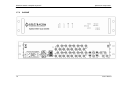
Connect a ground lead from the Earth pin on the SAS0E back panel to the frame of the
rack.
3.1 Powering Up
The SAS-E can be powered from an AC source, from a DC source, or from both.
For full redundancy, connect the DC power cables to the VDC connector and the AC power
cable to the AC connector. Check the polarity of the power signal before connecting it (refer to
DC Power Supply and to the back panel labels for the pin-out). Priority is given to AC input.
Power-up is immediate when connecting DC power with the cable, while AC power must be
switched on.
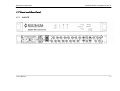
During power-up, check the initialization sequence process (OS boot) on the front panel. All of
the LEDs should be activated. This process may take about two minutes.
3.2 Network Connection
The factory IP address is 192.168.0.100 in static mode. On the back panel, a reset button
allows the user to return to this IP address by default.
Press the RST (reset) button and hold it for 2 seconds. The ETH LED will blink during this
process.
Connect the remote PC through a crossover Ethernet cable or through a network hub. Set the
PC IP address to an address belonging to the same sub-network (e.g. 192.168.0.001).
Press the RST button and hold it for 2 seconds. The ETH LED will blink during this process and,
after roughly 5 seconds, the SAS-E will restart. Wait two minutes.
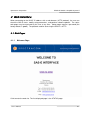
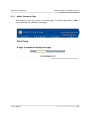
On the PC, open a web browser page to http://192.168.0.100/. Click to enter the web interface.
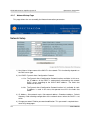
Go to the "System Setup">"Network Setup" web page. Type in the password (the factory default
is "pwd"). Modify the mode of IP address allocation (static or DHCP) and static address as
necessary.
If the SAS-E is already DHCP configured and if no DHCP server is available, you cannot
connect a PC to access the SAS-E network configuration pages. You may use the reset button
on the back panel to reset the IP address in this case.
User’s Manual
3-1