1
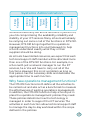
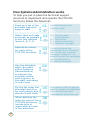
2 New patch available
News that a new patch is available may come from
a variety of sources such as manufacturers’ websites,
suppliers’ bulletins or technical forums. The patch will
usually have some release information explaining what
the patch fixes and who should use it. Read the
information carefully and ensure that the patch applies
to the components and overall network structure of
your school. The patch may not be applicable to every
component on the network, in which case you need to
identify which components require the patch.
3 Acquire patch
The next step is to acquire the patch by downloading
it from the internet, getting it sent by post or having it
emailed to you. Some of the new service packs are
hundreds of megabytes in size, in which case
requesting those on CD will save you bandwidth and
download time.
4 Test patch
Test the patch on a computer or other device reserved
for testing (or a limited number of live computers). The
testing itself depends on what the patch claims to fix.
You may be able to ascertain that the bug has been fixed,
although most patches nowadays are for obscure
security holes. Once you are satisfied that the computer
or other device still works properly and that the patch
has not created other faults, continue to the next step.
5 Deploy patch
This step may involve imaging a computer and
deploying the new image, or it may involve visiting
every computer affected by the patch. Again, this
depends on the tools you have available and the
patch management strategy you employ.
56