1
5-3 Direct mounting method
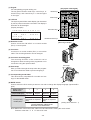
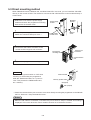
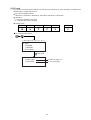
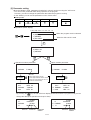
When JW50H/70H/100H, JW50/70/100, and W70H/100H PLC are used, you can install the JW-15PG
directly on the control module. The method to connect the JW-15PG with the control module directly is
shown below.
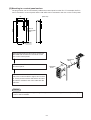
1) Detach the cover from the power supply
module and fasten the programmer mounting
bracket with the bracket screw.
2) Attach the power supply module cover and
detach the communication port cover. *
Mounting
bracket
Power supply
module
Bracket
screw
Power supply
module cover
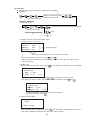
3) Connect the JW-15PG's connector to the
control module’s support tool connector.
ZW
-IP
U
JW
-70C
U
Support tool
connector
Programmer
mounting screw
Communication
port
4) Tighten the 2 programmer mounting screws.
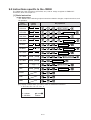
Reference
Set the memory protect switch to "ON" when
mounting or dismounting the programmer
while the JW50H/70H/100H, etc.’s power is
"ON." This protects the JW50H/70H/100H,
etc.’s memory.
Control module
Memory protect switch
ON (Input)
OFF (Output)
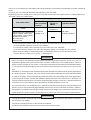
* Detach the communication port connector cover when directly mounting the programmer to the JW70H/
100H or JW70/100. Keep the detached cover.
Notes
- When the JW-15PG is connected, a condition may occur where a "beep" is emitted and nothing is
displayed. This occurs when the control module has been set to the device function.
5-8