1
6.6.3
Scripting Only: Formant Objects
If you’re not scripting, disregard this section. Working from a formant object will win you nothing
in a human-centric workflow.
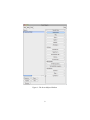
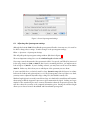
When scripting, you may want to create a Formant object (select the sound, then Objects →
Formants & LPC → To Formant (burg)..., specifying the proper settings as described above) so
that you don’t need to open the editor to measure formants. Once a formant object is created,
you can instead select the Formant object and run any of the commands in the Objects → Query
menu to get information.
Oddly, formant measures taken at the same timepoint and with the same settings from a formant object and from the editor window do not always agree, and in fact, can differ significantly. If measuring formants automatically, you may consider using both methods (the formant
object and the editor window’s formant track). It often happens that if one of the measurement
tactics misses or adds a formant, the other will not, so a measure where both are in agreement is
often more trustworthy than one where they disagree significantly. The author cannot explain
the discrepancy, but is quite happy to leverage it extensively in his scripting.
6.7
Measuring Intensity/Amplitude
Measuring intensity in Praat is relatively straightforward, albeit with a major disclaimer.
To get the overall intensity of a sound, select the desired sound and run Objects → Query → Get
Intensity (dB). To get the intensity at a specific point in the sound, open it in an editor window,
Editor → Intensity → Show Intensity, and then use the various commands available in the Editor
→ Intensity menu to get whatever information you desire.
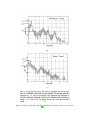
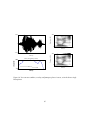
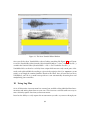
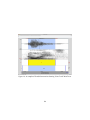
By default, Praat’s display of the intensity of a word is smoothed to avoid showing individual
pulses in the amplitude lines, both in the editor window and in amplitude objects (when drawn
or viewed). This smoothing is based on the minimum F0 of the sound.
If you want to see something closer the amplitude envelope of the sound in Praat (where
pulses show up individually as amplitude peaks), or if you want the amplitude curve to be
smoother than it normally would be, you must simply adjust the minimum pitch expected by
Praat. This can be done in Editor → Pitch → Pitch Settings..., as described more fully in Section
6.4.3. Similar smoothing/desmoothing can be accomplished when creating Intensity objects
by altering the minimum pitch value in the Objects → To Intensity... dialog box.
That said, in most recordings made for phonetic research, absolute intensity measures
as given by Praat are largely meaningless. To accurately measure the absolute intensity of
a speaker’s voice, a sound-attenuated booth with a calibrated sound level meter or calibrated
microphone with specialized software should be used.
22