1
1 Installation
high fidelity engineering
since 1974
4 Operation
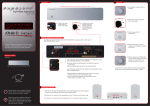
The Exposure 2010S Integrated Amplifier : Front View
a) Turn amplifier volume control to minimum.
a) Turn volume control
to minimum before
connecting or
disconnecting any
cables.
Integrated
Amplifier
b) Connect the mains
cable to the IEC
mains input socket.
c) Connect to the mains
outlet on the wall.
DO NOT switch on
until all input and
output connections
are made.
b) Press power switch. The LED power indicator
will light up. The pre-amplifier output relay will
click after a 6-second delay, together with the
other indicator lights on Volume and Input
Selector Knobs.
c) Without playing any CD/Tape/DVD/etc, turn
the volume control knob slowly clockwise to
around 20%. It is normal to hear a faint hiss.
2 CD Player/Tuner/Tape/DVD/etc Connections
The Exposure 2010s Integrated Amplifier is fitted with six-line level RCA Phono inputs, suitable for connection of CD players, tuners, recorders,
DVD players and other source components.
d) Turn the source selection knob to select a live
source component (Phono Aux1/Tuner/CD/
Aux2/Aux3/Tape). Audio should now be heard
when the source component is played.
The Exposure 2010S Integrated Amplifier: Back View
Quick Start Manual
Thank you for purchasing the Exposure 2010S Integrated Amplifier.
5 Remote Control
GroundTerminal
The source selection knobs will rotate to match selections made on
remote control.
Input
Output
a) Connect RCA Phono cables from source components (CD Player/
Tuner/Tape/DVD/etc) to the respective inputs.
TAPE REC provides line level output signals for recording.
PRE OUT
provides left and right channel output signals appropriate
for connection to an Exposure 2010S Power Amplifier
(a future-proof upgrade).
3 Loudspeaker Connections
Left Speaker
Right Speaker
Mains cable
HS-101 Exposure System remote control
(batteries included)
Rear of exposure 2010S Integrated Amplifier
+
-
Preout
Left
+
-
SPK1 SPK2
+
-
Ensure your unit is switched off and that the volume
control knob is at its minimum.
Please note that your 2010S Integrated Amplifier
may take up to 48 hours to “run-in” before reaching
its optimal performance. Each subsequent “run-in”
will then take about 30 minutes.
The Exposure 2010S Integrated Amplifier is fitted
with an over current sensor which will switch off the
speaker output in the event of a speaker wire short
circuit or excessive current. To reset the output,
switch off the Amplifier for 5 minutes.
For optimum performance,
use Exposure speaker cables with your Exposure equipment.
+
-
a) Connect left and right loudspeakers to corresponding left and right
speaker outputs on the amplifier.
b) Connect (+) terminal of loudspeaker to (+) terminal of the amplifier.
c) Connect (-) terminal of loudspeaker to (-) terminal of the amplifier.
b) Ensure left and right channels are connected correctly. (Right channel
is marked in red)
Bi-wired connection
Bi-wiring may provide a useful gain in subjective performance. Should you choose
this option, please refer to the “Extended Set-Up” instructions overleaf.
c) The tape input is labeled TAPE PLAY.
Turntable connection requires the installation of an optional MM or MC
Phono Card. A ground terminal is provided for connection to a turntable
arm grounding wire or RCA ground wire only.
Bi-amping of Loudspeakers
Bi-amping of loudspeakers using a 2010S Integrated and a 2010S Power Amplifier
provides a useful gain in subjective performance. For this operation, please refer
to the “Extended Set-Up” instructions overleaf.
Installation of a MC or MM Phono Module.
For details, please refer to the “Extended Set-Up” section overleaf or
contact your dealer.
Exposure 2010S Integrated Amplifier Extended Set-Up
Safety
Technical Specifications
Bi-wiring
Incorrect installation or inappropriate use of the Exposure 2010S
Integrated Amplifier may result in injury due to electric shock.
Power Output (1KHz):
75 Watts per channel RMS 8 Ohms
Input Sensitivity:
250mV
• Ensure that the voltage rating on the rear panel of this unit
matches that of your local mains supply.*
Input Impedance:
>14K Ohms, line input
Pre-amplifier Output:
gain + 18dB
• Ensure that the mains cable and plug supplied with this unit is also
correct. (Contact your dealer immediately if this is not the case.)
Frequency Response:
20Hz – 20Khz ± 0.5dB
Total Harmonic Distortion:
<0.05% at 1KHz , rated power
Signal to Noise:
>100dB, A weighted, ref rated output
Channel Separation:
20Hz - 20KHz, >60dB
Mains Supply:
110/120V or 220/240V, 50/60Hz
(factory set)
Max Power Consumption:
200VA (both channels driven,
8 Ohms load)
Dimensions (H x W x D):
90 mm x 440 mm x 310 mm
Nett Weight (Unpacked):
7 kg
Gross Weight (Packed):
9 kg
The Exposure 2010S Integrated Amplifier is fitted with two sets of 4mm loudspeaker sockets for bi-wired connection. Another pair of speaker wires is
required for this operation.
1. Ensure that the links at the speaker terminals between
the high frequency and the low frequency are removed
on both loudspeakers.
2. Follow the diagram on the right for connecting a pair
of loudspeakers in bi-wiring mode.
Please refer to the manufacturer of your loudspeakers
for advice on the practicality and potential benefits of
bi-wiring.
Right Speaker
Left Speaker
Rear of Exposure 2010S Integrated Amplifier
Preout
Right
Left
SPK1 SPK2
SPK1 SPK2
L
+
R
High Frequency
High Frequency
+
Low Frequency
+
Low Frequency
Bi-amping of Loudspeakers
Bi-amping of suitable loudspeakers using a 2010S Integrated and a 2010S Power Amplifier provides a useful gain in subjective performance. The Integrated
Amplifier is used to drive the treble units and the Power Amplifier is used to drive the bass units through the loudspeakers split crossover with the joining
links removed.
Rear of Exposure 2010S Integrated Amplifier
1. Check your loudspeaker user manual for the wiring
connections.
2. Follow the diagram on the right for connecting a pair
of loudspeakers in bi-amping mode.
Preout
Right
SPK1
Left Speaker
Left
SPK2
SPK1
L
+
R
-
• Fuse replacement specifications:
220/240V units
T2A fuse
110/120V units
T4A fuse
• Protect unit against all forms of liquid. Never expose unit to
dripping or splashing, or place objects filled with water, such as
vases, on the unit.
Connecting a pair of loudspeakers in bi-wiring mode
Right Speaker
• This unit is protected by a mains fuse which is accessible as part of
the IEC socket on the rear panel.
• Unplug unit from mains when not in use for prolonged periods.
• Do not open this unit-there are NO user serviceable parts inside
(except to install or change a phono card).
• Reduce the volume control to minimum before turning this unit on
or off.
SPK2
High Frequency
High Frequency
• Ensure that this unit is switched off when connecting or
disconnecting speaker and interconnect cables.
Rear of exposure 2010S Power Amplifier
Although the Exposure 2010S Integrated Amplifier is
able to drive almost any loudspeaker system, the best
results will most likely be achieved with speakers rated
at 8 Ohms.
+
Low Frequency
While the Exposure 2010S Integrated Amplifier is
compatible with most types of loudspeaker cables,
the type of cables used can influence the subjective
performance of your system.
INPUT
Right
SPK1
L
+
Left
SPK2
SPK1
SPK2
-
Low Frequency
+
* Contact Exposure Electronics for advice on moving your equipment to
another country or territor y.
STEREO
R
-
Caution
Connecting a pair of loudspeakers in bi-wiring mode
For a long and trouble-free life of your Exposure 2010S Integrated
Amplifier, please ensure the following:
Note: Exposure 2010S Integrated Amplifier is internally protected against damage from short circuits. However, no such protection is infallible, and damage
may occur if positive and negative speaker cables are inadvertently connected together.
Installation of a MC or MM Phono Module
This is best carried out by your dealer. However, if you wish to attempt installation yourself:
2. This warranty is valid only if the unit is purchased from an
authorised Exposure dealer, registered with the authorised agent
in your country of residence and issued with a recognised
warranty card.
3. The agent accepts no responsibility for defects arising from
accident, misuse, abuse, wear and tear, neglect or through
unauthorised adjustment and/or repair or replacement of any
components, nor will they accept responsibility for damage or
loss occurring during transit to or from the person making a claim
under warranty.
• Do not short circuit the speaker terminals.
• Do not remove the cover of the Integrated Amplifier or dismantle
the case (except to install or change phono card).
• Parts and labour costs for three (3) years from the date of
purchase. Please retain your original receipt as proof of purchase
and purchase date. The guarantee is extended only to the original
purchaser and is not transferable.
• Protect unit against all forms of liquid. Never expose unit to
dripping or splashing, or place objects filled with water, such as
vases, on the unit.
When making claims under this warranty:
• Do not operate the Integrated Amplifier in damp environment or
allow liquids to enter the unit.
1. The equipment should be suitably packed and returned to the
dealer from whom it was purchased, or directly to the local
distributor, together with proof of purchase or a copy of the
dated sales receipt.
• Do not attempt to bypass the mains fuse or replace the fuse with
one of a different specification.
Off
• Do not place the Integrated Amplifier in a position which restricts
cooling airflow around its case.
2 Remove the mains lead from
1.. The Exposure warranty entitles you to FREE repair of this unit for
the first three (3) years from the date of purchase.
4. The Exposure warranty covers:
Please ask your Exposure dealer for advice on bi-amping, loudspeaker cable compatibility and how to get the best from your Exposure 2010S Integrated
Amplifier.
1 Switch off the unit.
Exposure Warranty Policy
3 Remove the four cover screws.
the wall and the IEC socket.
4 Slide the cover back about 2 cm
until it is free to move upwards
to reveal the main circuit board.
• Do not use abrasive or solvent-based cleaning fluids on the
Integrated Amplifier’s case.
Failure to observe these precautionary measures may void your
warranty.
2. If necessary the unit should be sent carriage pre-paid by a
reputable carrier - NOT by post.
3. No responsibility is accepted for the unit whilst in transit to the
dealer or agent, and customers are advised to insure the unit
against loss or damage whilst in transit.
4. The warranty card MUST be produced when making claims
against this guarantee.
5. Any tampering or alteration made to the warranty card or to the
serial number on the equipment will invalidate the warranty.
5 Remove the small jumper board
that is fitted on the right hand
side at the back.
6 Observe the position of the plug
on the phono module and carefully
plug it in, ensuring that all of the
pins are inserted correctly into
their connectors.
7 Push the three plastic mounting
pillars into the corresponding
holes in the main board.
8 Replace the cover and screws.
6. The dealer or the agent shall notify the customer when the repairs
have been completed. The customer must claim the goods within
fourteen days from the date of notice, failing which; the Company
reserves the right to impose storage charges.
7. The Company reserves the right to dispose of the equipment
after 90 days from the date of notice in a manner that it sees fit
without compensation to the customer.