1
The EIS Simulation
The Change, IT Innovation and People Management Challenge
User Manual
1.0
2.0
3.0
4.0
5.0
6.0
Introduction
Your Mission during the EIS Simulation
The Teleswitches Management Team Structure
EIS Simulation - Getting Started
EIS Simulation - Sample Screens & Navigation
EIS Simulation – Stopping & Saving Sessions
Appendix A: Cross Reference for Key Navigation Buttons
Appendix B: Initiatives (Detailed Descriptions)
© AlphaLabs, 2002
The ‘EIS Simulation’
The Change, IT Innovation and People
Management Challenge
1.0 Introduction
In the ‘EIS Simulation’, you will be challenged to introduce an innovation in a subsidiary
(Teleswitches Ltd) of the EuroComm Corporation.
Your mission, as formulated by EuroComm Headquarters, is to spend the next 6 months trying to
convince the Teleswitches top management team to adopt an Executive Information System
(EIS) which will increase performance corporate-wide.
As displayed in the enclosed screens of the simulation, you will be able to choose among many
different initiatives to meet your goal. In some cases, you may gather information on the
managers (for example who drinks coffee with whom, etc.). In other cases, you may take direct
action to try to convince the managers and thus influence their willingness to adopt the proposed
innovation.
Each time you implement an initiative, you will receive feedback about the impact of your decision
immediately. The objective is to get as many adopters as possible in the shortest time.
The following screens illustrate in more detail the purpose and the main elements of the EIS
Simulation, and explain the navigation of the screens, should you have any difficulty.
Page 2
© AlphaLabs, 2002
2.0 Your Mission during the EIS Simulation
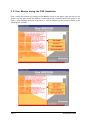
First, review your mission by clicking on the ‘Mission’ button in the upper right oval box of the
screen. You will then access the ‘Mission’ screen which has 4 buttons called ‘The Context’, ‘An
EIS??’, ‘Your Challenge’ and ‘How to go about it’. The information you will access is shown in the
following four screens.
Page 3
© AlphaLabs, 2002
2.0 Your Mission during the EIS Simulation (cont.)
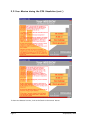
To leave the ‘Mission’ screen, click on the ‘Back to the Action!’ button.
Page 4
© AlphaLabs, 2002
3.0 The Teleswitches Management Team Structure (OrgChart)
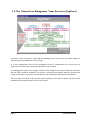
The above screen, ‘Org Chart’, shows what is displayed if you click on the ‘Org. Chart’ button at
any time during the simulation once you begin.
It is the organisational chart of the management team of Teleswitches Ltd in which you are
expected to introduce your innovation during the next 6 months.
The management team of the company consists of 22 managers, an External Financial Controller
and the CEO's Personal Assistant. The picture of each person appears when you position the
cursor on the name. If you then click on the box, you will also get the profile of that person.
You can access this chart at any time during the simulation, and return to where you were in the
simulation by clicking the ‘Back to the Action’ button.
Page 5
© AlphaLabs, 2002
4.0 EIS Simulation – Getting Started
Your second action should be to click on the ‘Strategy’ button in the middle oval box of the
screen and summarize the strategy you are planning to adopt. Include any revision you may have
during the simulation, for instance, after having gathered more information on the organisation
and its managers. Click on ‘Back to the Action’ when completed.
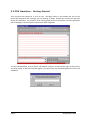
To start the simulation, click on “Enter new session” (oval box on the bottom right of the screen).
A screen similar to the one below will appear. You have enter your Personal Password to start the
simulation.
Page 6
© AlphaLabs, 2002
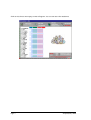
Click on OK, then a new empty screen will appear. You can now start the simulation.
Page 7
© AlphaLabs, 2002
5.0 EIS Simulation – Sample screens & Navigation
5.1 Control Panel
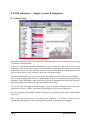
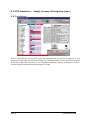
On the left hand side of the screen you will see displayed the list of the managers you are trying
to convince to adopt the EIS.
A variety of information about these managers can be accessed from this ‘Control Panel’ screen
(depending on the initiatives you take). A status on what you know about a person can be accessed
by placing the cursor over the bubble to the left of the person’s name. A personal profile can be
retrieved by clicking on the (i) bubble to the left of the person’s name.
The red bars displayed in the box to the right of the managers' names indicate how successful
you are being in changing the attitude of each manager in relation to adopting the EIS during the
simulation. This is dependent on the initiatives you decide to implement (you will be able to see an
overview of these initiatives on the right hand side of the screen).
You can see that the managers all go through a cycle of adoption, although at different paces,
and can be ‘not aware’, ‘aware’, ‘interested’, have the EIS ‘on trial’ or have ‘adopted’ it.
You can access the ‘Control Panel’ anytime to monitor your progress on the top left hand side of
the screen.
Part of the scoring summary at the end of the simulation is a function of the red bars
representing the degree of positive attitude that you have achieved for each manager.
Page 8
© AlphaLabs, 2002
5.0 EIS Simulation – Sample screens & Navigation (cont.)
5.2 Personal Profile
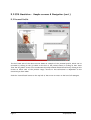
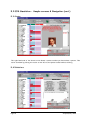
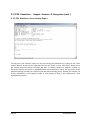
The left hand side of the above screen shows an example of the personal profile, which can be
accessed by clicking on the (i) bubble to the left of the person’s name or clicking on their name
from the ‘Org Chart’ screen. You can also switch quickly between Personal Profiles by clicking on the
arrows on either side of the person’s image. Access to this information is dependent on the
initiatives you have taken.
Click the ‘Control Panel’ button on the top left of the screen to return to the list of all managers.
Page 9
© AlphaLabs, 2002
5.0 EIS Simulation – Sample screens & Navigation (cont.)
5.3 Status
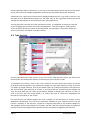
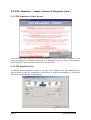
The right hand side of the above screen shows a status on what you know about a person. This
can be accessed by placing the cursor on the left of the person’s name without clicking.
5.4 Initiatives
Page 10
© AlphaLabs, 2002
On the right hand side of the screen, if you click on the ‘Initiatives’ button you will see the above
screen, which lists the change management initiatives you may launch during the simulation.
A description of a particular initiative will be displayed below this list if you click on any title. You
may also click on ‘Detailed Descriptions’ (in the lower half of the right hand screen) and scroll
through the descriptions of all initiatives at once (see Appendix A).
You may also take a decision from the ‘Initiatives’ screen. To implement an initiative from this
screen, highlight the initiative and click on ‘Implement It’. This will bring the ‘Take Decision’
screen up (see 5.5) with the initiative already chosen, and a prompt for any other details you
need to provide (ie. the names of people involved).
5.5 Take Decision
On the right hand side of the screen, if you click on the ‘Take Decision’ button you will see the
above screen, which shows the number of the decision you are about to take.
To implement an initiative, click on the “Your initiative” box and select the initiative from the
drop down menu that appears. You will also be prompted for any other details you need to provide
(ie. Names of people involved). This can be chosen either by clicking on the name of the person on
the ‘Control Panel’ (left hand side of screen), or clicking on the box, and selecting the manager (s)
from the drop down menu of names. If you make a mistake in choosing the initiative or name, or
click on the box with the wrong details in it, select ‘Don’t Do It’ instead of “Implement the
Decision’ at the bottom of the screen.
For each decision, you should complete the ‘Your rationale for this decision’ box. Finally, click on
‘Implement the Decision’. You will receive immediate feedback on your chosen initiative. You will
receive a summary of the outcome, a positive or negative indication of any attitude changes of
the managers involved (and maybe not involved), and the clock will continue ticking off along the
bottom of the screen (against the 6 months) for the time taken to implement the initiative.
Page 11
© AlphaLabs, 2002
5.0 EIS Simulation – Sample Screens & Navigation (cont.)
5.6 Org Networks button
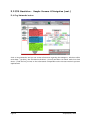
Click on ‘Org Networks’ and you can access information regarding the managers - who has coffee
with whom – (‘Coffee’), who socialises with whom – (‘Social’) and who is on which task force with
whom – (‘Task Forces’). Access to this information is dependent on the various initiatives you have
implemented.
Page 12
© AlphaLabs, 2002
5.0 EIS Simulation – Sample Screens & Navigation (cont.)
5.7 Insights & Issues
Version 2.4 of the EIS Simulation provides the possibility to take notes anytime during a
session. This Learning Notebook, accessible by selecting
in the upper
right side of the screen also provides a structured way to summarize key insights and
issues after completing a session.
You may fill in the Do’s column on the screen to share “Insights” of what you have learned
from the experience as well as Dont’s column for the “Issues” of Change Management you
would like to know more about. You are able to print it on paper or on a slide. The content
of the Do & Dont’s sheet is recorded in the Session Report.
Page 13
© AlphaLabs, 2002
5.0 EIS Simulation – Sample Screens & Navigation (cont.)
5.8 Track Record
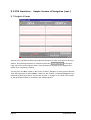
Click on ‘Track Record’ at any point during the simulation and you will see a summary of your
initiatives to date that you can scroll through. For a detailed history of your Initiatives: Decision
#, Initiative, Rationale, Outcome (ie. the immediate feedback), and No. of Adopters to date –
click on ‘History Details’ and scroll through your results.
Page 14
© AlphaLabs, 2002
5.0 EIS Simulation – Sample Screens & Navigation (cont.)
5.9 Score
This shows the score sheet that is displayed if you click the "Score" button located on the
bottom middle of the screen.
You may click on this at any time to see how you are progressing, and you can return to the
simulation by clicking on the buttons at the top of the screen.
The thin blue line on the graph (the top one) indicates the cumulative ‘positive attitude’ (ie. the
red bars) you have succeeded in gathering. As you can see in the example in the screen above, the
cumulative positive attitude can decrease too during the project, depending on your initiatives
and other events that can happen during the 6 months implementation period!
The thick red line (the bottom line) indicates the cumulative number of managers you have
convinced to adopt. Once someone has adopted they cannot move back through the adoption
process.
The numeric scores, the number of ‘Days per Adopter’, Elapsed Time, ‘# of Adopters’, and ‘# of
Decisions’ ‘# of Attitude Points’ are on the top left of the screen.
Page 15
© AlphaLabs, 2002
5.0 EIS Simulation – Sample Screens & Navigation (cont.)
5.10 EIS Simulation Save Session Report
You may save your session’s report at any time during the simulation by clicking on the “Save
Session Report” button on the right hand side of the “Score” screen. The report allows you to
get details about the session including: the date of running, number of adopters, number of
initiatives and the time spent to implement these initiatives and of course the key points of the
adopted strategy and also the content of do and dont’s learning points. Beside you will also get
all the information on the adoption stage of each person as well as the feedback for each
implemented initiative.
Page 16
© AlphaLabs, 2002
5.0 EIS Simulation – Sample Screens & Navigation (cont.)
5.11 EIS Simulation Credits Screen
This screen provides information about the simulation and those who have contributed to its
design, development and continuous updating. It is displayed if you click on the ‘EIS Simulation’
button located on the bottom left hand corner of every screen.
5.12 EIS Simulation Print
The ‘PRINT’ button allows the printing of any page in the Simulation (e.g the SCORE page). In
case you print directly on a transparency, you will have to insert the transparency in the printer
and choose the appropriate printing options.
Page 17
© AlphaLabs, 2002
6.0 EIS Simulation – Stopping & Saving Sessions
6.1 Stopping & Restarting
Version 2.4 of the EIS Simulation allows you to “stop” a session anytime you want and
“resume” it at a later stage. To “stop” the session, just quit the simulation software by
selecting
. The current session will be automatically saved in the file “EISMission.eis”.
To “restart” a session just select
which will appear
automatically on the Main Screen the next time you will enter the simulation software.
6.2
Automatic Saving before Quitting a Session
Version 2.4 of the EIS Simulation automatically saves a copy of the session every time you
quit the simulation software (in addition to producing the Report in editable form). Hence
the latest state of the session is always stored in the file “EISMission.eis” and can be
reloaded. You can always restart your session from the point you left it by selecting
after restarting.
Page 18
© AlphaLabs, 2002
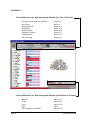
APPENDIX A
Cross Reference for Key Navigation Buttons (at Top of Screen)
Control Panel (People & Progress)
Org. Chart
Org. Networks
Initiatives
Track Record
Insights & Issues
Take Decision
Our Strategy
Refer 5.1
Refer 3
Refer 5.6
Refer 5.4
Refer 5.8
Refer 5.7
Refer 5.5
Refer 4.0
Cross Reference for Key Navigation Buttons (at Bottom of Screen)
Mission
Score
Print
Quit
EIS Simulation (Credits)
Page 19
Refer 2.0
Refer 5.9
Refer 5.12
Quit
Refer 5.11
© AlphaLabs, 2002
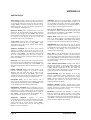
APPENDIX B
INITIATIVES
SEEK ADVICE: Organise a meeting with any one member of
the top management team in order to get some advice on how
to approach the EIS project in the most effective manner.
(2 days) NOTE – You will not actually receive advice in the
feedback message; the aim is to influence the person you
visit by taking the ‘humble’ approach.
PERSONAL PROFILE: Build a personal profile on any five
members of the top management team by talking informally
with some junior managers. (2 days) NOTE – Each person’s
profile includes a qualitative description of the individual and
an indication of how difficult it will be to move that
individual through the four change phases.
TASK FORCES: Discover which top managers are on the
company’s three main task forces. (1 day) NOTE – These
membership lists will not change, and will remain available
throughout the simulation.
INTERNAL MAGAZINE: Ask the editor of the internal
magazine to include a short article you write on the
advantages that Executive Information Systems can bring to
managers. (3 days) NOTE – This magazine is distributed to
all of the top management team. The article is about the
generic advantages of EIS, and does not include any company
specific information.
DIRECTIVE: Try to convince the CEO to send out a directive
to everyone on the top management team insisting that they
start using the EIS in two weeks’ time. (7 days) NOTE – You
spend several days writing a draft of this directive to give to
the CEO.
COVERT LOBBYING: Without the formal approval of the
Directors concerned, suggest to a group of selected
Managers that they meet the CEO to lobby for the
implementation of the EIS. (8 days) NOTE – This initiative
assumes that you have identified the appropriate Managers
to approach, and does not require you to specify them.
ELECTRONIC MAIL: Send a brief electronic mail to
everyone on the top management team explaining your ideas
on why an EIS makes sense for them. (1 day) NOTE – All of
the top managers have an individual E-mail account.
MANAGEMENT TRAINING: For five members of the top
management team, organise a week long residential training
programme at a nearby business school on the potential
benefits of an EIS and how to actually use such a system. (5
days) NOTE – You do not attend the programme, but it
takes a considerable amount of your time to plan it.
DIRECTORS
MEETING:
Organise
a
special
interdepartmental meeting in the main conference room with
all the five directors and the CEO to share and discuss
thoughts and plans for the EIS project. (3 days) NOTE –
Directors are informed that they can also bring along
Managers from their department.
Page 20
WORKSHOP: Help one of the top managers to organise and
lead a demonstration and discussion session on EIS for all
the top managers interested in the topic. (5 days) NOTE –
This will provide the opportunity for the workshop leader to
share and gather views and experiences on EIS.
FACE-TO-FACE MEETING: Fix a meeting with one of the
top managers in order to persuade him/her that the EIS
would make sense to implement. (1 day) NOTE – The meeting
will take place in the manager’s office.
COFFEE BREAK: Spend some time at the company bar in
order to see which groups of top managers meet regularly
for a coffee. (3 days) NOTE – These groups will not change,
and the list will remain available throughout the simulation.
MEMORANDUM: Write and send to any five of the top
managers a brief memo on how some of the specific features
of the EIS will improve transparency of information flows in
the company. (1 day) NOTE – This is distributed in the
company internal mail system.
PILOT TEST: Try to get commitment from one of the top
managers by asking him/her to organise a two-week-long pilot
test of the EIS in his/her department using current company
data. (4 days) NOTE – This will involve setting up the EIS on
all the department’s computers and providing users with the
appropriate training.
STAFF MEETING DISCUSSION: Develop a slide show on
the EIS, and present it during the regular weekly top
managers staff meeting. (5 days) NOTE – The presentation
includes potential applications of the EIS within the
different departments. All members of top management are
in principle expected to attend these meetings.
QUESTIONNAIRE: Write and distribute to all the top
managers a questionnaire aimed at assessing their current
level of interest in becoming regular EIS users. (2 days)
NOTE – The main objective of using this questionnaire is to
demonstrate your approach to the project rather than
gathering additional information.
EXTERNAL SPEAKER: Organise a speaker event in which
Professor Tom Petersen, an expert on Executive Information
Systems, will deliver an address entitled: “EIS: Liberating
Information in the Organisation”. (5 days)
NETWORKS: Spend some time observing or finding out
which top managers go together regularly to the company
health club, who is involved in the local charity campaign, and
who is looking informally at environmental issues together. (5
days) NOTE – These groups will not change, and the lists will
remain available throughout the simulation.
© AlphaLabs, 2002