1
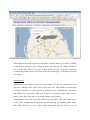
When right clicks on the map then it will show a marker where you clicked. Clicking
on the marker will shows you a dialog window and selecting ‘ok’ button will direct
you to insert page. Then give values to those fields to insert a location. If insertion
occurred successfully then it will direct to the successful page or otherwise gives the
error page.
Administrator
Administrator can register new users in the system. Go the user management and
select the ‘Add new user’ menu item to add a new user. Then fill the necessary data
for fields. Here there is a selection box to enable the user. Administrator can disable
and enable users. Next page set the roles of the user. If user is a profile owner select a
profile for the user. Edit user is very much similar to this process.
Administrator is also able to activate and deactivate profiles. This can be done by go
to the profile management in the menu bar and selecting the manage profile details
item. This will direct you to a page which lists all the profiles. In here you can