1
How to complete a Form B13A –
Export Declaration
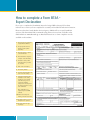
If you opt to complete the Form B13A (instead of using CAED software) follow these
instructions to ensure you have completed it accurately and included all relevant information.
Please note that the Canada Border Services Agency (CBSA) will not accept Form B13A
versions older than 2004. UPS recommends using the most recent form, available on the
CBSA website at www.cbsa-asfc.gc.ca. Detailed instructions on form completion are also
available on this website.
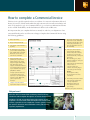
1. E nter your federal governmentassigned Business Number.
2. A
n export permit or license
number is required (when
applicable).
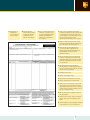
3. E nter the exporter’s complete
contact information.
4. E nter the ultimate consignee’s
complete contact information.
5. Include the country of final
destination where goods will
be consumed.
6. Name of the carrier (UPS).
7. UPS Tracking Number.
8. L ast mode of transport the goods
used to leave the country.
9. S tamp the Form B13A, either
manually or use the stamp
machine, at a local customs
office where the goods are
reported and available
for inspection. The stamp must
be identical on the three copies
of the Form B13A.
Note: stamping is not
required if you use CAED
software.
10.If the mode of transport is
marine, provide the vessel name.
11.Specify the date the goods are
anticipated to be exported.
12.Show the number and type
of packages.