1
5 Introduction
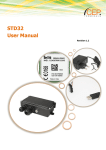
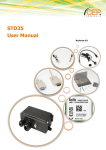
The STD32 is a telemetry module which is easy to install and simple to use.
With the STD32 you can control two relays and monitor the status of two digital inputs with one or several
common mobile phones.
Apart from the STD32 you only need a valid SIM Card of any network provider (GSM850 / 900 / 1800 or 1900
MHz)
While using prepaid SIM-cards one shall always keep aware of the amount of remaining credit left on the card,
so that in case of alarms a message can be sent.
Typical fields of application are
the opening of (garage) doors
switching on and off light and alarm devices as well as generating alarm messages (SMS or e-mail)
the retrieval of information from door sensors, movement sensors or level sensors
etc.
You can for example open your garage door with a call or get a message (viaSMS or e-mail) in case your house
alarm system gets triggered. In connection with the Telic camera you can get a photo via e-mail when a
movement sensor connected to the STD32 detects movement.
Relay
1
Relay
2
IN2
ANT
IN1
P
W
R
PWR
STD32
Relay1/2 IN2
IN1
User
name
L1 L2 L3 L4
GSM
Module
C
A
Camera GSM M
LED LED E
R
A
Status LEDs
Web-Server LED
System LEDs
Abb. 1
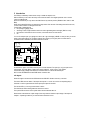
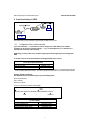
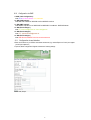
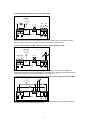
As described in figure 1 the STD 32 has five pairs of screw terminals. Two pairs (In1, In2) are inputs to two
optocouplers. Two pairs (Relay1, Relay2) are outputs (switches) of the 2 relays of the STD32.
Connect the supply voltage of the STD32 on connector PWR or on the screw terminal pair.
ANT: connect the GSM antenna with FME-female connector here.
LED Signals:
When the engine is booked into the GSM network the GSM LED flashes once every 2 seconds.
The status LEDs show the status of the inputs and outputs. L1 and L2 are on if the corresponding relay is
activated. L3 and L4 signal the status of the optocoupler inputs IN1 and IN2.
The camera LED is on as long as the camera is active.
The Web-Server LED is blinking when the web-server is active.
The system LEDs show the current system status and are described later on.
Please observe the maximum output voltage of the relays and the maximum input voltage of the inputs! In
chapter 3. “Operating conditions” you will find further information on this.
7