1
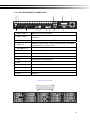
2-4 4CH REAR PANEL CONNECTORS
① ②
⑥ ⑦
③
⑧ ⑨ ⑩
④
⑪
⑤
⑫
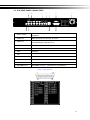
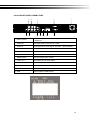
① SPOT monitor
BNC port to display full screen ima ge of all installed cameras
in sequence.
② VIDEO IN
BNC input ports for cameras, 4 in total.
③ AUDIO IN
RCA input port for audio signal. There are 1 ports available.
④ VGA
VGA port
⑤ Fan
DC 12V 40mm X 40mm fan
⑥ DC 12V
Socket for a DC 12V input.
⑦ MAIN monitor
BNC port for the main monitor.
⑧ AUDIO OUT
RCA output port for audio signal.
⑨ NTSC/PAL Switch
Switch between NTSC and PAL format.
⑩ LAN
Network port
⑪ EXTERNAL I/O
EXTERNAL I/O port (see below for pin definition)
⑫ USB
USB port(Device USB Mouse)
12