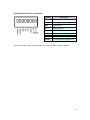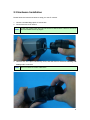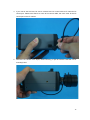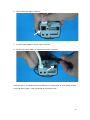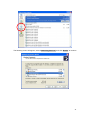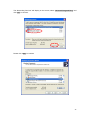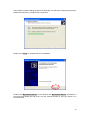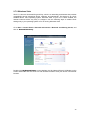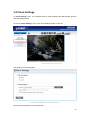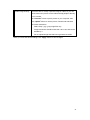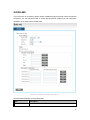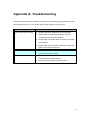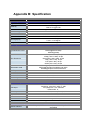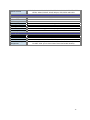
1
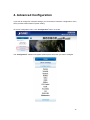
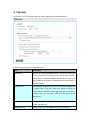
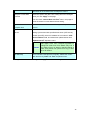
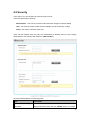
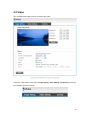
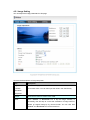
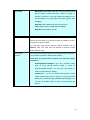
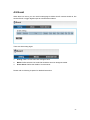
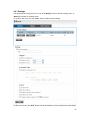
User’s Manual ICA-HM127 3 Mega-Pixel H.264 Box IP Camera Copyright Copyright 2012 by PLANET Technology Corp. All rights reserved. No part of this publication may be reproduced, transmitted, transcribed, stored in a retrieval system, or translated into any language or computer language, in any form or by any means, electronic, mechanical, magnetic, optical, chemical, manual or otherwise, without the prior written permission of PLANET. PLANET makes no representations or warranties, either expressed or implied, with respect to the contents hereof and specifically disclaims any warranties, merchantability or fitness for any particular purpose. Any software described in this manual is sold or licensed "as is". Should the programs prove defective following their purchase, the buyer (and not PLANET, its distributor, or its dealer) assumes the entire cost of all necessary servicing, repair, and any incidental or consequential damages resulting from any defect in the software. Further, PLANET reserves the right to revise this publication and to make changes from time to time in the contents hereof without obligation to notify any person of such revision or changes. All brand and product names mentioned in this manual are trademarks and/or registered trademarks of their respective holders. Federal Communication Commission Interference Statement This device has been tested and found to comply with the limits for a Class B digital device, pursuant to Part 15 of FCC Rules. These limits are designed to provide reasonable protection against harmful interference in a residential installation. This device generates, uses, and can radiate radio frequency energy and, if not installed and used in accordance with the instructions, may cause harmful interference to radio communications. However, there is no guarantee that interference will not occur in a particular installation. If this device does cause harmful interference to radio or television reception, which can be determined by turning the device off and on, the user is encouraged to try to correct the interference by one or more of the following measures: 1. Reorient or relocate the receiving antenna. 2. Increase the separation between the device and receiver. 3. Connect the device into an outlet on a circuit different from that to which the receiver is connected. 4. Consult the dealer or an experienced radio technician for help. FCC Caution To assure continued compliance. (example-use only shielded interface cables when connecting to computer or peripheral devices). Any changes or modifications not expressly approved by the party responsible for compliance could void the user’s authority to operate the device. This device complies with Part 15 of the FCC Rules. Operation is subject to the Following two conditions: ( 1 ) This device may not cause harmful interference, and ( 2 ) this Device must accept any interference received, including interference that may cause undesired operation. Federal Communication Commission (FCC) Radiation Exposure Statement This device complies with FCC radiation exposure set forth for an uncontrolled environment. In order to avoid the possibility of exceeding the FCC radio frequency exposure limits, human proximity to the antenna shall not be less than 20 cm (8 inches) during normal operation. 1 Safety This device is designed with the utmost care for the safety of those who install and use it. However, special attention must be paid to the dangers of electric shock and static electricity when working with electrical device. All guidelines of this and of the computer manufacture must therefore be allowed at all times to ensure the safe use of the device. CE Mark Warning This is a Class B product. In a domestic environment, this product may cause radio interference, in which case the user may be required to take adequate measures. WEEE Regulation To avoid the potential effects on the environment and human health as a result of the presence of hazardous substances in electrical and electronic device, end users of electrical and electronic device should understand the meaning of the crossed-out wheeled bin symbol. Do not dispose of WEEE as unsorted municipal waste and have to collect such WEEE separately. Revision User’s Manual for PLANET 3 Mega-Pixel H.264 Box IP Camera Model: ICA-HM127 Rev: 1.0 (January. 2012) Part No. EM-ICAHM127 2 Table of Content 1. Introduction ................................................................................................................ 5 1.1 Overview........................................................................................................................ 5 1.2 Features......................................................................................................................... 5 1.3 Package Contents........................................................................................................ 6 2. Basic Setup ................................................................................................................ 7 2.1 System Requirement ................................................................................................... 7 2.2 Physical Description .................................................................................................... 8 2.2.1 Identification of ICA-HM127 physical detail ...................................................... 8 2.3 Hardware Installation................................................................................................. 11 2.4 Initial Utility Installation .............................................................................................. 14 2.5 Preparation.................................................................................................................. 14 2.5.1 Configure Network by PLANET IPFinder........................................................ 14 2.6 Setup ActiveX to use the Internet Camera............................................................. 16 2.6.1 Internet Explorer 6 for Windows XP................................................................. 16 2.6.2 Internet Explorer 7 for Windows XP................................................................. 17 2.6.3 Internet Explorer 7 for Windows Vista ............................................................. 18 2.6.4 Internet Explorer 8 for Windows XP................................................................. 19 2.7 Using UPnP of Windows XP or Vista...................................................................... 20 2.7.1 Windows XP ........................................................................................................ 20 2.7.2 Windows Vista..................................................................................................... 24 3. Web-based Management........................................................................................ 25 3.1 Introduction ................................................................................................................. 25 3.2 Connecting to Internet Camera................................................................................ 25 3.3 Viewing Live Video..................................................................................................... 29 3 3.4 Client Settings............................................................................................................. 32 4. Advanced Configuration ........................................................................................ 34 4.1 System ......................................................................................................................... 35 4.2 Security........................................................................................................................ 37 4.3 Network........................................................................................................................ 39 4.3.1 General................................................................................................................. 39 4.3.2 Advanced ............................................................................................................. 41 4.4 IP Filter......................................................................................................................... 43 4.5 Video ............................................................................................................................ 45 4.5.1 Image Setting ...................................................................................................... 46 4.5.2 Video Setting ....................................................................................................... 48 4.5.3 Overlay Setting.................................................................................................... 50 4.6 Audio ............................................................................................................................ 52 4.7 Motion .......................................................................................................................... 53 4.8 RS-485......................................................................................................................... 55 4.9 Event............................................................................................................................ 57 4.9.1 Settings................................................................................................................. 58 4.9.2 Media .................................................................................................................... 60 4.9.3 Event Server ........................................................................................................ 61 4.10 Recording to SD Card............................................................................................. 65 4.11 Log ............................................................................................................................. 66 4.12 Device Info ................................................................................................................ 67 4.13 Maintenance ............................................................................................................. 68 4.14 Language .................................................................................................................. 69 Appendix A: Troubleshooting ................................................................................... 70 Appendix B: Specification.......................................................................................... 71 4 1. Introduction Thank you for purchasing the PLANET 3 Mega-Pixel H.264 Box IP Camera. The ICA-HM127 is 3 Mega-Pixel (2048 x 1536) Box POE IP Camera, supports the highest video compression – H.264, which provides small video size and save you lots of bandwidth usage. The new video compression is the best solution for Internet video transmission. Multi Profiles Streaming The Multi-profile Streaming function supported enables the ICA-HM127 to generate H.264 / MPEG-4 / M-JPEG streaming simultaneously to differentiate users in different resolutions and frame rates. This state-of-the-art design is considerable to fit in various network environments. 2-Way Audio The ICA-HM127 provides 2-Way audio function for surveillance. It can remotely talk to anyone at the ICA-HM127 site with additional speaker connected to the camera. Via two ICA-HM127, users can easily communicate to each other no mater for a personal chat. POE makes Installation Anywhere Compliant with IEEE 802.3af PoE interface, the ICA-HM127 can be located in places where there are no power outlets. And through Power over Ethernet, the installers are fearless for the power breakdown where it can be powered centrally where UPS installed. Day & Night Operations The ICA-HM127 offers high flexibility to be applied in various kinds of IP surveillance environment as it has built-in ICR (IR-cut filter Removable) for day / night capability supports low light surveillance as low as 0.5 LUX illumination. ONVIF Certified / Professional Software The ICA-HM127 follows the ONVIF v1.01 and v1.02 standard SDK for user to integration with rd 3 party software. The ICA-HM127 can work with the PLANET Cam Viewer 3 Lite/Pro Management software and Network Video Recorder products for video surveillance application and provides monitoring, recording and event management functions to secure your property and life. 1.1 Overview This user’s guide explains how to operate this camera from a computer. User should read this manual completely and carefully before you operate the internet camera. 1.2 Features 3 Mega-Pixel / Full HD Resolution H.264 / MPEG-4 / M-JPEG ICR for Day and Night IEEE802.3af PoE 2-Way Audio / SD slot / 3GPP IPv6 / ONVIF 5 1.3 Package Contents IP Camera unit x 1 Power Adapter x 1 Quick Installation Guide x 1 User’s Manual CD x 1 6mm Lens x 1 Lens Connector x 1 Stand x 1 Screw package x 1 1. If any of the above items are missing, please contact your dealer immediately. NOTE: 2. Using the power supply that is not the one included in Internet camera packet will cause damage and void the warranty for this product. 6 2. Basic Setup This chapter provides details of installing and configuring the Internet camera 2.1 System Requirement The Internet Camera can be monitoring on all of Windows operating system that suggest with system requirment below in order to got better video performance when resolution up to 3 Mega-pixel. CPU Intel® Core2 Duo E5300 2.6GHz RAM 1 GB Video RAM 128MB Display Chip nVIDIA GeForce 8500GT or ATI Radeon HD 4350 or above Display Resolution 1024 x 768 24bits Operating System Windows® XP, 2000, 2003, 2008 Server, Vista, Win 7 DirectX 9.0c or above Network Wired Ethernet 100Base-TX 1. The listed information is minimum system requirements only. Actual requirement will vary depending on the nature of your environment. NOTE: 2. The ICA-HM127 can be managed by PLANET Cam Viewer Three if you want to configure more detail information and settings of camera viewer plus software please refer to the CD-ROM folder “D:\Manual\Cam Viewer 3\”, assume D is your CD-ROM drive. 7 2.2 Physical Description 2.2.1 Identification of ICA-HM127 physical detail Front view Item Description 1. Lens mounting hole Lens C-mount or CS-mount hole 2. Iris control port Connects to lens set’s iris control cable Connects to tripod or pan-tilt camera cradle to secure the 3. Mounting hole IP camera *There’s another mounting hole located at the opposite side of IP camera’s body.* 8 Rear View Item Description 1. MIC IN 2. AUDIO OUT 3. SD 4. RESET 5. ETHERNET 6. DI/DO (Digital Input Output) / Digital Connects to external microphone to input audio signal to IP camera. Use 3.5mm audio cable. Connects to external audio amplifier to output voice. Use 3.5mm audio cable. Inserts SD card for video recording. Maximum 32GB of SD-HD card supported. When the IP camera is not functioning properly, you can use a pen or similar object to press this reset button to reset the IP camera. You can also press and hold this button for more than 5 seconds to clear all settings of IP camera, include administrator password, then the IP camera will download default setting automatically. Connect to your local area network by Ethernet cable. Left LED: Power indicator Right LED: Data transfer Digital input / output dry contacts. Connects to external peripherals by wire. See next page for pin definitions. WARNING: DO NOT CONNECT POWERED CABLE! 7. DC12V Connect to DC power adapter output 8. VIDEO OUT Output video signal, connect to external video devices 9. DC lens drive Adjust the DC lens driving ability 9 Terminal block for I/O connectors: Interface Description D+ RS485 signal positive (+) D- RS485 signal negative (-) GND Signal ground DO Digital Output #1 DI1 Digital Input #1 DI2 Digital Input #2 AC24V- AC 24V power input negative (-) AC24V+ AC 24V power input positive (+) To insert or release a wire, press the button of the PIN you wish to insert or release. 10 2.3 Hardware Installation Please follow the instructions below to setup your new IP camera. 1. Choose a suitable Mega pixel CS mount lens. 2. Connect the lens to IP camera. NOTE: In this step, please keep lens set and camera’s CMOS sensor clean! Do not touch lens and CMOS sensor by finger! 3. Hold lens set at the place indicated by arrow, and twist lens set clockwise carefully and slowly until it is secured. NOTE: Do not connect iris control cable now! 11 4. If you use an auto Iris lens, be sure to connect lens’ iris control cable to IP camera’s iris control port. Please mind there’s a notch at iris control cable; the notch must fit the iris control port on the IP camera. 5. Secure the IP Camera to the tripod, camera housing, or pan-tilt camera cradle with one of mounting holes. 12 6. Connect Ethernet cable to LAN port. 7. Plug DC power adapter to power outlet on the wall. 8. Connect DC power cable to IP Camera’s DC power connector. If everything’s ok, you should see the left LED light on LAN port light up. If not, please recheck every step and try again, or ask your dealer of purchase for help. 13 2.4 Initial Utility Installation This chapter shows how to quick set up your IP Camera. The IP Camera is with the default settings. However to help you find the networked IP Camera quickly the Windows utility (PLANET IPFinder) can search the IP Cameras in the network that shall help you to configure some basic setting before you start advanced management and monitoring. Please insert the bundle CD disk into your CD/DVD-ROM drive. When the welcome web page appears, please click your IP Camera name on the IP Camera list i.e. ICA-HM127. Then click on the utility IPFinder to start the program. 2.5 Preparation You can use your new Network IP Camera by its web user interface via web browser. Currently the viewing system requirement for Network IP camera is: ■ OS: Microsoft Windows 2000/XP/Vista/7 ■ Browser: Mozilla Firefox, IE7 or above, Chrome, Safari ■ Cell phone: 3GPP player ■ Quick Time: 6.5 or above The IP Camera will use DHCP server on your local network to obtain an IP address automatically by default. So, you can check your DHCP server’s IP address lease table to find the IP address of IP Camera. 2.5.1 Configure Network by PLANET IPFinder 1. Use “IP Finder” to assign an IP address of IP CAMERA. The IP Finder software is in the attached CD named" IPFinder.exe ". 2. The GUI of IP Finder is as follows (Default IP: 192.168.0.20). 14 3. Press ‘Discover’ button to search for all IP Cameras on your local network (make sure all IP Cameras are powered on and connect to local network first). When you find any IP Camera, you can click on it and click ‘Link’ button to connect to it by your web browser. 4. If you need to change a certain IP Camera’s IP address, you can also click on the IP Camera you wish to change IP address, then click ‘Change IP’ button to change select IP Camera’s IP address setting. 5. Please make sure the subnet of PC IP address and IP CAM IP address are the same. If you no longer need to use this utility, click ‘Exit’ button to close it. 15 2.6 Setup ActiveX to use the Internet Camera The Internet Camera web pages communicate with the Internet Camera using an ActiveX control. The ActiveX control must be downloaded from the Internet Camera and installed on your PC. Your Internet Explorer security settings must allow for the web page to work correctly. To use the Internet Camera, user must setup his IE browser as follows: 2.6.1 Internet Explorer 6 for Windows XP From your IE browse ”Tools” ”Internet Options…” ”Security” ”Custom Level…”, please setup your “Settings” as follow. Set the first 3 items • Download the signed ActiveX controls • Download the unsigned ActiveX controls • Initialize and script the ActiveX controls not masked as safe to Prompt By now, you have finished your entire PC configuration for Internet Camera. 16 2.6.2 Internet Explorer 7 for Windows XP From your IE browse ”Tools” ”Internet Options…” ”Security” ”Custom Level…”, please setup your “Settings” as follow. Set the first 3 items • Allow previously unused ActiveX control to run… • Allows Script lets • Automatic prompting for ActiveX controls By now, you have finished your entire PC configuration for Internet Camera. 17 2.6.3 Internet Explorer 7 for Windows Vista From your IE browse ”Tools” ”Internet Options…” ”Security” ”Internet” ”Custom Level…”, please setup your “Settings” as follow. • Enable “Automatic prompting for ActiveX controls” • Prompt “Initialize and script active controls not marked….” From your IE browse ”Tools” ”Internet Options…” ”Security” ”Trusted Sites” ”Custom Level…”, please setup your “Settings” as follow. • Enable “Automatic prompting for ActiveX controls” • Prompt “Initialize and script active controls not marked….” By now, you have finished your entire PC configuration for Internet Camera. 18 2.6.4 Internet Explorer 8 for Windows XP From your IE browse ”Tools” ”Internet Options…” ”Security” ”Custom Level…”, please setup your “Settings” as follow. Set the first some items as below. Under ActiveX ensure the following are set to enabled • Allow previously unused ActiveX control to run… • Allows Script lets • Automatic prompting for ActiveX controls • Run ActiveX and plug-ins • Script ActiveX controls marked as safe for scripting Set the following to “Prompt” • Download unsigned ActiveX Control • Download Signed ActiveX Control • Initialize and script ActiveX controls not mark as safe By now, you have finished your entire PC configuration for Internet Camera. 19 2.7 Using UPnP of Windows XP or Vista 2.7.1 Windows XP UPnP™ is short for Universal Plug and Play, which is a networking architecture that provides compatibility among networking device, software, and peripherals. This device is an UPnP enabled device. If the operating system, Windows XP, of your PC is UPnP enabled, the Internet Camera will be very easy to configure. Use the following steps to enable UPnP settings only if your operating system of PC is running Windows XP. NOTE: Windows 2000 does not support UPnP feature. Go to Start > Settings, and Click Control Panel The “Control Panel” will display on the screen and double click “Add or Remove Programs” to continue The “Add or Remove Programs” will display on the screen and click Add/Remove Widows Components to continue. 20 The following screen will appear, select “Networking Services” and click “Details” to continue 21 The “Networking Services” will display on the screen, select “Universal Plug and Pla y” and click “OK” to continue. Please click “Next” to continue 22 The program will start installing the UPnP automatically. You will see the below pop-up screen, please wait while Setup configures the components. Please click “Finish” to complete the UPnP installation Double-click “My Network Places” on the desktop, the “My Network Places” will display on the screen and double-click the UPnP icon with Internet Camera to view your device in an internet browser. 23 2.7.2 Windows Vista UPnP™ is short for Universal Plug and Play, which is a networking architecture that provides compatibility among networking device, software, and peripherals. This device is an UPnP enabled device. If the operating system, Windows Vista, of your PC is UPnP enabled, the Internet Camera will be very easy to configure. Use the following steps to enable UPnP settings only if your operating system of PC is running Windows Vista. Go to Start > Control Panel > Net work and Internet > Network and Sharing Center, and turn on “Network Discovery”. Double-click “My Network Places“ on the desktop, the “My Network Places” will display on the screen and double-click the UPnP icon with Internet Camera to view your device in an internet browser. 24 3. Web-based Management This chapter provides setup details of the Internet Camera’s Web-based Interface. 3.1 Introduction The Internet Camera can be configured with your Web Browser. Before configure, please make sure your PC is under the same IP segment with Internet Camera. 3.2 Connecting to Internet Camera Use the following procedure to establish a connection from your PC to the camera. Once connected, you can add the camera to your Browser’s Favorites or Bookmarks. Start the web browser on the computer and type the IP address of the camera. The Default IP: “ http://192.168.0.20 “ After connected to IP Camera, it will prompt for User Name and Password, please enter admin/admin to continue Web Management. Confirm the installation as it is required to view the video stream and some operations. 25 If difficulty is met, please refer to the following steps to establish the connection: - The IP Camera must be installed and powered ON. - If the IP Camera’s default IP Address (192.168.0.20) is already used by another device, the other device must be turned OFF until the device is allocated a new IP Address during configuration. NOTE: If the User name and Password have been changed with PLANET IPFinder, please enter the new User name and Password here. When you know the IP address of IP Camera, you can connect to it by Internet Explorer web browser by entering its IP address in address bar. The use login screen will appear when you get connected: IP Camera’s administrator username and password are both ‘admin’ (lower case) by default. Click ‘OK’ button or press ‘ENTER’ key on your keyboard when you finish entering username and password. When you connect to IP Camera for the first time, you’ll see the following message. This message prompts you that you need to install ActiveX plugin before you can see the video from IP Camera. For IE 8 and earlier version: Right click the indication bar and click: ‘‘Install This Add-on for All Users on This Computer…’ to install ActiveX plugin. If you’re prompted that: ‘Windows Firewall has blocked some features of this program’ 26 Click ‘Allow access’, or IP Camera will not be able to function properly. When you’re installing Internet Explorer plugin, you may also be prompted that if you want to allow changes to be made to your computer: Click ‘Yes’ to allow changes. After ActiveX plugin is installed, you should be able to see the video stream from camera. 27 NOTE: If this is the first time you use this IP Camera, you can refer to chapter 2.4 for instructions on Setup Wizard, which will guide you to complete the software setup of your new IP Camera. 28 3.3 Viewing Live Video After ActiveX control is installed, you can view IP camera’s video by web browser. Just connect to IP camera by web browser and login, and then you can see live video from IP camera: There are various controls on web page; here are descriptions of every control item: Item Description ‘Home’ button This button is visible in all setup pages of IP camera, and you can go back to live video view by clicking this button when you’re in other page. Stream Select video stream type: H.264 or MJPEG. H.264 required less network bandwidth and this will help when network connection is slow. Digital Output Switch digital output interface on or off. (ON / OFF) Client Settings Open ‘Client Setting’ menu. Configuration Open ‘Configuration’ menu. Language Open language menu, you can switch web interface to other language. Available languages: English, Simplified Chinese, Traditional Chinese Original size / Switches live image view between original size (full size: 3M 29 Fit screen pixels) and fit screen (smaller size). If you want to see video in detail, switch to original size. If your computer monitor’s resolution is not enough and you want to / see full image view, switch to fit screen and image size will adjust automatically. ‘Connect’ button Start live video view. ‘Disconnect’ button Stop live video view. ‘Snapshot’ button Take a snapshot or camera video and save image file on your computer. When you click this button, a new window will appear: Click ‘Save’ button when you see the image you wish to save, and you’ll be prompted to indicate the folder on your computer to save image file. If you changed your mind and don’t want to save image file, click ‘Cancel’. ‘Start Video Record’ Click this button to record video and save video file on your button computer. You’ll be prompted to indicate the folder on your computer to save video file. ‘Enable button Digital Zoom’ This function will enlarge video view digitally from 1X to 10X, so you can see objects in video in detail. 30 NOTE: That digital zoom uses computer algorithm to enlarge the video and some details may lost. If you need to focus on detail of specific objects in video view, please use optical zoom ring on lens set of IP camera. Enable / Disable mute When mute is enabled ( button IP camera; If you want to hear voice from IP camera, click this button to disable mute ( ), you will not hear the voice from ). / You can drag the slide bar ( ) beside enable/disable mute button to adjust audio playback volume. Start / Stop talk Start or stop playing your voice through IP camera’s audio Button output. When talk is stopped, people at IP camera will not hear you. / NOTE: You need a microphone connected to your computer, and computer’s mixer setting must enable microphone recording, or nothing will be outputted by IP camera. 31 3.4 Client Settings In ‘Client Settings’ menu, you configure basic IP camera settings like data transfer protocol and data storage folder. To access ‘Client Settings’ menu, click ‘Client Settings’ button on the left. The following screen will appear: Here are the descriptions of every setup item: 32 Item Description RTSP Select this option to use RTSP (Real-Time Streaming Protocol) to transfer video data. HTTP Select this option to use HTTP (Hyper-Text Transfer Protocol) to transfer video data. If you don’t know which one you should use, select ‘RTSP’. Folder Select a folder on your computer to save recorded video. Click ‘Browse’ button and you’ll be prompted to select a folder. Prefix When saving video files, the characters you typed in ‘Prefix’ field will be used as leading characters of video file’s name. For example, the default setting of ‘Prefix’ is ‘CLIP’, and video file’s named will be ‘CLIPxxxx’, where xxxx is a 4-digit serial number. Add date and time suffix to Check this box to add data and time to the ending part of file name video file’s filename, so you can see the date and time the video file is created directly from its filename. When you finish with above settings, click ‘Apply’ button to save changes. 33 4. Advanced Configuration If you wish to configure IP camera’s settings, you can access IP camera’s ‘Configuration’ menu, which provides various kinds of system setting. To access configuration menu, click ‘Configuration’ button on the left. The ‘Configuration’ submenu will appear, please pick a setup item you wish to configure. 34 4.1 System In this menu, you can configure basic IP camera settings like hostname and time. Here are the descriptions of every setup item: Item Description Host Name Input the IP camera’s hostname here, it can be any meaningful words or characters that will help you to identify this IP camera. You can use IP camera’s installation location as host name, and this will help you to identify IP camera when you have many IP cameras installed. Indicator LED The LED lights located at the back of IP camera is switched on by default. But, if you don’t want other people to know the status of this IP camera (so they will know this IP camera is operating etc.), you can select ‘Off’ and LED lights will be switched off. Time Zone Select the time zone of residence from dropdown menu to keep correct date and time. Daylight Saving If the area you live uses daylight saving, check this box; 35 otherwise do not check this box to keep time correct. Keep the current date Select this option and date / time setting will not be changed and time when you click ‘Apply’ in the page. You can check ‘Camera Date and Time’ item in this page to know IP camera’s current date and time setting. Synchronize with Select this item and IP camera will use your computer’s time as computer time its time. Synchronize with NTP Select this item and IP camera will keep its date and time Server setting synchronized with specified time server (NTP server). Please input NTP server’s IP address or host name in ‘NTP Server Address’ field, and select time update interval from ‘Update Interval’ dropdown menu. NOTE: Set Manually That digital zoom uses computer algorithm to enlarge the video and some details may lost. If you need to focus on detail of specific objects in video view, please use optical zoom ring on lens set of IP camera. Set IP camera’s date and time manually. Please set current date and time by ‘Date’ and ‘Time’ dropdown menu. When you finish with above settings, click ‘Apply’ button to save changes. 36 4.2 Security In this menu, you can configure IP camera’s login account. There are three kinds of account: ‐ Administrator : Can view IP camera’s video and make changes of camera setting ‐ User : Can view IP camera’s video and see settings, but can’t make any change ‐ Guest : Can view IP camera’s video only There can be multiple users, but only one administrator is allowed, and you can’t change administrator’s user name (it will always be ‘administrator’). Here are the descriptions of every setup item: Item Password Password Description / Retype Input administrator’s new password in both ‘Password’ and ‘Retype Password’ field, and click ‘Modify’ button to change 37 (Administrator) administrator’s password. NOTE: Account List Don’t forget administrator’s password! Or you’ll need to reset IP camera’s all settings to get administrator’s password recovered. Here lists all users existed in IP camera. If you want to remove one user, click it in the list, and then click ‘Remove’ button. If no user is existed, ‘New Account’ message will be shown here. User Name Input new user’s username here. User name must be greater than 1 character and less than 32 characters. Password / Retype Input this user’s password in both ‘Password’ and ‘Retype Password Password’ field. Authority To define this user’s access privilege, select ‘User’ or ‘Guest’ in dropdown menu. When you finish inputting new user’s information, click ‘New’ button to create a new user. 38 4.3 Network 4.3.1 General In this menu, you can configure IP camera’s network setting. This IP camera supports both IPv4 and IPv6 IP address. Here are the descriptions of every setup item: Item Description LAN Select this option to assign an IP address to LAN port (or obtain an address from DHCP server automatically). Available options are: ‐ DHCP IPv4: Obtain an IPv4 IP address from DHCP server on LAN 39 ‐ DHCP IPv4 / IPv6: Obtain both IPv4 and IPv6 address from DHCP server on LAN automatically. ‐ Static IPv4 / IPv6: Assign an IPv4 / IPv6 address to IP camera manually. If you don’t have a DHCP server on your local area network, you must use this option to specify an IP address. IP Address(IPv4): Input IPv4 IP address* IP Address(IPv6): Input IPv6 IP address* Prefix Length: Input IPv6 IP address’ prefix length (0-128) Subnet Mask: Input subnet mask Gateway: Input gateway address Primary DNS: Input DNS server’s IP address Secondary DNS: Input backup DNS server’s IP address, you can leave this field blank. *You can leave this field blank, if you only wish to use IPv4 or IPv6 IP address. ‐ Enable UPnP Discovery: Check this b ox to enable other devices on network to discover the presence of this IP camera by UPnP. It’s recommended to enable this function. ‐ Enable UPnP Port Mapping: When UPnP is enabled, check this box to enable UPnP’s port mapping. PPPoE Select this option to use PPPoE to connect to network. You have to input PPPoE username and password assigned by network operator to get connected. HTTP Port Input IP camera’s web connection port number here. When this port number is changed, you need to change web browser’s port number you used to connect to IP camera. For example, IP camera’s IP address is 192.168.1.1, and if you changed HTTP port number to 82, please input ‘http://192.168.1.1:82’ in web browser’s address bar to access IP camera’s web configuration interface. RTSP Port Input RTSP port number. When this port number changes, you must change corresponding settings in external network devices (NVR or CMS software) so they can receive this IP camera’s video. RTP Data Port Input RTP data port number here. When you finish with above settings, click ‘Apply’ button to save changes. 40 4.3.2 Advanced In this menu, you can configure IP camera’s advance network setting. Here are the descriptions of every setup item: Item Description Multicast Enable video multicast: Multicast Group Address: Input multicast group address here, must be an address between 232.0.0.0 to 232.255.255.255. Multicast video port: Input port number for video multicast here. Multicast RCTP video port: Input port number for RCTP video here. Multicast audio port: Input port number for audio here. 41 Multicast RCTP audio port: Input port number for RCTP audio here. Multicast TTL: Input TTL value for multicast here. Bonjour If you’re using MacOS and you have Bonjour installed, you can use it to discover this IP camera. QoS Enable QoS to improve the data transfer priority of this IP camera (Your local area network must support QoS). You can select Video / Audio’s QoS DSCP value (0 to 63), or both video and audio. DDNS Enable DDNS support if your ISP assigns dynamic IP address to you. You must register a dynamic IP service first. Currently this IP camera supports Dyndns and TZO dynamic IP service. Provider: Select dynamic IP service provider. Host Name: Input the host name you obtained from dynamic IP service provider. User name: Input user name used to login dynamic IP service provider. Password: Input the password used to login dynamic IP service provider. HTTPS Check ‘Enable HTTPS’ box to enable HTTPS channel to encrypt transferred data. You can also define HTTPS port number in ‘HTTPS Port’ field if you don’t want to use default value ‘443’. When you finish, click ‘Apply’ to save changes. 42 4.4 IP Filter When this IP camera is directly connected to Internet and not protected by firewall, this function acts like a mini built-in firewall to protect the safety of this IP camera and avoid attacks from hackers. Here are the descriptions of every setup item: Item Description Enable Filter Check this box to enable IP address filter, uncheck this Box to disable this function. Accepted IP list Here lists all IP address that can build connections to this IP camera. If you want to remove a set of IP address from the list, click on the IP address and click ‘Remove’ button. IP Address Input the starting and ending IP address of IP address you wish to (Accepted IP list) accept connections here. IP camera will only accept connections established from these IP address. If you want to specify one IP address only, input the same IP 43 address in both field. Click ‘New’ button to add IP address into accepted IP list. Deny IP list Here lists all IP address that cannot build connections to this IP camera. If you want to remove a set of IP address from the list, click on the IP address and click ‘Remove’ button. IP Address Input the starting and ending IP address of IP address you wish to (Accepted IP list) deny connections here. IP camera will deny connections established from these IP address. If you want to specify one IP address only, input the same IP address in both field. Click ‘New’ button to add IP address into deny IP list. When you finish with above settings, click ‘Apply’ button to save changes. 44 4.5 Video You can adjust the image of the IP camera in this menu. There are 3 sub-menus in this menu: Image Setting, Video Setting, and Overlay, which can be accessed by tabs on the top: 45 4.5.1 Image Setting You can adjust the image parameters in this page. Here are the descriptions of every setup item: Item Description Brightness / Control the image parameters. Click ‘ - ' to decrease value, or click ‘ + Contrast / ‘ to increase value. You can also input the value in the field directly. Saturation / Sharpness Default Set all above values to default value ‘128’. Mirror Check ‘Vertical’ or ‘Horizontal’ box to flip the image vertically or horizontally, this will help to correct the orientation of image when IP camera is hanged bottom-up by camera holder. You can click both ‘Vertical’ and ‘Horizontal’ box at the same time. 46 Power Line Select the frequency of power line of the place you’re using this IP Frequency camera. This will help to reduce the flicker of certain lights in the image. Condition Select the condition that you’ll be using this IP camera from dropdown menu. ‐ Auto: IP camera will adjust its parameters automatically. ‐ Night: You’ll be using this IP camera in dark places where lights are insufficient. TV Out Click “Enable” box to enable its “VIDEO OUT” function for connections and video sending to TV monitors or DVRs. Lens(under “TV While connecting with an auto iris lens, and would like to have clear Out”) images from “VIDEO OUT”, please click “Auto iris” to enable this feature. IR-cut An IR-cut filter is built in this IP camera to reduce the effect of IR lights (which will change the color of image and makes it looks different than what you see through your eye), and most of IR lights are coming from sunlight. You can select the behavior or IR-cut filter: ‐ Auto: IR filter will act automatically. If you don’t know if you should use IR filter, select this option. Day ‐ Always ON: IR filter is always on. ‐ Always OFF: IR filter is always off. IR-cut filter will only be switched on when there’s sunlight. You can define the starting and ending time when IR-cut filter should be switched on by select ‘Schedule’ and define starting and ending time by dropdown menu. When you finish with above settings, click ‘Apply’ button to save changes. 47 4.5.2 Video Setting You can adjust the video transfer parameters in this page. Here are the descriptions of every setup item: Item Description H.264 /MPEG4 Select the compression of main stream: H.264 / MPEG4. Video Select video resolution. Resolution ‐ H.264: 2048x1536 (QXGA) / 1920x1080 (1080p) 1280x960 (960p) / 1280x720 (720p) 720x480 (D1) / 640x480 (VGA) 320x240 (QVGA) ‐ MPEG4: 1920x1080 (1080p) / 1280x960 (960p) 1280x720 (720p) / 720x480 (D1) 640x480 (VGA) / 320x240 (QVGA) MJPEG: 1280x720 (720p) / 720x480 (D1) 640x480 (VGA) / 320x240 (QVGA) 48 NOTE: That some video resolution is not available when video encoder is ‘MPEG4’. When network speed is insufficient, select a lower video resolution will help. Frame Rate Select video frame rate. Please note that some frame rate is not available when video encoder is ‘H.264’. When network speed is insufficient, select a lower frame rate will help. Rate Control Select video bit rate. You can control bit rate by both ‘Video quality’ and ‘Bit rate’: ‐ Video quality: There are 5 levels of video quality, select ‘very high’ to improve video quality but consumes more network bandwidth, and select ‘very low’ will decrease video quality and consumes less network bandwidth. ‐ Bit rate: Input video’s bit rate directly. It must an integer between 512 and 4000. Higher bit rate provides better video quality, but consumes more network bandwidth. When you finish with above settings, click ‘Apply’ button to save changes. NOTE: MJPEG options are only available for portable devices like cell phone. 49 4.5.3 Overlay Setting You can adjust the video overlay parameters in this page. Here are the descriptions of every setup item: Item Description Enable Time Stamp Check this box to enable overlaying time stamp on video. Remove the Check this box to remove time stamp’s background color. You background color of may find this will help the readability of time stamp text in some the text cases. (for Time Stamp) Enable Text Display Check this box to display certain text on video; this will help when you need to identify certain IP camera when you have a lot of IP cameras. Please input the text in ‘Text’ field. You can input up to 15 characters. Remove the Check this box to remove custom text’s background color. You background color of may find this will help the readability of text in some cases. the text (Text) 50 Enable Image Overlay Check this box to overlay a specific image on video, so you can show certain text / picture on the video and help people to identify this IP camera. Click ‘Browse’ button to pick a picture on your computer, then click ‘Update’ button to use the picture. Please note that there are certain restrictions: ‐ Select .bmp / .jpg / .jpeg image files only. ‐ Image’s resolution should be less than 160 x 128, and can be divided by 4. ‐ Do not upload image files that size is greater than 64KB. When you finish with above settings, click ‘Apply’ button to save changes. 51 4.6 Audio You can adjust audio input / output parameters here. Here are the descriptions of every setup item: Item Description Enable Microphone Check this box to enable microphone. If you don’t want to hear voice from IP camera, you can uncheck this box to disable it. Audio Type The format is fixed as G.711 Microphone Gain If the voice received by microphone is too loud or silent, you can use this function to improve voice volume, so you can hear voice from IP camera more clearly. Enable Speaker ‐ Select -2 or -1 dB to correct the voice that is too loud; ‐ Select 0 dB and IP camera will do nothing on the voice; ‐ Select +2 dB to +26 dB to amplify the voice. Check this box to enable speaker. If you don’t want people at IP camera to hear you, you can uncheck this box to disable it. Audio Type The format is fixed as G.711 When you finish with above settings, click ‘Apply’ button to save changes. 52 4.7 Motion This IP camera is capable to detect object’s motion, so IP camera will only record when there’s motion and save disk storage space. Motion detection is performed by examine the movement of objects in rectangular motion detection area. You can define up to 3 motion detection areas. Here are the descriptions of every setup item: Item Description Enable Motion Check this box to enable motion detection. Detection Enable Check this box to enable this motion detection window. You can (Window 1 to select window 1 to 3 to enable up to 3 motion detection windows. Window 3) When a motion detection window is enabled, a rectangular will appear on camera’s view, with its title on the top. ‐ To move / resize a motion detection window: 53 ‐ Move: Use the mouse to drag the title text. ‐ Resize: Use the mouse the drag the four corners (upper-left/right, lower-left/right) to resize it. If you only want to adjust width or height, drag the four sidebars (top, bottom, left, and right). Title Input characters in title field to change motion detection area’s title (Window 1 to text so you can identify it. Window 3) Please note that you have to click ‘Apply’ button and the text will change. Percentage Select the percentage of pixel change that will trigger motion detection alert. Select a lower percentage and you can detect tiny changes in motion detection area. Sensitivity Select the sensitivity level that will trigger motion detection alert. Select a higher sensitivity and you can detect tiny changes in motion detection area. When you finish with above settings, click ‘Apply’ button to save changes. 54 4.8 RS-485 If you mount the IP camera on pan-tilt camera cradles that support pan-tilt control via RS-485 connection, you can use this function to control pan-tilt camera cradle so you can control the orientation of IP camera from remote place. Here are the descriptions of every setup item: Item Description Enable RS-485 Check this box to enable RS-485 functionality. 55 Port Setting ‐ Baud Rate: Select data baud rate of RS-485 interface that pan-tilt camera cradle will accept. When the length of RS-485 connection is very long (longer than 200M), it’s not recommended to use high speed connection (greater than 2400bps). Use Pelco-D ‐ Data Bits: Select data bits of RS-485 connection. ‐ Parity: Select parity bit “odd, even, or space”. ‐ Stop Bit: Select stop bit “1 or 2”. Select this option and RS-485 interface will output pan-tile control signal in Pelco-D format. This format is widely accepted by most of pan-tilt pan-tilt camera cradles. You have also input pan-tilt camera cradle’s address code in ‘Address’ field. This code must be identical to pan-tilt camera cradle’s address code. Use Custom When the pan-tilt camera cradle does not support Pelco-D protocol, Protocol you can define a protocol’s detail by this function. Please refer to pan-tilt camera cradle’s user manual to define the protocol. ‐ Home/Up/Down/Left/Right: Input the command string used to move pan-tilt camera cradle to home or up/down/left/right position. You can click ‘Test’ button to send command string for testing. ‐ Command 1 ~ 5: You can define extra pan-tilt camera cradle control strings here by giving it a name (Command Name) and command string (Hexadecimal Message). You can also click ‘Test’ button to send command string for testing. When you finish with above settings, click ‘Apply’ button to save changes. 56 4.9 Event When there’s an event, you can use this setup page to define what IP camera should do, like send an Email or trigger digital output to activate external alarm. There are three setup pages: 1. Setting: Define a new event and manage events. 2. Media: Define what kind of media file should be saved on designate media. 3. Event Server: Define the details of remote server. Please refer to following chapters for detailed instructions. 57 4.9.1 Settings This page lists all existing events. You can click ‘Modify’ button to edit an existing event, or ‘Remove’ to delete an existing event. To create a new even, just click “New” button to add an Event setting. To add a new event, click ‘New’ button and the descriptions of every setup item is listed below: 58 Item Description Enable Setting Check this box to enable this event. If you just want to disable this event temporarily, you can uncheck this box to keep this event and disabling while not deleting it. Title Input any description text for this event so you can identify it quickly. You can use alphabets, numbers, and symbols include: !$-.@^_~ (no spaces allowed). Motion Detection Check this box and this event will be activated when one of motion detection window detects motion. Digital Input Check this box and this event will be activated when digital input 1 or 1~2 2’s input signal is high or low (select from dropdown list). Enable Schedule Check this box and this event will be activated when designated Time weekday and time is reached. You also have to check weekday box, and select time from dropdown list. If you select ‘Always’ as time, this event will be activated during all the day. Enable FTP Check this box and IP camera will save file on FTP server (refer to ‘FTP Server’ setting in ‘Event Server’ tab) when this event is activated. Enable EMAIL Check this box and IP camera will send an Email to designated recipient address (refer to ‘SMTP Server’ setting in ‘Event Server’ tab) when this event is activated. Enable Samba Check this box and IP camera will save file on samba server (refer to (Net Storage) ‘Samba Server’ setting in ‘Event Server’ tab) when this event is activated. Enable SD CARD Check this box and IP camera will save file on SD card when this event is activated. A working SD card must be inserted into IP camera in advance. Trigger digital Check this box and IP camera will trigger digital out to ‘high’ state output for xx for xx seconds when this event is activated, where ‘xx’ seconds second(s). must be defined by the dropdown list. 59 4.9.2 Media You can define what kind of media file should be saved on designated media. Here are the descriptions of every setup item: Item Description One Snapshot Save a picture file when event is triggered. H.264 Video Save a H.264 video clip. You can also select the recording length before and / or after the time when event is triggered in ‘Pre Event’ and ‘Post Event’. For example, if you set ‘Pre Event’ to ‘10’ and ‘Post Event’ to ‘5’, and an event is triggered at 14:10:30, then the video file will be 15 seconds long, starting from 14:10:20 to 14:10:35. Tips: You may want to know what happened before event is triggered in many cases, especially when object is outside of motion detection window. NOTE: If the “Pre Event” set to “0” second, the “Post Event” cannot set to “0” second. When you finish with above settings, click ‘Apply’ button to save changes. 60 4.9.3 Event Server You can define the details of remote media server: FTP (File), SMTP (Email), and Samba (File). A Samba server can be any computer running windows operating system with network neighbor function enabled. Many stand-alone network file server also support samba server function. 61 Here are the descriptions of every setup item: Item Description Enable FTP Check this box to enable FTP server upload. Server ‐ FTP Server: Input FTP server’s IP address or hostname. ‐ Port: Input FTP server’s port number. In most cases it should be default value ‘21’. ‐ User Name: Input FTP server’s username. ‐ Password: Input FTP server’s password. ‐ File Path Name: Input the path where you want to save file on FTP server, like ‘upload/record’. If you want to save file on this FTP user’s home directory, you can leave this field blank. ‐ Enable Passive Mode: Check this box to force IP camera to communicate with FTP server in passive mode (Some FTP Server may only work when you check this box, while others don’t). ‐ Test FTP: Click this button to test FTP server settings above immediately. SMTP Server Check this box to enable Email send. 62 ‐ SMTP Server: Input SMTP server’s IP address or hostname. ‐ Port: Input SMTP server’s port number. In most cases it should uld be default value ‘25’. ‐ Sender Email Address: Input the sender’s email address that will appear in the Email send by IP camera. This will help you to identify the Email sent by this IP camera, and may help when you have anti-spam software installed (you can set this Email address to ‘White List’ in your anti-spam software) ‐ Receiver #1 Email Address: Input primary recipient’s Email address. This field is required. ‐ Receiver #2 Email Address : Input backup recipient’s Email address. This field is optional. ‐ Subject: Input Email titles that will appear in the Email send by IP camera. This will help you to identify the Email sent by this IP camera. ‐ Authentication: Check this box when authentication is required by the Email server you’re using. You also need to input Email server’s username and password in corresponding field. ‐ Requires SSL Encryption: If your Email server required SSL encryption, check this box. Please note that some Email server uses different port number than standard port 25 when SSL encryption is used. 63 ‐ STARTTLS: If your Email server required STARTTLS encryption, check this box. Please note that some Email server uses different port number than standard port 25 when STARTTLS encryption is used. ‐ Test SMTP: Click this button to test SMTP server settings above immediately. Samba Server Check this box to enable Samba server file upload. ‐ Samba Server Address: Input Samba server’s IP address or hostname. ‐ Path: Input the path where you want to save file on Samba server, like ‘upload/record’. If you want to save file on this user’s home directory, you can leave this field blank. ‐ User Name: Input Samba server’s username. ‐ Password: Input Samba server’s password. ‐ Test SMB: Click this button to test Samba server settings above immediately. Tips: Some samba server does not have username and password check, you can just input samba server address and path to access the file storage space. When you finish with above settings, click ‘Apply’ button to save changes. 64 4.10 Recording to SD Card When a SD card is inserted into IP camera, you can save video files on it. 1. Be sure that the SD Card format should be FAT32. The NTFS format cannot be NOTE: supported by this camera. 2. Unlink motion detection; this function will record video at specified time period on selected weekday(s). Here are the descriptions of every setup item: Item Description Enable External storage Check this box to record video on SD card. Recording Maximum Size of Each Input the maximum size of every video file from 1MB to 50MB. File IP camera will start a new video file when a recording video file reaches the size limit stated here. Recording Schedule Define the recording schedule. You can check Sun to Sat boxes to represent a weekday, and specify time period in ‘From’ and ‘To’ field. Select ‘Always’ to record 24 hours in selected weekday(s). When you finish with above settings, click ‘Apply’ button to save changes. 65 4.11 Log You can check the usage log of IP camera here. In this page, you can click: 1. First page / Final page: Jump to first / final page of log. 2. Previous / Next: Jump to previous or next page of log. 3. Remove: Clear log. You’ll be prompted for confirmation. 66 4.12 Device Info You can check the information and network settings of this IP camera. This information is very useful when you need to repair or fix the problem of this IP camera. An example of device info page looks like this: 67 4.13 Maintenance You can do some maintenance job about this IP camera here. Here are the descriptions of every setup item: Item Description Reboot Click this button to reboot the IP camera. This function is useful when you find IP camera is not working properly. Reset Clear all settings of IP camera and reset to factory default setting. Backup Backup IP camera’s setting and save it on your computer. Backup to SD card Backup IP camera’s setting and save it on SD card. A SD card must device be inserted into SD card slot when you click this button, or you’ll receive an error message. Restore Restore a previously-saved configuration file saved on your computer. Click ‘Browse’ button to select a file on your computer first, then click ‘Restore’ button. Restore from SD Restore IP camera’s configuration which is previously-saved on SD 68 card device card. Upgrade Upgrade IP camera’s firmware. Click ‘Browse’ button to select a firmware image file on your computer first, then click ‘Upgrade’ button. 4.14 Language You can change the display language of web interface. Click ‘Language’ button and select one language. More languages may available in latest firmware file. 69 Appendix A: Troubleshooting Please don’t panic when you found this IP Camera is not working properly. Before you send this IP Camera back to us, you can do some simple checks to save your time: Problem description Possible solution(s) Can’t connect to IP Camera 1) Please check the IP address of IP Camera again. 2) Please make sure the network cable is correctly connected to your local area network. 3) Please make sure power cable is correctly connected to IP Camera. 4) Please make sure IP Camera is switched on (the LED lights on IP Camera will light up). No IP Camera found 1) ‘Auto search’ function only works on IP Cameras located on local area network. No image 1) If the place where IP camera is installed is too dark, try to add some lights when possible. 2) Check if there’s anything covering the lens. 70 Appendix B: Specification Model ICA-HM127 Camera Specification Image Device 1/2.5" Progressive CMOS Sensitivity Color: 0.05 Lux @ 30 IRE B/W: 0 Lux @ IR ON Lens Focal Length 3.1-8mm , F1.2 Varifocal Lens Lens Mounting CS mount Auto Iris 1 x Auto Iris connector, DC Drive Night vision function Built-in removable IR cut filter H: 38.7~95.9 Degree V: 29.1~71.0 Degree View Angle(4:3) Storage Interface SD, SDHC support Video Specification Video Compression H.264 / MPEG4 / M-JPEG H.264 QXGA/1080p MJPEG@QXGA/1080p MPEG4@1080p High Resolution mode QXGA (2048 x1536): 20 fps 1080p (1920 x 1080): 30 fps Quad-VGA (1280 x 960): 30 fps 720p (1280 x 720): 30 fps VGA (640 x 480): 30 fps QVGA (320 x 240): 30 fps Video Resolution H.264 @720p/D1/VGA/QVGA/QCIF MPEG4@720p/D1/VGA/QVGA and 3GPP MJPEG@720p/D1/VGA/QVGA/QCIF Multi-stream mode Auto Exposure Control Yes Auto White Balance Yes Auto Gain Control Yes Text Overlay Text and Date-time Image Overlay Support JPG and Bitmap image format Audio/Video Specification Internal Omni-directional Microphone Sensitivity: more than -42Db +/- 3dB Freq Response: 100~10000Hz External Mic. In ; Audio Input Audio Output Line level out;1 Vrms; 3.5mm phone jack; Mono Compression method PCM / AMR Audio S/N ratio More than 60dB Operation mode 2 way audio Composite CVBS / 1 Vp-p±0.2 / 75 Ohms ; BNC connecter Network and Configuration Network Interface One RJ45 port; IEEE 802.3u compliant 10/100 Mbps Fast Ethernet with Auto-MDIX 71 Network Protocol TCP/IP, IPv4/v6, UDP, ICMP, DHCP, NTP, DNS, DDNS, SMTP, FTP, HTTP, HTTPs, Samba, PPPoE, UPnP, Bonjour, RTP, RTSP and RTCP General Power Supply PoE DC12V / 1A IEEE 802.3af PoE Consumption Operating Temperature Operating Humidity WEIGHT Dimension (W x D x H) Max. 8W 0 ~ 50 Degree C 20% ~ 85% 390g (Camera body only, w/o lens) 72.15 x 130.40 x 58.30 mm Viewing System OS Windows® XP, 2000, 2003, 2008 Server, Vista, Win 7 Browser IE 6.0 or latter Search & Installation PLANET IPFinder Monitor/ Recording / Management PLANET CV3P (4-ch Cam Viewer Three Pro Trail Version) PLANET CV3L (64-ch Cam Viewer Three Lite Bundle Version) 72