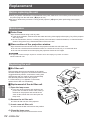
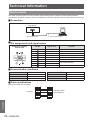
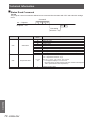
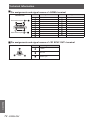
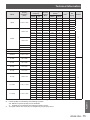
1
Operating Instructions Projector Operations DLP™ Based Projector Model No. Commercial Use PT-CW230U PT-CX200U Thank you for purchasing this Panasonic Product. JJ Before operating this product, please read the instructions carefully, and save this manual for future use. For information on using the product via a network, refer to “Operating Instructions – Network Operations”. ENGLISH MB2AC Read this first! WARNING: Important Information TO REDUCE THE RISK OF FIRE OR ELECTRIC SHOCK, DONOT EXPOSE THIS PRODUCT TO RAIN OR MOISTURE. Power Supply: This Projector is designed to operate on 100 V - 240 V, 50 Hz/60 Hz AC, house current only. CAUTION: The AC power cord which is supplied with the projector as an accessory can only be used for power supplies up to 125 V, 10 A. If you need to use higher voltages or currents than this, you will need to obtain a separate 250 V power cord. If you use the accessory cord in such situations, fire may result. WARNING: RISK OF ELECTRIC SHOCK, DO NOT OPEN. The lightning flash with arrowhead symbol, within an equilateral triangle, is intended to alert the user to the presence of uninsulated “dangerous voltage” within the product’s enclosure that may be of sufficient magnitude to constitute a risk of electric shock to persons. The exclamation point within an equilateral triangle is intended to alert the user to the presence of important operating and maintenance (servicing) instructions in the literature accompanying the product. CAUTION: This equipment is equipped with a three-pin grounding-type power plug. Do not remove the grounding pin on the power plug. This plug will only fit a grounding-type power outlet. This is a safety feature. If you are unable to insert the plug into the outlet, contact an electrician. Do not defeat the purpose of the grounding plug. WARNING: TURN OFF THE UV LAMP BEFORE OPENING THE LAMP COVER. 2 - ENGLISH Do not remove Read this first! Declaration of Conformity Model Number: PT-CW230U/PT-CX200U Trade Name: Panasonic Responsible Party: Panasonic Corporation of North America Address: One Panasonic Way, Secaucus, NJ 07094 Telephone number: (877)803-8492 E-mail: [email protected] This device complies with Part 15 of the FCC Rules. Operation is subject to the following two conditions: (1) This device may not cause harmful interference, and (2) this device must accept any interference received, including interference that may cause undesired operation. To assure continued compliance, follow the attached installation instructions and do not make any unauthorized modifications. Important Information FCC NOTICE (USA) CAUTION: This equipment has been tested and found to comply with the limits for a Class B digital device, pursuant to Part 15 of the FCC Rules. These limits are designed to provide reasonable protection against harmful interference in a residential installation. This equipment generates, uses and can radiate radio frequency energy and, if not installed and used in accordance with the instructions, may cause harmful interference to radio communications. However, there is no guarantee that interference will not occur in a particular installation. If this equipment does cause harmful interference to radio or television reception, which can be determined by turning the equipment off and on, the user is encouraged to try to correct the interference by one of the following measures: •• Reorient or relocate the receiving antenna. •• Increase the separation between the equipment and receiver. •• Connect the equipment into an outlet on a circuit different from that to which the receiver is connected. •• Consult the dealer or an experienced radio/TV technician for help. The user may find the booklet “Something About Interference” available from FCC local regional offices helpful. FCC Warning: To assure continued FCC emission limit compliance, follow the attached installation instructions and the user must use only shielded interface cables when connecting to host computer or peripheral devices. Also, any unauthorized changes or modifications to this equipment could void the user’s authority to operate this device. NOTIFICATION (Canada) This class B digital apparatus complies with Canadian ICES-003. WARNING: •• Not for use in a computer room as defined in the Standard for the Protection of Electronic Computer/Data Processing Equipment, ANSI/NFPA 75. •• For permanently connected equipment, a readily accessible disconnect device shall be incorporated in the building installation wiring. •• For pluggable equipment, the socket-outlet shall be installed near the equipment and shall be easily accessible. NOTICE U.S.A. only: •• This product has a High Intensity Discharge (HID) lamp that contains mercury. Dispose may be regulated in your community due to environmental considerations. For disposal or recycling information, please visit Panasonic website: http://www.panasonic.com/environmental or call 1-888-769-0149. ENGLISH - 3 Read this first! Important Information WARNING: POWER The wall outlet or the circuit breaker shall be installed near the equipment and shall be easily accessible when problems occur. If the following problems occur, cut off the power supply immediately. Continued use of the projector in these conditions will result in fire or electric shock. zz If foreign objects or water get inside the projector, cut off the power supply. zz If the projector is dropped or the cabinet is broken, cut off the power supply. zz If you notice smoke, strange smells or noise coming from the projector, cut off the power supply. Please contact an Authorized Service Center for repairs, and do not attempt to repair the projector yourself. During a thunderstorm, do not touch the projector or the cable. Electric shocks can result. Do not do anything that might damage the power cord or the power plug. If the power cord is used while damaged, electric shocks, short-circuits or fire will result. zz Do not damage the power cord, make any modifications to it, place it near any hot objects, bend it excessively, twist it, pull it, place heavy objects on top of it or wrap it into a bundle. Ask an Authorized Service Center to carry out any repairs to the power cord that might be necessary. Insert the power plug securely into the wall outlet. If the plug is not inserted correctly, electric shocks or overheating will result. zz Do not use anything other than the provided power cord. zz Do not use the provided power cord for other electrical equipment. zz Do not use plugs which are damaged or wall outlets which are coming loose from the wall. Clean the power plug regularly to prevent it from becoming covered in dust. Failure to observe this will cause a fire. zz If dust builds up on the power plug, the resulting humidity can damage the insulation. zz If not using the projector for an extended period of time, pull the power plug out from the wall outlet. Pull the power plug out from the wall outlet and wipe it with a dry cloth regularly. Do not handle the power plug with wet hands. Failure to observe this will result in electric shocks. Do not overload the wall outlet. If the power supply is overloaded (ex., by using too many adapters), overheating may occur and fire will result. ON USE/INSTALLATION Do not place liquid containers on top of the projector. If water spills onto the projector or gets inside it, fire or electric shocks will result. If any water gets inside the projector, contact an Authorized Service Center. Do not place the projector on soft materials such as carpets or sponge mats. Doing so will cause the projector to overheat, which can cause burns, fire or damage to the projector. Do not set up the projector in humid or dusty places or in places where the projector may come into contact with oily smoke or steam, ex. a bathroom. Using the projector under such conditions will result in fire, electric shocks or components deterioration. Components deterioration (such as ceiling mount brackets) may cause the projector which is mounted on the ceiling to fall down. Do not install this projector in a place which is not strong enough to take the full weight of the projector or on top of a surface which is sloped or unstable. Failure to observe this will cause projector to fall down or tip over the projector, and severe injury or damage could result. Do not place another projector or other heavy objects on top of the projector. Failure to observe this will cause the projector to become unbalanced and fall, which could result in damage or injury. The projector will be damaged or deformed. 4 - ENGLISH WARNING: Installation work (such as ceiling mount bracket) should only be carried out by a qualified technician. If installation is not carried out and secured correctly it can cause injury or accidents, such as electric shocks. zz Do not use anything other than an authorized ceiling mount bracket. zz Be sure to use the wire provided with the projector mount base for ceiling mount as an extra safety measure to prevent the projector from falling down. (Install in a different location to the ceiling mount bracket). Important Information Read this first! Do not cover the air inlet port or the air outlet port. Doing so will cause the projector to overheat, which can cause fire or damage to the projector. zz Do not place the projector in narrow, badly ventilated places. zz Do not place the projector on cloth or papers, as these materials could be drawn into the air inlet port. Do not place your hands or other objects close to the air outlet port. Doing so will cause burns or damage your hands or other objects. zz Heated air comes out of the air outlet port. Do not place your hands or face, or objects which cannot withstand heat close to this port. Do not look and place your skin into the lights emitted from the projection window while the projector is being used. Doing so can cause burns or loss of sight. zz Strong light is emitted from the projector’s projection window. Do not look or place your hands directly into this light. zz Be especially careful not to let young children look into the projection window. In addition, turn off the power and disconnect the power plug when you are away from the projector. Do not insert any foreign objects into the projector. Doing so will cause fire or electric shocks. zz Do not insert any metal objects or flammable objects into the projector or drop them onto the projector. Never attempt to remodel or disassemble the projector. High voltages can cause fire or electric shocks. zz For any inspection, adjustment and repair work, please contact an Authorized Service Center. Do not allow metal objects, flammable objects, or liquids to enter inside of the projector. Do not allow the projector to get wet. Doing so may cause short circuits or overheating, and result in fire, electric shock, or malfunction of the projector. zz Do not place containers of liquid or metal objects near the projector. zz If liquid enters inside of the projector, consult your dealer. zz Particular attention must be paid to children. Use the ceiling mount bracket specified by Panasonic. Defects in the ceiling mount bracket will result in falling accidents. zz Attach the supplied safety cable to the ceiling mount bracket to prevent the projector from falling down. ENGLISH - 5 Read this first! Important Information WARNING: ACCESSORIES Do not use or handle the batteries improperly, and refer to the following. Failure to observe this will cause burns, batteries to leak, overheat, explode or catch fire. zz Do not use unspecified batteries. zz Do not disassemble dry cell batteries. zz Do not heat the batteries or place them into water or fire. zz Do not allow the + and - terminals of the batteries to come into contact with metallic objects such as necklaces or hairpins. zz Do not store batteries together with metallic objects. zz Store the batteries in a plastic bag and keep them away from metallic objects. zz Make sure the polarities (+ and -) are correct when inserting the batteries. zz Do not use a new battery together with an old battery or mix different types of batteries. zz Do not use batteries with the outer cover peeling away or removed. zz Remove the empty batteries from the remote control at once. zz Insulate the battery using tape or something similar before disposal. Do not allow children to reach the batteries (AAA/R03 type). zz The battery can cause personal injury if swallowed. zz If swallowed, seek medical advice immediately. If the battery fluid leaks, do not touch it with bare hands, and take the following measures if necessary. zz Battery fluid on your skin or clothing could result in skin inflammation or injury. Rinse with clean water and seek medical advice immediately. zz Battery fluid coming in contact with your eyes could result in loss of sight. In this case, do not rub your eyes. Rinse with clean water and seek medical advice immediately. Do not disassemble the lamp unit. If the lamp breaks, it could cause injury. Lamp replacement The lamp has high internal pressure. If improperly handled, an explosion and severe injury or accidents will result. zz The lamp can easily explode if struck against hard objects or dropped. zz Before replacing the lamp, be sure to disconnect the power plug from the wall outlet. Electric shocks or explosions can result if this is not done. zz When replacing the lamp, turn the power off and allow the lamp it to cool for at least 1 hour before handling it otherwise it can cause burns. Do not allow infants or pets to touch the remote control unit. zz Keep the remote control unit out of the reach of infants and pets after using it. Do not use the supplied power cord with devices other than this projector. zz Using the supplied power cord with devices other than this projector may cause short circuits or overheating, and result in electric shock or fire. Remove the depleted batteries from the remote control promptly. zz Leaving them in the unit may result in fluid leakage, overheating, or explosion of the batteries. 6 - ENGLISH CAUTION: POWER When disconnecting the power cord, be sure to hold the power plug and power connector. If the power cord itself is pulled, the lead will become damaged, and fire, short-circuits or serious electric shocks will result. Important Information Read this first! When not using the projector for an extended period of time, disconnect the power plug from the wall outlet and remove the batteries from the remote control. Disconnect the power plug from the wall outlet before carrying out any cleaning and replacing the unit. Electric shocks can result if this is not done. ON USE/INSTALLATION Do not put your weight on this projector. You could fall or the projector could break, and injury will result. zz Be especially careful not to let young children stand or sit on the projector. Do not place the projector in extremely hot locations. Doing so will cause the outer casing or internal components to deteriorate, or result in fire. zz Take particular care in locations exposed to direct sunlight or near stoves. Always disconnect all cables before moving the projector. Moving the projector with cables still attached can damage the cables, which will cause fire or electric shocks to occur. Never plug headphones and earphones into AUDIO OUT jack. Excessive sound pressure from earphones and headphones can cause hearing loss. ACCESSORIES Do not use the old lamp unit. If used it could cause lamp explosion. If the lamp has broken, ventilate the room immediately. Do not touch or bring your face close to the broken pieces. Failure to observe this will cause the user to absorb the gas which was released when the lamp broke and which contains nearly the same amount of mercury as fluorescent lamps, and the broken pieces will cause injury. zz If you believe that you have absorbed the gas or that the gas has got into your eyes or mouth, seek medical advice immediately. zz Ask your dealer about replacing the lamp unit and check the inside of the projector. ENGLISH - 7 Read this first! Important Information Brazil Only Brasil Apenas Manuseio de baterias usadas BRASIL Após o uso, as pilhas e /ou baterias poderão ser entregues ao estabelecimento comercial ou rede de assistência técnica autorizada. Cobrir os terminais positivo (+) e negativo (-) com uma fita isolante adesiva, antes de depositar numa caixa destinada para o recolhimento. O contato entre partes metálicas pode causar vazamentos, gerar calor, romper a blindagem e produzir fogo. Não desmonte, não remova o invólucro, nem amasse a bateria. O gás liberado pela bateria pode irritar a garganta, danificar o lacre do invólucro ou o vazamento provocar calor, ruptura da blindagem e produzir fogo devido ao curto circuito dos terminais. Não incinere nem aqueça as baterias, elas não podem ficar expostas a temperaturas superiores a 100 °C (212 °F). O gás liberado pela bateria pode irritar a garganta, danificar o lacre do invólucro ou o vazamento provocar calor, ruptura da blindagem e produzir fogo devido ao curto circuito dos terminais provocado internamente. Evite o contato com o liquido que vazar das baterias. Caso isto ocorra, lave bem a parte afetada com bastante água. Caso haja irritação, consulte um médico. Remoção das baterias 1. Pressione a guia e levante a tampa. 2. Remova as baterias. Trademarks •• HDMI, the HDMI logo and High-Definition Multimedia Interface is a trademark or registered trademark of HDMI Licensing LLC. •• NVIDIA®, the NVIDIA® logo, and 3D VISION™ are registered trademarks and/or trademarks of NVIDIA Corporation in the United States and other countries. •• Other names, company names or product names used in these operating instructions are the trademarks or registered trademarks of their respective holders. Please note that the operating instructions do not include the ® and TM symbols. Illustrations in these operating instructions •• Note that illustrations of the projector and screens may differ from the ones you actually see. Page references •• In these instructions, references to pages are indicated as: (Æpage 00). Term •• In these instructions, the “Wireless remote control unit” accessory is referred to as the “Remote control”. 8 - ENGLISH JJFeatures of the Projector JJQuick steps For details, see the corresponding pages. Auto Setup Function This function enables Input search and Auto PC adjustment by pressing the <AUTO SETUP> button. Direct Power Off Function With the Direct Power Off function, you can disconnect the power cord from the wall outlet or turn off the breaker even during projection. Large Screen in Limited Space Short focus lens allows you to project large images from short distance. 1. Set up your projector. (Æpage 21) 2. Connect with other devices. (Æpage 25) 3. Connect the power cord. (Æpage 26) 4. Power on. (Æpage 28) LAN Network Function This function allows you to operate and manage the projector via network. 5. Select the input signal. (Æpage 31) 3D Display Function This projector is capable of displaying 3D video with the Frame Sequential Format, and you can view the dynamic 3D contents by wearing 3D glasses. 6. Adjust the image. (Æpage 31) ENGLISH - 9 Contents Be sure to read “Read this first!”. ( Important Information Important Information Read this first!............................................ 2 Contents.................................................... 10 Precautions for Use................................. 12 Preparation Cautions when transporting........................................... 12 Cautions when installing................................................ 12 Security......................................................................... 13 Disposal......................................................................... 13 Cautions on use............................................................ 14 Accessories................................................................... 16 Optional accessories..................................................... 16 Getting Started Preparation About Your Projector............................... 17 Remote control.............................................................. 17 Projector body............................................................... 18 Control panel ................................................................ 19 Side terminals................................................................ 19 Using Remote control.............................. 20 Basic Operation Installing and Removing batteries................................. 20 Setting Remote control ID numbers.............................. 20 Getting Started Setting up.................................................. 21 pages 2 to 8) Basic operations by using the remote control................................................... 33 Using the AUTO SETUP function.................................. 33 Switching the input signal.............................................. 33 Using the SCREEN button............................................ 33 Using the KEYSTONE button........................................ 34 Using the INFO. button.................................................. 34 Using the FREEZE function.......................................... 34 Using the AV MUTE function......................................... 35 Using the P-TIMER button............................................ 35 Using the LAMP button................................................. 35 Using the D.ZOOM buttons........................................... 35 Controlling the volume of the speaker........................... 35 Using the IMAGE button................................................ 35 Using the 3D button....................................................... 36 Using the MUTE button................................................. 36 Settings Menu Navigation....................................... 37 Navigating through the menu........................................ 37 Main menu..................................................................... 38 Sub menu...................................................................... 38 Input menu................................................ 40 Computer 1: RGB/Component /RGB (Scart) ............... 40 Computer 2: RGB.......................................................... 40 HDMI............................................................................. 41 Video............................................................................. 41 S-video.......................................................................... 41 Settings Maintenance Projection method......................................................... 21 Parts for ceiling or wall mount (Optional)...................... 21 Screen size and throw distance.................................... 22 Adjusting front adjustable feet....................................... 24 AUTO PC adjust........................................ 42 Connections.............................................. 25 Fine sync....................................................................... 43 Total dots....................................................................... 43 Horizontal...................................................................... 43 Vertical........................................................................... 43 Current mode................................................................ 44 Clamp............................................................................ 44 Reset............................................................................. 44 Mode free...................................................................... 44 Store.............................................................................. 44 Before connecting to the projector................................ 25 Connecting example...................................................... 25 Basic Operation Powering ON/OFF..................................... 26 Connecting the power cord........................................... 26 ON(G)/STANDBY(R) indicator...................................... 27 Turning On the Projector............................................... 28 Enter a PIN code........................................................... 29 Turning Off the Projector............................................... 30 Appendix Projecting.................................................. 31 Selecting the image....................................................... 31 How to adjust the state of the image............................. 31 For Viewing 3D Contents.............................................. 32 10 - ENGLISH AUTO PC adj................................................................. 42 Manual PC adjust...................................... 43 Image select ............................................. 45 Dynamic........................................................................ 45 Standard........................................................................ 45 Real............................................................................... 45 Cinema.......................................................................... 45 Image 1-4...................................................................... 45 Image adjust............................................. 46 Contrast......................................................................... 46 Brightness..................................................................... 46 Sound........................................................ 52 Input Source Information Display ................................. 60 Maintenance LAMP and WARNING Indicators............. 61 Managing the indicated problems................................. 61 Replacement............................................. 62 Before replacing the unit............................................... 62 Maintenance.................................................................. 62 Replacing the unit.......................................................... 62 Troubleshooting....................................... 66 Appendix Technical Information.............................. 68 Serial terminal............................................................... 68 Other terminals.............................................................. 71 List of compatible signals.............................................. 73 Specifications........................................... 77 Dimensions.................................................................... 79 Ceiling mount bracket safeguards......... 79 Index.......................................................... 80 Preparation Normal........................................................................... 49 Full. ............................................................................... 49 Wide(16:9)..................................................................... 49 Zoom............................................................................. 49 True................................................................................ 49 Natural wide (PT-CW230U Only).................................... 49 Custom.......................................................................... 49 Custom adj.................................................................... 50 Digital zoom +............................................................... 50 Digital zoom -................................................................ 50 Keystone....................................................................... 50 Ceiling........................................................................... 51 Rear............................................................................... 51 Screen aspect (PT-CW230U Only)............................... 51 Colorboard..................................................................... 51 Reset............................................................................. 51 Information................................................ 60 Getting Started Screen ...................................................... 49 Lamp runtime................................................................ 58 Filter counter................................................................. 59 Factory default............................................................... 59 Basic Operation Color.............................................................................. 46 Tint. ............................................................................... 46 Color temp..................................................................... 46 Red. ............................................................................... 47 Green............................................................................ 47 Blue .............................................................................. 47 Sharpness..................................................................... 47 Gamma.......................................................................... 47 Noise reduction............................................................. 47 Progressive................................................................... 48 Reset............................................................................. 48 Store.............................................................................. 48 Important Information Contents Volume.......................................................................... 52 Mute.............................................................................. 52 Settings Setting....................................................... 53 Appendix Maintenance Language...................................................................... 53 Menu position................................................................ 53 Auto setup..................................................................... 53 3D setting...................................................................... 54 Zoom............................................................................. 54 Background................................................................... 54 Display........................................................................... 54 Logo.............................................................................. 55 HDMI setup................................................................... 55 Terminal......................................................................... 55 Standby mode............................................................... 56 Power management...................................................... 56 Direct on........................................................................ 56 Closed caption............................................................... 56 Lamp power................................................................... 57 Remote control.............................................................. 57 Security......................................................................... 57 Fan. ............................................................................... 58 Fan control.................................................................... 58 ENGLISH - 11 Precautions for Use Important Information Cautions when transporting zz When transporting the projector, hold it securely by its bottom and avoid excessive vibration and impacts. Doing so may damage the internal parts and result in malfunctions. zz Do not transport the projector with the adjustable feet extended. Doing so may damage the adjustable feet. Cautions when installing JJ Do not set up the projector outdoors. zz The projector is designed for indoor use only. JJ Do not use under the following conditions. zz Places where vibration and impacts occur such as in a car or vehicle: Doing so may damage the internal parts and result in malfunctions. zz Near the exhaust of an air conditioner or near lights (studio lamps, etc.) where temperature changes greatly (Operating environment Æpage 78): Doing so may shorten the life of the lamp or result in deformation of the outer case and malfunctions. zz Near high-voltage power lines or near motors: Doing so may interfere with the operation of the projector. JJ Be sure to ask authorized personnel or your supplier when mounting the product to a ceiling or wall. This requires an optional ceiling mount bracket. Model No.: E T-PKV100H (for high ceilings), ET-PKV100S (for low ceilings), ET-PKC100B (Projector Mount Base), ET-PKC100W (Wall Mount Bracket). JJ When using the projector in the elevation of below 1 000 m, make sure [Fan control] is set to [Off]. Failure to do so may shorten the life of the internal parts and result in malfunctions. JJ When using the projector in the elevation of above 1 000 m and below 2 000 m, make sure [Fan control] is set to [On 1]. Failure to do so may shorten the life of the internal parts and result in malfunctions. JJ When using the projector in the elevation of above 2 000 m and below 2 700 m, make sure [Fan control] is set to [On 2]. Failure to do so may shorten the life of the internal parts and result in malfunctions. JJ Do not install the projector at elevations of 2 700 m (8 858 ft) or higher above sea level. Failure to do so may shorten the life of the internal parts and result in malfunctions. 12 - ENGLISH JJ Cautions when setting the projectors zz Do not stack the projectors. zz Do not block the ventilation ports (intake and exhaust) of the projector. zz Avoid heating and cooling air from the air conditioning system directly blow to the ventilation ports (intake and exhaust) of the projector. 1.5' (50 cm) Important Information Precautions for Use 3' (1 m) zz Do not place the projector in an enclosed space. If you need to place the projector in an enclosed space, additional air conditioning and ventilation system must be equipped. When ventilation is insufficient, remaining heat may trigger the protection circuit of the projector. Security JJ Take safety measures against following incidents. zz Personal information being leaked via this product. zz Unauthorized operation of this product by a malicious third party. zz Interfering or stopping of this product by a malicious third party. JJ Security instruction (Æpage 57 ) zz Make your password as difficult to guess as possible. zz Change your password periodically. zz Panasonic or its affiliate company never inquires a password directly to a customer. Do not tell your password in case you receive such an inquiry. zz The connecting network must be secured by firewall or others. zz Set a password and restrict the users who can log in. Disposal When disposing of the product, ask your local authority or dealer about the correct methods of disposal. The lamp contains mercury. When disposing of the used lamp unit, ask your nearest local authorities or dealer about proper disposal of the unit. Dispose of used batteries according to the instructions or your local disposal rule or guidelines. ENGLISH - 13 Precautions for Use Important Information Cautions on use JJ In order to get the picture quality zz Draw curtains or blinds over windows and turn off any lights near the screen to prevent outside light or light from indoor lamps from shining onto the screen. zz Depending on where the projector is used, heated air from an exhaust port or warm or cold air from an air conditioner can cause a shimmering effect on screen. Avoid use in locations where exhaust or streams of air from projector, other devices and air conditioners flow between the projector and the screen. zz The lens of projector is affected by the heat from the luminous source. Because of this, the focusing may not be stable right after the power is turned on. Focusing is stabled after projecting image for 30 minutes and longer. JJ Do not touch the surface of the projection window with your bare hand. If the surface of the projection window becomes dirty from fingerprints or anything else, this will be magnified and projected onto the screen. JJ DLP chips zz The DLP chips are precision-made. Note that in rare cases, pixels of high precision could be missing or always lit, but this is not a malfunction. z z Directing a high power laser beam onto the projection window surface can damage the DMD element. JJ Optical components Operating the projector in an environment with high temperature or heavy exposure to dust or tobacco smoke will reduce the service life of the optical components and may necessitate their replacement within less than one year of use. For details, consult your dealer. JJ Lamp The luminous source of the projector is a mercury lamp with high internal pressure. A high pressure mercury lamp has following characteristics. zz The brightness of the lamp will decrease by duration of usage. zz The lamp may burst with sound or shorten life by shock or chipping. zz The life of the lamp varies greatly depending on individual specificities and usage conditions. In particular, continuous use over 22 hours and frequent on/off switching of the power greatly deteriorate the lamp and affect the lamp life. zz In rare cases, the lamp burst shortly after the projection. zz The risk of bursting increases when the lamp is used beyond its replacement cycle. Make sure to replace the lamp unit consistently. (“When to replace the lamp unit” (Æ page 64)) zz If the lamp bursts, gas contained inside of the lamp is released in a form of smoke. zz It is recommended to store replacement lamps for contingency. zz It is recommended to have authorized engineer or your dealer replace the lamp unit. JJ Viewing 3D pictures Caution for properly viewing 3D pictures: zz The optimum 3D viewing distance from the screen is about 3 m or more and your eyes should be level with the screen. zz Viewing 3D images for an extended period of time or viewing them from an oblique angle can cause eye strain. zz Take breaks when viewing 3D images for an extended period of time. As this may cause eye fatigue. zz Some image sources can cause pseudoscopic image problem. Check the 3D settings to get the 3D effect. zz If the right-eye image and left-eye image are switched, you may not get the 3D effect, resulting in eye strain or nausea. zz There are differences in 3D visual perception between individuals. zz If you get double vision or don’t get the 3D effect, discontinue using the projector. zz If you experience fatigue or nausea, stop using the projector. zz After viewing the rotating, swinging, or jumping 3D images, you may experience 3D motion sickness. zz If you experience such symptom, immediately stop viewing the 3D images and take a break until the symptom has subsided. 14 - ENGLISH zz If you view 3D images in bright ambient light environment, you may not able to see them clearly. Or if you use the 3D glasses in a room which fluorescent lighting (50Hz), flickering may occur. If these happen, change the room lighting condition by making the room dark or turning off the light. Restrictions on viewing 3D images: zz Children who are six year of age or younger should not view 3D images. zz Parents should accompany and monitor their children as children cannot properly express discomfort with 3D image viewing. z z Photosensitive patients, patients with heart disease, pregnant women, elderly people, and people with serious illness and/or with a history of epilepsy should not view 3D images. z z We advise that you should refrain from viewing 3D images if you are in bad physical condition. zz We do not recommend viewing 3D images if you need sleep or have been drinking alcohol. Important Information Precautions for Use Pursuant to at the directive 2004/108/EC, article 9(2) Panasonic Testing Centre Panasonic Service Europe, a division of Panasonic Marketing Europe GmbH Winsbergring 15, 22525 Hamburg, F.R. Germany ENGLISH - 15 Precautions for Use Important Information Accessories Make sure the following accessories are provided with your projector. Numbers in the brackets ( ) show the number of accessories. Remote control unit (x1) (6451054586) Power cord (x1) (6103597751) CD-ROM (x1) (6103615875) Batteries (AAA/R03 type) (x2) (for remote control unit) RGB signal cable (x1) (6103580425) AC power cord holder (x1) (6103573700) (6103595221) Attention zz After unpacking the projector, discard the power cord cap and packaging material properly. zz For lost accessories, consult your dealer. zz The part numbers of accessories and separately sold components are subject to change without notice. zz Store small parts in an appropriate manner, and keep them away from young children. JJ Contents of the supplied CD-ROM The contents of the supplied CD-ROM are as follow. Operating Instructions – Projector Operations Operating Instructions – Network Operations [: Instructions/List (PDF)] Optional accessories Options Ceiling Mount Bracket Projector Mount Base Model No. ET-PKV100H (for high ceilings), ET-PKV100S (for low ceilings) ET-PKC100B Wall Mount Bracket ET-PKC100W Replacement Lamp Unit ET-LAC100 Replacement Filter Unit ET-RFC100 16 - ENGLISH About Your Projector Remote control (1) (10) (2) (3) (4) (11) (5) (12) (6) (13) (14) (15) (16) (17) (7) (8) (9) (10) < > Button Turn the projector on or off. (Æpage 28) (11) <KEYSTONE> Button Correct keystone distortion. (Æpage 34) (12) <INFO.> Button Operate the information function. (Æpage 34) (13) <LAMP> Button Select a lamp mode. (Æpage 35) (14) <P-TIMER> Button Operate the P-timer function. (Æpage 35) (15) <3D> Button Operate the 3D function. (Æpage 36) (16) <IMAGE> Button Select the image mode. (Æpage 35) (17) <MUTE> Button Mute the sound. (Æpage 36) (18) Remote control signal emitter Attention zz Do not drop the remote control. zz Avoid contact with liquids. zz Do not attempt to modify or disassemble the remote control. Note (1) <AUTO SETUP> Button Execute the setting of Auto setup in the setting menu. (Æpage 53) (2) Input Selection Buttons: <COMPUTER 1>, <COMPUTER 2>, <HDMI>, <VIDEO>, <S-VIDEO>, <COMPONENT>. These buttons are used to select the input signal. (Æpage 33) (3) ▲▼◄► Buttons, <SELECT> Button Navigate the MENU display. (Æpage 37) (4) <SCREEN> Button Select a screen mode. (Æpage 49) (5) <MENU> Button Open or close the On-Screen Menu. (Æpage 37) (6) <FREEZE> Button Pause the projected image and sound tentatively. (Æpage 34) zz If there are any obstacles between the remote control and the remote control signal receptor, the remote control may not operate correctly. zz You can operate the projector by reflecting the remote control signal on the screen. The operating range may differ due to the loss of light caused by the properties of the screen. zz When the remote control signal receptor is lit with a fluorescent light or other strong light source, the projector may become inoperative. Set the projector as far from the luminous source as possible. zz Point the remote control toward the projector (remote control signal receptor) when pressing the buttons. See the below figures indicating Maximum operating range for the remote control. 11.5’ (3.5 m) 16.4’ (5 m) 16.4’ (5 m) (7) <AV MUTE> Button Temporarily turn off the image on the screen. (Æpage 35) (8) <D.ZOOM +/-> Buttons Zoom in and out the images.(Æpage 33) (9) <VOLUME +/-> Buttons Adjust the volume of the speaker. (Æpage 35) ENGLISH - 17 Preparation (18) About Your Projector Projector body (1) Preparation (4) (2) (3) (5) (4) (7) (2) Remote control signal receptor (3) Lamp cover (Lamp and Air Filter) (Æpage 65) The lamp unit and filter unit are located inside. (4) Adjustable feet Adjust the projection angle. (5) Speaker (6) Air exhaust port Hot air is exhausted from the air exhaust port. Do not put heat-sensitive objects near this side. (7) Air intake port (8) Projection Window (9) Focus Lever Adjust the focus. (10) Terminals and Connectors (Æpage 19) (11) Kensington Security Slot This slot is for a Kensington lock used to deter theft of the projector. * Kensington is a registered trademark of ACCO Brands Corporation. (12) AC IN (13) Security Bar 18 - ENGLISH (12) (10)(11) (13) (6) (1) Control Panel and Indicators (Æpage 19) (8) (9) WARNING: JJ Keep your hands and other objects away from the air exhaust port. zzKeep your hand and face away. zzDo not insert your finger. zzKeep heat-sensitive articles away. Heated air from the air exhaust port can cause burns or external damage. About Your Projector (1) (2) (3) (4) (6) (7) (8) (9) (5) (10) (11) (1) <ON(G)/STANDBY(R)> indicator Indicate the power status. (2) <WARNING> indicator Indicate the abnormal conditions of the projector. (3) <LAMP> indicator Light yellow when the projection lamp reaches its end of life. (4) <3D> indicator (5) <SELECT> button Execute the selected item. (6) < > button Turn the projector on/off. (7) <AUTO SETUP> button Execute the setting of Auto setup in the setting menu. (Æpage 33) (8) <KEYSTONE> button Correct keystone distortion. (Æpage 34) (9) <MENU> button Displays the MENU screen. (Æpage 37) (10) ▲▼(ZOOM -/+)/◄► (VOL -/+) buttons Navigate the MENU screen. Adjust the volume level (with <VOL -/+> buttons). (Æpage 35) (11) Remote control signal receptor The protruding shape allows wide-angle remote control signal reception. Turn blue when the projector is in 3D mode. (Æpage 32) Side terminals (1) (2) (9) (3) (4) (5) (6) (10) (1) S-VIDEO IN Connect to S-VIDEO output signals. (2) VIDEO IN Connect to VIDEO output signals. (3) AUDIO IN Connect to the audio output signals. AUDIO IN has right and left (L and R) terminals. (4) COMPUTER 1/COMPONENT AUDIO IN Connect the audio input signals. (5) COMPUTER 2 AUDIO IN Connect to the audio input signals. (6) AUDIO OUT (VARIABLE) Output the audio signals input to the projector. (7) SERIAL IN Connect to a computer via an RS-232C cable. (7) (11) (8) (12) (8) 3D SYNC OUT Connect a 3D sync. signal cable for an IR wireless emitter to this jack. (9) LAN Connect to a LAN cable for network connection. (10) COMPUTER 1 IN/ COMPONENT IN Connect to COMPUTER 1 IN/ COMPONENT IN input signals. (11) COMPUTER 2 IN/ MONITOR OUT Connect to COMPUTER 2 IN/ MONITOR OUT input signals or outputs the analog RGB signals input the projector. (12) HDMI IN Connect to HDMI input signals. Attention zz When a LAN cable is directly connected to the projector, the network connection must be made indoors. ENGLISH - 19 Preparation Control panel Using Remote control Installing and Removing batteries 1111 Open the cover 2222 Install batteries and close the cover (Insert the – side first.) Preparation zz Remove the batteries in the reverse order of installation. Setting Remote control ID numbers When you use the system with multiple projectors, you can operate each projector individually using single remote control, if unique ID number is assigned to each projector. After setting the ID number of the projector, set the same ID number to the remote control. There are 2 different ID codes (Code 1 and Code 2), the initial ID number is [Code 1]. JJ Setting the ID number Press and hold both the MENU and IMAGE buttons together for 5 seconds or more. After changing the code, make sure the remote control operates properly. Note zz For details, please refer to the [Remote control] of the [Setting] menu. (Æpage 57) zz This remote control is only for PT-CW230U and PT-CX200U. You cannot operate the other Panasonic projectors by using this remote control. MENU button IMAGE button 20 - ENGLISH Setting up Projection method You can use the projector with any of the following 6 projection methods. To set the desired method in the projector. JJ Setting on a desk/floor and projecting from forward JJ Mounting on the ceiling JJ Vertical projecting and projecting from rear upwards (Using translucent screen) (Using translucent screen) JJSetting on a desk/floor and projecting rear JJ Vertical projecting downwards (Using translucent screen) Attention zz For optimum viewing quality, install the projector in a location where screen exposure to outside light, light from light fixtures or other light is at a minimum. Also draw the curtains, close blinds and turn off light fixtures. zz Do not roll the projector more than 10 degrees from side to side. zz Do not roll the projector more than 5 degrees from side to side when front or rear is downward. 10˚ 10˚ 5˚ 5˚ 5˚ 5˚ Parts for ceiling or wall mount (Optional) You can install the projector on the ceiling or wall by using the optional ceiling mount bracket (ET-PKV100H: for high ceiling, ET-PKV100S: for low ceiling), the optional projector mount base ET-PKC100B, and Wall Mount Bracket ET-PKC100W. zz Use only the ceiling mount brackets or Wall Mount Bracket specified for this projector. zz Refer to the installation manual for the ceiling mount bracket or Wall Mount Bracket when you install the bracket or hanger and the projector. Attention zz To ensure projector performance and security, installation of the ceiling mount bracket or Wall Mount Bracket must be carried by your dealer or a qualified technician. ENGLISH - 21 Getting Started JJMounting on the ceiling and projecting forward Setting up Screen size and throw distance Place the projector referring to the diagram on the right and the figures of throwing distance. You can adjust the display size. Projection distance (cm) A L L SH Height of the projection area (m) SW Width of the projection area (m) SD Diagonal length of the projection area (m) A Height from bottom of projector to bottom of screen (cm) Screen Attention Getting Started zzBefore installing, please read “Precautions for Use” (Æ pages 12 to 16). zzSpecial care should be used when DLP projectors are used in the same room as high power laser equipment. Direct or indirect hitting of a laser beam on to the lens can severely damage the DMD element in which case there is a loss of warranty. Note zzWhen projecting to wall or flat objects, even slight warpage or irregularities of the screen may have an effect on the quality of the projected images. JJ Projection distance for PT-CW230U (All measurements below are approximate and may differ slightly from the actual measurements.) Projection size For 4:3 aspect ratio For 16:9 aspect ratio For 16:10 aspect ratio Screen diagonal (SD) L A L A L A 1.40 m(55") 24.0 cm(0.79') 22.9 cm(0.75') - - - - 1.52 m(60") 26.5 cm(0.87') 24.1 cm(0.79') 23.7 cm(0.78') 27.0 cm(0.89') 23.0 cm(0.75') 22.5 cm(0.74') 1.78 m(70") 31.6 cm(1.04') 26.4 cm(0.87') 28.4 cm(0.93') 29.7 cm(0.97') 27.5 cm(0.90') 24.5 cm(0.80') 2.03 m(80") 36.7 cm(1.20') 28.6 cm(0.94') 33.0 cm(1.08') 32.5 cm(1.07') 32.0 cm(1.05') 26.5 cm(0.87') 2.29 m(90") 41.8 cm(1.37') 30.9 cm(1.01') 37.6 cm(1.23') 35.3 cm(1.16') 36.5 cm(1.02') 28.5 cm(0.94') 2.54 m(100") - - 42.2 cm(1.39') 38.0 cm(1.25') 41.0 cm(1.35') 30.5 cm(1.00') 2.79 m(110") - - - - 45.5 cm(1.49') 32.5 cm(1.07') * Install the projector where the projection distance should be within 23.0 cm and 45.5 cm in order to keep the lens performance. Any other projection distance can be obtained according to the screen dimensions (m) using the following calculations. The distance is shown in units of meters. (The calculated distance may contain a certain error.) If the screen dimensions are written as “SD", For 4:3 aspect ratio For 16:9 aspect ratio For 16:10 aspect ratio Screen height (SH) = SD(m) × 0.6 = SD(m) × 0.490 = SD(m) × 0.530 Screen width (SW) = SD(m) × 0.8 = SD(m) × 0.872 = SD(m) × 0.848 Projection distance (L) = 0.200425 × SD(m) - 0.039967 = 0.18196 × SD(m) - 0.039967 = 0.1770 × SD(m) - 0.039967 22 - ENGLISH Setting up JJProjection distance for PT-CX200U (All measurements below are approximate and may differ slightly from the actual measurements.) For 4:3 aspect ratio For 16:9 aspect ratio Screen diagonal (SD) L A L A 1.27 m(50") - - 24.8 cm(0.81') 35.5 cm(1.17') 1.40 m(55") 25.1 cm(0.82') 25.2 cm(0.83') 27.7 cm(0.91') 38.0 cm(1.25') 1.52 m(60") 27.7 cm(0.91') 26.6 cm(0.87') 30.6 cm(1.00') 40.5 cm(1.33') 1.78 m(70") 33.0 cm(1.08') 29.3 cm(0.96') 36.4 cm(1.19') 45.5 cm(1.49') 2.03 m(80") 38.3 cm(1.26') 31.9 cm(1.05') 42.1 cm(1.38') 50.5 cm(1.66') 2.29 m(90") 43.7 cm(1.43') 34.6 cm(1.14') - - * Install the projector where the projection distance should be within 23.0 cm and 45.5 cm in order to keep the lens performance. Any other projection distance can be obtained according to the screen dimensions (m) using the following calculations. The distance is shown in units of meters. (The calculated distance may contain a certain error.) If the screen dimensions are written as “SD", For 4:3 aspect ratio For 16:9 aspect ratio Screen height (SH) = SD(m) × 0.6 = SD(m) × 0.490 Screen width (SW) = SD(m) × 0.8 = SD(m) × 0.872 Projection distance (L) = 0.2092 × SD(m) - 0.041703 = 0.227909 × SD(m) - 0.041703 ENGLISH - 23 Getting Started Projection size Setting up Adjusting front adjustable feet Lift the front of the projector and rotate the adjustable feet to a proper height and tilt. You can turn the front adjustable feet to extend them. You can turn them in the opposite direction to contract them. (You can adjust the projection angle vertically.) Getting Started Adjustable range: 1.0 degree Attention zz Heated air comes out of the air exhaust port while the lamp is lit. Do not touch the air exhaust port directly when you adjust the front adjustable feet. zz If keystone distortion occurs on the projected image, perform “KEYSTONE” from the “Screen” menu. (Æpage 50) Note zz Screw up the adjustable feet, and an audible click will be heard as the limit. 24 - ENGLISH Connections Before connecting to the projector zz Read carefully the instruction manual for the device to be connected. zz Turn off the power switch of the devices before connecting cables. zz If any connection cable is not supplied with the device, or if no optional cable is available for connection of the device, prepare a necessary system connection cable to suit the device. zz Video signals containing too much jitter may cause the images on the screen to randomly wobble or wafture. In this case, a time base corrector (TBC) must be connected. zz The projector accepts the following signals: VIDEO, S-VIDEO, analogue-RGB (with TTL sync. Level) and digital signal. zz Some computer models are not compatible with the projector. zz When using long cables to connect with each of equipment to the projector, there is a possibility that the image will not be output correctly unless a compensator is used. zz For details on what video signals the projector supports, see “List of compatible signals”. (Æpages 73-76) 3D glasses Video deck (TBC built-in) Getting Started Connecting example Computer Audio system Control computer Blue ray disk player with HDMI IN terminal Attention zz When connecting with a video deck, be sure to use the one with a built-in time base corrector (TBC) or use a TBC between the projector and the video deck. zz If nonstandard burst signals are connected, the image may be distorted. If this is the case, connect a TBC between the projector and the video deck. Note zz When using an HDMI cable, check that it is compliant with the HDMI standard. Using a cable that is not compliant with the HDMI standard may result in problems such as the image cutting out or not appearing. When connecting the 1 080p signal using HDMI, use a cable compliant with 1 080p signal. zz This projector does not support the Viera link (HDMI). zz For the specifications of the RGB signals that can be applied from the PC, refer to “List of compatible signals”. (Æpages 73-76) zz See “Network operation” in the instruction manual on the supplied CD-ROM for the details of wired LAN communication between the projector and the computer. ENGLISH - 25 ic Operation Powering ON/OFF Connecting the power cord Be sure to insert the attached power cord securely to its base to prevent it from coming off. JJPower cord holder A power cord holder is designed to prevent the AC power cord from coming off the projector. Please insert the power cord into the power cord holder correctly as Picture (1) shown: AC Power cord holder Clamp Picture (1) JJAttaching Attach the AC power cord with the power cord clamp to the projector by following these steps. Basic Operation 1111 Plug the power cord with the power cord holder to the projector as Picture (2) shown. 2222 Push the clamp at the AC Power cord holder downward to secure it to the projector. It is correctly attached until you hear the "CLICK" sound. See Picture (3) for correct attachment. Bottom View Picture (2) 26 - ENGLISH Picture (3) Powering ON/OFF ON(G)/STANDBY(R) indicator The <ON(G)/STANDBY(R)> indicator informs you the status of the power. Confirm the status of the <ON(G)/ STANDBY(R)> indicator before operating the projector. ON(G)/STANDBY(R) indicator Indicator status No illumination or flashing Lit The power cord is unplugged. The power cord is plugged. The projector is in stand-by mode, after the cooling is completed. Flashing Lit Flashing The temperature inside the projector is abnormally high and the projector is cooling down. And the <WARNING> indicator also blinks in red (Æpage 61). The projector cannot be turned on until cooling is completed and the <ON(G)/STANDBY(R)> indicator stops blinking. Projecting. The projector is in stand-by status with [Power management] function. The projection lamp will be turned on if the input signal is reconnected or any button on the control panel or remote control is pressed. (Æpage 56) ENGLISH - 27 Basic Operation The projector is cooling down. The projector cannot be turned on until cooling is completed and the <ON(G)/STANDBY(R)> indicator stops blinking. RED GREEN Status Powering ON/OFF Turning On the Projector (3) (3) (2) 1111 Complete peripheral connections (with a computer, VCR, etc.) before turning on the projector. 2222 Connect the projector’s AC power cord into an AC outlet. The <ON(G)/STANDBY(R)> indicator lights red. Basic Operation 3333 Press the < > button on the control panel or the remote control. The <ON(G)/STANDBY(R)> indicator lights green and the cooling fans start to operate. The preparation display appears on the screen and the count down starts. Preparation display 06 The preparation display will disappear after 30 seconds. 4444 After the countdown, the input source that was selected the last time and the lamp power status icon appear on the screen. Initial display 5555 If there is no signal input when start on the projector, or the current signal is missed while operating the projector, the Video/Computer selection window will be displayed on the screen, please move the pointer to input source desired by pressing the ▲▼ and the <SELECT> button. And then follow the input signal guidance window to correct the signal and connection. Video/Computer selection If the projector is locked with a PIN code, PIN code input dialog box will appear. Enter the PIN code as instructed on the next page. Note zz When the [Logo select] function is set to [Off], the logo will not be shown on the screen (Æpage 55). zz When [Countdown off] or [Off] is selected in the [Display] function, the preparation display will not be shown on the screen (Æpage 54). zz When the [Input search] function is set to [On 2], the input signal will be searched automatically (Æpage 53). zz When the [Direct on] function is set to [On], the projector will be turned on automatically by connecting the AC power cord to an AC outlet. 28 - ENGLISH Input source Lamp power status Powering ON/OFF Enter a PIN code Press ▲▼ to enter a number. Press ► to fix the number and move the red frame pointer to the next box. The number changes to . If you fixed an incorrect number, use the ◄ button to move the pointer to the number you want to correct, and then enter the correct number. Repeat this step to complete entering a four-digit number. After entering the four-digit number, move the pointer to “Set”. Press the <SELECT> button so that you can start to operate the projector. PIN Code Input Dialog Box After the OK icon disappears, you can operate the projector. If you entered an incorrect PIN code, PIN code and the number () will turn red for a moment. Enter the correct PIN code all over again. Note Basic Operation zz If the PIN code number is not entered or wrong PIN code number is entered within three minutes after the PIN code dialog box appeared, the projector will be turned off automatically. zz The “1234” is set as the initial PIN code at the factory. ENGLISH - 29 Powering ON/OFF Turning Off the Projector 1111 Press the < > button on the control panel or the remote control, and Power off? appears on the screen. 2222 Press the < > button on the control panel or the remote control again to turn off the projector. The <ON(G)/STANDBY(R)> indicator starts to blink red, and the cooling fans keep running. At this time, you can unplug the AC power cord even if the fans are still running. 3333 When the projector has cooled down enough, the <ON(G)/STANDBY(R)> indicator stops blinking and you can turn on the projector. Note Basic Operation zz Do not put the projector in a case before the projector is cooled enough. zz While the <ON(G)/STANDBY(R)> indicator is blinking, the lamp is being cooled down and the projector cannot be turned on. Wait until the <ON(G)/STANDBY(R)> indicator stops blinking to turn on the projector again. zz The projector can be turned on after the <ON(G)/ STANDBY(R)> indicator turns red. The waiting time to restart will be shortened when the normal power-off processing for fan cooling is completed, compared with the time the AC power cord is immediately unplugged after the power-off. zz To protect the component parts inside the projector, the fans normally start running again in approximately 40 seconds after turning off the projector. This is NORMAL operation and not a malfunction. JJDirect Power Off function You can disconnect the power cord from the wall outlet or turn off the breaker even during projection without pressing the < > button. Note zz When using the Direct power Off function, you can not restart the projector immediately after the power is disconnected. The lamp remains high temperature and needs to be cooled, so it sometimes takes longer time than usual for the lamp to light up again. 30 - ENGLISH Power off? disappears after 4 seconds. Projecting Check the connections of the peripheral devices and connection of the power cord (Æpage 26) and switch on the power (Æpage 28) to start the projector. Select the image and adjust the state of the image. Selecting the image Select an input signal. The image selected with the <COMPUTER 1>, <COMPUTER 2>, <HDMI>, <VIDEO>, <S-VIDEO>, or <COMPONENT> button is projected (Æpages 40-41). Attention zz Images may not be projected properly depending on the connected device and DVD, video tape, etc. to be played. Set a system format that is suitable for the input signal in [Component], [S-video] and [Video] in the [Input] menu (Æpage 40). zz Check the aspect ratio of the screen and the image and select the optimum aspect ratio under the [Screen] menu (Æpage 49). How to adjust the state of the image JJ Zoom and Image Position Adjustment Press the ZOOM +/- buttons on the control panel to adjust the screen size. Screen size can be adjusted 84% to 100% from its maximum screen size. Zoom adjustment can be memorized (Æpage 54). The image position can be adjusted in the Zoom Adjustment by the following steps: 1111 Press the ZOOM+ or ZOOM- button on the control panel. 2222 While ZOOM+ or ZOOM- is displayed on the screen, press the <SELECT> button. Arrow marks displayed on the screen. 3333 Press ▲▼◄► buttons on the control panel or the remote control to adjust the image position. Note: zz Zoom and Image Position Adjustment can not be operated when 4:3 or 16:9 mode is selected in the [Screen aspect] menu or [Custom] is selected in the [Screen] menu. zz The image position adjustment can not be adjusted at ZOOM maximum. zz The white arrows indicate that there is no correction. zz A red arrow indicates the direction of correction. zz An arrow disappears at the maximum correction. JJ Focus Adjustment zz Adjust the lens focus with the focus lever. Focus Lever Note zz It is recommended that the images are projected continuously for at least 30 minutes before the focus is adjusted. zz If keystone distortion occurs, see “KEYSTONE”. (Æpage 50) ENGLISH - 31 Basic Operation It is not available when On-Screen menu is displayed. Projecting For Viewing 3D Contents To view 3D images, you need to prepare at least the 3D active shutter glasses, 3D content and 3D reproducing equipment. For example, as for computer, when transmitting 3D signals from a computer to the projector, you also need to install the graphic card which has the capability to sequentially output the 3D frames at 120Hz and software in the computer. The 3D signal type which the projector can accept is frame sequential only. Other 3D signal types such as frame packing and side-by-side are not supported. As for 3D glasses, DLP Link format and IR emitter format are compatible with this projector. Compatibility with any other 3D glasses than the 2 types 3D glasses is not guaranteed. In a situation of using NVIDIA 3D glasses, NVIDIA IR emitter, and a computer which NVIDIA graphics card is installed, when you want to view NVIDIA-compatible 3D contents, please set to NVIDIA 3D VISION mode. Attention zz COMPUTER 2 IN/MONITOR OUT terminal is not supported NVIDIA 3D VISION. Please input the image signals to COMPUTER 1 IN/COMPONENT IN or HDMI terminal. JJUsing 3D Glasses with DLP Link compatible When using DLP Link compatible glasses, follow these steps: 1111 Turn on the projector and the 3D glasses. 2222 Wear the 3D glasses and press the 3D button on the remote control to activate 3D Display function. When 3D mode is in On, 3D indicator turns blue. Basic Operation 3333 If you see a discrete or overlapping image, 3D Sync Invert function enables you to get the correct image. Press the 3D button to switch 3D Sync signal from among "3D Off", "3D (Sync 1)", "3D (Sync 2)" or "3D VISION". Note zz 3D setting can also be selected from the menu. (Æpage 54) JJUsing 3D Glasses with IR wireless emitter When using IR emitter system, follow these steps: 1111 Turn off the projector. 2222 Connect the sync cable for the IR emitter to 3D SYNC OUT terminal of the projector. 3333 Turn on the projector, the IR emitter and the stereoscopic wireless LCD glasses. 4444 Wear the 3D glasses and press the 3D button on the remote control to activate 3D Display function. Note zz If you see a discrete or overlapping image, press the 3D button to switch 3D Sync signal from among "3D Off", "3D (Sync 1)", "3D (Sync 2)" or "3D VISION". zz You can also invert the sync signal by using the switch on the IR emitter. Attention zz Before viewing 3D contents, please read "Precaution for use". (Æpages 14-15) 32 - ENGLISH Basic operations by using the remote control COMPUTER 1 Switch to Computer 1(RGB)/ Computer 1(Scart) input. COMPUTER 2 Switch to Computer 2(RGB)input. HDMI Switch to HDMI input. VIDEO Switch to Video input. S-VIDEO COMPONENT Switch to S-video input. Switch to Computer 1 (Component) input. Using the SCREEN button This function allows you to select screen mode or change the screen size. button This function allows you to automatically adjust Input search, and Auto PC adjustment during signal input from a computer. Press the <SCREEN> button on the remote control. Note zz For details, see “Screen” of Main menu. (Æpage 49) button Press the <AUTO SETUP> button on the remote control. Note zz For details, see “Setting” of Main menu. (Æpage 53) Switching the input signal You can switch the input signals to project. buttons Press (<COMPUTER 1>,<COMPUTER 2>, <HDMI>, <VIDEO>, <S-VIDEO>, or <COMPONENT>) button on the remote control. ENGLISH - 33 Basic Operation Using the AUTO SETUP function Basic operations by using the remote control Using the KEYSTONE button This function allows you to correct keystone distortion. Using the INFO. button This function allows you to display the information menu. button button Press the <KEYSTONE> button on the control panel or the remote control. The Keystone dialog box appears. Press ▲▼ to correct keystone distortion. The keystone adjustment can be stored (Æpage 50). Press <INFO.> button on the remote control. Note Operation Screen image Reduce the upper width with press ▲. Basic Operation Reduce the lower width with press ▼. Note zz The white arrows indicate that there is no correction. zz A red arrow indicates the direction of correction. zz An arrow disappears at the maximum correction. zz If you press the <KEYSTONE> button on the control panel or the remote control once more while the keystone dialog box is being displayed, the keystone adjustment will be canceled (Æpage 50). zz The adjustable range is limited depending on the input signal. zz For details, see “Input Source Information Display ” in “Information” under Main menu (Æpage 60). Using the FREEZE function You can freeze the projected image and stop the sound temporarily, regardless of the playing condition of the connected device. button Press the <FREEZE> button on the remote control to freeze the picture on the screen, meanwhile, volume is muted. To cancel the Freeze function, press the <FREEZE> button again or press any other button. Fig.1 will appear on the screen while the Freeze function is working. Fig.1 Note zzWhen no signal inputs, 34 - ENGLISH mark will appear. Basic operations by using the remote control Using the AV MUTE function Using the D.ZOOM buttons This function allows you to enter to the Digital zoom +/– mode. button Press the < AV MUTE> button on the remote control to black out the image. To restore to normal, press the < AV MUTE> button again or press any button. zz The screen changes each time you press the < AV MUTE> button as follows. black out projected image buttons Press <D.ZOOM+/-> buttons on the remote control. Note zz For details, see "Screen" of Main menu. (Æpage 49) Note Using the P-TIMER button Controlling the volume of the speaker You can control the volume of the projector’s speaker or audio output. Press the <P-TIMER> button on the remote control to operate the [Count up] function. The Timer display “00 : 00” appears on the screen and starts to count time (00 : 00–59 : 59). button Press <P-TIMER> button on the remote control. Press the <VOLUME+/–> buttons on the control panel or on the remote control to adjust the volume. The volume dialog box appears on the screen for a few seconds. Note Note zz To stop the P-timer, press the <P-TIMER> button. zz To cancel the P-timer, press the <P-TIMER> button again. Using the LAMP button This function allows you to select the lamp mode for changing the brightness on the screen. button Press <LAMP> button on the remote control. Note buttons zz For details, see “Lamp Power” of "Setting" under Main menu. (Æpage 57) zz For details, see “Volume” of "Sound" under Main menu. (Æpage 52) Using the IMAGE button This function allows you to select a desired image mode of the screen. button Press <IMAGE> button on the remote control to select the desired image mode among [Dynamic], [Standard], [Real], [Cinema], [Image 1], [Image 2], [Image 3] and [Image 4]. Note zz For details, see “Image select” of Main menu. (Æpage 45) ENGLISH - 35 Basic Operation zz When use the <MUTE> button to release the [AV mute] function, the mute function can not be operated at the same time. Basic operations by using the remote control Using the 3D button This function allows you to operate the 3D function. button Press <3D> button on the remote control. Note zz For details, see “3D” of "Setting" under Main menu. (Æpage 54) Using the MUTE button Press this button on the remote control to select [On] to temporarily turn off the sound. button Basic Operation Press <MUTE> button on the remote control. Note zz To turn the sound back on, press this button again to select [Off] or press the <VOLUME+/–> buttons. (Æpage 52) 36 - ENGLISH Menu Navigation JJOperating procedure 1111 Press the <MENU> button. The Main Menu screen appears. 2222 Press ▲▼ to select the Main Menu item. Select the desired item from the 9 items: [Input], [PC adjust], [Image select], [Image adjust], [Screen], [Sound], [Setting], [Information] and [Network]. The selected item is highlighted with an orange cursor and the submenu of the selected item appears on the right. 3333 Press ► or the <SELECT> button. The submenu appears so that you can select the sub-menu item. 4444 Press ▲▼ to select the desired submenu item. 5555 Press the <SELECT> button or press ► to enter the desired item. 6666 Press ▲▼ ◄► to set or adjust the parameter values. 7777 Press ◄ to return the previous menu. Press the <MENU> button to exit the menu display. Note zz Some items may not be adjusted or used for certain signal formats input to the projector. The MENU items that cannot be adjusted or used are shown in gray characters, and they cannot be selected. zz Some items can be adjusted even if signals are not input. zz See pages 38 and 39 for details on the items of submenu. Settings Navigating through the menu ENGLISH - 37 Menu Navigation Main menu Sub menu The main menu consists of the following 9 menu items. When a main menu item is selected, the screen changes to a submenu selection screen. The sub-menu screen of the selected main menu appears, and you can set and adjust the various items in the submenu. JJInput [ Input PC adjust Image select Image adjust Setting Information Network Factory default RGB RGB - Sub-menu item Computer 1 Computer 2 HDMI Video S-video JJPC adjust [ Screen Sound ] Page 40 40 41 41 41 ] Factory default - Sub-menu item AUTO PC adj. Fine sync. Total dots Horizontal Vertical Current mode Clamp Reset Mode free Store Page 42 43 43 43 43 44 44 44 44 44 Note Settings zz This function will be available when the input source come from computer. JJImage select [ Sub-menu item Dynamic Standard Real Cinema Image 1-4 38 - ENGLISH ] Factory default - Page 45 45 45 45 45 Menu Navigation JJSetting [ ] Sub-menu item Contrast Brightness Color*1 Tint*1 Color temp. Red Green Blue Sharpness Gamma Noise reduction*1 Progressive*1 Reset Store Factory default 32 32 32 32 Mid 32 32 32 8 Default L1 L1 - Page 46 46 46 46 46 47 47 47 47 47 47 48 48 48 ***** When input video signal to the projector, these functions will be available. JJScreen [ ] Sub-menu item Normal Full Wide (16:9) Zoom True*1 Natural wide*2 Custom Custom adj. Digital zoom + *1 Digital zoom - *1 Keystone Ceiling Rear Screen aspect*2 Colorboard Reset Factory default Store Off Off Default(16:10) Off - Page 49 49 49 49 49 49 49 50 50 50 50 51 51 51 51 51 ***** When input computer signal to the projector, these functions will be available. ***** PT-CW230U Only. JJSound [ ] Sub-menu item Volume Mute Sub-menu item Language Menu position Auto setup 3D setting Zoom Background Display Logo HDMI setup Terminal Power management Direct on Standby mode Closed caption Lamp power Remote control Security Fan Fan control Lamp runtime Filter counter Factory default JJInformation [ Page 52 52 Default English Center Store 1 Blue On Computer 2 Shut down Off Eco Off Normal Code 1 L2 Off - Page 53 53 53 54 54 54 54 55 55 55 56 56 56 56 57 57 57 58 58 58 58 59 Factory default - Page 60 60 60 60 60 60 60 60 60 60 60 60 ] Sub-menu item Input H-sync freq. V-sync freq. Screen Language Lamp power Lamp runtime Power management Key lock PIN code lock Remote control Serial number JJNetwork [ Default 32 Off ] ] Refer to “Operating Instructions, Network operations”. ENGLISH - 39 Settings Image adjust [ Input menu Select [Input] from the Main Menu (see “Navigating through the menu” on page 37), then select the item from the sub-menu. Remote Control Computer 2: RGB Press ▲▼ to select [Computer 2 (RGB)] and then press the <SELECT> button. Control Panel JJComputer System Selection This projector automatically tunes to various types of computers with its Multi-scan system and Auto PC Adjustment. If a computer is selected as a signal source, this projector automatically detects the signal format and tunes to project a proper image without any additional settings. (Signal formats provided in this projector are shown on pages 73-76.) Computer 1: RGB/Component /RGB (Scart) 1111 Press ▲▼ to select [Computer 1]. 2222 Press ► to access the submenu. 3333 Press ▲▼ to select [RGB], [Component] or [RGB(Scart)]. Auto ---- When the projector can not recognize the connected signal conforming to the provided PC Systems, Auto is displayed on the System Menu box and the Auto PC adjustment function works to display proper images. If the image is not projected properly, a manual adjustment is required. There is no signal input from the computer. Check the connection between your computer and the projector. Mode 1 The preset system is manually adjusted in the PC adjust Menu. The adjusted data can be stored in Mode 1-10. SVGA 1 Settings PC Systems provided in this projector is chosen. The projector chooses a proper system provided in the projector and displays it. * Mode 1 and SVGA 1 are examples. 1111 Press ▲▼ to select [System]. 2222 Press ► or the <SELECT> button to access the submenu. 3333 Press ▲▼ to select the desired system. 40 - ENGLISH Input menu HDMI Press ▲▼to select [HDMI] and then press the <SELECT> button. Video Press ▲▼ to select [Video] and then press the <SELECT> button. S-video Press ▲▼ to select [S-video] and then press the <SELECT> button. JJVideo System Selection The projector automatically detects an incoming video system, and adjusts itself to optimize its performance. Note Settings zz When the [Input Search] function is set to [On 1] or [On 2] in the [Auto setup] function, the input signal will be searched automatically. zz The [System] menu cannot be selected when the input is selected to [HDMI], [Video], [S-video] or [RGB(Scart)]. ENGLISH - 41 AUTO PC adjust Select [PC adjust] from the Main Menu (see “Navigating through the menu” on page 37), then select the item from the sub-menu. Remote Control Control Panel AUTO PC adj. [Auto PC adjustment] function is provided to automatically adjust [Fine sync], [Total dots], [Horizontal] and [Vertical] positions to conform to your computer. Press ▲▼ to select [AUTO PC adj.] and then press the <SELECT> button. zz [Please wait...] appears while the [Auto PC adjustment] is in process. To store adjustment parameters Settings The adjusted parameters from the [Auto PC adjustment] can be stored in the projector. Once the parameters are stored, the setting can be done just by selecting a Mode (1–10) in the PC System Menu (see page 40). See also [Store] on page 44. Attention zz [Fine sync], [Total dots], [Horizontal] and [Vertical] position of some computers cannot be fully adjusted with the [Auto PC adjustment] function. When the image is not provided properly with this operation, manual adjustments are required (Æpages 43-44). zz The [Auto PC adjustment] cannot be operated when [480i], [576i], [480p], [576p], [720p] or [1 080i] is selected in the PC System Menu (Æpage 40), or when the signal is coming from the HDMI IN terminal. 42 - ENGLISH Manual PC adjust Select [PC adjust] from the Main Menu (see “Navigating through the menu” on page 37), then select the item from the sub-menu. Remote Control Control Panel Horizontal 1111 Press ▲▼ to select [Horizontal]. 2222 Press the <SELECT> button to display the adjustment dialog box. 3333 Press ◄► to adjust the horizontal picture position. JJFor horizontal (right and left) adjustment Operation Fine sync 1111 Press ▲▼ to select [Fine sync]. 2222 Press the <SELECT> button to display the adjustment dialog box. 3333 Press ◄► to adjust the value. zz The value can be adjusted from 0 to 31. Press ◄. The picture position moves to the right. Press ►. The picture position moves to the left. Vertical 1111 Press ▲▼ to select [Vertical]. 2222 Press the <SELECT> button to display the adjustment dialog box. 3333 Press ◄► to adjust the vertical picture position. JJFor vertical (up and down) adjustment Total dots 1111 Press ▲▼ to select [Total dots]. 2222 Press the <SELECT> button to display the adjustment dialog box. 3333 Press ◄► to adjust the value. Operation Adjustment Press ►. The picture position moves up. Press ◄. The picture position moves down. ENGLISH - 43 Settings Some computers employ special signal formats which may not be tuned by Multi-scan system of this projector. Manual PC adjustment enables you to precisely adjust several parameters to match those signal formats. The projector has 10 independent memory areas to store those parameters manually adjusted. It allows you to recall the setting for a specific computer. Adjustment Manual PC adjust Current mode 1111 Press ▲▼ to select [Current mode]. 2222 Press ► or the <SELECT> button to enter the next submenu to show H-sync freq. and V-sync freq. of the connected computer. Clamp 1111 Press ▲▼ to select [Clamp]. 2222 Press the <SELECT> button to display the adjustment dialog box. 3333 Press ◄► to adjust the clamp level. zz When the image has dark bars, try this adjustment. Reset To reset the adjusted data, all adjustments will return to their previous figures. 1111 Press ▲▼ to select [Reset]. 2222 Press the <SELECT> button. zz A confirmation box appears and then select [Yes]. Settings Mode free 1111 Press ▲▼ to select [Mode free]. 2222 Press ► or the <SELECT> button to enter the next submenu. zz Move the highlight to the mode that you want to clear and then press the <SELECT> button. zz A confirmation box appears and then select [Yes]. Store 1111 Press ▲▼ to select [Store]. 2222 Press ► or the <SELECT> button to enter the next submenu. zz Move the highlight to one of the Modes 1 to 10 in which you want to store, and then press the <SELECT> button. zz A confirmation box appears and then select [Yes]. 44 - ENGLISH Image select Select [Image select] from the Main Menu (see “Navigating through the menu” on page 37), then select the item from the sub-menu. Image 1-4 For viewing with the user preset image mode in the Image adjust Menu. Press ▲▼ to select [Image 1-4] and then press the <SELECT> button. Remote Control Control Panel Dynamic For viewing pictures in a bright room. Press ▲▼ to select [Dynamic] and then press the <SELECT> button. Standard Normal picture mode preset on the projector. Settings Press ▲▼ to select [Standard] and then press the <SELECT> button. Real Picture mode with improved halftone for graphics. Press ▲▼ to select [Real] and then press the <SELECT> button. Cinema Picture mode adjusted with fine tone. Press ▲▼ to select [Cinema] and then press the <SELECT> button. ENGLISH - 45 Image adjust Select [Image adjust] from the Main Menu (see “Navigating through the menu” on page 37), then select the item from the sub-menu. Remote Control Control Panel Color 1111 Press ▲▼ to select [Color]. 2222 Press the <SELECT> button to display the adjustment dialog box. 3333 Press ◄► to adjust the setting value. Operation zz Make sure you selected [Store] after adjusting settings. Some settings can not be stored if not registered with [Store] function. Contrast 1111 Press ▲▼ to select [Contrast]. 2222 Press the <SELECT> button to display the adjustment dialog box. 3333 Press ◄► to adjust the setting value. Operation Adjustment Adjustment range Settings Press ►. increase the contrast Maximum value 63 Press ◄. decrease the contrast Minimum value 0 Press ►. increase the Maximum intensity of the color value 63 Press ◄. decrease the Minimum intensity of the color value 0 zz When input video signal to the projector, [Color] will be available. Tint 1111 Press ▲▼ to select [Tint]. 2222 Press the <SELECT> button to display the adjustment dialog box. 3333 Press ◄► to adjust the tint value to get a proper color balance. zz Adjustments can be made between 0 and 63. Note zz When you select [NTSC] or [NTSC4.43] in System menu under Video input signal, [Tint] will be available. Color temp. Brightness 1111 Press ▲▼ to select [Brightness]. 2222 Press the <SELECT> button to display the adjustment dialog box. 3333 Press ◄► to adjust the setting value. Adjustment Adjustment range Press ►. increase the brightness Maximum value 63 Press ◄. decrease the brightness Minimum value 0 46 - ENGLISH Adjustment range Note Note Operation Adjustment 1111 Press ▲▼ to select [Color temp.]. 2222 Press the <SELECT> button to display the adjustment dialog box. 3333 Press ◄► to select the desired Color temp. level. zz You can select the desired [Color temp.] from [XLow], [Low], [Mid] or [High]. Image adjust Red Sharpness 1111 Press ▲▼ to select [Red]. 2222 Press the <SELECT> button to display the adjustment dialog box. 3333 Press ◄► to adjust the setting value. Operation Adjustment Adjustment range Press ►. deepen red tone Maximum value 63 Press ◄. lighten red tone Minimum value 0 1111 Press ▲▼ to select [Sharpness]. 2222 Press the <SELECT> button to display the adjustment dialog box. 3333 Press ◄► to adjust the setting value. Operation Adjustment Adjustment range Press ►. increase the Maximum sharpness of the value 15 image Press ◄. decrease the Minimum sharpness of the value 0 image Green Operation Adjustment Adjustment range Press ►. deepen green tone Maximum value 63 Press ◄. lighten green tone Minimum value 0 Blue 1111 Press ▲▼ to select [Blue]. 2222 Press the <SELECT> button to display the adjustment dialog box. 3333 Press ◄► to adjust the setting value. Operation Adjustment Adjustment range Press ►. Maximum deepen blue tone value 63 Press ◄. lighten blue tone Minimum value 0 Gamma 1111 Press ▲▼ to select [Gamma]. 2222 Press the <SELECT> button to display the adjustment dialog box. 3333 Press ◄► to adjust the gamma value to obtain a better balance of contrast. zz Adjustments can be made among [Default/1.8/2.0/2.2/2.4/2.6]. Noise reduction 1111 Press ▲▼ to select [Noise reduction]. 2222 Press the <SELECT> button to display the adjustment dialog box. 3333 Press ◄► to select the desired item Off Disabled L1 Lower reduction L2 Higher reduction zz Noise interference on the screen can be reduced. Select one of the above options to get smoother images. Note zz When input video signal to the projector, [Noise reduction] will become available. zz[Noise reduction] cannot be selected when [480p], [576p], [720p] or [1 080p] is selected. zz[Noise reduction] cannot be selected when [On] or [NVIDIA 3D VISION] is selected in [3D] of [3D setting]. ENGLISH - 47 Settings 1111 Press ▲▼ to select [Green]. 2222 Press the <SELECT> button to display the adjustment dialog box. 3333 Press ◄► to adjust the setting value. Image adjust Progressive 1111 Press ▲▼ to select [Progressive]. 2222 Press the <SELECT> button to display the dialog box. 3333 Press ◄► to select the desired item. zz An interlaced video signal can be displayed in progressive mode. Select one of the following options. Off Disabled L1 For an active picture L2 For a still picture Film For watching a film Note zz When input video signal to the projector, [Progressive] will become available. zz[Progressive] cannot be selected when [480p], [576p], [720p] or [1 080p] is selected. zz[Film] cannot be selected when [1 080i] is selected. zz[Progressive] cannot be selected when [On] or [NVIDIA 3D VISION] is selected in [3D] of [3D setting]. Reset To reset the adjusted data, all adjustments will return to their previous figures. Settings 1111 Press ▲▼ to select [Reset]. 2222 Press the <SELECT> button. zz A confirmation box appears and then select [Yes]. Store 1111 Press ▲▼ to select [Store]. 2222 Press ► or the <SELECT> button. 3333 Press ▲▼ to select one from Image 1 to 4 and press the <SELECT> button. zz A confirmation box appears and then select [Yes]. 48 - ENGLISH Screen Select [Screen] from the Main Menu (see “Navigating through the menu” on page 37), then select the item from the sub-menu. Remote Control Control Panel True Provide the image in its original size. When the original image size is larger or smaller than the panel size (1 280 x 800),* the projector enters to the panning mode automatically. 1111 Press ▲▼ to select [True] and then press the <SELECT> button. 2222 Press ▲▼◄► to pan the image. zz When adjusted, the arrows will turn red. When * Provide the image to fit the screen size while maintaining the aspect ratio of the input signal. Press ▲▼ to select [Normal] and then press the <SELECT> button. Full Provide the full screen image. Press ▲▼ to select [Full] and then press the <SELECT> button. Wide(16:9) Provide the image at the 16:9 wide screen ratio. Press ▲▼ to select [Wide(16:9)] and then press the <SELECT> button. Zoom Scale the image proportionally to fit the entire screen. Either side of image may go over the screen. Press ▲▼ to select [Zoom] and then press the <SELECT> button. Note zz When input computer signal to the projector, [True] will be available. zz [True] is disabled and cannot be displayed when [480i], [576i], [480p], [576p], [720p] or [1 080i] is selected in the PC System Menu. zz When [True] is selected in the Screen menu, [Digital zoom +/-] can not be selected. Natural wide (PT-CW230U Only) Modify the 4:3 aspect ratio image to fit the screen size by stretching the image to make it look natural. Press ▲▼ to select [Natural wide] and then press the <SELECT> button. Note zz When input video signal to the projector, [Natural wide] will be available. zz [Natural wide] is not available when [720p] or [1 080i] is selected in the PC System Menu. Custom Provide the last stored aspect screen image. Press ▲▼ to select [Custom] and press the <SELECT> button. ENGLISH - 49 Settings Normal reached to the correction limits, the arrows will disappear. Screen size (1 280 x 800) is only for PT-CW230U. Screen size (1 024 x 768) is for PT-CX200U. Screen Custom adj. Adjust the screen scale and position manually with this function. 1111 Press ▲▼ to select [Custom adj.]. 2222 Press ► or the <SELECT> button to enter the next submenu. 3333 Press ▲▼ to choose the item you want to adjust. zz You can choose one from the items as below: Scale H/V Adjust the Horizontal/Vertical screen scale. H&V When set to [On], the aspect ratio is fixed. Position H/V Adjust the Horizontal/Vertical screen position. Common Save the adjusted scale or position to all the inputs. Reset To exit the Digital zoom +/– mode, press any button except the <D.ZOOM +/->, <SELECT> and ▲▼◄► buttons. To return to the previous screen size, select a screen size from the Screen Size Adjustment Menu or select an input source from the Input Source Selection Menu (Æpages 40-41) again, or adjust the screen size with the <D.ZOOM +/-> buttons. Note zz When input computer signal to the projector, this function will be available. zz [Digital zoom +/-] cannot be selected when [True] is selected in the Screen aspect. zz [Digital zoom +/–] are disabled and cannot be displayed when [480i], [576i], [480p], [576p], [720p], [1 080i] or [1 080p] is selected in the PC System Menu (Æpage 40). zzWhen [Digital zoom +/–] functions are disabled, mark will appear. Reset the all adjusted values. Keystone Digital zoom + Zoom in the images. 1111 Press ▲▼ to select [Digital zoom +] and then press the <SELECT> button. zz The On-Screen Menu disappears and [D. zoom + ] appears. Settings 2222 Press the <SELECT> button to zoom in the image size and press ▲▼ ◄► to move the image to the top/bottom/left/ right of the screen. This function is used to adjust keystone distortion of the projected image. 1111 Press ▲▼ to select [Keystone]. 2222 Press ► or the <SELECT> button. 3333 Press ▲▼ to choose the item you want to adjust. Keystone To correct keystone distortion Store To store or reset the keystone correction The following items are the submenu of [Store]. zz The Panning function can work only when the image is larger than the screen size. A projected image can be also expanded by pressing the <D.ZOOM +> or the <SELECT> button. Digital zoom Zoom out the images. 1111 Press ▲▼ to select [Digital zoom -] and then press the <SELECT> button. zz The On-Screen Menu disappears and [D.zoom - ] appears. 2222 Press the <SELECT> button to zoom out image size. zz The projected image can be also compressed by pressing the <D.ZOOM -> or the <SELECT> button. 50 - ENGLISH Store Keep the keystone correction even when the AC power cord is plugged out or turned off the projector. Reset Release the keystone correction when the AC power cord is plugged out. Screen Ceiling Colorboard This function is used to project the image from a ceiling-mounted projector. 1111 Press ▲▼ to select [Ceiling] and then press the <SELECT> button. 2222 Press ▲▼ to change the image. zz When this function is set to [On], the picture will be top/bottom and left/right reversed. For the image projected on a colorboard. 1111 Press ▲▼ to select [Colorboard]. 2222 Press ► or the <SELECT> button to display the submenu. zz Adjustments can be made among [Off/Red/ Blue/Yellow/Green/Blackboard(Green)]. Reset Rear This function is used to project the image from rear of the screen. 1111 Press ▲▼ to select [Rear] and then press the <SELECT> button. 2222 Press ▲▼ to change the image. To reset the adjusted data, all adjustments will return to their previous figures. Press ▲▼ to select [Reset] and then press the <SELECT> button. zz A confirmation box appears and then select [Yes]. zz When this function is set to [On], the picture will be left/right reversed. Screen aspect (PT-CW230U Only) This function is used to project the image to a 4:3 or 16:9 projection screen. Default(16:10) 16:10 is the aspect of the DLP chips. 16:9 Set to a 16:9 projection screen. 4:3 Set to a 4:3 projection screen. Settings 1111 Press ▲▼ to select [Screen aspect] and then press the <SELECT> button. 2222 Press ▲▼ to choose one from the items as below. Attention zz When the [4:3] function is selected, [Natural wide] is not available in the AV screen. zz When the [16:9] function is selected, [Wide (16:9)] is not available in the AV screen. ENGLISH - 51 Sound Select [Sound] from the Main Menu (see “Navigating through the menu” on page 37), then select the item from the sub-menu. Control Panel Remote Control Volume 1111 Press ▲▼ to select [Volume] and then press the <SELECT> button. 2222 Press ◄► to adjust the volume. zz Press <SELECT> button to set the volume. Operation Adjustment Adjustment range Press ►. turn up the volume Maximum value 63 Press ◄. turn down the volume Minimum value 0 Settings zz You can also press <VOLUME+/–> buttons on the remote control or control panel to adjust the volume. Mute 1111 Press ▲▼ to select [Mute] and then press the <SELECT> button. 2222 Press the <SELECT> button to switch the mute function [On]/[Off]. zz Press the <MUTE> button on the remote control to temporarily turn off the sound. To turn the sound back on, press the <MUTE> button again or press the <VOLUME+/–> buttons. 52 - ENGLISH Setting Select [Setting] from the Main Menu (see “Navigating through the menu” on page 37), then select the item from the sub-menu. Remote Control Control Panel Menu position This function is used to change the position of the OnScreen Menu. 1111 Press ▲▼ to select [Menu position]. 2222 Press the <SELECT> button to change the position. zz The Menu position changes each time you press <SELECT> button as follows: the center → the bottom left → the bottom right → the top left → the top right → the center...... Language 1111 Press ▲▼ to select [Language]. 2222 Press ► or the <SELECT> button. 3333 Press ▲▼ to select the desired language. Auto setup 1111 Press ▲▼ to select [Auto setup]. 2222 Press ► or the <SELECT> button. 3333 Press ▲▼ to select these functions as follows: JJInput search This function detects the input signal automatically. When a signal is found, the search will stop. Input search will not work On 1 Input search works*1 On 2 Input search works*2 ***** ●When pressing the <AUTO SETUP> button on the remote control or the control panel. ***** ●When turning on the projector by pressing the < > button on the remote control or the control panel. ●When pressing the<AUTO SETUP> button on the remote control or the control panel. ●When the current input signal is cut off.* * If the [AV mute] or [Freeze] function is active, cancel it to activate the Input search. It is also unavailable when On-Screen menu is displayed. JJAuto PC adj. zzThe language used in the On-Screen Menu is available in English, German, French, Italian, Spanish, Portuguese, Dutch, Swedish, Finnish, Norwegian, Danish, Polish, Hungarian, Romanian, Russian, Turkish, Arabic, Kazak, Simplified Chinese, Traditional Chinese, Korean, Japanese and Thai. On Enables Auto PC adjustment *1 Off Disables Auto PC adjustment ***** When pressing the <AUTO SETUP> button on the remote control or the control panel. Note zz [Input search] and [Auto PC adj.] cannot be set [Off] at the same time. ENGLISH - 53 Settings Off Setting 3D setting This function is used to set the 3D display function. Press ▲▼ to select these functions as follows: JJ3D S elect among [Off], [On] and [NVIDIA 3D VISION] mode. * When selecting [NVIDIA 3D VISION] mode, the other menus [3D sync], [3D->2D], [3D phase] setting are not necessary. (displayed in gray) Background Select the background screen for when no input signal is detected. 1111 Press ▲▼ to select [Background]. 2222 Press the <SELECT> button. 3333 Press ▲▼ to switch between each option as below. Blue Blue colored background. Black Black colored background. JJ3D sync If you see a discrete or overlapping image, 3D Sync Invert function* enables you to get the correct image. Switch the 3D sync signal to 1 or 2. JJ3D->2D When viewing the 3D contents without wearing the 3D glasses, set to "On" to convert 3D display format to 2D display format. JJ3D phase Adjust the phase of the 3D sync signal when the 3D SYNC OUT terminal is used. (0 - 31) Settings Note zzThe Frame Sequential Format is a technology that rapidly alternates between left-eye and right-eye images. When right-eye image and left-eye image are switched or you feel like you cannot get 3D effect due to out-of- synchronization state, first try to synchronize the projector with the 3D glasses by using 3D SYNC function. Zoom This function is used to memorize the Zoom adjustment with the <ZOOM +/-> buttons on the control panel. Press ▲▼ to switch between each option as below. Reset Store1 Store2 Reset the Zoom adjustment when the projector is turned off or the AC power cord is unplugged. Store the Zoom setting even when the projector is turned off. Zoom setting is cleared when the AC power cord is unplugged. Store the Zoom setting even when the AC power cord is unplugged. 54 - ENGLISH Display This function decides whether to display O n-Screen Displays. 1111 Press ▲▼ to select [Display]. 2222 Press the <SELECT> button. 3333 Press ▲▼ to switch between each option as below. On Show all the On-Screen displays *1 Countdown Show the input image instead off of the countdown when turning on the projector *2 Off Hide the On-Screen Displays *3 ***** Use this function when you want to project images after the lamp becomes bright enough. The factory default setting is in this option. ***** Use this function when you want to project the image as early as possible even when the lamp is not bright enough. ***** Hide the On-Screen Displays except; ● On-Screen Menu. ● [Power off?] ● [P-timer] display. ● No signal for [Power management] ● [Please wait ...] ● Arrows for the True function in the Screen Menu. Setting Logo HDMI setup This function allows you to customize the screen logo with [Logo select], [Logo PIN code lock] and [Logo PIN code change] functions. 1111 Press ▲▼ to select [Logo]. 2222 Press ► or the <SELECT> button. 3333 Press ▲▼ to choose the desired item. JJLogo select This function decides on the starting-up display from among following options. Off Default This function is only used for HDMI input source. 1111 Press ▲▼ to select [HDMI setup]. 2222 Press ► or the <SELECT> button. zz The names for the output setting of Digital R/G/ B vary from equipment to equipment. JJImage Normal When the output of Digital R/G/B equipment is set to Standard. Enhanced When the output of Digital R/G/B equipment is set to Enhanced. Show the countdown display only. Show the factory-set logo. JJSound JJLogo PIN code lock This function prevents an unauthorized person from changing the screen logo. Off The screen logo can be changed freely from the Logo Menu. On The screen logo cannot be changed without a Logo PIN code. HDMI When Digital input source is input, Sound is set to HDMI. When DVI input source is changed Computer to HDMI input source, Sound is set 1 to Computer 1. Note zz For details, refer to the operating instructions of your Digital R/G/B equipment. Note JJLogo PIN code change Logo PIN code can be changed to your desired fourdigit number. 1111 Press ▲▼ to select [Logo PIN code change] and press the <SELECT> button. Terminal The COMPUTER 2 IN/MONITOR OUT terminal on the back of the projector is switchable for computer 2 input or monitor output. 1111 Press ▲▼ to select [Terminal] and then press the <SELECT> button. 2222 Press ▲▼ to switch the item. zz Current logo PIN code dialog box appears. 2222 Press ▲▼ to enter the current code, press the ► button to fix the number and move the red frame pointer to the next box. zz The New Logo PIN code input dialog box appears. Computer 2 Computer input Monitor out Monitor out Note zz Terminal function is not available when selecting [Computer 2] to the input source. Change the input source to the others (Computer 1, HDMI,S-video or Video) so that the Terminal function will be available. 3333 Repeat this step to set the new Logo PIN code. Attention zz Be sure to note the new Logo PIN code and keep it on hand. If you lost the number, you could no longer change the Logo PIN code setting. ENGLISH - 55 Settings zz If you want to change the Logo PIN code lock setting, press the <SELECT> button and the Logo PIN code dialog box appears. Enter a Logo PIN code by following the steps below. The initial Logo PIN code is set to “4321” at the factory. Setting Standby mode This function can set the electric power when the projector is standing by. 1111 Press ▲▼ to select [Standby mode] and then press the <SELECT> button. 2222 Press ▲▼ to switch between the items as below. Eco Network Restricts some functions in standby mode to reduce power consumption. Does not restrict functionality even in standby mode. JJTimer 1111 Press ▲▼ to select [Timer] and then press the <SELECT> button. 2222 Press ▲▼ to set the Timer(1~30min). Direct on 1111 Press ▲▼ to select [Direct on] and then press the <SELECT> button. 2222 Press ▲▼ to switch between [On] and [Off]. zz When this function is set to [On], the projector Note zz When selecting [Network], the cooling fans may be running depending on the temperature inside the projector even if the projector is turned off. zz Refer to "Operating Instructions - Network Operations". zz If Standby mode is set to [Eco], you cannot use network functions when the projector is standing by. Also, you cannot use some RS-232C protocol commands. zz If set to [Network], you can use network functions when the projector is standing by. will be automatically turned on just by connecting the AC power cord to a wall outlet. zz Be sure to turn off the projector properly. If the projector is turned off in the incorrect sequence, the [Direct On] function does not work properly. Closed caption [Only for NTSC input] Power management For reducing power consumption as well as maintaining the lamp life, the Power management function turns off the projection lamp when the projector is not operated for a certain period. 1111 Press ▲▼ to select [Closed caption]. 2222 Press ► or the <SELECT> button to enter the submenu. JJClosed caption Settings 1111 Press ▲▼ to select [Power management]. 2222 Press ► or the <SELECT> button to access the submenu. 1111 Press ▲▼ to select [Closed caption] and then press the <SELECT> button. 2222 Press ▲▼ to select [Off], [CC1], [CC2], [CC3] or [CC4]. JJMode JJColor 1111 Press ▲▼ and then press the <SELECT> button to select one mode among the items as below. 1111 Press ▲▼ to select [Color] and then press the <SELECT> button. 2222 Press▲▼ to select [Color] or [White]. Ready When the lamp has been fully cooled down, the <ON(G)/STANDBY(R)> indicator changes to green blinking. In this condition, the projection lamp will be turned on if the input signal is reconnected or any button on the control panel or remote control is pressed Shut down When the lamp has been fully cooled down, the power will be turned off. Off [Power management] function is off. 56 - ENGLISH Note zz The closed caption is mainly used in the north America. This function shows the text information contained in the image signal. Captions may not be displayed on some devices or software. zz You can select [Closed caption] when [NTSC] signal is input. zz Part of characters may not displayed when high compensation values are set in [Keystone]. zz Closed captions are not displayed while the menu screen appears. Setting This function allows you to change brightness of the screen. 1111 Press ▲▼ to select [Lamp power] and then press the <SELECT> button . 2222 Press ▲▼ to select one among the modes as below. zz You can also press the <LAMP> button to display [Lamp power]. Normal Normal brightness. Eco Lower brightness reduces the lamp power consumption and extends the lamp life. Security This function allows you to use the Key lock and PIN code lock function to set the security for the projector operation. 1111 Press ▲▼ to select [Security]. 2222 Press ► or the <SELECT> button to access the submenu. JJKey lock This function locks the control panel and remote control buttons to prevent operation by unauthorized persons. 1111 Press ▲▼ to select the desired items as below. Unlocked. Lock the operation of the control panel. To unlock, use the remote control. Remote control Lock the operation of the remote control. To unlock, use the control panel. This switching function prevents remote control interference when operating several projectors or video equipment at the same time. 1111 Press ▲▼ to select [Remote control]. 2222 Press ► or the <SELECT> button. 3333 Press ▲▼ to select one among the two codes. zz This projector provides 2 different remote control codes: [Code 1] and [Code 2]. Note zz When different codes are set on the projector and on the remote control, any operation cannot be made. In that case, switch the code on the remote control to fit the code on the projector. zz If the batteries are removed from the remote control for a long period of time, the remote control code will be reset. JJPIN code lock This function prevents the projector from being operated by unauthorized persons and provides the following setting options for security. 1111 Press ▲▼ to select the desired items as below. Off Unlocked. On 1 Enter the PIN code every time turning on the projector. On 2 Enter the PIN code to operate the projector once the power cord is disconnected; as long as the AC power cord is connected, the projector can be operated without a PIN code. Note zz Whenever you change the PIN code lock setting or the PIN code (the four-digit number), you are required to enter the PIN code. The "1234" is set as the initial PIN code at the factory. ENGLISH - 57 Settings Lamp power Setting JJPIN code change The PIN code can be changed to your desired fourdigit number. 1111 Press ▲▼ to select [PIN code change] and then Press <SELECT> button. zz Current Pin code dialog box appears. 2222 Press ▲▼ to enter the current code. Press ► button to fix the number and move the red frame pointer to the next box. zz The New PIN code input dialog box appears. 3333 Repeat these steps to set a new PIN code. Attention zz Be sure to note the new PIN code and keep it on hand. If you lost the number, you could no longer change the PIN code setting. ***** Set this function to [Off] when using the projector in non-high altitude environment. ***** Select this mode when using the projector in high altitudes (about 1 000 meters or more above the sea level) where the fans have less cooling effect. ***** Select this mode when using the projector in higher altitudes (than above where the fans have lesser cooling effect). It is recommended to select [On 1] when the altitudes is over about 1 000 m and select [On 2] when the altitudes is over about 2 000 m. Note zzFailure to set the running speed of cooling fans properly may affect the projector life. zzThe fan noise becomes louder in [On 1] and [On 2]. Lamp runtime This function is used to display the cumulative lamp operating time and reset the lamp runtime. Fan 1111 Press ▲▼ to select [Fan] and then press <SELECT> button. 2222 Press ▲▼ to select one option. 1111 Press ▲▼ to select [Lamp runtime]. 2222 Press ►or the <SELECT> button to access the submenu items. zz This function provides the following options in the cooling fans’ operation when the projector is turned off. Settings L1 It takes less time to cool the projector down than L 2 mode. L2 Slower and lower-sound than L 1 mode, but it takes more time to cool the projector down. Fan control 1111 Press ▲▼ to select [Fan control] and then Press <SELECT> button. 2222 Press ▲▼ to select one among options as below. zz Choose the running speed of cooling fans from the following options according to the ground elevation under which you use the projector. Off Normal speed.*1 On 1 Faster than [Off] mode.*2 On 2 Faster than [On 1] mode.*3 58 - ENGLISH JJLamp runtime Show the total accumulated lamp run time. JJLamp runtime reset After replacing the lamp unit, be sure to reset the timer. 1111 Press ▲▼ to select [Lamp runtime reset]. 2222 Press the <SELECT> button. zz [Lamp runtime Reset?] appears. Select [Yes] to continue. Another confirmation dialog box appears, select [Yes] to reset the Lamp runtime. Attention zzWhen the lamp run time is elapsed the estimated duration, [Lamp runtime] will be displayed in red and the Lamp replacement icon (Æpage 64) will appear on the screen, indicating that the end of lamp life is reached. When replacing the lamp unit, reset the lamp runtime. Setting Filter counter This function is used to set a frequency for the filter replacement. 1111 Press ▲▼ to select [Filter counter]. 2222 Press ►or the <SELECT> button to access the submenu items. JJFilter counter Show the total accumulated time of the filter use timer setting. JJTimer To set a timer. When the projector reaches the selected time the filter warning icon appears on the screen. 1111 Press ▲▼ to select [Timer] and then press the <SELECT> button. 2222 Press ▲▼ to set the Timer. zz Select from [Off/2000 H/3000 H/4000 H] depending on the use environment. JJFilter counter reset After replacing the filter unit, be sure to reset the timer. 1111 Press ▲▼ to select [Filter counter reset]. 2222 Press the <SELECT> button. zz [Filter counter Reset?] appears. Select [Yes] Settings to continue. Another confirmation dialog box appears, select [Yes] to reset the [Filter counter]. Factory default This function returns all setting values except for the [PIN code lock], [Logo PIN code lock], [Lamp runtime] and [Filter counter] to the factory default settings. 1111 Press ▲▼ to select [Factory default]. 2222 Press the <SELECT> button. zz [Return to Factory default?] appears. Select [Yes] to continue. Another confirmation dialog box appears, select [Yes] to return to [Factory default]. ENGLISH - 59 Information Select [Information] from the Main Menu (see “Navigating through the menu” on page 37), then select the item from the sub-menu. Remote Control Control Panel JJLamp runtime The cumulative lamp operating time is displayed. JJPower management [Off] , [Ready] or [Shut down], and [Timer] are displayed. JJKey lock The selected Key lock icon is displayed. JJPIN code lock [Off], [On 1] or [On 2] is displayed. Input Source Information Display The Information Menu is used for checking the status of the image signal being projected and the operation of the projector. You can also Press the <INFO.> button on the remote control to display the Information menu. JJInput The selected input source is displayed. JJH-sync freq. Settings The selected H-sync freq. is displayed. The horizontal frequency of the input signal is displayed in KHz, or - - - - kHz when no signal. JJV-sync freq. The selected V-sync freq. is displayed. The vertical frequency of the input signal is displayed in Hz, or - - - - Hz when no signal. Numbers of Hz doubles when during Interlace. JJScreen The selected Screen size is displayed. JJLanguage The selected language is displayed. JJLamp power The selected lamp mode is displayed. 60 - ENGLISH JJRemote control The selected remote control code is displayed. JJSerial number The serial number of the projector is displayed. The serial number is used to service the projector. LAMP and WARNING Indicators LAMP and WARNING Indicators Managing the indicated problems If a problem should occur inside the projector, the <ON(G)/STANDBY(R)> , <LAMP> and/or <WARNING> indicators will inform you. Manage the indicated problems as follow. CAUTION zz Before you take a remedial measure, follow the procedure of switching the power off indicated in “Turning off the projector”. (Æpage 30) zz If multiple indicators light or blink, verify the status of the projector by looking at each indicator. Note zz Confirm the status of the power indicated on the <ON(G)/STANDBY(R)> indicator. JJLAMP indicator Indicator Lights in yellow. Status The projection lamp reaches its end of life. Check Is there a Lamp replacement icon appears on the screen? Remedy Replace the lamp unit. (Æpage 65) Note zz Contact your dealer for repair services when <LAMP> indicator persists to light after taking these measurements. JJWARNING indicator Indicator Status Check Remedy Lights in red. Blinks in red. The projector detects an abnormal The temperature inside the projector is abnormally high. condition and cannot be turned The projector cannot be turned on. And the <ON(G)/ on. STANDBY(R)> indicator also blinks in red. Unplug the AC power cord and plug it again to turn on the projector. - Did you provide appropriate space for the projector to be ventilated? Check the installing condition to see if the air vents of the projector are not blocked. - Has the projector been installed near an AirConditioning/ Heating Duct or Vent? - Is the filter clean? If the projector is turned off again, - Provide good installing condition to your projector. unplug the AC power cord and - Move the installation of the projector away from the duct contact the dealer or the service or vent. center for service and checkup. - Replace the filter unit. ENGLISH - 61 Maintenance Note zz If <WARNING> indicator persists to light or blink after taking these measurements, please contact your dealer for repair services. Do not leave the projector on. It may cause an electric shock or a fire hazard. zz The projector detects an abnormal condition and cannot be turned on. Unplug the AC power cord and plug it again to turn on the projector. If the projector is turned off again, unplug the AC power cord and contact the dealer or the service center for service and checkup. Do not leave the projector on. It may cause an electric shock or a fire hazard. Replacement Before replacing the unit zz When you perform maintenance or replacement of the parts, make sure to turn off the power and disconnect the power plug from the wall outlet. (Æpages 26, 30) zz Be sure to observe the procedure “Turning off the projector” (Æpage 30) when performing power supply operation. Maintenance JJOuter Case Wipe off dirt and dust using a soft dry cloth. zz If the dirt is persistent, soak the cloth with water and wring it thoroughly before wiping. Dry off the projector with a dry cloth. zz Do not use benzene, thinner, or rubbing alcohol, other solvents, household cleaners, or chemical treated dusters. Using them may cause deterioration of the outer case. JJGlass surface of the projection window. Wipe off the dirt and dust off the surface of the projection window with soft clean cloth. zz Do not use a cloth that has an abrasive surface or a cloth that is moist, oily, or covered with dust. zz Do not use excessive force when wiping the projection window as it is fragile. Attention zz The projection window is fragile. Impacts or excessive force when wiping may scratch its surface. Please handle with care. Replacing the unit Lamp Cover JJAir filter unit Filter prevents dust from accumulating on the optical elements inside the projector. Should the air filter become clogged with dust particles, it will reduce cooling fans’ effectiveness and may result in internal heat buildup and adversely affect the life of the projector. If a “Filter warning” icon appears on the screen, replace the air filter unit immediately. JJ Replacement of the air filter unit Maintenance 1111 Open the lamp cover. zz First, turn off the projector and unplug the AC power cord from the AC outlet. Then, clean up the dust on the projector and around the air vents. At last, loosen the screw and open the lamp cover. 2222 Remove the air filter unit. zz Lift the air filter unit out of the projector. 3333 Insert a new air filter unit. zz Insert a new air filter unit back into the position. 4444 Close the lamp cover. zz Close the lamp cover and secure the screw. 62 - ENGLISH Screw Air filter unit Replacement JJ Resetting the Filter Counter Be sure to reset the Filter counter after replacing the air filter unit. (Æpage 59" Filter counter reset") Attention zz Turn off the power before you replace the air filter unit. zz When attaching the air filter unit, make sure that the projector is stable, and work in an environment that is safe, even in the event of the air filter unit dropping. zz Do not operate the projector with the filter removed. Dust may accumulate on the optical elements degrading picture quality. zz Do not put anything into the air ports. Doing so may result in malfunction of the projector. zz The air filter unit to be replaced should be an unused product. zz After replacing the air filter, reset the filter counter. Otherwise, the power of the projector may be turned off for Maintenance safety. ENGLISH - 63 Replacement JJLamp unit The lamp unit is a consumable component. You can check the total usage time using Lamp runtime in the Information menu on page 60. It is recommended to ask an authorized engineer to replace the lamp unit. Contact your dealer. Consult your dealer to purchase a replacement lamp unit (ET-LAC100). CAUTION: ■ Do not replace the lamp unit when it is hot. (Wait at least 1 hour after use.) The inside of the cover can become very hot, take care to avoid burn injuries. JJNotes on the replacement of the lamp unit zz The luminous source of the lamp is made of glass and may burst if you hit it against a hard surface or drop it. Please handle with care. zz A Phillips screwdriver is required for replacement of the lamp unit. zz When replacing the lamp unit, be sure to hold it by the handle. zz When replacing the lamp because it has stopped illuminating, there is a possibility that the lamp may be broken. If replacing the lamp of a projector which has been installed on the ceiling, you should always assume that the lamp is broken, and you should stand to the side of the lamp cover, not underneath it. Open the lamp cover gently. Small pieces of glass may fall out when the lamp cover is opened. If pieces of glass get into your eyes or mouth, seek medical advice immediately. zz The lamp contains mercury. Consult your local municipality or your dealer about correct disposal of used lamp units. Attention zz Do not use other than designated lamp units. zz The part numbers of accessories and separately sold components are subject to change without notice. JJWhen to replace the lamp unit The lamp unit is a consumable component. Brightness decreases according to duration of usage, so periodical replacement of the lamp unit is necessary. When the projection lamp of the projector reaches its end of life, the Lamp replacement icon appears on the screen and <LAMP> indicator lights yellow. Replace the lamp with a new one promptly. On screen Lamp replacement icon Lamp runtime Maintenance Over 2 000 hours The message is displayed for 4 seconds. If you press any button within the 4 seconds, the message disappears. LAMP indicator Lights in yellow (even in stand-by mode). *2 000 hours of use is a rough guideline, but is not a guarantee. The lamp runtime differs depending on the setting of "Lamp power" menu. Note zzThe Lamp replacement icon will not appear when the [Display] function is set to [Off] (Æpage 54), or during "Freeze" (Æpage 34), or "AV mute" (Æpage 35). 64 - ENGLISH Replacement JJ Replacing the Lamp unit CAUTION: zz When the projector is mounted on a ceiling, do not work with your face close to the projector. zz Attach the lamp unit and the lamp cover securely. zz When you experience difficulty in installing the lamp, remove it and try again. If you use force to install the lamp, the connector may be damaged. Lamp cover 1111 Turn off the Power by following the procedure in “Turning off the projector" (Æpage 30). Unplug the AC power cord. Wait at least 1 hour and make sure the lamp unit and surroundings are cool. Lamp cover fixing screw 2222 Use a Phillips screwdriver to loosen the lamp cover fixing screw and open the lamp cover. zz Open the lamp cover by pulling it slowly toward the direction of the arrow. Lamp unit Lamp unit fixing screws 3333 Use a Phillips screwdriver to loosen the two lamp unit fixing screws until the screws turn freely. Hold the used lamp unit by its handles, and pull it gently from the projector. 4444 Insert the new lamp unit in correct direction. Tighten the two lamp unit fixing screws securely with a Phillips screwdriver. Handles 5555 Close the lamp cover, and tighten the lamp cover fixing screw securely with a Phillips screwdriver. zz Close the lamp cover by pushing it slowly opposite the direction of the arrow. JJ Resetting the Lamp Runtime Maintenance Be sure to reset the [Lamp runtime] after replacing the lamp unit. (Æpage 58 " Lamp runtime reset") ENGLISH - 65 Troubleshooting Please check following points. For details, see the corresponding pages. Problem Cause Reference page zz The power cord may not be connected. — zz No electric supply is at the wall outlet. — Power does not turn zz The circuit breakers have tripped. on. zz Is the <LAMP> indicator, <ON(G)/STANDBY(R)> indicator, or <WARNING > indicator lit or blinking? 27, 61 zz The lamp cover has not been securely installed. 65 zz The video signal input source may not be connected to a terminal 25 zz The input selection setting may not be correct. 33 zz The [Brightness] adjustment setting may be at the minimum setting. 46 zz The input source which is connected to the projector may have a — zz The [AV mute] function may be in use. 35 zz The lens focus may not have been set correctly. 31 zz The projector may not be at the correct distance from the screen. 22 zz The projection window may be dirty. 14 zz The projector may be tilted too much. — zz [Color] or [Tint] adjustment may be incorrect. 46 zz The input source which is connected to the projector may not be — zz RGB cable is damaged. — zz The input terminals may not have been correctly connected. 25 properly. No picture appears. problem. The picture is fuzzy. The color is pale or grayish. adjusted correctly. zz The volume may have been set to the minimum level. No sound from the internal speaker 35 zz When the AUDIO OUT is plugged-in, the projector's built-in speaker is 19 zz The [Mute] function may have been turned on. Maintenance The control buttons of the projector do not operate. 66 - ENGLISH 36, 52 zz The batteries may be weak. — zz The batteries may not have been inserted correctly. 20 zz The remote control signal receptor on the projector may be obstructed. 17 zz The remote control unit may be out of the operation range. 17 zz Strong light such as fluorescent shine onto the signal receptor. 17 zz When different codes are set on the projector and on the remote control. 57 zz The control panel is not available if the control panel is locked at [Key 57 lock] under [Security] of [Setting] section. The picture does not zz There may be a problem with the VCR or other signal source. zz A signal which is not compatible with the projector is being input. display correctly. Picture from a computer does not appear. 35, 52 zz The [AV mute] function may have been turned on. not available. The remote control does not operate. — — 73-76 zz The cable may be longer than the optional cable. — zz The external video output from a laptop computer may not be correct. — Troubleshooting Problem Picture from a HDMI device does not appear or picture is not stable. No sound is output from a HDMI device. Reference page Cause zz Is the HDMI cable securely connected? 25 zz Turn off the power of the projector and the connected devices. Then turn — the power of the projector and the connected devices back on. zz Isn't unsupported signal cable connected? 73-76 zz Set the sound channel of the attached device to Linear PCM. — zz If no audio signal is output during HDMI cable connection, connect the 55 audio cable to COMPUTER 1/COMPONENT AUDIO IN terminal and set to "Computer 1" in "Sound" of "Setting" menu. zz Check [PC adj.] or [Screen] and adjust them. The image is distorted or runs off. 42, 49 The exclamation mark appears on the screen. zz Your operation is invalid. Operate correctly. — 3D contents appear as 2D. zz The glasses or the projector are set to 2D mode. 32 3D image is inverted. zz 3D mode is out of phase. (The data for right/left eyes is inverted.) (3D image is not correct.) 32 Image of glasses has flicker. zz Outside of the recommended viewing zone of the glasses. 32 Glasses does not turn on. zz The battery of the glasses is exhausted. zz The projector is not set to 3D mode. 32 Note Maintenance zz If the problem persists, after confirming the contents of the table, please consult your dealer. ENGLISH - 67 Technical Information Serial terminal The serial connector which is on the connector panel of the projector conforms to the RS-232C interface specification, so that the projector can be controlled by a personal computer which is connected to this connector. JJConnection Connecting terminals on projector Computer D-Sub 9-pin (female) D-Sub 9-pin (male) Communication cable JJPin assignments and signal names D-Sub 9-pin (female) Outside view Pin No. Signal name — TXD RXD — GND — CTS RTS — Contents NC Transmitted data Received data NC Earth NC Connected internally NC JJCommunication conditions Signal level Sync. method Baud rate Parity RS-232C-compliant Asynchronous 19 200 bps None Character length Stop bit X parameter S parameter JJCable specifications [When connected to a computer] Projector Appendix 68 - ENGLISH 1 2 3 4 5 6 7 8 9 NC NC NC NC NC NC NC NC 1 2 3 4 5 6 7 8 9 Computer (DTE specifications) 8 bits 1 bit None None Technical Information JJFunctional Execution Command Format The projector control command is defined as one command line that starts with "C" and ends with carriage return. More than 100ms Command PC � Projector “C” “0” “7” CR Projector � PC Next Command ACK CR Response (A few ms ~ 5s) C02 C04 C05 C06 C07 C09 C0A C0B C0C C0D C0E C0F C10 C1C C1D C20 C21 C28 Function Turn the projector ON Turn the projector OFF (immediately OFF) Turn the projector OFF Select HDMI Select Computer 1 Select Computer 2 Select Video Volume + Volume Sound mute ON Sound mute OFF Video mute ON Video mute OFF Screen Normal Size Screen Wide Size Menu ON Menu OFF Brightness UP Brightness DOWN Direct on ON Command C29 C30 C31 C34 C3A C3B C3C C3D C3F C43 C44 C46 C47 C50 C51 C54 C89 C8E C8F Function Direct on OFF D.ZOOM + D.ZOOM Select S-video Pointer RIGHT Pointer LEFT Pointer UP Pointer DOWN Enter Freeze ON Freeze OFF Zoom Zoom + Select Computer 1 RGB Select Computer 1 SCART Select Computer 1 Component Auto PC adj. Keystone UP Keystone DOWN Appendix Command C00 C01 ENGLISH - 69 Technical Information JJStatus Read Command Format The projector control command is defined as one command line that starts with "CR" and ends with carriage return. Command PC � Projector “C” “R” “0” CR Projector � PC ACK CR Processing (A few ms ~ 5s) Command Function CR0 Status Read CR6 Temperature Read Projector Return 00 80 40 20 10 28 24 04 21 81 %1 %2 %3 ? Appendix 70 - ENGLISH Projector status Power On Stand-by mode Countdown Cooling down Power Malfunction Cooling down at the temperature anomaly Cooling down at Power Management mode Power Management mode after Cooling down Cooling down after the projector is turned off when the lamps are out. Stand-by mode after Cooling down when the lamp is out. %1 = Temperature at Sensor 1 (˚C) %2 = Temperature at Sensor 2 (˚C) %3 = Temperature at Sensor 3 (˚C) (ex.) %1 = 12.3˚C, %2 = 23.4˚C, %3 = 34.5˚C --> The projector displays “12.3 23.4 34.5” (For each sensor, two digit and the tenth place numbers are displayed with a space between each temperature.) Communication failure Technical Information Other terminals JJPin assignments and signal names of <S-VIDEO IN> terminal Outside view Pin No. Signal names GND (luminance signal) GND (color signal) Luminance signal Color signal JJPin assignments and signal names of <COMPUTER 1 IN/COMPONENT IN> terminal Outside view Pin No. Signal names R/PR G/G SYNC/Y B/PB +5V DDC data HD/SYNC VD DDC clock : Not assigned - , , : GND terminals JJPin assignments and signal names of <COMPUTER 2 IN/MONITOR OUT> terminal Pin No. Signal names R G B HD/SYNC VD , - , , , , : Not assigned : GND terminals Appendix Outside view ENGLISH - 71 Technical Information JJPin assignments and signal names of <HDMI> terminal Pin No. Outside view Even-numbered pins to Odd-numbered pins to Signal names T.M.D.S data 2+ T.M.D.S data 2 shield T.M.D.S data 2T.M.D.S data 1+ T.M.D.S data 1 shield T.M.D.S data 1T.M.D.S data 0+ T.M.D.S data 0 shield T.M.D.S data 0T.M.D.S clock + Pin No. Signal names T.M.D.S clock shield T.M.D.S clock CEC — SCL SDA DDC/CEC GND +5V Hot plug detection JJPin assignments and signal names of <3D SYNC OUT> terminal Outside view Pin No. Signal names +5VDC Ground Stereo Sync Appendix 72 - ENGLISH Technical Information List of compatible signals The following table specifies the types of signals compatible with the projectors. Format : V = VIDEO, S = S-VIDEO, C = COMPUTER, Y = YPBPR, H = HDMI H (kHz) V(Hz) Dot clock frequency (MHz) NTSC/NTSC 4.43/ PAL-M 720 x 480 15.7 59.9 PAL/PAL-N/SECAM 720 x 576 15.6 480p 720 x 480 31.469 480i 720 x 480 15.734 576p 720 x 576 576i 720 x 576 720p 1 280 x 720 1 080i 1 920 x 1 080i Mode 1 080p 1 920 x 1 080 640 x 480 VGA 640 x 400 720 x 400 SVGA 800 x 600 Picture quality *2 3D Display Format A ○ V/S A A ○ V/S A A ○ 12.273 A A ○ 50.00 29.50 A A ○ 50.00 14.75 A A ○ 37.50 50.00 74.25 AA A ○ 45.00 60.00 74.25 AA A ○ 28.125 50.00 74.25 A A ○ 33.75 60.00 74.25 A A ○ 33.750 30.000 74.25 A A 28.125 25.000 74.25 A A 27.000 24.000 74.25 A A 67.500 60.000 148.50 A A 56.250 50.000 148.50 A A 31.47 59.88 25.149 A A 37.86 74.38 31.50 A A 37.86 72.81 31.50 A A ○ 37.50 75.00 31.50 A A ○ 43.269 85.00 36.00 A A 31.47 70.09 25.175 A A PTCW230U PTCX200U -- A 60.0 -- 59.94 25.20 60.00 31.25 15.625 PnP*3 ○ ○ 31.47 70.09 28.322 A A 35.156 56.25 36.00 A A ○ ○ ○ 37.88 60.32 40.00 A A ○ 46.875 75.00 49.50 A A ○ 53.674 85.06 56.25 A A 48.08 72.19 50.00 A A 37.90 61.03 40.02 A A ○ 34.50 55.38 36.432 A A ○ 38.00 60.51 40.128 A A ○ 38.60 60.31 38.60 A A ○ 32.70 51.09 32.70 A A ○ ○ 76.302 119.972 73.250 A A MAC 1 280 x 1 024 80.00 75.08 135.20 A A MAC 13 640 x 480 35.00 66.67 30.24 A A MAC LC13 640 x 480 34.97 66.60 31.33 A A MAC 16 832 x 624 49.72 74.55 57.283 A A MAC 19 1 024 x 768 60.24 75.08 80.01 A A MAC 21 1 152 x 870 68.68 75.06 100.00 A A C/Y ○ C ***** “i” added to the resolution value indicates an interlaced signal. ***** Picture quality is indicated by the following symbols. AA: Maximum picture quality can be obtained. A: Signals are converted by the image processing circuit. ***** The signal marked with circles (O) can be applied by plug-and-play device. ENGLISH - 73 Appendix Scanning frequency Display resolution *1 (dots) Technical Information Mode XGA Display resolution *1 (dots) 1 024 x 768 1 152 x 864 1 152 x 900 1 280 x 960 SXGA SXGA+ 1 400 x 1 050 Scanning frequency Picture quality *2 H (kHz) V(Hz) Dot clock frequency (MHz) 48.360 60.000 65.000 A AA 68.677 84.977 94.504 A AA 60.023 75.030 78.750 A AA ○ 56.476 70.070 75.000 A AA ○ 60.31 74.92 79.252 A AA 48.50 60.02 65.179 A AA ○ 44.00 54.58 59.129 A AA ○ 63.48 79.35 83.41 A AA 62.04 77.07 84.375 A AA 61.00 75.70 81.00 A AA 46.90 58.20 63.03 A AA ○ 47.00 58.30 61.664 A AA ○ 58.03 72.00 74.745 A AA 97.551 119.989 115.500 A AA 64.20 70.40 94.560 A A 61.20 65.20 92.00 A A 71.40 75.60 105.10 A A 61.85 66.00 94.50 A A 60.00 60.00 108.00 A A ○ 63.90 60.00 107.35 A A ○ 63.34 59.98 108.18 A A ○ 63.74 60.01 109.497 A A ○ 71.69 67.19 117.004 A A 81.13 76.107 135.008 A A 63.98 60.02 108.00 A A 79.976 75.025 135.00 A A 63.37 60.01 111.520 A A 76.97 72.00 130.08 A A PTCW230U PTCX200U 3D Display ○ ○ Format ○ ○ ○ 63.79 60.18 108.19 A A 91.146 85.024 157.5 A A 63.970 60.190 107.990 A A ○ 65.350 60.120 122.850 A A ○ 65.120 59.900 122.430 A A ○ 64.030 60.010 108.160 A A ○ 62.500 58.600 108.000 A A ○ 64.744 59.948 101.000 A A ○ 65.317 59.978 121.750 A A ○ ***** “i” added to the resolution value indicates an interlaced signal. ***** Picture quality is indicated by the following symbols. AA: Maximum picture quality can be obtained. A: Signals are converted by the image processing circuit. ***** The signal marked with circles (O) can be applied by plug-and-play device. Appendix 74 - ENGLISH PnP*3 ○ C Technical Information Mode UXGA Display resolution *1 (dots) 1 600 x 1 200 1 280 x 768 WXGA 1 280 x 800 Scanning frequency Dot clock frequency (MHz) Picture quality *2 H (kHz) V (Hz) PTCW230U PTCX200U 75.00 60.00 162.00 A A 81.25 65.00 175.50 A A 87.5 70.00 189.00 A A PnP*3 3D Display ○ 93.75 75.00 202.50 A A 106.250 85.000 229.500 A A 47.776 59.870 79.500 AA A 60.289 74.893 102.250 AA A 68.633 84.837 117.500 AA A 97.396 119.798 140.250 AA A ○ 49.600 60.050 79.360 AA A ○ 41.200 50.000 68.557 AA A 49.702 59.810 83.500 AA A ○ ○ 101.563 119.909 146.250 AA A ○ 97.533 119.967 148.250 A A ○ 1 376 x 768 48.360 60.000 86.670 A A ○ WSXGA+1 1 680 x 1 050 65.290 59.954 146.250 A A WXGA+1 1 440 x 900 55.935 59.887 106.500 A A WUXGA 1 920 x 1 200 74.556 59.885 193.250 A A 74.038 59.950 154.000 A A ○ D-480i 720 x 480i 15.734 59.940 - A A ○ 31.469 119.880 - A A ○ D-576i 720 x 576i 15.625 50.000 - A A ○ 31.250 100.000 - A A ○ D-480p 720 x 480 31.469 59.940 27.000 A A 62.937 119.880 54.000 A A D-576p 720 x 576 31.250 50.000 27.000 A A 62.500 100.000 54.000 A A 37.500 50.000 74.250 AA A ○ ○ ○ ○ D-1 080i D-1 080p 1 280 x 720 1 920 x 1 080i 1 920 x 1 080 C ○ ○ 1 360 x 768 D-720p Format ○ ○ ○ ○ ○ ○ ○ 45.000 60.000 74.250 AA A 75.000 100.000 148.500 AA A 90.000 120.000 148.500 AA A 28.125 50.000 74.250 A A ○ ○ ○ ○ ○ H ○ 33.750 60.000 74.250 A A 56.250 100.000 148.500 A A ○ 67.500 120.000 148.500 A A ○ 33.750 30.000 74.250 A A 28.125 25.000 74.250 A A 27.000 24.000 74.250 A A 67.500 60.000 148.500 A A 56.250 50.000 148.500 A A Appendix ***** “i” added to the resolution value indicates an interlaced signal. ***** Picture quality is indicated by the following symbols. AA: Maximum picture quality can be obtained. A: Signals are converted by the image processing circuit. ***** The signal marked with circles (O) can be applied by plug-and-play device. ENGLISH - 75 Technical Information Scanning frequency Display resolution *1 (dots) H (kHz) V (Hz) D-VGA 640 x 480 31.469 59.940 D-SVGA 800 x 600 37.879 Mode D-XGA D-SXGA D-SXGA+ Dot clock frequency (MHz) Picture quality *2 PnP*3 3D Display A ○ ○ A ○ ○ PTCW230U PTCX200U 25.175 A 60.320 40.000 A 76.302 119.972 73.250 A A 43.363 60.000 65.000 A AA 97.551 119.989 115.500 A AA ○ 63.980 60.020 108.000 A A ○ 60.276 58.069 93.067 A A 65.350 60.120 122.850 A A 65.120 59.900 122.430 A A 62.500 58.600 108.000 A A ○ 64.744 59.948 101.000 A A ○ 65.317 59.978 121.750 A A ○ 1 360 x 768 97.533 119.967 148.250 A A ○ 1 376 x 768 48.360 60.00 86.670 A A ○ 47.776 59.870 79.500 AA A ○ 60.289 74.893 102.250 AA A 68.633 84.837 117.500 AA A 97.396 119.798 140.250 AA A ○ 49.600 60.050 79.360 AA A ○ 41.200 50.000 68.557 AA A ○ 49.702 59.810 83.500 AA A ○ 1 024 x 768 1 280 x 1 024 1 400 x 1 050 1 280 x 768 D-WXGA 1 280 x 800 Format ○ ○ ○ 101.563 119.909 146.250 AA A ○ D-WXGA+ 1 440 x 900 55.935 59.887 106.500 A A ○ D-WSXGA+ 1 680 x 1 050 65.290 59.954 146.250 A A ***** “i” added to the resolution value indicates an interlaced signal. ***** Picture quality is indicated by the following symbols. AA: Maximum picture quality can be obtained. A: Signals are converted by the image processing circuit. ***** The signal marked with circles (O) can be applied by plug-and-play device. Note zz The number of display dots is 1 280 x 800 for the PT-CW230U and 1 024 x 768 for the PT-CX200U. A signal with a different resolution will be projected after converting the resolution to match the projector display. zz When interlaced signals are connected, flicker may occur on the projected image. Appendix 76 - ENGLISH H Specifications Model No. PT-CW230U Power supply PT-CX200U AC100 V - 240 V 50 Hz/60 Hz 100 V - 240 V 4.5 A-2.2 A, 350 W Power consumption When [Standby mode] of [Setting] is set to [ECO]: 0.45W When [Standby mode] of [Setting] is set to [Network]: 11.0W Size DLP chip 0.65"(aspect ratio 16 : 10) Display System Number of pixels One-unit DLP chip, DLP type 1 024 000 pixels (1 280 x 800 dots) 786 432 pixels (1 024 x 768 dots) Manual focus F 2.5, f 4.83 mm Lens Luminous lamp Light output * for RGB signal for YPBPR signal for Video signal (including S-video) for HDMI signal Color system 2 000 lm Horizontal 15 kHz to 93 kHz, Vertical 50 Hz to 120 Hz Dot clock frequency: 150 MHz or less [525i(480i)] Horizontal 15.75 kHz, Vertical 60 Hz [525p(480p)] Horizontal 31.5 kHz, Vertical 60 Hz [750(720)/60p] Horizontal 45 kHz, Vertical 60 Hz [1 125(1 080)/60i] Horizontal 33.75 kHz, Vertical 60 Hz [625i(576i)] Horizontal 15.63 kHz, Vertical 50 Hz [625p(576p)] Horizontal 31.25 kHz, Vertical 50 Hz [750(720)/50p] Horizontal 37.5 kHz, Vertical 50 Hz [1 125(1 080)50i] Horizontal 28.13 kHz, Vertical 50 Hz zzHD/SYNC and V terminals are not compliant with 3 value composite SYNC Horizontal 15.75 kHz / 15.63 kHz, Vertical 50 Hz / 60 Hz 525p(480p), 625 p(576p), 750(720)/60p, 750(720)/50p, 1 125(1 080)/60p, 1 125(1 080)/50p, 1 125(1 080)/60i, 1 125(1 080)/50i zzDisplayable resolution: VGA to WSXGA+ (non-interlace) zzDot clock frequency: up to 150 MHz 7 (NTSC, NTSC4.43, PAL, PAL-N, PAL-M, SECAM, PAL60) Projection size Screen aspect ratio Projection scheme Speaker 1.524 m -2.794 m (60"-110") 1.397 m -2.286 m (55"-90") 16 : 10 4:3 Ceiling/floor, front/rear, vertical upwards/downwards 1 (3.7 cm round-type) Maximum usable volume output Contrast ratio * 275 W UHM lamp 2 500 lm 1 Applicable scanning frequency *2 0.55"(aspect ratio 4 : 3) 1 10W 2 000 : 1 (all white / all black) Appendix ***** Measurement, measuring conditions and method of notation all comply with ISO21118 international standards. ***** For details of video signals that can be projected using this projector, refer to “List of compatible signals”. (Æpages 73-76) ENGLISH - 77 Specifications Model No. Terminals PT-CX200U COMPUTER 1 IN/ COMPONENT IN 1 (D-sub 15 pin female) [RGB signal] 0.7 V [p-p] 75 Ω (When G-SYNC: 1.0 [p-p] 75 Ω HD/SYNC TTL high impedance, automatic positive/negative polarity compatible VD TTL high impedance, automatic positive/negative polarity compatible [YPBPR signal] Y: 1.0 V [p-p] including synchronization signal, PBPR: 0.7 V [p-p] 75 Ω COMPUTER 2 IN/ MONITOR OUT [RGB signal] VIDEO IN S-VIDEO IN HDMI IN AUDIO IN AUDIO OUT SERIAL IN LAN Power cable length Cabinet 0.7 V [p-p] 75 Ω (When G-SYNC: 1.0 [p-p] 75 Ω HD/SYNC TTL high impedance, automatic positive/negative polarity compatible VD TTL high impedance, automatic positive/negative polarity compatible 1 (RCA pin jack 1.0 V [p-p] 75 Ω) 1 (Mini DIN 4 pin, Y 1.0 V [p-p], C 0.286 V [p-p] 75 Ω, S1 signal compatible) 1 (HDMI 19 pin, HDCP and Deep color compatible) 2 (M3 stereo mini jack, 0.5 V [rms], input impedance 22 kΩ and more) 1 (RCA pin jack x 2 (L-R), 0.5 V [rms], input impedance 22 kΩ and more) 1 (M3 stereo mini jack, stereo monitor output compatible, 0 V [rms] to 2.0 V [rms] valuable, output impedance 2.2 kΩ and less) 1 (D-sub 9 pin, RS-232C compliant, for computer control use 1 (for RJ-45 network connection, PJLink compatible,) 3.0 m (9.8") Molded plastic Width: 321 mm (12.6") Height: 170 mm (6.69") {178 mm (7.01") (when front adjustable feet shortened)} Depth: 385 mm (15.16") {386 mm (15.2")(excluding protractions)} Dimensions Weight Approx.6.2 kg(13.67 lbs.) *3 Operating environment Power supply Remote control PT-CW230U Operating range Weight Dimensions Operating environment temperature: 0 °C (32 °F) to 40 °C (104 °F) Operating environment humidity: 20 % to 80 % (no condensation) DC 3 V (battery (AAA/R03 Type ) x 2) Approx. 5 m (196.9") (when operated directly on top of receptor) 67 g (2.36 ozs.) (including batteries) Width : 52 mm (2.05"), Length : 110 mm (4.33"), Height : 18 mm (0.71") ***** This is an average value. It may differ depending on individual product. zz The part numbers of accessories and separately sold components are subject to change without notice. Appendix 78 - ENGLISH Specifications Dimensions 104.2 (4.10) 107.9 (4.25) 117.0 (4.61) 291.0 (11.46) 114.5 (4.51) 78.0 (3.07) 227.0 (8.94) 385.0 (15.16) 386.0 (15.20) <Unit : mm(inch)> 125.8 (4.95) 77.5 (3.05) 134.6 (5.30) 10.0 (0.39) 170.0 (6.69) 321.0 (12.64) 178.0 (7.01) ½½½ Actual dimension may differ by product. Ceiling mount bracket safeguards zz Installation work of the ceiling mount bracket should only be carried by a qualified technician. zz Even if it is during guaranteed period, the manufacturer is not responsible for any hazard or damage caused by using a ceiling mount bracket which is not purchased from an authorized distributors, or environmental conditions. zz Remove an unused ceiling mount bracket promptly. zz Ensure to use a torque driver and do not use an electrical screwdriver or an impact screwdriver. zz For details, see the work instruction manual packed together with the ceiling mount bracket. zz The model Nos. of the accessories and the parts sold separately are subject to change without notice. zz Make sure the screws on the ceiling mount kit cannot touch the metal parts materials (metallic lath, wire or board) in the ceiling board. Otherwise it may result in fire hazard. Bottom view Appendix Model No. of ceiling mount bracket: ET-PKV100H (for high ceilings) ET-PKV100S (for low ceilings) Model No. of projector mount base: ET-PKC100B Model No. of Wall Mount Bracket: ET-PKC100W M4 x 0.7 16 mm (0.63") Torque:1.2 ± 0.1N · m ENGLISH - 79 Index Number 3D setting........................................54 Input search.....................................53 Installing and Removing batteries...20 A K About Your Projector.......................17 Accessories.....................................16 Adjusting front adjustable feet.........24 AUTO PC adjust..............................42 Auto setup.......................................53 AV MUTE.........................................35 B Background.....................................54 Basic operations by using the remote control........................33 Brightness.......................................46 C Cautions on use..............................14 Cautions when installing..................12 Cautions when transporting.............12 CD-ROM..........................................16 Ceiling.............................................51 Cinema............................................45 Closed caption.................................56 Color................................................46 Colorboard.......................................51 Color temp.......................................46 Computer System Selection............40 Connecting the power cord.............26 Connections....................................25 Contrast...........................................46 Control panel...................................19 Custom............................................49 Custom adj......................................50 D Digital zoom.....................................50 Direct on..........................................56 Direct Power Off function.................30 Display.............................................54 Disposal...........................................13 Dynamic..........................................45 F Factory default.................................59 Fan..................................................58 Fan control......................................58 For Viewing 3D Contents.................32 FREEZE..........................................34 Full...................................................49 G Gamma............................................47 H HDMI setup.....................................55 How to adjust the state of the image.....................................31 Appendix I ID numbers......................................20 Image adjust....................................46 Image select....................................45 Information......................................60 Input menu......................................40 80 - ENGLISH Keystone...................................34, 50 L LAMP indicator................................61 Lamp runtime..................................58 Lamp unit.........................................64 Language........................................53 List of compatible signals................73 M Main menu.......................................38 Maintenance....................................62 Managing the indicated problems...61 Manual PC adjust............................43 Menu Navigation.............................37 Menu position..................................53 Mute................................................52 N Natural wide....................................49 Noise reduction...............................47 Normal.............................................49 O ON(G)/STANDBY(R) indicator.........27 Optional accessories.......................16 Other terminals................................71 P PIN code..........................................29 Power management........................56 Precautions for Use.........................12 Progressive.....................................48 Projecting........................................31 Projection distance....................22, 23 Projection method...........................21 Projector body.................................18 R Read this first!...................................2 Real.................................................45 Rear.................................................51 Remote control..........................17, 57 Replacing the Lamp unit..................65 Replacing the unit............................62 S Screen.............................................49 Screen aspect.................................51 Screen size and throw distance......22 Security...........................................13 Serial terminal.................................68 Setting.............................................53 Setting the ID number.....................20 Setting up........................................21 Sharpness.......................................47 Side terminals..................................19 Sound..............................................52 Specifications..................................77 Standard..........................................45 Standby mode.................................56 Sub menu........................................38 Switching the input signal................33 T Terminal...........................................55 Tint...................................................46 Troubleshooting...............................66 True.................................................49 Turning Off the Projector.................30 Turning On the Projector.................28 V Video System Selection...................41 Volume............................................52 W WARNING indicator.........................61 Wide(16:9).......................................49 Z Zoom.........................................49, 54 Information on Disposal in other Countries outside the European Union These symbols are only valid in the European Union. If you wish to discard this product, please contact your local authorities or dealer and ask for the correct method of disposal. Panasonic Corporation Web Site : http://panasonic.net/avc/projector/ Panasonic Systems Communications Company of North America One Panasonic Way 2F-13, Secaucus, NJ 07094 TEL: (877) 803 - 8492 Panasonic Canada Inc. 5770 Ambler Drive, Mississauga, Ontario L4W 2T3 TEL: (905) 624 - 5010 © Panasonic Corporation 2012 M0312LH1062 -ST