1
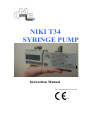
NIKI T34
SYRINGE PUMP
Instruction Manual
Ref.: 100-090SS Edition June 2008
0473
2
CONTENTS
A - Introduction
3
B - General Warnings
5
C – Precautions
6
D – Feature Recognition
7
E – Symbols on pump, consumables & accessories
8
F - Installation and Inspection
8
G - Administration Sets
9
H – Batteries
10
I – Access Codes & Keypad Lock
11
J – Infusion set up & programming
12
K – Using Accessories with T34 Syringe Pump
16
L – Recommended Checks during infusion
17
M – Advanced Functions of the T34
18
N - Change Set Up
19
O– Alarm Conditions
20
P – Troubleshooting
21
Q – Specifications
22
R – Patient Training – Using the T34
23
S – Service, Calibration and Maintenance
24
T - LIMITED WARRANTY
25
U - APPENDIX
26
3
A - Introduction
Do not operate the T34 Syringe Pump until you have read and understood the contents of this
manual paying close attention to Warnings, Cautions & Notes as described below. If you are
unsure about any aspect contact the distributor or manufacturer.
This manual will ensure the Healthcare Provider will be able to: 1. Identify the features of the T34 and understand their use
2. Correctly load a syringe into the T34
3. Program the T34 to deliver the contents of the syringe
4. Access and interpret patient history and event log data
5. Troubleshoot and resolve alarm conditions
6. Train patients and/or patient’s caregiver in the use of the T34.
What is the T34 Syringe Pump?
The T34 is a small, lightweight, robust, battery powered, ambulatory syringe Pump designed to
deliver the contents of a 2 to 50ml syringe over a specified duration or at a given rate in
milliliters per hour (ml/hr). The Pump actuator drives the syringe plunger forward at a controlled
rate. This rate is adjustable from 0.1 to 1000 ml/h in increments of 0.1 ml/h up to 100 ml and 1
ml up to 1000 ml/h.
The size and weight of the T34 makes it ideal for ambulatory use in a hospital or alternate site /
homecare setting. It is equally suitable for adults or for pediatric use.
The T34 syringe pump can be easily concealed beneath clothing in a shoulder holster and
combination belt. A compact lockbox is provided to protect the Pump from damage and/or
tampering with either the pump or the syringe.
T34 offers 3 point syringe detection enabling the pump to identify all commonly used (or
programmed) syringe brands. This feature ensures the pump can make calculations for the
healthcare provider therefore minimizing the risk of programming errors. The sensors also
activate an alarm if the syringe is removed or partially displaced during infusion.
The T34 syringe pump may be used to deliver indicated medications via any common infusion
routes including central, peripheral venous, epidural, intra-arterial or subcutaneous.
Indications for Use
The T34 SYRINGE DRIVER is designed for infusion of medications or fluids requiring
continuous or intermittent delivery at precisely controlled infusion rates through all clinically
acceptable routes of administration including intravenous, subcutaneous, percutaneous, intraarterial, epidural, enteral, in close proximity to nerves, and into an intraoperative site (soft
tissue/body cavity/surgical wound site). The system is intended for patients who require
maintenance medications, analgesics, PCA therapy, parenteral and enteral nutrition fluids,
chemotherapeutic agents and general fluids therapy in hospital and homecare environments.
4
Contraindications
•
Infusion of blood and blood products.
•
Infusion of insulin.
•
Infusion of critical medications whose stoppage or interruption could cause serious injury
or death.
•
Use in ambulatory regimens by patients who do not possess the mental, physical or
emotional capability to self-administer their therapy; or who are not under the care of a
responsible individual.
Pump Lockout Protection Features
The T34 has several lockout features that ensure that unintended programming and key
presses do not occur.
The T34 syringe is contained within a locked box. Only the healthcare provider is able to
open the box.
After the healthcare provider programs the T34 for infusion, they will lock the program
with a special code. The T34 infusion program cannot be changed unless the healthcare
provider re-enters the code and changes the program.
The keypad has a locking feature that prevents unintentional power off of the unit. This
lock is available to the patient.
Service screens and troubleshooting are protected with a technician’s code. These codes are only
available to personnel trained in servicing the T34.
5
B - General Warnings
To reduce potential risks to patients and healthcare providers.
The T34 is a medical device designed for the safe, accurate delivery of appropriate infusion
regimes and should only be operated by, or under the supervision of, a medical/healthcare
professional.
For pumps used in a home setting, once the prescription has been programmed into the
pump, lock the system to ensure that the program cannot be changed by the patient.
The equipment is not suitable for use in the presence of flammable anesthetic gas
/oxygen/nitrous oxide mixture. Do not use the system in environments where these agents
are present.
Do not use the T34 pump in the presence of high-intensity magnetic fields (e.g., MRI
scanners). Exposure to strong magnetic fields may impair the operation of the pump
and/or the accuracy of the infusion.
Never take a syringe that is not empty off the pump if it is still connected to the patient.
Before removing the syringe, the infusion line must be disconnected or clamped to
prevent free flow. Depending on the medication and route of administration, free flow
into the patient may cause serious injury or death.
Before connecting to the patient, purge all air from the syringe and the administration set.
Depending on the route of administration and the volume of air, air emboli infused into
the patient may cause serious injury or death.
Patients using the T34 Syringe Pump on their own, or individuals responsible for helping
a patient using the pump, must be instructed in its proper use.
Adjustments, maintenance, or repair made by un-certified service personnel may impair
the operation of the T34 System and/or the accuracy of the infusion. Make sure any
adjustments, maintenance, or repair of the device is carried out by authorized skilled
technicians trained by the T34 distributor.
Dropping the Syringe Pump could cause damage to components. If the pump is dropped,
return the pump for inspection by qualified service personnel.
Use good aseptic technique when filling the syringe and priming the infusion set. Patient
infection may result from the use of non-sterile components. Maintain sterility of all
disposable components and do not re-use single use IV sets.
Immersing the T34 Syringe pump in liquid could cause damage to components. Do not
immerse the pump into any type of liquid.
Caution: Federal [USA] Law restricts this device to sale by, or on the order of, a
physician.
6
C – Precautions
Information to ensure safe and effective use.
Before use, the user must become thoroughly familiar with the operating instructions contained
in the T34 user manual.
The provider is responsible for ensuring that the T34 pump and medications are used according
to the physician’s infusion therapy prescription.
The provider is responsible for educating the patient in proper use of the pump.
Do not allow water or other fluids to get inside the pump or the lockbox. Fluids getting into the
pump may damage it. If the pump gets wet, stop the pump and initiate service of the pump.
A security code must be keyed in to access the lock-level 2 programming functions. This code
is designed to allow access to the provider only. To prevent a patient from tampering with
programmed settings, this security code should not be given to the patient.
As with any infusion, the disposables used with the T34 pump must be compatible with the
medication being delivered. Check with the manufacturer of the disposables before use.
Consult the drug manufacturer’s insert for precautions, guidelines, and instructions for
preparing and using the medication.
Do not drop the pump, strike it against hard objects or otherwise subject it to extreme physical
stress. This could damage the pump, which may impair the operation of the pump and/or the
accuracy of the infusion. If the pump is dropped, return the pump for inspection by qualified
service personnel.
Unsafe operation may result from using improper accessories. Use only accessories and
options designed for this system and supplied by the T34 distributor.
A kinked/occluded infusion line may impair the operation and accuracy of the pump. Before
operation, verify that the infusion line is not kinked or occluded.
Make sure any adjustments, maintenance or repair of the device are carried out by authorized
service technicians certified by the T34 distributor. Adjustments, maintenance or repair made
by un-qualified service personnel may impair the operation of the pump and/or the accuracy of
the infusion.
Battery damage could occur at ambient temperatures >55°C (131°F).
To prevent damage to the pump, do not store the pump for extended periods with the battery in
the pump.
The pump housing is not hermetically sealed – immersing the pump in liquid could cause
damage internal components. Do not immerse the pump into any type of liquid.
If fluid is spilled on the pump, clean and dry it immediately. A damp cloth should be used for
cleaning and a mild detergent may be used if needed. Xylene, acetone or similar solvents could
damage the pump – do not clean the pump with harsh chemicals.
7
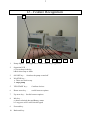
D – Feature Recognition
1
8
7
6
5
4
10
9
1
Pump display - Backlight can be enabled when any key pressed
2
Operation LED a. Green shows infusing
b.Red when Stop or alarm
3
ON/OFF key -
4
NO/STOP key –
a. Takes user back a step
b. stops pump
5
YES/START key –
Confirms choices
6
Down arrow key -
scrolls between options
7
Up arrow key – Scrolls between options
8
Info key a. shows technical data and Battery status
b. Long press will Lock/Unlock Keypad
9
Forward key.
10
Backward key.
Switches the pump on and off.
3
2
8
E – Symbols on pump, consumables & accessories
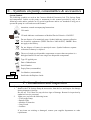
System Symbols
The following symbols are used on the Caesarea Medical Electronics Ltd. T34 Syringe Pump
and components. Labels on the pump or statements in this manual preceded by any of the
following words and/or symbols are of special significance and/or are intended to help you to
operate the pump in a safe and successful manner.
Attention, consult accompanying Instructions.
CSA mark
CE mark indicates conformance to Medical Device Directive 93/42/EEC.
0473
Do not dispose of in municipal waste. Symbol indicates separate collection
for electronic equipment. (WEEE Directive 2002/96/EEC). NOTE: Does
not apply to the battery.
Do not dispose of battery in municipal waste. Symbol indicates separate
collection for battery is required.
The use of single-use disposable components on more than one patient is a
biological hazard. Do not reuse single-use disposable components.
Type CF applied part.
Date of Manufacture
Serial Number
Expiry Date (consumables)
LOT
STERILE EO
Lot Number (consumables)
Sterilized with Ethylene Oxide
F - Installation and Inspection
Unpacking
1.
Remove the T34 Syringe Pump & accessories from the box and inspect for damage
during shipment or storage.
Do not use T34 if there are any obvious signs of damage. Return for inspection by
authorized service personnel.
2.
Make sure you have the following items:
• T34 Syringe Pump
• Patient Guide
• Alkaline 9V batteries
• Carry Pouch
• Lockbox
If any items are missing or damaged, contact your supplies department to order
replacement.
9
G - Administration Sets
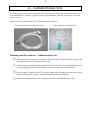
The T34 Syringe Pump can be operated with any extension set with a luer connection however it
is recommended, to optimize system accuracy & performance, that the proprietary sets listed
below are used.
Proprietary sets available from The T34 distributor are as follows: 150cm IV infusion set with check valve
100cm Sub-cut set with needle
Warnings and Precautions – Administration Sets
Administration sets must be compatible with the medicine delivered. Please check with
the manufacturer of the infusion set before use.
Visually inspect packaging and contents before each use. Do not use administration sets
if the packaging is in any way damaged as sterility may have been compromised.
Do not connect a patient to the T34 Syringe Pump until all trapped air has been cleared
from the fluid path & syringe. Carefully read the instruction for loading.
Replace the administration set at a frequency defined by the healthcare provider.
10
H – Batteries
Recommended batteries
Always use a 9 volt alkaline battery. These batteries can easily be identified by the international
marking code 6LR61 (a recommended battery of this type is the Duracell Plus MN1604).
Suitable 9V Lithium batteries which extend operating time are available from your T34
distributor.
Fitting the Battery
To fit or change the battery slide the compartment cover at the back of the pump. Push the
battery into the compartment taking care to ensure that the + / - contacts are aligned as shown on
the label inside the compartment. Slide the cover back on.
Zinc-carbon batteries (marked 6F22 or 6R61 (for example a PP3) are not recommended for use
with the T34. These batteries perform poorly and need to be replaced more often. Do not use
non-alkaline or rechargeable batteries.
There is some variation in size between different brands of batteries. Never try to force a battery
into the battery compartment as this may damage the battery contacts.
Incorrectly aligning the battery contacts will not cause any harm to the battery or the pump.
Remove the battery and re-align the contacts.
Battery Test
When setting up the pump always check that there is enough charge in the battery to cover the
infusion being set up. To do so follow this procedure: 1. Switch the pump ON.
2. Press INFO key
3. Select BATTERY LIFE from the menu and press YES to confirm
4. Verify sufficient battery charge is available to complete the current program. If not, change
the battery.
WARNING: Battery damage could occur at ambient temperatures >50C (122°F).
WARNING: Do not store the pump for extended periods with the battery in the pump.
11
I – Access Codes & Keypad Lock
Secure Provider Access Codes
The T34 has three levels of healthcare provider access protection to prevent unauthorized
changes to the set up, configuration or program. Although no access code is required to turn the
pump on and run an infusion, certain settings and features may be configured and locked based
on patient need.
No access codes are contained in this manual. Please refer to senior clinical or technical staff for
these codes if you have been trained and certified in their use. Do not share access codes with
unauthorized personnel.
Program Lock
Always use the Program Lock when the pump is used in homecare environments to prevent the
patient changing the prescription.
Technicians Menu
‘Technicians Menu’, used for service and/or repair of the Pump, is also protected by a special
access procedure and different code from ‘Change Set Up’.
Keypad Lock
The T34 allows all users to lock the operation of the keypad during infusion to prevent
tampering with the keypad if program lock is not used and prevent inadvertent power off if
program lock is used. To active the keypad lock: with the pump infusing, press and hold the INFO key until a chart is displayed showing a bar
moving from left to right.
Hold the key until the bar has moved completely across the screen and a beep is heard to
confirm the lock has been activated.
To turn the lock off repeat this procedure. The bar will now move from right (ON) to left
(OFF) and a beep will be heard to confirm.
The keypad lock does not affect the operation of the STOP keys as patients unaware of how to
deactivate the lock may need to STOP an infusion in an emergency (for example, when clearing
an alarm state).
12
J – Infusion set up & programming
Syringe Selection
The T34 is programmed to recognize most commonly used syringes from 2 ml to 50 ml. Luer
lock syringes should always be used to ensure secure connection of the infusion set. For
homecare applications it is recommended that all but the brand of syringe in regular use are
disabled per the technician menu to prevent accidental selection of the incorrect brand during set
up.
Priming the infusion set
After filling the syringe attach the infusion set, prime manually to remove all air from the
syringe and extension set and apply the clamp to the set.
Pre-Loading & Syringe Placement
1.
Before placing the syringe into the Pump ensure the barrel clamp arm is down then press
and hold the ON/OFF key until the SELF TEST screen appears. Do not label the syringe
or apply anything that changes its external diameter at the point where the barrel clamp is
applied as incorrect syringe recognition may result.
2.
Check that remaining battery life is sufficient to cover the infusion the healthcare
provider is about to program. Press the INFO key and use the UP or DOWN arrow keys
to select Battery Level. Press YES/START to confirm and view battery status.
3.
Load the syringe into the Pump prior to connecting the syringe to the patient.
4.
The LCD display will show PRE-LOADING and the actuator will start to move.
Wait until it stops moving and the syringe sensor detection screen(syringe graphic) appears.
During Pre-Loading the actuator returns to the start
position of the last infusion programmed. If the healthcare
provider regularly uses the same syringe brand, size and
fills to the same volume the actuator should return to the
correct position and not require adjustment.
5.
Pre-Loading
Use NO to Interrupt …..
If the actuator is not in the correct position to accommodate the syringe leave the barrel
clamp arm down and use the FF or BACK buttons on the keypad to move the actuator to
the required position. Forward movement of the actuator is limited, therefore repeated
presses of the FF key may be required when moving the actuator forward. Backwards
movement is not restricted.
The actuator can only be moved as described above. Do not use force to try to move the
actuator manually as this could damage the device.
6.
Lift the barrel clamp arm and load the syringe into the
Pump (see right). Note that the syringe graphic on the
screen flashes in three places, the barrel, ear/collar and
plunger, denoting the position and status of each sensor.
Seat the collar/ear and plunger first. As you correctly seat
each point of the syringe note that the flashing indicator for
that sensor becomes solid on the display.
13
7.
Finally lower the barrel clamp arm. If the syringe is correctly
loaded the syringe graphic (right) will become solid (no
flashing components) and the pump will display the next
screen - Size and Brand of the syringe detected.
Syringe Detection & Confirmation
8.
Check the LCD display to ensure that the Pump has correctly
identified the syringe size and brand.
If the syringe brand displayed is not correct, use the UP or DOWN arrow keys to scroll
between brands of similar dimensions. This will only happen if the syringe selected has
dimensions within +/-3% of another commonly used brand.
9.
Press YES/START key to confirm
10.
If the pump was stopped and turned off before the last program
reached End Program the Resume prompt screen will appear (i.e. Press YES to Resume
if, during an infusion, the pump was turned off to change the NO for New Program
battery). Press NO to continue programming the new regime.
11.
Purge Option
NOTE: PURGE OPTION – In order to eliminate/reduce slack (visible spaces at the syringe
collar & plunger loading points) and ensure a faster start up time (time to reach the programmed
infusion rate), the user can purge the system (once only) up to a volume limit configured under
Change Set Up (max 0.5 ml). To use this option after syringe confirmation:
a. Press FF key
b. Ensure the patient is NOT connected to the set & Press Yes to confirm.
d. Press and Hold the FF key until the slack is removed and/or purge is completed
e. Press STOP to return to programming screens when purge is completed.
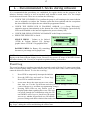
PROGRAMMING MAY NOW TAKE TWO DIFFERENT PATHS DEPENDING ON WHETHER
THE PUMP HAS BEEN CONFIGURED WITH PROGRAM LOCK ON OR
OFF. PROCEED AS FOLLOWS DEPENDING ON THE SCREEN DISPLAYED
10ml BD Plastipak
Volume
12 ml
Change ↑↓ Press YES
PROCEED TO STEP 12
PROGRAM LOCK IS OFF
Volume
12.0ml
Duration 24:00
Rate
0.50ml/h
Confirm, Press YES
PROCEED TO STEP 18
PROGRAM LOCK IS ON
12.
Once the syringe brand & size are confirmed the pump calculates and displays the
deliverable volume in the syringe.
13.
The programmer can use the arrow keys to adjust the Volume To Be Infused (VTBI) e.g.
to allow a residual volume for KVO if required). The Pump cannot deliver the full contents
of all syringe brands/sizes so in some cases there may be a slight residual volume left in
the pump when the actuator has traveled to the zero position. If this is the case the
deliverable volume displayed will reflect this. For example, if the visually confirmed
contents of the syringe are 18ml the Pump may display 17.5ml (of 18ml) as the deliverable
volume. In this example 0.5ml will be left in the syringe at End of Infusion.
14
WARNING: If the volume displayed after loading the syringe is greater than or
significantly less than the volume visually confirmed on the syringe scale, remove the
syringe, turn off the pump and, with the barrel clamp arm down, turn the pump on to
allow pre-loading to occur. Repeat the Syringe placement and detection steps and
ensure the correct syringe size and brand are confirmed. If the calculated volume
reading is still significantly different from the visually confirmed contents, remove
the pump from use and return to an authorized service centre for inspection, testing
and calibration.
14.
Press YES/START key to confirm the volume to be infused (VTBI).
15.
The LCD display now prompts the healthcare provider to set 10ml BD Plastipak
the Duration of the infusion. The Pump is likely to be
configured to a default duration in the access code protected set Duration 24:00
up menu. For example, senior clinical or technical personnel Change ↑↓ Press YES
may have set a 24:00 hour default. If so the Duration screen
will show the default.
16.
Use the UP & DOWN arrow keys to set the desired duration or press YES to confirm
acceptance of the default duration.
Setting the Infusion Rate
10ml BD Plastipak
17.
The Pump calculates and displays the rate (in milliliters per Rate
0ml/h
hour) required to deliver the VTBI over the infusion Duration Change ↑↓ Press YES
confirmed. Rate can be set in increments of 0.1ml between 0.1
- 100ml/hr and 1ml increments from 100 to 1000ml/hr.
Senior clinical personnel or technicians can set a maximum rate limit to prevent rates
above a certain limit being set, appropriate to the application in use.
18.
Press YES to confirm the calculated rate or use the UP & DOWN arrow to adjust.
Changing the rate will alter the duration confirmed at the
previous step. In most cases a maximum rate will be
programmed into the Pump (see Change Set Up) which will limit Duration Changed
Please Check rate
the healthcare provider’s ability to increase the infusion rate
outside of safe limits. If the rate is changed a Warning screen is
displayed (right) before the Summary Screen is displayed.
Set Program Lock
19.
Enter the program code and enable the program lock.
Start Infusion
20.
The Summary Screen confirms Volume To Be Infused, duration
and Infusion rate. Healthcare provider should always check
that the detail on this screen matches the prescription
especially if they have altered either the default Duration or
the calculated Rate during programming.
Volume
12 ml
Duration
24:00
Rate
0.5 ml/h
Confirm, Press YES
15
21.
Press YES/START to confirm the pre-set (if program lock on) / programmed
infusion parameters.
22.
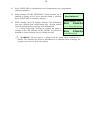
Pump prompts START INFUSION? Check infusion set is
attached to patient access device and the clamp is released.
Press YES/START to commence infusion
23.
While running, the LCD displays infusion Time Remaining
(top line), Infusion Rate (main/central line) and the bottom
line will alternate between Syringe Size & Brand and
‘<<<<<Pump Delivering’ message to confirm the pump is
running if the LED indicator on the ON/OFF key has been
disabled to conserve battery life (see Change Set Up).
Start Infusion?
Time Remaining 23:57
Rate
0.5ml/hr
<<<<< Pump Delivering
Time Remaining 23:58
Rate
0.5ml/hr
10ml BD Plastipak
WARNING: Do not remove a syringe from the pump while connected to a
patient. The infusion line must be disconnected or clamped before removing the
syringe to prevent free flow to the patient.
16
K – Using Accessories with T34 Syringe Pump
The T34 distributor supplies the following accessories for the T34: Rigid lockbox (with key) suitable for all syringes up to 50ml (Required for home patient
use)
Carry pouch for pump & lockbox
Use only accessories and options designed for this system and supplied by The T34 distributor.
After the syringe loaded on the T34, place it into the lockbox and carry pouch to protect the
syringe Pump, syringe & contents from damage or tampering: 1.
Open the lockbox using the standard key that operates all T34 lockboxes.
2.
Place the Pump into the lockbox so that the LCD display and keypad line up with the cut
out opening.
3.
Close the lockbox, guiding the administration set out of the slot at the side of the top
section of the box.
4.
Place the lockbox (or syringe pump if the security of the lockbox is not required for your
practice) into the carry pouch and secure to the patient.
17
L – Recommended Checks during infusion
It is recommended that procedures are established for regular checks on the progress of the
infusion. Patients, relatives as well as medical staff, should be made aware of a few simple
checks that can be made. These are to confirm the following: •
CHECK THE LCD DISPLAY to confirm the pump is still running at the same infusion
rate as originally set (unless the Titration option has been enabled and the user/patient
has been authorized to adjust the rate within the programmed limits)
•
CHECK THE GREEN LED IS FLASHING AND/OR “<<<<<Pump Delivering”
animation appears intermittently on the bottom line of the LCD display (green delivery
LED can be disabled or the interval lengthened to preserve battery life)
•
CHECK FOR SIGNS OF PHYSICAL DAMAGE to the Pump or accessories.
•
PRESS THE INFO KEY to check: SINGLE PRESS - Volume to be Infused
(VTBI) & Volume Infused (VI). Syringe
graphic shows VTBI & VI in graphical form
DOUBLE PRESS for Battery life remaining
shown as a percentage and in graph form.
Battery Level
50%
NOTE: After pressing the INFO key either a third press or waiting a few seconds returns the
display to the main infusion display screen. Excessive key presses or usage of the INFO feature
will reduce battery life. Use only as required to optimize battery performance.
Event Log
The event log shows a complete time and date stamped record of the last 512 pump events along
with a record of pump status (volume infused, rate, etc) at the time of the event. Event log data
cannot be deleted or altered. To view the event log: 1.
Press STOP to temporarily interrupt the infusion
2.
Press the INFO key and scroll to ‘Event Log’.
Press YES to confirm selection.
3.
screen now shows the most current event, alarm,
date, time, etc. Use the Up & Down arrow keys to scroll through events to find the
event of interest (e.g. an alarm or programming change).
4.
Pressing INFO when on any chosen event to
VI
0.1ml
display further data regarding this event. The user
VTBI
14.2ml
can scroll through the information using the UP
Rate
0.6ml/h
20
ml
BD
Plastipak
and DOWN arrow keys to check how the pump
Travel
3.61 mm/ml
was set up, whether keypad lock was ON and the
pressure settings and other technical data at the time of the event.
Event No. :
2635
04.03.2005
17:08
Switched ON
Press INFO - Details
NOTE: Each event is assigned a number and the pump stores the last 512 in memory. The event
log “loops” adding the newest and deleting the oldest event.
18
M – Advanced Functions of the T34
KVO (Keep Vein Open) Operation
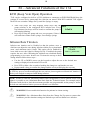
T34L can be configured to deliver a KVO infusion to commence at END PROGRAM keep the
patients IV access device patent until the clinician can attend. With KVO enabled T34L applies
the KVO rate set under Change Set Up until the Syringe is empty.
•
•
After four beeps the End Program alarm stops and the
pump switches to the configured KVO infusion rate. Every KVO
0.5ml/h
four minutes four beeps will be heard to confirm the pump is
still running/infusing.
Press NO to Stop the pump and set a new program, if there is
still sufficient volume in the syringe, if not change syringe
Infusion Rate Titration
Infusion rate titration can be Enabled so that the patient, carer or
clinician can adjust the rate during infusion within pre-set maximum
(max.) and minimum (min.) limits. This option can be Enabled by
users with access code rights in Change Set Up. If enabled, the pump
requires the user, after confirming the infusion rate calculated during
programming, to set a max. & min. rate. To titrate the rate up or down
during infusion follow these steps: •
•
•
Max. Titration Limit
3.5ml/h
Select ↑↓ Press YES
Use the UP or DOWN arrows on the keypad to adjust the rate to the desired new
setting as displayed on the main LCD screen
Press YES (within a few seconds of making the change) to confirm the new rate
Pump sounds a beep to confirm the change and the screen will display the new rate
NOTE: Titration requires Two separate, distinct actions (rate selection with arrow keys followed
by YES key press to confirm and apply the new rate) to protect against accidental rate titration if
the keys are nudged or tampered with during infusion.
NOTE: in order to limit the maximum titration limit configurable by users without access code
rights it is possible to set a Maximum Rate limit from the Technician menu. For example senior
clinicians could decide to limit the maximum possible rate programmable on the pump to 3ml/hr
for both rate and titration limit to prevent accidental over infusions.
WARNING: Do not enable this function for patients in a home setting.
WARNING: Set a Maximum Rate limit from the Change Set Up menu to ensure that
healthcare provider titration settings are limited to prevent accidental over infusion.
19
N - Change Set Up
An unlock code is required to enter the Change Set Up menu. Set up parameters should only
be changed by clinical or technical staff with healthcare provider code access rights.
When the pump is in program mode, or stopped during infusion, pressing the INFO
button.
Select Change Set Up from the menu using the UP / DOWN arrows and press YES
Pump will prompt for Healthcare provider Code (not given in this manual, please consult
senior clinical personnel or biomedical engineers), use the UP arrow to scroll code.
When the UP arrow is held down the pump will count up in single digits to ten, then in
tens to one hundred and then in hundreds thereafter. Scroll to the nearest point in tens
and then release the key. Press the key again, UP or DOWN arrow depending on digit
displayed on the screen, to select the final, correct code. Press YES to submit code.
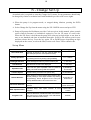
Set up Menu
Parameter
Application
Set Time & Date
Ensures all events in log are correctly date and
time stamped (ensure local update for DST)
FF Key Operation
Limits the forward movement of actuator caused
by pressing the FF key during syringe loading
0.1 – 100mm
Backlight Duration
Limits backlight duration to preserve battery life
0 – 60 secs.
Sets time info screens are displayed
1 – 20 secs.
Info Duration
Range
Operation LED
Turns off the green operation LED to preserve
battery life. Red warning LED still operates
0 (Disabled) –
64 seconds
Titration Option
enables setting a titration limit (≤max.rate)
Enable/Disable
Default Duration
When entering a new program pump resets to this
default (setting to zero skips duration step during
programming). When Program Lock is ON (see
below) default duration cannot be set to zero.
00:00 (OFF) to
99:59 hours
Occlusion Pressure
Sets pressure level at which occlusion alarm will
activate
100–1500mmHg,
10mm increment
KVO Operation Rate
Activates Keep Vein Open infusion at End
Program
0 (KVO OFF) –
2.0ml/h
Program Lock
Prevents alteration of default duration and infusion
rate during set up (with Program Lock ON Default
Duration cannot be set to zero)
ON/OFF
20
O– Alarm Conditions
When the Pump detects a problem, four things occur:
End Program
Press YES to Confirm
The infusion stops.
An audible alarm is activated.
A message appears on the display (example right) screen
indicating the cause of the alarm, and:
The LED indicator turns red.
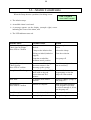
Alarm/Alert*
Possible cause
Action
Occlusion/Syringe Empty
Check Line & Syringe
Press YES to Confirm
Patient access device
blocked
Flush or replace access
device
Clamp on the infusion line
Release the clamp
Tubing occluded (kinked or
trapped)
Clear the occlusion
Pump has reached the
minimum travel position
Turn pump off
Syringe Displaced
Check Syringe
Press YES to confirm
One or more of the syringe
detection sensors is not
detecting up the syringe
Check the syringe and reseat as necessary
Pump Paused Too Long
Pump has been left in STOP
mode with no keypad
presses detected for 2
minutes
Start the infusion, continue
programming or turn the
pump off if not needed.
Near End*
15 minutes from End of
Infusion
Prepare to change syringe or
turn pump off
End Program
Press YES to Confirm
Infusion is complete
Pump will either default to
KVO program if set (wait
for nurse to attend) or, if not,
turn the pump off.
Low Battery*
Battery is almost depleted
Prepare to change battery
End Battery
Battery is depleted
Change battery
21
P – Troubleshooting
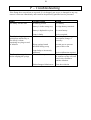
If the Pump does not perform as expected, if it is dropped, gets wet or is damaged in any way,
remove it from use immediately and return for inspection by qualified service personnel.
Fault
Possible cause
Action
The Pump will not start
No battery present
Fit a battery
Battery is in the wrong way.
Re-align battery terminals
Battery is depleted/very low
Fit a new battery
Pump is faulty
Incorrect rate set
Service required
Check displayed rate against
prescription, change if
necessary.
Wrong syringe brand
onfirmed during set up
Re-train user to prevent
repeat of this event
The infusion is going too
quickly/has ended early or
too slowly/ volume
remaining in syringe at end
of infusion.
The Pump has stopped
before empting the syringe
Pump faulty or incorrectly
calibrated.
Exhausted battery
Blocked/trapped infusion set
Service/calibration required
Fit a new battery, turn pump
on, confirm syringe size and
brand, select resume to
continue infusion.
Clear the occlusion
22
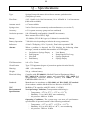
Q – Specifications
Type:
Flow Rate:
Syringe Pump with motor driven linear actuator, pulsed motion
(540 pulses per mm)
0.05- 10ml/h in 0.01ml increments, 10 to 650ml/h in 1 ml increments
(1000 ml/hr available)
Actuator travel:
c.67 mm available
Syringe sizes:
2 ml to 50 ml (most commonly used manufacturers, see section T)
Accuracy:
± 5 % system accuracy (pump and set combined)
Occlusion pressure:
100-1500mmHg configurable (10mmHG increments).
Max. actuator force 50N (5 Kgf).
Battery:
9V alkaline, IEC 6LR61 type (or Lithium for extended life)
Battery Operation:
7 full deliveries depending on infusion & set up parameters.
Indicators:
4 Line LCD display (122 x 32 pixels) , Dual color operation LED
Alarms:
When a problem is detected, the T34 displays the following alarm
messages, sounds an audible alarm and the red LED lights: •
•
•
•
Occlusion or Syringe Empty
End Program
Near End
End Battery
•
•
•
•
Low Battery
Pump Paused Too Long
Syringe Displaced
Syringe Empty
T34 Dimensions:
169 x 53 x 23mm
Classification
Type CF Equipment (degree of protection against electrical shock)
Housing:
ABS
Weight
210 gr. without battery
Electrical Safety
Complies with: EN 60601-1 (Medical Electrical Equipment Safety),
IEC 60601-2-24 (Infusion pumps and controllers), IEC 60601-1-4
(Programmable Electrical Medical System), UL 60601- 1 and
CAN/CSA C22.2 No 601.1.
Manufacture in accordance to ISO 9001 and ISO 13485. CE marked
(In accordance with the Medical Devices Directive 93/42/EEC)
Standards
EMC
Environmental
Specifications
(fire retardant)
McKinley T34 complies with IEC 60601-1-2 (EMC)
Non Operating Conditions (Transportation and Storage): Temperature: -25oC to 55 oC (-13 oF to + 131 oF)
Humidity: 5 % to 100% R.H., non-condensing
Air pressure: 48kPa to 110kPa
Operating Conditions: The system may not meet all performance
specifications if operated outside of the following conditions: Temperature: +15oC to +45 oC (+59 oF to + 113 oF)
Humidity: 20 % to 85% R.H. at +40 oC, non-condensing
Air pressure: 70kPa to 110kPa
23
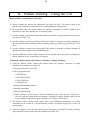
R – Patient Training – Using the T34
Responsibility of the Healthcare Provider:
1) Assess whether the patient can adequately and safely use the T34 syringe pump in the
patient’s environment or situation before recommending the syringe pump.
2) Be accessible when the patient and/or the patient’s assistants or family members have
questions or concerns regarding the T34 syringe pump.
3) Provide training to the patient and/or the patient’s assistants or family members in the proper
use and care of the T34.
4) Provide training to instruct the patient and/or the patient’s assistants or family members in
how to perform routine functions such as bathing, showering, and sleeping while the T34 is
in use.
5) Provide training to instruct the patient and/or the patient’s assistants or family members in
dealing with alarms and/or minor troubleshooting.
6) Provide healthcare provider contact numbers for the patient and/or the patient’s assistants or
family members in case of questions or concerns.
Training the Patient and/or the Patient’s Assistants or Family Members
1) Using the Patient Guide, instruct the patient and/or the patient’s assistants or family
members in the routine use of the T34.
a. Description and Use of the T34
b. The keypad functions
i. ON/OFF Key
ii. YES/START Key
iii. NO/STOP Key
iv. Keypad Lock
c. Starting and Stopping Infusion
d. Dealing with alarms
e. Minor troubleshooting
f. Where possible, in the patient’s home environment where their specific setup can be
viewed, teach the patient and/or the patient’s assistants or family members the best way
for the patient to bath and/or shower and how to set up the T34 for sleep.
2) The Patient Guide contains blank spaces where any Additional Instructions or specific
comments can be written in to ensure that the patient is successful in their use of the T34
syringe pump.
3) After the training, verify that the patient and/or the patient’s assistants or family members
can perform the routine tasks associated with the use of the T34.
24
S – Service, Calibration and Maintenance
Service and Unscheduled Repairs
The Pump must only be serviced or repaired by one of the following:
• The T34 distributor or its approved service representative,
• Qualified biomedical technicians trained and certified.
If the Pump is damaged in any way, return to authorized service personnel.
Unauthorized modifications or the use of any spare parts, other than those supplied by the
manufacturer or their distributor, will void any warranty.
Annual Maintenance and Calibration
Send the T34 Syringe Pump to the service center annually for maintenance and calibration.
Monthly Cleaning
Once a month (or as required) clean the lead screw thread (beneath the actuator) and guiding
rods with a small dry brush to remove debris or other particles.
Between Patients
Change the battery.
Before connecting the pump to a patient, and periodically during use, clean the unit using a lintfree cloth lightly dampened with warm water and a mild detergent, disinfectant or 10% bleach
solution.
Always turn the syringe Pump off and remove the battery before cleaning.
Do not clean the Syringe Pump with chemicals such as Xylene, Acetone or similar solvents.
These chemicals can cause damage to components and labels. Use a lint-free cloth dampened
with warm water and mild detergent or 10% bleach solution.
Do not soak or immerse any part of the T34 in water or any other solution.
Storage
If the pump is to be stored for an extended period it should be cleaned and the battery removed.
Store in a clean, dry atmosphere at room temperature and, if available, use the original
packaging, or a suitable alternative, for protection.
25
T - LIMITED WARRANTY
The T34 Syringe Pump has been carefully manufactured from the highest quality components.
Caesarea Medical Electronics Ltd. (CME) guarantees the pump against defects in material and
workmanship for twelve (12) months from date of purchase.
CME’s obligation, or that of its designated representative under this Limited Warranty, shall be
limited, at CME’s option, or that of its designated representative, to repairing or replacing
pumps, which upon examination, are found to be defective in material or workmanship. The
repair or replacement of any product under this Limited Warranty shall not extend the
abovementioned Warranty period.
All repairs under this Limited Warranty should be undertaken only by qualified, trained service
personnel. In the event that a pump is found to be defective during the warranty period, the
purchaser shall notify CME or its designated representative within thirty (30) days after such
defect is discovered.
The defective pump should be sent immediately to CME or its designated representative for
inspection, repair or replacement. Shipping costs are the purchaser’s responsibility.
Material returned to CME or its designated representative should be properly packaged using
CME shipping cartons and inserts. Inadequate packaging may result in damage to the pump.
This Limited Warranty shall not apply to defects or damage caused, wholly or in part, by
negligence, spilt fluids, dropping of the pump, misuse, abuse, improper installation or alteration
by anyone other than qualified, trained personnel; or to damage resulting from inadequate
packaging in shipping the pump to CME or its designated representative. If, after inspection,
CME or its designated representative is unable to identify a problem, CME or its designated
representative reserves the right to invoice purchaser for said inspection.
This Limited Warranty is the sole and entire warranty pertaining to CME’s products and is in
lieu of and excludes all other warranties of any nature whatsoever, whether stated, or implied or
arising by operation of law, trade, usage or course of dealing, including but not limited to,
warranties of merchantability and warranties of fitness for a particular purpose. Purchaser
expressly agrees that the remedies granted to it under this limited warranty are purchaser’s sole
and exclusive remedies with respect to any claim of purchaser arising under this Limited
Warranty.
Mr. Zvi Barak
Managing Director
Caesarea Medical Electronics Ltd.
26
U - APPENDIX
Default Syringe brands configured for use with T34: Braun Omnifix 2, 5, 10, 20, 30 & 50ml
BD Plastipak 3, 5,10, 20, 30ml & 50ml
Monoject 6, 12, 20, 35 & 50ml
Codan/Once 2.5, 5, 10, 20 & 50ml
Terumo 5, 10, 20, 30 & 50ml
It is possible to disable default syringes from the memory or replace them with one not listed
above. This procedure is not detailed in this manual as it should only be undertaken by trained,
certified service centers or biomedical engineers. Please consult your local certified engineers or
return to your T34 distributor should this need arise.
For alternate site / homecare applications it is recommended that all but the brand of syringe in
regular use are disabled by technicians to prevent accidental selection of the incorrect brand
during set up.
Manufacturer: Caesarea Medical Electronics Ltd.
European address: Staufenburgstr. 23 Lichtenstein P.O.B. 1248 Lichtenstein 72805
Germany
International Toll Free: +800-323-575-00
E-mail: [email protected]
www.cme-infusion.com