1
Advanced programmings and registrations
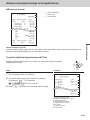
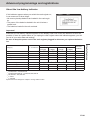
Setting symbol characters
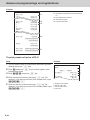
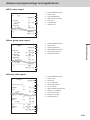
You can change the symbols or titles of sales reports for example, printing “CASH
IN DRW” on the sales reports instead of “CAID” for cash amount in drawer.
Step
Operation
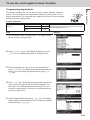
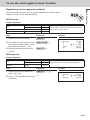
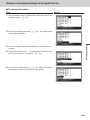
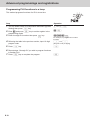
1 Turn the Mode switch to PGM position and select [System
>▪▪▪▪▪>F
Setting] then press F key.
[System Setting] is the last column on the programming top
menu and is not shown on the first screen. Keep pressing
> key until it appears on the screen.
2Enter 2 and press o key to set the register in the
2o
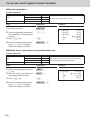
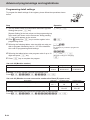
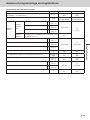
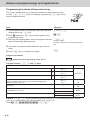
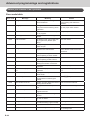
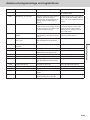
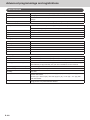
3 Referring the following tables, enter two-digit memory num-
BB
character setting mode.
ber and program code. Then press o key.
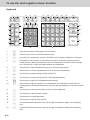
4 Referring the character entry methods on pages E-54 and
E-55, input characters you wish to set and press F
key.
BBo
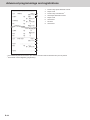
[Memory No.](Program code)
BB▪▪▪▪▪BBF
(Character keys)
5 If you wish to set in the next memory number, repeat step
4. If you wish to set other memory number than the next
number, repeat steps 3 and 4.
6Press o key to complete the setting.
o
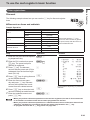
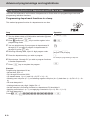
Example: To set “CASH IN DRW” in memory number 3
Press 2o0301[C][A][S][H][SPACE][I][N][SPACE][D][R][W]Fo
E-60