1
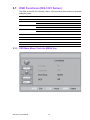
3.1 OSD Functions (IDS-3121 Series)
The OSD of the IDS-3121 display (1920 x 1080 resolution) was selected to illustrate
examples below:
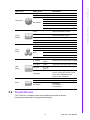
Buttons
Description
Power
Turn the monitor power ON or OFF
Menu
Activate the OSD menu
Select
Auto/Exit
Automatically adjust the clock, phase
H-position and V-position
Value Up/Down
Move the selector to the previous option
Decrease the gauge value of the selected option
LED Function
DPMS ON
Green
DPMS STANDBY
Orange
DPMS OFF
Red
3.1.1 OSD Main Menu: Push the MENU Key
IDS-3121 User Manual
10