1
1
MULTIHEAD BEAM
M6B20W & M6B10RGBW
USER MANUAL
For safety, please read this user manual carefully before initial use.
Event Lighting reserves the right to revise the manual at any time. Information and specifications within this manual are subject to
change without notice. Event Lighting assumes no liability or responsibility for any errors or omissions. Please consult Event Lighting
for any clarification or information regarding this item.
www.event-lighting.com.au
V1.1
2
Safety Instructions
WARNING
• Do not open this device, there is no user-serviceable parts inside. Risk of electric shock.
• Do not look at the light source when the device is on.
• CAUTION: This unit's housing may be hot during and after operation.
• Install this device in a location with adequate ventilation, at least 20 inch (50 cm) from adjacent surfaces.
• Do not leave any flammable material within 50 cm of this unit while operating or connected to power.
• Use a safety chain when mounting this device overhead.
• Do not operate this device outdoors or in any location where dust, excessive heat, water, or humidity may affect it.
• Do not operate this device if the housing, lenses, or cables appear damaged.
• Do not connect this device to a dimmer or rheostat.
• ONLY connect this device to a grounded and protected circuit.
• ONLY use the hanging bracket to carry this device.
• In case of a serious operating problem, stop using immediately.
• The maximum ambient temperature is 104° F (40° C). Do not operate this device at higher temperatures.
Power Input & Power Linking
This device has an auto-switching power supply work with input voltage range of 100~240 VAC, 50/60 Hz.
Link up to the maximum 8A. DO NOT exceed this.
Fuse Replacement
If the fine-wire fuse of the device fuses, only replace the fuse by a fuse of same type and rating.
Before replacing the fuse, unplug mains lead.
Procedure:
Step 1: Unscrew the fuse holder on the rear panel with a fitting screwdriver from the housing (anticlockwise).
Step 2: Remove the old fuse from the fuse holder.
Step 3: Install the new fuse in the fuse holder.
Step 4: Replace the fuse holder in the housing and fix it.
Product Installation
This device can be mounted in many orientations provided each
individual device is secured by the use of correct mounting bracket.
Use a safety chain when mounting this device overhead.
3
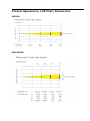
Product Appearance, LUX Chart, Dimensions
M6B20W
M6B10RGBW
4
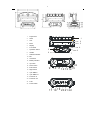
1.
Project lens
2.
Head
3.
Arm
2
4.
Base
3
5.
Display
6.
Foot stand
7.
Operation button
8.
Handle
9.
Wireless indicator
1
4
5
8
6
7
10. Mic
11. Left button
12. Battery indicator
13. Up button
14. Down button
15. Enter button
16. Right button
16
9 10 11 12 13 15
14
17. 3-pin DMX in
18. 3-pin DMX out
19. Powercon in
20. Powercon out
21. Fuse
22. Power switch
17 18 19 20 21 22
5
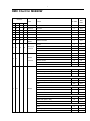
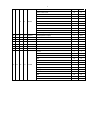
Menu operation
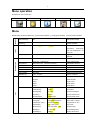
Description of icons in the menu
CONNECT
LIGHT
INFOMATION
SET
PROGRAM
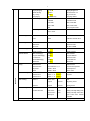
Menu
CONNECT
Default setting shadowed. Mark with ①can be basic reloaded, ② be program reloaded, ③can be private reloaded.
DMX Address①
XXX
DMX address setting
Wireless①
Max Temperature①
Wireless Enabled
80~139℃, 80℃ (176~282℉, 176℉)
Lamp will switch off when
LIGHT
temperature
continuously
over max temperature
for
5 minutes
Lamp Adjust①
Adjust
value
of
each
channels
Time Info.
Current
XXXX(Hours)
INFORMATION
Fixture Life
XXXX(Hours)
Temperature
Near Lamp Temp
Fans Speed
Near Lamp Fan
(depends on fixture)
(depends on fixture)
Fixture boot time
Fixture total run time
Temperature Sensors
Fan speed Sensors
Channel Value
Display value of channel
Error Message
Error channels
Fixture Model
M1S150W
Display brand and model
Software Ver
1U01
Version of each IC
Reset
All
Reset all
Pan&Tilt
Reset Pan&Tilt
Colors
Reset Colors
Gobos
Reset Gobos
Others
Reset Others
SET
Movement
UI Set
V1.0.00
Pan Reverse①
ON/OFF
Pan Reverse
Tilt Reverse①
ON/OFF
Tilt Reverse
Pan Degree①
630°/540°
Choose Pan Degree
Encoders①
ON/OFF
Encoder wheel on/off
Pan/Tilt Mode①
Stand/Smooth
Choose pan/tilt mode
Mic Sens. ③
0~99%,60%
Sensitivity of Mic
No Signal①
Close/Hold/Auto/Music
Mode when no signal
Temperature. C/F①
Fahrenheit/Celsius
Temperature at ℃/℉
Fans Mode①
Auto / High Speed
Fans mode
Hibernation①
OFF, 01M~99M,15M
Sleeping mode
Backlight①
02~60m 02m
Show backlight time
Flip Display①
ON/OFF
Display 180°reverse
6
Users
Display Bright③
00~31 10
Display Brightness
Brand Show①
ON/OFF
Show brand or not
Key Lock①
ON/OFF
Key lock on/off
Language①
En/简/繁/Fr/Sp
Language Select
User Mode①
Standard
Standard mode
Extended
Extended mode
Basic-8bit
Basic mode-8bit
Basic-16bit
Basic mode-16bit
User
User program mode
Max Channel = XX
Edit users mode
Edit User③
PAN = CH01
:
Calibration③
Fixture ID③
Wireless Set①
Reload Default
Play①
PROGRAM
Select Chase②
Edit Chase②
Edit Scenes②
-Password-
=XXX
Password: 050
Color
=XXX
Calibrate channel value
:
:
Name
Name
-Password-
Password: 050
PID Code
Set PID of RDM
DMX On Cable
ON/OFF
DMX Send Out
Reset Connect
ON/OFF
Reset Connect
Basic Reload(①)
ON/OFF
Basic Reload
Program Reload(②)
ON/OFF
Program Reload
---Password---
XXX
Password: 050
Private Reload(③)
ON/OFF
Private Reload
All Reload
ON/OFF
All Reload
DMX Receive
DMX Receive
Slave Receive
Slave Receive 1,2,3
Choose slave position
Sequence
Master / Alone
Run Sequence
Music
Master / Alone
Music mode
Chase Part 1
Chase 1 ~ 8
Chase 1
Select
Chase Part 2
Chase 1 ~ 8
Chase 2
program
Chase Part 3
Chase 1 ~ 8
Chase 3
Chase 1
Chase Test
:
Step 01
=SCxxx
Beginning scene
:
:
:
:
Chase 8
Step 64
=SCxxx
Ending scene
Edit Scene 001
Pan,Tilt,……
=xxx
Input manual scene
~ Edit Scene 250
Fade Time--
=xxx
Modify manually fading time
Secne Time--
=xxx
Modify manually scene time
DMX Input
and
run
Test
Input scene from exterior
controller
Scenes Record
ScXX=>ScXX
auto
Auto Input scenes
7
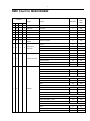
DMX Chart for M6B20W
Channel
name
function
Min DMX
Max
DMX
St
Ex
Ba1
Ba2
1
1
1
1
Pan
Pan Coarse
0
255
2
Pan fine
Pan Fine
0
255
3
Tilt
Tilt Coarse
0
255
4
Tilt fine
Tilt Fine
0
255
5
Tilt
Tilt Coarse
0
255
6
Tilt fine
Tilt Fine
0
255
fastest to Slowest
0
255
Normal
0
15
Movement
Movement With Blackout
16
31
Function
All Tilt Movement
32
47
TBD
48
255
Normal Shutter Functions
0
15
Pulse-effect Forward
16
31
Shutter
Pulse-effect Reverse
32
47
Function
Random Strobe
48
63
Effect
64
95
TBD
96
255
Close
0
31
Strobe Rate (slow to fast)
32
223
Open
224
255
Close
0
31
Strobe Rate (slow to fast)
32
223
Open
224
255
Close
0
31
Strobe Rate (slow to fast)
32
223
Open
224
255
Close
0
31
Strobe Rate (slow to fast)
32
223
Open
224
255
Close
0
31
Effect Speed (slow to fast)
32
223
Open
224
255
2
2
3
2
4
3
5
3
6
4
5
6
7
8
9
4
5
7
8
Movement
Speed
Normal Shutter Functions
Pulse-effect Forward
Pulse-effect Reverse
7
10
Shutter
Random Strobe
Effect
8
6
9
Shutter
Shutter closed
0
31
Effect 1 slow to fast
32
47
Effect 2 slow to fast
48
63
Strobe effect slow to fast
64
95
Effect 3 slow to fast
96
111
Effect 4 slow to fast
112
127
Pulse-effect in sequences
128
159
Effect 5 slow to fast
160
175
Effect 6 slow to fast
176
191
Random strobe effect slow to fast
192
223
No function (shutter open)
224
255
8
11
7
10
Dimmer
Dimmer(Close to Open)
0
255
9
12
8
11
White 1
White 0->100%
0
255
10
13
9
12
White 2
White 0->100%
0
255
11
14
10
13
White 3
White 0->100%
0
255
12
15
11
14
White 4
White 0->100%
0
255
13
16
12
15
White 5
White 0->100%
0
255
14
17
13
16
White 6
White 0->100%
0
255
Normal
0
7
Reset All
8
15
Pan&Tilt Reset
16
23
TBD
24
31
TBD
32
39
TBD
40
47
TBD
48
55
Display Off
56
63
Display On
64
71
TBD
72
79
TBD
80
87
Hibernation
88
95
TBD
96
255
15
18
14
17
Control
9
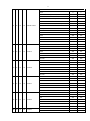
DMX Chart for M6B10RGBW
Channel
name
function
Min DMX
Max
DMX
St
Ex
Ba1
Ba2
1
1
1
1
Pan
Pan Coarse
0
255
2
Pan fine
Pan Fine
0
255
3
Tilt
Tilt Coarse
0
255
4
Tilt fine
Tilt Fine
0
255
5
Tilt
Tilt Coarse
0
255
6
Tilt fine
Tilt Fine
0
255
fastest to Slowest
0
255
Normal
0
15
Movement
Movement With Blackout
16
31
Function
All Tilt Movement
32
47
TBD
48
255
Normal Shutter Functions
0
15
Pulse-effect Forward
16
31
Pulse-effect Reverse
32
47
Random Strobe
48
63
Effect
64
95
TBD
96
255
Close
0
31
Strobe Rate (slow to fast)
32
223
Open
224
255
Close
0
31
Strobe Rate (slow to fast)
32
223
Open
224
255
Close
0
31
Strobe Rate (slow to fast)
32
223
Open
224
255
Close
0
31
Strobe Rate (slow to fast)
32
223
Open
224
255
Close
0
31
Effect Speed (slow to fast)
32
223
Open
224
255
2
2
3
2
4
3
5
3
6
4
5
6
7
8
9
4
5
7
8
Movement
Speed
Shutter Function
Normal Shutter Functions
Pulse-effect Forward
Pulse-effect Reverse
7
10
Shutter
Random Strobe
Effect
10
6
8
9
11
12
7
8
9
10
11
Shutter
Dimmer
Virtual Color
Function
Shutter closed
0
31
Effect 1 slow to fast
32
47
Effect 2 slow to fast
48
63
Strobe effect slow to fast
64
95
Effect 3 slow to fast
96
111
Effect 4 slow to fast
112
127
Pulse-effect in sequences
128
159
Effect 5 slow to fast
160
175
Effect 6 slow to fast
176
191
Random strobe effect slow to fast
192
223
No function (shutter open)
224
255
Dimmer(Close to Open)
0
255
No Function
0
15
CTC Function
16
31
Forward Spin
32
47
Reverse Spin
48
63
Continuous
64
79
Color Bounce
80
111
TBD
128
255
0
223
White 3200K
224
231
White 4200K
232
239
White 5600K
240
247
White 8000K
248
255
0
255
0
255
Black
0
3
Red=full, Green->up,Blue=0,White=0
4
33
Red->down, Green=full,Blue=0,White=0
34
63
Red=0 Green=255 Blue->up White=0
64
93
Red=0 Green->down Blue=255 White=0
94
123
Red=0 Green=0 Blue=255 White->up
124
153
Red=0 Green=0 Blue->down White=255
154
183
Red->up Green=0 Blue=0 White=255
184
213
Red=255 Green=0 Blue=0 White->down
214
243
Red
244
245
Green
246
247
Blue
248
249
White
250
251
All Color
252
255
CTC Function
Colour Temperature Correction 2000K->2700K
Forward Spin
Rainbow Effect (Slow->Fast)
Reverse Spin
Rainbow Effect (Slow->Fast)
Continuous & Color Bounce
10
13
9
12
Virtual Color1
11
Color Bounce
11
12
13
14
15
16
14
15
16
17
18
19
10
11
12
13
14
15
13
14
15
16
17
18
Virtual Color2
Color A
Color B
Color C
Color D
Color E
Black
0
3
Red=full, Green->up,Blue=0,White=0
4
33
Red->down, Green=full,Blue=0,White=0
34
63
Red=0 Green=255 Blue->up White=0
64
93
Red=0 Green->down Blue=255 White=0
94
123
Red=0 Green=0 Blue=255 White->up
124
153
Red=0 Green=0 Blue->down White=255
154
183
Red->up Green=0 Blue=0 White=255
184
213
Red=255 Green=0 Blue=0 White->down
214
243
Red
244
245
Green
246
247
Blue
248
249
White
250
251
All Color
252
255
Black
0
3
Color Continuous
4
243
Red
244
245
Green
246
247
Blue
248
249
White
250
251
All Color
252
255
Black
0
3
Color Continuous
4
243
Red
244
245
Green
246
247
Blue
248
249
White
250
251
All Color
252
255
Black
0
3
Color Continuous
4
243
Red
244
245
Green
246
247
Blue
248
249
White
250
251
All Color
252
255
Black
0
3
Color Continuous
4
243
Red
244
245
Green
246
247
Blue
248
249
White
250
251
All Color
252
255
Black
0
3
Color Continuous
4
243
12
17
18
-
20
21
16
17
19
20
Color F
Control
Red
244
245
Green
246
247
Blue
248
249
White
250
251
All Color
252
255
Black
0
3
Color Continuous
4
243
Red
244
245
Green
246
247
Blue
248
249
White
250
251
All Color
252
255
Normal
0
7
Reset All
8
15
Pan & Tilt Reset
16
23
TBD
24
31
TBD
32
39
TBD
40
47
TBD
48
55
Display Off
56
63
Display On
64
71
TBD
72
79
TBD
80
87
Hibernation
88
95
TBD
96
255
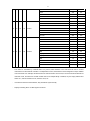
The device is controlled by universal DMX 512 protocol, DMX address is the start channel used to receive
instructions from the external controller. For independent control, each fixture must be assigned its unique address
control channels. For example, this device has four channel modes: 18/21/17/20, if we set the mode at standard 21
channels mode, and there are several models need to be independently controlled, we just simply address first
fixture at 1, and second fixture at 22, third one at 43, etc.
-
If the devices have the same address, they will behave synchronically.
-
Display is flashing when no DMX signal is received.
13
-
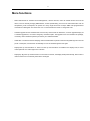
More functions
-
RDM. RDM stands for “Remote Device Management”, with this function, users can realize remote control of the
device, such as remotely changing DMX address, reverse pan/tilt setting, check a lot of useful information such as
temperature, power consumption, fan speed. Etc. Every single device has a unique RDM code programmed at
manufacture to distinguish from each other. It is not recommended for users to change this code.
-
Software upgrade function via DMX cable. If there is any new firmware for this device, it can be upgraded simply via
a software upgrade box, no need to change any mechanical parts. The upgrade box is not included in the package,
if need any further assistance please just contact your authorized dealer.
-
Hibernation. The device will enter sleeping mode if activated after a period of disconnecting DMX signal to save the
power consumption, and will return immediately as soon as the DMX signal is sent again.
-
Display back-up communication IC. There is a back-up communication IC installed in the display PCB, so users
could replace at once if the original one is broken.
-
Display flip. By press up and down button for more than 3 seconds, the display will flip automatically, this function is
useful to read menu conveniently when device is hanged.
14
-
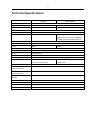
Technical Specifications
M6B20W
M6B10RGBW
Input Voltages
100V~240V AC, 50/60Hz
Power Consumption
206W
134W
Light source
6 pcs 20W white LED
6 pcs 10W RGBW LED
Power Connection
Neutrik® Powercon input and output connection
LED life
60,000 hours
Lux
32000 lux @2.5M for per beam
3167 lux @3M Red per beam, 5910 lux
@3M Green per beam, 950 lux @3M Blue
per beam,9080 lux @3M white per beam
Beam angle
2.5°
PWM
1,200Hz
Colors
white
Pixel control
Yes
Separate control of two heads
Yes
Dimmer
0-100% dimmer
Strobe
0.5 - 26 Hz
Head movement
630°(2.8 sec)or 540°(2.0 sec), Tile 265°(1.8 sec).16-bit resolution, auto repositioning
Control
DMX512, 3-pin XLR interfaces,
DMX512, 3-pin XLR interfaces, 18/21/17/20
15/18/14/17 channel mode
channel mode
wireless DMX is available
Yes
2.4 inch colour LCD display
Yes
RGBW
with back-up power
Thermostat Controlled,
Yes
variable speed fan
RDM and software upgrade
Yes
via DMX
Net weight
10Kg
Overall Size
468x375x375mm
Rigging
1pc omega brackets with 1/4 – turn quick locks
Road case available
Yes