1
1 Preamble
In the following pages we will present a step-by-step practical guidelines for demonstration of an
electrotherapy application. This electrotherapy application can be done on an Enraf-Nonius Endomed,
Myomed, Sonopuls or Sonopuls StatUS. All steps are documented and displayed, but don’t hesitate to
ask in case of any queries.
This guideline is not an instruction- or user-manual. In case you need to know in depth the possibilities of
the unit you need to consult the User’s manual of the unit you are using. User manuals can be
downloaded from the Enraf-Nonius partnersite (http://www.partnersite.enraf-nonius.org/)
2 Naming convention
In this manual we will use the following names:
US
Ultrasound therapy
StatUS
Stationary Ultrasound
Electrotherapy
Therapeutical use of currents
Russian stim
A current form that is excellent for
demonstration purposes. Russian stim is soft
and it creates a clear perception at the side
of the patient (your customer).
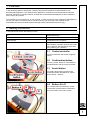
2.1
Central controller
The big round button that scrolls trough the
menu’s
2.2
Confirmation button
The long “mouse” button for confirmation of
the selected item with the central controller
2.3
Assist button
The small orange button just above the
confirmation button that allows for a quick
jump to Home – Stop etc.
2.4
Button A to D
The 4 small buttons just below the screen.
Functionality of these buttons is defined by
the current “tabs” in the menu screen.
1