1
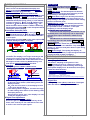
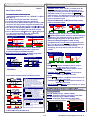
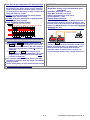
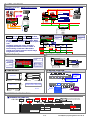
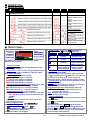
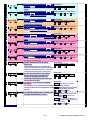
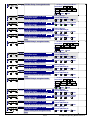
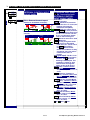
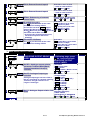
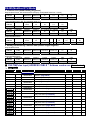
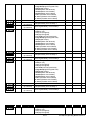
Auto Range: ■ DISPLAY FUNCTIONS Dual Display screens Down screen can be Immediate Value(PV) and Batch programmable; Up screen can be Totalizer and Batch counter programmable. Maximum Hold or Minimum Hold for PV When the DSPLY function in【Input Group】set to be MAX.H(Max. Hold) or Mini.H(Mini. Hold), The meter will keep display in maximum (or minimum) value of Immediate Value(PV) during power on, until manual reset by front key in 【User Level】, Up/Down Key function or【External Control Input(E.C.I.)】; The Reset functions will be explan in detail in following. Please paste the sticker M.H on the red square LED to identify the status of display. Immediate Value(PV) Hold Three mode selectable between Auto(Auto range)/SEMi(Semi-Auto range)/MANUL(Manual range) Auto(Auto range): The decimal point will be auto changed according to the input frequency so that keep reading in the highest resolution. SEMi(Semi-Auto range): The decimal point will be auto changed according to the input frequency to keep reading in the highest resolution under setting position of decimal point. MANUL(Manual range): The decimal point will be fixed according to the setting of decimal point. So, it’s possible to show “overflow”, if the input frequency is over the display range. Time out at Lowest frequency In the case of low frequency, the totalizer can not to identify that is low frequency and no input until the next pulse input. Sometimes, it takes a long period. CS2-TM builds in a time out function to cut out the reading. There are two modes MAnAL / AUto can be selected. When the External Control input set to be Pv. HLd(PV Hold) function in【ECI Gruop】, The display will be hold, when the E.C.I. is closed until the E.C.I. is to be open. Please paste the sticker PV.H on the green square LED of ECI to identify the status of display. Max. ( Mini.) Hold & Reset PV Hold & Reset Maximum Hold Present Value Reset the Max.(or Mini.) Hold by E.C.I. or Front Key Level Trigger ON Reset Data Hold by E.C.I. PV Hold Present Value ON ON Level ON Trigger Write to display by RS485 command The display can be written by RS485 command. At meantime, the display is no longer according to the input signal. In past, The meter normally receive 4~20mA or 0~10V from AO card or BCD card of PLC. We support a new solution by RS485 writing in so that can be save cost and wiring into PLC. display “0”, when the next pulse doesn’t input during the setting time. Auto(Auto range): The reading will display “0”, when the next pulse doesn’t input during the time that gave by formular of meter’s firmware. ■ READING STABLE FUNCTIONS Average Display update Setting range: 1~99 times; The meter’s sampling is 15cycle/sec. If the AvG(Average) set to be 3, it means the meter is sampling 3 readings, and calculating the average then update display once. At meantime, the display update will be 5 times/sec. Low Cut Setting range from -29999~+29999 counts. Low Cut set to be +0.50 Present Value Low Cut set to be -0.10 PV according to input signal Present Value PV according to input signal Average set to be 3 Sample 1 0.50 Low cut function Low cut function Low Cut is set for 0.50, if the PV is from -0.50~+0.50, that display will be 0. Sample 2 Sample 3 Sample 4 Sample 5 Sample 6 ……. Display Update Value = Display Update Value = (Sample 1 + Sample 2 + Sample 3)/3 (Sample 1 + Sample 2 + Sample 3)/3 -0.10 -0.50 MANUL(Manual): There is a period named ito can be set from 0.0 sec~999.9sec. The reading will Remark: The higher average setting will cause the response time of Relay and Analogue output slower. Low Cut is set for -0.10, if the PV is under (<= -0.10), that display will be -0.10. If the setting value is positive, it means the range of absolute value will be 0; PV≤ Setting value, the display will be 0; Ex:Low Cut is set for 0.10, if the display is from -0.10~+0.10, that will be 0. If the setting value is negative, it means the range of under setting value will be 0; PV≤ -Setting value, the display will be 0; Ex:Low Cut is set for -0.01, if the display is ≤ -0.01, and all the display will be 0. Digital filter Setting range from 0(None)/1~99 times. The digital filter can reduce the magnetic noise in field. Digital Fine Adjustment Setting range from -19999~+29999 ; Users can get Fine Adjustment by front key of the meter, and “Just Key In” the value which user want to show in the current input signals. 2 / 27 CS2-TM(Pulse)-Operating Manual 2012-05-10