1
NW119 / SNW119
User Manual
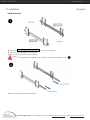
1.9 Installation
Chapter 1
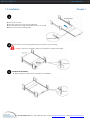
3
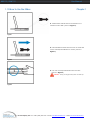
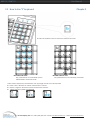
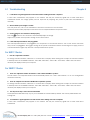
■ Pick up the LCD tray.
■ Insert the LCD tray into the mounting bracket.
■ Pull and hold the left & right black arrow buttons on the rails.
■ Return the LCD tray to park position.
4
■ Fix the rear kit to the mounting bracket by M3.2 screw x 4 pcs included.
Caution : This step is necessary. Failure to complete this will cause damage.
5
Complete the installation
■ Tighten all 8 pcs of M6 screw to complete the installation.
i-Tech Company LLC TOLL FREE: (888) 483-2418 • EMAIL: [email protected] • WEB: www.iTechKVM.com