1
NW119 / SNW119
User Manual
1.15 NW119 (Single console)
Chapter 1
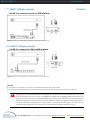
- Use NE-6 to connect to server via USB interface
Figure 8. Example of connecting NE-6 4-in-1 Combo KVM cable to server via USB interface
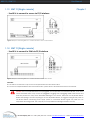
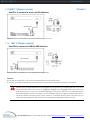
1.16 NW119 (Single console)
- Use NE-6 to connect to KVM via USB interface
Figure 9. Example of connecting NE-6 4-in-1 Combo KVM cable to KVM via USB interface
Remarks:
■ The above connection is only for the LCD keyboard without KVM switch built-in.
■ For the LCD keyboard drawer with KVM switch built-in, please refer to attached KVM switch user manual.
Caution: The LCD keyboard drawer is hot-pluggable, but components of connected devices, such as the
servers and KVM switch, may not be hot-pluggable. Plugging and unplugging cables while servers and
KVM are powered on may cause irreversible damage to the servers, KVM and LCD keyboard drawer.
Before attempting to connect anything to the LCD keyboard drawer, we suggest turning off the power to
all devices before connecting them. Apply power to connected devices again only after the LCD
keyboard is receiving power. The company is not responsible for damage caused in this way.
i-Tech Company LLC TOLL FREE: (888) 483-2418 • EMAIL: [email protected] • WEB: www.iTechKVM.com