1
CHAPTER 4. GUIDED TOUR OF BUILT-IN VTY-UI WIDGETS
4.14.2
58
Scrolling a List
Although the list key bindings are bound to the List’s scrolling behavior, the List module exports the scrolling functions for programmatic manipulation of Lists. Note that in
all cases, the scrolling functions change the position of the currently-selected item and, if
necessary, scroll the list in the terminal to reveal the newly-selected item.
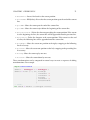
• scrollUp – moves the selected item position toward the beginning of the List by
one position.
• scrollDown – moves the selected item position toward the end of the List by one
position.
• pageUp – moves the selected item position toward the beginning of the List by one
page; the size of a page depends on the height of the List’s widgets and the amount
of space available to the rendered List.
• pageDown – moves the selected item position toward the end of the List by one
page; the size of a page depends on the height of the List’s widgets and the amount
of space available to the rendered List.
• scrollBy – takes a number of positions and moves the selected item position in the
specified direction. If the number is negative, this scrolls toward the beginning of
the List, otherwise, it scrolls toward the end.
4.14.3
Handling Events
The List type produces a variety of events:
• scrolling events – events indicating that the position of the currently-selected item
has changed. Handlers are registered with onSelectionChange and receive an
event value of type SelectionEvent. A SelectionEvent describes whether the
selection has been turned “off”, which happens when the last element in the List is
removed, or whether it is on and corresponds to an item.
• item events – events indicating that an item has been added to or removed from the
List. Handlers for added items are registered with onitemAdded receive event
values of type NewItemEvent. Handlers for removed items are registered with
onItemRemoved and receive event values of type RemoveItemEvent.
• item activation – events indicating that the currently-selected item was activated, which
occurs when the user presses Enter on a focused List. Handlers for activation















![Defining Event Handlers [Backbase Manual]](http://vs1.manualzilla.com/store/data/005692904_1-d6f01c41c66ce6049d8fb6a78592ae1b-150x150.png)