1
LX Navigation d.o.o.
LX 166 V 1.1
User Manual
Dec. 2009
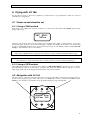
7.1.2 Vario unit connection
In Vario unit package is a cable set with speaker. The cable set consists of one cable having one 15 P SUB D
connector, one 9P SUB D connector, SC isolated wire and speaker connector. The 9P connector should be
inserted in one of two 485 marked plugs of LX 166. SC wire may be connected to a toggle switch or switch
mounted on flaps mechanism. Switch active status can be adjusted in System setup/SC input.
Caution!
It is strongly prohibited to insert 9P connector into PDA plug, this will damage Vario unit.
7.1.3 PDA connection
PDA connection can be realized via LX 1636 or 1638 cable, which should be inserted into PDA plug. The
cable is delivery included. LX 166 sends data toward PDA and also supplies PDA with 5V.
7.1.4 Connection of optionally secondary vario indicators
System extension with additionally LCD vario indicators (DIG VAR 5) is absolutely easy and plug and play,
after using of free 485 ports.
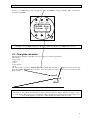
7.1.5 GPS connection
GPS should be connected exclusively via 6P telephone type connector. A 6P-6P telephone type cable is also
delivery included. Connection to following units is plug_and_play.
-LX 20 2000
-Colibri
-Flarm
-VL
Above mentioned units are also powered from LX 166. This is not valid for LX Flarm Red Box which requires
its own power supply.
For other units an open wire cable variant is also delivered.
Baud rate adaptation is done automatically after power on.
22