1
Touch Screen Options
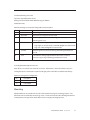
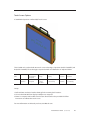
LC1502R with Capacitive or Infrared (IR) Touch Screens
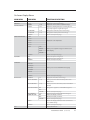
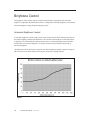
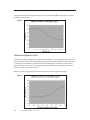
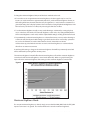
The LC1502R can be ordered with two touch screen technologies: Capacitive (model LC1502RTC) and
IR (model LC1502RTI). The technologies respective benefits and drawbacks are explained below.
Capacitive
(3M*)
Indoor Use
Occasional
Recalibration
Required
Any size Stylus
or finger
Excellent Optical
Clarity
USB
Interface
Scratch
Resistant
IR
Indoor/
Outdoor
No recalibration
Required
Stylus must
be larger
than 3mm
Best in class
optical clarity
USB
Interface
Impervious
to scratching
Set Up:
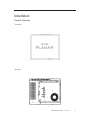
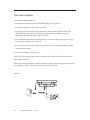
1. Refer to Planar mechanical outline drawing for the mounting hole locations.
2. Connect the USB cable from display to USB port on computer.
3. Power on computer and install the touchscreen driver found on the provided CD. Follow
instructions to calibrate the touch screen.
For more information on 3M touch products, visit 3Mtouch.com.
LC1502R User’s Guide
(020-0315-02B)
25