1
System Settings
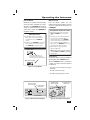
AUDIO SETTINGS
The system’s audio can be adjusted at the
Master Station to suit your preferences.
The six system audio adjustment options
available. The system will return to normal
operation five seconds after the last
setting is made.
Music Volume
Adjusts the volume for system music.
Setting the System Music Volume:
1. Press POWER to turn on the music.
Master Station Volume
Adjusts the volume for intercom
communications through the speaker on
the Master Station ONLY.
Setting the Master Station Volume:
1. Press TONE until MASTER VOLUME is
displayed.
2. Use VOLUME ▲ and VOLUME ▼ to adjust
the Master Station’s intercom volume from
0-29.
✓ Note: When the music is off, use
VOLUME ▲ and VOLUME ▼ to set the
Master Station’s intercom volume.
2. The music volume setting will be the same
as it was last set.
3. Use VOLUME ▲ and VOLUME ▼ to adjust
the music volume from 0-29.
✓ Note: The music volume setting may vary
depending on which source is selected.
Loudness
When set to ON, adjusts the bass tone for
better listening at low audio levels.
Turning Loudness On and Off:
1. Press POWER to turn on the system.
Treble
Adjusts the level of the system’s high
frequency audio.
Setting the Treble Level:
1. Press POWER to turn on the system.
2. Press TONE until TREBLE is displayed.
3. Use VOLUME ▲ and VOLUME ▼ to adjust
the treble level from 0-14.
Bass
Adjusts the level of the system’s low
frequency audio.
2. Press TONE until LOUDNESS is displayed.
3. Press VOLUME ▲ to turn on the loudness
feature. ON will be displayed to the right of
the clock.
4. Press VOLUME ▼ to turn off the loudness
feature. OFF will be displayed to the right of
the clock.
Intercom Volume
Adjusts the volume for system intercom
communications to the Room Stations,
Door Stations, and Patio Stations.
Setting the Intercom Volume:
Setting the Bass Level:
1. Press POWER to turn on the system.
2. Press TONE until BASS is displayed.
3. Use VOLUME ▲ and VOLUME ▼ to adjust
the bass level from 0-14.
1. Press TONE until INTERCOM VOLUME is
displayed.
2. Use VOLUME ▲ and VOLUME ▼ to adjust
the intercom volume from 0-29.
✓ Note: The intercom volume sets the
audio level from the Master Station to
the Room Stations, Door Stations, and
Patio Stations. The Master Station’s
volume is set separately.
7