1
Sets whether to turn the power off when the viewfinder is stowed.
1. MENU →
(Setup) → [Function for VF close] → desired setting.
Menu item details
Power OFF:
Turns the power off when the viewfinder is stowed.
Not Power OFF:
Does not turn the power off when the viewfinder is stowed.
Note
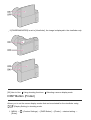
Push the eyepiece into the viewfinder before stowing the viewfinder. If you try to squeeze
the viewfinder into the camera with the eyepiece pulled out, the viewfinder may be
subjected to force and become damaged.
[173] How to Use
Changing settings
Setup menu
Volume Settings
Sets the sound volume for movie playback.
1. MENU →
(Setup) → [Volume Settings] → desired setting.
Adjusting the volume during playback
Press the bottom of the control wheel while playing back movies to display the operation
panel, then adjust the volume. You can adjust the volume while listening to the actual sound.
[174] How to Use
Changing settings
Setup menu
Audio signals
Selects whether the product produces a sound or not.
1. MENU →
(Setup) → [Audio signals] → desired setting.