1
1.
Content
Install/Repair/Remove............................................................................................................... 5
1.1.
Install InterVideo InstantON............................................................................................5
1.1.1.
Run the InstantON Install file under Windows....................................................5
1.1.2.
Welcome Page, press “Next” button to continue or “Cancel” to abort
Installation............................................................................................................................6
1.1.3.
Setup Status..........................................................................................................6
1.1.4.
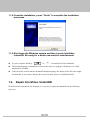
Complete Installation, press “Finish” to complete the Installation processes. ....7
1.1.5.
Shut down the Windows system and then Launch InterVideo InstantON. Be
ready for a whole new world of entertainment ....................................................................7
1.2.
Repair InterVideo InstantON ...........................................................................................7
1.2.1.
Welcome Page, press “Next” button to continue or “Cancel” to abort
Installation............................................................................................................................8
1.2.2.
Choose “Repair” option and click “Next” ...........................................................8
1.2.3.
Setup Status..........................................................................................................8
1.2.4.
Complete Installation, press “Finish” to complete the Installation processes. ....9
1.2.5.
Shut down the Windows system and then Launch InterVideo InstantON. Be
ready for a whole new world of entertainment ....................................................................9
1.3.
Remove InterVideo InstantON.........................................................................................9
2.
General Input & Setup ............................................................................................................ 11
2.1.
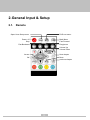
Remote ........................................................................................................................... 11
2.2.
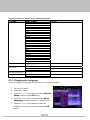
General Setup Menu.......................................................................................................12
2.2.1.
Changing the Language .....................................................................................13
2.2.2.
Setting the Sleep Timer ......................................................................................14
2.2.3.
Version information............................................................................................14
2.2.4.
Resetting to the Default......................................................................................14
3.
4.
Instruction Menu ..................................................................................................................... 15
Playing Music ........................................................................................................................... 25
4.1.
Index to Parts and Controls............................................................................................25
4.1.1.
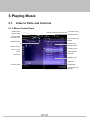
Music Control Panel ..........................................................................................25
4.1.2.
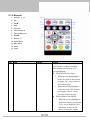
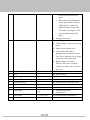
Remote ...............................................................................................................26
4.1.3.
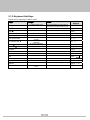
Keyboard Hot Keys............................................................................................28
4.2.
Functions & Operations .................................................................................................29
4.2.1.
Opening the Music Mode...................................................................................29
4.2.2.
Information.........................................................................................................29
4.2.3.
Playing an Audio CD .........................................................................................30
4.2.4.
Browsing the Folders and Tracks.......................................................................31
4.2.5.
Managing the Playlist.........................................................................................31
2