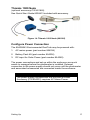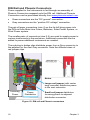
1
Checklist for Sampling with the Environmental Enclosure Before beginning a sample, check to see that all of the following conditions are satisfied: All components are properly installed into the enclosure as described in the Setup section. The Environmental DustTrak monitor (8540/8543) has been zeroed at the temperature at which it will be sampling (if possible). The Environmental Enclosure has been put in a place clear of any obstructions that will affect the flow around the enclosure. The Enclosure is not resting directly on the ground (no standing water). The Environmental DustTrak monitor (8540/8543) has been set to the appropriate survey or logging mode. The Enclosure is locked shut to prevent theft or vandalism to instrument. Transporting the Environmental Enclosure When transporting the Environmental Enclosure it is important to store its components correctly. To ensure that no damage is done to the enclosure or its components during transportation, the following steps should be taken: Attention The Environmental Enclosure is designed to protect equipment during stationary sampling only. Do not transport or ship equipment inside the Environmental Enclosure. 1. Unscrew the aerosol inlet from the top of the case. 2. Empty any water from the water trap. 3. Remove antenna and extender for GSM/GPS modem accessory if in use. 4. Remove RH/Temp sensor for heated inlet accessory (if applicable). 5. Remove Environmental DustTrak aerosol monitor. 6. Remove batteries (if applicable). 32 Chapter 4