1
9210 & XPERT DATALOGGERS
BASIC Manual
Part No. 8800-1151
Version 3.18
July 12, 2013
Sutron Corporation
22400 Davis Drive
Sterling, Virginia 20164
TEL: (703) 406-2800
FAX: (703) 406-2801
WEB: http://www.sutron.com/
i
Table of Contents
Introduction ..................................................................................................................................... 9
Overview ....................................................................................................................................... 10
Installing and Configuring BASIC.SLL ....................................................................................... 11
Installation................................................................................................................................. 11
Configuration ............................................................................................................................ 11
Program Start and Stop ......................................................................................................... 11
Recording Start and Stop ...................................................................................................... 12
Recurring Schedule ............................................................................................................... 12
Basic Blocks.......................................................................................................................... 13
Format Data for SatLink/GPRS/Iridium Transmission ........................................................ 14
Run Always Mode ................................................................................................................ 15
Program "Basics" .......................................................................................................................... 16
Using the Language ...................................................................................................................... 19
Comments ................................................................................................................................. 19
Statements and Functions ......................................................................................................... 19
Variables ................................................................................................................................... 19
Operators ................................................................................................................................... 21
Logical and Binary Operators ............................................................................................... 22
Math Functions ......................................................................................................................... 22
Conditional Statements and Loops ........................................................................................... 22
Aborting a Program................................................................................................................... 25
String Functions ........................................................................................................................ 25
Subroutines and Functions ........................................................................................................ 25
Recursion .............................................................................................................................. 26
Pass by Reference ................................................................................................................. 27
Public Subroutines and Functions ......................................................................................... 27
Calling Subroutines and Functions contained in a DLL ....................................................... 27
Date and Time ........................................................................................................................... 28
Debugging ................................................................................................................................. 29
Error Handling .......................................................................................................................... 30
File I/O ...................................................................................................................................... 31
Log I/O ...................................................................................................................................... 31
Serial I/O ................................................................................................................................... 31
Socket I/O ................................................................................................................................. 32
Digital I/O ................................................................................................................................. 32
Analog I/O ................................................................................................................................ 32
SDI I/O ...................................................................................................................................... 32
SSP Messaging.......................................................................................................................... 32
Satlink/GPRS/Iridium Formatting ............................................................................................ 32
Basic Tags ................................................................................................................................. 33
Basic Blocks And Basic Sensors .............................................................................................. 34
Readings .................................................................................................................................... 36
Run Always Mode .................................................................................................................... 37
Running a Program at System Start or Shutdown ................................................................ 37
Multi-threading ......................................................................................................................... 38
2
Resource Contention ............................................................................................................. 38
Yielding the CPU .................................................................................................................. 39
Thread Synchronization ........................................................................................................ 39
Web Page Creation and CGI-style forms handling................................................................... 39
Miscellaneous Statements and Functions ................................................................................. 41
Solving Problems with Basic ........................................................................................................ 43
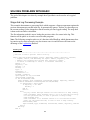
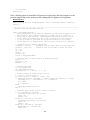
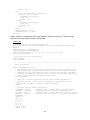
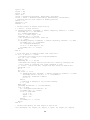
Stage And Log Processing Example ......................................................................................... 43
SelfTimed Message Formatting Example ................................................................................. 50
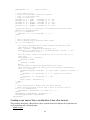
Creating a new sensor from a combination of two other sensors ............................................. 51
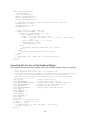
Interacting with the user via the Graphical Display.................................................................. 52
Moving from Tiny Basic to Xpert Basic....................................................................................... 54
Overview ................................................................................................................................... 54
Scheduling a Program ............................................................................................................... 54
Detecting Initial Startup ............................................................................................................ 55
Detecting Recording Stop ......................................................................................................... 55
Program Example...................................................................................................................... 55
Time to Measure/Log ................................................................................................................ 55
Custom Hourly Averaging ........................................................................................................ 56
Custom GOES Formatting ........................................................................................................ 56
Custom Speech Modem Handling ............................................................................................ 57
Obsolete Functions.................................................................................................................... 57
Language Reference...................................................................................................................... 58
Language Reference Syntax ..................................................................................................... 58
Run-Time Errors ....................................................................................................................... 59
Basic Operators ......................................................................................................................... 59
- Operator .............................................................................................................................. 59
& Operator ............................................................................................................................ 59
* Operator ............................................................................................................................. 60
Operator ................................................................................................................................ 60
\ Operator .............................................................................................................................. 60
^ Operator ............................................................................................................................. 60
+ Operator ............................................................................................................................. 61
+ Operator ............................................................................................................................. 61
< Operator ............................................................................................................................. 61
<< Operator ........................................................................................................................... 61
<= Operator ........................................................................................................................... 61
<> Operator ........................................................................................................................... 62
= Operator (assignment) ....................................................................................................... 62
= Operator (comparison) ....................................................................................................... 62
> Operator ............................................................................................................................. 62
>= Operator ........................................................................................................................... 62
>> Operator ........................................................................................................................... 63
And Operator ........................................................................................................................ 63
Eqv Operator ......................................................................................................................... 63
Mod Operator ........................................................................................................................ 63
Not Operator ......................................................................................................................... 64
Or Operator ........................................................................................................................... 64
Xor Operator ......................................................................................................................... 64
3
Statements and Functions ......................................................................................................... 64
Abort Function ...................................................................................................................... 65
Abs Function ......................................................................................................................... 65
Ad Function .......................................................................................................................... 65
Ad420 Function .................................................................................................................... 66
AdAC Function ..................................................................................................................... 66
AdDC Function ..................................................................................................................... 66
AddGroup Statement ............................................................................................................ 66
AdGain Function ................................................................................................................... 67
AdRatio Function .................................................................................................................. 67
AdTherm Function ................................................................................................................ 68
Array Function ...................................................................................................................... 68
Asc Function ......................................................................................................................... 68
Atn Function ......................................................................................................................... 68
Bin Function.......................................................................................................................... 69
Bin6 Function........................................................................................................................ 69
BitConvert Function.............................................................................................................. 69
Call Statement ....................................................................................................................... 70
Cd Function ........................................................................................................................... 70
ChDir Statement.................................................................................................................... 70
Chr Function ......................................................................................................................... 71
ClearAlarm Statement ........................................................................................................... 71
ClearAlert Statement ............................................................................................................. 71
Close Statement .................................................................................................................... 72
ComputeCRC Function......................................................................................................... 72
ConfigAd Statement.............................................................................................................. 73
Const Statement .................................................................................................................... 73
Cos Function ......................................................................................................................... 74
Counter Function .................................................................................................................. 74
Counter Statement ................................................................................................................. 74
Cts Function .......................................................................................................................... 74
CurDir Function .................................................................................................................... 75
Date Function ........................................................................................................................ 75
Date Statement ...................................................................................................................... 75
DateSerial Function .............................................................................................................. 75
Day Function ......................................................................................................................... 75
Declare Statement ................................................................................................................. 76
Declare Tag Statement .......................................................................................................... 76
Digital Function .................................................................................................................... 76
Digital Statement .................................................................................................................. 77
Dim Statement ...................................................................................................................... 77
DisableAlert Statement ......................................................................................................... 77
Do Statement ......................................................................................................................... 77
Dsr Function.......................................................................................................................... 78
EnableAlert Statement .......................................................................................................... 78
Eof Function.......................................................................................................................... 78
Erl Function .......................................................................................................................... 79
Err Function .......................................................................................................................... 79
4
Error Function ....................................................................................................................... 79
ErrorMsg Statement .............................................................................................................. 80
Exit Statement ....................................................................................................................... 80
Exp Function ......................................................................................................................... 80
FFT Function ........................................................................................................................ 80
FFTI Function ....................................................................................................................... 81
FileCopy Statement ............................................................................................................... 81
FileLen Function ................................................................................................................... 81
Flush Statement ..................................................................................................................... 82
FlushInput Statement ............................................................................................................ 82
For Statement ........................................................................................................................ 82
Format Function .................................................................................................................... 83
FreeFile Function .................................................................................................................. 84
Frequency Function .............................................................................................................. 84
Function Statement ............................................................................................................... 84
GetAbortEvent Function ....................................................................................................... 85
GetInput Function ................................................................................................................. 85
GetInputAlarm Function ....................................................................................................... 85
GetInputData Function.......................................................................................................... 86
GetInputDigits Function ....................................................................................................... 86
GetInputName Function........................................................................................................ 86
GetInputQuality Function ..................................................................................................... 86
GetInputTime Function ......................................................................................................... 87
GetInputUnits Function ........................................................................................................ 87
GetMessage Function............................................................................................................ 87
GetScheduledTime Function ................................................................................................ 88
GetStopEvent Function ......................................................................................................... 88
GetTag Function ................................................................................................................... 88
GetTickCount Function ........................................................................................................ 89
Gosub Statement ................................................................................................................... 89
Goto Statement...................................................................................................................... 90
Hex Function ......................................................................................................................... 90
Hour Function ....................................................................................................................... 90
If Statement ........................................................................................................................... 90
InAlarm Function .................................................................................................................. 91
InAlert Function .................................................................................................................... 91
Inp Function .......................................................................................................................... 91
Input Statement (file I/O) ...................................................................................................... 92
Input Statement (log file) ...................................................................................................... 92
InStr Function ....................................................................................................................... 93
Int Function ........................................................................................................................... 93
IsXpert Function ................................................................................................................... 93
Kill Statement ....................................................................................................................... 93
Left Function ......................................................................................................................... 94
Len Function ......................................................................................................................... 94
Line Statement ...................................................................................................................... 94
Loc Function ......................................................................................................................... 94
Lock Statement ..................................................................................................................... 95
5
Log Statement (records) ........................................................................................................ 95
Log Statement (sensors) ........................................................................................................ 96
Log Statement (notes) ........................................................................................................... 96
Log Statement (readings) ...................................................................................................... 97
Log Function ......................................................................................................................... 97
LogReading Function............................................................................................................ 97
Measure Statement ................................................................................................................ 98
Mid Statement ....................................................................................................................... 98
Mid Function ......................................................................................................................... 99
Minute Function .................................................................................................................... 99
MkDir Statement ................................................................................................................... 99
Month Function ..................................................................................................................... 99
MsgBox Function.................................................................................................................. 99
Name Statement .................................................................................................................. 100
Now Function...................................................................................................................... 100
On Error Statement ............................................................................................................. 101
On … GoTo, On … GoSub Statement ............................................................................... 102
Open Statement ................................................................................................................... 102
Out Statement...................................................................................................................... 103
Peek Function...................................................................................................................... 103
Poke Statement.................................................................................................................... 103
Power Statement ................................................................................................................. 103
PowerAd Statement ............................................................................................................ 104
PowerSwGnd Statement ..................................................................................................... 104
Print Statement .................................................................................................................... 104
RaiseAlarm Statement ........................................................................................................ 105
RaiseAlert Statement .......................................................................................................... 105
ReadB Function .................................................................................................................. 105
Reading Function ................................................................................................................ 106
Reboot Statement ................................................................................................................ 106
Rem Statement .................................................................................................................... 106
RequestMessage Function .................................................................................................. 106
ResetEvent Statement ......................................................................................................... 108
Resume Statement ............................................................................................................... 108
Return Statement ................................................................................................................. 108
Ri Function.......................................................................................................................... 108
Right Function .................................................................................................................... 109
RmDir Statement ................................................................................................................ 109
Rnd Function ....................................................................................................................... 109
Sdi Function ........................................................................................................................ 109
SdiCollect Function ............................................................................................................ 110
Second Function.................................................................................................................. 110
Seek Statement .................................................................................................................... 110
Seek Function...................................................................................................................... 111
Select Case Statement ......................................................................................................... 111
SendMessage Statement...................................................................................................... 111
SendReport Statement ......................................................................................................... 112
SendTag Statement ............................................................................................................. 112
6
SetDTR Statement .............................................................................................................. 113
SetEvent Statement ............................................................................................................. 113
SetOutput Statement ........................................................................................................... 114
SetOutputAlarm Statement ................................................................................................. 114
SetOutputData Statement .................................................................................................... 115
SetOutputDigits Statement.................................................................................................. 115
SetOutputName Statement .................................................................................................. 115
SetOutputQuality Statement ............................................................................................... 115
SetOutputTime Statement ................................................................................................... 116
SetOutputUnits Statement ................................................................................................... 116
SetPort Statement ................................................................................................................ 116
SetRTS Statement ............................................................................................................... 117
SetSpeed Statement ............................................................................................................. 118
SetTimeout Statement ......................................................................................................... 119
Sgn Function ....................................................................................................................... 119
Shell Statement ................................................................................................................... 119
Sin Function ........................................................................................................................ 119
Sleep Statement ................................................................................................................... 120
Space Function .................................................................................................................... 120
Sqr Function ........................................................................................................................ 120
StartTag Statement .............................................................................................................. 120
StartTask Statement ............................................................................................................ 120
Static Statement .................................................................................................................. 121
StatusMsg Statement ........................................................................................................... 122
Stop Statement .................................................................................................................... 122
StopTag Statement .............................................................................................................. 122
StopTask Statement ............................................................................................................ 122
Str Function ......................................................................................................................... 123
StrComp Function ............................................................................................................... 123
String Function.................................................................................................................... 123
Sub Statement ..................................................................................................................... 124
Systat Function.................................................................................................................... 124
Tag Function ....................................................................................................................... 126
Tag Statement ..................................................................................................................... 127
Tan Function ....................................................................................................................... 127
Time Function ..................................................................................................................... 127
Time Statement ................................................................................................................... 127
Timeout Function ................................................................................................................ 128
Timer Function.................................................................................................................... 128
TimeSerial Function............................................................................................................ 128
TriggerTask Statement ........................................................................................................ 128
Troff Statement ................................................................................................................... 129
Tron Statement .................................................................................................................... 129
Turn Statement .................................................................................................................... 129
Ubound Function ................................................................................................................ 130
Ucase Function.................................................................................................................... 130
UnLock Statement .............................................................................................................. 130
Val Function........................................................................................................................ 130
7
WaitEvent Function ............................................................................................................ 131
WaitFor Statement .............................................................................................................. 132
WarningMsg Statement ...................................................................................................... 132
WebServer Statement.......................................................................................................... 132
While Statement .................................................................................................................. 134
WriteB Function.................................................................................................................. 135
Year Function...................................................................................................................... 135
APPENDIX A: Basic Error Codes ............................................................................................. 136
Table of Figures
Figure 1: The Basic Control Panel Entry ...................................................................................... 12
Figure 2: Typical Program Schedule Configuration ..................................................................... 13
Figure 3: Basic Block Properties Dialog ...................................................................................... 14
Figure 4: Basic Properties Dialog ................................................................................................. 15
Figure 5: Hello World!.................................................................................................................. 16
Figure 6: Compiler Error Message ............................................................................................... 17
Figure 7: Run-time Error Message ............................................................................................... 17
Figure 8: Basic Setup .................................................................................................................... 18
8
INTRODUCTION
Sutron's Xpert family of DCPs (both the 9210 and the Xpert, hereafter referred to as the Xpert)
have been designed to be easily expandable by adding additional software libraries, called Sutron
Link Libraries (SLLs). One such library is basic.sll, which adds the ability to create custom
programs and processing using the Xpert Basic language. This document is the user manual for
basic.sll. The following topics are discussed:
Overview
Installing and Configuring the library.
Program "Basics"
Using the Language
Solving Problems with Basic.
Moving from Tiny Basic to Xpert Basic
Language Reference
9
OVERVIEW
Xpert Basic is a language derived from Sutron's Tiny Basic and Microsoft's Visual Basic, with
various extensions to support the Xpert and Xlite Dataloggers.
Here is a list of some of the features of Xpert Basic:
Variable support for integers, floating point numbers, strings, date and time, sensor readings,
events, and arrays, including multi-dimensional arrays.
Global variables and functions can be shared across programs.
Subroutine and function support.
Pseudo-compiled code for faster execution and early syntax error detection.
Excellent support for structured programming concepts by way of FOR, WHILE, and DO
control loops, and Select Case statement. Line numbers are supported, but are optional. Line
labels are supported.
No limit on program size, multiple programs are supported.
Ability to schedule programs to be run on an interval.
Ability to create Basic "Sensor" blocks for use in EzSetup or Graphical Setup.
Ability to create Basic "Processing" blocks for use in Graphical Setup.
Functions to access the Analog and Digital I/O modules to make sensor measurements.
Support for alarm and alert processing.
Support for SSP SendTag and GetTag, as well as generic SSP messaging (RequestMessage,
SendMessage and GetMessage).
Support for reading and writing disk files, serial ports, log files, and sockets.
Ability to call functions in "C" DLL's.
Support for run-time error handling.
Support for TCP/IP communication, including the ability to creating TCP or UDP Web
Servers.
Support for dynamic web page creation, including support for HTML forms (CGI).
Multi-threaded support, including independent threads of execution, critical sections, and
event variables.
Ability to run programs even while recording is turned off.
10
INSTALLING AND CONFIGURING BASIC.SLL
This section describes the installation and configuration of the basic.sll library.
Installation
Basic is part of the standard installation of the Xpert so that no additional installation steps are
normally required. However, should an updated Basic SLL be made available separately, you
can upgrade to it by downloading the SLL to the Xpert's \Flash Disk subdirectory and then
rebooting the Xpert.
The version of any Basic SLL downloaded to the Xpert must be compatible with your current
Xpert firmware version. The version of the Xpert application can be found at the top of the
About dialog, accessed from the Status tab. The version of the Basic SLL can be found from
within Windows (when the file is on you PC, and NOT on the Flash Disk), by right-clicking on
the file and selecting "Properties" and then "Version".
Configuration
Xpert Basic programs can be made to run at various times:
Program start and stop
On recording start and stop
On a recurring schedule
When an Xpert Basic block in the setup runs
When it's time to format data for a transmission
Program Start and Stop
All subroutines named “Start_Program” are executed at “program start”, which is defined as
when the Xpert application starts up (typically, system boot) when Run Always is enabled, and is
defined as recording start when Run Always is disabled. These subroutines typically contain
code to perform short initialization tasks.
Note: When Run Always is enabled, main body code is also executed at program start, before
calls to Start_Program (main body code is any code found in a program file that does not reside
within a function or subroutine definition).
All subroutines named “Stop_Program” are executed at “program stop”, which is defined as
when the Xpert application shuts down when Run Always is enabled, and is defined as recording
stop when Run Always is disabled. These subroutines typically contain code to perform short
cleanup tasks.
Since the system start and shutdown processes do not complete until all subroutines have been
executed, it is imperative that these code sections do not enter continuous task loops.
Note: Start_Program and Stop_Program subroutines should not be marked public, since more
than one may appear in the system (up to one per program file).
11
Recording Start and Stop
All subroutines named “Start_Recording” are executed at recording start, and all subroutines
named “Stop_Recording” are executed at recording stop.
Note: when Run Always is disabled at recording start, all code found in main body program files
is executed before the calls to Start_Recording (main body code is any code found in a program
file that does not reside within a function or subroutine definition).
Typically, code run on recording start is used to perform short initialization tasks. Since the
recording start process does not complete until all this code has been executed, it is imperative
that these programs do not enter continuous task loops. Code run on recording stop should
always exit quickly.
NOTE: when more than one main body program or Start_Recording subroutine exists (i.e.,
multiple bas files, each with code outside any subroutine or with a Start_Recording routine), the
order in which the routines are executed is not defined. If you need to control the order in which
things occur at recording start, make sure only one main body program exists, and have it call
subroutines in the desired order.
Recurring Schedule
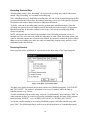
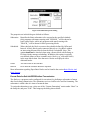
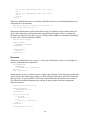
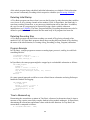
Basic programs can be scheduled for execution from the Basic entry of the Xpert Setup tab.
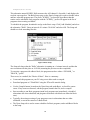
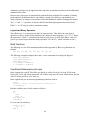
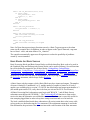
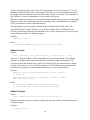
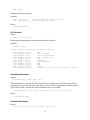
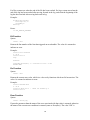
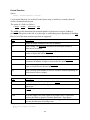
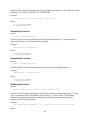
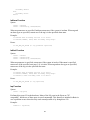
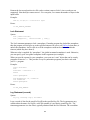
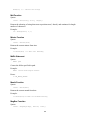
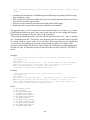
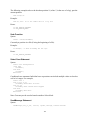
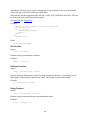
Figure 1: The Basic Control Panel Entry
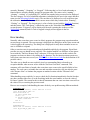
The Basic entry on the Setup tab shown above shows two scheduled programs: "LOGCOUNT"
and "INCCOUNT". The former is scheduled to run every 15 minutes, while the latter is
scheduled to run every 2 hours.
To add a scheduled program to the setup, select the "[Add Schedule]" entry and press "Edit". In
order programs to show up in the list of possible scheduled programs, the name of the program
must start with "SCHED_", as in "SCHED_LOGCOUNT" or "SCHED_INCCOUNT".
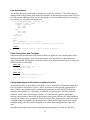
To edit the schedule settings of an existing scheduled program, select the schedule entry and
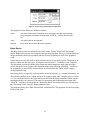
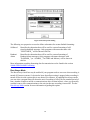
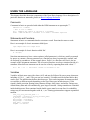
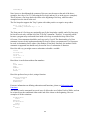
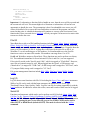
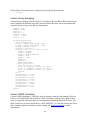
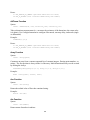
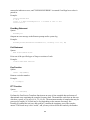
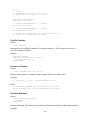
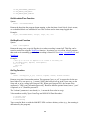
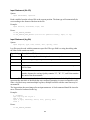
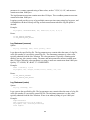
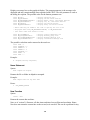
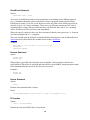
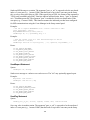
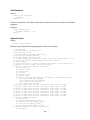
press "Edit". The following dialog is used to set or edit the properties of a scheduled program:
12
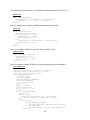
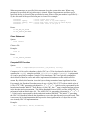
Figure 2: Typical Program Schedule Configuration
The properties in this dialog are defined as follows:
Name
The name of the Basic subroutine to be executed at the specified schedule.
Only programs with names starting with "SCHED_" will be shown in this
list.
Time
The time offset of the schedule.
Interval
How often the schedule should be repeated.
Basic Blocks
The Basic SLL provides two blocks for use in the setup: "Sensor" blocks and "Processing"
blocks. Both blocks execute basic programs that you write for them. However, Sensor blocks are
unique in that they do not accept inputs and may be used in EzSetup as well as the graphical
setup.
Sensor blocks are typically used to define custom sensors for use in the system. These blocks do
not have inputs but may have up to 20 outputs (versions before 3.2 could have only 5 outputs) .
The subroutine associated with the block determines which outputs are used when it assigns
values and quality to the outputs. The subroutine name must start with "SENSOR_" in order to
be assignable to a sensor block. Sensor blocks are selected from the "Input" block category
during graphical setup.
Processing blocks are typically used to perform custom processing, e.g., custom calculations, etc.
These blocks can have up to 5 inputs and up to 20 outputs (again, only 5 outputs prior to version
3.2). As with Sensor blocks, the subroutine associated with the block determines which outputs
(and inputs in this case) are used. The name of a processing block subroutine must start with
"BLOCK_" in order to be assignable to a processing block. Processing blocks are selected from
the "Processing" block category during graphical setup.
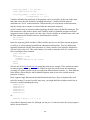
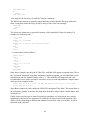
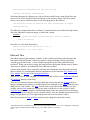
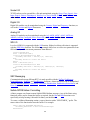
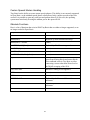
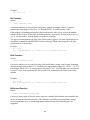
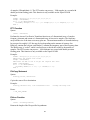
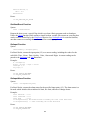
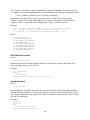
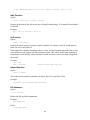
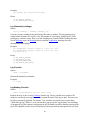
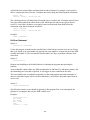
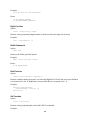
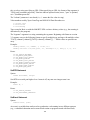
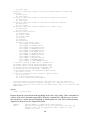
The properties dialog for a Basic Sensor block is shown below. The properties for the Processing
block are the same:
13
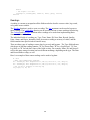
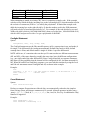
Figure 3: Basic Block Properties Dialog
The properties set in this dialog are defined as follows:
Subroutine:
Identifies the Basic subroutine to be executed at the specified schedule.
Only programs with names starting with "SENSOR_" will be shown for
basic sensor blocks, while only programs with names starting with
"BLOCK_" will be shown for basic processing blocks.
Scheduled:
When checked, the block executes at the schedule defined by Offset and
Interval. A Basic block can be connected directly to a Log Block without
an intervening Measure Block when the block is scheduled. Note: This
option should not be checked when using a Sensor block with EzSetup, as
EzSetup already manages scheduling. In addition, this option is typically
not checked whenever there is another active block (e.g., a Measure block)
in the same block chain. Note that active blocks are displayed with a
darkened border.
Offset
The time offset of the schedule.
Interval
How often the schedule should be repeated.
More information regarding Xpert Basic blocks can be found in the section Basic Blocks And
Basic Sensors.
Format Data for SatLink/GPRS/Iridium Transmission
The final way a program can be configured for execution is by defining a subroutine to format
data for telemetry transmission. The subroutine receives a buffer to be used for formatting. The
subroutine is called when it is time to format the data.
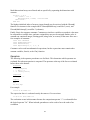
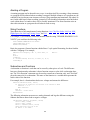
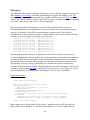
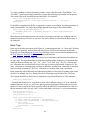
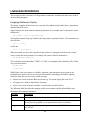
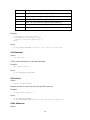
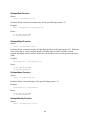
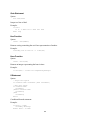
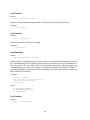
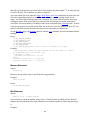
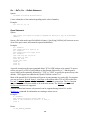
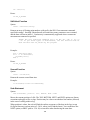
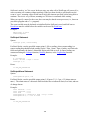
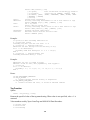
To assign the subroutine to use, select one of the “Custom Formatting” entries under “Basic” in
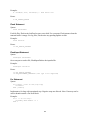
the Setup tab, and press "Edit". This brings up the dialog shown below:
14
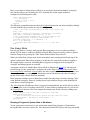
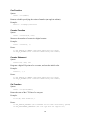
Figure 4: Basic Properties Dialog
The following two properties are used to define subroutines for custom Satlink formatting:
Selftimed
Identifies the subroutine that will be used for custom formatting of selftimed (scheduled) messages. Only programs with names that start with
"SELFTIMED_" will be shown in this list.
Random/
Alarm
Identifies the subroutine that will be used for custom formatting of
Random/Alarm messages. Only programs with names that start with
"RANDOM_" (or “ALARM_”, for GPRS and Iridium), will be shown in
this list.
More information regarding formatting data for transmission can be found in the section
Satlink/GPRS/Iridium Formatting.
Run Always Mode
The Run Always check box may be enabled if your program needs to run even when recording is
turned off. In most systems, it’s desired to know that all processing is stopped when recording is
turned off, but in some systems this is not desired. For instance, by enabling Run Always mode
you can write a program that will reboot the unit if recording is left off for an extended period of
time. Another example would be a communications driver written in Basic, where you generally
wouldn’t want to lose communications to the unit just because recording is turned off. See the
Run Always Mode section for more information regarding this option.
15
PROGRAM "BASICS"
A Basic program is a standard ASCII text file with a .BAS file extension. The file may consist of
a main body and/or subroutines and functions. Any files with a .BAS extension in the Xpert's
\Flash Disk folder are automatically compiled as needed (e.g., when recording is turned on, or
when a dialog that needs to prompt for a subroutine is displayed). A program may be manually
compiled (without running it) by pressing the Compile button under the Basic entry of the Setup
tab. Syntax errors are automatically detected during the compilation and are displayed in a
message dialog and in the Status screen.
Here is an example of a very simple Basic Program:
A=MsgBox("Hello World")
To try out this program, enter this line in to a standard text editor (e.g., notepad), and save it as
Hello.bas (note: notepad may attach .txt to the file's name turning it in to Hello.bas.txt; you will
have to rename the file to Hello.bas if this occurs). Next, use XTerm to transfer the program to
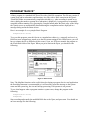
the \Flash Disk folder of the Xpert. When you press Start on the Xpert, you should see the
following:
Figure 5: Hello World!
Note: The MsgBox function can be useful when developing a program, but in a real application
the ErrorMsg statement is recommended as it will not only report the message to the system
status and the system log, but it won't hold up processing if an operator is not present.
To see what happens when a program contains a syntax error, change the program to the
following:
A=MsgBox("Hello World")
A=MsgBox(B)
Stop recording and transfer the modified Hello.bas to the Xpert, and press start. You should see
an error message like the following:
16
Figure 6: Compiler Error Message
The compiler has detected an error in the program. It does so before the program is executed, so
the "Hello World" message is not displayed. The error occurred because Xpert Basic does not
allow variables to be used without them first being initialized or declared. Other implementations
of Basic generally permit this, but it can often lead to program bugs that will show up only hours,
days, or years later, when that section of the code is called.
Xpert Basic not only detects compiler errors, but detects run-time errors as well. To see what
happens when a divide by zero error occurs, modify Hello.bas as follows:
A=MsgBox("Hello World")
B=0
A=10/B
Stop recording and transfer the modified Hello.bas to the Xpert, and press start. After pressing
OK to the "Hello World" message, the following dialog is displayed:
Figure 7: Run-time Error Message
Basic detected the divide by zero condition and stopped the program. For more information on
handling run-time errors in your program, see the section Error Handling.
The Hello program is a main body program that is compiled and checked for errors when
recording is turned on, and then executed. Typically, a main body program only initializes
variables and does not do much other work. In fact, main body programs must not be written to
perform continuous work, otherwise the Xpert would never complete start-up.
The majority of a program's work occurs in subroutines. A subroutine is a piece of code that can
be called by the main body of the program, by another subroutine or, most importantly, by a
scheduled program or Basic block. A simple subroutine that can be scheduled might look like
this:
Public Sub SCHED_Hello
Volts=Ad(1,1)
A=MsgBox(Volts)
End Sub
17
A=MsgBox("Hello World")
This subroutine named SCHED_Hello measures the A/D channel 1 of module 1 and displays the
result in a message box. The Basic Setup entry on the Xpert's Setup tab is used to schedule when
and how often this program runs. The prefix "SCHED_" is what tells Xpert Basic that this
routine can be scheduled. Only programs with the "SCHED_" prefix will appear in the list of
programs when creating a schedule.
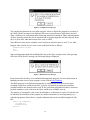
To schedule the program, download it and go to the Basic setup. Click [Add Schedule] and select
the subroutine "Hello". Enter an interval of 1 minute "00:01:00" and select OK. The Setup tab
should now look something like this:
Figure 8: Basic Setup
The Setup tab shows that the "Hello" subroutine is running on a 1 minute interval, and that the
next execution will take place at 14:56:00 (assuming the previous run has completed).
To associate a program with a Basic block, the program must have either a "SENSOR_" or
"BLOCK_" prefix.
That covers, in a nutshell, the "Basics of Basic". Here is a summary:
Create and edit programs on your PC using a text editor such as notepad.
Download programs to "\Flash Disk" using the XTerm file transfer dialog.
Use the Compile button, located on the Xpert Setup tab under Basic, to check for syntax
errors. If any errors are detected, edit the program, transfer the file, and re-compile.
Start recording to run Basic programs (main body programs run immediately, scheduled
subroutines run when scheduled, and programs associated with blocks run when the block
runs).
Typically, the main processing of your program occurs in subroutines that are either
scheduled, or run in the context of a Basic block.
The Xpert Setup tab is used to create schedules for Basic programs, and to add Basic blocks
to the setup.
18
USING THE LANGUAGE
This chapter describes the major components of the Xpert Basic language. For a description of a
particular function or statement, please see Basic Language Reference.
Comments
Comments in basic are preceded with either the REM statement or an apostrophe "'".
REM This is a comment
' This is also a comment
A=5 ' Comments may appear at the end of a statement
A=A+1 : REM but REM is a statement so it needs a statement separator
Statements and Functions
Statements in basic are commands that do not return a result. Functions do return a result.
Here is an example of a basic statement called Open:
Open "Report.Txt" For Output As #1
Here is an example of a basic function called Eof:
A = Eof(#1)
Note that statements may have various options (called parameters), which are usually separated
by spaces or commas, whereas parameters to a function are always separated by commas, and
are enclosed by parentheses. In the example above, Eof(#1) is a function call, but it's also an
example of the assignment statement. This is because functions are always contained inside of a
statement. More then one statement can be used on a line by separating them with colons ":"
A=1 : B=1 : C=1 : ' Initialize a bunch of variables to one
Variables
Variables in Basic must start with a letter (A-Z) and may be followed by one or more characters
including A-Z, 0-9, _, and $. They are not case sensitive. Variables must be defined before they
can be used. The initialization defines their data-type. This can be important for statements that
set variables to different results depending on the type. Data types include integers (32-bit
signed), double precision floating-point, character strings, dates, times, and arrays. Strings may
contain binary data and will automatically grow larger as needed. String constants are contained
inside double quotes. Data contained inside double quotes must be on one line, for readability,
strings may be concatenated together with &, +, etc. Floating-point numbers support exponential
notation.
This_Is_A_Long_Variable_Name = 5
ShortName$ = Str(This_Is_A_Long_Variable_Name)
A_String = "Hello World"
Max_Integer = 2147483647
Min_Integer = -2147483648
Real_Num = 3.1415932
BigNum = 10.56e+200
19
Bad_string_example = "all this data
Cannot extend beyond one line"
Good_string_example = "Unless the data " &
"is seperated by &, +, etc."
Variables defined in the main body of the program can be accessed by all the code in the main
body that comes after the definition, including subroutines. Variables defined inside of
subroutines are "local" to that subroutine. That means they are only known to that subroutine,
and any memory they consume is released when the subroutine completes.
A local variable may be declared without supplying an initial value with the Dim statement. The
Dim statement is often used to declare local variables inside of scheduled programs and block
programs because in these special cases the value of local variables are retained across calls, and
the Dim statement will declare but not re-initialization the variable.
Dim LocalVar1
Dim LocalVar2
Basic also supports global variables. Global variables may be accessed from separate programs
(.bas files), as well as among from different subroutines and functions. They are defined and
optionally initialized with the Static statement. If a Static variable is not explicitly initialized it
will start with a value of 0. This can be handy if you wish to retain the value of a variable even
after recording has been restarted.
Static GlobalVar
Lock
If GlobalVar = 0 Then
GlobalVar = 1
StatusMsg "Program was just loaded"
End If
UnLock
Note the use of the Lock and UnLock statements in the above example. These statements ensure
no other program can access the variable GlobalVar while the code between the statements is
executing. If a global variable can be accessed from different thread contexts, i.e., from different
Basic Blocks, Sensor Blocks, and Scheduled Programs, then access to the variable must be
protected, as shown.
Basic supports single dimensional and multi-dimensional arrays. They are dynamically sized
much like strings. If you need a really large array, you might initialize its highest index first so
less time is wasted expanding the array.
TestArray(5)=5
TestArray(0)=0
TestArray(1)=1
TestArray(2)=2
TestArray(3)=3
TestArray(4)=4
or…
TestArray = Array(0, 1, 2, 3, 4, 5)
Array indices inherently start at 0, although you may use 1 as the base index for clarity (negative
indices are not allowed).
20
Multi-dimensional arrays are allowed and are specified by separating the dimensions with
commas.
For Row = 1 To 5
For Column = 1 To 3
MultiArray(Row, Column) = Row*5+Column
Next Column
Next Row
The highest initialized index of an array (upper bound) may be retrieved with the Ubound()
function. For instance in the example above Ubound(MultiArray) would be 5 (rows), and
Ubound(MultiArray(0)) would be 3 (columns).
Finally, Basic also supports constants. Constants are similar to variables except their value must
be computable at compile time, and once assigned they may not be assigned another value. A
constant can contain an integer, floating-point, string value, or an array of the same. Here are a
few examples of constants:
Const
Const
Const
Const
Pi=3.141592654
DegToRad=Pi/180.0
AsciiA=Chr(65)
MyList=Array(0, 1, 2, 3, 4)
Constants can be used in mathematical expressions, but the expressions must contain other
constant variables, literals, or the Chr() function.
Operators
The following is the operator precedence tree for Basic. This determines which operators are
evaluated first when an equation is computed. The operators at the top of the list are evaluated
before those at the bottom:
Arithmetic
^
- (unary negation)
* / \ Mod >> <<
+ - & (string concat)
Comparison
=,<>,<,>,>=,<=
Logical
Not
And
Or, Xor, Eqv
For example:
If A>5 Or B>6 Then C=5
The expression above is evaluated exactly the same as if it was written:
If (A>5) Or (B>6) Then C=5
The evaluation occurs in this manner because the comparison operator ">" is evaluated before
the logical operator "Or". When in doubt, parentheses can be used to force the order of an
evaluation.
21
Arithmetic operators may be applied to dates and times so that dates and times can be added and
subtracted from other.
In most cases, data types are automatically promoted when combined. For example, a floating
point number will automatically be converted to a string if it's added (or concatenated) to a
string. Similarly, an integer is converted to a float when added to another floating point number.
The "<<" and ">>" operators are bitwise shift left and shift right operators borrowed from C.
Either "+" or "&" may be used to concatenate strings.
Logical and Binary Operators
Xpert Basic uses -1 to represent true and 0 to represent false. This allows the same logical
operators to also be used as binary operators (in contrast to other languages, e.g. C/C++). Hence,
the expression "5 And 3" evaluates to the logical value of true, as well as the binary value of 1
(just as you would expect from the binary operation "1012 & 0112" which evaluates to 0012).
Math Functions
The following is a list of the standard math functions supported by Basic (trig functions use
radians):
Abs, Atn, Cos, Exp, Int, Log, Sgn, Sin, Sqr, Tan
The following example computes the x and y vector component of an angle (in degrees):
Const Pi=3.141592654
Const DegToRad=Pi/180.0
Angle=Ad(1,1)*360/5
X = cos(Angle * DegToRad)
Y = sin(Angle * DegToRad)
Conditional Statements and Loops
Basic supports the usual If-Then-Else type blocks as well as For-loop, Do-loop, While-loop,
Select-case, Goto, and Gosub statements. All of these loops may be nested, which means you can
code a For-loop inside of a For-loop, etc.
Basic supports the pre-structured programming constructs such as:
10 A=0
20 A=A+1 : X(A)=A : If A<10 Then Goto 20 Else Goto 30
30 StatusMsg A
But this would be more clearly written as follows:
A=0
Do
A=A+1
X(A) = A
Loop While A<10
StatusMsg A
Or even more succinctly as:
For A = 1 To 10
X(A) = A
Next A
22
StatusMsg A
Note, however, that although the contents of the array are the same at the end of the above
examples, the value of A is 11 following the For-loop (and not 10, as in the top two examples).
This is because a For loop checks the index at the beginning of the loop, while the other
examples have the check at the end.
The For-loop also supports the "Step" option with either positive or negative step values.
For I = 10 To 1 By –2
StatusMsg "Countdown by 2 = " & I
Next
The Next part of a For-loop may optionally specify the loop index variable, and a For-loop may
be forced to exit early with the use of the "Exit For" statement. "Exit For" is especially useful
because a program may not branch from inside a For-loop to outside the loop with a Goto.
Of course, Goto statements should be used very rarely, if at all. The functionality of a Goto
statement is more clearly implemented using Do-loop or Select-case statements. If a Goto must
be used, its destination can be either a line number or line label. Similarly, the archaic GoSub
statement is supported but should rarely be used in lieu of a subroutine or function.
Here's the old way you might create a subroutine to double a variable:
10 A=5
20 Gosub 100
30 Stop
100 A = A * 2
110 Return
Here's how it can be done without line numbers:
A=5
Gosub Times2
Stop
Times2:
A = A * 2
Return
Here's the preferred way to do it, using a function:
Function Times2(X)
Times2 = X*2
End Function
A=Times2(5)
For more information on defining subroutines and functions, please see Subroutines and
Functions.
The Do-loop can be structured in several ways. It allows the use of either Until or While, and can
be written to test the conditional either at the end of the clause or the beginning. Here are
examples of all the variations:
Do While A<10
A=A+1
End Loop
Do Until A>10
A=A+1
End Loop
Do
A=A+1
23
Loop While A<10
Do
A=A+1
Loop Until A>10
A Do-loop may be forced to exit with the "Exit Do" statement.
The While-loop construct is typically simpler and more concise then the Do-loop, but doesn't
allow exiting from inside the loop (except by using a Goto). Here's an example:
While A<10
A=A+1
Wend
The Select-case statement is a powerful construct, which simplifies if-then-else testing. For
example, the following code:
If I=1 Then
A=1
ElseIf I=3 Or I=4 Then
A=2
ElseIf I=10 Or I=11 Or (20<=I And I<=30) Then
A=3
Else
A=4
End If
…is clearer when coded as follows:
Select Case I
Case 1
A=1
Case 3, 4
A=2
Case 10, 11, 20 To 30
A=3
Case Else
A=4
End Select
In the above example, note how the If-Then, Else, and End-If all appear on separate lines. This is
the "structured" method of using these statements. In older programs, you will often find several
statements on one line separated with a colon (":"). This method is still supported, but is not
recommended, since it does not lead to code that is as easy to read and maintain. Compare either
of the previous examples to this:
If I=1 Then A=1 Else If I=3 Or I=4 Then A=2 Else If I=10 Or I=11 Or (20<=I And
I<=30) Then A=3 Else A=4
Xpert Basic compiles its code, unlike the 8200/8210's interpreted Tiny Basic. This means there is
no performance penalty at run-time for using more descriptive loops, longer variable names, and
comments, etc.
Finally, there's one last type of control-loop that is sometimes very convenient, but is mostly
supplanted by the Select-case statement. It's called the On-Goto or On-Gosub statement. This
allows selective branching to different line numbers based on the value of a variable. It will be
described in the reference.
24
Aborting a Program
A running program can be aborted in two ways: it can abort itself by executing a Stop statement,
or a program will be aborted when recording is stopped. Multiple instances of a program may be
scheduled, but just because one instance executes a Stop statement and terminates, the others do
not. On the other hand, when recording is turned off, all scheduled subroutines must finish their
work within about 5 seconds or they will be forcibly terminated. The Abort function exists to
detect this situation so a program can tell when it needs to stop.
String Functions
Xpert Basic has a full complement of string functions: Asc, Chr, Hex, InStr, Left, Len, Mid,
Right, Space, Str, StrComp, String, Ucase, and Val.
For example, if you needed to extract the number from the string "SENSOR READING=24.54
VOLTS" you could use the following code:
Test="SENSOR READING=24.54 VOLTS"
SubStr=Mid(Test,16,5)
Answer=Val(SubStr)
Basic also supports a Format function which allows C-style sprintf formatting for those familiar
with the C language. For example,
REM This will display: "A= 5, B=12.3000, C=
A=5
B=12.3
C="Hello"
D = Format("A=%3d, B=%3.4f, C=%10s", A, B, C)
StatusMsg D
Hello".
Subroutines and Functions
A subroutine or function is code that can be reused by other pieces of code. The difference
between a function and a subroutine is that a function returns a value while a subroutine does
not. The "Exit Function" statement may be used to return from a function early, and "Exit Sub"
plays the same role for a subroutine. The name of the function is a variable that represents the
return value of the function.
For example, here's a function that checks two voltages and returns the difference:
Function Subtract(Volt1, Volt2)
If Volt1>5.0 Or Volt1<0.0 Or Volt2>5.0 Or Volt2<0.0 Then
Subtract = -1.0
Exit Function
End If
Subtract = Volt1-Volt2
End Function
The following subroutine measures two analog channels and logs the difference using the
Subtract function to detect bad or negative voltages.
Sub Measure_Subtract_Log(Chan1, Chan2)
Volt1 = Ad(1, Chan1)
Volt2 = Ad(1, Chan2)
Delta = Subtract(Volt1, Volt2)
Open "ssp.log" for Log as #1
If Delta >= 0.0 Then
25
Log #1, Now, "MeasSubLog", Delta, "G", "Volts"
Else
Log #1, Now, "MeasSubLog", Delta, "B", "Volts"
End If
Close #1
End Sub
While user defined functions are invoked just like Basic functions, user defined subroutines are
called with the Call statement.
REM Log the difference between chan 1 and chan 2
Call Measure_Subtract_Log(1, 2)
Subroutines and functions can be declared before they are defined in order to allow them to be
used in other subroutines and functions that are defined earlier in the code. For example, the
declaration of function AAA allows it to be called by function BBB, even though the definition
of AAA comes after the definition of BBB:
Declare Function AAA(X)
Function BBB(X)
BBB=AAA(X) + AAA(X+1)
End Function
Function AAA(X)
AAA=X*X
End Function
Recursion
Subroutines and functions may recurse, i.e., they may call themselves. Here is an example of a
recursive subroutine that counts down:
Sub CountDown(X)
A=MsgBox(X)
If X>0 Then Call CountDown(X-1)
End Sub
Call CountDown(10)
Implementing a recursive function is more complex since the name of the function represents the
current value of the function (preventing you from calling the function by name from within the
function body). To get around this, use a helper function that calls the function to be recursed.
The following example demonstrates the concept of using a helper function to implement
function recursion:
Declare Function Factorial(X)
Function Helper(X)
Helper=Factorial(X)
End Function
Function Factorial(X)
If X=1 Then
Factorial = 1
Else
Factorial = X*Helper(X-1)
End If
End Function
StatusMsg Factorial(56.0)
26
Pass by Reference
All variables passed to a subroutine or function are passed by "reference". This means that any
changes made to the variable while inside the subroutine or function persist upon return. This can
be used to return additional values. Here's an example of a function that computes an average of
two numbers, as well as the min and the max.
Function AvgMinMax(Num1, Num2, Min, Max)
AvgMinMax = (Num1 + Num2) / 2
If Num1 >= Num2 Then
Max = Num1
Min = Num2
Else
Max = Num2
Min = Num1
End If
End Function
Min=0
Max=0
Ans = AvgMinMax(5.0, 10.0, Min, Max)
StatusMsg Format("Avg=%3.2f Min=%3.2f Max=%3.2f", Ans, Min, Max)
Output:
05/19/2004 21:50:20 (Status) - Avg=7.50 Min=5.00 Max=10.00
Public Subroutines and Functions
Subroutines and functions that are declared as Public are global in scope, meaning they can be
called from other programs. In the following example, test1.bas defines a public function to
apply a polynomial. The function is used in test2.bas. Note the declaration of the Poly function in
test2.bas before it is first used:
TEST1.BAS
Public Function Poly(X, A, B, C)
Poly = A*X^2 + B*X + C
End Function
TEST2.BAS
Public Declare Function Poly(X, A, B, C)
Test = Poly(5.0, 1.0, 2.0, 3.0)
Calling Subroutines and Functions contained in a DLL
An advanced feature of Xpert Basic is the ability to call C subroutines or functions contained in
DLLs (Dynamic Link Libraries). Since C DLLs do not have a data-type that corresponds to a
Basic variable, any variable passed is automatically converted to either LPCTSTR (unicode
character string pointer), a 32-bit integer, or a double. No other types of data may be passed.
Similarly, return values can be Integer, Double, or a character string pointer. Returning a
character string pointer is non-trivial as the memory must persist until the call returns and Basic
can copy the string to it's own memory. Hence, invoking a DLL function that is known to return
a constant string is acceptable, but one that returns a shared global string variable may return a
corrupted string, if the DLL function happens to be called from multiple threads at the same
time.
The following example retrieves the constant string representing the version of LZO.DLL:
27
Declare Function GetLZOVersion Lib "Lzo.dll" As String
StatusMsg "LZO Version: "&GetLZOVersion
Sometimes the name of a function you wish to call may conflict with a name Xpert Basic has
reserved. The Win32 API GetTickCount function is just such an example. The Alias option
allows you to specify a different name to use in the program for the function:
Declare Function GetTick Lib "Kernel32.dll" Alias "GetTickCount" As Integer
StatusMsg GetTick()
The following example shows how to define a C subroutine that can be called from Xpert Basic,
where the subroutine accepts an integer, a double and a string:
TestDLL.c
extern "C" _declspec(dllexport) void TestCode(int A, double B, LPCTSTR C)
{
// Insert "C" code here
};
Here's how to call it from Xpert Basic:
Declare Sub TestCode Lib "TestDLL.dll" (A, B, C)
Call TestCode(5, 12.34, "Hello there")
Date and Time
Xpert Basic supports date and time variables. A date variable represents an absolute date and
time down to the millisecond1. When converted to a string, the string will have the format
"mm/dd/yyyy hh:mm:ss:mss". A time variable represents a span of time with millisecond
resolution2. When converted to a string, the string will have the format "hh:mm:ss:mss" format.
Times may be added to, and subtracted from, other times or dates.
Custom string formats can be created by extracting the components of the date and converting
them to strings. For extracting date and time components, see the functions Day, Month, Year,
Hour, Minute, and Second in the Language Reference.
There are no Time or Date constants. To create a fixed date or time, use the DateSerial function
or TimeSerial function, respectively.
There are also various functions related to getting the current time and date. Timer returns an
integer representing the number of seconds elapsed since midnight, while Time returns the same
thing but as a Time variable. The Now function retrieves the current date and time as a date
variable, whereas Date returns the current day (time is 00:00:00) as a date variable. Finally
GetTickCount returns the number of milliseconds elapsed since the system booted as an integer
(when using GetTickCount, take care to consider rollover, since the internal representation of an
integer in Xpert Basic is a 32-bit signed integer that rolls over after about 24 days).
Basic also provides the Date and Time statements for setting the current date or time.
1
Date and Time have resolution in seconds in version of Xpert Basic prior to ver 3.x. In 3.x and greater, fixed point
values express seconds and fracions thereof (e.g., 3.2 is used to express 3.2 seconds).
2
ibid.
28
Debugging
Xpert Basic does not support a debugger. The primary means to debug a program is by inserting
either MsgBox or StatusMsg statements, downloading the program and running it. The Tron
statement may be used to turn on program line or global variable tracing, and Troff may be used
to turn it off. Global variable tracing is helpful when you know a variable should not be changing
to a certain value, but can’t tell where or why it’s happening.
One convenient method for debugging is to run an XTerm session on one com port for
downloading programs, and a hyperterminal session on another for viewing debug and status
messages. At Remote's \Flash Disk command prompt you may use the "Report Debug"
command to see debug and other messages or "Report High" to see errors, warnings, and status
messages. Here's an example excerpt from a tron line trace:
05/05/2004
05/05/2004
05/05/2004
05/05/2004
05/05/2004
05/05/2004
05/05/2004
05/05/2004
05/05/2004
20:01:53
20:01:53
20:01:53
20:01:53
20:01:53
20:01:53
20:01:53
20:01:53
20:01:53
(Status)
(Status)
(Status)
(Status)
(Status)
(Status)
(Status)
(Status)
(Status)
-
TRACE
TRACE
TRACE
TRACE
TRACE
TRACE
TRACE
TRACE
TRACE
hello.bas
hello.bas
hello.bas
hello.bas
hello.bas
hello.bas
hello.bas
hello.bas
hello.bas
[11]
[12]
[13]
[14]
[15]
[16]
[15]
[16]
[15]
Note the program name "hello.bas" is displayed as well as the line number in the program.
To aid in debugging the status tab and the info command prompt command have been enhanced
to display the Run Always status, the overall state (running or stopped) and for each currently
running subroutine or function: which program the subroutine or function is contained in, the
state (running, sleeping, waiting, or performing I/O), and the line number currently being
executed. In addition the state of each scheduled subroutine (created in the setup), and each task
(created by programs with StartTask) is displayed. If your program isn’t working as you expect,
check the status and see if the program is executing the code you expect it should be.
Sample Basic Status:
\Flash Disk> info
(other system status messages)
Basic Status: [Run Always Enabled, Running]
Program Gprs.bas:
GPRS_Task is performing I/O at line 320
Program Sampler.bas:
TakeSample is sleeping at line 9
Scheduled Subroutine Status:
MonitorWater runs every 00:00:10, runs next at 17:45:35, Waiting
Task Status:
TakeSample runs every 00:00:10, runs next at 17:45:40, Running
GPRS_Task runs every 00:00:05, runs next at 17:45:15, Running
(other system status messages)
In the sample above, the line labeled “Basic Status:” summarizes the overall status and will
display “Run Always Enabled” or “Run When Recording On”, as well as whether Basic is
29
currently “Running”, “Stopping”, or “Stopped”. Following that is a list of each subroutine or
function that is currently running, grouped by program name. The status can be “running”,
“sleeping”, “waiting” or “performing I/O”, and the line number being executed is also displayed.
The next category is a list of scheduled subroutines (scheduled by the user in the setup) and their
status (see the Recurring Schedule topic). The run interval is displayed, as well as the next time
the subroutine is scheduled to run, and its current status which may contain either “Running”,
“Waiting”, or “Stopped”. The last category is a list of tasks (created with the StartTask function)
and their status. The “Task Status” is almost the same as the “Scheduled Subroutine” status
except the status “Triggered” will be displayed if the task is running due to the use of the
TriggerTask statement, and if a Task is stopped it simply will not appear in the list.
Error Handling
Normally when a run-time error occurs in a Basic program, the program stops execution and an
error message is reported. The error message is displayed in a dialog box on the Xpert screen and
is also logged to the system.log. The dialog box is displayed for only about a minute in case no
user is available to respond.
Often, a run-time error is expected and must be handled explicitly by the program. Xpert Basic
provides two ways to handle errors explicitly. The simplest method is to tell Basic to just ignore
errors with the "On Error Resume Next" statement. If an error does occur in this scenario, the
program can choose to detect it by calling the Err function. The Err function returns a non-zero
code when a run-time error occurs (see APPENDIX A: Basic Error Codes for the definition of all
possible codes).
The other way to handle an error explicitly involves commanding Basic to branch to an
exception-handler when an error occurs with the "On Error Goto label" command. This
statement will cause Basic to branch when a run-time error occurs to the specified label or linenumber. The code can try to handle the error and can either resume the code just after the error
with "Resume Next" or continue the program at another location with the "Resume Label"
command.
When handling errors explicitly, be sure to check the Err function immediately after the line that
may have produced the error, or as the first thing inside the error handler, or store the value of
Err into a variable. The reason for this is that all statements that can cause run-time errors will set
the value of Err, overwriting the previous result.
Here are two examples, both handling the same divide by zero problem using different methods:
DIVBYZERO1.BAS
REM Divide two numbers, return 99887766 on error
const BE_DIVIDE_BY_ZERO =25
Function DivXY(X, Y)
On Error Resume Next
DivXY = X/Y
If Err=BE_DIVIDE_BY_ZERO Then
DivXY = 99887766
End If
End Function
DIVBYZERO2.BAS
REM Divide two numbers, return 99887766 on error
const BE_DIVIDE_BY_ZERO =25
30
Function DivXY(X, Y)
On Error Goto Problem
DivXY = X/Y
Exit Function
Problem:
DivXY = 99887766
End Function
Important: if a subroutine or function fails to handle an error, then the error will be reported and
the current task will exit. This means higher-level functions or subroutines will not have an
opportunity to handle the error. The presumption is that if an unhandled error occurs you will
want to be notified of it to correct the issue and further execution of the program can not be
trusted at that point. A scheduled subroutine will continue to execute at the next interval, but a
function that’s been executed due to StartTask will only run again if it has not set its return value
to non-zero before the error.
File I/O
Xpert Basic has a rich set of file handling functions including Open, Close, Input #, Line Input,
Print #, Seek, Eof, FileLen, FreeFile, Loc, ReadB, WriteB, and Flush #. For the most part, these
functions follow normal Basic conventions including the use of file numbers. Programs share the
same set of file numbers. So file #1 in Stage.Bas would specify the same file as file #1 in
Wind.Bas. To avoid conflicting use of file numbers, it's recommended to use the FreeFile
function to retrieve an unused file number. File numbers can range from #1 to #512.
ReadB and WriteB are unique to Xpert Basic. These functions are used to perform raw binary
I/O. The traditional statements for record oriented I/O, Put # and Get #, are not supported.
Files typically reside on the Xpert2's main "disk", which is mapped as "\Flash Disk". However,
users can use external storage as well. When plugged into the Xpert2, a USB storage card
("thumb drive") is mapped as "\USB Card", an SD storage card is mapped as "\SD Card", and a
CF (compact flash) storage card is mapped as "\CF Card".
File system management functions include Kill, ChDir, FileCopy, Name, MkDir, RmDir,
CurDir.
Log I/O
Log I/O shares some functions with File I/O including the Open, Close, and Input # statements.
While a log file can be read with the Input statement, the parameters are fixed (Type,
TimeStamp, Sensor, Data, Quality, Units). Log files can only be written (appended to) with the
Log # statement. In addition to sensor data values, notes and records of data can also be logged.
Serial I/O
Functions and statements which can be used to perform serial I/O include: Open, Close, Print,
Cd, Dsr, Cts, Ri, Timeout, Flush #, FlushInput #, SetPort, SetDTR, SetRTS, SetTimeout, and
WaitFor. NOTE: When using RS485 port (COM4 on 9210 and 9210B), RTS must be set to
"on" after opening the port, or no data will get sent. On 9210B, COM4 can be used in
either RS232 or RS485 mode (default is R232). The mode is selected with the SetPort
command.
31
Socket I/O
TCP/IP sockets can be opened like a file and manipulated using the Open, Close, Input #, Line
Input, Print #, Flush #, FlushInput #, WaitFor, Loc, Seek, ReadB, WriteB, and WebServer
commands.
Digital I/O
Digital I/O modules can be manipulated using the Counter, Digital and Frequency functions, as
well as the Counter and Digital Statements.
Analog I/O
Analog I/O modules can be manipulated using the Ad, Ad420, AdDC, AdAC, AdTherm,
AdRatio, AdGain, ConfigAd, Power, PowerAd, and PowerSwGnd functions.
SDI I/O
Low-level SDI I/O is supported with the Sdi function. Higher-level data collection is supported
with the SDICollect function. The following example shows how to collect two parameters from
SDI address 0, and 3 concurrent parameters from address 1.
On Error Resume Next
Data1 = SdiCollect("0M!")
If Err<>0 And Ubound(Data1)=2 Then
StatusMsg "SDI Data1 = "&Data1[1]&", "&Data1[2]
Else
ErrorMsg "Failed to collect SDI Data1"
End If
Data2 = SdiCollect("1C!")
If Err<>0 And Ubound(Data2)=3 Then
StatusMsg "SDI Data2 = "&Data2[1]&", "&Data2[2]&", "&Data2[3]
Else
ErrorMsg "Failed to collect SDI Data2"
End If
SSP Messaging
Communication between different RTU's is made possible with the GetTag, GetMessage,
RequestMessage , SendTag, and SendMessage functions. Alarms and Alerts can be manipulated
with the InAlarm, InAlert, ClearAlarm, ClearAlert, DisableAlert, EnableAlert, RaiseAlarm, and
RaiseAlert functions.
Satlink/GPRS/Iridium Formatting
A Basic program can format custom Satlink/GPRS/Iridium messages. Any of the Basic string
functions can be used to format the buffer as required, but the Bin and Bin6 functions exist
specifically to help forming 8-bit and 6-bit binary encoded data.
To create a selftimed formatting routine, create a function with a "SELFTIMED_" prefix. The
return value of the function becomes the buffer. For example:
Public Function SELFTIMED_STFormatter
Selftimed_STFormatter = "Test Selftimed Message"
End Function
32
To create a random (or alarm) formatting routine, create a function with a "RANDOM_" (or
“ALARM_”) prefix and a single parameter in which the random group number will be passed.
The return value of the function becomes the buffer. For example:
Public Function RANDOM_RRFormatter(Group)
RANDOM_RRFormatter = "Test Random Reporting Message: " + Str(Group)
End Function
It's possible to append to the buffer, as opposed to simply overwriting it, by taking advantage of
string concatenation. The following example appends its message to the current buffer:
Public Function SELFTIMED_STFormatter
SELFTIMED_STFormatter = SELFTIMED_STFormatter + "Test Selftimed Message"
End Function
More than one formatting function can exist in your program, but only one selftimed and one
random function may be active at one time. The active routine is selected in the Basic entry of
the Setup tab.
Basic Tags
Basic tags wrap what are known in the Xpert as "communications tags", or "coms tags" for short.
Coms tags are primarily used to share real time data over SSP-based communications links.
Basic tags are created using the Declare Tag statement, and are accessed and manipulated with
the Tag, Measure, StartTag, StopTag, statements and functions.
A tag consists of one or more data values and a set of subroutines and functions that operate on
the tag's data. The tag's subroutines and functions implement the standard set of operations that
can be performed with any tag: "get", "set", "start", "eval", and "stop". The Get_ function and
Set_ subroutine are executed when values of the tag are retrieved and stored, respectively. The
Start_ subroutine is executed when recording is turned on, and the Stop_ subroutine is executed
when recording is turned off. The Eval_ subroutine is executed when a tag is measured.
Basic determines which functions and subroutines belong to which tags by looking at the names
of each. For example, the Get_ function for the AirTemp tag must be named Get_AirTemp.
The example that follows shows how to implement a tag named WaterLevel. The statement…
Declare Tag WaterLevel(3)
…declares that WaterLevel is a tag in the system with 3 different values (1 to 3) on which the
standard functions of get, set, eval, start, and stop may be performed. While tags can have any
number of values, tags in the Xpert typically follow the 8200/8210 convention where value 1 is
the last measured value of a tag, value 2 is the alarm status, and value 3 is a live measurement.
Declare Tag WaterLevel(3)
Last_WaterLevel = Counter(1,1)
Last_WaterLevel_Alarm = 0
Public Function Get_WaterLevel(Value)
If Value=1 Then Get_WaterLevel = Last_WaterLevel
If Value=2 Then Get_WaterLevel = Last_WaterLevel_Alarm
If Value=3 Then
Call Eval_WaterLevel
Get_WaterLevel = Last_WaterLevel
End If
End Function
33
Public Sub Set_WaterLevel(Value, Data)
If Value=1 Then
Last_WaterLevel = Data
Counter 1, 1, Data
End If
If Value=2 Then
Last_WaterLevel_Alarm = Data
End If
End Sub
Public Sub Eval_WaterLevel
Last_WaterLevel = Counter(1, 1)
End Sub
Public Sub Start_WaterLevel
REM called when recording is started
Call Eval_WaterLevel
End
Public Sub Stop_WaterLevel
REM called when recording is stopped
End
Note: for Xpert alarm processing to function correctly, a Basic Tag must preserve the alarm
status (as the example does). In addition, in order to appear on the Xpert's Data tab, a tag must
have at least 1 value, and must define a Get_ function.
The compiler automatically uppercases all tag names to reduce the possibility of problems
caused by case mismatches.
Basic Blocks And Basic Sensors
Basic Processing blocks and Basic Sensor blocks are blocks that allow Basic code to be used in
the Graphical Setup and EzSetup (only Sensor blocks can be used in EzSetup). Several functions
have been defined to support the use of these blocks: GetInputData, GetInputDigits,
GetInputAlarm, GetInputName, GetInputQuality, GetInputTime, GetInputUnits, SetOutputData,
SetOutputDigits SetOutputAlarm, SetOutputQuality, SetOutputTime, and SetOutputUnits. Or
alternatively all the sub-fields may be manipulated at once by using the GetInput function and
the SetOutput statements, which accept Sensor Readings.
A Basic Sensor only has outputs, while a Basic Block may have inputs and outputs. The number
of inputs is limited to 5 (numbered 1 to 5), and the number of outputs is limited to 20 (only 5
ouputs were available prior to version 3.2). NOTE: the default input and output point number is 3
(the middle point on the GUI, easily observed when you activate the GUI's Zoom feature).
All Basic Processing block subroutines must begin with "BLOCK_", and all Basic Sensor
subroutines must begin with "SENSOR_". The GetScheduledTime function is often used to
retrieve the time the subroutine was scheduled to execute. This function is especially useful for
time stamping logged data in order to keep time stamps consistent and on even intervals.
The local variables defined inside these subroutines will persist (retain their value) across calls,
as long as they are declared using the Dim statement. If an assignment statement is used in the
Dim declaration, the persistent value is overwritten with each execution of the Dim statement.
34
The following example defines a very simple block that implements F(X,Y)=X*Y:
MULTXY.BAS
Public Sub BLOCK_MultXY
SetOutputData 3, GetInputData(2) * GetInputData(4)
SetOutputDigits 3, 2
' Use 2 right digits
End Sub
Here's a slightly more complex example demonstrating data quality:
DIVXY.BAS
Public Sub BLOCK_DivXY
REM Detect divide by zero
If GetInputData(4) = 0 Then
SetOutputData 3, 99887766
SetOutputQuality 3, "B"
Else
SetOutputData 3, GetInputData(2) / GetInputData(4)
SetOutputQuality 3, "G"
End If
End Sub
Here's an example of a Basic Sensor that always returns 42 feet.
FOURTYTWO.BAS
Public Sub SENSOR_FOURTYTWO
SetOutputData 3, 42
SetOutputUnits 3, "feet"
SetOutputQuality 3, "G"
End Sub
Here's a complete example of a Basic Sensor that measures an analog channel.
1AIO SENSOR.BAS
' Measure analog voltage on channel 1 of module 1
' Provide excitation on channel 2 of 3 volts
' Set ouput 3 of block with the data
Public Sub SENSOR_AdcCh1
'*** error codes
Const BE_NO_ERROR=0
Const BE_INVALID_IO_HANDLE=27
Const BE_IO_FAILED=28
'********* initialize
QFlag = "B"
Result = -99.999
On Error Resume Next
SData = Ad(1, 1, 2, 3)
E = Err
If E = BE_NO_ERROR Then
QFlag = "G"
Result = SData
' Could also add equations here to process data
'*** add error message to system log if failed
Else
Select Case E
Case BE_INVALID_IO_HANDLE
ErrorMsg "Failed to find specified AIO module"
Case BE_IO_FAILED
ErrorMsg "Failed to get data from AIO module"
End Select
35
End If
' Use output 3 for data
SetOutput 3, Reading(Now, "VOLT-1", SData, QFlag, "Volts”)
End Sub
Readings
A reading is a means to encapsulate all the fields needed to describe a sensor value, log record,
or log note in one variable.
The Reading function is used to create a reading. The Log statement can be used to log one or
more readings. The LogReading function can be used to read one or more readings from the log.
The GetInput and SetOutput functions allow readings to be used when implementing Basic
Sensors and Basic Blocks.
The individual fields of a reading are: Type, Time, Name, ID, Note, Data, Record, Quality,
Units, Alarm, and Digits. Internally, Basic just treats a reading as an array of values, and the
fields translate into specific indexes into the array.
There are three types of readings: sensor data, log record, and log note. The Type field indicates
which type of data the reading contains: "D" for Sensor Data, "R" for a Log Record, "N" for a
Log Note, or "B” for bad data. Some of the fields overlap. For example, Name, ID, and Note all
refer to the same storage location, but have different meanings, depending on the type. The Data
and Record fields overlap, as well.
Here’s an example of how sensor readings can be used to log data:
N = Now
' Make 3 Air Temperature readings
R1 = Reading(N, "Air Temperature 1", Ad(1,1)*40.0-50.0, "G", "deg C")
R2 = Reading(N, "Air Temperature 2", Ad(1,2)*40.0-50.0, "G", "deg C")
R3 = Reading(N, "Air Temperature 3", Ad(1,3)*40.0-50.0, "G", "deg C")
' Now log the 3 readings to the ssp.log
Log "ssp", R1, R2, R3
36
Here’s an example of using sensor readings to create a Basic block that multiplies its input by
100, but then passes on everything else as-is. Normally this would require numerous
GetInputxxx and SetOutputxxx calls:
Public Sub BLOCK_Mult100
R = GetInput(3)
R.Data = R.Data * 100.0
SetOutput 3, R
End Sub
The following example demonstrates how the LogReading function can extract multiple readings
at a time from the log (it returns an array of readings):
' Form a time stamp corresponding to 12 noon of the current day
Today = Now
TimeStamp = DateSerial(Year(Today), Month(Today), Day(Today))
Time Stamp = TimeStamp + TimeSerial(12, 00, 00)
' Pull 10 Wind Speed readings from 12 noon and display them
N = LogReading("ssp", TimeStamp, "Wind Speed", 10)
StatusMsg "Items Read = " & (UBound(N) + 1)
For i = 0 To UBound(N)
StatusMsg "Wind Speed Reading " & i & " = " & N(i).Data
Next i
Run Always Mode
Run Always Mode is a feature which permits Basic programs to run even when recording is
turned off. This mode is enabled or disabled using the Basic Properties dialog, which is opened
from the Setup tab by pressing the “Edit” button with the Basic entry selected.
When you enable Run Always mode, Basic immediately starts running and will only stop if the
option is unchecked. When a new program is loaded into the setup and recording is toggled or
the compile button is pressed, all running Basic programs are stopped, the new program is
compiled, and then programs are restarted.
A program can discover whether Run Always Mode is enabled with Systat(31) and report an
error message if in the wrong mode, or adapt to the mode. Basic Scheduled Subroutines, Basic
Processing Blocks, and Basic Sensors behave the same regardless of the Run Always mode, and
do not execute when recording is off. Subroutines can be scheduled to run when recording is
turned off, but only with the StartTask statement.
Basic programs continue to run in Run Always mode when the setup is cleared (selecting “New”
setup from the setup tab). However, loading a new setup with Run Always mode disabled will
cause Basic to stop all programs.
The Abort function still indicates when a program is being shutdown, but in Run Always mode it
will remain false even if recording is turned off. To detect when recording turns off, you can use
the GetStopEvent function. Here’s an example that simply tests for the current recording state:
' This function returns true when recording is turned OFF
Function IsRecordingOff
' Wait on the stop event with no timeout and then check the status
IsRecordingOff = WaitEvent(0, GetStopEvent) = 1
End Function
Running a Program at System Start or Shutdown
To run a program at system start, create a subroutine named Start_Program. All subroutines
having this name are run at system init. This subroutine should NOT enter a task loop, but should
37
perform its processing and return quickly. To run a program that loops until some event (e.g.,
recording start/stop or system shutdown), use StartTask to kick-off a program that monitors for
the desired event, sleeping when there’s nothing to do.
To run a program at system shutdown, create a subroutine named Stop_Program. All subroutines
having this name are run at system shutdown. This subroutine should perform cleanup quickly
and return.
Note: when defining Start_Program and Stop_Program, don’t declare them as Public, since there
could be other subroutines having these names in other .bas files.
The following example shows how to start a program at system start, and then signal that
program to stop at system shutdown:
TimeToStop = 0
Public Function ProcessingLoop(Parm)
Sum = 0.0
' Return 0 to schedule the function for the next minute
ProcessingLoop = 0
' Average A/D channel 1 once per second for the next 10 seconds
For i = 1 To 10
Sum = Sum + Ad(1, 1)
' Exit and stop processing if the TimeToStop event is raised
' otherwise delay a second between samples
If WaitEvent(1, TimeToStop) = 1 Then
ProcessingLoop = -1
Exit Function
End If
Next i
End Function
Sub START_PROGRAM
StatusMsg "Start Program"
ResetEvent TimeToStop
REM Run the main processing loop every minute on the minute
StartTask "ProcessingLoop", 0, TimeSerial(0, 0, 0), TimeSerial(0, 1, 0)
End Sub
Sub STOP_PROGRAM
StatusMsg "Stop Program"
SetEvent TimeToStop
StopTask "ProcessingLoop"
End Sub
Multi-threading
Xpert Basic programs often run in independent program threads (e.g., programs started with
StartTask, scheduled subroutines, and setup blocks). There are several concerns related to multithreaded operation to address:
Resource Contention
The first concern is that subroutines executing in different threads may require access to the
same variable, allowing the possibility of data corruption. When a subroutine uses only local
variables, there is no concern of data corruption. However, when a subroutine uses global
resources (e.g., a global variable or com port), it is important to synchronize thread access to the
resource so that only a single thread will use it at any given time.
38
Thread synchronization is accomplished through critical sections, which are sections of code that
can be executed by only one thread at a time. The Lock and UnLock statements are used to
implement critical sections. The Lock statement is called to enter a critical section, while the
UnLock statement is called to leave the critical section. While one thread is executing in the
critical section, no other thread can execute that code. Since a critical section may be in use when
you try to enter it, the Lock statement accepts a timeout parameter that determines how long to
wait for the critical section to become available. In situations where having a single critical
section is inconvenient, users may create and supply the critical section variable.
Yielding the CPU
The second concern in a multi-threaded system is that of yielding the CPU to other threads, and
the related concern of power management. A Basic program should avoid sleepless loops
whenever possible (a sleepless loop is a loop where the code performs some task over and over,
e.g., checking the state of a variable, without sleeping in between). When a program fails to
sleep, it "hogs" the CPU, making it difficult for other threads to have sufficient time to run. Also
while in this state, the system is never allowed to enter any kind of power savings mode, which
will drain a battery very quickly.
A program sleeps by calling the Sleep statement. During a sleep, the program thread does
nothing for the amount of time specified as a parameter to the statement. During this time, any
other thread that needs to run can and, if no other threads need to run, the system will sleep.
Thread Synchronization
Events may be used to synchronize different Basic threads, the WaitEvent function, and the
SetEvent, and ResetEvent statements allow threads to signal to each other when there is work to
be done.
Web Page Creation and CGI-style forms handling
Web pages can be created from Basic in a few different ways. One approach is to create HTML
files or images in the "\Flash Disk\Web\" folder and the built-in HTTP server will automatically
retrieve them. This method will even work with older versions of Basic. The disadvantage to
this, however, is that it doesn't allow the page contents to vary based on the request (forms
handling) or to be generated as needed.
A dynamic web page handler may be created using Basic by defining a function called
Web_Manager. This must be declared as a public function with the following parameters:
StreamHandle
A file handle to the current socket session. Socket I/O functions may be used
to send or receive data from the stream, but in most situations this is not
necessary.
IpAddress
The IP Address of the client which is requesting a web page. This is in the
form of a string (ex. "192.168.5.6")
Cmd
The type of command that was issued (ex: "POST" or "GET")
Url
The file or resource being requested (ex: "web/index.html")
39
Headers
The various strings and information that describe what sort of web browser is
making the request and any other information meant to be passed on to the
web server.
The return value of the function may be an empty string (ex. "") to indicate to the HTTP Server
that it should continue to process the page as it normally would, or it may contain a string of
HTML code to be sent back to the client.
For instance here's an example that will return the current stage value (contained in a tag named
"STAGE") but only if the request comes from a very specific IP address (hard coded as
192.168.1.2):
Public Function Web_Manager(StreamHandle, IpAddress, Cmd, Url, Headers)
Web_Manager = "" ' By default let the Web Server handle the request
If Cmd = "GET" And IpAddress = "192.168.1.2" Then
StageVal = Tag("STAGE")
Web_Manager = "<HTML><BODY>Current Stage Value is: "
& StageVal & "</BODY></HTML>"
End If
End Function
The Web_Manager function provides an easy method to supply dynamic HTML pages, but to
handle forms (data supplied by the user) you would have to either parse the URL (in the case of a
GET command) or parse the headers (in the case of a POST). Fortunately, Basic can do this
automatically by providing CGI support.
CGI is a mechanism that web servers use to pass form data in to custom scripts. These scripts are
commonly contained in a "cgi-bin" folder on the web server and the Xpert follows this
convention, although the folder does not actually exist. Rather than running a program, the Xpert
will instead call a function that begins with the prefix "CGI_" passing the user entered form data
as parameters. A CGI function returns a dynamic web page.
So for instance you could create a simple web page to prompt for a name with the following
HTML code:
<FORM METHOD="get"
ACTION="/cgi-bin/getsample">
<INPUT TYPE="text" NAME="sName"
SIZE=20 VALUE="(Enter a name and press ENTER)">
</FORM>
Paste or enter this code sample in to notepad, save it out as Sample1.html and then transfer it to
the Xpert and place it in the folder "\Flash Disk\Web". Then with your web browser access the
page by entering the URL " http://ipaddressofmyxpert/sample1.html" where if you're not sure
what the IP address of your Xpert is, you can determine it with the Setup\LAN Settings\View
Config menu option. Be sure to turn the LAN ON if it's not already on.
A simple text box should be displayed in your browser where you may enter a name and press
enter, but for now it won't do anything. We need to connect it to Basic code. We do this by
creating a CGI function like the following exmaple:
Public Function CGI_GetSample(IpAddress, sName)
CGI_GetSample = "<HTML><BODY>Your name is " & sName & "</BODY></HTML>"
End Function
40
Notice that the name of the function "CGI_GetSample" must match the name of the CGI script in
the HTML code prefixed with the string "CGI_". The parameters to a CGI function consist of the
IpAddress of the client requesting the page and one or more field values from the HTML form in
the order they are defined in the form. The actual name of the parameters does not matter, just
the order. In this example we're returning a dynamic web page containing the name that was
entered, but this value (or values) passed can be set points, passwords, sensor IDs, whatever you
can design in HTML code.
The IPAddress may be used for security purposes such as to permit only authorized clients to
perform an operation, or it can also be used to remember state information. Typically an HTTP
session is stateless. Each request is unique and independent, but if the script remembers who
requested the pages by either IP address or by a session ID field then it can vary the response
based on what's been asked before. You could use global variables to remember the state.
A CGI post differs from a CGI get command in that the form data is passed as part of the header
fields and not in the URL. This is a more secure method since the data (which may include
passwords and hidden fields) are not clearly visible in the URL, but as far as Basic is concerned
it looks exactly the same. Here's a sample of HTML code to create a form which will prompt for
someone's name and gender and pass the information on to the Xpert using a CGI post
command:
<FORM METHOD="post"
ACTION="/cgi-bin/postsample">
<INPUT TYPE="text" NAME="First Name"
SIZE=20 VALUE="">
<INPUT TYPE="text" NAME="Last Name"
SIZE=20 VALUE="">
<INPUT TYPE="radio" NAME="gender" VALUE="M" CHECKED>Male<BR>
<INPUT TYPE="radio" NAME="gender" VALUE="W">Female<BR>
<INPUT TYPE="submit" NAME="button" VALUE="OK">
</FORM>
Just like with the previous sample, you'll need to enter or paste this code in to notepad and save it
out to a file named Sample2.html and then transfer it over to the "\Flash Disk\Web" folder on the
Xpert. When you request this web page using your web browser, it will prompt for a first name,
last name, and gender. We can capture these fields by writing a CGI function as follows:
Public Function CGI_PostSample(IpAddress, FirstName, LastName, Gender)
CGI_PostSample = "<HTML><BODY>You entered " & FirstName
& ", " & LastName & ", " & Gender
& "</BODY></HTML>"
End Function
Again, the field values in the function must be defined in the same order they were defined in the
form. Please be aware, that while the data passed in a post is not visible to plan viewing, it is not
considered secure as it is passed as plain text in the headers. If your web server can be accessed
by un-trusted users, then your CGI functions must protect your system by checking to make sure
the request appears valid, the fields are legitimate, and that it's been issued by an authorized user.
Miscellaneous Statements and Functions
There are a variety of other statements and functions available in Xpert Basic that can be used to
perform useful tasks, but that do not fit well into the general categories in this chapter. Some of
these are Systat, Reboot, Shell, StatusMsg, WarningMsg, ErrorMsg, and ComputeCRC. A
41
review of the Language Reference section will help to reveal other useful statements and
functions.
42
SOLVING PROBLEMS WITH BASIC
The goal of this chapter is to show by example how Xpert Basic can be used to solve typical
problems.
Stage And Log Processing Example
This example demonstrates a processing block which compares a Stage measurement against the
previous measurement recorded in the log. It automatically ignores "outliers" by throwing away
the current reading if it has changed too much from the previous logged reading. The stage data
is then used in an inflow calculation.
The first subroutine needed is one to lookup the previous value of a sensor in the log. This
function will be public so it can be re-used in other programs.
Note: The following examples make use of a function called ReadLog which demonstrates how
log entries can be retrieved step by step, but in most cases it would be more efficient to take
advantage of the LogReading function.
ReadLog.Bas
'''''''''''''''''''''''''''''''''''''''''''''''''''''''''''''''''''''''
' Function to read a specific sensor from log.
'
Public Function ReadLog(LogName, Sensor, TimeStamp, RLData, RLQuality, RLUnits)
' LogName, Sensor, and TimeStamp are inputs. RLData, RLQuality, and
' RLUnits are variables that receive this function's outputs.
' If Sensor at Timestamp is found, 1 is returned. Otherwise, 0.
RLData = 0.0
RLQuality = "U"
RLUnits = ""
ReadLog = 0
Type = 0
TimeFound = 0
SensorFound = ""
FileNum = FreeFile
Open LogName for Log as FileNum
Seek FileNum, TimeStamp
If Not Eof(FileNum) Then
Input FileNum, Type, TimeFound, SensorFound, RLData, RLQuality, RLUnits
Do While TimeFound = TimeStamp And Not EOF(FileNum)
If SensorFound = Sensor Then
If RLQuality = "G" Then
ReadLog = 1
End If
Exit Do
Else
' Log may contain multiple entries for this time-slot so keep looking.
' Seek statements using firmware prior to 2.5.0.16 find the last entry
' for the specified time, so move to previous to keep looking.
' Seek FileNum, Prev
' Seek statements as of firmware version 2.5.0.16 find the earliest
' entry for the specified time, so move to next to keep looking.
Seek FileNum, Next
Input FileNum, Type, TimeFound, SensorFound, RLData, RLQuality, RLUnits
End If
End Loop
End If
43
Close FileNum
End Function
Next, a block program is needed that will process it's input stage data and compare it to the
previous logged stage value, passing on the reading only if it appears to be legitimate.
MeasStage.Bas
Public Declare Function ReadLog(LogName, Sensor, TimeStamp, RLData, RLQuality,
RLUnits)
''''''''''''''''''''''''''''''''''''''''''''''''''''''''''''''''''''''''''''''''''
' Measure Stage and Eliminate Outliers
'
Public Sub BLOCK_MeasStage
' This program runs at the interval scheduled for the block to which it has
' been assigned. This program retrieves its input, which it assumes is a
' block used to measure stage, and determines whether the input is valid.
' If the input is deemed valid, the value is passed on to the output so
' it can be logged or processed by any blocks connected to the output.
' If the input is not deemed valid, the last known valid value is passed.
' Variables used in reading logged data.
StageName = "Stage"
' Should be same as Sensor Name of stage log block.
StageLog = "ssp.log"
' Should be same as Log Name of stage log block.
S2 = 0.0
Q2 = "B"
Stage = 0.0
QStage = "B"
tStart = GetScheduledTime
' Variables used to store results of ReadLog function.
RLData = 0.0
RLQuality = "U"
RLUnits = ""
' Retrieve the input.
S1 = GetInputData(3)
Q1 = GetInputQuality(3)
StatusMsg "S1 = " + Str(S1) + " " + Q1
' Get most recent 15 minute stage from log.
t = tStart - (tStart mod 900)
If tStart mod 900 = 0 Then t = tStart - 900
If (ReadLog(StageLog, StageName, t, RLData, RLQuality, RLUnits) = 1) Then
StatusMsg "S2 = " + Str(RLData) + " " + RLQuality
S2 = RLData
Q2 = RLQuality
Else
StatusMsg "ReadLog failed."
End If
' Determine which stage value to output as current.
If Q1 = "B" And Q2 = "G" Then
StatusMsg "Selecting S2 cuz S1 bad"
Stage = S2
QStage = "G"
ElseIf Q1 = "G" And Q2 = "B" Then
StatusMsg "Selecting S1 cuz S2 bad"
Stage = S1
QStage = "G"
ElseIf Q1 = "B" And Q2 = "B" Then
WarningMsg "S1 & S2 Both bad"
Stage = 0.0
44
QStage = "B"
Else
' Both good. Evaluate S1 against S2.
If Abs(S1 - S2) >= 2 Then
StatusMsg "Selecting S2"
Stage = S2
QStage = "G"
Else
StatusMsg "Selecting S1"
Stage = S1
QStage = "G"
End If
End If
SetOutputData 3, Stage
SetOutputQuality 3, QStage
End Sub
Finally, Inflow is calculated by processing multiple samples from the log. The processing
includes converting samples using a lookup table.
Inflow.Bas
' Declarations of functions and subroutines
Public Declare Function ReadLog(LogName, Sensor, TimeStamp, RLData, RLQuality,
RLUnits)
Declare Function LookupVolume(d)
Declare Function LookupOutflow(d)
Declare Sub SetOutputs (V1, Q1, V2, Q2, I, Q3, F1, Q4, F2, Q5)
Declare Sub InitTables
' Stage and tail water lookup tables
Static StageTbl
Static TailTbl
''''''''''''''''''''''''''''''''''''''''''''''''''''''''''''''''''''''''''''''''''
' Inflow Calculation
'
Public Sub SENSOR_InflowCalc
' This program runs at the interval scheduled for the block to which it has
' been assigned. This program assumes pool and tail water stages are measured
' separately at 15 minute intervals and are logged. The variables StageName,
' StageLog, TailName, and TailLog must be set to the actual names used in the
' setup of the blocks that log pool and tail stage.
Call InitTables
' Sleep for a second to make sure that any stage reading scheduled for
' the same time-slot as this block is complete and logged. This allows
' this block's schedule to overlap a stage measurement.
Sleep 1
' Variables used in reading logged data.
StageName = "Stage"
' Should be same
StageLog = "ssp.log"
' Should be same
TailName = "Tail"
' Should be same
TailLog = "ssp.log"
' Should be same
TimeStamp = 0
Sensor = 0
V1 = -1.0
V2 = -1.0
I = 0.0
F1 = 0.0
F2 = 0.0
V1Qual = "B"
V2Qual = "B"
45
as
as
as
as
Sensor Name
Log Name of
Sensor Name
Log Name of
of stage log block.
stage log block.
of tail water log block.
tail water log block.
IQual = "B"
F1Qual = "B"
F2Qual = "B"
tNow = Now
tStart = DateSerial(Year(tNow), Month(tNow), Day(tNow))
tStart = tStart + TimeSerial(Hour(tNow), Minute(tNow), Second(tNow))
' Variables used to store results of ReadLog function.
RLData = 0.0
RLQuality = "U"
RLUnits = ""
' Get most recent 15 minute stage from log.
t = tStart - (tStart mod 900)
If (ReadLog(StageLog, StageName, t, RLData, RLQuality, RLUnits) = 1) Then
StatusMsg "S1 = " + Str(RLData)
V1 = LookupVolume(RLData)
If V1 <> -1 Then V1Qual = "G"
StatusMsg "V1 = " + Str(V1)
' Get 15 minute stage from 3 hours ago.
t = t - 10800
If (ReadLog(StageLog, StageName, t, RLData, RLQuality, RLUnits) = 1) Then
StatusMsg "S2 = " + Str(RLData)
V2 = LookupVolume(RLData)
If V2 <> -1 Then V2Qual = "G"
StatusMsg "V2 = " + Str(V2)
End If
End If
' If we were able to compute volumes from stage data...
If V1 <> -1 And V2 <> -1 Then
' Calculate flow based on pool stage measurements
F1 = (V1 - V2) * 4.0333
F1Qual = "G"
StatusMsg "F1 = " + Str(F1)
' Determine the average outflow over the last 3 hours by averaging the
' last 3 hours of 15-minute tail stage converted to flow.
t = tStart - (tStart mod 900) ' Begin with most recent 15-minute data
TailAccum = 0.0
N = 0
F2 = 0.0
For Count = 1 to 12
If (ReadLog(TailLog, TailName, t, RLData, RLQuality, RLUnits) = 1) Then
StatusMsg "Tail" + Str(N) + " = " + Str(RLData)
TailAccum = TailAccum + RLData
N = N + 1
End If
' Backtrack 15 minutes in log for next reading.
t = t - 900
Next Count
StatusMsg "TailAccum = " + Str(TailAccum)
If N >= 6 Then
F2 = LookupOutflow(TailAccum / N)
StatusMsg "F2 = " + Str(F2)
If F2 <> -9999 Then
I = F1 + F2
F2Qual = "G"
IQual = "G"
End If
StatusMsg "I = " + Str(I)
End If
End If
' Set data and quality for each output of this block.
Call SetOutputs (V1, V1Qual, V2, V2Qual, I, IQual, F1, F1Qual, F2, F2Qual)
46
End Sub
''''''''''''''''''''''''''''''''''''''''''''''''''''''''''''''''''''''''''''''''''
' Sub to initialize output data and quality.
'
Sub SetOutputs (V1, Q1, V2, Q2, I, Q3, F1, Q4, F2, Q5)
SetOutputData 1, V1
SetOutputQuality 1, Q1
SetOutputData 2, V2
SetOutputQuality 2, Q2
SetOutputData 3, I
SetOutputQuality 3, Q3
SetOutputData 4, F1
SetOutputQuality 4, Q4
SetOutputData 5, F2
SetOutputQuality 5, Q5
End Sub
''''''''''''''''''''''''''''''''''''''''''''''''''''''''''''''''''''''''''''''''''
' Function to convert pool stage into volume
'
Function LookupVolume(d)
If d <= StageTbl(0, 0) Or d > StageTbl(UBound(StageTbl), 0) Then
LookupVolume = -1
Else
For i = 1 to UBound(StageTbl)
If d <= StageTbl(i, 0) Then
Exit For
Else
End If
Next i
' Linear interpolation of storage of measured pool stage
A = StageTbl(i-1, 1)
B = (d - StageTbl(i-1, 0))
C = StageTbl(i, 0)
D = StageTbl(i-1, 0)
E = StageTbl(i, 1)
F = StageTbl(i-1, 1)
LookupVolume = A + (B / (C - D)) * (E - F)
End If
End Function
''''''''''''''''''''''''''''''''''''''''''''''''''''''''''''''''''''''''''''''''''
' Function to convert tail stage into outflow
'
Function LookupOutflow(d)
If d <= TailTbl(0, 0) Then
LookupOutflow = TailTbl(0, 1)
ElseIf d > TailTbl(UBound(TailTbl), 0) Then
LookupOutflow = -1
Else
For i = 1 to UBound(TailTbl)
If d <= TailTbl(i, 0) Then
Exit For
End If
Next i
' Linear interpolation of outflow for measured tail stage
A = TailTbl(i-1, 1)
B = (d - TailTbl(i-1, 0))
C = TailTbl(i, 0)
D = TailTbl(i-1, 0)
E = TailTbl(i, 1)
47
F = TailTbl(i-1, 1)
LookupOutflow = A + (B / (C - D)) * (E - F)
End If
End Function
''''''''''''''''''''''''''''''''''''''''''''''''''''''''''''''''''''''''''''''''''
' Initialize conversion tables
'
Sub InitTables
' Stage Storage Curve, 32 points.
StageTbl(31,0) = 73
StageTbl(31,1) = 41287
StageTbl(0,0) = 0
StageTbl(0,1) = 0
StageTbl(1,0) = 1
StageTbl(1,1) = 5
StageTbl(2,0) = 3
StageTbl(2,1) = 22
StageTbl(3,0) = 5
StageTbl(3,1) = 42
StageTbl(4,0) = 7
StageTbl(4,1) = 92
StageTbl(5,0) = 9
StageTbl(5,1) = 243
StageTbl(6,0) = 11
StageTbl(6,1) = 500
StageTbl(7,0) = 13
StageTbl(7,1) = 900
StageTbl(8,0) = 15
StageTbl(8,1) = 1317
StageTbl(9,0) = 17
StageTbl(9,1) = 1876
StageTbl(10,0) = 19
StageTbl(10,1) = 2504
StageTbl(11,0) = 21
StageTbl(11,1) = 3202
StageTbl(12,0) = 23
StageTbl(12,1) = 3958
StageTbl(13,0) = 25
StageTbl(13,1) = 4773
StageTbl(14,0) = 27
StageTbl(14,1) = 5650
StageTbl(15,0) = 29
StageTbl(15,1) = 6587
StageTbl(16,0) = 31
StageTbl(16,1) = 7583
StageTbl(17,0) = 33
StageTbl(17,1) = 8635
StageTbl(18,0) = 35
StageTbl(18,1) = 9743
StageTbl(19,0) = 37
StageTbl(19,1) = 10903
StageTbl(20,0) = 39
StageTbl(20,1) = 12119
StageTbl(21,0) = 41
StageTbl(21,1) = 13389
StageTbl(22,0) = 43
StageTbl(22,1) = 14717
StageTbl(23,0) = 45
StageTbl(23,1) = 16103
StageTbl(24,0) = 47
StageTbl(24,1) = 17547
StageTbl(25,0) = 51
48
StageTbl(25,1)
StageTbl(26,0)
StageTbl(26,1)
StageTbl(27,0)
StageTbl(27,1)
StageTbl(28,0)
StageTbl(28,1)
StageTbl(29,0)
StageTbl(29,1)
StageTbl(30,0)
StageTbl(30,1)
=
=
=
=
=
=
=
=
=
=
=
20607
55
23895
59
27393
61
29219
65
33011
69
37019
' Tail water rating table, 36 points.
TailTbl(35,0) = 11.4
TailTbl(35,1) = 2255
TailTbl(0,0) = 4.4
TailTbl(0,1) = 4
TailTbl(1,0) = 4.6
TailTbl(1,1) = 10
TailTbl(2,0) = 4.8
TailTbl(2,1) = 19
TailTbl(3,0) = 5.0
TailTbl(3,1) = 34
TailTbl(4,0) = 5.2
TailTbl(4,1) = 54
TailTbl(5,0) = 5.4
TailTbl(5,1) = 79
TailTbl(6,0) = 5.6
TailTbl(6,1) = 110
TailTbl(7,0) = 5.8
TailTbl(7,1) = 151
TailTbl(8,0) = 6.0
TailTbl(8,1) = 200
TailTbl(9,0) = 6.2
TailTbl(9,1) = 249
TailTbl(10,0) = 6.4
TailTbl(10,1) = 303
TailTbl(11,0) = 6.6
TailTbl(11,1) = 363
TailTbl(12,0) = 6.8
TailTbl(12,1) = 429
TailTbl(13,0) = 7.0
TailTbl(13,1) = 500
TailTbl(14,0) = 7.2
TailTbl(14,1) = 573
TailTbl(15,0) = 7.4
TailTbl(15,1) = 645
TailTbl(16,0) = 7.6
TailTbl(16,1) = 715
TailTbl(17,0) = 7.8
TailTbl(17,1) = 785
TailTbl(18,0) = 8.0
TailTbl(18,1) = 855
TailTbl(19,0) = 8.2
TailTbl(19,1) = 925
TailTbl(20,0) = 8.4
TailTbl(20,1) = 1000
TailTbl(21,0) = 8.6
TailTbl(21,1) = 1078
TailTbl(22,0) = 8.8
TailTbl(22,1) = 1154
TailTbl(23,0) = 9.0
TailTbl(23,1) = 1230
TailTbl(24,0) = 9.2
49
TailTbl(24,1)
TailTbl(25,0)
TailTbl(25,1)
TailTbl(26,0)
TailTbl(26,1)
TailTbl(27,0)
TailTbl(27,1)
TailTbl(28,0)
TailTbl(28,1)
TailTbl(29,0)
TailTbl(29,1)
TailTbl(30,0)
TailTbl(30,1)
TailTbl(31,0)
TailTbl(31,1)
TailTbl(32,0)
TailTbl(32,1)
TailTbl(33,0)
TailTbl(33,1)
TailTbl(34,0)
TailTbl(34,1)
End Sub
=
=
=
=
=
=
=
=
=
=
=
=
=
=
=
=
=
=
=
=
=
1310
9.4
1390
9.6
1472
9.8
1557
10.0
1642
10.2
1728
10.4
1815
10.6
1902
10.8
1990
11.0
2078
11.2
2166
SelfTimed Message Formatting Example
This example formats a selftimed message by collecting the samples from the log with the
ReadLog function from the previous example.
Selftimed.bas
' Declarations of functions and subroutines
Public Declare Function ReadLog(LogName, Sensor, TimeStamp, RLData, RLQuality,
RLUnits)
'***** NOTES *****
' ASCII Selftime formater routine. Don K. 12 May 04
' Makes all logged data transmitted with two decimal precision and log name to
' match tx label.
' 15 Minute and hourly data each have a number of values to tx.
' It would be possible to build up the data array to hold a "log name" and a
' "label name" to tx a different label
' It would also be possible to add a "numVal" to the table to send different
' number of each data sensor.
'
' Sensors to tx:
' 15minute interval- RAIN, QSE
' 1hour interval- ATMIN, ATMAX, AAT
' make tx look like this
' :QSE 39 #0 0.00 0.00 0.00 0.00 :AAT 40 #0 22.2 22.2 :atmin 39 #0 22.2 22.2
' :atmax 39 #0 22.2 22.2 :Rain 9 #15 16.10 16.10 16.10 16.10
'
Public Function SELFTIMED_STFormatter
' Variables used to store results of ReadLog function.
RLData = 0.0
RLQuality = "U"
RLUnits = ""
' INITIALIZE local variables
LogName = "SSP.LOG"
' where to get the data from
HourTx = 2
' Hourly values to tx
MinTx = 4
' 15min values to tx
tNow = Now
' What time are we starting
TimeNow = DateSerial(Year(tNow), Month(tNow), Day(tNow))
TimeNow = TimeNow + TimeSerial(Hour(tNow), Minute(tNow), Second(tNow))
50
TxDataBuffer = ""
' temp tx buffer
'
' set up sensors array
' array at 2 holds sensor interval in seconds
' array at 1 holds sensor name
' array at 0 holds data
DataToTx (4, 1) = "QSE"
: DataToTx (4, 2) = 900
:
DataToTx (3, 1) = "AAT"
: DataToTx (3, 2) = 900
DataToTx (2, 1) = "RAIN" : DataToTx (2, 2) = 900
DataToTx (1, 1) = "ATMAX" : DataToTx (1, 2) = 3600
DataToTx (0, 1) = "ATMIN" : DataToTx (0, 2) = 3600
'
'Initialize array at 0 to hold data for transmission,start with :sensor
NumSensors = Ubound(DataToTx)
For I = 0 to NumSensors
DataToTx(I, 0) = ":" + DataToTx(I, 1) + " "
Next I
'
'
' Loop to get data from log
' Get all defined sensors and build their string
For I = 0 To NumSensors
'
'Get recent timestamp based on sensor interval and add time offset
'and interval to sensor message
TSens = TimeNow - (TimeNow Mod (DataToTx(I, 2)))
DataToTx(I, 0) = DataToTx(I, 0) + Str(Minute(TimeNow - TSens)) + " #" +
Int((DataToTx(I, 2)/60))
'
'How many values. Since we only have two, if it's not 900 (sec) it is
'3600 (sec)
If (DataToTx(I, 2)) = 900 Then
SensLoop = MinTx
Else
SensLoop = HourTx
End If
'Get the number of values specified (recent data first),
' Add good data to sensor tx string, place an M in bad or missing data
For T = 1 to SensLoop
If ReadLog(LogName, DataToTx(I, 1), Tsens, RLData, RLQuality, RLUnits) = 1
Then
DataToTx(I, 0) = DataToTx(I, 0) + " " + Format("%.2f", RLData)
Else
DataToTx(I, 0) = DataToTx(I, 0) + " M"
End If
TSens = TSens - DataToTx(I, 2)
Next T
Next I
'
' loop to build entire tx buffer from each sensor message
' minus last value because we don't want a space at the end of the tx
For I = 0 To (NumSensors-1)
TxDataBuffer = TxDataBuffer + DataToTx(I, 0) + " "
Next I
TxDataBuffer = TxDataBuffer + DataToTx(I, 0)
Selftimed_STFormatter = TxDataBuffer
End Function
Creating a new sensor from a combination of two other sensors
This example shows how a Basic block can be created which will compute dew point from an
Air Temperature and a Humidy input.
DewPoint.bas
51
Public Sub BLOCK_DewPoint
' Retrieve inputs.
Temp = GetInputData(2)
TempQ = GetInputQuality(2)
Humid = GetInputData(4)
HumidQ = GetInputQuality(4)
' Initialize attributes of result, assuming calculation will fail.
SetOutputUnits 3, "deg C"
SetOutputQuality 3, "B"
SetOutputData 3, 0.0
' Verify quality of inputs check out.
If TempQ = "G" And HumidQ = "G" Then
If Humid >= 0.0 And Humid <= 100.0 Then
' Test temperature range.
If Temp >= -60.0 And Temp <= 80.0 Then
DewPt = (0.057906 * log(Humid / 100.0) / 1.1805) + (Temp / Temp +
238.3)
DewPt = DewPt * 238.3 / (1.0 - DewPt)
SetOutputData 3, DewPt
SetOutputQuality 3, "G"
Else
WarningMsg "Incoming temperature out-of-range."
End If
Else
WarningMsg "Incoming humidity out-of-range."
End If
Else
WarningMsg "Can't compute due to bad quality inputs."
End If
End Sub
Interacting with the user via the Graphical Display
Basic supports limited interaction with the user via the MsgBox function. Here's an example:
'***************************
' Simple msgbox program to show how to get feedback from
' a user. This would normaly happen on recording start, since that would be the
' only time a user could be expected to be able to answer the question
' This uses a YES/NO response, you could also use any of the other buttons
'***************************
Const MB_OK=0
' Display OK button only
Const MB_OKCANCEL=1
' Display OK and Cancel buttons
Const MB_ABORTRETRYIGNORE=2 ' Display Abort, Retry, and Ignore buttons
Const MB_YESNOCANCEL=3
' Display Yes, No, and Cancel buttons
Const MB_YESNO=4
' Display Yes and No buttons
Const MB_RETRYCANCEL=5
' Display Retry and Cancel buttons
Const IDOK = 1
Const IDCANCEL = 2
Const IDABORT = 3
Const IDRETRY = 4
Const IDIGNORE = 5
Const IDYES = 6
Const IDNO = 7
NoCount = -1 ' initialize count
A = IDNO
' initialize to NO
Do While A <> IDYES
A = MsgBox("Press yes test", MB_YESNO, "'YES' test!")
NoCount = NoCount + 1
End Loop
52
If NoCount > 0 Then
Bad = MsgBox("You pressed NO " & NoCount & " times!", MB_OK, "Bad, Bad, Bad")
Else
Good = MsgBox("You pressed YES!", MB_OK, "Great!")
End If
53
MOVING FROM TINY BASIC TO XPERT BASIC
This chapter discusses the differences between Sutron Tiny Basic and Sutron Xpert Basic.
Overview
The following table contrasts the features of Tiny Basic to those of Xpert Basic:
8200/8210 Tiny Basic Feature
Xpert Basic Feature
Single letter variable names: A-Z
Long variable names with $, _, and numbers
allowed.
No String Support
Full String Support
Interpreter with immediate mode
Integrated compiler and pseudo code
interpreter. Immediate mode is no longer
supported. Programs are edited on a PC, but
compiled by the Xpert. Because a compiler is
more efficient and the processor in the Xpert is
so much faster, Xpert Basic programs run many
times faster than Tiny Basic programs. The
performance considerations required when
writing in Tiny Basic do not exist for Xpert
Basic, largely due to the code being compiled.
Line numbers required
Line numbers are optional. Line labels are
supported.
Full IEEE 64-bit floating point support
Same plus support for 32-bit integers.
Full expressions and logarithmic functions Same plus much, much more.
Single nested FOR...NEXT loops, and
GOSUB...RETURN
Full nesting is supported. In addition, user
subroutines and functions may be created that
support parameter passing and a return value.
Sensor values may be accessed directly
and/or used as variables
Any point in an Xpert setup that's connected to
a ComsTag may be read,written, or measured
by Xpert Basic.
Program size may be increased up to 64K
bytes
Program size is limited by the room available
on the flash disk for the source, and by
available RAM space for the compiled code.
Unused program memory can be used as
data storage
Supports multi-dimensional arrays. Variable
space is limited only by available RAM space.
Scheduling a Program
In Tiny Basic only a single program can be created, and it can only have a single schedule. When
the schedule runs, the program starts from the beginning. In Xpert Basic, the program runs
whenever recording is turned on (or all the time when Run Always mode is enabled), and instead
54
of the whole program being scheduled, individual subroutines are scheduled. Each subroutine
may execute concurrently according to their respective schedules (see Recurring Schedule).
Detecting Initial Startup
A Tiny Basic program can detect when it was run the first time by either detecting that variables
were reset to 0, or by placing a branch at line number 65100. In Xpert Basic, the main body is
run when recording is turned on, so any necessary initialization can be done there. In addition,
the very first run of a program may be detected by using a Static variable without an
initialization (see Variables). The Start_Program and Start_Recording subroutines may also be
defined to provide further initialization after the main body of all programs has been run.
Detecting Recording Stop
A Tiny Basic program can detect that recording was turned off by placing a branch at line
number 65101. An Xpert Basic program detects that recording has been turned off by checking
the status of the Abort function, or creating a Stop_Recording (or Stop_Program) subroutine.
Program Example
In Tiny Basic, a simple program to measure an analog input, process it, and log it would look
something like this:
10 A=Measure (Analog1)
20 Analog1 = 1.2*A^2 - 0.5*A + 2
30 Log Time, Analog1, A
In Xpert Basic, the same program might be wrapped up in a schedulable subroutine as follows:
Sub SCHED_Sample1
A=Ad(1,1)
Result = 1.2*A^2 - 0.5*A + 2
Open "SSP.Log" For Log As #1
Log #1, Now, "Analog1", Result, "G", "Volts"
Close #1
End Sub
Or a more general approach would be to create a Basic Sensor subroutine and using EzSetup to
handle the schedule and logging:
Sub SENSOR_Sample1
A = Ad(1,1)
Result = 1.2*A^2 - 0.5*A + 2
SetOutputData 3, Result
SetOutputQuality 3, "G"
End Sub
Time to Measure/Log
Determining the current hour or minute in Tiny Basic, often used to determine when it's time to
measure or log, requires some fairly complex math involving modulo arithmetic. In Xpert Basic,
determining the current hour and minute is done with the time functions. In Tiny Basic, the
current hour is computed as follows:
H = Int(Time Mod 86400 / 3600)
55
In Xpert Basic, the current hour is simply retrieved using the Hour function:
H = Hour(Now)
Custom Hourly Averaging
Custom hourly averaging is fairly complex in Tiny Basic. In Xpert Basic, Basic blocks can be
used to simplify this task and expose the processed data to the setup. Here's an example that
computes hourly average, min, and max temperature:
TempMin =
TempMax =
TempSum =
TempCount
LastMin =
LastMax =
LastAvg =
9999
-9999
0
= 0
-9999.0
-9999.0
0.0
Sub BLOCK_HourlyAverage
Temp = GetInputData(2)
If Temp < TempMin Then TempMin = Temp
If Temp > TempMax Then TempMax = Temp
TempSum = TempSum + Temp
TempCount = TempCount + 1
If Minute(Now) = 0 Then ' Detect the hour
LastMin = TempMin
LastMax = TempMax
LastAvg = TempSum/TempCount
TempMin = 9999
TempMax = -9999
TempSum = 0
TempCount = 0
T=GetScheduledTime
REM Log the results:
Open "SSP.Log" For Log As #1
Log #1, T, "TempAvg", LastAvg, "G", "deg C"
Log #1, T, "TempMin", LastMin, "G", "deg C"
Log #1, T, "TempMax", LastMax, "G", "deg C"
Close #1
End If
SetOutputData 2, LastMin
SetOutputQuality 2, "G"
SetOutputUnits 2, "deg C"
SetOutputData 3, LastAvg
SetOutputQuality 3, "G"
SetOutputUnits 3, "deg C"
SetOutputData 4, LastMax
SetOutputQuality 4, "G"
SetOutputUnits 4, "deg C"
End Sub
Custom GOES Formatting
Custom GOES formatting in Tiny Basic involves placing a branch at line numbers 65010 to
format a self-timed buffer, and a branch at 650011 to format a random buffer. Both of these
cases are supported with Xpert Basic by creating Satlink formatting functions. Whereas Tiny
Basic would have to open a special device called "BUFFER:" to create the message, the Xpert
Basic formatting function needs only return a string (see Satlink Formatting for more
information).
56
Custom Speech Modem Handling
Tiny Basic has the ability to create custom speech phrases. This ability is not currently supported
in Xpert Basic, as the standard speech phrase editor allows fairly complex speech scripts to be
created. It is possible to open any serial port and perform direct I/O, however, the operating
system must not already be using the modem port or the open will fail.
Obsolete Functions
Here is a list of functions that exist in 8200 Tiny Basic that are either no longer supported, or are
no longer needed in Xpert Basic:
Tiny Basic Function
Reason for Removal
FREEMEM
Much more RAM is available in the Xpert.
MEM(Index)
Replaced by multi-dimensional arrays.
MEM(Index) = number
(same)
RAMPEEK(Addr[, Len])
Replaced by file I/O to storage cards.
RAMINFO(Option)
(same)
RAMERASE
(same)
RAMPOKE Addr, Num[, Len]
(same)
DQAP sensorname
The Xpert supports flexible connections
between processing blocks and sensor blocks.
This command exists in Tiny Basic to allow
connecting a sensor other then WaterLevel to
the DQAP averaging of the 8210.
LIST line1-line2
Interactive editing is not supported.
NEW
(same)
RUN
(same)
POWER OnOff
Replaced by the Power and PowerAd
statement.
POWER AUX OnOff
Replaced by the Power and PowerAd
statement.
RUNLINE SensorName, LineNo
Use Basic Sensors to create custom sensors.
57
LANGUAGE REFERENCE
This section provides a reference of all operations, statements, and functions that can be used in
an Xpert Basic program.
Language Reference Syntax
The syntax examples in this section use some special symbols to help clarify how a statement or
function should be used.
Square brackets are used to denote optional parameters. For example, the For statement's syntax
definition is:
For counter = start To end [Step step]
The brackets around "Step step" indicate the step portion is optional. Hence, a For statement can
look like this:
For I = 1 To 10
or like this:
For I = 1 To 10 Step 5
When more than one keyword is possible in the syntax of a statement, each keyword is listed
with a vertical bar between them. For example, the syntax of the Do statement is:
Do [While|Until condition]
The vertical bar means that either "While" or "Until" is acceptable syntax following "Do". Both
ways are shown below.
Do While A>5
Do Until A>5
While Basic is not case-sensitive (variables, functions, and statements can be typed in any
combination of upper or lower case and yet still mean the same thing), the Basic Language
Reference does use case to convey certain concepts.
Mixed case is used to denote Basic keywords (e.g. For means typing the word "For").
All uppercase is used to denote Basic constants.
Lower case is used to denote variables or expressions (see table below).
The following table describes the meaning of the most common variable placeholders used
throughout the Language Reference:
Variable
Description
result
The result of a function or expression evaluation.
number
An integer or floating point variable, a literal number (i.e., a number typed
directly into the program), or an equation that results in a number.
integer
An integer variable, or an integer constant from –2147483648 to 2147483647
58
string
A string variable, a literal string (i.e., a string typed directly into the program
like "Hello World"), or an equation that results in a string.
variable
A variable of some type, or perhaps multiple types
mod
An analog or digital I/O module number ranging from 1 up to the number of
I/O modules in the system.
chan
An analog or digital I/O channel number, ranges from 1 to 6 for the Xpert
analog I/O, or 1-8 for the Xpert digital I/O.
excitation_chan
A channel of the Xpert analog I/O to be used for outputting an excitation
voltage.
excitation_volt
The number of volts to output on an excitation channel, ranging from 1, 2, 3,
4, or 5.
tag
A string containing the name of a tag in the system.
filenumber
A constant or integer representing a basic file.
time
A time variable or an equation that returns a time.
date
A date variable or an equation that returns a date
parms
A comma-separated list of variables or equations.
Run-Time Errors
Some operators, statements, and functions can result in a run-time error if the operation fails for
some reason. If a run-time error is possible, the operation's Language Reference section provides
an "Errors" listing that defines the numeric value of the error returned by the Err function and a
description of the error. For more information on handling run-time errors in basic, see Error
Handling.
Basic Operators
The following is a list of Basic Operators:
- Operator
Syntax:
result = number1 - number2
Subtracts number2 from number1.
Example:
A=A-2
& Operator
Syntax:
result = string1 & string2
59
Concatenates string1 and string2.
Example:
A="Sutron" & " Corp"
* Operator
Syntax:
result = number1 * number2
Multiplies number1 by number2.
Example:
A=A*3.1415
/ Operator
Syntax:
result = number1 / number2
Divides number1 by number2, resulting in a floating point.
Example:
A=A/12.34
Errors:
25: BE_DIVIDE_BY_ZERO
\ Operator
Syntax:
result = number1 \ number2
Divides number1 by number2, resulting in an integer.
Example:
If (A/2) = (A\2) Then StatusMsg "A is Even"
Errors:
25: BE_DIVIDE_BY_ZERO
^ Operator
Syntax:
result = number1 ^ number2
Raises number1 to power of number2.
Example:
A=C1*X^3+C2*C^2+C3
60
+ Operator
Syntax:
result = string1 + string2
Concatenates string1 and string2.
Example:
A="Sutron" + " Corp"
+ Operator
Syntax:
result = number1 + number2
Adds number1 to number2.
Example:
A=A+2
< Operator
Syntax:
result = variable1 < variable2
Result is True when variable1 is less than variable2. For strings, all comparison operators
perform a textual comparison (e.g., "abcd" is less than "efgh") where case is relevant.
Example:
If A<Min Then Min=A
<< Operator
Syntax:
result = integer1 << number2
Bit-wise shift integer1 left integer2 places. Both values must be integers.
Example:
If Ch And (1<<7) Then StatusMsg "High Bit Set"
<= Operator
Syntax:
result = variable1 <= variable2
The result is True when variable1 is less than or equal to variable2. For strings, all comparison
operators perform a textual comparison (e.g., "abcd" is less than "efgh") where case is relevant.
Example:
If X <= 0 Then Exit Sub
61
<> Operator
Syntax:
result = variable1 <> variable2
True when variable1 does not equal variable2. For strings, all comparison operators perform a
textual comparison (e.g., "abcd" is less than "efgh") where case is relevant.
Example:
Match = InpStr <> "TEST"
= Operator (assignment)
Syntax:
result = variable1
Assigns variable1 to result.
Example:
Temperature = Ad(1,1)
= Operator (comparison)
Syntax:
result = variable1 = variable2
True when variable1 equals variable2. For strings, all comparison operators perform a textual
comparison (e.g., "abcd" is less than "efgh") where case is relevant.
Example:
If X=0 Then Goto Done
> Operator
Syntax:
result = variable1 > variable2
True when variable1 is greater than variable2. For strings, all comparison operators perform a
textual comparison (e.g., "abcd" is less than "efgh") where case is relevant.
Example:
If A>Max Then Max=A
>= Operator
Syntax:
result = variable1 >= variable2
True when variable1 is greater than or equal to variable2. For strings, all comparison operators
perform a textual comparison (e.g., "abcd" is less than "efgh") where case is relevant.
Example:
62
Do While Num >= 0
Num = Num - 1
End Loop
>> Operator
Syntax:
result = integer1 >> number2
Bit-wise shift integer1 right integer2 places. Both values must be integers.
Example:
BitMask = BitMask >> 1
And Operator
Syntax:
result = number1 And number2
Performs a conjunction between number1 and number2. Logically, the result is true only when
both operands are true. The conjunction is performed at the bit level so a bit in the result is set
only when the corresponding bits in the operands are set.
Example:
Ch = Chr(Asc(Ch) And &h7f) ' Strip off high-bit
If Ch<>"Y" And Ch<>"N" Then StatusMsg "Expected Y or N"
' boolean-and
Eqv Operator
Syntax:
result = number1 Eqv number2
Performs an equivalency comparison between number1 and number2. Logically, the result is true
when either both operands are both true or both false. The comparison is performed at the bit
level so a bit in the result is set only when the corresponding bits in the operands are either both
set or both cleared.
Example:
EqualMask = A Eqv B
Mod Operator
Syntax:
result = number1 Mod number2
Divides number1 by number2 (rounding floating-point numbers to integers) and returns only the
remainder as result. For example, in the following expression, the result is 5:
A = 19 Mod 6.7.
Example:
X = (X+1) Mod 100 ' Inc X, but when it exceeds 100 wrap to 0
63
Errors:
25: BE_DIVIDE_BY_ZERO
Not Operator
Syntax:
result = Not number
The Not operator negates number. Logically, if number is true, the result is false. If number is
false, the result is true. The operation is performed at the bit level so each bit set in number is
cleared in the result and each bit cleared in number is set in the result.
Example:
If Not IsXpert Then StatusMsg "Running on XLite"
Or Operator
Syntax:
result = number1 Or number2
Performs a disjunction between number1 and number2. Logically, the result is true only when at
least one operand is true. The disjunction is performed at the bit level so a bit in the result is set
only when at least one of the corresponding bits in the operands are set.
Example:
Num = Num Or 1 ' Make Num odd
If Num=5 Or Num=7 Then Num=1
Xor Operator
Syntax:
result = number1 Xor number2
Performs exclusion between number1 and number2. Logically, the result is true only when either
operand is true, but not both. The exclusion is performed at the bit level so a bit in the result is
set only when one of the corresponding bits in the operands are set, but not both.
Example:
BitMask = BitMask Xor &hff ' Invert the low 8-bits
Statements and Functions
Statements are commands that perform an operation without returning a result. For example, the
Digital statement sets a digital output and does not return a result:
Digital 1, 2, 1
Functions are commands that return a result. For example, the Ad function measures an analog
voltage and returns the result to A:
A = Ad(1, 1)
64
The result of a function must be used, either in assignment to a variable, or as part of an
equation.
Occasionally, a statement and a function may have the same name. The compiler differentiates
between the two based on how they are used.
The definition of each statement and function available in Xpert Basic follows, in alphabetical
order.
Abort Function
Syntax:
result = Abort
When Run Always mode is not active, this function returns true when recording has stopped.
This is typically used by programs to detect when to shut down (note: programs that continue to
run beyond recording stop are eventually terminated forcefully; hence, programs should use
Abort to trigger a clean shut down).
Example:
If Abort Then Exit Function
Abs Function
Syntax:
result = Abs(number)
Returns the absolute value of number.
Example:
Y=Sqr(Abs(X))
Ad Function
Syntax:
result = Ad(mod, chan [, excitation_chan, excitation_volt])
Takes a 0-5v measurement on the specified channel. An excitation voltage and channel may be
specified, if required. Use the ConfigAd statement to configure filter notch, warm-up delay, and
mode (Single or Differential) if the defaults of 60Hz, 50ms, and Single aren't acceptable.
Example:
ConfigAd 1, 1, 60, 5, 0 ' Use quick 5ms warmup
Level = Ad(1, 1)
' Measure level
Errors:
27: BE_INVALID_IO_HANDLE (specified module does not exist)
28: BE_IO_FAILED (error occurred communicating with module)
65
Ad420 Function
Syntax:
result = Ad420(mod, chan)
Takes a 4-20ma A/D measurement. If sensor is connected to SW-12, then use PowerAd to turn
SW-12 on prior to measurement and then again to turn it off after the measurement. Use
ConfigAd statement to configure filter notch, warm-up delay, and mode (single or differential).
Example:
A = Ad420(1, 4)
Errors:
27: BE_INVALID_IO_HANDLE (specified module does not exist)
28: BE_IO_FAILED (error occurred communicating with module)
AdAC Function
Syntax:
result = AdAC(mod, chan, excitation_chan, excitation_volt)
Takes an AC resistance measurement. Use ConfigAd statement to configure filter notch, warmup delay, and mode (single or differential).
Example:
A = AdAC(2, 1, 2, 5)
' 5v excitation on chan 2
Errors:
27: BE_INVALID_IO_HANDLE (specified module does not exist)
28: BE_IO_FAILED (error occurred communicating with module)
AdDC Function
Syntax:
result = AdDC(mod, chan, excitation_chan, excitation_volt)
Takes a DC resistance measurement. Use ConfigAd statement to configure filter notch, warm-up
delay, and mode (single or differential).
Example:
V = AdDC(1, 4, 5, 3)
Errors:
27: BE_INVALID_IO_HANDLE (specified module does not exist)
28: BE_IO_FAILED (error occurred communicating with module)
AddGroup Statement
Syntax:
AddGroup group, "name", enableparser
66
Adds a custom login group to the system. The group number may be in the range 1 to 10, and
should not conflict with any other custom groups. The name is a string containing the name of
the group (it should contain only characters that a basic variable can contain). The enableparser
flag will allow a custom command parser to be created for the group.
When a user interactively logs in to an account associated with a custom group, the custom login
function is called. The custom login function can enable custom commands that, if so enabled,
will be processed by a custom command function.
The login function must be a public function defined with the name LOGIN_name. The
command function is a public function as well, defined with the name COMMAND_name.
Creating a custom login function and command parser is fairly complicated as it involves using
socket communications to the Remote program.
Example:
AddGroup 2, "CoOp", 1
Errors:
29: BE_INVALID_ARGUMENT (group number outside allowable range)
AdGain Function
Syntax:
result = AdGain(mod, chan [, excitation_chan] [, excitation_volt] [, gain])
Takes a 0-5v hi-gain (default is 16X) measurement on the specified channel. Use ConfigAd
statement to configure filter notch, warm-up delay, and mode (single or differential). An
excitation voltage and channel may be specified, if required. The gain amount may be passed
explicitly. Gain values of 1, 16, or 128 are permitted. An 128X absolute measurement can be
performed by passing the excitation channel and voltage as 0 (see example below).
Example:
REM Take a 16X gain absolute A/D measurement of module 1 channel 1
V = AdGain(1,1)
REM Take a 128X gain absolute A/D measurement of module 1 channel 1
V128 = AdGain(1,1,0,0,128)
Errors:
27: BE_INVALID_IO_HANDLE (specified module does not exist)
28: BE_IO_FAILED (error occurred communicating with module)
AdRatio Function
Syntax:
result = AdRatio(mod, chan, excitation_chan, excitation_volt)
Measures the channel and the excitation voltage and returns the channel voltage divided by the
excitation voltage.
Example:
V = AdRatio(1,1,2,3)
67
Errors:
27: BE_INVALID_IO_HANDLE (specified module does not exist)
28: BE_IO_FAILED (error occurred communicating with module)
AdTherm Function
Syntax:
result = AdTherm(mod, chan, excitation_chan, excitation_volt)
Takes a thermistor measurement (i.e., measures the resistance of the thermistor; the return value
is in ohms). Use ConfigAd statement to configure filter notch, warm-up delay, and mode (single
or differential).
Example:
V=AdTherm(1,1,2,2)
Errors:
27: BE_INVALID_IO_HANDLE (specified module does not exist)
28: BE_IO_FAILED (error occurred communicating with module)
Array Function
Syntax:
result = Array(parms)
Constructs an array from a comma-separated list of constant integers, floating-point numbers, or
strings. The first position is always index 0 of the array. Multi-dimensional arrays can be created
by nesting the Arrays:
TwoDimArray=Array(Array(0.0,0.1), Array(1.0,1.1), Array(2.0,2.1))
Example:
Names = Array("Tom", "Steve", "Dan")
Asc Function
Syntax:
result = Asc(string)
Return the ordinal value of first char contained string.
Example:
AsciiA = Asc("A")
Atn Function
Syntax:
result = Atn(number)
Return arctan of number in radians.
68
Example:
Pi = Atn(1.0)*4
Bin Function
Syntax:
result = Bin(num, count)
Converts a number in to a (count) byte long binary string. For example, Bin(65, 1) would
generate the same thing as Chr(65) or "A". Bin(&h414243, 3) would generate "ABC".
If the number is a floating point number, then count must be either 4 or 8, to have the number
stored in IEEE 32 bit or 64 bit single or double precision, respectively. If count is not 4 or 8 (or 4 or -8, see note below), then the number is treated as an integer.
The sign of count determines the byte order. When count is positive, the most significant byte is
stored first (compatible with ARGOS 8-bit binary formats). When count is negative, the least
significant byte is stored first.
Example:
BV = 12.32
Data = Bin(Int(BV*100), 2) ' Convert BV in to a 2-byte binary value
Bin6 Function
Syntax:
result = Bin6(num, count)
Converts a number in to a (count) byte long 6-bit packed binary string, used for goes formatting.
The maximum number of bytes is 3, which allows a representation range of [–131072 .. 131071].
For example, Bin6(12345, 3) would generate the string "C@Y". The byte order was corrected in
version 2.3 to be most significant byte first in order to be compatible with GOES 6-bit binary
formats.
Example:
BV = 12.32
Data = Bin(Int(BV*100), 3) ' Convert BV in to a 3-byte 18-bit value
BitConvert Function
Syntax:
result = BitConvert(string, type)
Converts a binary string of specific format type into a number (this function does essentially the
inverse of what the Bin statement does). This function is useful for converting binary strings
received from other devices into the appropriate numerical type. The following types are
supported:
69
Type
String contents
1
4 byte integer, least significant byte (LSB) first
2
4 byte integer, most significant byte (MSB) first
3
IEEE 754 32 bit float, least significant byte (LSB) first
4
IEEE 754 32 bit float, most significant byte (MSB) first
5
IEEE 754 64 bit double, least significant byte (LSB) first
6
IEEE 754 64 bit double, most significant byte (MSB) first
Example:
' Read binary value from device
If (ReadB(Port, BinString, 4)) Then
MyFloat = BitConvert(BinString, 4)
End If
Errors:
29: BE_INVALID_ARGUMENT (string is not a string or wrong size)
Call Statement
Syntax:
Call sub(parms)
Calls a named subroutine (see the Sub statement).
Example:
Call LogData(Stage, 2)
Errors:
10: BE_SUBROUTINE_NOT_FOUND
Cd Function
Syntax:
result = Cd(#filenumber)
Returns the state of carrier detect for the specified com port.
Example:
If Cd(#1) Then SetDTR #1, -1
Errors:
10: BE_INVALID_FILENUM
18: BE_UNSUPPORTED_OPERATION (the file type does not support Cd)
ChDir Statement
Syntax:
70
ChDir path
Changes the current directory
Example:
ChDir "\SD Card"
ChDir "\Storage Card"
'Xpert2 or 9210B with SD card inserted.
'9210 and Xpert with PCMCIA.
Errors:
5: BE_CHDIR_FAILED
Chr Function
Syntax:
result = Chr(charcode)
Return string containing the character associated with charcode.
Example:
LetterA = Chr(65)
'Useful characters when dealing with serial or file I/O
Const
Const
Const
Const
Const
Const
Const
Const
Const
Const
Const
CharNUL = Chr(0)
CharSOH = Chr(1)
CharSTX = Chr(2)
CharEOT = Chr(4)
CharAck = Chr(6)
CharLF = Chr(10)
CharCR = Chr(13)
CharDLE = Chr(16)
CharNAK = Chr(21)
CharESC = Chr(27)
CharQuote = Chr(34)
'NUL
'Start of Header
'Start of Transmission
'End of Transmission
'ACK
'Line Feed
'Carriage Return
'DLE
'NAK
'Escape
'Quote (to send quote character inside of a string)
ClearAlarm Statement
Syntax:
ClearAlarm [tag [, HIGH | LOW | ROC]]
When no parameters are specified, this statement clears all tags out of the alarm state. When a
tag parameter is specified, the tag's alarm state is cleared. When a tag parameter and alarm type
is specified, the tag is cleared of the specified alarm state. For example:
ClearAlarm "MyTag", HIGH ' Clears high alarm state from tag named "MyTag"
Errors:
23: BE_TAG_NOT_FOUND
ClearAlert Statement
Syntax:
ClearAlert [ [tag [, HIGH | LOW | ROC]] | [port_num] ]
71
When no parameters are specified, this statement clears the system alert state. When a tag
parameter is specified, the tag's alert state is cleared. When a tag parameter and alert type is
specified, the tag is cleared of the specified alert state. When a com port number is specified (1 –
9), the alert state of the specified com port is cleared. For example:
ClearAlert
'
ClearAlert "MyTag"
'
ClearAlert "MyTag", HIGH '
ClearAlert 2
'
Clears
Clears
Clears
Clears
system alert state
alert state of tag named "MyTag"
high alert state from tag named "MyTag"
alert state of com port 2
Errors:
23: BE_TAG_NOT_FOUND
29: BE_INVALID_ARGUMENT
Close Statement
Syntax:
Close filenum
Closes a file.
Example:
Close #1
Errors:
10: BE_INVALID_FILENUM
ComputeCRC Function
Syntax:
result = ComputeCRC(initialvalue, polynomial, string)
Computes a 16-bit cyclic redundancy check (CRC) or a 32-bit checksum for the block of data
contained in string using the specified initialvalue and polynomial. A polynomial
of 0 can be specified to compute a simple 32-bit checksum. CRC's are typically computed to
check blocks of data for errors and can be implemented in hardware on the actual serial bit
stream. By default, this function views the byte as being transmitted most significant bit first.
For example, the Xmodem/Ymodem protocols use a 16-bit CRC-CCITT with an initial value of
0. The CCITT CRC generating polynomial is: x16 + x12 + x5 + 1 which can be represented by the
hexadecimal number &h1021. Note: Being a 16 bit CRC, the x16 term is implied and not present
in the hexadecimal representation. The Sutron Standard Protocol (SSP) uses the ANSI CRC-16
polynomial with an initial value of 0. The ANSI CRC-16 generating polynomial is x16 + x15 + x2
+ 1 which can be represented by the hexadecimal number &h38005. The initial "3" preceding
the CRC-16 Polynomial informs the algorithm to reverse the data bits and reverse the result. This
is necessary for an implementation that expects the least significant bit of a byte first as is the
case in many CRC-16 implementations.
Example:
CRC = ComputeCRC(0, &h1021, DataBuffer)
72
Protocol
Ymodem
SSP
Modbus
initialvalue
0
0
&hffff
polynomial
&h1021
&h38005
&h38005
When attempting to match an existing CRC, there is sometimes example code. If the example
code has a loop which shifts the incoming byte to the left (multiple by 2) then the number used in
the exclusive or statement (XOR or ^) is usually the polynomial. If instead the example code
shifts the incoming byte to the right (divide by 2) then the number used in the XOR statement
will need to be bit reversed and proceeded by a 3. For example, if the code divides by two and
XORs with A001 which is (1010 0000 0000 0001), then reverse the bits ( 1000 0000 0000 0101)
which is 8005 and proceed it with a 3 to get a polynomial of &h38005.
ConfigAd Statement
Syntax:
ConfigAd mod, chan[, freq, warmup, mode]
The ConfigAd statement sets the filter notch frequency in Hz, warmup time in ms, and mode (0
for single, 1 for differential) for Analog measurements. Default filter notch is 60Hz, default
warmup time is 50ms, and default mode is single=0. Mode=1 specifies differential.
NOTE: while rare, it’s sometimes the case that you’ll want to make two different measurements
(M1 and M2), of the same channel at roughly the same time, but with different configurations
(e.g., one single ended, the other differential). Since ConfigAd and Ad are separate statements,
this allows for the possibility that the channel will be configured for M1, but then measured for
M2. When M1 and M2 are both Basic programs, you can avoid this situation by using the Lock
and UnLock statements around ConfigAd and Ad, as shown in the example.
Example:
Lock
ConfigAd 1, 1, 60, 10, 1 ' Use 10ms warmup on channel 1, do differential 1 to 2
Level = Ad(1, 1)
' Measure level
UnLock
Const Statement
Syntax:
Const variable=const-expr
Declares a constant. Expressions are allowed (they are automatically reduced to the simplest
form). Strings, floats, and integer constants may be created. Allowed operators include: unary ,unary +, (), ^, *, /, \, Mod, &, +, -, >=, >, <, <>, =, Not, And, Or, Xor, Eqv. In addition the Chr()
function is supported.
Example:
Const GateWarning = 10.0
Const GateAlarm = GateWarning * 1.2
73
Cos Function
Syntax:
result = Cos(number)
Returns a double specifying the cosine of number (an angle in radians).
Example:
YVector = Cos(Angle)*FullScale
Counter Function
Syntax:
result = Counter(mod, chan)
Measures the number of counts in a digital counter.
Example:
Counts = Counter(1, 1)
Errors:
27: BE_INVALID_IO_HANDLE (specified module does not exist)
28: BE_IO_FAILED (error occurred communicating with module)
Counter Statement
Syntax:
Counter mod, chan, num
Programs a digital I/O point to be a counter, and sets the initial value.
Example:
Counter 1, 1, 0
Errors:
27: BE_INVALID_IO_HANDLE (specified module does not exist)
28: BE_IO_FAILED (error occurred communicating with module)
Cts Function
Syntax:
result = Cts(#filenumber)
Return the state of the CTS line of a com port.
Example:
If Cts(#1) Then SetRTS #1, 1
Errors:
10: BE_INVALID_FILENUM (the filenumber has not been successfully opened)
18: BE_UNSUPPORTED_OPERATION (the file type does not support Cts)
74
CurDir Function
Syntax:
result = CurDir
Returns the current directory.
Example:
ChDir CurDir & "Speech"
Date Function
Syntax:
result = Date
Returns the current date.
Example:
If Month(Date) = 12 Then StatusMsg "It's december"
Date Statement
Syntax:
Date=variable
Sets the current Date
Example:
Date = DateSerial(Y, M, D)
DateSerial Function
Syntax:
result = DateSerial(Y,M,D)
Returns a Date (the earliest supported date is Jan 1 1970, and the latest supported date is Jan 18
2038).
Example:
NextYear = DateSerial(Year(Date)+1, 1, 1)
Day Function
Syntax:
result = Day(date)
Returns the day of the month contained in date.
Example:
If Day(Date)=31 Then StatusMsg "It's the end of the month"
75
Declare Statement
Syntax:
[Public] Declare Sub|Function sub [Lib library] [Alias alias](parms) [As
Integer|Double|String]
Declares a subroutine or function, which may optionally be located in the DLL specified by the
Lib statement. A DLL based subroutine or function will be passed integers, doubles, or char*
strings depending on the type of variables passed.
If public is specified then the subroutine or function is assumed to be defined as public in another
basic program. If neither the Lib nor the Public keyword is specified, then the subroutine or
function is treated as private. Declare may be used as a forward declaration for the definition of a
subroutine or function, which must occur later in the same source file.
The As keyword may be used to specify the return parameter of a DLL function (the default, if
not specified, is Integer). The Alias keyword may be used to specify a name of the exported DLL
function, otherwise the sub name is used.
Example:
Public Declare Sub LogData(Meas1, Meas2, Meas3)
Public Declare Function ComputeFlow(Stage)
Declare Tag Statement
Syntax:
Declare Tag name[(numvalues)]
Creates a communication tag, which may be connected up to various functions and subroutines.
If numvalues isn't specified, then the tag is assumed to have no values.
Example:
Declare Tag PumpOn(5)
Digital Function
Syntax:
result = Digital(mod, chan)
Returns the state of a digital I/O point. If the point is an output, the last value written is readback. If the point is programmed as an input then,–1 will be returned if the input is active (driven
to ground) and 0 if inactive (floating or driven to 5v). This function uses negative logic because
it's assumed an open-collector type input such as an Opto-22 module is connected. This is in
contrast to the BinIn block, which uses positive logic.
Example:
DoorOpen = Digital(1, 1)
Errors:
27: BE_INVALID_IO_HANDLE (specified module does not exist)
28: BE_IO_FAILED (error occurred communicating with module)
76
Digital Statement
Syntax:
Digital mod, chan[, num]
Sets a digital output to num or, if a number isn't specified, the channel is turned in to a digital
input. Digital I/O points are negative logic in Basic. So, to turn an output on, you would specify
–1 for the value of num, which would drive the physical output to ground. To turn it off, specify
a value of 0 for num. This function uses negative logic, because it's assumed an open-collector
type output such as an Opto-22 module is connected. This is similar to the BinOut block, which
also uses negative logic.
Example:
Digital 1, 1, -1 ' Open gate
Sleep 5.0
' for 5 seconds
Digital 1, 1, 0 ' Now stop it
Errors:
27: BE_INVALID_IO_HANDLE (specified module does not exist)
28: BE_IO_FAILED (error occurred communicating with module)
Dim Statement
Syntax:
Dim variable
Declares a local variable but does not initialize it. This can be useful when used with Basic
Blocks, Basic Sensors, and Basic Schedule subroutines as the local variables persist across calls.
In the following example, the output increments after each execution:
Public Sub Sched_IncTest
Dim Counter
StatusMsg "IncTest = "&Counter
Counter = Counter + 1
End Sub
The value of Counter begins at 0, but increments and persists after each scheduled execution of
the IncTest subroutine.
DisableAlert Statement
Syntax:
DisableAlert
Disable sending alarm messages.
Example:
DisableAlert
Do Statement
Syntax:
Do [While|Until condition]
77
statements
End Loop
Do while, until, or infinite loop
Example:
Do While Not Abort
A = Ad(1,1)
StatusMsg A
End Loop
Syntax:
Do
statements
Loop While|Until condition
Do while or until loop with check at the end
Example:
Do
A = A^2 + X
X = X + 1
Loop Until X > 50
Dsr Function
Syntax:
result = Dsr(#filenumber)
Returns the state of the DSR line of a com port.
Example:
If Dsr(#1) Then Call AnswerPhone(#1)
Errors:
10: BE_INVALID_FILENUM
18: BE_UNSUPPORTED_OPERATION (the file type does not support Dsr)
EnableAlert Statement
Syntax:
EnableAlert
Enable sending alarm messages.
Example:
EnableAlert
Eof Function
Syntax:
result = Eof(filenumber)
78
For files, returns true when the end of the file has been reached. For logs, returns true when the
end of the log has been reached after moving forward in the log, and when the beginning of the
log has been reached after moving backward in log.
Example:
Do While Not Eof(#1)
Line Input #1, A
StatusMsg A
End Loop
Errors:
10: BE_INVALID_FILENUM
Erl Function
Syntax:
result = Erl
Returns the line number of the line that triggered an error handler. The value 0 is returned to
indicate no error.
Example:
On Error Goto Problem
Y = A/B
On Error Goto 0
Stop
Problem:
StatusMsg Error(Err) & " occurred at line " & Erl
Resume Next
Err Function
Syntax:
result = Err
Returns the current error value, which is a value set by functions which can fail at run-time. The
value 0 is returned to indicate no error.
Example:
On Error Resume Next
Y = A/B
If Err<>0 Then Y=0.0
On Error Goto 0
' check for divide by 0
Error Function
Syntax:
result = Error[(x)]
If passed a parameter than the name of the error associated with that value is returned, otherwise
the name of the current error condition is returned (same as Error(Err)). The value "OK" is
79
returned to indicate no error, and "UNKNOWN ERROR" is returned if an illegal error value is
passed in.
Example:
On Error Resume Next
Y = A/B
If Err <> 0 Then StatusMsg Error & " occurred at line " & Erl
On Error Goto 0
ErrorMsg Statement
Syntax:
ErrorMsg str
Outputs an error message to the Remote prompt and/or system log.
Example:
ErrorMsg Format("WaterLevel exceeded 10ft, currently %1.2f ft", WL)
Exit Statement
Syntax:
Exit Do|For|Function|Sub
Exits one of the specified types of loops or sections of code.
Example:
If Abort Then Exit Function
Exp Function
Syntax:
result = Exp(number)
Returns e raised to number.
Example:
Y = C1*Exp(X)
FFT Function
Syntax:
result = FFT(data)
Performs the Fast Fourier Transform function on an array of time sampled data and returns a 2
dimensional array containing the complex frequency data. The transform works best on data sets
which are a power of 2 in size (8, 16, 32, 64, etc). The maximum number of samples that may be
processed is roughly 16,384 but may be less depending on the amount of memory free.
Result[n,0] contains the real part, and result[n,1] contains the imaginary part of the complex
answer. The Result array is not “scaled”, and you may wish to divide the results by the number
80
of samples (UBound(data)+1). The FFT routine can process ~ 3400 samples in a second with
double precision floating point. This function is only available on the Xpert2/9210B.
Example:
TimeAr = Array(2,3,2,3,2,3,2,3,2,3,2,3,2,3,2,3)
FreqAr = FFT(TimeAr)
For i = 0 To UBound(FreqAr)
StatusMsg "FreqAr(" & i & ") = [" & FreqAr(i,0) & "," & FreqAr(i,1) & "]"
Next i
FFTI Function
Syntax:
result = FFTI(data)
Performs the inverse Fast Fourier Transform function on a 2-dimensional array of complex
frequency elements and returns a 1 dimensional array of time series samples. The frequency
array half the size of the time series array plus one. The maximum number of elements that may
be processed is roughly 8,193 but may be less depending on the amount of memory free.
Data[n,0] contains the real part, and Data[n,1] contains the imaginary part of the frequency data.
The Result array is “scaled”, and it is not necessary to divide the results by the number of
samples. The FFTI routine can process ~ 1400 elements in a second with double precision
floating point. This function is only available on the Xpert2/9210B.
Example:
TimeAr = Array(2,3,2,3,2,3,2,3,2,3,2,3,2,3,2,3)
REM Process the samples with an FFT
FreqAr = FFT(TimeAr)
REM Invert the FFT to see if we get the original data back
NewAr = FFTI(FreqAr)
For i = 0 To UBound(NewAr)
StatusMsg "NewAr(" & i & ") = [" & NewAr(i) & "]"
Next i
FileCopy Statement
Syntax:
FileCopy source, destination
Copies the source file to destination.
Example:
FileCopy "default.ssf", "\SD Card\default.ssf"
Errors:
7: BE_COPY_FAILED
FileLen Function
Syntax:
result = FileLen(pathname)
Returns the length of the file specified in pathname.
81
' Backup the setup file
Example:
N = ReadB(#1, Data, FileLen(#1)) ' Read entire file
Errors:
9: BE_FILELEN_FAILED
Flush Statement
Syntax:
Flush #filenumber
For disk files, Flush writes buffered sectors out to disk. For com ports, Flush returns when the
transmit buffer is empty. For log files, Flush writes any pending updates to disk.
Example:
Flush DataFile
Errors:
10: BE_INVALID_FILENUM
FlushInput Statement
Syntax:
FlushInput #filenumber
On a com port or socket file, FlushInput flushes the input buffer.
Example:
FlushInput SerialPort
Errors:
10: BE_INVALID_FILENUM
18: BE_UNSUPPORTED_OPERATION (file type is not supported)
For Statement
Syntax:
For counter = start To end [Step step]
statements
Next [counter]
Implements a for loop with an optional step. Negative steps are allowed. Note: Goto may not be
used to branch outside a For Next block.
Example:
For i = 2 To 100 Step 2
StatusMsg "Even Number " & i
Next i
82
Format Function
Syntax:
result = Format(formatstr, varlist)
C style sprintf function. For each field in the format string a variable (or constant) from the
varlist is formatted and inserted.
The syntax of a field is as follows:
%[flags] [width] [.precision] type
The width typically determines the minimum number of characters to output. Padding is
performed with spaces on the left, or on the right, or with leading zeroes depending on the flags.
Here's a list of the most common types that are supported:
type
Description
%c
Inserts an integer formatted as an ASCII character
%s
Insert a string. The precision determines the maximum number of
characters to be printed.
%d
Insert a decimal integer. The precision will determine the minimum
number of digits that will be formatted.
%x
Insert an unsigned hexadecimal integer (using lower case)
%e
Insert a floating-point number in scientific notation. The precision
determines the number of digits to format after the decimal point.
%f
Insert a floating-point number. The precision determines the number of
digits to format after the decimal point.
%g
Insert a floating-point number in fixed or scientific notation depending on
which format is more compact.
flags
Description
-
Left align the result within the given field width.
+
Prefix the output value with a sign (+ or –) if the output value is of a
signed type.
If width is prefixed with 0, zeros are added until the minimum width is
reached.
0
blank
#
Prefix the output value with a blank if the output value is signed and
positive; the blank is ignored if both the blank and + flags appear.
Forces the output of a decimal point (for floating point formats) and
prevents the truncation of trailing zeroes.
Example:
With the following variables:
A = 5
83
B
C
D
D
= 3.4
= "5.67"
= Format("A=%3d, B=%5.4f, C=%10s", A, B, C)
contains "A= 5, B=3.4000, C=
5.67"
With the following number:
NumberTest = 123.123456
D = Format("%.0f",NumberTest) & " 0 digit"
D contains "123 0 digit"
D = Format("%.1f",NumberTest) & " 1 digit"
D contains "123.1 1 digit"
D = Format("%#.0f",NumberTest) & " 0 digit float force dec"
D contains "123. 0 digit float force dec"
FreeFile Function
Syntax:
result = FreeFile
Returns the next available file number. File numbers begin at 1. If 0 is returned, there are no
more file numbers available.
Example:
DataFile = FreeFile
Open "Data.dat" For Input As DataFile
Line Input DataFile, Str
Close DataFile
Frequency Function
Syntax:
result = Frequency(mod, chan, period)
Measures the frequency of a digital counter channel. Period is in milliseconds.
Example:
F = Frequency(1, 1, 1000) ' Measure frequency for 1sec
Errors:
27: BE_INVALID_IO_HANDLE (specified module does not exist)
28: BE_IO_FAILED (error occurred communicating with module)
Function Statement
Syntax:
[Public] Function name(parms)
statements
End Function
Declares a function. The Public keyword makes the function accessible to other Basic programs.
Example:
84
Function Mult(X, Y)
Mult = X*Y
End Function
Errors:
16: BE_FUNCTION_NOT_FOUND
GetAbortEvent Function
Syntax:
event = GetAbortEvent
Returns the abort event, a special flag which is set when a Basic program needs to shutdown.
Unlike the Abort function which returns a simple boolean variable, this returns an event flag that
can be tested or waited for by the WaitEvent function. See GetStopEvent for a similar function,
one that returns an event flag that can be tested for recording stop.
GetInput Function
Syntax:
sensorreading = GetInput(point)
For Basic blocks, returns the input point (1-5) as a sensor reading, including the values for the
sub-fields .Time, .Name, .Data, .Quality, .Units, .Alarm and .Digits. A sensor reading can be
passed to the SetOutput and Log statements.
Example:
R = GetInput(3)
R.Data = R.Date * Slope + Offset
SetOutput 3, R
Log "ssp”, R
Errors:
29: BE_INVALID_ARGUMENT
32: BE_NOT_BASICBLOCK
GetInputAlarm Function
Syntax:
result = GetInputAlarm(point)
For Basic blocks, returns the alarm status for the specified input point (1-5). The alarm status is a
bit mask which includes bits to indicate hi limit, low limit, and rate of change alarms.
Example:
Const HiLimitA = 1<<0
Const LowLimitA = 1<<1
Const RocA
= 1<<8
If GetInputAlarm(3) And HiLimitA Then StatusMsg "Hi limit alarm detected!"
If GetInputAlarm(3) = 0 Then StatusMsg "No alarms detected"
Errors:
29: BE_INVALID_ARGUMENT
32: BE_NOT_BASICBLOCK
85
GetInputData Function
Syntax:
result = GetInputData(point)
For Basic blocks, returns the last data value for the specified input point (1-5).
Example:
Ratio = GetInputData(2)/GetInputData(4)
Errors:
29: BE_INVALID_ARGUMENT
32: BE_NOT_BASICBLOCK
GetInputDigits Function
Syntax:
result = GetInputDigits(point)
For Basic blocks, returns the number of right digits for the specified input point (1-5). When the
value is less than 0, a more compact format is used that may use either scientific or fixed
notation depending which is shorter. In this case, the absolute value of result specifies the field
width.
Example:
SetOutputDigits 3, GetInputDigits(3)
Errors:
29: BE_INVALID_ARGUMENT
32: BE_NOT_BASICBLOCK
GetInputName Function
Syntax:
result = GetInputName(point)
For Basic blocks, returns the name of the specified input point (1-5).
Example:
SetOutputName 3, GetInputName(3)
Errors:
29: BE_INVALID_ARGUMENT
32: BE_NOT_BASICBLOCK
GetInputQuality Function
Syntax:
result = GetInputQuality(point)
86
For Basic blocks, returns the quality flag for the specified input point (1-5). The flag is one of the
following: "G"=GOOD, "B"=BAD, "U"=UNDEFINED.
Example:
If GetInputQuality(3) = "G" Then TempF = 9*TempC/5+32
Errors:
29: BE_INVALID_ARGUMENT
32: BE_NOT_BASICBLOCK
GetInputTime Function
Syntax:
result = GetInputTime(point)
For Basic blocks, this returns the actual time the specified input point (1-5) was measured (as
opposed to the time it was scheduled to be measured).
Example:
SetOutputTime 3, GetInputTime(3)
Errors:
29: BE_INVALID_ARGUMENT
32: BE_NOT_BASICBLOCK
GetInputUnits Function
Syntax:
result = GetInputUnits(point)
For Basic blocks, this returns the engineering units for the specified input point (1-5).
Example:
SetOutputUnits 3, GetInputUnits(3)
Errors:
29: BE_INVALID_ARGUMENT
32: BE_NOT_BASICBLOCK
GetMessage Function
Syntax:
result = GetMessage(port, station, opcode, timeout-seconds)
Waits for an SSP message containing the specified opcode and returns the data portion. The arg
"port" is assumed to be one-based index of com port (e.g., 1 means COM1). This function
assumes the indicated port has been configured for SSP communications using the Coms
Manager in the Setup control panel.
Example:
Msg = GetMessage(2, "MASTER", 41, 10) ' Wait 10sec for a mail message on COM2
Errors:
87
18: BE_UNSUPPORTED_OPERATION
30: BE_REMOTE_COMM_ERROR
31: BE_REMOTE_WAIT_TIMEOUT
GetScheduledTime Function
Syntax:
Result = GetScheduledTime
Returns the date/time the program began running, or the date/time a basic block, a basic sensor,
or a scheduled block was scheduled to run. This is often used to time stamp logged data.
Example:
Log #1, GetScheduledTime, "Stage", Stage, "G", "ft"
GetStopEvent Function
Syntax:
event = GetStopEvent
Returns the stop event, a special flag that is set when recording is turned off. This flag can be
tested or waited for using the WaitEvent function. Its primary use is in a Run Always program
that needs to do something special when recording is turned off. See Abort, GetAbortEvent, and
WaitEvent.
Example:
' Wait up to an hour for MyEvent to be raised or recording off.
R = WaitEvent(3600, MyEvent, GetStopEvent)
If R <> 1 Then
Exit Sub
End If
GetTag Function
Syntax:
result = GetTag(port_or_url, station, tagname, valnum, timeout-seconds)
Returns a tag value from another station. The argument "port_or_url" is expected to be the onebased index of a com port (e.g., 1 means COM1) that has been set up in the Coms entry on the
Setup tab, or to be a string specifying an URL. When specifying an URL, the format of the
argument is "URL[:port][,username,password]". Brackets indicate optional items, hence, ":port"
is optional, as is ",username,password".
The "valnum" parameter is one-based (i.e., 1 means the first value in a tag).
Value numbers used by Xpert ComsTags and 8200/8210 Data Recorders:
1: Current Value
2: Alarm Status
3: Live Reading
Tags created in Basic or with the 9000 RTU SDL can have arbitrary values (e.g., the meaning is
determined by the program).
88
The "tagname" argument is a string containing the tag name. Beginning with firmware version
3.2, tagname can use the following format to specify multiple tags, and tags with multiple values:
"TAG1[:valnum1[-valnum2]],TAG2[:valnum1[-valnum2]],…"
Multi-values are returned in an array. Note: in the case of a multi-value GetTag request,
"valnum" is used as the default value number, if an explicit value number isn't specified in
"tagname". Hence, in the multi-value example below, Stage:1 would be retrieved.
Example:
Stage = GetTag(2, "UPSTRM", "STAGE", 1, 10.0) ' Get upstream stage value
URL = "192.168.1.100:23" ' port 23 at ip address 192.168.1.100
R = GetTag(URL, "*", "WaterLevel:31-34,AirTemp:5-7,Stage", 1, 10.0)
Errors:
24:
30:
36:
37:
38:
39:
40:
41:
42:
BE_BAD_QUALITY
BE_REMOTE_COMM_ERROR
BE_TELNET_LOGIN_DENIED
BE_TELNET_TIMEOUT
BE_TELNET_LOGIN_FAILED
BE_TELNET_CONNECT_FAILED
BE_TELNET_WRITE_FAILED
BE_TELNET_READ_TIMEOUT
BE_TELNET_BAD_REPLY
GetTickCount Function
Syntax:
result = GetTickCount
Returns the system tick counter (milliseconds since system start) synced to the minute. This
value can range from 0 to 2,147,483,647.
Example:
S1 = GetTickCount
Sleep 1.5
S2 = GetTickCount
StatusMsg "Actual sleep time was " & (S2-S1)/1000
Gosub Statement
Syntax:
Gosub Line|Label
Runs a subroutine. Program control branches to the specified line or label, until the subroutine
executes a Return statement, at which point control is returned to the statement after the Gosub.
The Gosub statement has been superceded by named subroutines with parameters. Please see the
Sub and Call statements.
Example:
Gosub 100
Gosub Test
Stop
100 StatusMsg "100" : Return
Test: StatusMsg "Test" : Return
89
Goto Statement
Syntax:
Goto Line|Label
Jumps to a line or label.
Example:
10 X=X+1
If X > 5 Then Goto 10 Else Goto Done
Done: Stop
Hex Function
Syntax:
result = Hex(number)
Returns a string containing the ascii-hex representation of number.
Example:
StatusMsg "255 in base 16 = " & Hex(255)
Hour Function
Syntax:
result = Hour(time)
Returns an integer representing the hour in time.
Example:
If Hour(Now) = 0 Then Call ComputeDailyAverages
If Statement
Syntax:
' Single line syntax
If condition Then statements [Else statements]
' Mult-line syntax
If condition Then
statements
[ElseIf condition Then
statements]
[Else
statements]
End If
Conditional branch statement.
Example:
If Level > 5 Then
StatusMsg "Warning"
ElseIf Level > 10 Then
90
StatusMsg "Alert"
Else
StatusMsg "Good"
End If
InAlarm Function
Syntax:
result = InAlarm
result = InAlarm(tag, HIGH|LOW|ROC)
When no parameters are specified, InAlarm returns true if the system is in alarm. When tag and
an alarm type are specified, returns true if the tag is in the specified alarm state.
Example:
If InAlarm Then StatusMsg "Station is in alarm"
If InAlarm("STAGE", HIGH) Then StatusMsg "Stage High"
Errors:
23: BE_TAG_NOT_FOUND (if tag parameter specified)
InAlert Function
Syntax:
result = InAlert
result = InAlert(num)
result = InAlert(tag, HIGH|LOW|ROC)
When no parameter is specified, returns true if the system in in alert. When num is specified,
returns true if the specified com port (1-9) is in alert. When tag and an alert type are specified,
returns true if the tag is in the specified alert state.
Example:
If InAlert Then StatusMsg "Station is in alert"
If InAlert("STAGE", HIGH) Then StatusMsg "Stage High"
If InAlert(2) Then StatusMsg "Com2 is in Alert"
Errors:
23: BE_TAG_NOT_FOUND (if tag specified)
Inp Function
Syntax:
result = Inp(port)
Performs direct port I/O to the hardware. Many of the I/O ports in the Xpert are "PC
compatible", but the use of these ports is not recommended. This function is included in Basic in
case a problem occurs where the only work around possible is by doing direct I/O.
Example:
Com1Data = Inp(&h3f8)
91
Input Statement (file I/O)
Syntax:
Input #filenumber, inputlist
Read variables from the selected file at the current position. The data type will automatically be
set according to the format of the data in the file.
Example:
Input DataFile, SensorName, Slope, Gain
Errors:
10: BE_INVALID_FILENUM
15: BE_INVALID_FILE_ACCESS (file was not opened for binary, input, or log)
Input Statement (log file)
Syntax:
Input #logfile, type, time, sensor, data, quality, units
Log files must be read with the parameters specified. The type field is a string describing what
the other fields contain on return.
Type String
Description of field contents
"B"
Bad data in the log. Part of the log has become corrupted.
"E"
End of the log (or beginning when seeking backwards) has been reached.
"N"
Log note. Sensor contains the note, and Data is blank.
"R"
Log record. Sensor contains the block ID, and Data contains a comma separated
block of data.
"D"
Normal sensor data. Sensor contains the sensor value, Data usually contains a
number, but may be a string, Quality contains "G", "B", "U", and Units contains
the units of the measurement.
On return, Time always contains the time of the log entry. In the case of a bad log block, time
represents the start time of the block that was corrupted (assuming it was not corrupted as well).
Since a log block may contain multiple log lines, multiple bad lines with the same time may be
encountered.
The log position does not change after an input statement. A Seek command should be issued to
move forward or backward in the log.
Example:
L = FreeFile
Open "ssp.log" For Log As L
Seek L, Top
Input L, Type, TimeStamp, Sensor, Data, Quality, Units
Close L
Errors:
10: BE_INVALID_FILENUM
92
15: BE_INVALID_FILE_ACCESS (file was not opened for binary, input, or log)
InStr Function
Syntax:
result = InStr(start, string1, string2)
Returns the position of the first occurrence of string2 within string1. If it cannot be found then 0
is returned.
Example:
Pos = Instr(1, InputData, "Flow: ")
Int Function
Syntax:
result = Int(number)
Returns the largest integer less than or equal to number. For instance, Int(8.4) would return 8,
while Int(-8.4) would return -9.
When applied to variables containing a date or a time, the Int() function returns the date or time
to the nearest second, lopping off any fractional seconds. This can be useful when preparing a
timestamp to search the log, where fractional seconds are often 0, since most data is logged on
the second.
Example:
tNow = Now
tNow = Int(tNow)
' Remove milliseconds from time
IsXpert Function
Syntax:
result = IsXpert
True if the current hardware platform is an Xpert, false if it is an Xlite (9210).
Example:
If IsXpert Then StatusMsg "Xpert detected"
Kill Statement
Syntax:
Kill pathname
Deletes the file specified in pathname.
Example:
Kill "Temp.dat"
Errors:
8: BE_KILL_FAILED
93
Left Function
Syntax:
result = Left(string, length)
Returns a string containing length number of characters from the left side of string.
Example:
A = Left(InpStr, 5)
Len Function
Syntax:
result = Len(string)
Returns the number of characters in string.
Example:
A = Len(InpStr)
Line Statement
Syntax:
Line Input #filenumber, variable
Reads an entire cr/lf delimited line from a file at the current position. Disk files are assumed to
be LF delimited and CR's are ignored, while serial port and socket files are CR delimited and
LF's are ignored. This is to support CR LF line termination in disk files, while allowing for just
CR termination over sockets or serial ports. The maximum length of an input line is 1MB. If
more than 1MB data is input before a CR is encountered, the statement terminates and the error
BE_OVERFLOW is thrown.
Example:
DataFile = FreeFile
Open "Test.Txt" For Input As DataFile
Line Input DataFile, TextStr
Close DataFile
Errors:
10: BE_INVALID_FILENUM
15: BE_INVALID_FILE_ACCESS
35: BE_OVERFLOW
Loc Function
Syntax:
result = Loc(filenumber)
94
Returns the last record position in a file read or written (same as Seek-1 since records are not
supported). Note that byte counts start at 1. For com ports, Loc returns the number of bytes in the
input buffer.
Example:
Seek #1, Loc(#1)-10 ' move back 10 bytes
Errors:
10: BE_INVALID_FILENUM
Lock Statement
Syntax:
Lock [timeout-seconds]
Lock [sempaphore [, timeout-seconds [, name]]]
The Lock statement attempts to lock a semaphore. If another program has locked the semaphore,
then the program will sleep for up to the specified timeout. Be sure to call UnLock when done, to
unlock the semaphore. An Err code is set if the semaphore could not be obtained within the
timeout (which may have been 0).
When no value is supplied for “semaphore”, the global un-named semaphore is used. Otherwise,
you can specify your own global semaphore in this argument (see example).
When you provide a name for your semaphore, you create an “event” object that can be seen by
programs written in C++. This provides a way to synchronize programs your basic code with
your C++ program.
Example:
Static GlobalData
Lock
GlobalData = GlobalData + 1
UnLock
Static MySemaphore
Lock MySemaphore, 60, "Com2Lock”
Call TalkToCom2
UnLock MySemaphore
Errors:
33: BE_LOCK_TIMEOUT
Log Statement (records)
Syntax:
Log log, timestamp logid, recorddata
Logs a record of data for the specified LogID to the specified log file. The log parameter may
contain either the name of a log file, or the file number of a previously opened log file. The
timestamp parameter is a date value, typically obtained from the Now function. The recorddata
95
parameter is a comma separated string of data values, such as "12,54,3.6,-9.8", and must not
contain more than 1000 bytes.
The logid parameter must not contain more than 128 bytes. The recorddata parameter must not
contain more than 1000 bytes.
Logging records provides a way to log multiple sensors per time stamp using less log space, and
is compatible with how EzSetup will log an entire measurement when the Log ID option is
checked.
Example:
Log LogFile, GetSheduledTime, "B", Format("%f,%f,%f", A, B, C)
Errors:
10: BE_INVALID_FILENUM
15: BE_INVALID_FILE_ACCESS
Log Statement (sensors)
Syntax:
Log log, timestamp, name, value, quality, units
Logs data to the specified log file. The log parameter may contain either the name of a log file,
or the file number of a previously opened log file. The timestamp parameter is a date value,
typically obtained from the Now function. The value parameter is typically a floating-point
number, but may also contain a string. The name and units parameters must not contain more
than 128 bytes. When the value parameter is a string, it must not contain more than 1000 bytes.
Quality: "G"=GOOD, "B"=BAD, "U"=UNDEFINED
Example:
Level = Counter(1, 1)/100
Log LogFile, Now, "Stage", Format("%1.2f", Level), "G", "ft"
Errors:
10: BE_INVALID_FILENUM
15: BE_INVALID_FILE_ACCESS
Log Statement (notes)
Syntax:
Log log, timestamp, note
Logs a note to the specified log file. The log parameter may contain either the name of a log file
or the file number of a previously opened log file. The timestamp parameter is a date value,
typically obtained from the Now function. A note is an arbitrary string of up to 1000 bytes.
Example:
LogFile=FreeFile
Open "System.Log" For Log As LogFile
Log LogFile, Now, "Starting Processing"
Close LogFile
96
Example:
Log "System", Now, "Starting Processing"
Errors:
10: BE_INVALID_FILENUM
15: BE_INVALID_FILE_ACCESS
Log Statement (readings)
Syntax:
Log log, reading1 [, reading2, reading3, etc]
Logs one or more readings to the specified log file name or number. The log parameter may
contain either the name of a log file, or the file number of a previously opened log file. Each
reading may contain a sensor, note, or record. Readings are created with the Reading function.
See the Readings topic, the Reading function, and the LogReading statement for more
information about readings.
Example:
R1 = Reading(Now, "Stage1", Counter(1, 1)/100, "G", "ft")
R1 = Reading(Now, "Stage2", Counter(1, 2)/100, "G", "ft")
Log "ssp", R1, R2
Errors:
10:
11:
13:
15:
BE_INVALID_FILENUM
BE_FILENUM_IN_USE
BE_FILE_OPEN_FAILED
BE_INVALID_FILE_ACCESS
Log Function
Syntax:
result = Log(number)
Returns the natural log of number.
Example:
Y = Log(X)
LogReading Function
Syntax:
result = LogReading(log, position, match, count)
Returns an array of one or more Readings from the log. The log variable may contain a file
number to an already open log file, or it can contain the name of the log to open. The name can
be fully or minimally qualified, for instance "ssp" would be exactly the same as specifying
"\flash disk\ssp.log". While it’s very convenient to just specify the log file name, one advantage
of opening the log file separately and passing in the file number would be that the position in the
log will be updated as items are read. Passing in 0 for the position on subsequent calls will allow
97
that call to pickup where the previous left off. The position may also contain "T" to cause the log
to seek to the top, "B” for bottom, or a date to search for.
Any error which can occur when the Open, Seek, Input, and Close statements are used can occur
when the LogReading function is used. The match variable contains a string which, if nonempty, will cause only matching entries to be returned. The count variable specifies how many
readings to return. If the end of the log is reached, then the function just returns with what it
could find. The actual number of readings found can be computed using Ubound(result). In most
cases the log position moves forward in time, but in the case where the position is set to "B", the
function will start from the bottom of the log (most recent) and move backwards.
See the Readings topic, the Reading function, and the Log statement for more information about
readings.
Errors:
10:
11:
12:
13:
14:
15:
BE_INVALID_FILENUM
BE_FILENUM_IN_USE
BE_INVALID_PATH
BE_FILE_OPEN_FAILED
BE_INVALID_SEEK
BE_INVALID_FILE_ACCESS (type of access not allowed by file type)
Example:
' Extract the most recent 100 stage readings from the log (newest to oldest)
N = LogReading("ssp", "B", "Stage", 100)
If UBound(N) < 0 Then
ErrorMsg "No Stage Data in the log"
End If
Statusmsg “Current data = “ & N(0).data
Statusmsg “Previous data = “ & N(1).data
Measure Statement
Syntax:
Measure tag
Measures the tag whose name is specified in the tag parameter.
Example:
Measure "Stage"
Errors:
23: BE_TAG_NOT_FOUND
Mid Statement
Syntax:
Mid(str, start [,length])=string
Sets a section of a string to another string. Start is 1-based position at which to insert string. If
length is specified then only that many characters are inserted regardless of how long the string
is.
Example:
98
Mid(Data, 1) = "Prefix the String"
Mid Function
Syntax:
result = Mid(string, start[, length])
Returns the substring of string that starts at position start (1-based), and continues for length
number of characters.
Example:
Ch = Mid(InputStr, 5, 1)
Minute Function
Syntax:
result = Minute(time)
Returns the current minute from time.
Example:
If Minute(Now) = 15 Then Call Min15Avg
MkDir Statement
Syntax:
MkDir path
Creates the folder specified in path.
Example:
MkDir "\Flash Disk\Output Folder"
Errors:
3: BE_MKDIR_FAILED
Month Function
Syntax:
result = Month(date)
Returns the current month from date.
Example:
If Month(Date)=12 Then Call DoDecProcessing
MsgBox Function
Syntax:
result = MsgBox(prompt[, buttons, title])
99
Displays a message box on the graphical display. The prompt parameter is the message to be
displayed and may contain multiple lines separated with CR LF. The title parameter is used as
the dialog box caption. The possible codes for the buttons parameter are:
Const
Const
Const
Const
Const
Const
MB_OK=0
MB_OKCANCEL=1
MB_ABORTRETRYIGNORE=2
MB_YESNOCANCEL=3
MB_YESNO=4
MB_RETRYCANCEL=5
'
'
'
'
'
'
Display
Display
Display
Display
Display
Display
OK button only
OK and Cancel buttons
Abort, Retry, and Ignore buttons
Yes, No, and Cancel buttons
Yes and No buttons
Retry and Cancel buttons
' These codes may be added to the code to specify the icon to be
' displayed when using MB_ABORTRETRYIGNORE, or MB_RETRYCANCEL
' (the other codes have default icons):
Const
Const
Const
Const
MB_ICONHAND=16
MB_ICONQUESTION=32
MB_ICONEXCLAMATION=48
MB_ICONASTERISK=64
'
'
'
'
Display
Display
Display
Display
Critical Message icon
Warning Query icon
Warning Message icon
Information Message icon
The possible codes that can be returned as the result are:
Const
Const
Const
Const
Const
Const
Const
IDOK = 1
IDCANCEL = 2
IDABORT = 3
IDRETRY = 4
IDIGNORE = 5
IDYES = 6
IDNO = 7
Example:
A = MsgBox("Startup Complete")
Name Statement
Syntax:
Name oldpath As newpath
Rename the file or folder in oldpath to newpath.
Example:
Name "Report.Txt" As "My Data.Txt"
Errors:
6 : BE_RENAME_FAILED
Now Function
Syntax:
result = Now
Returns the current date and time.
Note: as of version 3.0 firmware, all date-times and times have millisecond resolution. Hence,
Now does not return the current time to the second, as it once did. This can be a problem for any
100
calculations that assumed dates and times had second resolution. For example, you used to be
able to compute the time of the last 15-minute interval by doing the following mod calculation:
tStart = Now
tLast15 = tStart - (tStart mod 900)
The calculation above will indeed lop off enough time to reach the last 15-minute interval, but it
leaves the milliseconds from tStart in the result, which does not achieve the typical desired
result. To correct the calculation, you simply remove milliseconds from tStart before the
calculation using the Int function, as follows:
tStart = Int(Now)
tLast15 = tStart - (tStart mod 900)
Example:
CurHr = Hour(Now)
On Error Statement
Syntax 1:
On Error Goto Line|Label
Causes the program to branch to the specified line or label when a run-time error occurs. Errors
that occur inside of an error handler are ignored (the error handler is expected to check the ERR
variable and handle it). The error handler should either Exit, Stop, or perform a Resume Next
when done.
Syntax 2:
On Error Goto 0
Returns error handling to the default behavior of aborting the program and reporting the
problem.
An error handler cannot reside in a different subroutine or function. If a subroutine returns with
an outstanding error (one that it ignored), it will trigger an error condition in the caller.
The error handler state is maintained separately for the main program and each subroutine so,
unless a subroutine begins with an On Error statement, it will always abort and report when an
error occurs.
Syntax 3:
On Error Resume Next
Specifies that run-time errors should be ignored so that program flow is not interrupted, the
program is not stopped, and only the ERR variable is set.
Example:
On Error Goto 100
Y1 = A1/B1
Y2 = A2/B2
Ans = Y1/Y2
Stop
100 Ans = 0 : Stop
101
On … GoTo, On … GoSub Statement
Syntax:
On number Goto|Gosub destinationlist
Causes a branch to a line number depending on the value of number.
Example:
On I Goto 10, 20, 30
Open Statement
Syntax:
Open string [for Input|for Output|for Append|for Binary|for Log] As #filenumber
[NoWait]
Opens a file in the mode specified (default is binary). Specifying [NoWait] will cause an error to
occur if the port is inuse and cannot be opened immediately.
Example:
F1 = FreeFile
Open "Input.Dat" For Input As F1
F2 = FreeFile
Open "Output.Dat" For Output As F2
F3 = FreeFile
Open "SSP.Log" For Log As F3
Line Input F1, Text
Print F2, Text
Log F3, Now, Text
Close F1
Close F2
Close F3
A special extension to the open command allows TCP or UDP sockets to be opened. To open a
socket you specify a URL or an IP address as the filename followed by a ":" and the port to
access which can be optionally followed by ",TCP" or ",UDP" to specify the protocol (tcp is the
default). UDP support was added to the Xpert2/9210B in version 3.1.0.
Most of the normal file I/O functions will operate in some manner on a socket file. For instance
you can use Print #, WriteB, Input #, Line Input, or ReadB on either TCP or UDP socket files.
Eof and Timeout will return true if the socket has been closed or timed out. The Loc function
returns the number of bytes available to be read in the stream. The WaitFor statement and
SetTimeout functions are supported.
Various standard and custom web protocols can be supported using socket I/O, see the
WebServer command for information on creating a custom server.
Example:
F = FreeFile
Open "server.mycompany.com:610,UDP" As F
Print F, "The current A/D value is: "; Ad(1,1)
Close F
Errors:
10: BE_INVALID_FILENUM
102
11:
12:
13:
15:
BE_FILENUM_IN_USE
BE_INVALID_PATH
BE_FILE_OPEN_FAILED
BE_INVALID_FILE_ACCESS (type of access not allowed by file type)
Out Statement
Syntax:
Out port, number
Performs direct port I/O to the hardware. Many of the I/O ports in the Xpert are "PC
compatible", but the use of these ports is not recommended. This function is included in Basic in
case a problem occurs where the only work around possible is by doing direct I/O. Warning!
Incorrect use of this statement may result in corrupted data or system crashes.
Example:
Out &h3f8, Asc("A") ' Force an A to COM1
Peek Function
Syntax:
result = Peek(addr)
Performs direct memory access to the hardware. This function is included in Basic in case a
problem occurs where the only work around possible is by doing direct memory access.
Errors:
20: BE_ILLEGAL_ACCESS
Poke Statement
Syntax:
Poke addr, number
Performs direct port memory access to the hardware. This function is included in Basic in case a
problem occurs where the only work around possible is by using direct access. Warning!
Incorrect use of this statement may result in corrupted data or system crashes.
Errors:
20: BE_ILLEGAL_ACCESS
Power Statement
Syntax:
Power mod, val
Requests SW_BATT line (12v) on the digital module specified by mod to be on (val=1) or off
(val=0). Note that on/off requests are counted, meaning every On must be matched by an Off, in
order for the output to actually turn off. This allows multiple processes to share the output.
Example:
103
Power 1, 1
Errors:
27: BE_INVALID_IO_HANDLE (specified module does not exist)
28: BE_IO_FAILED (error occurred communicating with module)
PowerAd Statement
Syntax:
PowerAd mod, val
Requests SW_BATT line (12v) on the analog module specified in mod to be on (val=1) or off
(val=0). Note that on/off requests are counted, meaning every On must be matched by an Off, in
order for the output to actually turn off. This allows multiple processes to share the output.
Note: the Xpert AIO module's SW-BATT line does not actually turn on until a measurement
begins, subject to the specified warmup time, and turns off when the measurement ends.
Example:
PowerAd 1,0
Errors:
27: BE_INVALID_IO_HANDLE (specified module does not exist)
28: BE_IO_FAILED (error occurred communicating with module)
PowerSwGnd Statement
Syntax:
PowerSwGnd mod, val
Sets SW_GND line (Aux1) on the Xpert analog module (8080-0003) specified in mod to on
(val=1) or off (val=0). This output is not counted (i.e., not shared across processes).
Example:
PowerSwGnd 1,0
Errors:
27: BE_INVALID_IO_HANDLE (specified module does not exist)
28: BE_IO_FAILED (error occurred communicating with module)
Print Statement
Syntax:
Print #filenumber, outputlist
Prints the outputlist string parameter to a file. The output list can contain commas or semi-colons
as separators. Semi-colons cause the data to be concatenated, while commas cause the data to be
tabbed out with spaces to the next even 8th column. Two special functions exist to help format
data: SPC(n) adds "n" spaces to the output, and TAB(n) adds spaces until the "n"th column is
reached.
To write data to a log file see the Log statement.
104
Example:
Print #5, Stage, Temp, Rain; Tab(50); "<= HI LIMIT"
Errors:
10:
15:
18:
43:
BE_INVALID_FILENUM
BE_INVALID_FILE_ACCESS (access
BE_UNSUPPORTED_OPERATION (file type not supported, e.g. log)
BE_WRITE_FAILED
RaiseAlarm Statement
Syntax:
RaiseAlarm tag, HIGH | LOW | ROC
Puts tag into an alarm state. The system will start transmitting based on the current Alarm
interval.
Example:
RaiseAlarm "STAGE", LOW
RaiseAlert Statement
Syntax:
RaiseAlert
RaiseAlert num
RaiseAlert tag, HIGH | LOW | ROC
When no parameters are specified, RaiseAlert puts the system into the alert state. When num is
specified, RaiseAlert puts the system into alert on the specified com port (1-9). When a tag and
alert type are specified, puts a tag into the alert state (used to track which tag caused an alert; to
force an actual alert transmission, use one of the other forms of RaiseAlert as well).
Example:
RaiseAlert
RaiseAlert 2
RaiseAlert "STAGE", ROC
Errors:
23: BE_TAG_NOT_FOUND
ReadB Function
Syntax:
result = ReadB(#filenumber, data, numbytes)
Reads up to numbytes raw binary data and puts the result in data. Returns the number of bytes
read. Not permitted on log files.
Example:
N = ReadB(#1, Text, 6)
Errors:
105
10: BE_INVALID_FILENUM
15: BE_INVALID_FILE_ACCESS
18: BE_UNSUPPORTED_OPERATION
Reading Function
Syntax:
SensorReading = Reading(time, name, data, quality, units)
NoteReading = Reading(time, note)
RecordReading = Reading(time, id, record)
Returns a reading variable containing a representation of a sensor measurement, a log note, or a
log record, depending on how many parameters are passed. The resulting variable may be used
by statements and functions that accept readings.
The individual fields of the Reading may be accessed by using the dotted field name. The
individual fields are Type, Time, Name, ID, Note, Data, Record, Quality, Units, Alarm, and
Digits, and correspond to the parameters passed in to the Reading function. The Type field
indicates which type of data the reading contains: "D" for Sensor Data, "R" for a Log Record,
"N" for a Log Note, or "B” for bad data.
See the Readings topic, the Log statement, the LogReading function, and the Log statement for
more information about readings.
Example:
' Create a sensor reading - always has 5 paramaters
SR = Reading(Now, "Sensor", 12.345, "G", "ft")
' Use 3 right digits when formatting the number
SR.Digits = 3
' Create a log note – always has 2 paramaters
NR = Reading(SR.Time, "This is a log note.")
' Create a log record – always has 3 paramaters
RR = Reading(SR.Time, "0", "1,2,3,4,5,6,7")
' Log the 3 different type of readings
Log "ssp", SR, RR
Log "system", NR
Reboot Statement
Syntax:
Reboot
Reboots the system.
Rem Statement
Syntax:
Rem comment
' comment
Denotes a comment in the program.
RequestMessage Function
Syntax:
106
result = RequestMessage(port_or_url, station, txopcode, message, rxopcode, timeoutseconds)
Combines the functionality of SendMessage and GetMessage by sending an SSP message
then waiting for a reply.
This is performed seamlessly without the risk of a message being missed because it arrived
between one statement and the other.
Retries are also performed as needed based on the default SSP settings.
Replies that may contain either an OpAck or OpNak can be handled.
The argument "port_or_url" is expected to be the one-based index of a com port (e.g., 1 means
COM1) that has been set up in the Coms entry on the Setup tab, or to be a string specifying an
URL. When specifying an URL, the format of the argument is
"URL[:port][,username,password]". Brackets indicate optional items, hence, ":port" is optional,
as is ",username,password". The timeout value should account for all possible retries (typically
30 seconds, based on 3 retries with a 10 sec ack delay). When rxopcode is set to 0 (OpAck) this
is a special case for handling txopcodes that respond with an OpAck or an OpNak. If the
message is acknowledged the data will simply contain the opcode that was acknowledged (the
one that was sent). If instead the message is nak'd, then the error BE_ILLEGAL_OPCODE is
raised.
Example:
' Send an SSP mail message to any unit or base station connected to COM2:
Const OpMail = 41
Const OpAck = 0
Msg="This is a test message"+Chr(0) ' Mail messages need to be null terminated
REM Send a mail message, and then wait up to 30 seconds for an Ack (or Nak)
Reply = RequestMessage(#2, "*", OpMail, Msg, OpAck, 30.0)
If Asc(Reply) = OpMail Then StatusMsg "Mail Sent"
Example:
' Send an SSP mail message to unit or base station via TCP/IP:
Const OpMail = 41
Const OpAck = 0
Msg="This is a test message"+Chr(0) ' Mail messages need to be null terminated
REM Send a mail message, and then wait up to 30 seconds for an Ack (or Nak)
Reply = RequestMessage("192.168.1.1,user,pass", "*", OpMail, Msg, OpAck, 30.0)
If Asc(Reply) = OpMail Then StatusMsg "Mail Sent"
Errors:
20:
28:
29:
30:
31:
36:
37:
38:
39:
40:
41:
42:
BE_ILLEGAL_OPCODE
BE_IO_FAILED
BE_INVALID_ARGUMENT
BE_REMOTE_COMM_ERROR
BE_REMOTE_WAIT_TIMEOUT
BE_TELNET_LOGIN_DENIED
BE_TELNET_TIMEOUT
BE_TELNET_LOGIN_FAILED
BE_TELNET_CONNECT_FAILED
BE_TELNET_WRITE_FAILED
BE_TELNET_READ_TIMEOUT
BE_TELNET_BAD_REPLY
107
ResetEvent Statement
Syntax:
ResetEvent event, [name]
An event is a variable that can be used to synchronize code running in two different contexts
(e.g., a scheduled subroutine and a sensor block routine or program started with StartTask).
ResetEvent is used to “reset” the event. In the reset state, any other call to WaitEvent will wait
until the event is “set” before continuing. The wait is very efficient, meaning no CPU time is
consumed while waiting. When you then decide to call SetEvent, the event is “set”, meaning
calls to WaitEvent will succeed (not-wait) immediately.
When you specify a name for the event, the event may be shared across processes (i.e., between
your basic program and a C++ program).
The event variable must be declared or initialized before ResetEvent is used, and ResetEvent or
SetEvent must be called before the variable can be used by WaitEvent.
Example:
REM Create an event and make it initially cleared
Dim MyEvent
ResetEvent MyEvent
Resume Statement
Syntax:
Resume label
Resume Next
When a label is specified and used inside an error handler, returns program control to the
specified label. When Next is specified and used inside an error handler, returns program control
to the statement after the error as if the error never occurred.
Example:
Resume 100
Resume Next
Return Statement
Syntax:
Return
Returns to the statement after a Gosub.
Errors:
34: BE_RETURN_FAILED (return without a gosub, non-trappable error)
Ri Function
Syntax:
result = Ri(#filenumber)
Returns the state of the RING line of a serial port.
108
Example:
If Ri(#1) Then Call AnswerPhone(#1)
Errors:
10: BE_INVALID_FILENUM
18: BE_UNSUPPORTED_OPERATION
Right Function
Syntax:
result = Right(string, length)
Returns a string containing length number of characters from the right side of string.
Example:
Last3 = Right(TextStr, 3)
RmDir Statement
Syntax:
RmDir path
Removes the folder specified in path.
Example:
RmDir "\Flash Disk\Test Folder"
Errors:
4: BE_RMDIR_FAILED
Rnd Function
Syntax:
result = Rnd[([LowLimit], HighLimit)]
Returns a random number between LowLimit and HighLimit. If LowLimit is not specified then
it is assumed to be 0.0. If HighLimit is not specified then it is assumed to be 1.0.
Example:
Function SimulateAirTemp
SimulateAirTemp = Rnd(-40, 70)
End Function
Sdi Function
Syntax:
result = Sdi(string)
Returns a string containing the result of the SDI-12 command.
Example:
109
Id = Sdi("0I!")
Errors:
28: BE_IO_FAILED
SdiCollect Function
Syntax:
result = SdiCollect(string)
Returns an array of floating point numbers collected by the SDI-12 measurement command
specified in string*. Invoking Ubound(result) will return how many parameters were returned,
and the data will start at index 1. Concurrency is automatically supported when a concurrent
measurement command is specified.
*NOTE: The only supported commands are V, M, MC, M1 - M9, C, CC, C1
- C9. To get other types of measurements, the SDI function must be
used and data must be parsed by the program.
Example:
Data = SdiCollect("0M!")
For i = 1 To Ubound(Data)
StatusMsg Data(i)
Next i
Errors:
28: BE_IO_FAILED
Second Function
Syntax:
result = Second(time)
Returns the current second from time.
Example:
If Second(Now)=0 Then Call DoMinuteAvg
Seek Statement
Syntax:
Seek #filenumber, position | TOP | BOTTOM | NEXT | PREV
Moves the current position of a file. The TOP, BOTTOM. NEXT, and PREV options are Sutron
extensions and apply to files or logs. Position may be a date or an absolute line number (0 based)
in the case of seeking within a log.
When position is a date, the seek will find the earliest occurrence of the date in the log (except
for Xpert firmware versions prior to 2.5.0.16, where it will find the latest). You can then use the
NEXT option (or PREV prior to 2.5.0.16) to search for other data having the same date.
110
The following example seeks to the absolute position 5 (or line 5, in the case of a log), past the
current position.
Seek Loc(#1)+5
Example:
Seek #1, TOP ' Go to the oldest data in a log file
Errors:
10: BE_INVALID_FILENUM
14: BE_INVALID_SEEK
Seek Function
Syntax:
result = Seek(filenumber)
Current byte position in a file (0 being the beginning of a file).
Example:
If Seek(#1) = 0 Then StatusMsg "At the top"
Errors:
10: BE_INVALID_FILENUM
Select Case Statement
Syntax:
Select Case testexpression
[Case expr
statement]
Case Else
statement]
End Select
Conditional case statement. Individual case expressions can include multiple values to check as
well as 'to' ranges. For example,
Select Case I
Case 1,5,10 to 12
StatusMsg "Found what we want"
Case 20, 30
StatusMsg "This should never happen"
Case Else
StatusMsg "Bad data"
End Select
Note: Goto may not be used to branch outside a Select block.
SendMessage Statement
Syntax:
SendMessage port_or_url, station, opcode, message, timeout-seconds
111
Sends an SSP Message to a station. The argument "port_or_url" is expected to be the one-based
index of a com port (e.g., 1 means COM1) that has been set up in the Coms entry on the Setup
tab, or to be a string specifying an URL. When specifying an URL, the format of the argument is
"URL[:port][,username,password]". Brackets indicate optional items, hence, ":port" is optional,
as is ",username,password".The argument "port" is assumed to be the one-based index of the
com port (e.g., 1 means COM1). This function assumes the indicated port has been configured
for SSP communications using the Coms Manager in the Setup control panel.
Example:
' Use SSP to tequest WATERLEVEL from a station connected to COM2:
Const OpValueReq = Chr(27)
Msg="WATERLEVEL"+Chr(0)+Chr(1)+Chr(0)
SendMessage #2, "*", OpValueReq, Msg, 1.0
Example:
' Send the current stage in a user defined message via TCP/IP
Const OpCustom = Chr(255)
SendMessage "192.168.1.1:23,user,pass", , "*", OpCustom, Tag("STAGE"), 1.0
Errors:
29:
30:
36:
37:
38:
39:
40:
41:
42:
BE_INVALID_ARGUMENT
BE_REMOTE_COMM_ERROR
BE_TELNET_LOGIN_DENIED
BE_TELNET_TIMEOUT
BE_TELNET_LOGIN_FAILED
BE_TELNET_CONNECT_FAILED
BE_TELNET_WRITE_FAILED
BE_TELNET_READ_TIMEOUT
BE_TELNET_BAD_REPLY
SendReport Statement
Syntax:
SendReport url, message
Sends a text message to a telnet or raw socket server. The "url" may optionally append a port.
Example:
Msg="Hello from Sutron!"
SendReport "192.168.1.1", Msg
Errors:
29:
39:
40:
41:
42:
BE_INVALID_ARGUMENT
BE_TELNET_CONNECT_FAILED
BE_TELNET_WRITE_FAILED
BE_TELNET_READ_TIMEOUT
BE_TELNET_BAD_REPLY
SendTag Statement
Syntax:
SendTag port_or_url, station, tagname, valnum, data, timeout-seconds
Sets a tag value in another station. The argument "port_or_url" is expected to be the one-based
index of a com port (e.g., 1 means COM1) that has been set up in the Coms entry on the Setup
112
tab, or to be a string specifying an URL. When specifying an URL, the format of the argument is
"URL[:port][,username,password]". Brackets indicate optional items, hence, ":port" is optional,
as is ",username,password".
The "valnum" parameter is one-based (i.,e., 1 means the first value in a tag).
Value numbers used by Xpert ComsTags and 8200/8210 Data Recorders are:
1: Current Value
2: Alarm Status
3: Live Reading
Tags created in Basic or with the 9000 RTU SDL can have arbitrary values (e.g., the meaning is
determined by the program).
The "tagname" argument is a string containing the tag name. Beginning with firmware version
3.2, tagname can use the following format to specify multiple tags, and tags with multiple values:
"TAG1[:valnum1[-valnum2]],TAG2[:valnum1[-valnum2]],…". Multi-values are passed in an
array.
Example:
SendTag ComPort, "*", "LEVEL", 1, 12.345, 10.0
SendTag "192.168.1.1:23,user,pass", "*", "AirTemp:5-7", 1, Array(1, 2, 3), 10.0
Errors:
29:
30:
36:
37:
38:
39:
40:
41:
42:
BE_INVALID_ARGUMENT
BE_REMOTE_COMM_ERROR
BE_TELNET_LOGIN_DENIED
BE_TELNET_TIMEOUT
BE_TELNET_LOGIN_FAILED
BE_TELNET_CONNECT_FAILED
BE_TELNET_WRITE_FAILED
BE_TELNET_READ_TIMEOUT
BE_TELNET_BAD_REPLY
SetDTR Statement
Syntax:
SetDTR #filenumber, integer
Sets DTR on a serial port high or low. 0 turns it off, any non-zero integer turns it on.
Example:
SetDtr #1, 1
Errors:
10: BE_INVALID_FILENUM
18: BE_UNSUPPORTED_OPERATION
SetEvent Statement
Syntax:
SetEvent event, [name]
An event is a variable that can be used to synchronize code running in two different contexts
(e.g., a scheduled subroutine and a sensor block routine or program started with StartTask).
113
SetEvent is used to “set” the event. In the set state, any other call to WaitEvent will succeed (i.e.,
code execution will continue without waitiing). When you then decide to call ResetEvent, the
event is “reset”, meaning calls to WaitEvent wait for the timeout specified, before being able to
continue. The wait is very efficient, meaning no CPU time is consumed while waiting.
When you specify a name for the event, the event may be shared across processes (i.e., between
your basic program and a C++ program).
The event variable must be declared or initialized before SetEvent is used, and SetEvent or
ResetEvent must be called before the variable can be used by WaitEvent.
Example:
REM Trigger an event
SetEvent MyEvent
SetOutput Statement
Syntax:
SetOutput point, sensorreading
For Basic blocks, sets the specified output point (1-20) to reading, where sensorreading is a
sensor reading that should include settings for the .Time, .Name, .Data, .Quality, and Units subfields and optionally the buried .Alarm and .Digits sub-fields as well. A sensor reading can
constructed using the GetInput function, Reading function, or the LogReading function.
Example:
R = GetInput(3)
R.Data = R.Date * Slope + Offset
SetOutput 3, R
Errors:
32: BE_NOT_BASICBLOCK
SetOutputAlarm Statement
Syntax:
SetOutputAlarm point, num
For Basic blocks, sets the specified output point (1-20 post v3.2, 1-5 pre v3.2) alarm status to
num. ). The alarm status is a bit mask which includes bits to indicate hi limit, low limit, and rate
of change alarms.
Example:
Const HiLimitA =
Const LowLimitA =
Const RocA
=
SetOutputAlarm 3,
SetOutputAlarm 2,
1<<0
1<<1
1<<8
HiLimitA Or RoCA ' Flag 2 alarms
0 ' Not in alarm
Errors:
32: BE_NOT_BASICBLOCK
114
SetOutputData Statement
Syntax:
SetOutputData point, num
For Basic blocks, sets the specified output point (1-20 post v3.2, 1-5 pre v3.2) value to num.
Example:
SetOutputData 3, Ad(1,1)
Errors:
32: BE_NOT_BASICBLOCK
SetOutputDigits Statement
Syntax:
SetOutputDigits point, num
For Basic blocks, sets the number digits to the right of the decimal point to be displayed when
the output point (1-20 post v3.2, 1-5 pre v3.2) value is displayed. This will affect the format of
raw readings of the sensor, such as user measurement made in the Sensor tab. When num is less
than 0, a more compact format is used that may use either scientific or fixed notation depending
which is shorter. In this case, the absolute value of num specifies the field width.The number of
digits sets a default value, which is often overridden by further processing in the setup.
Example:
SetOutputDigits 3, 2
Errors:
32: BE_NOT_BASICBLOCK
SetOutputName Statement
Syntax:
SetOutputName point, string
For Basic Sensor blocks, sets the name of the specified output point (1-20 post v3.2, 1-5 pre
v3.2) to string. This name will appear in the Sensor tab and permits a more meaningful label for
the output values than the default. Outputs with undefined quality are not displayed.
Example:
SetOutputName 3, "Level"
Errors:
32: BE_NOT_BASICBLOCK
SetOutputQuality Statement
Syntax:
SetOutputQuality point, string
115
For Basic blocks, sets the specified output point (1-20 post v3.2, 1-5 pre v3.2) quality to string.
Possible values are "G" for GOOD, "B" for BAD, and "U" for UNDEFINED.
Example:
SetOutputQuality 3, "G"
Errors:
32: BE_NOT_BASICBLOCK
SetOutputTime Statement
Syntax:
SetOutputTime point, num
For Basic blocks, sets the specified output point (1-20) time to num. This corresponds to the
actual time the sensor was measured and not the scheduled time.
Example:
SetOutputTime 3, Now
Errors:
32: BE_NOT_BASICBLOCK
SetOutputUnits Statement
Syntax:
SetOutputUnits point, string
For Basic blocks, sets the specified output point (1-20 post v3.2, 1-5 pre v3.2) units to string. (ie
"feet", "meters", etc).
Example:
SetOutputUnits 3, "Meters"
Errors:
32: BE_NOT_BASICBLOCK
SetPort Statement
Syntax:
SetPort #filenumber, baud, parity, bits, stopbits, mode
Sets the configuration parameters for a serial port. Baud rates of up to 115200 baud are
supported. 7 or 8 bit data is supported. Hardware rts/cts flow control may be enabled by setting
the mode parameter to 1, or disabled by setting it to 0.
When using COM4 on the 9210B, RS-485 operation may be selected by selecting mode setting 2
or 3. If you do not wish to see transmitted characters echoed back over RS-485, select mode 3.
Mode 4 may be used to enable RS232 operations with AUTO RTS. This means RTS is raised
whenever data is transmitted and lowered whenever the last byte has been sent. You may wish to
116
concatenate your message into one big string before printing it to the COM port. If instead you
use multiple print statements, RTS may toggle in between lines.
The allowable parameters for parity are:
const
const
const
const
const
NOPARITY = 0
ODDPARITY = 1
EVENPARITY = 2
MARKPARITY = 3
SPACEPARITY = 4
The allowable parameters for stopbits are:
const ONESTOPBIT = 0
const ONE5STOPBITS = 1
const TWOSTOPBITS = 2
The allowable parameters for mode are:
const NOHANDSHAKE = 0
const HANDSHAKE = 1
const RS485 = 2
'9210B only
const RS485_NOECHO = 3
'9210B only
const RS232_AUTORTS = 4 '9210B and Xpert2 only
Example:
Open "Com2:" As #1 NoWait
SetPort #1, 115200, NOPARITY, 8, ONESTOPBIT, NOHANDSHAKE
SetDTR #1, 1
SetRTS #1, 1
Print #1, "This is a RS232 test"
Close #1
F = FreeFile
Open "Com4:" As F NoWait
SetPort F, 9600, NOPARITY, 8, ONESTOPBIT, RS485_NOECHO
SetRTS F, 1
Print F, "This is a RS485 test"
Close F
Errors:
10: BE_INVALID_FILENUM
18: BE_UNSUPPORTED_OPERATION
SetRTS Statement
Syntax:
SetRTS #filenumber, integer
Set RTS on a serial port high or low. 0 turns it off, any non-zero integer turns it on.
Example:
SetRTS #1, 1
Errors:
10: BE_INVALID_FILENUM
18: BE_UNSUPPORTED_OPERATION
117
SetSpeed Statement
Syntax:
SetSpeed speed
The allowable parameters for speed are:
Const
Const
Const
Const
spd_Minute=1
spd_Second=2
spd_Standby=3
spd_Fast=4
' (suspend for up to 1min at a time when idling)
' (suspend for up to 1sec at a time when idling)
' (normal, enter standby mode when idling)
' (run full out)
SetSpeed sets the power management speed for the current basic thread. The Xpert's power
manager examines the requested speed of all threads in the system and selects the highest speed
requested.
SetSpeed is an advanced command that is not necessary in most Basic programs. Generally
speaking, power management and speed selection is handled automatically in the Xpert, even
when it is necessary to avoid deep sleep modes due to special types of activity (for example,
activity on COM1 forces the Xpert into the fastest mode for a few seconds in order to not drop
data).
A Basic program (thread) normally runs at "Standby" speed. This means the processor is allowed
to enter standby mode, but will not enter a deeper sleep. This is acceptable in most situations, but
can waste power when a deeper sleep is desired while waiting several seconds, or even minutes,
for an interrupt or event. The Sleep statement handles this situation by selecting the optimal
speed based on the amount of time requested for the sleep.
One scenario where SetSpeed can be used, is when a program needs to wait indefinitely on an
I/O operation. If the processor were left in Standby mode, the power consumption would be
fairly high. So, if the I/O operation is the sort which would automatically wake up the processor
anyway, the speed can be switched to the Minute or Second mode. The Sleep statement is
designed to facilitate this, in that automatic speed selection is bypassed when the Minute or
Second mode is selected.
For example:
Const spd_Minute=1 ' (suspend for up to 1min at a time when idling)
Const spd_Standby=3 ' (normal, enter standby mode when idling)
SetSpeed spd_Minute
Sleep 0.1
SetSpeed spd_Standby
The sleep is only for 100ms, but because the thread speed is set to the minute mode, the actual
duration of the sleep can be anywhere between 100ms to 1 minute depending on activity and
other threads. When an event occurs or the system is active, the delay will only be 100ms. When
other threads are idle and events have stopped, then delay will be to a minute and power will be
saved. This is a great way to extend battery life if your basic program needs to wait on events.
Errors:
29: BE_INVALID_ARGUMENT
118
SetTimeout Statement
Syntax:
SetTimeout #filenumber, timeout-seconds
Sets a timeout for a com port or socket operation to be the specified number of seconds (0 means
do not timeout).
Example:
SetTimeout #1, 10
Errors:
10: BE_INVALID_FILENUM
18: BE_UNSUPPORTED_OPERATION
Sgn Function
Syntax:
result = Sgn(number)
Returns an integer indicating the sign of number. Returns 1 when above 0, returns 0 when 0, and
returns –1 when negative.
Example:
Y = Y * Sgn(X)
Shell Statement
Syntax:
Shell progname, parameters
Runs a program (which is assumed to be in the current path if another isn't specified). Parameters
specify any desired command line options to the program.
Example:
Shell "\Windows\Rtcadj.exe", "" ' Correct the RTC according to oscillator drift
Errors:
22: BE_SHELL_FAILED
Sin Function
Syntax:
result = Sin(number)
Return sin of number (angle in radians).
Example:
Y = Sin(X)
119
Sleep Statement
Syntax:
Sleep num
Sleeps the amount of time specified in num (seconds) with milli-second resolution (e.g., Sleep
2.125 would sleep for 2 and 1/8 seconds).
Example:
Sleep 10.5
Space Function
Syntax:
result = Space(number)
Returns a string containing the specified number of spaces.
Example:
S = Space(10)
Sqr Function
Syntax:
result = Sqr(number)
Returns the square root of number.
Example:
Y = Sqr(X)
StartTag Statement
Syntax:
StartTag string
Runs the start code for a tag (Coms Tags don't have any, but Basic Tags may).
Example:
StartTag "GATECONTROL"
Errors:
23: BE_TAG_NOT_FOUND
StartTask Statement
Syntax:
StartTask taskname, parameter, [offset, interval, [startinterval]]
120
StartTask schedules a function to run in a separate thread of execution, typically to perform
background processing.
The taskname argument is actually a string which contains the name of a public function to run,
while parameter is a value that may be passed in to the function. If no other arguments are
specified, then the task is started immediately and run just once. If an offset and an interval are
specified, then the task will be run on a scheduled basis. A startinterval may also be specified,
and this will be used instead of interval for just the first execution.
Offset, interval, and startinterval, are time variables, and can be formed using the TimeSerial()
function.
Scheduled tasks local variables will persist across calls if the Dim statement is used to declare
them.
Note: If the function returns a value of 0 it will keep running as scheduled, whereas a non-zero
return value will cause the scheduled task to stop.
A task may only be started once. If you try to start a task that’s already running or scheduled to
run, the error BE_TASK_ALREADY_RUNNING will occur.
See StopTask and TriggerTask.
Example:
Public Function AveragingTask(Channel)
AveragingTask = 0
Dim Count
Dim Sum
Sum = Sum + Ad(1, Channel)
Count = Count + 1
If Count >= 10 Then
StatusMsg "Average for channel " & Channel & " is " & Sum/Count
Count = 0
Sum = 0
End If
End Sub
REM Starting on the hour, constantly average A/D channel 1 every minute
StartTask "AveragingTask", 1, TimeSerial(0,0,0),
TimeSerial(0,1,0), TimeSerial(1,0,0)
Errors:
44: BE_TASK_ALREADY_RUNNING
Static Statement
Syntax:
Static variable [= expr]
Declares a global variable that can be shared across programs. A static variable can be declared
inside of a function or sub, but it will still have global scope.
A static variable is not initialized until the code where it's assigned a value is executed. One
option is to just declare a static variable but not initialize it. This will create a variable that will
retain its value across starts and stops. When the program is loaded (or reloaded) the variable
will default to a value of 0.
121
Typically the variable is defined and initialized in one program and simply declared in any others
that need to access it:
Program1.bas
REM Define and initialize global variables
Static GlobalVar=4.5
Program2.bas
REM Declare global variables
Static GlobalVar
Be sure to synchronize access to the global variable using Lock and UnLock. See Resource
Contention for more information.
StatusMsg Statement
Syntax:
StatusMsg str
Outputs a status message to the Remote prompt and/or the system log.
Example:
StatusMsg "Opening gate"
Stop Statement
Syntax:
Stop
Stops the program.
StopTag Statement
Syntax:
StopTag string
Runs the stop code for a tag (Coms Tags don't have any, but Basic Tags can).
Example:
StopTag "GATECONTROL"
Errors:
23: BE_TAG_NOT_FOUND
StopTask Statement
Syntax:
StopTask taskname
StopTask will stop a task that has been scheduled with the StartTask statement, but cannot stop a
task that is currently running. StopTask only requests a task to stop and hence returns
122
immediately. The best way to signal a running task to stop would be to use an event and add
code to the task to check the event on a regular basis.
If the task has already stopped then the error BE_TASK_NOT_RUNNING will occur. This can
be used to tell when a task has actually stopped.
See StartTask and TriggerTask.
Example:
REM Try for up to a minute to stop the averaging tasks
On Error Goto Done
For i = 1 To 600
StopTask "AveragingTask"
Sleep 0.1
Next i
Done:
On Error Goto 0
Errors:
45: BE_TASK_NOT_RUNNING
Str Function
Syntax:
result = Str(number)
Returns a string representation of number.
Example:
TextStr = Str(42.34)
StrComp Function
Syntax:
result = StrComp(string1, string2)
Returns an integer indicating the result of a string comparison. Return –1 when string1 is less
than string2, 0 when string1 equals string2, and 1 when string1 is greater than string2.
Example:
N = StrComp(TextStr, MidStr)
String Function
Syntax:
result = String(number, character)
Returns a string containing character repeated number times.
Example:
Dashes = String(15, "-")
123
Sub Statement
Syntax:
[Public] Sub name(parms)
statements
End Sub
Declares a subroutine. The Public keyword will make the function accessible to other Basic
programs.
Example:
Sub ProcessDaily(X, Y)
StatusMsg "X="&X&" Y ="&Y
End Sub
Systat Function
Syntax:
result = Systat(number)
Returns system information depending on the value of the number:
0: Station Name
1: Recording Status -1=Recording on.
2: Basic Version String
3: Running under CE 1=WINCE, 0=WIN32 (PC)
4: Alert Status 1=Alerts Enabled
5: Internal Battery Voltage (volts)
6: Internal Temperature (degrees C) – Xpert only, with firmware before v3.0
7: Reset Count (goes up by one whenever the system reboots)
8: Serial Number
9: System Status Info (a string containing the contents of the status page)
10: Master ID (used to direct SSP alarm messages)
11: Array of COM1 status and mail information
(0) Rx Good Count
(1) Rx Total Count
(2) Rx Bad Count
(3) Tx Count
(4) Tx Total Count
(5) Tx Fail Count
(6) Array of Received Mail Messages. Use Ubound() to determine how many.
(6,0) Most recent mail message
(6,1) Slightly older mail message
(6,2) Even older mail message
(6,3) Oldest mail message
12: Array of COM2 status and mail information (same format as COM1)
13: Array of COM3 status and mail information (same format as COM1)
14: Array of COM4 status and mail information (same format as COM1)
15: Array of COM5 status and mail information (same format as COM1)
16: Array of COM6 status and mail information (same format as COM1)
17: Array of COM7 status and mail information (same format as COM1)
18: Array of COM8 status and mail information (same format as COM1)
19: Array of COM9 status and mail information (same format as COM1)
20: Array of Memory Information
(0) Memory Load %
(1) Total Physical Memory (bytes)
(2) Available Physical Memory (bytes)
(3) Total Virtual Memory (bytes)
(4) Available Virtual Memory (bytes)
21: Array of disk space values on \Flash Disk
(0) Free space
124
(1) Total space
22: Array of disk space values on \CF Card (if Xpert2/9210B, \Storage Card
otherwise)
(0) Free space
(1) Total space
23: Array of disk space values on \USB Card (if installed on Xpert2)
(0) Free space
(1) Total space
24: Array of disk space values on \SD Card (if installed on Xpert2)
(0) Free space
(1) Total space
25: Array of disk space values on Ram Disk ("\", Xpert1 only)
(0) Free space
(1) Total space
26: Array of I2C Statistics
(0) Rx Good Count
(1) Rx Error Count
(2) Rx Fail Count
(3) Tx Count
(4) Tx Errors
(5) Tx Failures
(6) Array of I2C Error Counts
(6,1) Number of NAK errors
(6,2) Number of TIMEOUT errors
(6,3) Number of COLLISION errors
(6,4) Number of OVERFLOW errors
(6,5) Number of BUS ERROR errors
(6,6) Number of RX ERROR errors
(6,7) Number of SLAVE TX errors
(6,8) Number of CHECK SUM errors
(6,9) Number of STOP errors
(6,10) Number of BUS BUSY errors
(6,11) Number of RESTART errors
(6,12) Number of :BAD CHANNEL errors
27: Platform Version (1=Xpert Ver 1, 2=Xpert Ver 2)
28: Kernel Version String (9210B and Xpert2 only)
29: Loader Version String (9210B and Xpert2 only)
30: Monitor Version String (9210B and Xpert2 only)
31: Run Always Status: 0=Disabled, -1=Enabled
32: CPLD Vesion String (not supported on Xpert1/9210A).
Ex: "Xpert, ver A"
33: Array of information about currently logged in users
(n, 0) User name
(n, 1) Port they used to login on
(n, 2) How long they’ve been logged in
111-119: Retrieves com port statistics just like 11-19 but also clears the
statistics after retrieving (111=COM1, 112=COM2, etc). These options are only
supported in version 2.9.0 or later for the Xpert1/9210, and 3.1.0 or later for the
Xpert2/9210B.
Syntax:
result = Systat(string)
Returns advanced system information depending on the value of the string. These commands are
a subset of the same commands supported by Remote's command line, and hence may do more
then just retrieve a status message depending on which options are used. Most of the parameters
supported by Remote are also supported by Basic:
"About":
"Get":
Version numbers of applications, DLLs and SLLs
Retrieve log information. Be sure to restrict how much data you
request to what can be retrieved in under a minute, or else a
timeout will occur.
125
"Info":
"Measure":
"Set":
"Show":
"Shutdown":
"Station":
Format: GET [sensors] [/CSV]
[/F logfile]
Start and end date are mm-dd-yyyy hh:mm:ss
[/S startdate]
/startat may be /NEWEST, /OLDEST, /HOUR
[/E enddate] [/BAD] /TODAY, /YESTERDAY, /WEEK, /MONTH, /YEAR.
[/REVERSE] [/INVERT]
[/startat]
System Status Information
A string containing measurements of one or more sensors or tags
Format: MEASURE [tags] [/TAG] [/SENSOR] /[/CSV]
Set a tag value
Format: SET tag[:value] data
A string containing latest values of one or more sensors or tags
Format: SHOW [sensors] [/TAG] [/SENSOR] [/CSV]
Shutdown the Xpert application.
Retrieves and/or sets the station's name.
Format: STATION [name]
Example:
If Systat(3)=0 Then StatusMsg "Emulation!!!"
X = Systat("Get /Hour")
StatusMsg "Log Data from the last hour: " & X
X = Systat(11) : ' Retrieve COM1 info
REM Access the mail message from the sub-array at X(6)
For i = 0 To Ubound(X(6))
StatusMsg "COM1 Mail Message #" & i & ": " & X(6,i)
Next I
X = Systat(20) : ' Retrieve memory info
StatusMsg "Available Memory " & X(2)
Example:
REM Report the list of logged in users:
REM The 3 felds are User, Port[:IpAddress], Time logged in
l = Systat(33)
For i = 0 To UBound(l)
StatusMsg i & ", " & l(i,0) & ", " & l(i,1) & ", " & l(i,2)
Next i
Errors:
18: BE_UNSUPPORTED_OPERATION
28: BE_IO_FAILED
Couldn't measure internal battery or temperature
30: BE_REMOTE_COMM_ERROR
Couldn't retrieve SSP stats, or failed an advanced command
Tag Function
Syntax:
result = Tag(string[, value])
Returns the specified value of the tag named string. When value is not specified, value = 1 is
assumed.
Value numbers used by Xpert ComsTags and 8200/8210 Data Recorders:
1: Current Value
2: Alarm Status
3: Live Reading
126
Example:
N = Tag("WATERLEVEL", 3) ' Take a live reading
Errors:
23: BE_TAG_NOT_FOUND
24: BE_BAD_QUALITY
Tag Statement
Syntax:
Tag(string[, value])=expr
Sets the value of the tag named string. When value is not specified, value = 1 is assumed.
Value numbers used by Xpert ComsTags and 8200/8210 Data Recorders:
1: Current Value
2: Alarm Status
3: Live Reading
Example:
Tag("WATERLEVEL") = Ad(1,1)
Errors:
23: BE_TAG_NOT_FOUND
Tan Function
Syntax:
result = Tan(number)
Returns the tangent of number. Number is an angle in radians.
Example:
X = Tan(Y)
Time Function
Syntax:
result = Time
Returns the current time of day.
Example:
Hr = Hour(Time)
Time Statement
Syntax:
Time=variable
127
Sets the current time.
Example:
Time=TimeSerial(Hr, Min, Sec)
Timeout Function
Syntax:
result = Timeout(#filenumber)
Returns true if a com or socket port has timed out.
Example:
If Timeout(SerPort) Then Goto Done
Errors:
10: BE_INVALID_FILENUM
18: BE_UNSUPPORTED_OPERATION
Timer Function
Syntax:
result = Timer
Returns the number of seconds elapsed since midnight.
Example:
If Timer>=43200 Then Call AfternoonProcess
TimeSerial Function
Syntax:
result = TimeSerial(H,M,S)
Returns a date containing the specific hours, minutes, and seconds.
Example:
T = TimeSerial(23, 0, 0) ' 11 pm
TriggerTask Statement
Syntax:
TriggerTask taskname
TriggerTask will cause a scheduled task to start running immediately ignoring its execution
interval.
See StartTask and StopTask
If the task has already stopped then the error BE_TASK_NOT_RUNNING will occur.
128
Example:
TriggerTask "AveragingTask"
Errors:
45: BE_TASK_NOT_RUNNING
Troff Statement
Syntax:
Troff [global-variable]
Turns line or global-variable tracing off that was previously turned on with the Tron statement.
Tron Statement
Syntax:
Tron [global-variable]
Turns line tracing on. Each line as executed is output as a status message. This is a useful
debugging tool for seeing what order a program is executed. Line tracing will remain on as local
subroutine and function calls are made. Tracing can also be performed on a global variable.
Everytime the specified global variable changes value a status message will be output to the
system.log and/or to the command prompt if the “report status” command has been issued. Only
one variable may be traced at a time.
Turn Statement
Syntax:
Turn device, mode
The Turn statement can control power to various devices in the system. Device and Mode are
both strings. One common use is to turn the ethernet ("LAN") port on or off. Here is a list of the
possible devices that can be controlled: "LCD", "USB", "LAN", "USRLEDS", "SDCARD",
"ETH", "COM1" through "COM9". The possible modes include "AUTO", "OFF", "LOW",
"IDLE", "WAKE", and "ON".
"LAN" is a special version of the ethernet device in that it's designed to share and manage the
port and only supports the modes "ON" and "OFF". All requests to turn the LAN on are counted.
An equal number of "OFF" must be issued for each "ON" before the interface will power down.
The "ETH" device is a way to bypass sharing and change the mode of the ethernet interface
directly.
Example:
REM Turn the Xpert LCD display off – it will turn back on when touched
Turn "LCD", "OFF"
REM Turn the ethernet interface on
Turn "LAN", "ON"
REM Turn the USB interface off to save power while a thumb drive is inserted
TURN "USB", "OFF"
129
REM Allow the USB port to automatically wake up when a drive is inserted
TURN "USB", "WAKE"
REM Put ethernet port in to a mode where it will only power on when there's a link
TURN "ETH", "LOW"
Errors:
28: BE_IO_FAILED
29: BE_INVALID_ARGUMENT
Ubound Function
Syntax:
result = Ubound(arrayname)
Returns the upper bound (index of highest entry containing a value) of an array.
Example:
For I = 1 To Ubound(Data)
Sum = Sum + Data(I)
Next I
Ucase Function
Syntax:
result = Ucase(string)
Returns string converted to uppercase.
Example:
S = Ucase(S)
UnLock Statement
Syntax:
UnLock [semaphore [,name]]
The UnLock statement unlocks a semaphore, allowing any pending calls to Lock of the same
semaphore, to succeed. When no value is supplied for “semaphore”, the global un-named
semaphore is used. Otherwise, you can specify your own global semaphore in this argument.
When you provide a name for your semaphore, you create an “event” object that can be seen by
programs written in C++. This provides a way to synchronize programs your basic code with
your C++ program.
Val Function
Syntax:
result = Val(string)
130
Returns the numbers contained in string as a numeric value of appropriate type. To convert a
Hexadecimal precede the number with &H, to convert an Octal use &O.
Things to keep in mind when using this function:
1. Preceding and intermediate white spaces are ignored.
2. Scientific notation, Hex and Octal values are supported.
3. Leading non-numeric characters will return zero, trailing non-numeric characters will
return the number up to the non-numeric character.
4. The function will return the max value of its type (integer, floating point, etc.) if it
exceeds the maximum value that can be stored.
Examples:
StatusMsg "Test1 val '1.2345' = " & val("1.2345")
StatusMsg "Test2 val 'abcd' = " & val("abcd")
StatusMsg "Test3 val '5.69E-05' = " & val("5.69E-05")
StatusMsg "Test4 val '6.789E+05' = " & val("6.789E+05")
StatusMsg "Test5 val
'111111111111111111111122222222222222222222222222333333333333333333333' = " &
val("111111111111111111111122222222222222222222222222333333333333333333333")
StatusMsg "Test6 val '123z' = " & val("123z")
StatusMsg "Test6a val 'z123' = " & val("z123")
StatusMsg "Test7 val '&HFFFF' = " & val("&HFFFF")
StatusMsg "Test8 val '&O177777' = " & val("&O177777")
StatusMsg "Test9 val '
1615 198th Street N.E.' = " & val("
1615 198th Street
N.E.")
Produces:
07/08/2015,11:20:30,(Stat) - Test1 val '1.2345' = 1.2345,,,
07/08/2015,11:20:30,(Stat) - Test2 val 'abcd' = 0,,,
07/08/2015,11:20:30,(Stat) - Test3 val '5.69E-05' = 5.69000e-005,,,
07/08/2015,11:20:30,(Stat) - Test4 val '6.789E+05' = 678900.,,,
07/08/2015,11:20:30,(Stat) - Test5 val
'111111111111111111111122222222222222222222222222333333333333333333333' =
2147483647,,,
07/08/2015,11:20:30,(Stat) - Test6 val '123z' = 123,,,
07/08/2015,11:20:30,(Stat) - Test6a val 'z123' = 0,,,
07/08/2015,11:20:30,(Stat) - Test7 val '&HFFFF' = 65535,,,
07/08/2015,11:20:30,(Stat) - Test8 val '&O177777' = 65535,,,
07/08/2015,11:20:30,(Stat) - Test9 val '
1615 198th Street N.E.' = 1615198,,,
WaitEvent Function
Syntax:
Result = WaitEvent(timeout-sec, Event1, [Event2, …])
Waits up to timeout-sec seconds for an event to be set (see SetEvent). One or more events can be
waited upon, but only one of the events needs to be set for the wait to stop. The function returns
the value -1 if a timeout occurs, 0 if Basic is being shutdown, or 1 if Event1 was signaled, 2 if
Event2 was signaled, etc.
Events must be initialized with either SetEvent or ResetEvent before they can be passed to
WaitEvent or else a BE_INVALID_ARGUMENT error will occur. Events are a powerful means
to synchronize and signal tasks to perform work or a special function. If more than one event is
signaled at the same time, then the lowered numbered event will be returned.
Example:
131
Dim DoSomeWork
ResetEvent DoSomeWork
REM CallDoSomeWork until the StopLoop event has been raised
Do While WaitEvent(0, StopLoop) = -1
Call DoSomeWork
End Loop
Errors:
29: BE_INVALID_ARGUMENT
WaitFor Statement
Syntax:
WaitFor #filenumber, string
Waits for the pattern in string to be received on a com port or a socket. A timeout occurs if the
pattern is not received. A "?" in the pattern will match any single character. A "*" will match
anything (ie "A*G" would match "ABCDEFG"). Control characters may be embedded with "^"
(ie "^C" would match a ctrl-c). Any of the special codes may be matches by prefixing with a "\"
(ie to "\?\\\*" would match the pattern "?\*".
Example:
WaitFor #1, "STAGE="
Errors:
10: BE_INVALID_FILENUM
18: BE_UNSUPPORTED_OPERATION
19: BE_WAITFOR_FAILED
WarningMsg Statement
Syntax:
WarningMsg str
Outputs a warning message to the Remote prompt and/or the system log.
Example:
WarningMsg "Measurement failed"
WebServer Statement
This statement was introduced in Xpert Basic v3.1.0.
Syntax:
WebServer subroutine[, port[, protocol]]
Associates a subroutine with a TCP/IP port and protocol. The subroutine is called when a
connection is made to the specified port. The subroutine may then read or write data back to the
client that initiated the connection. The port number may be any valid TCP/IP port that's not
already in use. It may also be assigned dynamically by passing in a variable initialized to 0. The
protocol by default is TCP (value of 0)., but UDP may be specified by passing 1. Passing just a
subroutine name to the WebServer statement will stop a server.
132
The subroutine itself must be declared as Public with one or more of the following parameters:
Public Sub MyServer(Socket, UdpBuffer, ClientIp, ServerPort,
ClientPort)
Socket:
UdpBuffer:
ClientIP:
ServerPort:
ClientPort:
A file number that can be used to read or write data to the
client.
A string containing the UDP message received (UDP only)
The IP address in string form of the client
The TCP/IP port number the server is listening on
The TCP/IP port number the client is listening on
UDP protocols are connectionless, hence the message is passed in to the subroutine, and the
subroutine would normally parse the buffer, perhaps send a reply, and finish up quickly. In the
case of TCP a separate thread is created for each connection and the server may freely interact
with with the client. In either case if the protocol loops, be sure to call the Abort function to see
if recording was turned off, and the Timeout function to see if the client has dropped the
connection. The Loc function is useful to detect if data has been received, and the normal set of
file I/O functions are available including SetTimeout, Input, Line Input, ReadB, WriteB, Print,
etc. However, do not close the file number, this is handled automatically when the subroutine
returns.
BE_REMOTE_COM_ERROR will be signaled if a web server could not be started on the
specified port. BE_FILE_OPEN_FAILED will be signaled if Basic runs out of file numbers to
assign to the session.
Example:
REM
REM
REM
REM
REM
This subroutine implements the functionality of the web server
it will output the value of the tag "5MINRAIN" every second until either
the connection is terminated, or the command QUIT<cr> is entered
The command TAG<cr> may be used to display a different tag. These tags must
predefined in the setup or this example program will not work.
REM The program may be tested using TELNET: "telnet <ipaddr> 610"
REM (the default port used by this program is tcp 610)
Public Sub FiveMin(Socket, UdpBuffer, Ip, OurPort, TheirPort)
On Error Goto Problem
REM Log the connection
StatusMsg "TCP/IP connection from " & Ip & ":" & TheirPort & " to port " &
OurPort
TagName = "5MINRAIN"
REM Constantly output the current reading until the connection is closed
Do
REM Retrieve the station name
StationName = Systat(0)
REM Retrieve the Data
Data = Tag(TagName)
N = Now
HHMMSS = Format("%02d:%02d:%02d", Hour(N), Minute(N), Second(N))
Print Socket, StationName; ","; HHMMSS; ","; TagName; ","; Data
REM Look for commands QUIT and TAG - TAG allows the tag name to be switched
If Loc(Socket) Then
SetTimeout Socket, 30
Cmd = ""
Line Input Socket, Cmd
133
Cmd = UCase(Cmd)
If UCase(Cmd) = "QUIT" Then
Exit Do
End If
If UCase(Cmd) = "TAG" Then
Print Socket, "Enter Tag Name to Retrieve: ";
Line Input Socket, TagName
Else
Print Socket, "Commands supported: TAG, QUIT"
End If
REM Remove any straggling line feeds characters
If Loc(Socket) = 1 Then
FlushInput Socket
End If
Else
REM Detect if the connection was closed on the other side
If Not Timeout(Socket) Then
Sleep 1
End If
End If
Loop Until Timeout(Socket) Or Abort
StatusMsg "TCP/IP connection closed " & Ip
Exit Sub
Problem:
Print Socket, Systat(0);": Could not retrieve data for "; TagName
ErrorMsg TagName & " tag is not defined"
End Sub
REM We need the LAN ON in order for this demo program to work
Turn "LAN", "ON"
Const TCP = 0
Const UDP = 1
REM Startup a Webserver to display 5min Rain Data using TCP port 610
WebServer FiveMin, 610, TCP
Errors:
13:
17:
29:
30:
BE_FILE_OPEN_FAILED
BE_SUBROUTINE_NOT_FOUND
BE_INVALID_ARGUMENT
BE_REMOTE_COMM_ERROR
While Statement
Syntax:
While condition
statements
Wend
The statements inside a while loop are executing as long as the initial condition is met.
Example:
While I < 10
I = I + 1
Wend
134
WriteB Function
Syntax:
result = WriteB(#filenumber, data, numbytes)
Writes up to numbytes raw binary data from data to file. Returns the number of bytes written.
Not permitted on log files.
Example:
N = WriteB(#1, OutStr, Len(OutStr))
Errors:
10:
15:
18:
43:
BE_INVALID_FILENUM
BE_INVALID_FILE_ACCESS
BE_UNSUPPORTED_OPERATION
BE_WRITE_FAILED
Year Function
Syntax:
result = Year(date)
Returns the current year from date.
Example:
If Year(Date) <> LastYear Then Call HappyNewYear
135
APPENDIX A: BASIC ERROR CODES
The following table defines all possible run-time errors that can occur during program execution.
The numeric value of the error (as would be returned by the Err function) is given, as is the
message generated when the error is not explicitly handled by the program. A description of the
error is also given.
Err #
Error Message
Description
1
STOP
Program has exited (typically not an error a
program has to be concerned about).
2
ABORT
Program has aborted (typically not an error a
program has to be concerned about).
3
MKDIR FAIL
A call to the MkDir statement failed.
4
RMDIR FAIL
A call to the RmDir statement failed.
5
CHDIR FAIL
A call to the ChDir statement failed.
6
RENAME FAIL
A call to the Name statement failed.
7
COPY FAIL
A call to the Copy statement failed.
8
KILL FAIL
A call to the Kill statement failed.
9
FILELEN FAIL
The FileLen function failed.
10
INVALID FILENUM
The file number provided was invalid (i.e., a
successful Open using the file number has not
occurred before the file number was used).
11
FILENUM IN USE
The file number provided to the Open statement
is already in use.
12
INVALID PATH
The file path provided to the Open statement
does not exist.
13
FILE OPEN FAIL
A call to the Open statement failed.
14
INVALID SEEK
A call to the Seek statement failed.
15
INVALID FILE ACCESS
An attempt was made to access a file in a mode
not compatible with the mode specified in the
open statement (e.g., attempting to write to a file
opened for input only).
16
FUNCTION NOT FOUND
An attempt was made to a call a function that
could not be found (e.g., calling a DLL function
that does not exist).
17
SUBROUTINE NOT FOUND
An attempt was made to a call a function that
could not be found (e.g., calling a DLL
subroutine that does not exist).
18
UNSUPPORTED OPERATION
An attempt was made to perform an unsupported
136
operation on a file (e.g., trying to call SetRts on a
disk file, or trying to read binary from a log file).
19
WAITFOR FAILED
A call to the WaitFor statement failed.
20
ILLEGAL OPCODE
An attempt was made to execute an illegal
opcode (typically not an error a program has to
be concerned about).
21
ILLEGAL ACCESS
An attempt was made to Peek or Poke an invalid
memory address.
22
SHELL FAILED
A call to the Shell statement failed.
23
TAG NOT FOUND
An attempt was made to access a Basic Tag that
does not exist.
24
BAD QUALITY
The quality of a Basic Tag following a GetTag
operation was not good.
25
DIVIDE BY ZERO
An operation was attempted that would have
resulted in divide by zero.
26
EXCEPTION
Unused.
27
INVALID I/O HANDLE
An attempt was made to reference an I/O module
that does not exist.
28
I/O FAILED
A failure occurred while trying to perform an I/O
operation (e.g., Ad, Digital, etc).
29
INVALID ARGUMENT
A parameter provided to a statement or function
was invalid (e.g., out of range).
30
REMOTE COMM ERROR
A communications error during a GetTag, Tag,
GetMessage, RequestMessage operation
occurred.
31
REMOTE WAIT TIMEOUT
The timeout expired during a GetMessage or
RequestMessage operation.
32
NOT BASICBLOCK
The program attempted to invoke a statement or
function that is specific to a Basic Block or Basic
Sensor outside of one of these contexts.
33
BE_LOCK_TIMEOUT
The program timed-out wating for access to the
global lock, in a Lock statement.
34
BE_RETURN_FAILED
An error occurred returning from a gosub.
35
BE_OVERFLOW
An overflow of data occurred while perfoming a
Line Input.
36
BE_TELNET_LOGIN_DENIED
The login information provided in an URL (e.g.,
SendTag, GetTag, etc.) failed to gain access to
the remote system.
137
37
BE_TELNET_TIMEOUT
38
BE_TELNET_LOGIN_FAILED
39
BE_TELNET_CONNECT_FAILED An attempt to connect to an URL failed.
40
BE_TELNET_WRITE_FAILED
An attempt to write to an URL failed.
41
BE_TELNET_READ_TIMEOUT
An attempt to read from an URL failed.
42
BE_TELNET_BAD_REPLY
The response received from the server was bad.
43
BE_WRITE_FAILED
A disk file write operation failed. The drive is
probably out of space.
44
BE_TASK_ALREADY_RUNNING
An attempt was made to start a task that was
already running.
45
BE_TASK_NOT_RUNNING
An attempt was made to stop a task that was not
running.
A remote system requires login information
before it will allow an operation (SendTag,
GetTag, SendMessage, RequestMessage) to
succeed.
If desired, the following list can be copied into your basic program to provide a set of constants
for referring to errors by name.
const
const
const
const
const
const
const
const
const
const
const
const
const
const
const
const
const
const
const
const
const
const
const
const
const
const
const
const
const
const
const
const
const
BE_NO_ERROR=0
BE_STOP=1
BE_ABORT=2
BE_MKDIR_FAILED=3
BE_RMDIR_FAILED=4
BE_CHDIR_FAILED=5
BE_RENAME_FAILED=6
BE_COPY_FAILED=7
BE_KILL_FAILED=8
BE_FILELEN_FAILED=9
BE_INVALID_FILENUM=10
BE_FILENUM_IN_USE=11
BE_INVALID_PATH=12
BE_FILE_OPEN_FAILED=13
BE_INVALID_SEEK=14
BE_INVALID_FILE_ACCESS=15
BE_FUNCTION_NOT_FOUND=16
BE_SUBROUTINE_NOT_FOUND=17
BE_UNSUPPORTED_OPERATION=18
BE_WAITFOR_FAILED=19
BE_ILLEGAL_OPCODE=20
BE_ILLEGAL_ACCESS=21
BE_SHELL_FAILED=22
BE_TAG_NOT_FOUND=23
BE_BAD_QUALITY=24
BE_DIVIDE_BY_ZERO=25
BE_EXCEPTION=26
BE_INVALID_IO_HANDLE=27
BE_IO_FAILED=28
BE_INVALID_ARGUMENT=29
BE_REMOTE_COMM_ERROR=30
BE_REMOTE_WAIT_TIMEOUT=31
BE_NOT_BASICBLOCK=32
138
const
const
const
const
const
const
const
const
const
const
const
const
const
BE_LOCK_TIMEOUT=33
BE_RETURN_FAILED=34
BE_OVERFLOW=35
BE_TELNET_LOGIN_DENIED=36
BE_TELNET_TIMEOUT=37
BE_TELNET_LOGIN_FAILED=38
BE_TELNET_CONNECT_FAILED=39
BE_TELNET_WRITE_FAILED=40
BE_TELNET_READ_TIMEOUT=41
BE_TELNET_BAD_REPLY=42
BE_WRITE_FAILED=43
BE_TASK_ALREADY_RUNNING=44
BE_TASK_NOT_RUNNING=45
139