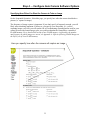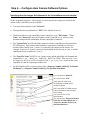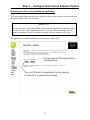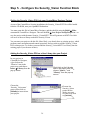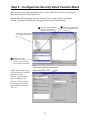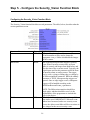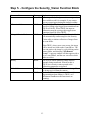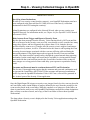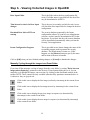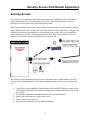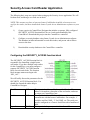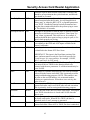
1
User Manual Document: D5126 Part: D301427X012 May, 2010 ControlWave Security Vision ControlWave Security Vision Application User’s Guide 08:19 Camera 1 Pic23.jpg 08:19 Camera 2 Pic6.jpg 08:18 Pic5.jpg 08:17 Pic4.jpg 08:16 Pic3.jpg /Cam_1 08:15 Pic2.jpg 08:14 /Cam_2 Remote Automation Solutions www.EmersonProcess.com/Remote Pic1.jpg IMPORTANT! READ INSTRUCTIONS BEFORE STARTING! Be sure that these instructions are carefully read and understood before any operation is attempted. Improper use of this device in some applications may result in damage or injury. The user is urged to keep this book filed in a convenient location for future reference. These instructions may not cover all details or variations in equipment or cover every possible situation to be met in connection with installation, operation or maintenance. Should problems arise that are not covered sufficiently in the text, the purchaser is advised to contact Emerson Process Management, Remote Automation Solutions division (RAS) for further information. EQUIPMENT APPLICATION WARNING The customer should note that a failure of this instrument or system, for whatever reason, may leave an operating process without protection. Depending upon the application, this could result in possible damage to property or injury to persons. It is suggested that the purchaser review the need for additional backup equipment or provide alternate means of protection such as alarm devices, output limiting, fail-safe valves, relief valves, emergency shutoffs, emergency switches, etc. If additional information is required, the purchaser is advised to contact RAS. RETURNED EQUIPMENT WARNING When returning any equipment to RAS for repairs or evaluation, please note the following: The party sending such materials is responsible to ensure that the materials returned to RAS are clean to safe levels, as such levels are defined and/or determined by applicable federal, state and/or local law regulations or codes. Such party agrees to indemnify RAS and save RAS harmless from any liability or damage which RAS may incur or suffer due to such party's failure to so act. ELECTRICAL GROUNDING Metal enclosures and exposed metal parts of electrical instruments must be grounded in accordance with OSHA rules and regulations pertaining to "Design Safety Standards for Electrical Systems," 29 CFR, Part 1910, Subpart S, dated: April 16, 1981 (OSHA rulings are in agreement with the National Electrical Code). The grounding requirement is also applicable to mechanical or pneumatic instruments that include electrically operated devices such as lights, switches, relays, alarms, or chart drives. EQUIPMENT DAMAGE FROM ELECTROSTATIC DISCHARGE VOLTAGE This product contains sensitive electronic components that can be damaged by exposure to an electrostatic discharge (ESD) voltage. Depending on the magnitude and duration of the ESD, this can result in erratic operation or complete failure of the equipment. Read supplemental document S14006 for proper care and handling of ESD-sensitive components. Remote Automation Solutions A Division of Emerson Process Management 1100 Buckingham Street, Watertown, CT 06795 Telephone (860) 945-2200 Emerson Process Management Training GET THE MOST FROM YOUR EMERSON INSTRUMENT OR SYSTEM Avoid Delays and problems in getting your system on-line Minimize installation, start-up and maintenance costs. Make the most effective use of our hardware and software. Know your system. As you know, a well-trained staff is essential to your operation. Emerson offers a full schedule of classes conducted by full-time, professional instructors. Classes are offered throughout the year at various locations. By participating in our training, your personnel can learn how to install, calibrate, configure, program and maintain your Emerson products and realize the full potential of your system. For information or to enroll in any class, go to http://www.EmersonProcess.com/Remote and click on “Educational Services” or contact our training department in Watertown at (860) 945-2200. BLANK PAGE Before You Begin This guide is intended to help you get 'up-and-running' with a minimal amount of effort. It does NOT, however, tell you everything you need to know about setting up and configuring the Security Vision application and the Axis camera hardware and software. We have included references throughout this book to other places in the documentation set, where you can get more details on a particular subject. Throughout your configuration activities, please be aware of the following items: Shock Hazard! Always follow accepted safety guidelines. As with all electronic devices, improper installation, grounding, or usage can cause an electrical shock. If you have any doubts about how to install, ground, and use this product safely, please consult a qualified electrician. Electrostatic Discharge (ESD) - Sensitive electronic devices such as this can be damaged by electrostatic discharge. Please follow accepted ESD guidelines. If You Need Help… If you're having problems setting up and configuring this unit, please call our ControlWave Application Support team at (860) 945-2394 or (860) 945-2286 for assistance. Help is available Monday through Friday 8:00 AM to 4:30 PM Eastern Time, excluding holidays, and scheduled factory shutdowns. i Introduction - What is the Security Vision Application? Introduction - What is the Security Vision Application?................................................................ 1 When Would the Security Vision Application be used? .......................................................... 1 How does the Security Vision Application Work?................................................................... 2 What is included in the Security Vision Application Package? ............................................... 4 What if I want to use a different brand of camera?................................................................... 4 Before You Begin ..................................................................................................................... 4 Step 1. Set up the ControlWave-series controller.......................................................................... 5 Procedures for the ControlWave Process Automation Controller ........................................... 5 Procedures for the ControlWave MICRO Process Automation Controller ............................. 5 Step 2.Install the Network Camera on Site..................................................................................... 6 Write Down the Serial Number of the Camera - You'll Need it Later..................................... 6 Mount the Camera.................................................................................................................... 6 Connect an Ethernet Cable to the Camera ............................................................................... 6 Step 3 Assign an IP Adress to the Camera .................................................................................... 7 Assigning the IP Address for an Axis 210/211/211A Camera ................................................. 7 Assigning the IP Address for an Axis 210/211/211A Camera using Axis IP Utility ......... 7 Assigning a Password for the ‘root’ User Account: ........................................................... 8 Assigning the IP Address for an Axis 210/211/211A Camera using ARP Commands...... 8 Assigning the IP Address for an Axis 2100 / Axis 2120 Camera........................................... 10 Step 4. – Configure Axis Camera Software Options .................................................................... 11 Configuring Camera Software for Axis 210/211/211A.......................................................... 11 Defining the Users who will be allowed to Access Images from the Camera.................. 12 Viewing/Changing the IP Address You Assigned Earlier................................................ 13 Setting the Correct Date/Time Used in the Camera.......................................................... 14 Specifying the Resolution and Compression Level of the Images ................................... 15 Specifying the ControlWave-series Controller as an Event Server .................................. 16 Specifying the Frequency At Which Images Are Uploaded............................................. 17 Configuring Camera Software for Axis 2100 / Axis 2120 ..................................................... 19 Specifying the Resolution and Compression Level of the Images ................................... 20 Viewing/Changing the IP Address You Assigned Earlier................................................ 21 Setting the Correct Date/Time Used in the Camera.......................................................... 22 Defining the Users who will be allowed to Access Images from the Camera.................. 23 Specifying 'Sequential Mode' on the Operation - Selection Page..................................... 24 Specifying How Often You Want the Camera to Take an Image..................................... 25 Specifying How the Images Get Uploaded to the ControlWave-series Controller .......... 26 Activating your Choices by Enabling the Application ..................................................... 27 Step 5 - Configure the Security_Vision Function Block .............................................................. 28 Getting the Security_Vision POU into your ControlWave Designer Project ........................ 28 Adding the Security_Vision POU as a User Library into your Project ................................. 28 iii Introduction - What is the Security Vision Application? Configuring the Security_Vision Function Block.................................................................. 30 Step 6. - Viewing Collected Images in OpenBSI ......................................................................... 33 Starting the Security Vision utility on the OpenBSI Workstation ......................................... 34 Using the Security Vision Main Window .............................................................................. 34 Viewing the Images Associated with a Security Event.......................................................... 35 To See a List of All Security Events for a Camera ................................................................ 36 Using the Security Vision Options Dialog Box ..................................................................... 37 Manually Cycling through the images in an Event Folder..................................................... 38 Adding Nodes to the Security Vision Application................................................................. 39 Removing a Node from the Security Vision Application ...................................................... 39 Deleting an Event Folder........................................................................................................ 39 Security Access Card Reader Application.................................................................................... 41 Configuring the SECURITY_ACCESS function block............................................................ 42 Configuring the Security Database in Isonas Crystal Access Administration Software........... 45 Step 1. Start Crystal Access and Log in............................................................................ 45 Step 2. Set Compile and Export Options .......................................................................... 46 Step 3. Define a Server and COM Port and Subnet:......................................................... 46 Step 4. Define Which Doors have Card Readers .............................................................. 48 Step 5. Define Which People Will Be Using the Card Readers ....................................... 50 Step 6. Assigning People to Groups.................................................................................. 51 Step 7. Assign Permissions to Groups .............................................................................. 53 Downloading the Security Database to the ControlWave Controller........................................ 54 Appendix A - Effects of Storing FLASH Images on the Life Cycle of Your FLASH memory .. 55 Appendix B – Troubleshooting Checklist..................................................................................... 59 iv Introduction - What is the Security Vision Application? Introduction - What is the Security Vision Application? The Security Vision application is a package of hardware and software, available from Emerson’s Remote Automation Solutions division, which allows a ControlWave series controller to store images from a remote security camera, and make them available to operators back at the OpenBSI Workstation. Beginning with OpenBSI Version 5.5., a related application, Security-Access, is also supported. Security Access allows a ControlWave controller to control one or more card readers for security doors. Security Access may be used in conjunction with, or independently from, the Security Vision camera application. When Would the Security Vision Application be used? Typically, remote process controllers are installed at remote sites (at water pumping stations, on natural gas pipelines, etc). As part of a Supervisory Control and Data Acquisition (SCADA) system, they collect data, and send that data back to an operator control center or office, which may be miles away. Security Vision allows the remote process controller, which is already on site, performing measurement and control operations, to also collect images from one or more security cameras, and make them available to operators, back at the OpenBSI Workstation in the control center. This can provide a useful supplement to other security measures you already have in place at your remote sites (intrusion alarms, fences, etc.) 1 Introduction - What is the Security Vision Application? How does the Security Vision Application Work? The Axis security camera(s) are connected via Ethernet to a ControlWave series controller, and continually take pictures (capture images) at a particular frequency specified by the user, for example, once every minute. The images are in JPEG format, and are named with the file base name picx where x is the sequential number of the image from that particular camera.1 1 Axis camera(s) periodically capture images of area of interest 2 Images are uploaded to ControlWave-series controller via FTP, over Ethernet line 08:19 Camera 1 Pic23.jpg 08:19 Pic6.jpg Camera 2 08:18 Pic5.jpg 08:17 Pic4.jpg 08:16 Pic3.jpg /Cam_1 Images from Camera 1 stored in /Cam_1 folder 08:15 Pic2.jpg 08:14 /Cam_2 Pic1.jpg Images from Camera 2 stored in /Cam_2 folder 3 ControlWave-series controller, in addition to performing normal measurement and control operations, stores images from cameras in files, in folder in the FLASH memory of the controller. These images are uploaded to the ControlWave-series controller, and stored in FLASH memory; each camera has its own folder in FLASH memory for storing images. The folders are named 'cam_x' where folder 'cam_1' would hold pictures pic1.jpg to picn.jpg from camera 1, folder 1 Actually, within the camera the pic file name is pic_ _ 00001.jpg, pic_ _ 00002.jpg, etc, but we have shortened it in these examples for ease of explanation. 2 Introduction - What is the Security Vision Application? 'cam_2' would hold pictures pic1.jpg to picn.jpg from camera 2, and so on. The images are stored in a cyclical order, i.e. older images are eventually overwritten as newer images are uploaded. Inside the ControlWave-series controller runs the user's project to perform control operations. For each camera, a Security_Vision POU is configured within the ControlWave project. The Security Vision POU continually monitors a particular digital input (the digital input could be tied to a door alarm, a motion sensor, etc.). When the digital input BOOL variable becomes TRUE, the Security Vision POU declares a security event, and takes a certain number of images (specified by the user) both before and after the event was triggered, and stores them in a separate Event folder. When all images associated with the event have been copied, Operators at the OpenBSI Workstation are notified, and can then view the images associated with a particular event, and take appropriate actions. 1 Unauthorized person triggers motion sensor or intrusion alarm at 7:23:42 Camera 1 Camera 2 2 DIGITAL INPUT (DI) turns TRUE, and Security_Vision POU in the /Cam_1 ControlWave controller declares a security event /Cam_2 DIGITAL INPUT IS TRIGGERED 07:23:27 07:23:32 07:23:37 07:23:42 07:23:47 07:23:57 07:24:02 07:24:07 Contents of a /Cam folder: Pic73.jpg Pic74.jpg Pic75.jpg 07:23:32 Pic76.jpg Pic77.jpg Pic78.jpg Pic79.jpg Pic80.jpg 07:23:37 07:23:42 07:23:47 07:23:57 Contents of an EVENT folder: EVENT FOLDER 3 Pic1.jpg Pic2.jpg Pic3.jpg Pic4.jpg Pic5.jpg For each camera associated with the Digital Input, an Event Folder is generated, and a pre-defined number of images from that camera from both before and after the event was triggered are stored in the Event folder. In this case, 2 images before, and 2 after are stored. NOTE: PIC numbers are re-numbered for files in the Event folder. 4 Operators at the Open BSI Workstation receive notification of event, and can view images on the Open BSI Workstation. 3 Introduction - What is the Security Vision Application? What is included in the Security Vision Application Package? The Security Vision Application consists of the following components: Axis 210/211/211A Network Camera (includes Axis camera software CD-ROM and Installation Guide)2 If used outside the Axis camera must be in a proper outdoor enclosure. NOTE: ControlWave Security Vision also supports older Axis Model 2100/2120 cameras; the 2100 model is for indoor use only; the 2120 model can be used outdoors when installed in a proper enclosure. Network Hub for camera Cables OpenBSI software CD-ROM (includes Security Vision software) ControlWave-series Controller (unless purchased separately) What if I want to use a different brand of camera? If you purchase the Security Vision application without the Axis Network Camera, and choose to use a different brand of camera, the camera you choose must be able to send images to the ControlWave-series controller via File Transfer Protocol (FTP). Before You Begin You must have a working process control network, in which one or more OpenBSI Workstations communicates with ControlWave-series controller(s) either via IP or BSAP. IMPORTANT: When using Security Vision, you must consider how much bandwidth will be consumed by transferring images on the network. If, for example, you have a low-speed BSAP network, you must be aware that automatic image transfers may affect the overall performance of your process control network. To improve performance in a situation like this, you may want to consider transferring images only on an on-demand basis See the section on configuring the Security Vision function block for more information. 2 The Axis Network Camera is our standard offering. Users can use virtually any Internet-capable camera, provided that it can use File Transfer Protocol (FTP) to upload images. 4 Step 1. - Install the ControlWave-series controller Step 1. Set up the ControlWave-series controller The ControlWave-series Controller must be installed on site, added to the OpenBSI network, as either a BSAP or an IP node, and it MUST have an Ethernet port configured, which will be used to communicate with the camera(s). Procedures for the ControlWave Process Automation Controller Installation procedures for the ControlWave are described, in detail, in manual CI-ControlWave. Also, see the ControlWave Quick Setup Guide (document# D5084) for a quick overview of the installation process, including software setup. Procedures for the ControlWave MICRO Process Automation Controller Installation procedures for the ControlWave MICRO Process Automation Controller are described, in detail, in manual CI-ControlWaveMICRO. Also, see the ControlWave MICRO Quick Setup Guide (document# D5124) for a quick overview of the installation process, including software setup. 5 Step 2. - Install the Network Camera on Site Step 2. Install the Network Camera on Site Write Down the Serial Number of the Camera - You'll Need it Later Write down the serial number on the camera (including dashes); you will need it later in the installation process. The serial number is located on a sticker on the bottom of the camera. Mount the Camera, following the Guidelines in the Axis Network Camera Installation Guide Mount the camera in the desired location so that it can take pictures of the area of interest. More details on mounting the camera are included in the user documentation on the Axis CD-ROM. IMPORTANT: The current model Axis Network Camera can be used outdoors provided that it is installed in a proper enclosure, and protected from direct sunlight or very bright lights such as from a halogen bulb. If you are using the older model Axis 2100/2120 cameras, the Axis 2100 camera is designed for indoor use only and should not be subjected to direct sunlight or very bright lights such as from a halogen bulb. The AXIS 2120 can be used outdoors provided that it is installed in a proper enclosure, and protected from direct sunlight or very bright lights such as from a halogen bulb. Bright lights can damage the CCD element in any of these cameras. Connect an Ethernet Cable to the Camera Plug an Ethernet Cable into the RJ45 network connector on the back of the camera, then connect the other end of the cable to an active Ethernet hub of your Ethernet network. (A hub is included in your package) for use if you do not have a spare place to connect. NOTE: The Axis Network Camera Installation Guide includes instructions on using the camera via a dial-up network; this option is not supported for the Security Vision application; you must use the Ethernet connection. 6 Step 3. - Assign an IP address to the Camera Step 3 Assign an IP Adress to the Camera Assigning the IP Address for an Axis 210/211/211A Camera (Skip these pages if you have an older model Axis 2100/2120 camera) There are two methods for setting the address an Axis 210/211/211A camera. You can run the Axis IP Utility, or you can type ARP commands from the DOS prompt. NOTE: No matter which of these methods you use, the very first time you use the camera, you will also need to assign a password for the ‘root’ user account. See ‘Assigning a Password for the ‘root’ User Account’ later in this section. Assigning the IP Address for an Axis 210/211/211A Camera using Axis IP Utility One way to set the IP Address for these Axis Models is to use the Axis IP Utility, included on the Axis Network Cameras Software & Documentation CD-ROM. If the camera is already connected to your local area network (LAN) the Axis IP Utility will attempt to detect it automatically. NOTE: The factory default IP address of the camera is: 192.168.0.90 The current IP address for this camera To change the address, click on Server Set IP Address and the Set IP Address dialog box will appear. If the serial number of the camera is NOT displayed, enter it in the “Serial Number” field. Enter the new address in the “IP Address” field, then click on the [Set IP] button to load the new address. Restart the camera (unplug power, then restore power) within two minutes for the new address to take effect. 7 Serial number (found on bottom of camera) To change the IP address, enter the new address here, then click on [Set IP]. Step 3. - Assign an IP Address to the Camera Once the camera is reset, you can access its configuration web pages by clicking on the [View Home Page] button. Assigning a Password for the ‘root’ User Account: Enter the same password in both these fields, then click on [OK]. The very first time you access the camera, you will be required to assign a password to the ‘Root’ user account. Enter the password in the “Password” and “Confirm Password” fields, then click on [OK]. You can then log onto the camera’s web pages using the root account and password. Assigning the IP Address for an Axis 210/211/211A Camera using ARP Commands Another way to set the IP address for the camera is to use ARP commands. From a PC on your network, call up a DOS window, and type the following commands, at the prompt: C:\> arp -s <camera's new IP address> <serial number> <your PC's IP address> C:> ping -t <camera's new IP address> where: 8 Step 3. - Assign an IP address to the Camera <camera's new IP address> is the IP address you want to assign to the web server in the camera. (Don't type the brackets). <serial number> is the serial number (including dashes) that you copied off of the camera in the previous step. (Don't type the brackets). <your PC's IP address> is the IP address of the PC you are currently using. (Don't type the brackets). For example, if you want to assign the camera an IP address of 10.177.15.4, and the IP address of the PC you are currently on is 10.177.3.22, and the serial number on the camera is 00-40-8c10-00-86, then enter the following commands: C:\>arp -s 10.177.15.4 00-40-8c-10-00-86 10.177.3.22 C:\>ping -t 10.177.14.4 Within 2 minutes of entering the ARP command you must disconnect power from the camera, then re-connect it to reset the camera. You should see some messages saying 'Reply from 10.177.14.4' or something similar. If, instead, you receive 'Request Timed Out…' messages, this indicates a problem. Please check that the IP addresses you have used are valid for this network, and for the IP mask, check the connectors, etc. (For more information about IP addresses, see the ControlWave Designer Programmer's Handbook (document# D5125). Assuming the IP address was set successfully, you should now be able to type that address into your browser’s “Address” field to call up the web pages in the camera, and continue with the configuration. 9 Step 3. - Assign an IP Address to the Camera Assigning the IP Address for an Axis 2100 / Axis 2120 Camera (Skip these pages if you have a newer model Axis 210/211/211A camera) For this step you will need access to a PC on your network. Call up a DOS window, and type the following commands, at the prompt: C:\> arp -s <camera's new IP address> <serial number> <your PC's IP address> C:> ping -t <camera's new IP address> where: <camera's new IP address> is the IP address you want to assign to the web server in the camera. (Don't type the brackets). <serial number> is the serial number (including dashes) that you copied off of the camera in the previous step. (Don't type the brackets). <your PC's IP address> is the IP address of the PC you are currently using. (Don't type the brackets). For example, if you want to assign the camera an IP address of 10.177.15.4, and the IP address of the PC you are currently on is 10.177.3.22, and the serial number on the camera is 00-40-8c10-00-86, then enter the following commands: C:\>arp -s 10.177.15.4 00-40-8c-10-00-86 10.177.3.22 C:\>ping -t 10.177.14.4 Connect the external power supply to the Power Supply Connector in the back of the camera. Then connect the power supply to your main power. (The camera is OFF until after you start sending it messages from the PC.) Within 10 seconds, you should see some messages saying 'Reply from 10.177.14.4' or something similar. If, instead, you receive 'Request Timed Out…' messages, this indicates a problem. Please check that the IP addresses you have used are valid for this network, and for the IP mask, check the connectors, etc. (For more information about IP addresses, see the ControlWave Designer Programmer's Handbook (document# D5125). Look at the camera and verify that the power indicator (on the back of the camera, next to the power supply connector) is constantly lit. Also, check to see that the network indicator (on the back of the camera, next to the network connector) is blinking intermittently. 10 Step 4. – Configure Axis Camera Software Options Step 4. – Configure Axis Camera Software Options Configuring Camera Software for Axis 210/211/211A (Skip these pages if you have an older model Axis 2100/2120 camera) The different camera configuration pages are accessed via links on the left hand side of the page. To access the different pages to configure the camera, click on the links in the menu on the left hand side of the screen. NOTE: This section highlights the items you are likely to use. For more detailed information on Axis Camera Software configuration, please consult the Axis 201/211/211A Network Camera User’s Manual that is included on the Axis Network Cameras Software & Documentation CDROM. NOTE: After configuration, to ensure all changes take effect, you should power cycle the camera (turn it OFF, then back ON.) 11 Step 4. – Configure Axis Camera Software Options Defining the Users who will be allowed to Access Images from the Camera You must define a name and password for each person (user) who will be allowed to view images captured by the camera, change administration options, etc. This is important because you do NOT want unauthorized persons to be able to change the configuration for your own internal security cameras. The 'root' user is required and cannot be deleted. To add a user, click on [Add...]. Enter the name of the new user. Choose a password for the user, and enter it in both of these fields. Choose the privileges of the user. Click on [OK] when finished. After you have defined the user, click on the [Save] button to save the changes. 12 Step 4. – Configure Axis Camera Software Options Viewing/Changing the IP Address You Assigned Earlier On the TCP/IP Settings page, you can view / change the IP address you assigned to the camera in Step 3: You should leave these settings at their defaults. This should show the IP address for the camera that you configured earlier. The [Test] button lets you verify that the IP address can be reached from this PC. Click on the [Save] button when finished. 13 Step 4. – Configure Axis Camera Software Options Setting the Correct Date/Time Used in the Camera Be sure to set the correct date and time in the camera, because the date and time are used to organize the images that you save for later retrieval. Click on [Save] when finished. 14 Step 4. – Configure Axis Camera Software Options Specifying the Resolution and Compression Level of the Images On the Image Settings page, you specify the resolution of the images (number of pixels used) which will be captured by the camera. The higher the resolution you specify, the larger the file size for each image. Also on this page, you specify the level of compression for your image files. Low compression results in larger file sizes, but allows for better image quality. High compression results in smaller file sizes, but reduces the quality of the images. For information on how the image size affects the life cycle of your FLASH memory, please see Appendix A - Effects of Storing FLASH Images on the Life Cycle of Your FLASH memory. The greater the resolution, the greater the file size. Low compression means higher file sizes, but better picture quality; High compression means smaller file sizes but reduced picture quality. You can specify text you want to appear on the image, for example, to identify the location viewed by the camera. Click on [Save] when you’ve made your choices. Click on [Save] when finished. 15 Step 4. – Configure Axis Camera Software Options Specifying the ControlWave-series Controller as an Event Server Images from the Axis camera are uploaded to the ControlWave controller and stored in FLASH memory for use with the ControlWave Security Vision application. You must identify the ControlWave as an Event Server so it can receive those images. ControlWave Security Vision requires that you define an FTP Event Server, so choose "Add FTP" here. Choose a name for the FTP Event Server. This must be the IP address of the ControlWave controller that is the host to the camera. This is the folder in FLASH memory at the ControlWave where images will be stored. ControlWave Security Vision requires the folder have the name \cam_x\ where x is the number of the camera. You must specify a valid username/password combination for this ControlWave controller. Specify a name for the ControlWave in the “Name” field. The “Network Address” is the IP Address of the ControlWave’s Ethernet Port. 16 Step 4. – Configure Axis Camera Software Options The "Upload Path" specifies the folder name used in the ControlWave controller's FLASH memory. Each camera which uploads to a particular ControlWave will have a separate folder, named /cam_x/ where x is replaced by the number of the camera. For example, if you have 2 security cameras associated with this ControlWave, the upload path for the first one is /cam_1/ and the upload path for the second one is /cam_2/ The "User name" and "Password" must be a valid username and password combination for that ControlWave controller. Specifying the Frequency At Which Images Are Uploaded Images are captured and uploaded to ControlWave Security Vision at a scheduled rate so that they are available to users should an event (intrusion, etc.) occur. The frequency of image capture is important. If you don't specify it frequently enough, you will likely miss something important. If, however, you specify it too frequently, (i.e. you are capturing images very fast) you will run the risk of overburdening communications used for your control system with camera images, plus you could overburden the ControlWave controller's FLASH memory. For a detailed discussion of how FLASH memory is affected by the number and frequency at which images are stored, see Appendix A - Effects of Storing FLASH Images on the Life Cycle of Your FLASH memory. To configure the capturing of the images, you need to create a scheduled event. From the Event Types page, click on the [Add scheduled…] button. Add a Scheduled Event 17 Step 4. – Configure Axis Camera Software Options Because the camera is always uploading new images to the ControlWave controller, you should choose "Always". You need to upload images via FTP, to the ControlWave which is your FTP server. You need to upload as long as the event is active (which is all the time) since the camera uploads images continuously. Exercise care when choosing the frequency at which images are uploaded. You must choose "Add sequence number suffix up to value then start over" and chose how many images to save before wrapping around and overwriting old images. This should typically be 20. Click on [OK] when you have finished defining the scheduled event. 18 Step 4. – Configure Axis Camera Software Options Configuring Camera Software for Axis 2100 / Axis 2120 (Skip these pages if you have a newer Axis 210/211/211A camera) In the browser on your PC, type the following on the "Address" line: http://<camera's new IP address> where you replace <camera's new IP address> with the IP address you just assigned to the camera. For example, http://10.177.14.4 A web page from the camera will appear. Skip the Installation Wizard option, and instead, choose “Administration Tools”. Step 4 Specify Administration Options from web page Choose ‘Administration Tools’ The Administration Tools page will appear. Along the left hand side of the page are links to the various administration options. We will discuss the most important ones in this section. Click on the items in the menu to specify various administrative options 19 Step 4. – Configure Axis Camera Software Options Specifying the Resolution and Compression Level of the Images On the Image - General page, you specify the resolution of the images which will be captured by the camera. The higher the resolution you specify, the larger the file size for each image. Also on this page, you specify the level of compression for your image files. Low compression results in larger file sizes, but allows for better image quality. High compression results in smaller file sizes, but reduces the quality of the images. For information on how the image size affects the life cycle of your FLASH memory, please see Appendix A - Effects of Storing FLASH Images on the Life Cycle of Your FLASH memory. The greater the resolution, the greater the file size Low compression means higher file sizes, but better picture quality; High compression means smaller file sizes but reduced picture quality. Click on [Save] when you’ve made your choices. 20 Step 4. – Configure Axis Camera Software Options Viewing/Changing the IP Address You Assigned Earlier On the Network - TCP/IP page, you can view / change the IP address you assigned to the camera in Step 3: Here you can verify the IP address you assigned earlier. Other parameters should be left at their defaults. 21 Step 4. – Configure Axis Camera Software Options Setting the Correct Date/Time Used in the Camera Be sure to set the correct date and time in the camera, because the date and time are used to organize the images that you save for later retrieval. 22 Step 4. – Configure Axis Camera Software Options Defining the Users who will be allowed to Access Images from the Camera You must define a name and password for each person (user) who will be allowed to view images captured by the camera, change administration options, etc. This is important because you do NOT want unauthorized persons to be able to change the configuration for your own internal security cameras. Define the users who can view the image or change the configuration. 23 Step 4. – Configure Axis Camera Software Options Specifying 'Sequential Mode' on the Operation - Selection Page You must choose 'Sequential Mode'. That is because the Security Vision application sequentially takes pictures, even if no security event is currently happening, so that if an event does occur, it may capture images both before and after the event. You must choose “Sequential Mode” 24 Step 4. – Configure Axis Camera Software Options Specifying How Often You Want the Camera to Take an Image On the Sequential Operation - Scheduler page, you specify how often the camera should take a picture (i.e. capture an image). The frequency of image capture is important. If you don't specify it frequently enough, you will likely miss something important. If, however, you specify it too frequently, (i.e. you are capturing images very fast) you will run the risk of overburdening communications used for your control system with camera images, plus you could overburden the ControlWave controller's FLASH memory. For a detailed discussion of how FLASH memory is affected by the number and frequency at which images are stored, see Appendix A - Effects of Storing FLASH Images on the Life Cycle of Your FLASH memory. Here you specify how often the camera will capture an image. 25 Step 4. – Configure Axis Camera Software Options Specifying How the Images Get Uploaded to the ControlWave-series Controller On the Sequential Operation - Upload page, you must specify how images are sent from the camera to the ControlWave series controller. You must always upload via the "Network". The upload must be performed via "FTP" (File Transfer Protocol). The Remote Host is your ControlWave series controller, so for "Host Name", "User Name" and "Password" enter the IP address of the ControlWave, as well as a valid username and password combination for that ControlWave controller. The "Upload Path" specifies the folder name used in the ControlWave-series controller's FLASH memory. Each camera which uploads to a particular ControlWave will have a separate folder, named /cam_x/ where x is replaced by the number of the camera. For example, if you have 2 security cameras, the upload path for the first one is /cam_1/ and the upload path for the second one is /cam_2/ The "Base File Name" MUST be 'pic'. Images in the upload path folder will be numbered sequentially, i.e. pic_ _00001, pic_ _00002, pic_ 00003, etc. NOTE: When an event occurs, the images for that event will be re-numbered, pic_1, pic_2, pic_3, etc. as part of that event, regardless of what the original pic number was. For the filename suffix, you must choose either “Sequence Number Suffix Up To Default Maximum” or “Sequence Number Suffix Up To Specified Maximum”. You must choose “Network” You must choose “FTP” These items all refer to the ControlWave controller which hosts this camera This is the folder in FLASH memory at the ControlWave where images will be stored You must use ‘Pic’ as the base filename You must choose “Sequence Number Suffix Up To Default Maximum” or “Sequence Number Suffix Up To Specified Maximum”. 26 Step 4. – Configure Axis Camera Software Options Activating your Choices by Enabling the Application The camera application software must be enabled in order for the choices you have made with the administration tools to be activated. IMPORTANT Because the camera application software only reads the administrative parameters when it is started, if the camera application software is already enabled (running), you will need to momentarily disable it, and then re-enable it, for the changes to take effect. The application is enabled/disabled from the Operation - Enable page. Current status of the application is displayed here. You must ‘Enable’ the application for the camera in order for it to capture any images. 27 Step 5. - Configure the Security_Vision Function Block Step 5 - Configure the Security_Vision Function Block Getting the Security_Vision POU into your ControlWave Designer Project As part of the ControlWave Security installation, the Security_Vision.ZWT file will be loaded from the CD-ROM, onto your OpenBSI Workstation. You must open this file in ControlWave Designer, and then build it using the Build Make command in ControlWave Designer. Then use the File Save Project As/Zip Project As… to save the project with the name Security_Vision.MWT. This will generate an MWT file which will serve as the user library needed for Security Vision. You can start your project with this file. More likely, you already have an existing project, which performs some measurement and control operations, and you want to add the Security_Vision POU to that project. To do that, you must add the Security_Vision.MWT User Library into the existing project. (see the next section). Adding the Security_Vision POU as a User Library into your Project In your project in ControlWave Designer, right-click on the ‘Libraries’ item in the project tree, and choose Insert Library from the pop-up menus. Right-click on the Libraries item in the project tree, then choose “Insert...” and “Library” from the pop-up menus. Choose the ‘Security_Vision.mwt’ project, then click on [Include] to insert it into your project. Choose the Security_Vision project as the library you want to insert, then click on [Include]. 28 Step 5. - Configure the Security Vision Function Block Once you have successfully added the Security_Vision .MWT file as a library, it will appear under the Libraries icon in the project tree. With the Edit Wizard running, select the ‘Security_Vision’ group, and you can add the Security_Vision function block into your project like any other function block. 1 Make sure the Edit Wizard is running. Now choose the <Security_Vision> group. The Security_Vision library is now visible in the project tree. 3 Double-click on the Security_Vision FB to add it into your program like any other function block. NOTE: Each camera used with a particular controller must have its own Security_Vision function block. In addition, the Security_Vision function block name you use must begin with the characters ‘Sec_Vis’. The function block’s name must begin with ‘SEC_VIS’ 29 2 Click on an insertion point in the worksheet for your program. Step 5. - Configure the Security_Vision Function Block Configuring the Security_Vision Function Block The Security_Vision function block has several parameters. The table, below, describes what the various parameters mean. Parameter Name iiCamera Data type INT ibDetection BOOL iiFolders INT Explanation This specifies the number of the camera. The iiCamera number will be used to locate the appropriate /cam_x/ folder which holds the images for this camera. This is the digital input which triggers a security event. When a security event occurs, an Event folder is created, and images from both before and after the time of the event are stored. Typically, the digital input used for this parameter would be from an intrusion alarm or motion sensor. The trigger may be either a rising or falling edge, as chosen by the ibDetectionMode parameter. While the obBusy parameter is TRUE, subsequent edge triggers are ignored. Once an edge trigger occurs, subsequent triggers will be handled according to the iiMinTimeBetweenEvents_n parameters. NOTE: The ibDetection transition should be a single pulse, and then should be reset. It is the responsibility of the programmer to include this logic in the project. This defines the maximum number of event folders that can be saved. IMPORTANT: When all event folders have been used, and a new security event occurs, the oldest event folder will be overwritten to save images for the newest security event. 30 Step 5. - Configure the Security Vision Function Block Parameter Name Data type Explanation iiPreImages INT iiPostImages INT irCameraTestSP REAL ibAuthorizedEntry BOOL This specifies the number of images that should be saved in the Event folder from immediately before the security event was triggered. This specifies the number of images that should be saved in the Event folder from the period after the security event was triggered. Specifies the frequency (in milliseconds) at which the function block will check to see if the camera is sending new messages. If FALSE, iiMinTimeBetweenEvents_1 will be used to specify how frequently events are logged immediately following a trigger. If TRUE, iiMinTimeBetweenEvents_2 will be used to specify how frequently events are logged immediately following a trigger. iiMinTimeBetweenEvents_1 iiMinTimeBetweenEvents_2 INT You might, for example, want to prevent events being triggered during the regular workday, since authorized people are present and regularly tripping motion sensors, etc. To do this, you could create logic to set ibAuthorizedEntry to TRUE during regular working hours, and then at the end of the day, set it to FALSE. These parameters allow you to specify (in seconds) two separate times, for how frequently events are logged immediately following an event trigger via ibDetection. This may be used to prevent additional events from being created for the same intrusion incident. It may be desirable, for example, to prevent event triggering while authorized people are working on site (i.e. an authorized entry). The choice of which time is used (iiMinTimeBetweenEvents_1 and iiMinTimeBetweenEvents_2) is determined based on the ibAuthorizedEntry parameter. For whichever time is active, if a positive value is specified, for that number of seconds after an ibDetection edge trigger, any subsequent edge triggers will be ignored. If zero is specified, subsequent edge triggers are processed normally, depending on the value of obBusy. If a negative 31 Step 5. - Configure the Security_Vision Function Block Parameter Name Data type ibDetectionMode BOOL ibImageCollectionMode BOOL obBusy BOOL obCamFail BOOL obDetection BOOL Explanation value is specified, all edge transitions are ignored; this would be useful, for example, if you want to prevent event triggers during the normal workday. When FALSE (default), the input at ibDetection must be a falling-edge trigger (must transition from TRUE to FALSE). When TRUE, the input at ibDetection must be a rising-edge trigger (must transition from FALSE to TRUE). When FALSE (default) the Sec_Vis function block will automatically send messages to the Security Vision utility to initiate collection of images from an event folder. When TRUE, when a new event occurs, the image will be stored in a folder at the ControlWave. The user can retrieve the image by right-clicking on the camera folder, and choosing “List Remote Events”. A pop-up window will then appear with a list of event folders, and the user can select which folder to collect. This is set to TRUE whenever image files are currently being transferred. Whenever this is TRUE, new security events reported at the ibDetection parameter are ignored. When set TRUE, indicates that no new image files are being received from the camera. Similar to ibDetection, however, will not indicate a edge transition when obBusy is TRUE, or if iiMinimumTimeBetweenEvents timers are counting. 32 Step 6. - Viewing Collected Images in OpenBSI Step 6. - Viewing Collected Images in OpenBSI IMPORTANT NOTES Specifying Alarm Destinations In order to view security events from the camera(s), your OpenBSI Workstation must have been configured at the Network Host PC (NHP) to be one of the four (4) valid alarm destinations for the RTU hosting the camera(s). Alarm Destinations are configured in the Network Wizard, when you are creating your OpenBSI Network. For information on this, see Chapter 6 of the OpenBSI Utilities Manual (document# D5081). Delay between Event Trigger and Report of Security Event Because the alarm message from the Security_Vision function block is NOT sent until the full set of images for the security event are ready, users should carefully consider how many images they capture, and how frequently they capture them. If, for example, the user specifies that they want to save 15 images after the security event is triggered, and images are captured every minute, it will be 15 minutes before the alarm is sent reporting the event occurring, because images associated with the event are still being collected during the intervening minutes. If the digital input used to trigger the Security Event was an alarm variable, that alarm would be reported earlier, through the systems normal alarm reporting mechanism, but the actual images still would not be available for viewing until all images associated with the event had been stored in the Event folder. In other words, saving too many images over a long period of time could delay your response to a particular security event. Username and Password must be consistent between RTU and Workstation The Security Vision application requires that the username and password combination used to sign onto the ControlWave MUST MATCH the username and password combination used to log onto the OpenBSI Workstation. If this is NOT true, errors will be generated in the ‘Actions’ pane of the Security Vision application. Once the Digital Input (DI) triggers a security event, images from before the event are placed in an Event folder, and a certain number of images (defined by the user) from the period after the event are also placed in the event folder. When the complete set of images are in the folder, an alarm is generated to notify users at all OpenBSI Workstations configured as alarm destinations that a security event has occurred, and a copy of the Event folder is sent to those OpenBSI Workstations. The alarm about a Security event is displayed in the Security Vision application running at the OpenBSI Workstation. 33 Step 6. - Viewing Collected Images in OpenBSI Starting the Security Vision utility on the OpenBSI Workstation Before, you can start, NetView must be running with the current NETDEF files for your network. To start the Security Vision utility, click on Start Programs OpenBSI Tools Utility Programs Security Vision Using the Security Vision Main Window The Security Vision main window will appear: Network Tree shows all RTUs which have been included in the Security Vision system. Actions window pane reports Security Event alarms and other messages about the Security Vision application. 14:20:55 14:20:53 14:20:46 14:20:39 14:20:33 14:20:25 14:20:16 RPC3 RPC5 RPC5 RPC5 RPC5 RPC5 RPC5 Synchronizing Event Folders with the Remote SECURITY EVENT - Remote Folder: cam_1\ event_5, SECURITY EVENT - Remote Folder: cam_1\ event_4, SECURITY EVENT - Remote Folder: cam_1\ event_3, SECURITY EVENT - Remote Folder: cam_1\ event_2, SECURITY EVENT - Remote Folder: cam_1\ event_1, Synchronizing Event Folders with the Remote Individual Event folders hold images associated with a particular Security event. Folders are named based with the timestamp of when the event occurred. To view the images, double-click on the folder. 34 Local Local Local Local Local Folder: Folder: Folder: Folder: Folder: 08-20-2004 08-20-2004 08-20-2004 08-20-2004 08-20-2004 13-50-00 13-40-00 14-20-00 14-10-00 14-00-00 Step 6. - Viewing Collected Images in OpenBSI The Security Vision utility main window is divided into two parts. The left hand window pane shows a tree of all RTUs which the user has identified as being equipped and configured for the Security Vision application. If you click on the plus '+' sign under an RTU icon, any Event folders which have been generated at that RTU will be displayed. Each Event folder holds images associated with a particular Security Event. The event folders are named with the timestamp from the digital input (DI) alarm associated with the event in the format mmddyyyy-hhmmss Where mm dd yyyy hh mm ss is the month is the day is the year is the hour of the day (0-23 format) is the minutes is the seconds Viewing the Images Associated with a Security Event RTU name To view the images associated with a Security Event, either double-click on the folder for that event, -or- click once on the folder, then click on the 'Show' icon (see above) or click on File Show. Folder name (corresponds to timestamp of alarm that triggered Security Event) In either case, a sequence of all of the images from that folder will be displayed, one-at-a-time. If desired, you can adjust the rate at which the individual images are presented via the "Delay between images when displaying" parameter in the Options dialog box, or you can turn off the automatic presentation, and manually scroll through the pictures using toolbar controls, by specifying '0' for the delay. You can right-click on an individual image, and perform various standard Windows™ options such as save it locally on your PC, send it via e-mail, etc. (see figure at left) 35 Step 6. - Viewing Collected Images in OpenBSI To See a List of All Security Events for a Camera If you want to see a list of all security events associated with a particular camera, right-click on the icon for that camera, and choose “List Remote Events”. A list box will appear. To retrieve images for an event in the list, click on the event name, and click on [Retrieve]. A dialog box that shows the progress of the retrieval opens. You can cancel retrieval of the images by clicking on the [Cancel] button. 36 Step 6. - Viewing Collected Images in OpenBSI Using the Security Vision Options Dialog Box The Security Vision Options dialog box allows you to alter certain aspects of how the Security Vision application works. This dialog box is accessible by clicking on the icon, shown above, or by clicking on ViewOptions from the menu bar. Delete remote folders after collection Delay between images when displaying …Seconds When checked, will delete event folders in the controller after the images for those events have been collected by the Security Vision application at the workstation. This is the period of time, in seconds, that an image from an Event folder will be displayed on the screen, before the next image in sequence will be shown, instead. Image Storage Folder This is the root path on the OpenBSI Workstation where event folders will be created for storing images uploaded from the ControlWave. Image File Prefix ‘Pic_’ is the prefix used for naming images stored at the RTU. If desired, you can specify a different prefix for the image names, of images stored on the PC workstation. To do so, specify the new name in the “Image File Prefix” field. NOTE: This field CANNOT be used to change the prefix name of images down in the ControlWave. 37 Step 6. - Viewing Collected Images in OpenBSI Door Input Folder This is the folder where the door configuration file exists. If a folder name is specified here the door files may be downloaded to all RTUs. Time interval to check for Door Input changes This is the rate (in seconds) at which Security Access will check the door input folder for changes in the door configuration. Download Door Info to RTUs on startup The security database generated by the Isonas configuration software (Crystal Access Administrator software, or other) must be downloaded to RTUs that host doors. If you check this box, the security database will be downloaded automatically when you start the Security Vision application. Isonas Configuration Program This is provided in case Isonas changes the name of the executable program used to generate the security database. The default name is isonas.exe. If this happens, use the [Browse] button to specify the name and location of the new executable. Click on [OK] when you have finished making changes, or [Cancel] to abandon the changes. Manually Cycling through the images in an Event Folder If you turn off the automatic cycling of images from the event folder, by setting "Delay between images when displaying" parameter in the Security Vision Options dialog box to 0, you can manually cycle through the images, one-at-a-time, by clicking on the directional controls in the toolbar. NOTE: These controls are only available when the delay parameter mentioned above is 0, otherwise, they are 'grayed out'. Click on this icon to display the first image (earliest by timestamp) in the current Event folder. Click on this icon to display the last image (newest by timestamp) in the current Event folder. Click on this icon to display the previous image in sequence (as determined by timestamps) in the current Event folder. Click on this icon to display the next image in sequence (as determined by timestamp) in the current Event folder. 38 Step 6. - Viewing Collected Images in OpenBSI Adding Nodes to the Security Vision Application To add a ControlWave series controller to the Security Vision application, click on File Add Nodes, or click on the 'Add Node' icon, shown above. The Add Nodes dialog box will appear. Click on the node you want to add, so that it is highlighted, then click on the [Add] button. To add multiple nodes, hold down the [Ctrl] key as you select the nodes, then click on the [Add] button. To add multiple nodes which are adjacent to each other in the list of nodes, select the first node, then hold down the [Shift] key, then select the last adjacent node, then click on the [Add] button. Removing a Node from the Security Vision Application To remove a node from the Security Vision application, which will delete all its associated Event folders from this OpenBSI Workstation, click on the node in the tree of nodes, then click on File Remove Node, or click on the 'Remove node' icon, shown above. Deleting an Event Folder To delete an Event Folder from this OpenBSI Workstation, click in the tree on the folder you want to delete, then click on the 'Delete Folder' icon, shown above, or right-click on the folder, and choose "Delete Folder" from the pop-up menu. To delete all folders associated with a particular camera, right-click on the camera icon, and choose “Delete All Folders” from the pop-up menu. 39 Step 6. - Viewing Collected Images in OpenBSI Notes about Flash Files and Folders Flash memory in the ControlWave uses a linear file structure. Because of this, the event folders and camera folders are used internally just as path names for files. If you were to use a File Transfer Program (FTP) to examine the contents of the ControlWave’s FLASH memory, you would see what appear to be multiple event and camera folders for the same event or camera. Don’t be concerned by this, they are not duplicate folders, just multiple references to the same folder. The picture, below. shows this duplication. Several event folders share the same name; in reality these are simply unique references to the same folder for each file in the folder. 40 Security Access Card Reader Application Security Access The Security Access application provides a mechanism for a ControlWave series controller to control and manage one or more proximity card readers. The card readers limit access to a particular area to only those users with valid security cards. When a person wants to enter a door, they pass their security card or key fob in front of the card reader. Data from the card is read by the card reader, and sent to the ControlWave controller. The controller checks its security database to verify that the card is valid; if it is, the ControlWave sends a message back to the card reader to unlock the door. If the card is invalid, an ‘Access Denied’ error message is generated, and the door remains closed. The Security Access application may be used in conjunction with, or independently from, the Security Vision camera application. The major components of the Security Access application are: ControlWave-series controller with an Ethernet Port or an RS-485 port to connect to the card reader(s). The RS-485 Port must be configured as a Generic Serial Port with a baud rate of 9600. A ControlWave project containing the Security_Access function block Isonas Card reader and one or more access cards Isonas Crystal Access software Security Vision software at the OpenBSI Workstation 41 Security Access Card Reader Application The following basic steps are required when setting up the Security Access application. We will list them first, and then go over each one in detail. NOTE: This assumes you have at least one Isonas Card Reader installed, at least one access card for the reader, and have installed the Isonas Crystal Access Administrator software on your PC. 1) Create a project in ControlWave Designer that includes a separate, fully-configured SECURITY_ACCESS function block for each card reader handled by this ControlWave. Download this project into the ControlWave controller. 2) Configure a security database using Isonas Crystal Access Administrator software. This database includes information on each door/reader, and person who will have access to the door. 3) Download the security database to the ControlWave controller. Configuring the SECURITY_ACCESS function block The SECURITY_ACCESS function block is responsible for controlling a single Isonas card reader. If you have multiple card readers for this ControlWave, you must configure a separate SECURITY_ACCESS function block for each card reader. The function block instance name must begin with ‘SEC_ACC’. We will briefly discuss the parameters for the SECURITY_ACCESS function block. You should also consult the online help in ControlWave Designer. DoorID INT PortNum INT RepeatRate DINT This input is the address of the Isonas Card Reader. The address is located on a data plate of the card reader, and must be unique per ControlWave port. This input is the ControlWave serial Port number used to communicate with the Isonas Card Readers. For example, ‘1’ would be used for COM1, ‘2’ for COM2, etc. The serial port must be configured as a Generic Serial Port with a baud rate of 9600. This input is the frequency at which the ControlWave 42 Security Access Card Reader Application DoorRelayTimeout INT DoorOpenTimeout INT OpenDoorDI BOOL DoorName STRING Init BOOL Index INT CardData BOOL DoorState BOOL REX BOOL Tamper BOOL controller requests data from the card reader. Generally, this should be set equivalent to the cyclical task rate, and the task rate should be executed This input is the amount of time the door open relay will remain energized after the Security_Access function block allows entry, or either the REX, AUX, or OpenDI parameters is set TRUE. DoorRelayTimeout basically determines how long the door remains unlocked for the person trying to come in. The default is 10 seconds. This input is the amount of time the door is allowed to remain open after a valid door open event, before a ‘Door Open Too Long’ alarm is generated. This could occur, for example, if someone holds the door open too long or props it open, or if it doesn’t latch properly on closing. This is an optional input for making a door open request. This is in addition to the REX and AUX inputs available on the Isonas Card Reader. In the Crystal Access Administrator software, the card reader is identified in the format RTU!DoorName. IMPORTANT: This input is the DoorName portion of the name, and must match exactly the DoorName specified in Crystal Access. It is case-sensitive, for example, DOOR5, door5, and Door5 do NOT match. If you change the value of DoorID, PortNum, or RepeatRate, you must set this to TRUE for the function block to be restarted with the new parameters. It will then immediately be set to FALSE. This output is a number identifying the last valid card number to be used in the Isonas card reader. This is primarily used for testing/troubleshooting purposes. NOTE: This number is not the same as the card ID number; it is an internal number referring to a particular user. When there is no activity, this value is set to 0. This output is set TRUE when a valid card is presented to the Isonas card reader, and is set FALSE after one task execution. This is primarily used for testing/troubleshooting purposes. This is the state of the door red via the card reader. This output is set TRUE when the door is closed and FALSE when the door is open. This output reports the state of the Remote Exit (REX) line on the Isonas card reader. When REX is TRUE, the door is unlocked, and a ‘Local’ message is generated. This output represents the state of the tamper switch on the Isonas card reader. When AUX is TRUE, the door is unlocked, 43 Security Access Card Reader Application AUX BOOL Status DINT and a ‘Local’ message is generated. This output reports the state of the AUX line on the Isonas card reader. This output reports status codes on the operation of the function block. The main status codes are: -8006 -8017 -10001 -10002 -10003 -10004 -17001 -17002 -17005 -17006 -23001 RTUName STRING Invalid Door Address Invalid Checksum Invalid ID Presented No rtuname.txt file found No doors.txt file found No users defined for door Mode not supported Invalid Mode for serial port Memory not available for buffer space Timeout waiting for response Feature is not supported. Seen in simulation only. -23002 Destination address was either not a string variable, or the length is greater than 80 characters. -23004 The TCP connection to the destination address is not currently active. This status can appear even after a connection is made, if the connection is dropped. This name is downloaded by the Security Vision application from the ControlWave In the Crystal Access Administrator software, the card reader is identified in the format RTU!DoorName. This output is the RTU portion of the name, and must match the RTU specified in Crystal Access. 44 Security Access Card Reader Application Configuring the Security Database in Isonas Crystal Access Administration Software Before you configure the Security Database, you need to be able to answer the following questions: Which doors will have card readers, and which ControlWave controllers will be responsible for controlling particular card readers? Who are the people who will have badges for the card reader, and what ID numbers should they be assigned? Which doors can people use? Here is an overview of the steps for configuring the Security Database: IMPORTANT For a full discussion of the Isonas Crystal Access Administrator software, please consult the Isonas Crystal Access System Software Reference Manual. In addition, please be aware that the Security Access application does NOT currently support all of the options available in the Isonas software. In particular, it does NOT currently support the following items: Shifts (can be defined in Isonas but Security_Access does NOT use them) Door direction checking (e.g. same employee card used to get in without first going out) Employee photographs Standalone card reader configuration via the Security Access application. (Standalone mode allows the card reader to still operate, using a local Security Database even if communication is lost with the ControlWave. Note: Card readers can still operate in standalone mode, if configured through the Isonas software to do so.) Step 1. Start Crystal Access and Log in Start the Crystal Access Administration software as follows: StartProgramsIsonasCrystal Access Administrator When prompted, log in using your password and click on [OK]. If prompted to run the Virtual Reader-Controller, click on [Close]. 45 Security Access Card Reader Application Step 2. Set Compile and Export Options Click on Application Passwords and Options In the Change Passwords and Options dialog box, check the following boxes, then click on [OK]. “Allow Compile without running Badgesvr.exe” “Export on Compile (network, people, access)” “Skip Send On Compile (do not send records to controllers)” NOTE: You can also set passwords for Crystal Access from this page. For details, see the Crystal Access documentation. Step 3. Define a Server and COM Port and Subnet: The Isonas software requires that a server, COM port, and subnet be defined for the card reader. The choices for names and numbers is arbitrary, however, you can only have one COM Port per subnet. 46 Security Access Card Reader Application In the ‘Adding a SERVERS Record’ dialog box, enter a name in the “Name” field. You can choose a name, or just use the default. For the “Server ID” choose any two digit number. Click on [OK] next. Now, right-click on the resulting ‘SERVER’ icon, and choose “Insert” from the pop-up menu. The ‘Adding a Subnet’ dialog box will appear. Choose an ID number for this COM port subnet. NOTE: There can only be one subnet per server. 47 Security Access Card Reader Application Step 4. Define Which Doors have Card Readers Each door that operates using an Isonas card reader must be defined for the system. To define a door, right-click on the COM port, and choose “Insert” from the pop-up menu. 48 Security Access Card Reader Application Each door must be assigned a name called the “Door Name”. The door name must consist of the ControlWave controller’s RTU name (as defined in NetView) followed by an explanation point ‘!’, and then the name of the door exactly as configured in the Security_Access function block in the ControlWave. NOTE: The door name is case sensitive; DOOR5, door5, and Door5 would all refer to different doors. For example, if you have a ControlWave controller with a node name of ‘RTU1’ and it controls two card readers to which you have given the names of ‘FRONT_DOOR’ and ‘REAR_DOOR’ in Security_Access function blocks, you must assign door names of: RTU1!FRONT_DOOR RTU1!REAR_DOOR NOTE: You can re-use the names FRONT_DOOR and REAR_DOOR with another controller, but the combination of the node name ‘RTU1’ with either of those names cannot be repeated for a different card reader’s “Door Name”. IMPORTANT: If you have a large number of doors, and there are certain doors that can be opened by any user, or all doors can be opened by any user, there are three special door definitions that you can use, instead of defining each and every door. ANY!ANY – If you enter this for a door definition, it means that a person in a group assigned to this door can use their card at any door at any RTU in the system. If that’s what you want, this is the only door you need to define. ANY!door_name – If you enter this for a door definition, it means that a person in a group assigned to this door can use their card at any card reader that has this door_name, configured in the SECURITY_ACCESS function block, no matter which ControlWave controller the card reader is connected to. RTU_name!ANY – If you enter this for a door definition, it means that a person in a group assigned to this door can use their card at any card reader connected to the ControlWave named RTU_name. These ‘ANY’ door ‘wildcards’ are useful because they reduce the amount of configuration you have to perform, and also reduce configuration file sizes, allowing faster updates to the system, if you have slow communication lines. You can enter a textual description of the door in the “Description” field. 49 Security Access Card Reader Application The “Controller ID” is a number identifying the card reader that must be unique for each server/subnet. You cannot re-use this number on a different door in the system, since each card reader can only handle a single door. The “Controller ID” must be a positive integer. The other items should be left at their default values. Click on [OK] when finished. The door icon will now appear in the left window pane. Repeat for each additional door that has a card reader. Step 5. Define Which People Will Be Using the Card Readers Each person who will be entering the door(s) controlled by one of the Isonas card readers must be identified for the system. To define, people, click on: People People/Badges A list of all people defined in the system will appear (or the list will be empty if this is the first time you are adding people.) 50 Security Access Card Reader Application Click on the [Insert] button. The ‘Adding/Changing Employee Record’ dialog box will appear. You must enter the “First Name”, “Last Name” and “EmployeeID” number for the person. You will also need to specify the Badge ID number for the card or key fob that this person will use. Enter the number in the “Enter BadgeID or Read From Controller” field and click on the [Add] button. NOTE: If the right side of the dialog box is grayed out, click on the “Last Name” or “SSN” fields to shift focus, and make the right-hand fields accessible. When finished, click on [OK]. Repeat this process for each person you want to add. Step 6. Assigning People to Groups Each person you have now defined must be assigned to a group. (Groups are used to establish permission as to who has access to particular doors.) To do this, first click on People Groups and the GROUPS dialog box will appear: 51 Security Access Card Reader Application To create a group, click on [Insert] to add the group name, then enter the “Group Name” in the ‘Adding a Group Name Record’ dialog box, and click on [OK]. Now that you have your new group defined, you need to assign people to the group. With the name of your group highlighted, click on the [Insert] button on the right side of the dialog box. Now, enter the employee ID number of a person you want to add to this group, and click on [OK]. 52 Security Access Card Reader Application Repeat this process until you have assigned all the people you want in this particular group. As you add people, you will notice their information will appear in the list on the right hand side of the GROUPS dialog box. When you’ve finished, click on [Close]. Step 7. Assign Permissions to Groups So far, we’ve defined doors, and we’ve defined the people who will use doors and put them into groups. Now we have to specify which groups of people can use which doors. Click on RightsPermissions to call up the PERMISSIONS dialog box. Select the group you want to configure from the ‘Group’ list along the left hand side of the dialog box. Next, choose a door you want this group to be able to access from the ‘Door’ list, and then click on [Insert New Permission] to add this permission to the Permissions Table. Repeat this until you have specified all the doors this group can access. You can then select a different group and repeat this process. When you have defined all your groups, compile the information so that its ready to be downloaded to the ControlWave unit by clicking on the Compile Send to Doors [Full] button. Then click on [Close] to exit the dialog box. 53 Security Access Card Reader Application Downloading the Security Database to the ControlWave Controller The final step in configuring the Security Access application is to download the contents of the Security Database to the ControlWave controller. The Isonas Crystal Access Administrator creates a database that resides in three separate files called in the Isonas LiveDB folder: ACCESS.CSV, CONTROL.CSV, and PEOPLE.CSV. Do NOT attempt to edit these files. OpenBSI Security Vision will generate two additional files based in the information in these, called DOORS.TXT and RTUNAME.TXT. To download the Security Database, click on Command Download Door Info in the OpenBSI Security Vision application, and the DOORS.TXT and RTUNAME.TXT files will be downloaded to the ControlWave. NOTE: Prior to OpenBSI 5.8, DOORS.TXT contained door information for all RTUs; beginning with OpenBSI 5.8 it only includes information for the current RTU receiving the security database. 54 Appendix A Effects of Storing Images in Flash on the Life Cycle of Your FLASH Memory Appendix A - Effects of Storing FLASH Images on the Life Cycle of Your FLASH memory Your ControlWave controller contains 8MB of FLASH Memory. This FLASH memory is used for the following purposes: 4MB is used to hold the System Firmware (code which governs the internal operations of the ControlWave). The remaining 4MB can contain the following items: Historical Data (most users choose to store historical audit and archive data in FLASH memory) Zipped copy of the project (*.ZWT) Boot project Images from the Security Vision application The amount of FLASH memory you use, and the frequency at which it gets erased, affects the life cycle of the FLASH memory. The following calculations can be used to calculate how FLASH memory is used when storing images from Security Vision, and its affect on life cycle of the FLASH. NOTE: These calculations only take into account the affect of camera images on the FLASH memory, they do NOT factor in the affect of historical data updates, or any other items in FLASH. 55 Appendix A Effects of Storing Images in Flash on the Life Cycle of Your FLASH Memory Determine the Number of Segments of FLASH which will be used for Images (S) FLASH memory is erased (written to) one segment at a time, so first, you must determine the number of segments of FLASH memory which will be used for storing images from the Security Vision application. Each segment is 128 KiloBytes (also can be written as 128KB or just 128K) of memory. So for this calculation, divide the total amount of FLASH memory you want to use for images from the camera by 128. S = Total amount of Flash memory to be used for images 128 So, for example, if you want to reserve 2 megabytes (2,048 KB) of FLASH memory for images from the camera, divide 2048 by 128. S = 2048 128 And you get 16 for the value of S. Determine the Total Number of Images Which Will be Stored in Each Segment (I) Now you need to determine the total number of images which will be stored in each segment. The larger the image you save (higher resolution, lower compression) the fewer images you will be able to store in a segment. We recommend you take some test images with the Axis camera using various compression / resolution settings, to settle on a image resolution / compression that results in a reasonable image quality that takes a minimum amount of space. Once you know the size of the image (in kilobytes) you can determine the number of images in each segment. Once again, each segment is 128 KB. I = 128 (KB) Size of image (KB) So, for example, if each image is 8KB, you divide 128 by 8, and get 16. That means that 16 images can be stored in each segment. Determine the Total Number of Images Which Will be Stored in FLASH (T) The total number of images stored in FLASH (T) is equal to the total number of segments (S) multiplied by the number of images stored in each segment (I). 56 Appendix A Effects of Storing Images in Flash on the Life Cycle of Your FLASH Memory T=S*I So, for example, if you have 16 segments, and each segment holds 16 images, multiple 16 by 16, and you get 256 for T. Determine the Number of Seconds of FLASH Life Expended for an Erasure Operation (N) Each time an erasure occurs in FLASH, a portion of the life cycle of the FLASH memory is expended. To determine this time, multiply the total number of images in FLASH (T) by the frequency (F) at which the unit is updated with a new image. The frequency of updates (F) is in seconds. N=T*F For example, if you have 256 images in FLASH (T), and you are collecting new images at a frequency (F) of one new image every 5 seconds multiply 256 * 5 = 1280. Determine the Life Expectancy in Years (Y) of The FLASH Memory Based on the Number, Size and Frequency of Images Now, the big question, what is the life expectancy of my FLASH memory when I use the Security Vision application? NOTE: Once again, we must stress that these calculations only take into account the affect of camera images on the FLASH memory, they do NOT factor in the affect of historical data updates, web pages writes, or any other items in FLASH. The specification for the FLASH memory used in the ControlWave is 1,000,000 erasure operations. To determine the life expectancy, multiply 1,000,000 by N (the amount of FLASH life expended by an erasure), then divide it by the number of seconds in a year (30,758,400). Y = N * 1,000,000 30,758,400 57 Appendix A Effects of Storing Images in Flash on the Life Cycle of Your FLASH Memory So, if the size of your images is 8KB each, and you're using 2048KB of FLASH for images, and the camera is storing a new image in the unit every 5 seconds, then your value for N is 1280, and your value for Y is 41.6. This means that ignoring all other factors (historical, etc.) your FLASH memory should fail in approximated 41.6 years! That's pretty good. Most people wouldn't complain about that. If, however, you used the same 2048KB of FLASH for images, and you save larger images (16KB) and you store images at a faster frequency (say, one per second), then your value for N goes to 128, and ignoring all other factors, your FLASH memory should fail in 4.16 years. That's a big difference, and one likely to affect your operation. The point of this exercise, therefore, is to make you aware of the issue, and to give you some basis for balancing the tradeoffs between image size, frequency at which images are collected, and the life cycle of your FLASH memory. In general, we recommend 5 seconds for the frequency of updates (F). 58 Appendix B Troubleshooting Checklist Appendix B – Troubleshooting Checklist In order for the Security Vision Application to function properly, it is important that all the various parts of the application be configured correctly. If you are encountering difficulties in using the application, please review the checklist, below, to see that all items are properly configured. Did you set up the ControlWave-series controller? Is the controller included in a running OpenBSI network, running Ethernet, and can OpenBSI communicate with it? Did you mount the camera according to the guidelines in the Axis Network Camera Installation Guide? Did you connect an Ethernet cable to the camera, and then connect the cable to a network hub of your OpenBSI network? Is the external power supply connected to the camera, and is it powered on? Did you assign an IP address to the camera using the arp command? After assigning the IP address to the camera, were you able to type that address into your browser to bring up the camera’s internal web page? From the internal web pages, did you set up the administrative options, including: Resolution and compression level of images Correct system date and time Users for the camera Mode of operation (You must specify ‘Sequential Mode’) Frequency at which images are captured. Upload parameters (These determine how the images get uploaded from the camera into the ControlWave controller) Did you enable the camera application software after you configured the parameters? This is 59 Appendix B Troubleshooting Checklist a critical step; if you don’t enable the application, the configuration settings won’t take effect. Remember also, that if you make configuration changes while the application is already running, you must momentarily disable the application, and then re-enable it, for the changes to take effect. In ControlWave Designer, did you open the Security_Vision.ZWT file, build it, and save it as a library (.MWT file)? Did you include the Security_Vision.MWT library in your ControlWave project? Did you insert Security_Vision function blocks in your ControlWave project for each camera hosted by this ControlWave, and did you configure them properly? Does the name of each Security_Vision function block start with ‘Sec_Vis’? Did you define each workstation running the Security Vision application as an alarm destination for the RTUs hosting the camera(s)? Within the Security Vision application running at the OpenBSI Workstation, did you add a node via FileAdd Node for each RTU hosting security camera(s)? 60 ControlWave Security Vision User Manual D5126 May, 2010 NOTICE Emerson Process Management Remote Automation Solutions 1100 Buckingham Street Watertown, CT 06795 Phone: +1 (860) 945-2262 Fax: +1 (860) 945-2525 www.EmersonProcess.com/Remote Emerson Process Management Remote Automation Solutions 6338 Viscount Rd. Mississauga, Ont. L4V 1H3 Canada Phone: 905-362-0880 Fax: 905-362-0882 www.EmersonProcess.com/Remote Emerson Process Management SA de CV Calle 10 #145 Col. San Pedro de los Pinos 01180 Mexico, D.F. Mexico T +52 (55) 5809-5300 F +52 (55) 2614-8663 www.EmersonProcess.com/Remote Emerson Process Management, Ltd. Remote Automation Solutions Blackpole Road Worcester, WR3 8YB United Kingdom Phone: +44 1905 856950 Fax: +44 1905 856969 www.EmersonProcess.com/Remote Emerson Process Management AP Pte Ltd. Remote Automation Solutions Division 1 Pandan Crescent Singapore 128461 Phone: +65-6770-8584 Fax: +65-6891-7841 www.EmersonProcess.com/Remote “Remote Automation Solutions (“RAS”), division of Emerson Process Management shall not be liable for technical or editorial errors in this manual or omissions from this manual. RAS MAKES NO WARRANTIES, EXPRESSED OR IMPLIED, INCLUDING THE IMPLIED WARRANTIES OF MERCHANTABILITY AND FITNESS FOR A PARTICULAR PURPOSE WITH RESPECT TO THIS MANUAL AND, IN NO EVENT SHALL RAS BE LIABLE FOR ANY INCIDENTAL, PUNITIVE, SPECIAL OR CONSEQUENTIAL DAMAGES INCLUDING, BUT NOT LIMITED TO, LOSS OF PRODUCTION, LOSS OF PROFITS, LOSS OF REVENUE OR USE AND COSTS INCURRED INCLUDING WITHOUT LIMITATION FOR CAPITAL, FUEL AND POWER, AND CLAIMS OF THIRD PARTIES. Bristol, Inc., Bristol Babcock Ltd, Bristol Canada, BBI SA de CV and the Flow Computer Division are wholly owned subsidiaries of Emerson Electric Co. doing business as Remote Automation Solutions (“RAS”), a division of Emerson Process Management. FloBoss, ROCLINK, Bristol, Bristol Babcock, ControlWave, TeleFlow and Helicoid are trademarks of RAS. AMS, PlantWeb and the PlantWeb logo are marks of Emerson Electric Co. The Emerson logo is a trademark and service mark of the Emerson Electric Co. All other trademarks are property of their respective owners. The contents of this publication are presented for informational purposes only. While every effort has been made to ensure informational accuracy, they are not to be construed as warranties or guarantees, express or implied, regarding the products or services described herein or their use or applicability. RAS reserves the right to modify or improve the designs or specifications of such products at any time without notice. All sales are governed by RAS’ terms and conditions which are available upon request. © 2010 Remote Automation Solutions, division of Emerson Process Management. All rights reserved.