1
FEMA ELECTRÓNICA . Series K . K40-T
1.11 Configuration menu (cont.)
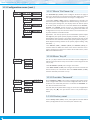
1.11.7 Menu ‘On Power Up’
On Power-Up
Delay
Alarm 1
Alarm 2
Alarm 3
Seconds
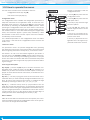
The ‘On Power Up’ (‘on.Pu’) menu configures functions to apply at
start-up. It applies only to instrument restart after power loss. It does
not apply to instrument restart due to change in configuration.
• parameter ‘Delay’ (‘dLAy’) assigns a waiting time in seconds. The
instrument waits the configured time before starting normal function. During this waiting time, the display shows all decimal points
on in flash mode, all alarms are in the state defined at the ‘Alarm 1’,
‘Alarm 2’ and ‘Alarm 3’ entries, there is no signal acquisition and
there is no communications or control being performed. After the
configured time is over, the instrument starts in normal function. Delay value between 0 and 200 seconds.
Application - the start-up process for an automation system implies
that different parts of the system (engines, actuators, controllers, ...)
have different start-up times. The ‘Delay’ function gives time to the
instrument to wait until the slowest part of the system is fully functional before executing actions on the system (signal reading, relay
activation, ...)
• the ‘Alarm 1’ (‘ALr1’), ‘Alarm 2’ (‘ALr2’) and ‘Alarm 3’ (‘ALr3’) parameters allow to define the status of the alarms while the instrument is starting from a power loss. Select ‘on’ for active alarm, select
‘oFF’ for deactivated alarm.
1.11.8 Menu ‘Key LE’
Key LE
No function
Alarm unlock
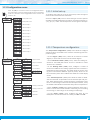
The ‘LE’ (3) key at the front of the instrument can be configured to
activate several functions. Only one function can be assigned to the
‘LE’ (3) key
• the ‘No function’ (‘nonE’) value assigns no function.
• the ‘Alarm unlock’ (‘A.Lck’) value assigns the manual unlock of the
alarms function, for instruments with the ‘Locked alarms’ (‘A.Lck’)
function activated (see section 1.11.3)
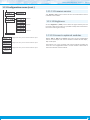
1.11.9 Function ‘Password’
Password
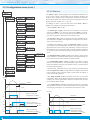
At the ‘Password’ (‘PASS’) menu select a 4 digit code to block access
to the ‘configuration menu’. Instrument configuration will not be accessible to non authorized personnel. To activate the ‘Password’ select ‘on’ and introduce the code.
Factory reset
The code will be requested when trying to access the ‘configuration
menu’ (key ‘SQ’ (<)). The ‘fast access’ menu is not password protected.
1.11.10 Factory reset
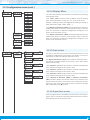
At the ‘Factory reset’ (‘FAct’) menu, select ‘yes’ to load the default
factory configuration for the instrument (see section 1.16).
10