1
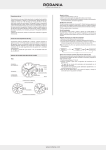
The scheme below shows the correct interpretation of the different case back inscriptions on your watch.
INSTRUCTIONS FOR QUARTZ WATCHES
RONDA CAL. 6003.D, RONDA CAL. 6003.B, RONDA CAL. 6004D, RONDA CAL. 6004.B
RONDA CAL. 8040.B
Case back engraving
Battery 373 (ø 9.5 mm, H 1.65 mm)
Battery type: 395 (Ø 9,5 mm x 2,6 mm / SR 927 SW)
Crown position I
Normal function
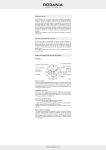
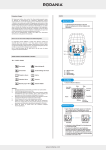
DESCRIPTION OF THE DISPLAY AND CONTROL BUTTONS
Crown position II
3 ATM
5 ATM
10 ATM
20 ATM
Case back engraving:
• 3 ATM: the watch resists to accidental contact with water and normal perspiration.
It means no immersion in water, neither for swimming nor aquatic sports.
• WATER RESISTANT 5 ATM: this watch resists to occasional immersion.
An annual control of the sealing gaskets is necessary.
• WATER RESISTANT 10 ATM: the watch is suited for all aquatic sports, except diving.
An annual control of the sealing gaskets is necessary.
• WATER RESISTANT 20 ATM: the screwed crown, the thickness of the crystal and packings have been especially
designed to withstand pressure of 20 atm. Make sure that the crown is entirely screwed, before you go into the water.
An annual control of the sealing gaskets is necessary.
Date setting (quick mode)
An extreme acceleration in setting the date with quick mode can induce
a false date indication. The synchronisation is re-established by setting
DISPLAY ELEMENTS
CONTROL BUTTONS
the date from 01 till 31 (crown position II).
MINUTE HAND
1⁄10 SECOND COUNTER
(hour counter after 30 minutes)
Crown position III
Time setting
Watch stops. Energy saving mode (saving approx. 70%)
DATE
RONDA CAL. 7003.L
PUSH-BUTTON A
HOUR HAND
Battery 381 (ø 11.6 mm, H 2.15 mm)
MINUTE COUNTER
CENTRE STOP-SECOND
Crown position I
Crown position II
Normal function
Date setting (quick mode)
CROWN
During the date change phase between 11 PM and 1 AM; it is possible to correct the date (date must be set
PUSH-BUTTON B
to the following day !) An extreme acceleration in setting the date with quick mode can induce
a false date
indication. The sunchronisation is re-established by setting the date from 01 till 31 (crown position II).
SECOND HAND
Crown position III
Time setting
Weekday setting
40 l www.rodania.com
Watch stops. Energy saving mode (saving approx. 70%)
www.rodania.com l 45
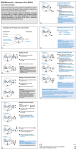
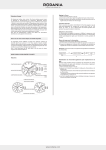
CHRONOGRAPH: BASIC FUNCTION (Start / Stop / Reset)
MINUTE COUNTER
Push-button A
1⁄10 SECOND
COUNTER
Push-button B
Example:
Start: Press push-button A.
Stop: to stop the timing, press pushbutton A once more and read the three
chronograph counters: 4 min / 38 sec /
7⁄10 sec
Zero positioning:
Press push-button B.
(The three chronograph hands will be
reset to their zero positions).
ACCUMULATED TIMING
Example:
Start: start timing
Stop: e.g. 15 min 5 sec following
Restart: timing is resumed
SECOND
Stop: e.g. 13 mn 5 s following
COUNTER
= 28 mn 10 s
(The accumulated measured time is
shown)
1⁄10 SECOND
Push-button B
*Reset:
COUNTER
The three chronograph hands are
returned to their zero positions.
Please note: * Following , the accumulation of the timing can be continued by pressing push-button A (Restart / Stop,
Restart / Stop, …).
MINUTE COUNTER
Push-button A