1
Feature Description
Before we move on to the next step there are several things to know. This will help you
in the next step as to which sub-steps you will need and why you need them.
As mentioned earlier in the manual, ZB01 comes with 3 models. There are different features in each
model. Feature such as Zone, On/Off and Temperature give each model different specific tasks.
Zone, for example, will feature the device to work as a zone sensor for the security system to notify
the security system or called CIE device -Control & Indication Equipment in the network to trigger a
siren or a silent alarm. This device will require security system enrollment (registration).
On/Off, for example, will feature the device to work as a motion-triggered light or power switch. In
many cases it is use for door or stairway lighting application. This device will require device
pairing.
Temperature, for example, will feature the device to work as a temperature reporting device. It
reports the temperature reading to a paired display device. This device will require device
pairing.
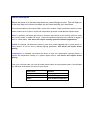
From your purchase order you have the model name written on the purchased order. From the table
you will know what feature you have for your device.
Model name
Features
ZB01A
Zone (only)
ZB01B
On & Off (only)
ZB01C
Zone/On&Off/Temperature