1
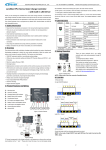
EPEVER LS-E Series —— Solar Charge Controller USER MANUAL LandStar LS-E Series —— Solar Charge Controller LS0512E/LS1012E 12VDC LS1024E/LS2024E 12/24VDC Maximum PV Input LS0512E/LS1012E 30V Voltage LS1024E/LS2024E 50V Nominal System Voltage Nominal Charge/Discharge Current LS0512E 5A LS1012E/LS1024E 10A LS2024E 20A Contents 1 Important Safety Information ..........................................1 2 General Information........................................................2 3 Installation Instructions...................................................3 3.1 Mounting ...............................................................3 3.2 Wiring ...................................................................4 4 Operation ........................................................................5 4.1 LED Indicators ......................................................5 4.2 Setting Operation ...................................................7 5 Protection and Troubleshooting ......................................8 5.1 Protection ..............................................................8 5.2 Troubleshooting .....................................................9 6 Technical specifications ................................................11 1 Important Safety Information Read all of the instructions and cautions in the manual before beginning installation. There are no user serviceable parts inside the controller. Do not disassemble or attempt to repair it. Install external fuses/breakers as required. Disconnect the solar module and fuse/breakers near to battery before installing or adjusting the controller. Do not allow water to enter the controller. Confirm that power connections are tightened to avoid excessive heating from loose connection. 1 2 General Information LS-E series solar charge controller, with beautiful, economic, practical, simple and easy to use, etc. It has various unique functions: High efficient Series PWM charging, increase the battery lifetime and improve the solar system performance. Battery LED indicator can indicates battery situation. Support 3 charging options: Sealed, Gel and Flooded. Adopt temperature compensation, correct the charging and discharging parameters automatically and improve the battery lifetime. Electronic protection: load overload and short circuit, battery over discharging, over voltage, low voltage and reverse protection. With humanized Settings, operation will be more comfortable and co nvenient. Industrial design, wide application range. 2 3 Installation Instructions 3.1 Mounting Read through the entire installation section first before beginning installation. Be very careful when working with batteries. Wear eye protection. Have fresh water available to wash and clean any contact with battery acid. Uses insulated tools and avoid placing metal objects near the batteries. Explosive battery gasses may be present during charging. Be certain there is sufficient ventilation to release the gasses. Avoid direct sunlight and do not install in locations where water can enter the controller. Loose power connections and/or corroded wires may result in resistive connections that melt wire insulation, burn surrounding materials, or even cause fire. Ensure tight connections and use cable clamps to secure cables and prevent them from swaying in mobile applications. Use with Gel, Sealed or Flooded batteries only. Battery connection may be wired to one battery or a bank of batteries. The following instructions refer to a singular battery, but it is implied that the battery connection can be made to either one battery or a group of batteries in a battery bank. Select the system cables according to 3.5A/mm2 current density. 3 3.2Wiring 1. Connect components to the charge controller in the sequence as shown in above picture and pay much attention to the “+” and “-”.Always power the battery First. 2. After power the battery, check the battery indicator on the controller, it will be green. If it’s not green, please refer to chapter 5. 3. The load should be DC applicant with the same rated voltage as battery’s. Controller offers power to loads through the battery voltage. 4 4 Operation 4.1 Features Load status indicator Charging status indicator LED2 LED1 LED4 LED3 Setting button Mounting Holes Solar Module Battery Load Terminals Terminals Terminals Charging and load status indicator Table 4-1 Indicator Charging status indicator Indicator Status On System Status Charging Fast Flashing Over voltage On Load ON OFF Load OFF Note Normal Refer to section 5 Normal Load status indicator Slowly Flashing When the load amp is Overload 1.25times of rated 5 current for 60 seconds, or the load amp is 1.5 times of rated current for 5 seconds Fast Flashing Short Circuit Refer to section 5 Battery status indicator(LED1、LED2、LED3、LED4) Battery LED indicator(The parameters in the table below is for 12VDC system at 25℃, for 24VDC system ,the parameters is doubled) Table 4-2 LED1 LED2 LED3 LED4 Battery Status Slowly × × × Under voltage Flashing Fast × × × Over discharged Flashing Battery LED indicator status during voltage is up ○ ○ × × 12.8V< Ubat<13.4V ○ ○ ○ × 13.4V< Ubat<14.1V ○ ○ ○ ○ 14.1V < Ubat Battery LED indicator status during voltage is down ○ ○ ○ × 12.8V<Ubat<13.4V ○ ○ × × 12.4V<Ubat<12.8V ○ × × × “○”LED indicates on “×”LED indicates off 6 Ubat<12.4V “Ubat”battery voltage 4.2 Setting Operation Load Work Mode Setting When the controller is powered on, press the setting button to control the load output. Press the button once, the ON/OFF status will be changed corresponding. Battery Type Setting Press the setting button for more than 5 seconds, battery indicator LED1, LED2, LED3 will be flashing correspondingly. Then press the setting button to choose Sealed, Gel, and Flooded battery type, when you finish choosing, stop pressing the button, the setting is finished till the digital tube stop flashing. The parameters indicated are shown below: Battery type selection Table4-4 LED1 LED2 LED3 Battery type ○ × × ○ ○ × Gel battery ○ ○ ○ Flooded battery Sealed lead acid battery “○”LED indicator on “×”LED indicator off 7 5 Protection and Troubleshooting 5.1 Protection · Load Overload If the load current exceeds 1.25 times of rated current for 60 seconds, or the load amp is 1.5 times of rated current for 5 seconds, the controller will disconnect the load. Overload must be cleared up through powering on again or pressing the setting button. · Load Short Circuit Fully protected from load wiring short circuit (exceeds 2 times of rated current) automatically. One automatic load reconnect attempt, the fault must be cleared by reapply power or pressing the setting button. · Battery Reverse Polarity Fully protection form battery reverse polarity, no damage to the controller will result. Correct the mistake of wiring to resume normal operation. · Damaged Local Temperature Sensor If the temperature sensor short-circuited or damaged, the controller will be charging or discharging at the default temperature 25℃ to prevent the battery damaged from overcharging or over discharged. 8 · High Voltage Transients PV is protected from high voltage transients. In lightning prone areas, additional external suppression is recommended. 5.2 Troubleshooting Trouble Shooting Table 5-1 Possible Faults Troubleshooting reasons Charging LED PV Check if PV and battery wire indicator off array connections are correct and during daytime disconnection tight. Charging LED Battery voltage Check if battery voltage is indicator higher over high. Disconnect the when sunshine falls on PV modules properly. fast flashing over than voltage solar module. disconnect voltage(OVD) Battery LED1 Battery When load output is normal, indicator under LED status will return to ON SLOWLY voltage automatically when fully FLASHING charged. 9 Battery LED1 Battery When the controller cut off indicator over the output automatically, FAST discharged LED status will return to ON FLASHING. automatically when fully charged. Load LED Over load Please reduce the load and indicator press the button once, the SLOWLY controller will resume to FLASHING work after 3s. Load LED Short circuit When the first short-circuit indicator occurs, the controller will FAST automatically resume to work FLASHING after 10s; when a second short-circuit occurs, press the button, the controller will resume to work after 3s. No LED battery voltage Measure battery voltage with indicator lower than 6V multi-meter. Min.6V can start No input voltage of Measure the input voltage of solar solar up the controller. charging status LED module indicator with lower than normal battery voltage connection 10 module, the input voltage must be higher than battery voltage. 6 Technical specifications Electrical Parameters Description Nominal System Voltage Max.batt.Volt.to the controller Rated Battery Current Table 7-1 Parameter Type LS0512E/LS1012E 12VDC LS1024E/LS2024E 12/24VDC LS0512E/LS101E 16V LS1024E/LS202E 32V LS0512E 5A LS1012E/LS102E 10A LS2024E 20A Charge Circuit Voltage Drop ALL ≤0.26V Discharge Circuit Voltage Drop ALL ≤0.15V Self-consumption ALL ≤6mA Temperature Compensation Coefficient Description Temperature Compensation Coefficient(TEMPCO)* Table7-2 Parameter -5mV/℃/2V (ref) * Compensation of equalize, boost, float and low voltage disconnect voltage Environmental parameters Table 7-3 Environmental parameters Parameter Working temperature -35℃~+55℃ Storage temperature -35℃~+80℃ Humidity ≤95% N.C. Enclosure IP30 11 (The parameters in the table below is for 12VDC system at 25℃, for 24VDC system ,the parameters is doubled) Battery Voltage Parameters Table 7-4 Charging Battery charging setting Sealed Gel 16V 16V 16V 15.5V 15.5V 15.5V Over Voltage Disconnect Voltage Charging Limit Voltage Parameters Over Voltage Reconnect Flooded 15V 15V 15V Equalize Charging Voltage 14.6V ------- 14.8V Boost Charging Voltage 14.4V 14.2V 14.6V Float Charging Voltage 13.8V 13.8V 13.8V 13.2V 13.2V 13.2V 12.6V 12.6V 12.6V 12.2V 12.2V 12.2V 12V 12V 12V 11.1V Voltage Boost Reconnect Charging Voltage Low Voltage Reconnect Voltage Under Voltage Warning Reconnect Voltage Under Voltage Warning Voltage Low Voltage Disconnect 11.1V 11.1V Discharging Limit Voltage 10.5V 10.5V 10.5V Equalize Duration 2 hours ------- 2 hours 2 hours 2 hours 2 hours Voltage Boost Duration 12 Mechanical Parameters Type Overall Dimension Mounting dimension LS0512E 92.8x65x20.2mm 84.4mm Table 7-5 LS1012E 101.2x67x21.8mm 92.7mm Mounting hole size Φ4.5 Φ4.5 Terminal Weight 2.5mm² 74g 4mm² 82.5g Mechanical Parameters Table 7-6 Type LS1024E LS2024E Overall Dimension 101.2x67x21.8mm 128x85.6x34.8mm Mounting dimension 92.7mm 118mm Mounting hole size Φ4.5 Φ4.5 Terminal Weight 4mm² 82g 6mm² 151.6g 13 Final interpretation right of the manual belongs to our company. Any changes without prior notice! Version number: V1.7 BEIJING EPSOLAR TECHNOLOGY CO., LTD. Tel:+86-10-82894112 / 82894962 Fax:+86-10-82894882 E-mail:[email protected] Website: http://www.epsolarpv.com