1
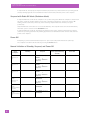
Psion Power States
Wake up from Suspend Mode, or Suspend With Radio Off Mode
Psion
Computer
Standby
Suspend
Omnii XT15
(7545XA)
Omnii RT15
(7545XC)
(Windows
Embedded
Hand-Held 6.5)
Not accessible.
Press FN/BLUE, then
press Power
or
Tap Start > Shutdown >
Suspend.
EP10 (7515)
(Windows
Embedded
Hand-Held 6.5)
Not accessible.
Press Power button.
Suspend with Radio Off
(menu option hidden by
default)
Power Off
Not available.
Not available.
Press and hold POWER
or
Tap Start > Shutdown >
Suspend With Radio Off.
Press and hold POWER
or
Tap Start > Shutdown >
Power Off.
Wake up from Suspend Mode, or Suspend With Radio Off Mode
When one of the following occurs, a computer that is in suspend mode, or suspend with radio off mode,
wakes up:
•
•
•
•
•
•
The device is connected to external power.
A USB peripheral is connected.
The battery is inserted.
The battery door is closed.
The touch screen is touched.
Suspend mode only: The WWAN radio receives an incoming voice call, or it receives SMS or IP
data packets.
•
An expansion port, controlled through the HDK, is connected.
Not all of these wake-up sources are available on all Psion computers. Consult the user manual for your
computer to find out which features are on your device.
4